
1688 Sourcing
By Image
Find visually similar 1688 offers, verify product specifications, and compare sourcing costs before contacting a supplier.
What Would You Like To Research?
Set your inputs and run here, or take the same inputs into your agent.
Optional Filters
Agent Workflow Details
These details apply to the full workflow in your agent.
Known Supplier Offers And Costs
Run Here finds supplier candidates from your image. The complete ASIN sourcing workflow needs Amazon evidence and verified costs; your agent coordinates the remaining research and profit calculation using verified records.
What You Can Do With
1688 Sourcing By Image
Find Supplier Candidates
Illustrative ExampleStart with the exact product reference and the specifications you need suppliers to confirm.
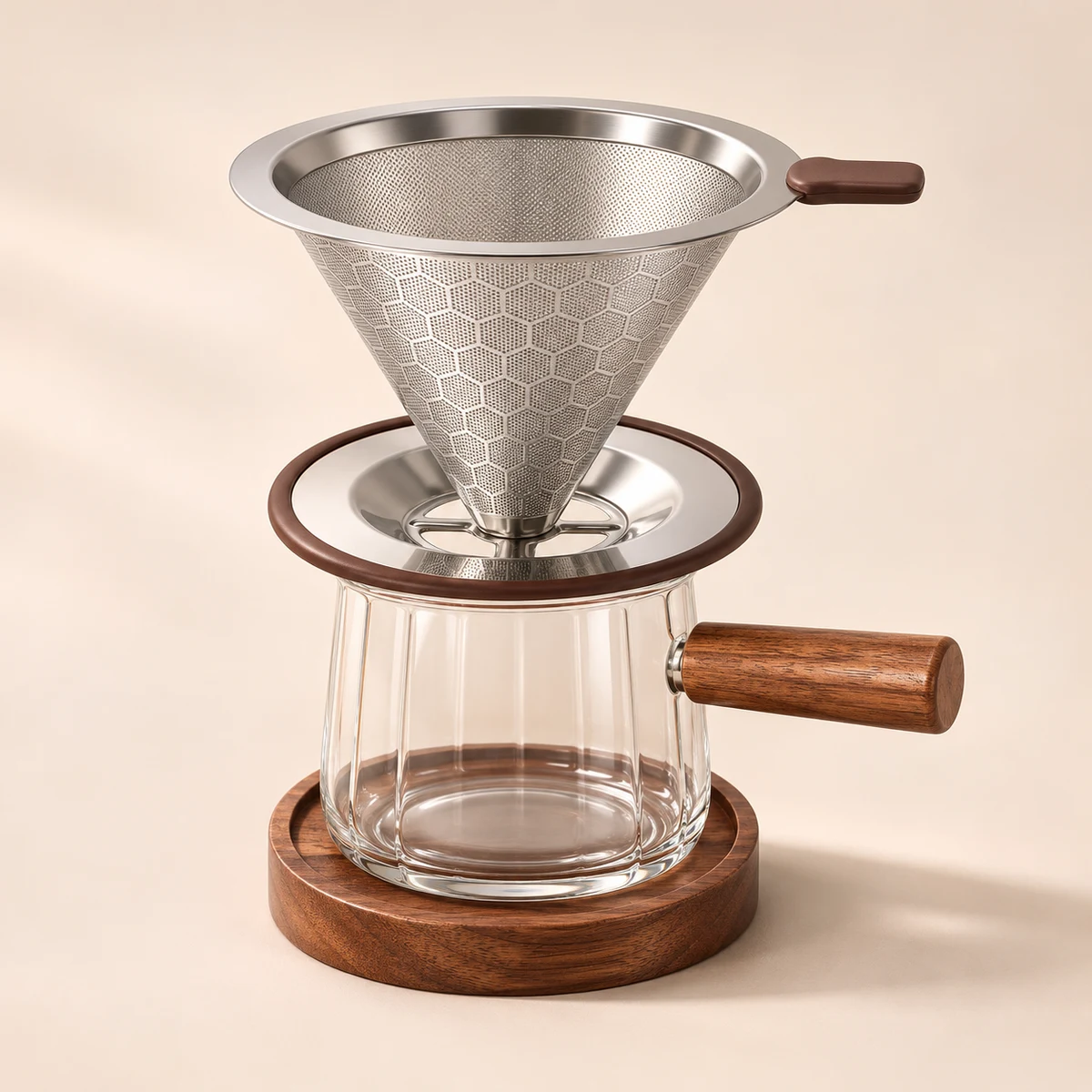
Pour-Over Coffee Dripper
- Visible Components
- Filter · Glass cup · Wooden handle
- Supplier Confirmation
- Materials, dimensions and order terms
Verify Product Matches
Illustrative ExampleCompare visible construction with the returned candidate specifications. A similar photograph is not a verified match.
Verify The Candidate Against This Reference| Feature | Reference | Candidate Evidence |
|---|---|---|
| Filter shape | Cone-shaped | Confirm dimensions |
| Handle | Wooden appearance | Confirm material |
| Cup | Clear glass appearance | Request capacity and specification |
Compare Landed Costs
Illustrative ExampleUse a sourced cost worksheet after confirming a product match. The simplified numbers below are hypothetical USD examples, not supplier quotes.
| A | B | C | |
|---|---|---|---|
| 1 | Cost Line | Offer A | Offer B |
| 2 | Purchase | 8 | 9 |
| 3 | Freight | 3 | 4 |
| 4 | Fees + returns allowance | 7 | 7 |
| 5 | Total modeled cost | 18 | 20 |
| 6 | At $30 selling price | 12 profit | 10 profit |
How It Works
Choose A Sourcing Target
Start with a product image to find offers, or a US Amazon ASIN and known costs for the full profit comparison.
Find And Verify 1688 Offers
Search by image and keyword, then compare materials, dimensions, minimum orders, and quotes against the target product.
Data Sources & APIs
Required
1688 Search By Image API →Optional
Amazon Product Detail API →Amazon ASIN Keywords API →Amazon Search API →Amazon Product History API →Amazon Product Price Series API →Amazon Niche Info By Keyword API →Product Description Generator API →1688 Product Search API →Google AI Mode Search API →Run Here performs the 1688 Search By Image API request. Use your agent for the complete workflow and additional sources.
Compare Sourcing Costs
Review a supplier shortlist with match evidence and itemized costs. Compare estimated profit by offer and rank ASINs only where sales and cost evidence is comparable.
Frequently Asked Questions
What Do I Need For 1688 Sourcing By Image?
Provide uS Amazon ASIN, supplier candidates, dated fees, exchange rate, return assumptions, and monthly sales. Start with a US Amazon ASIN for the complete sourcing workflow. Use the current APIs to collect keyword, competitor, 1688 and cost evidence; record product identity and supplier terms as confirmed or partial before estimating profit. An image alone supports a narrower 1688 search.
Does An Image Match Confirm The Same Product?
No. Compare material, dimensions, specifications, minimum order and supplier terms. An image-only search finds candidates; the complete US ASIN workflow also needs dated Amazon fees, sales and verified sourcing costs.
What Does Supplier Shortlist & Cost Comparison Include?
Sourcing report with cost worksheet and profit × monthly-sales ranking. Have your agent calculate sourcing profit for each plausible or partial offer using the supported processing contract and verified inputs. Supply dated Keepa, Jiimore and SIF evidence, label original expert fallback assumptions and FBA reference-table estimates, and confirm supplier quote and current marketplace fees before making a purchasing decision.
Can I Run The Complete Workflow On This Page?
Run Here, where available, executes one selected step only. Your agent coordinates the remaining supported tools and carries intermediate results between them; it asks you for missing business inputs. Use In Your Agent carries your supplied inputs and the business workflow for multi-step work. Generation and other task-based tools require the documented completion flow; a submitted task is not a finished output.
What Does This Workflow Cost?
Creating an account is free. Individual data, processing and generation calls use the current tool pricing and your account access. Review the supporting documentation before running; multi-step workflows can make several chargeable calls. This page does not promise free queries or a fixed total.
What Happens When Evidence Or An Optional Tool Is Missing?
Keep the missing source or failed step visible in the supplier shortlist & cost comparison. Skip optional enrichment when it is unavailable, but stop any conclusion that depends on missing primary evidence. Have your agent calculate sourcing profit for each plausible or partial offer using the supported processing contract and verified inputs. Supply dated Keepa, Jiimore and SIF evidence, label original expert fallback assumptions and FBA reference-table estimates, and confirm supplier quote and current marketplace fees before making a purchasing decision.
Start Your Sourcing By Image
Find visually similar 1688 offers, verify product specifications, and compare sourcing costs before contacting a supplier.