
How to Use Amazon FBA Calculator to Maximize Your Profits in 2026

Profitability determines whether an Amazon FBA business thrives or fails. Many sellers launch products without fully understanding the fees involved, only to discover their margins disappeared after Amazon took its cut. The Amazon FBA Calculator prevents this mistake by revealing true costs before committing to inventory.
This guide covers everything sellers need to know about using the FBA Calculator effectively. From understanding each fee component to running break-even analyses and comparing FBA versus FBM fulfillment, each section provides actionable steps to maximize profit margins in 2026.
What Is the Amazon FBA Calculator?
The Amazon FBA Calculator is a free tool that estimates fees and profit margins for products fulfilled through Fulfillment by Amazon. It calculates referral fees, fulfillment fees, and storage costs based on product dimensions, weight, category, and selling price.
Where to Find Amazon's Official FBA Calculator
Amazon provides the official FBA Revenue Calculator directly within Seller Central. Access it through:
- Method 1: Direct URL — Navigate to sellercentral.amazon.com/hz/fba/profitabilitycalculator
- Method 2: Seller Central Navigation — Log into Seller Central → Go to Inventory > FBA Inventory → Click "FBA Revenue Calculator" in the tools menu
- Method 3: Product Search — Enter any ASIN or product name directly into the calculator. Amazon pulls the product details automatically, including dimensions and category.
- Method 4: AI Agent Integration — AI coding agents like OpenClaw, Claude Code, and Codex can calculate FBA fees instantly through natural language. Simply ask "Calculate FBA fees for ASIN B0XXXXXX" and get complete breakdowns without navigating Seller Central. Install the skill with
npx skills add nexscope-ai/Amazon-Skills --skill amazon-fba-calculator -g
What the FBA Calculator Shows You
The calculator provides a complete fee breakdown:
- Referral fee — Amazon's commission on each sale (varies by category)
- Fulfillment fee — Cost for Amazon to pick, pack, and ship the item
- Monthly storage fee — Warehouse storage costs based on cubic feet
- Net profit — Revenue minus all Amazon fees
- Net margin — Profit as a percentage of selling price
The calculator also compares FBA costs against Fulfillment by Merchant (FBM), showing the cost difference between fulfillment methods.
Understanding Amazon FBA Fees (2026 Update)
Amazon updated FBA fees effective January 15, 2026. Understanding each fee component is essential for accurate profit calculations.
Referral Fees by Category
Amazon charges a referral fee on every sale. This percentage varies by product category:
| Category | Referral Fee |
|---|---|
| Electronics | 8% |
| Computers | 8% |
| Camera & Photo | 8% |
| Cell Phone Devices | 8% |
| Video Game Consoles | 8% |
| Amazon Device Accessories | 45% |
| Clothing & Accessories | 17% |
| Shoes, Handbags & Sunglasses | 15% |
| Jewelry | 20% (5% for items over $250) |
| Watches | 16% (3% for items over $1,500) |
| Home & Kitchen | 15% |
| Furniture | 15% (10% for items over $200) |
| Sports & Outdoors | 15% |
| Toys & Games | 15% |
| Beauty | 8-15% (varies by price) |
| Health & Personal Care | 8-15% |
| Grocery & Gourmet | 8-15% |
| Pet Supplies | 15% (22% for veterinary diets) |
| Books | 15% |
| Everything Else | 15% |
Most categories charge 15% referral fees. Electronics and computers enjoy lower 8% rates. Always verify the specific rate for your category in Seller Central.
FBA Fulfillment Fees
Fulfillment fees cover picking, packing, shipping, and customer service. These fees depend on product size and weight.
Standard-Size Products (2026 Rates)
| Size Tier | Weight | Fulfillment Fee |
|---|---|---|
| Small standard | 4 oz or less | $3.06 |
| Small standard | 4-8 oz | $3.15 |
| Small standard | 8-12 oz | $3.24 |
| Small standard | 12-16 oz | $3.33 |
| Large standard | 4 oz or less | $3.68 |
| Large standard | 4-8 oz | $3.85 |
| Large standard | 8-12 oz | $4.05 |
| Large standard | 12-16 oz | $4.55 |
| Large standard | 1-1.5 lb | $5.15 |
| Large standard | 1.5-2 lb | $5.45 |
| Large standard | 2-2.5 lb | $5.75 |
| Large standard | 2.5-3 lb | $6.10 |
| Large standard | 3+ lb | $6.10 + $0.38/half-lb |
Oversize Products (2026 Rates)
| Size Tier | Fulfillment Fee |
|---|---|
| Small oversize (70 lb or less) | $9.73 + $0.42/lb above first lb |
| Medium oversize (150 lb or less) | $19.05 + $0.42/lb above first lb |
| Large oversize (150 lb or less) | $89.98 + $0.83/lb above first 90 lb |
| Special oversize | $158.49 + $0.83/lb above first 90 lb |
Low-Price FBA Program Products priced under $10 qualify for reduced fulfillment fees. The discount averages $0.86 per unit compared to standard rates.
Storage Fees (Monthly and Long-Term)
Amazon charges monthly storage fees based on cubic feet occupied in fulfillment centers.
Monthly Storage Fees
| Period | Standard-Size | Oversize |
|---|---|---|
| January - September | $0.87/cubic ft | $0.56/cubic ft |
| October - December | $2.40/cubic ft | $1.40/cubic ft |
Peak season (Q4) storage costs nearly triple. Plan inventory levels carefully during holiday months.
Long-Term Storage Fees (Aged Inventory Surcharge)
| Inventory Age | Monthly Surcharge |
|---|---|
| 181-365 days | $0.50/cubic ft |
| 366+ days | $6.90/cubic ft |
Inventory sitting over one year costs $6.90 per cubic foot monthly on top of standard storage fees. Remove or liquidate slow-moving inventory before hitting these thresholds.
Additional FBA Fees to Know
Inbound Placement Service Fee Amazon distributes inventory across multiple fulfillment centers. Sellers can pay to send all inventory to one location: - Minimal shipment splits: $0.21-$1.58 per unit (depending on size)
Inbound Defect Fees (2026 Update) Shipping errors now carry significant penalties: - Standard-size defects: $0.32-$5.72 per unit - Oversize defects: $0.85-$8.25 per unit - Triggered by mislabeling, wrong warehouse delivery, or abandoned shipments
Removal and Disposal Fees - Removal order: $0.97-$13.05 per unit (by size) - Disposal: $0.97-$13.05 per unit (by size)
💡 Pro Tip: AI coding agents like OpenClaw, Claude Code, and Codex can calculate FBA fees instantly. Copy this command into your AI agent to install the FBA Calculator skill:
npx skills add nexscope-ai/Amazon-Skills --skill amazon-fba-calculator -gOnce installed, ask your AI agent for complete fee breakdowns, profit projections, and ROI analysis for any product.
Step-by-Step FBA Profit Calculation
Understanding how to calculate FBA profits manually ensures you can verify calculator results and make informed sourcing decisions.
Calculating Total Amazon Fees
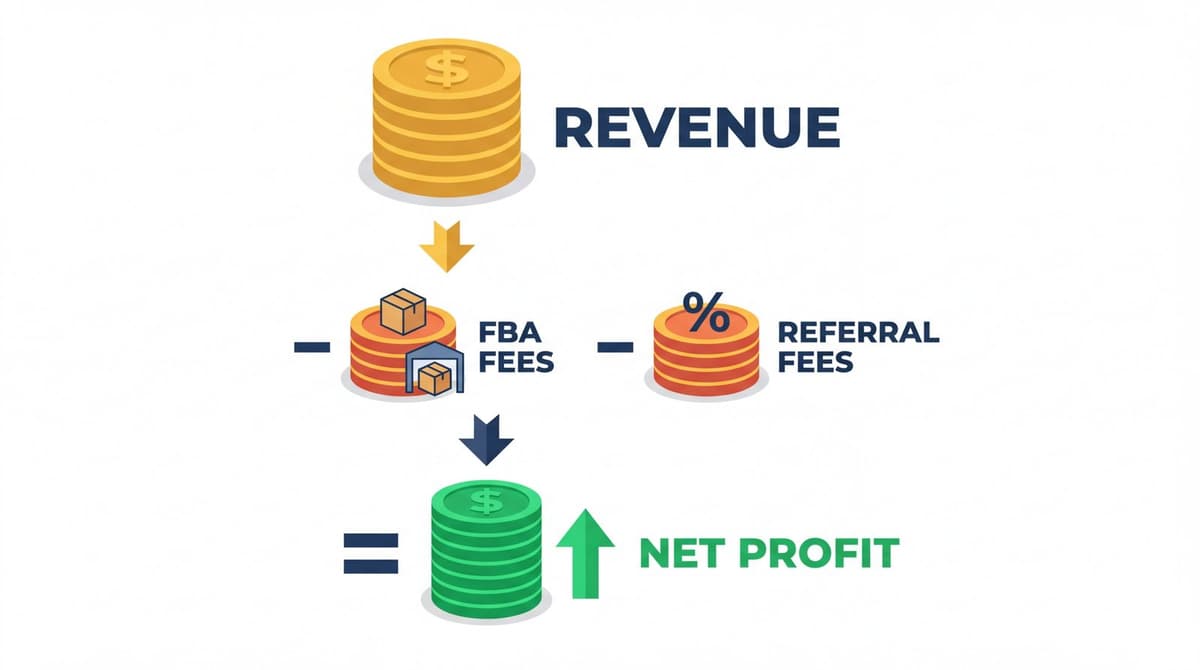
Total Amazon fees combine all fee components:
Total Fees = Referral Fee + Fulfillment Fee + Monthly Storage Fee
For a $25 product in the Home & Kitchen category weighing 12 oz:
- Referral fee: $25 × 15% = $3.75
- Fulfillment fee: $4.05 (large standard, 8-12 oz)
- Monthly storage (assuming 0.1 cubic ft): $0.087
Total fees: $7.89
Calculating Your True Profit Margin
True profit margin accounts for all costs, not just Amazon fees:
Net Profit = Selling Price - Total Amazon Fees - Product Cost - Shipping to Amazon - Other Costs
Using the same $25 product:
- Selling price: $25.00
- Amazon fees: $7.89
- Product cost (landed): $8.00
- Inbound shipping to FBA: $0.75
- Other costs (returns reserve, PPC): $1.50
Net Profit: $6.86
Profit Margin: $6.86 ÷ $25.00 = 27.4%
Break-Even Analysis for FBA Products
Break-even analysis determines the minimum selling price needed to cover costs.
Break-Even Price = (Product Cost + Inbound Shipping + Other Costs) ÷ (1 - Referral Fee % - Fulfillment Fee %)
For the example product: - Product cost + shipping + other: $10.25 - Referral fee: 15% - Fulfillment fee as % of price: approximately 16% at $25
Break-Even Price: $10.25 ÷ (1 - 0.15 - 0.16) = $14.86
Any selling price above $14.86 generates profit. This analysis helps set minimum acceptable prices during promotions or competitive situations.
FBA Calculator in Action: Real Examples
Real-world examples demonstrate how fee structures impact different product types.
Example 1: Small Standard Product ($15 item)
Product: Phone case Dimensions: 6" × 4" × 0.5" Weight: 3 oz Category: Cell Phones & Accessories Selling price: $15.00 Product cost: $2.50 Inbound shipping: $0.30
Fee Calculation: - Referral fee (15%): $2.25 - Fulfillment fee (small standard, 4 oz or less): $3.06 - Monthly storage: $0.03
Total Amazon fees: $5.34
Profit Calculation: - Revenue: $15.00 - Amazon fees: -$5.34 - Product cost: -$2.50 - Inbound shipping: -$0.30
Net profit: $6.86 Profit margin: 45.7%
This product demonstrates healthy margins typical of lightweight accessories.
Example 2: Large Standard Product ($45 item)
Product: Kitchen appliance Dimensions: 12" × 10" × 8" Weight: 2.8 lb Category: Home & Kitchen Selling price: $45.00 Product cost: $15.00 Inbound shipping: $1.20
Fee Calculation: - Referral fee (15%): $6.75 - Fulfillment fee (large standard, 2.5-3 lb): $6.10 - Monthly storage (0.55 cubic ft): $0.48
Total Amazon fees: $13.33
Profit Calculation: - Revenue: $45.00 - Amazon fees: -$13.33 - Product cost: -$15.00 - Inbound shipping: -$1.20
Net profit: $15.47 Profit margin: 34.4%
Heavier products face higher fulfillment fees but can maintain strong margins with appropriate pricing.
Example 3: FBA vs FBM Comparison
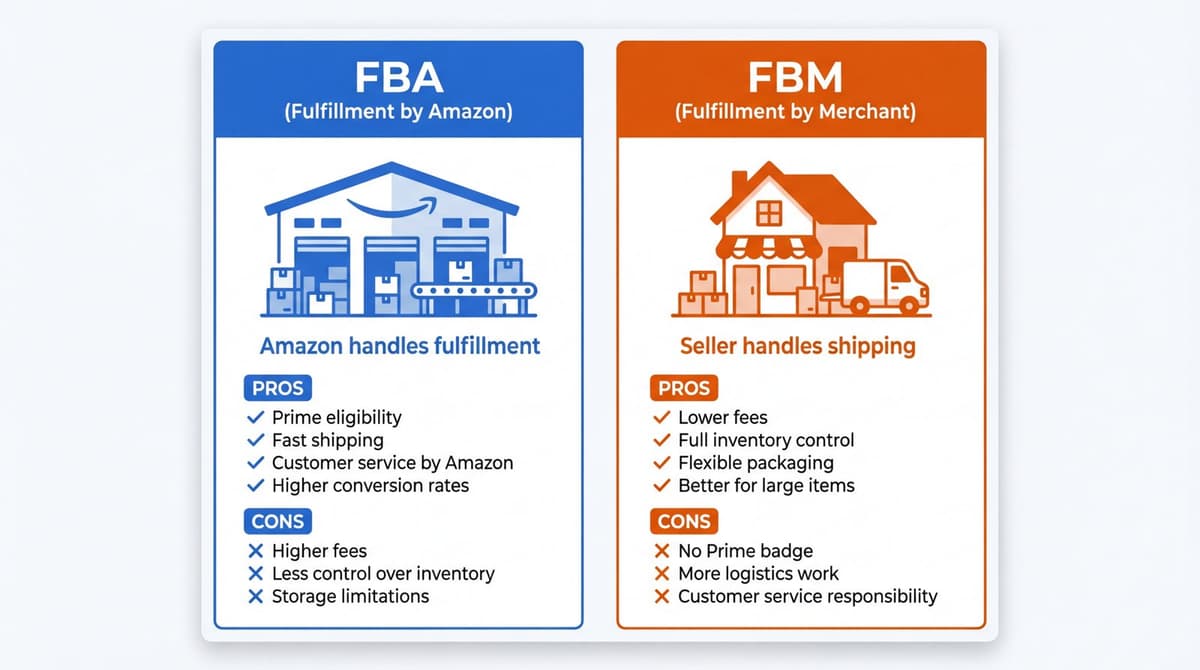
The FBA Calculator compares both fulfillment methods side by side.
Product: Bluetooth speaker ($35)
| Cost Component | FBA | FBM |
|---|---|---|
| Referral fee | $5.25 | $5.25 |
| Fulfillment/Shipping | $5.45 | $4.50* |
| Storage | $0.15 | $0.00 |
| Total fees | $10.85 | $9.75 |
*FBM shipping assumes seller-negotiated rates
When FBA wins: - Products requiring fast Prime shipping for competitiveness - High-volume products where time savings matter - Products with complex packaging or handling
When FBM wins: - Slow-moving inventory (avoids storage fees) - High-margin items where Prime badge is less critical - Products requiring special handling or customization
How to Improve FBA Profit Margins
Strategic adjustments can significantly improve profitability without raising prices.
Reducing Fulfillment Costs
Optimize product dimensions Smaller packaging reduces size tier classification. A product measuring 15.1 inches moves from small standard to large standard, increasing fees by $0.50-$1.00 per unit. Design packaging to stay under size tier thresholds.
Reduce product weight Weight directly impacts fulfillment fees. Consider: - Lighter packaging materials - Removing unnecessary components - Optimizing product design
Qualify for Low-Price FBA Products priced under $10 receive approximately $0.86 discount per unit. For appropriate products, pricing at $9.99 may yield higher net profit than $10.99.
Optimizing Storage Costs
- Maintain healthy inventory turnover — Target 30-60 day inventory supply. Excess inventory incurs unnecessary storage costs and risks long-term storage fees.
- Remove aged inventory before surcharges — Set calendar reminders at 150 days to evaluate slow movers. Removal fees ($0.97+) are far lower than aged inventory surcharges ($6.90/cubic ft monthly).
- Reduce Q4 storage — October-December storage costs triple. Minimize inventory levels entering Q4 for products unlikely to see holiday demand spikes.
Pricing Strategies for Better Margins
- Bundle complementary products — Bundling increases average order value while adding minimal incremental fulfillment cost. A $20 product bundled with a $5 accessory might cost only $0.30 more to fulfill.
- Test higher price points — Many sellers underestimate price elasticity. Test 10-15% price increases on strong-performing products. Conversion rate decreases often fail to offset margin improvements.
- Implement dynamic pricing — Adjust prices based on competition, inventory levels, and demand. Higher prices during low-competition periods and strategic discounting to clear slow inventory improves overall margin performance.
💡 Pro Tip: Use your AI agent to factor in import duties and tariffs for accurate landed cost calculations. Install with
npx skills add nexscope-ai/Amazon-Skills --skill tariff-calculator-amazon -gto calculate duties, taxes, and total landed costs.
Common FBA Calculator Mistakes to Avoid
These errors lead to inaccurate profit projections and poor sourcing decisions.
- Mistake 1: Ignoring inbound shipping costs — The FBA Calculator shows Amazon fees but not the cost of shipping inventory to fulfillment centers. Always add inbound shipping ($0.30-$2.00+ per unit depending on weight and origin) to total cost calculations.
- Mistake 2: Forgetting storage fees — Products sitting in warehouses accumulate storage costs. The calculator shows monthly storage, but slow-selling inventory may sit for 3-6 months before selling. Multiply monthly storage by expected days-to-sell.
- Mistake 3: Using wrong product dimensions — Packaging dimensions determine size tier, not product dimensions. Measure the actual shipping package including all protective materials. A slightly larger package can push products into higher fee tiers.
- Mistake 4: Overlooking return costs — Amazon FBA handles returns, but sellers absorb costs. Return rates vary by category (2-5% typical, 15-30% for apparel). Build return reserves into margin calculations.
- Mistake 5: Calculating at current fees only — Amazon raises FBA fees annually, typically in January. Build 3-5% fee increase assumptions into long-term profitability projections.
- Mistake 6: Ignoring category-specific referral fees — Not all categories charge 15%. Electronics (8%), jewelry (20%), and Amazon device accessories (45%) have significantly different rates. Verify category classification before finalizing calculations.
Nexscope provides structured ecommerce data that teams can use in focused web tools or connect to their existing Agent through API, MCP, or Skills. Ready workflows include Keyword to Ads, Video Clone, and Buy Box Repricer.
Conclusion
The Amazon FBA Calculator transforms guesswork into data-driven sourcing decisions. Understanding every fee component—referral fees, fulfillment costs, storage charges, and ancillary fees—reveals true profit margins before committing capital to inventory.
Successful FBA sellers use the calculator not just once, but throughout the product lifecycle. They verify margins during sourcing, adjust pricing as fees change, and continuously optimize dimensions and packaging to minimize costs.
The 2026 fee updates make accurate calculations more important than ever. Fulfillment fee increases of $0.08-$0.31 per unit and dramatically higher inbound defect penalties mean small errors compound into significant profit erosion.
Build FBA calculations into every sourcing decision. Know your break-even prices. Understand which products suit FBA versus FBM fulfillment. The sellers who master FBA economics consistently outperform those who treat Amazon fees as an afterthought.
Connect Ecommerce Data to Your Agent
Use Nexscope through API, MCP, or Skills, or open a ready seller workflow.
Explore Ecommerce Data →1,000 free credits • API, MCP & Skills
Frequently Asked Questions
How accurate is the Amazon FBA Calculator? The official Amazon FBA Calculator uses live fee data and provides accurate estimates for referral and fulfillment fees. However, it does not include inbound shipping costs, return reserves, or advertising expenses. Always add these costs manually for complete profitability analysis.
What fees does the FBA Calculator include? The calculator includes referral fees, FBA fulfillment fees, and monthly storage fees. It does not include inbound shipping to Amazon, long-term storage surcharges, removal fees, advertising costs, or return processing costs.
How do I calculate FBA profit margin? Profit margin equals net profit divided by selling price, expressed as a percentage. Net profit equals selling price minus all costs: Amazon fees, product cost, inbound shipping, and other expenses. A 25-35% profit margin is considered healthy for most FBA products.
What is a good profit margin for Amazon FBA? Target minimum 25% net profit margin after all costs. Products with 30-40% margins provide comfortable buffers for price competition and fee increases. Margins below 20% leave little room for error or market changes.
Does the FBA Calculator include storage fees? Yes, the calculator estimates monthly storage fees based on product dimensions. However, it shows only one month of storage. Multiply by expected inventory turnover time (typically 30-90 days) for accurate total storage cost projections.
How often do Amazon FBA fees change? Amazon typically updates FBA fees annually in January. Fee announcements usually come 2-3 months in advance. The 2026 fee changes took effect January 15, 2026, with increases across fulfillment fees and significant raises to inbound defect penalties.
Sources
- Amazon Seller Central. (2026). FBA revenue calculator. Retrieved from sellercentral.amazon.com
- Amazon Services. (2026). 2026 US FBA fulfillment fee changes. Retrieved from sellercentral.amazon.com
- Amazon Services. (2026). FBA features, services, and fees. Retrieved from sellercentral.amazon.com
- Payability. (2025). Amazon FBA fees 2026: Complete calculator and impact guide. Retrieved from payability.com