

FBA Meaning Explained: How Amazon Fulfillment Works

FBA stands for Fulfillment by Amazon—a service where Amazon stores your products, packs orders, ships them to customers, and handles returns. You focus on sourcing and marketing; Amazon handles the logistics.
Over 64% of Amazon sellers use FBA because it unlocks Prime shipping, improves Buy Box win rates, and eliminates fulfillment headaches. This guide covers how FBA works, what it costs, and whether it's right for your business.
What Does FBA Mean?
FBA stands for Fulfillment by Amazon. It's a service that lets third-party sellers outsource storage, packing, shipping, and customer service to Amazon.
The Simple Explanation
Instead of storing products in your garage and running to the post office every day, you send your inventory to Amazon's warehouses. When a customer orders, Amazon picks the item, packs it, and ships it—often with Prime two-day delivery.
What Amazon Handles with FBA
| Task | Who Does It |
|---|---|
| Storing inventory | Amazon |
| Picking and packing orders | Amazon |
| Shipping to customers | Amazon |
| Customer service | Amazon |
| Returns processing | Amazon |
| Refunds | Amazon |
What You Still Handle
| Task | Who Does It |
|---|---|
| Finding products to sell | You |
| Sourcing and purchasing inventory | You |
| Creating product listings | You |
| Marketing and advertising | You |
| Pricing decisions | You |
| Inventory planning | You |
How Does Amazon FBA Work?
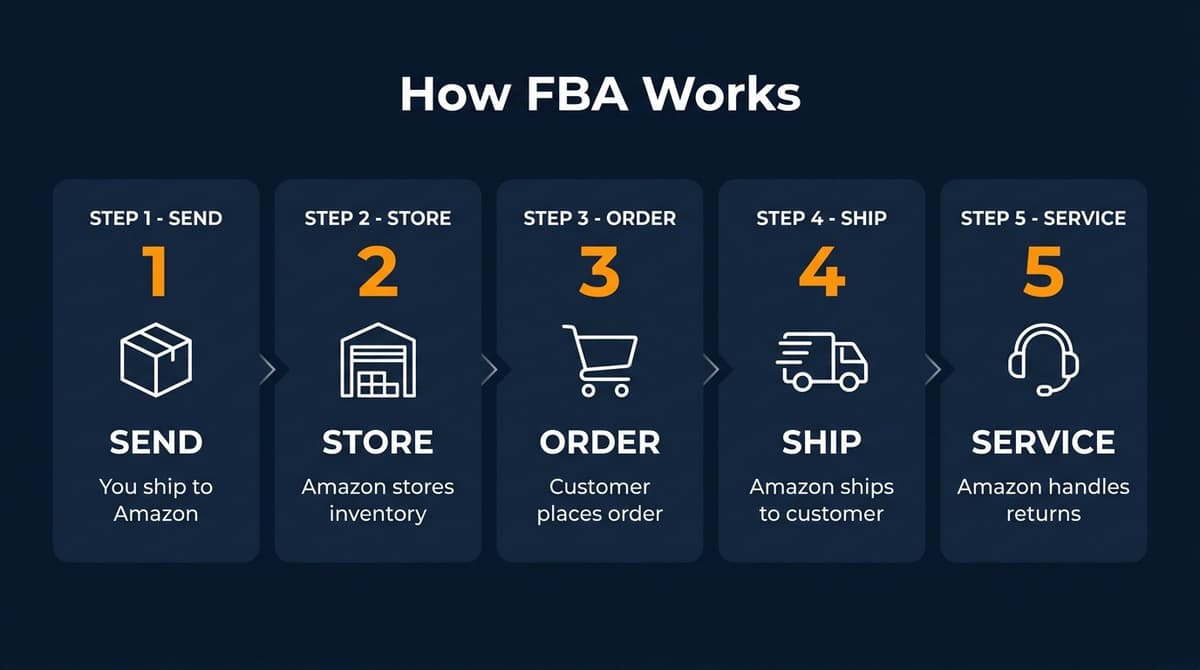
The FBA process follows five main steps:
Step 1: Send Inventory to Amazon
You ship your products to Amazon's fulfillment centers. Amazon tells you which warehouse(s) to send inventory to based on their distribution network.
What You Need
- Products properly labeled with FNSKU barcodes
- Boxes meeting Amazon's packaging requirements
- Shipping labels from your Seller Central account
Step 2: Amazon Stores Your Products
Once your shipment arrives, Amazon receives it, scans items into their system, and stores them in their warehouses. Your inventory becomes available for sale.
Storage Notes
- Products are stored alongside items from other sellers
- Amazon tracks your inventory separately in their system
- Storage fees apply based on space used and time stored
Step 3: Customer Places an Order
When someone buys your product on Amazon, the order goes directly to Amazon's fulfillment system. You don't need to do anything—no notification to respond to, no order to process manually.
Step 4: Amazon Ships the Order
Amazon's warehouse team: 1. Locates your product 2. Picks it from the shelf 3. Packs it in Amazon-branded packaging 4. Ships it to the customer
Shipping Speed
- Prime members get free 1-2 day shipping
- Non-Prime customers get standard shipping options
- Your products display the Prime badge
Step 5: Amazon Handles Customer Service
If customers have questions about shipping, want to return an item, or need a refund, Amazon handles it. You only get involved for product-specific questions.
FBA vs FBM: What's the Difference?
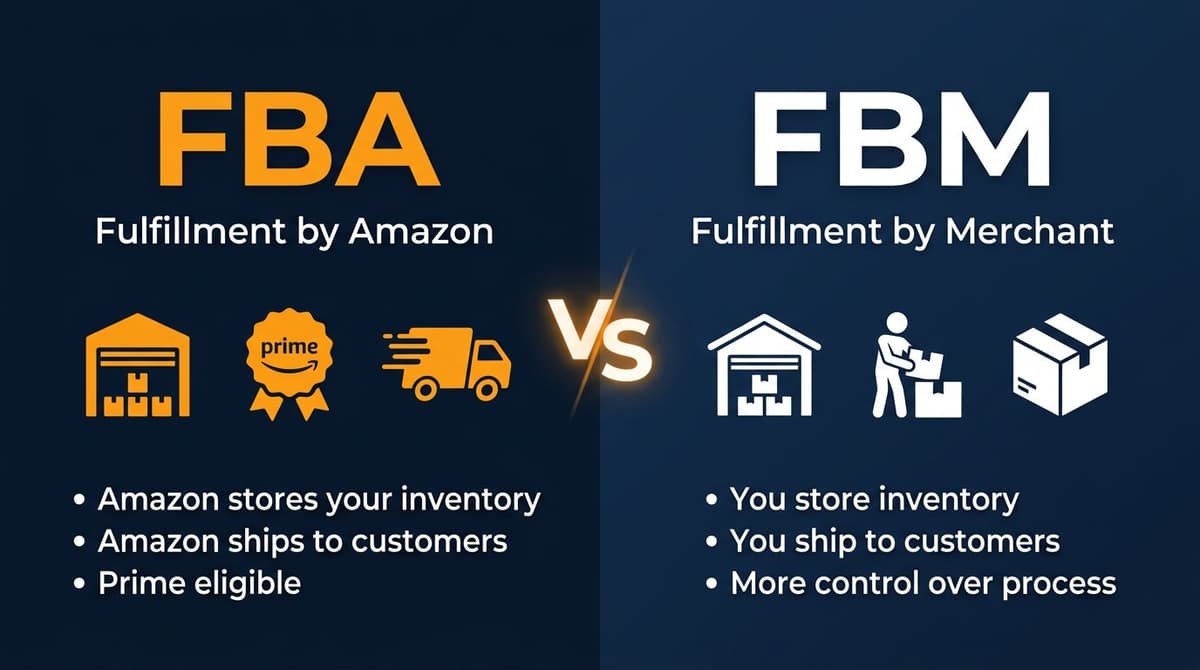
FBM stands for Fulfillment by Merchant—where you handle all storage and shipping yourself.
Side-by-Side Comparison
| Factor | FBA | FBM |
|---|---|---|
| Who ships orders | Amazon | You |
| Who stores inventory | Amazon warehouses | Your location |
| Prime eligibility | Automatic | Must qualify for Seller Fulfilled Prime |
| Customer service | Amazon handles | You handle |
| Startup cost | Higher (fees + inventory to Amazon) | Lower |
| Ongoing fees | FBA fees + storage | Shipping costs only |
| Scalability | High | Limited by your capacity |
| Buy Box advantage | Higher chance | Lower chance |
| Best for | High-volume, standard products | Low-volume, oversized, or high-margin |
When to Choose FBA
- You want Prime badge and faster shipping
- Your products are standard size (not oversized)
- You're selling more than 50-100 units/month
- You don't have space for inventory storage
- You want to scale without hiring staff
When to Choose FBM
- Your products are oversized or heavy
- Your margins are thin and FBA fees would eliminate profit
- You already have warehouse infrastructure
- You sell slow-moving inventory (avoid long-term storage fees)
- You want more control over packaging and branding
FBA Fees Explained
FBA isn't free. Amazon charges fees for storage and fulfillment. Understanding these costs is critical for profitability.
Main FBA Fee Types
1. Fulfillment Fees
Charged per unit sold. Covers picking, packing, shipping, and customer service.
| Size Tier | Weight | Fee (2026) |
|---|---|---|
| Small standard | Up to 1 lb | $3.22 |
| Large standard | Up to 1 lb | $3.86 |
| Large standard | 1-2 lb | $4.08 |
| Large standard | 2-3 lb | $4.76 |
| Small oversize | Up to 70 lb | $9.73 + $0.42/lb above first lb |
2. Monthly Storage Fees
Charged per cubic foot for inventory stored in Amazon's warehouses.
| Period | Standard Size | Oversize |
|---|---|---|
| January - September | $0.78/cubic ft | $0.56/cubic ft |
| October - December | $2.40/cubic ft | $1.40/cubic ft |
Q4 Storage Warning
Q4 storage fees are 3x higher due to holiday demand for warehouse space.
3. Aged Inventory Surcharge
Extra fee for inventory stored longer than 180 days: - 181-270 days: $1.50/cubic ft - 271-365 days: $3.00/cubic ft - 365+ days: $6.90/cubic ft (or $0.15/unit, whichever is greater)
4. Other Fees
- Removal fees: $0.97-$1.98 per unit to have inventory returned to you
- Disposal fees: $0.97-$1.98 per unit to have Amazon dispose of inventory
- Label service: $0.55 per unit if Amazon labels products for you
- Returns processing: Free for most categories
How to Calculate FBA Profitability
Before sending products to FBA, calculate whether you'll actually make money:
Simple formula:
Profit = Sale Price - Product Cost - FBA Fees - Amazon Referral Fee - Advertising Cost
Use Amazon's FBA Calculator to estimate fees for specific products before sourcing.
Pros and Cons of FBA
Advantages of FBA
1. Prime Badge = More Sales
Products fulfilled by Amazon display the Prime badge. Prime members (200+ million globally) filter for Prime-eligible items and buy more frequently from Prime listings.
Prime products often see 30-50% higher conversion rates.
2. Buy Box Advantage
The Buy Box (the "Add to Cart" button) drives 82% of Amazon sales. FBA sellers have a significant advantage in winning the Buy Box over FBM sellers, all else being equal.
3. Hands-Off Fulfillment
No packing boxes at midnight. No post office runs. No customer service emails about "where's my order?" Amazon handles it all.
4. Multi-Channel Fulfillment
FBA inventory can fulfill orders from your own website, eBay, or other channels—not just Amazon. Amazon charges slightly higher fees for non-Amazon orders.
5. Customer Trust
Amazon's return policy and customer service reputation reduce buyer hesitation. Customers trust that they can return items easily if needed.
6. Scalability
Selling 10 units or 10,000 units requires the same effort from you—send inventory to Amazon. No hiring, no warehouse leases, no shipping infrastructure.
Disadvantages of FBA
1. Fees Add Up
FBA fees can be 15-25% of your sale price (on top of Amazon's 15% referral fee). Low-margin products may become unprofitable.
2. Less Control
You can't control: - How products are packaged (generic Amazon boxes) - Shipping speed for individual orders - Which warehouse stores your inventory - Returns acceptance (Amazon is generous with returns)
3. Storage Fee Pressure
Slow-moving inventory gets expensive. Aged inventory surcharges punish products that don't sell quickly enough.
4. Commingling Risk
By default, Amazon may mix your inventory with identical products from other sellers ("commingled inventory"). If another seller sends counterfeit items, your customers might receive them. Solution: Use FNSKU labeling to keep your inventory separate.
5. Inventory Planning Complexity
You need to forecast demand and send inventory before it's needed—but not so much that you incur long-term storage fees. Getting this balance wrong costs money.
Is FBA Right for Your Business?
FBA Works Best When:
- ✅ Your products have healthy margins (30%+ after all fees)
- ✅ Products are small to medium size
- ✅ Inventory turns over within 3-6 months
- ✅ You want to scale without building infrastructure
- ✅ You're selling commodity products where Prime badge matters
- ✅ You don't have time to fulfill orders yourself
FBA May Not Work When:
- ❌ Your products are heavy or oversized (fees become prohibitive)
- ❌ Margins are thin (under 20% before FBA fees)
- ❌ Products are slow-moving (storage fees accumulate)
- ❌ You need custom packaging for brand experience
- ❌ You're selling fragile items that Amazon may not handle carefully
- ❌ You already have efficient fulfillment infrastructure
The Hybrid Approach
Many successful sellers use both FBA and FBM: - FBA for best-sellers with high velocity - FBM for slow-moving items, oversized products, or items with thin margins
This approach maximizes Prime visibility while controlling costs on products where FBA doesn't make sense.
How to Get Started with FBA
Step 1: Create an Amazon Seller Account
If you don't have one, sign up at sellercentral.amazon.com. Choose the Professional plan ($39.99/month) if you plan to sell more than 40 items monthly.
Step 2: List Your Products
Create product listings in Seller Central. If the product already exists on Amazon, you can match to the existing listing. For new products, you'll create a new listing with title, images, description, and price.
Step 3: Convert Listings to FBA
In Seller Central, change the fulfillment method for your listings from "Merchant" to "Amazon." This enables FBA for those products.
Step 4: Prepare Your Inventory
Products must meet Amazon's packaging requirements.
Packaging Requirements
- FNSKU barcode on each unit (or use Amazon's labeling service)
- Proper poly bagging if required
- Bubble wrap for fragile items
- Boxes meeting size and weight limits
Step 5: Create a Shipping Plan
Create your shipment in Seller Central.
How to Create a Shipment
- Go to Inventory → Manage FBA Shipments
- Select products and quantities to send
- Print box labels and shipping labels
- Ship to the assigned fulfillment center(s)
Step 6: Monitor and Optimize
Once inventory arrives, stay on top of performance.
Ongoing Tasks
- Track inventory levels in Seller Central
- Monitor FBA fees and profitability
- Reorder before stock runs out
- Remove slow-moving inventory before aged surcharges apply
Conclusion
FBA means Fulfillment by Amazon—a service that handles storage, shipping, and customer service so you can focus on growing your business.
For most Amazon sellers, FBA is worth the fees because it: - Unlocks Prime eligibility and faster shipping - Improves Buy Box win rate - Removes fulfillment headaches - Enables scaling without infrastructure investment
But FBA isn't for every product. Calculate fees carefully, consider the hybrid approach, and always monitor profitability.
The sellers who succeed with FBA treat it as a tool—not a magic solution. They choose the right products, price appropriately, and keep inventory moving to avoid storage penalties.
Want to Calculate FBA Profitability?
Before sending inventory to Amazon, make sure the numbers work. Nexscope provides structured ecommerce data that can be used in focused tools or connected to an existing Agent through API, MCP, or Skills.
Connect Ecommerce Data to Your Agent
Use Nexscope through API, MCP, or Skills, or open a ready seller workflow.
Explore Ecommerce Data →1,000 free credits • API, MCP & Skills
FAQs
What does FBA stand for?
FBA stands for Fulfillment by Amazon. It's a service where Amazon stores your inventory, packs and ships orders, handles customer service, and processes returns—all for a fee.
Is Amazon FBA free?
No. Amazon charges fulfillment fees (per unit sold) and storage fees (per cubic foot stored). Total FBA costs typically range from 15-25% of your sale price, depending on product size and how long inventory is stored.
How much does it cost to start Amazon FBA?
To start FBA, you need: - Professional Seller account: $39.99/month - Inventory to send to Amazon: Varies (minimum recommended: $500-2,000) - Product prep supplies: ~$50-100 - Total minimum: ~$600-2,500 depending on your product
What is the difference between FBA and FBM?
FBA (Fulfillment by Amazon) means Amazon handles storage and shipping. FBM (Fulfillment by Merchant) means you handle it yourself. FBA gives you Prime eligibility but costs more in fees. FBM gives you more control but requires your own logistics.
Can you lose money with Amazon FBA?
Yes. Sellers lose money when: - Product margins are too thin to cover fees - Inventory sits too long (aged inventory surcharges) - Pricing doesn't account for all costs - Returns are excessive
Always calculate profitability before sourcing products.
How long does it take to make money with FBA?
Most new FBA sellers take 3-6 months to become consistently profitable. The timeline depends on product selection, capital available, and how quickly you learn to optimize listings and advertising.
Sources
- Amazon Seller Central: Fulfillment by Amazon
- Jungle Scout: State of the Amazon Seller Report 2026
- Amazon FBA Fee Schedule 2026