

How to Write Amazon A+ Content That Converts (With Design Tips)

Your bullet points can only do so much. If you want to tell your brand story, explain complex features, or differentiate from competitors, you need A+ Content.
Amazon A+ Content (formerly Enhanced Brand Content) lets brand-registered sellers replace the plain text product description with rich media — images, comparison charts, and formatted text that actually looks good.
Done right, A+ Content can increase conversions by 3-10%. Done wrong, it's wasted real estate.
This guide covers everything: what A+ Content is, how to write compelling copy for each module, how to design images that sell, and the mistakes that kill conversion rates.
What Is Amazon A+ Content?
A+ Content is a feature available to brand-registered sellers that lets you enhance your product detail page with:
- Rich images — Lifestyle shots, infographics, feature callouts
- Formatted text — Headers, paragraphs, and styled layouts
- Comparison charts — Compare your products or highlight differences from competitors
- Brand storytelling — Tell your brand's story and build trust
It replaces the standard product description section with a visually rich experience that looks professional and builds credibility.
Basic A+ vs Premium A+ Content
Amazon offers two tiers:
Basic A+ Content (Free) - Available to all brand-registered sellers - Up to 5 modules per ASIN - Standard module options - Mobile-responsive
Premium A+ Content (Invitation or fee-based) - Interactive modules (video, hotspots, carousels) - Up to 7 modules per ASIN - Enhanced engagement features - Better mobile experience
Most sellers use Basic A+ Content, and that's what this guide focuses on. Premium A+ is worth considering once you've mastered the basics and have budget for it.
Why A+ Content Matters
Higher Conversion Rates
Amazon's own data suggests A+ Content can increase sales by 3-10%. Why?
- Visual learners — Many shoppers skim. Images communicate faster than text.
- Trust signals — Professional-looking content signals a legitimate brand.
- Objection handling — Address concerns that bullet points can't cover.
- Comparison shopping — Help shoppers understand why you're different.
Reduced Returns
When customers understand what they're buying, they're less likely to return it. A+ Content lets you:
- Show product scale and dimensions clearly
- Explain use cases and limitations
- Set accurate expectations
Brand Building
Your competitors might have similar products. A+ Content lets you differentiate through:
- Brand story and values
- Quality signals and certifications
- Lifestyle imagery that resonates with your target customer
A+ Content Module Types
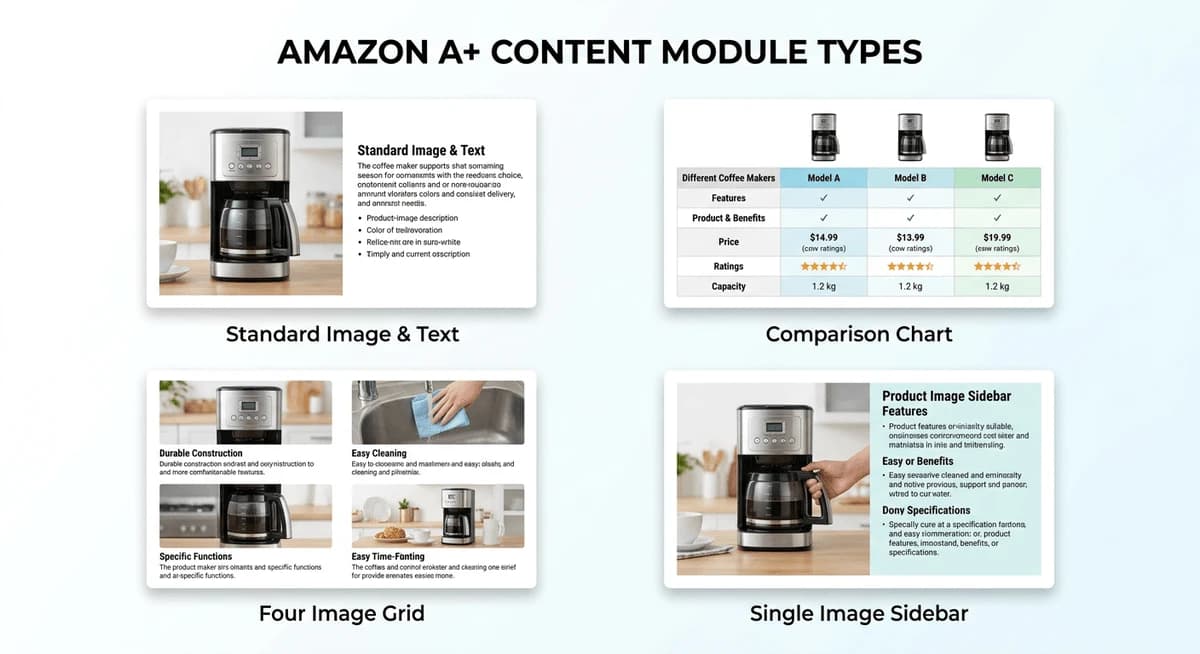
Amazon offers various module types. Here are the most useful ones:
Standard Image and Text
A large image with text overlay or adjacent text. Good for:
- Hero images with key benefits
- Lifestyle shots with feature callouts
- Brand imagery with positioning statements
Standard Comparison Chart
A table comparing your products or comparing to generic alternatives. Good for:
- Showing product variations (sizes, colors, models)
- Highlighting what makes you different
- Upselling to premium versions
Standard Four Image and Text
Four images in a grid with text. Good for:
- Feature highlights
- Use cases
- Step-by-step instructions
Standard Single Image and Sidebar
Large image with sidebar text. Good for:
- Technical specifications
- Detailed feature explanations
- Certifications and trust signals
Standard Text
Text-only module. Use sparingly for:
- Brand story paragraphs
- Detailed explanations that need more words
- SEO (A+ text is now indexed)
How to Write A+ Content Copy
Start With Your Customer
Before writing anything, answer these questions:
- Who is buying this? — Demographics, experience level, primary use case
- What problem does it solve? — The pain point that led them to search
- What objections might they have? — Price, quality, compatibility concerns
- What makes you different? — Why you vs competitors
Your A+ Content should address all of these.
Write for Skimmers
Most shoppers won't read every word. Structure your copy for scanning:
- Headlines that communicate value — Not "Premium Quality" but "3x Thicker Than Standard Mats"
- Short paragraphs — 2-3 sentences max
- Bullet points in modules — When listing features or benefits
- Bold key phrases — Draw attention to what matters
Focus on Benefits, Not Features
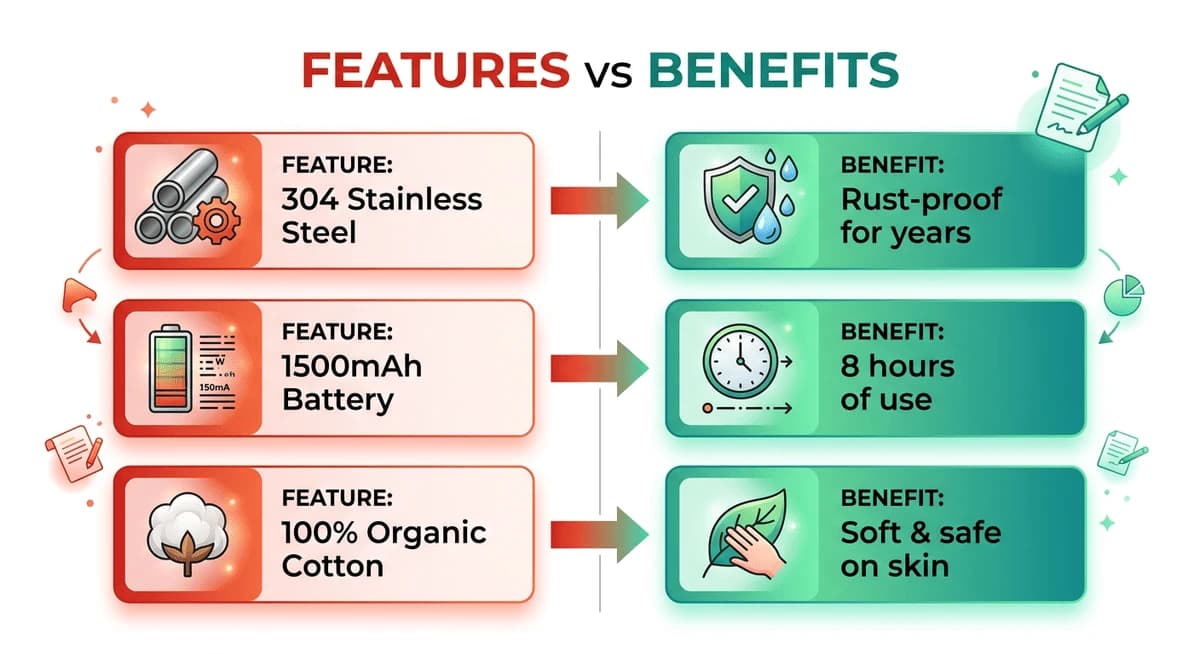
Features describe what the product is. Benefits describe what it does for the customer.
Feature: "Made with 304 stainless steel" Benefit: "Rust-proof for years of daily use"
Feature: "1500mAh battery" Benefit: "Lasts 8 hours on a single charge — enough for a full workday"
Always connect features to real-world outcomes.
Use Specific Numbers
Vague claims are forgettable. Specific numbers are credible.
❌ "Long-lasting battery" ✅ "8-hour battery life"
❌ "High quality materials" ✅ "Made from 100% organic cotton, OEKO-TEX certified"
❌ "Easy to clean" ✅ "Dishwasher safe — clean in 2 minutes"
Address Objections Directly
Think about why someone might NOT buy:
- Price concern: Justify value ("Costs $0.15/day over its lifetime")
- Quality concern: Show certifications, testing, materials
- Compatibility concern: List what it works with
- Durability concern: Mention warranty, materials, testing
Write Module by Module
Hero Module (First Module)
This is your opening statement. Make it count.
What to include: - Your single biggest benefit or differentiator - A compelling headline (not your brand name) - Supporting image that reinforces the message
Example headline approaches: - Problem-solution: "Finally, a Yoga Mat That Doesn't Slip" - Outcome-focused: "Wake Up Pain-Free Every Morning" - Differentiation: "The Only Cooler That Keeps Ice for 7 Days"
Feature Modules (Middle Modules)
Break down your key selling points. Each module should focus on one theme:
- Materials/Quality — What it's made of, why that matters
- How It Works — Step-by-step or mechanism explanation
- Use Cases — Different ways to use the product
- What's Included — Package contents, especially for bundles
Copy formula for each feature: 1. Headline (benefit-driven) 2. Supporting statement (how it delivers that benefit) 3. Proof point (specific detail, number, or certification)
Comparison Module
Use comparison charts strategically:
Comparing your own products: - Help customers choose the right variant - Upsell to premium versions - Reduce returns from wrong purchases
Comparing to "generic" alternatives: - Never name competitors directly - Compare to "standard products" or "typical alternatives" - Focus on measurable differences
Brand Story Module (Optional)
If you have a compelling brand story, use it. If not, skip this module.
Good brand stories include: - Origin — Why you started the company - Mission — What you're trying to achieve - Values — What you stand for - People — The humans behind the brand
Bad brand stories are generic fluff about "passion for quality" that every brand claims.
Need Help Writing A+ Content?
Writing persuasive A+ Content copy takes time and skill. Nexscope ecommerce data can support the research behind A+ Content in focused tools or connect to your Agent through API, MCP, or Skills.
Here are some prompts you can try:
For a hero module:
"Write a compelling A+ Content hero headline and subtext for a stainless steel insulated water bottle. Focus on the main benefit: keeps drinks cold for 24 hours. Target audience: fitness enthusiasts and outdoor adventurers."
For feature modules:
"Create A+ Content copy for 4 feature modules for my yoga mat. Key features: 6mm thickness, non-slip texture, eco-friendly TPE material, alignment lines. Convert each feature into a benefit-focused headline with 2-3 sentences of supporting copy."
For comparison charts:
"Write comparison chart copy comparing my premium chef's knife to generic kitchen knives. Highlight these advantages: German steel blade, ergonomic handle, lifetime warranty, 15-degree edge angle. Keep it factual and avoid naming competitors."
For the full A+ Content:
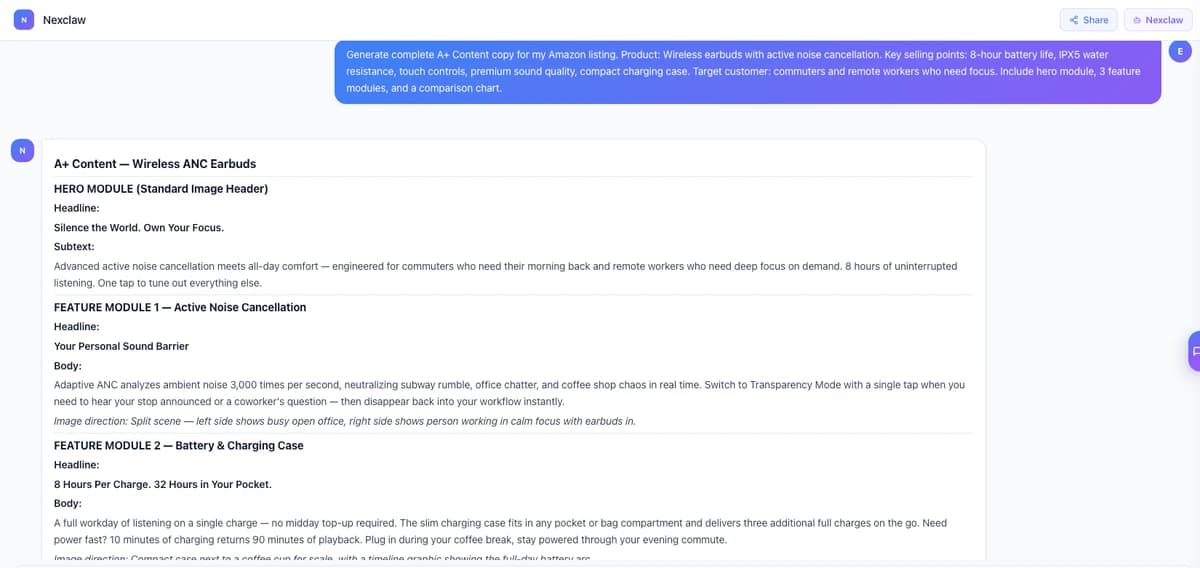
"Generate complete A+ Content copy for my Amazon listing. Product: Wireless earbuds with active noise cancellation. Key selling points: 8-hour battery life, IPX5 water resistance, touch controls, premium sound quality, compact charging case. Target customer: commuters and remote workers who need focus. Include hero module, 3 feature modules, and a comparison chart."
The AI will generate benefit-driven copy that you can refine and customize for your brand voice.
How to Design A+ Content Images
Great copy with bad images won't convert. Here's how to create images that sell.
Image Specifications
Amazon's requirements:
- Resolution: Minimum 970px wide (1500px+ recommended)
- Format: JPEG, PNG, or GIF
- File size: Under 2MB
- Aspect ratio: Varies by module (check specific requirements)
Types of Images You Need
Lifestyle Images
Show the product in real-world context:
- Product being used by your target customer
- Product in its natural environment
- Emotional connection to the outcome
Tips: - Use models that match your target demographic - Show the result, not just the product - Avoid cluttered backgrounds
Infographic Images
Communicate information visually:
- Feature callouts with arrows/labels
- Size/dimension comparisons
- Process or how-to steps
- What's in the box
Tips: - Keep text readable (minimum 16px equivalent) - Use consistent fonts and colors - Don't overcrowd — max 5-6 callouts per image
Comparison Images
Visual side-by-side comparisons:
- Your product vs generic alternatives
- Before and after
- Size comparisons with common objects
Tips: - Make differences obvious at a glance - Use checkmarks/X marks for feature comparisons - Keep it factual and defensible
Detail Shots
Close-ups that highlight quality:
- Material texture
- Stitching, construction details
- Components or mechanisms
Tips: - Use macro photography for texture - Show craftsmanship and quality signals - Include scale reference when helpful
Design Principles
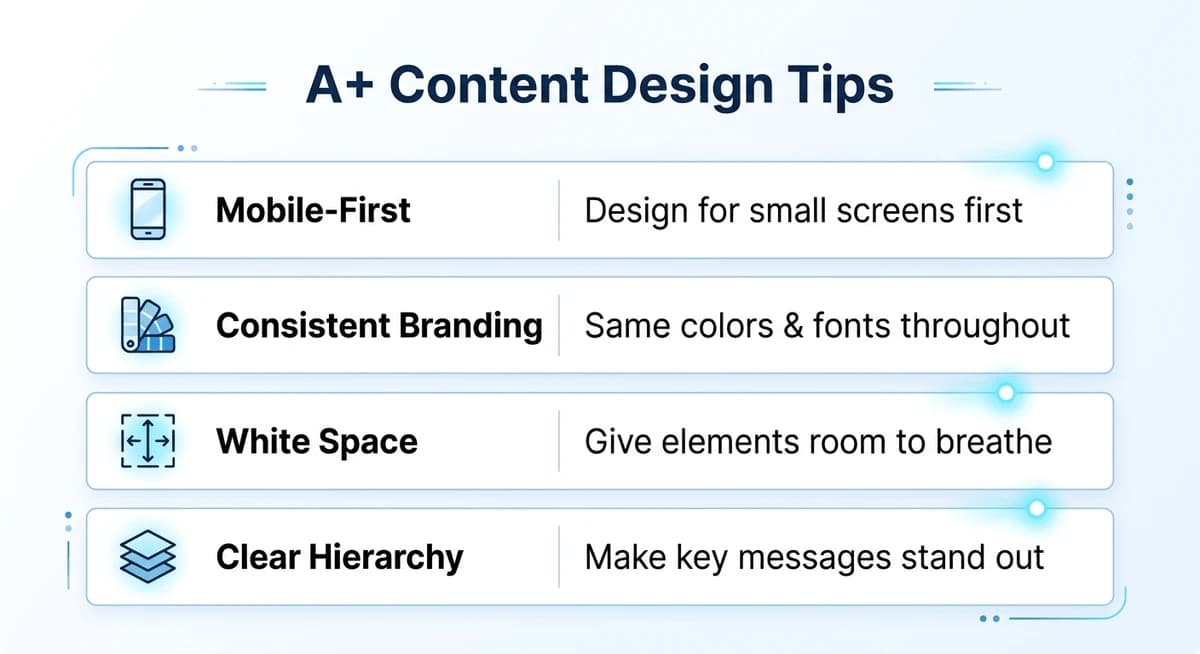
Consistent Branding
Your A+ Content should look cohesive:
- Color palette — Use your brand colors consistently
- Fonts — Stick to 1-2 fonts max
- Style — Same photography style throughout
- Logo placement — Consistent but not overwhelming
Mobile-First Design
Over 60% of Amazon traffic is mobile. Design for small screens:
- Large, readable text — At least 24px for headlines
- Simple layouts — Avoid tiny details that get lost
- Vertical-friendly — Images that work when scrolled
- Test on phone — Preview before publishing
White Space
Don't cram everything together:
- Give elements room to breathe
- Use margins between text and image edges
- Avoid wall-of-text layouts
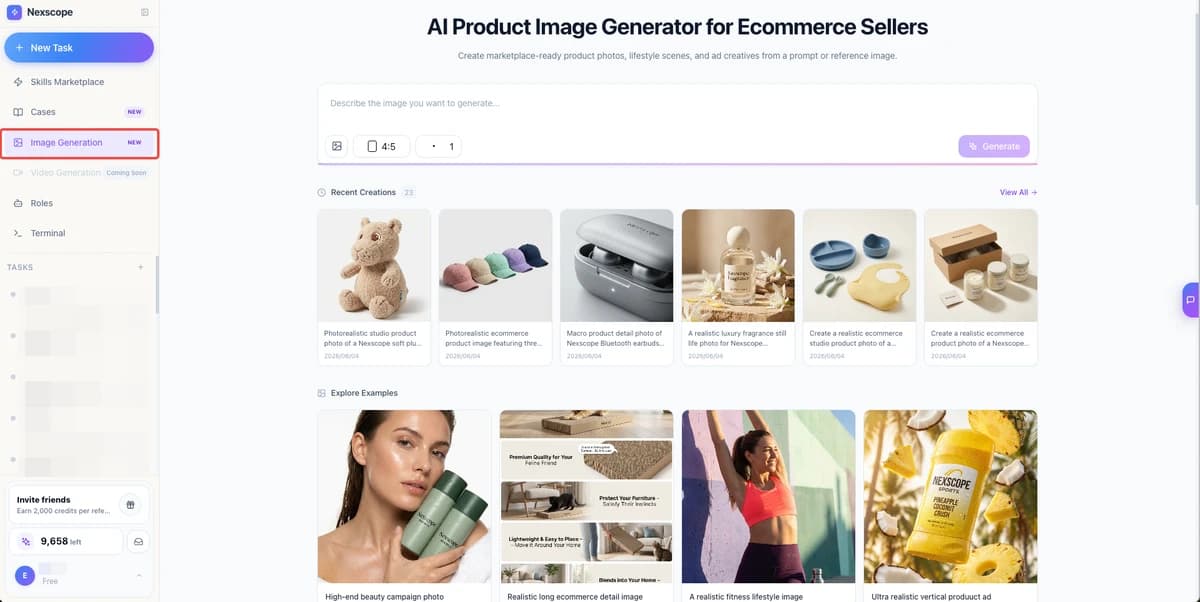
Create A+ Images With Nexscope
Don't have design skills or budget for a professional photoshoot? Nexscope's AI Image Generator creates marketplace-ready product images in minutes.
What you can generate:
- Product photos — Studio-quality shots on white backgrounds
- Lifestyle images — Products in real-world context and settings
- Infographics — Feature callouts, comparison visuals, size charts
- Ad creatives — Images optimized for sponsored ads and social media
Just describe what you want, upload a reference image if needed, and generate. No photoshoot required.
A+ Content Best Practices
Do's
- Lead with your strongest benefit — First module should hook attention
- Use all available modules — More content = more opportunities to convert
- Include a comparison chart — Even if just comparing your own variants
- Optimize for mobile — Test on phone before publishing
- A/B test different versions — Amazon allows experiments
- Update seasonally — Refresh for holidays, new features, or trends
- Include social proof — Awards, certifications, "As seen in" logos
Don'ts
- Don't repeat bullet points verbatim — A+ is for additional information
- Don't use tiny text — If it's not readable on mobile, remove it
- Don't include pricing — Prices change; A+ Content doesn't auto-update
- Don't make unverifiable claims — "Best in class" without proof
- Don't forget your brand story — But only if it's genuinely compelling
- Don't ignore image quality — Blurry or pixelated images kill trust
Common A+ Content Mistakes
Mistake 1: All Features, No Benefits
Listing specs without explaining why they matter.
Fix: For every feature, add "which means..." and complete the sentence with a customer benefit.
Mistake 2: Generic Stock Photos
Using obvious stock photos that could be any brand.
Fix: Invest in custom photography or AI-generated images that show YOUR product in context.
Mistake 3: Too Much Text
Walls of text that nobody reads.
Fix: Cut your copy in half. Then cut it again. Use images to communicate instead.
Mistake 4: Ignoring Mobile
Designing on desktop and never checking mobile preview.
Fix: Always preview on mobile. If text is too small to read, make it bigger or remove it.
Mistake 5: No Clear Hierarchy
Everything looks equally important, so nothing stands out.
Fix: Decide on 1-3 key messages. Make those dominant. Everything else is supporting.
Mistake 6: Inconsistent Branding
Different fonts, colors, and styles across modules.
Fix: Create a style guide before starting. Use the same fonts, colors, and image styles throughout.
How to Submit A+ Content
Step-by-Step Process
- Go to Seller Central → Advertising → A+ Content Manager
- Click "Start creating A+ content"
- Select content type — Basic or Brand Story
- Choose modules — Select and arrange your modules
- Add content — Upload images, enter text
- Preview — Check desktop and mobile views
- Apply to ASINs — Select which products get this content
- Submit for review — Usually approved within 7 days
Approval Tips
Amazon reviews A+ Content before publishing. Avoid rejection by:
- No competitor mentions — Don't name other brands
- No external links — No URLs or QR codes
- No unverifiable claims — "Best selling" needs proof
- No pricing information — Prices change; content doesn't
- No contact information — No emails or phone numbers
- Clean images — No watermarks or promotional overlays
Measuring A+ Content Performance
Metrics to Track
- Conversion rate — Compare before and after adding A+ Content
- Sessions — A+ Content doesn't directly drive traffic, but better conversion can improve ranking
- Returns — Should decrease if A+ Content sets better expectations
A/B Testing
Amazon's "Manage Your Experiments" feature lets you test:
- Different images
- Different copy approaches
- Different module arrangements
Run tests for at least 2-4 weeks to get statistically significant results.
Get Help With A+ Content
Creating effective A+ Content requires:
- Copywriting skills — Persuasive, benefit-focused writing
- Design skills — Professional-looking images and layouts
- Amazon knowledge — Understanding what converts on the platform
If you don't have all three in-house, consider getting help.
Nexscope offers A+ Content creation as part of our Listing Optimization service — including AI-generated product images, copywriting, and design that follows Amazon best practices.
Connect Ecommerce Data to Your Agent
Use Nexscope through API, MCP, or Skills, or open a ready seller workflow.
Explore Ecommerce Data →1,000 free credits • API, MCP & Skills
FAQ
How long does A+ Content take to approve?
Usually 7 business days, sometimes faster. Complex content or first-time submissions may take longer.
Can I use A+ Content on all my products?
A+ Content is available for brand-registered products. You need to be enrolled in Amazon Brand Registry for the brand that owns the ASIN.
Does A+ Content help with SEO?
Yes. Amazon now indexes A+ Content text for search. Include relevant keywords naturally in your copy.
How often should I update A+ Content?
Update when you have new features, better images, or seasonal relevance. At minimum, review annually.
Can I use the same A+ Content for multiple ASINs?
Yes. You can apply the same A+ Content to multiple ASINs. This is useful for product variations where the brand story and most features are the same.
What's the difference between A+ Content and Brand Story?
A+ Content replaces the product description. Brand Story is a separate module that appears above A+ Content and focuses on your brand rather than the specific product.