
https://api.nexscope.ai/alibaba1688/createOrderEjecutar esta API
Envía una solicitud JSON para ejecutar esta API y recibir los datos de respuesta documentados.
Endpoint
| Método | POST |
| Ruta | https://api.nexscope.ai/alibaba1688/createOrder |
| Autenticación | Bearer API key |
| Content-Type | application/json |
Before testing 1688 procurement
Examples illustrate the request format. Product, SKU, address, logistics and order IDs are not verified for your account. Replace them with actual values before running a request.
Authorization and where to get your values
- Get an authorization URL
Use your Nexscope API key and an
accountNamelabel of your choice. Your Nexscope key identifies your Nexscope account. Open the returned URL in your browser to authorize your own 1688 buyer account; its tokens are stored securely by the Nexscope backend.Authorization is supported by LinkFox Agent, Nexscope's strategic partner in China. You will see "LinkFox Agent" on the 1688 authorization page. Authorize your own 1688 account; Nexscope links it to your Nexscope user account.
Use data only within the scope of your authorization and in accordance with applicable local laws, regulations, and platform terms.
The permission descriptions and agreement notice on the 1688 authorization page are in Chinese. Use your browser's translation feature and select English to read them. Changing your browser's language alone does not switch these sections to English.
1688 authorization page — English reference translation 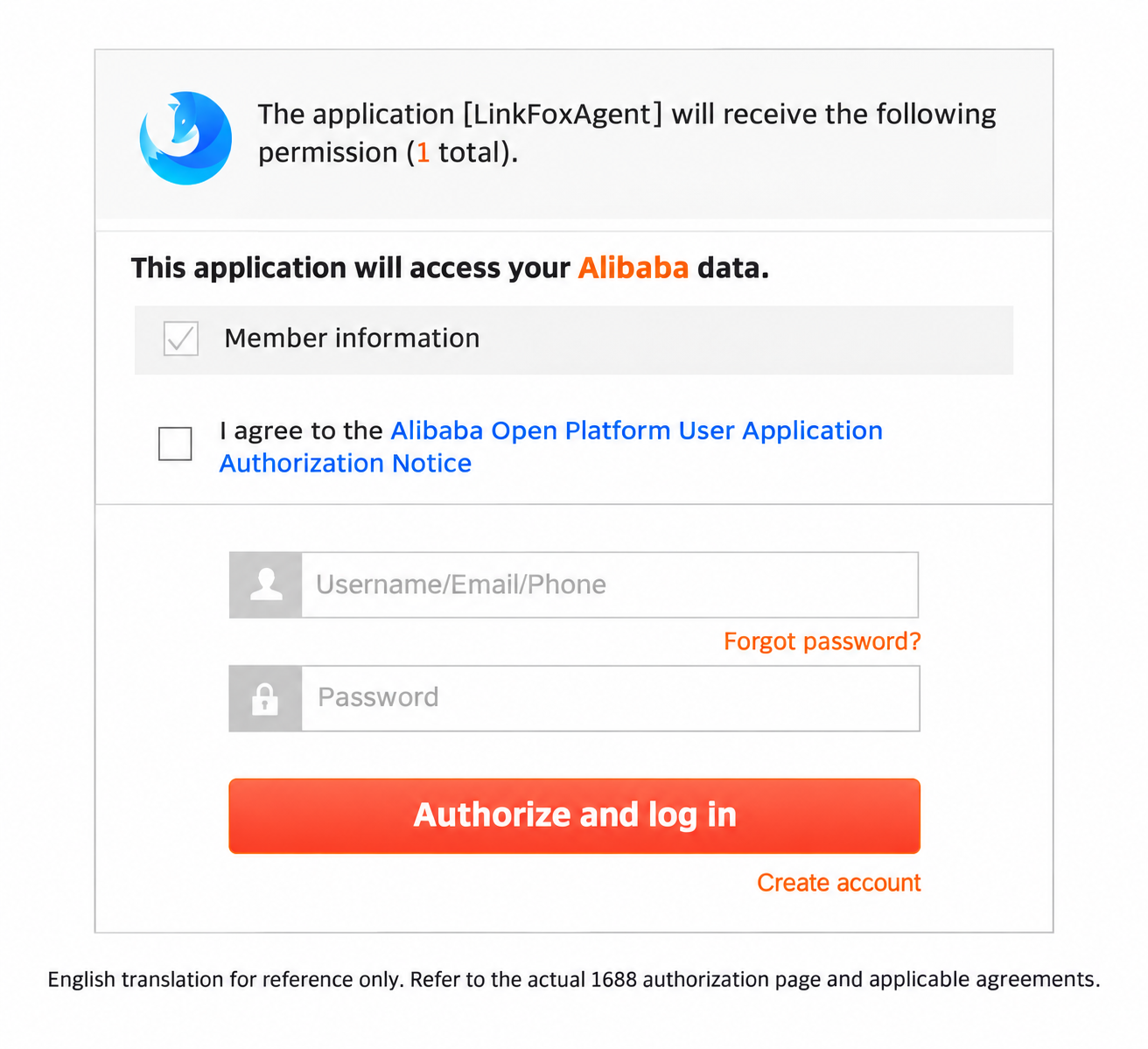
This translated screenshot is provided for reference only. Please refer to the actual 1688 authorization page and applicable agreements. The translation does not change the official page or indicate that your account is authorized.
Open the full-size translated screenshotComplete authorization within 10 minutes of requesting the URL. If the link expires or authorization fails, request a new URL and try again. Check authorized accounts afterward; the redirect page alone does not verify authorization.
Getting an authorization URL and checking authorized accounts each cost 10 credits per call. Internal token exchange and refresh are not charged separately. Other procurement calls use their configured credit price.
- Check authorized accounts
Continue with buyer operations only when an account has
status=ACTIVEandexpired=false. Returning from the authorization page alone does not confirm success. Tokens and refresh are handled by the backend. Use a real product ID from a selected 1688 product or search result. Query its SKUs and use a returned
specIdwhen selecting a specification.Query your addresses and select a returned
addressId, or supply the documentedaddressParam.Use your existing order ID or the
orderIdreturned by order creation. Send it asaliOrderId,orderIdListororderIdsas required by the selected API. Keep all IDs as strings. Existing-order queries do not require creating a new order.For a shipment, select
logisticsIdfrom the order logistics result. For an invoice, copy each order's amount from the invoice amount result unchanged in cents and provide your actual invoice title details.
Request parameters and response index
Each link opens the complete request schema, required and conditional fields, types, supported values and response schema. These summaries do not replace the schemas. All operations use POST JSON and your Nexscope API key.
| Operation | Request parameters | Business response and next step |
|---|---|---|
| authorizeUrl | accountName: a nonblank buyer-account label. | authorizeUrl: open manually and complete authorization within 10 minutes. |
| authorizedStores | An empty object; the current Nexscope user is selected automatically. | stores[].accountName, status and expired. Continue only with ACTIVE and expired=false. |
| receiveAddressList | An empty object; uses your authorized buyer account. | items[].addressId and recipient/address details. Use your actual addressId. |
| sku | offerId: a positive decimal ID string. | skuList[].specId, price and amountOnSale. Select specId for a product specification. |
| orderPreview | addressId or addressParam, cargoParamList and flow; optional invoiceParam. | status, sumPayment, sumCarriage, discountFee, cargoList and payment/promotion options. Stop if status=false. |
| createOrder | Address, cargo and flow inputs; confirmCreateOrder=true. See the schema for optional creation fields; invoiceParam is preview-only. | success, orderId and business messages. Save orderId for later reconciliation. |
| paymentUrl | orderIdList: a nonempty string array; confirmGetPaymentUrl=true. | success, payUrl, errorMessage and errorCode. Never open or pay automatically. |
| orderStatus | aliOrderId: the actual order ID as a string. | aliOrderId, aliStatus and normalizedStatus. |
| logistics | aliOrderId: the actual order ID as a string. | logisticsOrders[].logisticsId, logisticsBillNo, logisticsCompanyName and status. |
| logisticsTrace | aliOrderId; optional logisticsId from logistics. | traceList[].traceTime, location, traceDescription and traceStatus. Times use Asia/Shanghai. |
| confirmReceive | aliOrderId and confirmReceive=true. | success and aliOrderId. Confirm receipt only after checking the shipment. |
| cancelOrder | aliOrderId and confirmCancel=true; optional cancelReason and remark. | success, aliOrderId, compatibility orderId and message. Cancellation is not a refund request. |
| invoiceAmount | orderIds: a nonempty array of positive decimal ID strings. | orderInvoiceAmountModelList[].orderId/amount and retCodes. Copy each amount unchanged in cents. |
| invoiceApply | invoiceApplyModelList with orderId, amount, invoiceType and purchaserInvoiceTitleModel; confirmApplyInvoice=true. | successList and failedList, including per-order errors. Inspect both lists even when the platform code is 0. |
Send product, SKU and order IDs as strings. For direct API requests, provide flow explicitly: general, fenxiao or boutiquefenxiao. The procurement Skill scripts default an omitted flow to general. Use distribution modes only when intended.
Preview totals, shipping and discounts are in cents; cargoList.finalUnitPrice and cargoList.amount are in yuan. SKU prices and stock are indicative; the preview determines purchasability and final amounts. Keep invoiceAmount values unchanged in cents.
Nexscope returns code, msg, data, ts, time, cost and traceId. Numeric outer code=0 means platform success; HTTP 200 alone does not. The procurement result keeps its provider code/message/data wrapper; inspect the business result inside data.data, including status, success and invoice rows. The outer cost field is elapsed time, not credits.
Actions that require confirmation
Confirm each exact action and its parameters separately. The confirmation field must be the JSON boolean true, not a string or number. Changing the account, order, goods, address, invoice details or other parameters requires a new confirmation. Online test requests confirmation before execution.
confirmCreateOrder: Create a real order after a successful preview.confirmGetPaymentUrl: Retrieve a payment link; this does not make a payment.confirmReceive: Confirm receipt of the exact order.confirmCancel: Attempt to cancel the exact order; this does not request a refund.confirmApplyInvoice: Submit invoice applications with the confirmed title and exact per-order amounts.
Do not automatically retry an uncertain write after a timeout or network error. Check order or invoice state first, then obtain confirmation for any further attempt. Never automatically open a payment link or make a payment.
Errors and how to recover
Check the HTTP status, Nexscope outer code and business result separately. Supplier 1002/1003/1005 codes are not Nexscope outer codes. Gateway HTTP authentication or credit errors can also occur; do not rely on HTTP status alone.
11209: API key is missing or does not exist. Supply your Nexscope API key; this can be returned with HTTP 200.99001: Invalid parameters or missing confirmation. Follow the English message, correct the request and confirm again when necessary. Procurement pricing configuration errors also require support to check the service configuration.13007: Buyer authorization is unavailable, or a procurement service/proxy call failed. Read the message and check authorization when indicated; not every 13007 requires reauthorization. Do not switch to another buyer or repeat an uncertain write.13011: Insufficient Nexscope credits. Check your Nexscope balance.99000: Unexpected service failure. Keep the traceId when provided and contact support; reconcile uncertain writes before any retry.code=0with businessstatus=falseorsuccess=false: The business operation failed or partially failed. Stop dependent actions and inspect business messages and per-order results. INVOICE_ALREADY_APPLIED means the order is already invoiced; do not resubmit the whole batch.
Parámetros de la solicitud
| Nombre | Tipo | Obligatorio | Descripción |
|---|---|---|---|
addressId | string | opcional | Select from receiveAddressList. |
addressParam | object | opcional | addressParam |
addressParam.address | string | obligatorio | Street address. |
addressParam.areaText | string | opcional | Valor de Area text usado por esta operación de API. |
addressParam.cityText | string | opcional | Valor de City text usado por esta operación de API. |
addressParam.fullName | string | obligatorio | Recipient name. |
addressParam.mobile | string | obligatorio | Recipient phone; avoid sharing outside the request. |
addressParam.phone | string | opcional | Landline phone number. |
addressParam.postCode | string | opcional | Postal code. |
addressParam.provinceText | string | opcional | Valor de Province text usado por esta operación de API. |
anonymousBuyer | boolean | opcional | Valor de Anonymous buyer usado por esta operación de API. |
cargoParamList | array | obligatorio | cargoParamList Cantidad mínima de elementos: 1 |
cargoParamList[] | object | obligatorio | cargoParamList |
cargoParamList[].offerId | string | obligatorio | Exact positive integer identifier. Send as a JSON string. Patrón: ^[1-9][0-9]*$ |
cargoParamList[].quantity | integer | obligatorio | Quantity in the selling unit. Mínimo: 1 |
cargoParamList[].specId | string | opcional | SKU specification identifier. |
confirmCreateOrder | boolean | obligatorio | Must be JSON true after separate explicit user confirmation. Examples default to false and do not authorize this action. Predeterminado: false |
crossBorderLogisticsSolutionId | string | opcional | Cross-border logistics solution sourceId. |
fenxiaoChannel | string | opcional | Distribution platform. Permitidos: douyin, kuajing, pinduoduo, taote |
flow | string | opcional | Order flow; defaults to general when omitted. Permitidos: general, fenxiao, boutiquefenxiao Predeterminado: general |
isvBizType | string | opcional | Cross-border business type. Permitidos: cross, cross_daigou, cross_distribution Predeterminado: cross |
message | string | opcional | Valor de Message usado por esta operación de API. |
outOrderId | string | opcional | Valor de Out order id usado por esta operación de API. |
shopPromotionId | string | opcional | Valor de Shop promotion id usado por esta operación de API. |
tradeType | string | opcional | Trade type: assureTrade, alipay, period, assure, creditBuy, bank, 631staged or 37staged. |
useBorderLogisticsSolution | boolean | opcional | Whether to use a cross-border logistics solution. |
useRedEnvelope | string | opcional | Valor de Use red envelope usado por esta operación de API. Permitidos: y, n Predeterminado: n |
Opción 1 de cualquier alternativa — requiere addressId
Opción 2 de cualquier alternativa — requiere addressParam
Respuesta de ejemplo
Estructura de respuesta de la plataforma. code 0 indica éxito o aceptación; data contiene el resultado de negocio.
{
  "code": 0,
  "cost": "0",
  "data": {
    "orderId": "3309156590237728779",
    "success": true
  },
  "msg": null,
  "time": "2026-10-20T00:00:00Z",
  "traceId": null,
  "ts": "0"
}
Campos de respuesta
| Nombre | Tipo | Obligatorio | Descripción |
|---|---|---|---|
code | integer | opcional | Nexscope transport/business envelope code; 0 means the request was processed. Inspect data for operation outcomes. |
cost | string | opcional | Processing time in milliseconds, not credits. |
data | object | opcional | Valor de Data usado por esta operación de API. |
data.code | string | opcional | Upstream business code. |
data.message | string | opcional | Valor de Message usado por esta operación de API. |
data.orderId | string | opcional | Exact positive integer identifier. Send as a JSON string. Patrón: ^[1-9][0-9]*$ |
data.subCode | string | opcional | Valor de Sub code usado por esta operación de API. |
data.subMessage | string | opcional | Valor de Sub message usado por esta operación de API. |
data.success | boolean | opcional | Inspect this business outcome even when HTTP status is 200. |
msg | string | null | opcional | Safe response message. |
time | string | opcional | Server response time. |
traceId | string | null | opcional | Request trace identifier. |
ts | string | opcional | Server timestamp. |
Respuestas
| Código | Descripción |
|---|---|
| 200 | Respuesta HTTP predeterminada tanto para el éxito como para muchos errores de negocio. Solo el código JSON externo 0 indica éxito o aceptación asíncrona; consulta data para obtener el resultado. |
| 429 | Límite de admisión de ejecuciones; respeta Retry-After cuando esté presente. |
| 503 | La admisión de ejecuciones no está disponible temporalmente; respeta Retry-After cuando esté presente. |
| Opcional | X-Nexscope-Http-Status: semantic asigna estados HTTP a los errores de negocio gestionados por el controlador en las rutas de ejecución y tareas. Los fallos previos a la autenticación, como una clave API ausente o no válida (code 11209, incluida una copia incompleta o dañada) o una sesión web caducada (code 12001), pueden seguir devolviendo HTTP 200 antes de esta asignación. Comprueba siempre el código JSON externo; las solicitudes malformadas y los fallos de infraestructura también pueden devolver respuestas HTTP distintas de 200. |
Fuente de datos, vigencia y limitaciones
La fuente, la vigencia, la cobertura, los límites de frecuencia y las notas de estimación no se especifican en esta definición de API salvo que aparezcan en la documentación de campos de solicitud o respuesta anterior. No supongas datos oficiales del mercado ni actualización en tiempo real cuando no estén documentados explícitamente.