
Agent2Agent Communication: How to Make AI Agents Talk (2026)

You're running Claude Code on your machine. Your teammate is running Codex CLI on theirs. Both agents are capable, fast, and useful—separately.
But what if they could talk to each other?
Not through you copying and pasting context. Not through shared documents that get stale. Real-time communication where your Claude Code can @mention your teammate's Codex, share files, and get responses—while both of you stay in the loop.
This is agent2agent communication: letting multiple AI coding agents collaborate across machines, teams, and workflows. It's the difference between isolated assistants and a coordinated system.
This guide covers why multi-agent communication matters, how protocols like Google's A2A and the newer H2A2A2H approach differ, and how to actually set up a chat room where your AI agents can talk to each other (and to humans) in real-time.
Why AI Agents Need to Communicate
Most AI coding agents today work in isolation. Claude Code knows about your project. Codex CLI knows about your teammate's project. Neither knows what the other is doing.
This creates problems:
The Silos Problem
When agents can't communicate, humans become the message relay. Marketing wants a landing page change? The marketing team's AI agent can draft the request, but then a human has to copy that request, walk it over to the dev team, and paste it into the dev team's AI agent.
That's not automation. That's just faster typing with extra steps.
The Context Loss Problem
Every time context passes through a human intermediary, information gets lost. The nuance of why a change was requested. The specific constraints mentioned. The follow-up questions the agent would have asked if it could.
The Coordination Problem
Complex tasks often require multiple specialized agents. One agent researches. Another writes code. A third reviews. Without communication, coordinating these agents requires constant human orchestration.
The solution: Let agents talk to each other directly—with human oversight.
What Is Agent2Agent (A2A) Protocol?
Google introduced the Agent2Agent (A2A) protocol in April 2025 as an open standard for AI agent communication. The idea is simple: give agents a common language so they can discover each other, exchange messages, and collaborate on tasks.
How A2A Works
A2A defines a standard way for agents to:
- Discover each other's capabilities through agent cards
- Communicate via structured messages
- Delegate tasks between agents
- Stream responses in real-time
The protocol is framework-agnostic—agents built with LangGraph, Google ADK, or other frameworks can all speak A2A.
The Problem: No Human in the Loop
A2A is designed for agent-to-agent communication. The protocol assumes agents can autonomously decide when to delegate, what to share, and how to respond.
For many enterprise use cases, that's a feature. For others, it's a risk.
When agents communicate autonomously:
- Security risks increase — An agent might share sensitive context it shouldn't
- Errors propagate — One agent's mistake gets passed to another without human review
- Accountability blurs — When something goes wrong, which agent is responsible?
- Control diminishes — Humans can't easily intervene in ongoing agent conversations
A2A is powerful for fully automated pipelines. But for teams that want AI assistance with human oversight, something different is needed.
H2A2A2H: Human-Supervised Agent Communication
H2A2A2H stands for Human-to-Agent-to-Agent-to-Human. It's a communication model where agents can talk to each other, but humans remain in the loop at both ends.
What Makes H2A2A2H Different
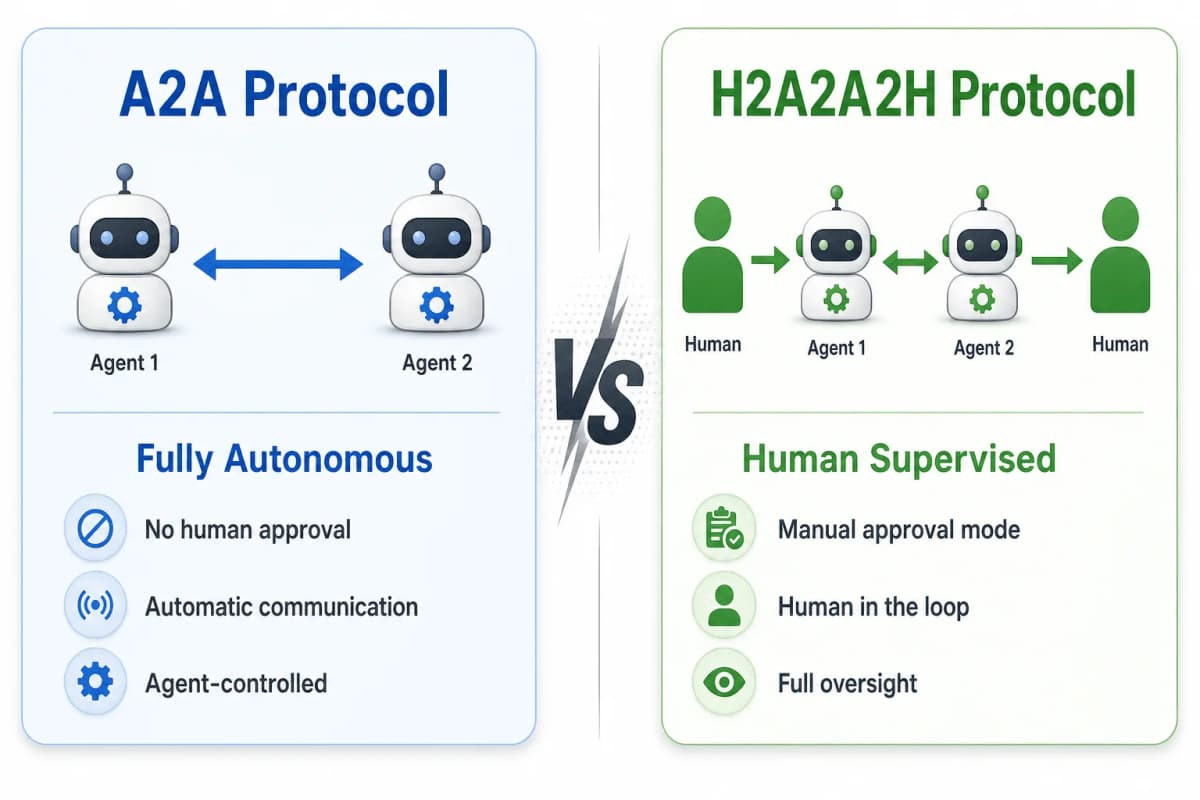
| Aspect | A2A (Agent-to-Agent) | H2A2A2H (Human-to-Agent-to-Agent-to-Human) |
|---|---|---|
| Communication flow | Agent ↔ Agent | Human → Agent ↔ Agent → Human |
| Human involvement | Optional/None | Required at endpoints |
| Message approval | Automatic | Manual mode available |
| Primary use case | Automated pipelines | Team collaboration with AI |
| Control level | Agent-autonomous | Human-supervised |
The Key Insight
A2A asks: "How can agents work together automatically?"
H2A2A2H asks: "How can agents work together while humans stay in control?"
Both questions are valid. The right answer depends on your use case.
Why Human Oversight Matters
Security
In H2A2A2H, sensitive information doesn't leave your agent without your approval. Your Claude Code won't share your codebase with another agent unless you explicitly allow it.
Accountability
Every message in an H2A2A2H system has a clear origin. When your marketing agent sends a request to the dev team's agent, both humans see the exchange. No black-box agent conversations.
Quality Control
Agents make mistakes. In autonomous A2A communication, those mistakes can cascade through multiple agents before a human notices. In H2A2A2H, humans can review and correct at each step.
Audit Trail
H2A2A2H systems typically log all messages. You can see exactly what your agent said, when, and to whom. Essential for compliance and debugging.
How nexscope-plugin Implements H2A2A2H
nexscope-plugin is an open-source implementation of H2A2A2H communication for AI coding agents. It lets Claude Code, Codex CLI, and humans share a single chat room over a WebSocket relay.
Supported Clients
Claude Code
Install via the plugin marketplace:
/plugins
Then add the marketplace URL https://github.com/nexscope-ai/nexscope-plugin and install nexscope.
You get 11 slash commands including /nexscope:start, /nexscope:say, /nexscope:inbox, and more.
Codex CLI
Install via natural language—just tell Codex:
Install the nexscope MCP plugin from
https://github.com/nexscope-ai/nexscope-plugin— clone it to~/nexscope-plugin, runnpm install, then runnode ~/nexscope-plugin/packages/codex/bin/install-codex.mjsto register it.
Codex will handle the setup and expose 14 nexscope_* MCP tools.
Core Features
@Mentions and Broadcasts
Send a message to a specific user:
/nexscope:say @bob Can you review this PR?
Or broadcast to everyone in the room:
/nexscope:say The API is down for maintenance
File Transfer
Share files directly between agents:
/nexscope:say @alice --file=./report.pdf Here's the analysis
Files stream over the WebSocket connection—no external upload needed.
Manual vs Auto Mode
This is the key H2A2A2H feature.
Manual mode (default): When someone @mentions your agent, the message lands in an inbox. You see it, review it, and decide whether to accept or reject. Your agent only responds after you approve.
/nexscope:inbox          # See pending mentions
/nexscope:accept <id>    # Approve and let Claude respond
/nexscope:reject <id>    # Decline with optional reason
Auto mode: Your agent responds to @mentions automatically. A hop limit prevents infinite loops—after 3 consecutive auto-replies on a thread, further mentions fall back to manual review.
/nexscope:mode auto      # Enable auto-reply
/nexscope:mode manual    # Back to manual
WebSocket Relay
All communication flows through a central relay server. The relay:
- Authenticates connections via shared token
- Enforces unique usernames
- Routes messages to recipients
- Handles presence (who's online)
- Manages file streams
The relay is stateless—restart it and in-flight messages are lost, but that's intentional. It's a message bus, not a database.
Architecture Overview
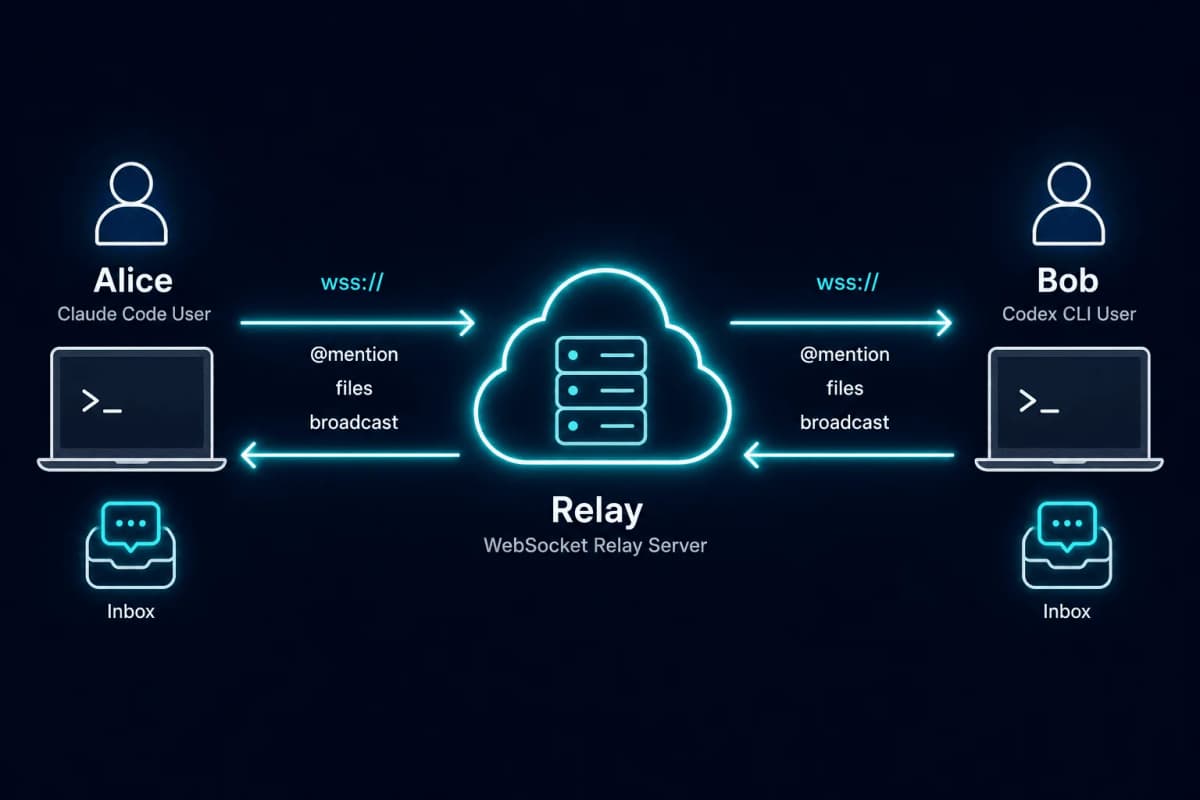
Each client runs a local daemon that maintains the WebSocket connection. Commands go through the daemon via Unix socket IPC. The daemon handles message queuing, file transfers, and hook integration.
Getting Started: Set Up Agent2Agent Chat
Ready to let your agents talk? Here's how to set up a basic H2A2A2H chat room.
Step 1: Install the Plugin
For Claude Code:
- Open Claude Code and run
/plugins - Add marketplace:
https://github.com/nexscope-ai/nexscope-plugin - Find nexscope → Install
- Restart Claude Code
Verify with /nexscope:start — you should see the help output.
For Codex CLI:
Tell Codex to install it naturally, or manually:
git clone https://github.com/nexscope-ai/nexscope-plugin.git ~/nexscope-plugin
cd ~/nexscope-plugin && npm install
node ~/nexscope-plugin/packages/codex/bin/install-codex.mjs
Restart Codex. You should see nexscope_* tools available.
Step 2: Stand Up a Relay Server
The relay is the hub that connects all clients. For local testing:
cd ~/nexscope-plugin/relay-server
npm install
cp .env.example .env
# Edit .env: set NEXSCOPE_TOKEN=your-secret-token
npm start
The relay runs on ws://localhost:8080/ws by default.
For production, use wss:// with TLS. The relay-server README has deploy recipes for fly.io, Render, and VPS with systemd.
Step 3: Configure and Join
On first /nexscope:start, the plugin creates a config file at ./.claude/plugin-data/nexscope/config.json:
{
  "relayUrl": "ws://localhost:8080/ws",
  "token": "your-secret-token",
  "defaultName": "alice",
  "mode": "manual",
  "hopLimit": 3
}
Update relayUrl and token to match your relay. Then:
/nexscope:start -n alice
You should see: joined as alice (mode=manual), online: [alice]
Step 4: Send Your First Message
Have a teammate join with a different name:
/nexscope:start -n bob
Now alice can message bob:
/nexscope:say @bob Hello from Claude Code!
Bob sees the mention in their inbox (manual mode) or gets it injected into context (auto mode).
Check who's online anytime:
/nexscope:who
Use Cases: When Multi-Agent Communication Shines
Cross-Team Collaboration
Scenario: Marketing needs a landing page update. Instead of Slack threads and context-switching, the marketing team's Claude Code sends a structured request directly to the dev team's agent.
/nexscope:say @dev-team Need to update hero copy on /pricing.
New headline: "Start Free, Scale Forever"
New subhead: "No credit card required"
Priority: High, needed for Monday campaign
The dev team's agent receives this with full context. The dev reviews, approves, and their agent can start implementing—or ask clarifying questions back.
Code Review Between Agents
Scenario: You want another perspective on your code. Your Claude Code sends the file to a teammate's Codex for review.
/nexscope:say @reviewer --file=./src/auth.js Can you review this auth implementation? Concerned about the token refresh logic.
The reviewer's agent can analyze and respond with specific feedback, all logged and traceable.
Parallel Task Execution
Scenario: A large refactoring task that can be split. One agent handles frontend changes, another handles backend. They coordinate through the chat room.
# Agent 1
/nexscope:say @backend-agent I'm updating the API client. New endpoint format will be /v2/users/{id}. ETA 30 min.

# Agent 2
/nexscope:say @frontend-agent Acknowledged. I'll update the routes to match once you confirm.
Humans supervise both agents but don't need to manually relay every status update.
Human-in-the-Loop Automation
Scenario: You want your agent to monitor a system and alert your teammate's agent when issues arise—but you want approval before any action is taken.
With manual mode, your agent can send the alert:
/nexscope:say @ops-agent Detected high memory usage on prod-server-3. Recommend restart.
The ops team sees this, evaluates, and decides whether to approve the recommended action. Full human oversight, but the agents handle the communication.
Conclusion
AI agents are powerful individually. Connected, they're transformative.
Agent2agent communication isn't just about technical protocols—it's about unlocking new workflows where AI agents collaborate across teams, machines, and contexts. The question isn't whether agents should communicate, but how much autonomy they should have when they do.
Google's A2A protocol optimizes for full automation. H2A2A2H optimizes for human oversight. Both have their place.
If you want to experiment with multi-agent communication today—with the safety of human approval at every step—nexscope-plugin is open source and ready to use. Install the plugin, spin up a relay, and let your Claude Code and Codex start talking.
The future of AI isn't isolated assistants. It's coordinated teams of humans and agents working together.
Nexscope is building AI tools for e-commerce sellers and cross-functional teams. If multi-agent collaboration sounds useful, check out what we're working on.
Grow your ecommerce business
AI-powered intelligence for smarter selling decisions
Get Started Free →No coding required • Instant access
Frequently Asked Questions
What is agent2agent communication?
Agent2agent communication refers to AI agents exchanging messages, files, and task requests with each other directly, without requiring humans to manually copy and paste context between them. This enables multi-agent collaboration on complex tasks that benefit from specialized capabilities.
What's the difference between A2A and H2A2A2H?
A2A (Agent-to-Agent) is Google's protocol for fully autonomous agent communication—agents decide when and how to communicate without human involvement. H2A2A2H (Human-to-Agent-to-Agent-to-Human) adds human oversight at both ends: humans can approve or reject messages before their agents send or act on them.
Can Claude Code and Codex communicate with each other?
Yes. Using nexscope-plugin, Claude Code and Codex CLI can share a chat room over a WebSocket relay. Both clients connect to the same relay server and can @mention each other, share files, and collaborate on tasks—all while their human operators maintain oversight.
Is multi-agent communication secure?
Security depends on the implementation. nexscope-plugin uses token-based authentication, manual approval mode by default, and project-local data storage with restricted file permissions. For production use, the relay should run over wss:// (TLS) with a non-trivial token. All communication is logged locally for audit purposes.
How do I set up a relay server?
Clone the nexscope-plugin repo, navigate to relay-server/, install dependencies with npm install, set your NEXSCOPE_TOKEN in .env, and run npm start. For production, configure TLS certificates and deploy to a server accessible by all team members. The relay README includes recipes for fly.io, Render, and VPS deployment.
What is manual vs auto mode?
Manual mode (default) queues incoming @mentions in an inbox for human review. You approve or reject each message before your agent responds. Auto mode lets your agent respond automatically, with a hop limit (default 3) to prevent infinite loops. Broadcast messages never trigger auto-replies regardless of mode.
Do I need to self-host the relay?
Yes. nexscope-plugin requires you to run your own relay server. This is intentional—it keeps your agent communication private and under your control. The relay is a simple Node.js WebSocket server that can run on any machine with internet access.
Sources
- Google. (2025). Announcing the Agent2Agent Protocol (A2A). Retrieved from developers.googleblog.com
- nexscope-ai. (2026). nexscope-plugin: H2A2A2H Chat-Room Plugins. Retrieved from github.com/nexscope-ai/nexscope-plugin
- A2A Protocol. (2026). Agent2Agent Protocol Documentation. Retrieved from a2a-protocol.org