

How to Optimize Amazon Listings for Higher Conversions in 2026

Amazon listing optimization determines whether products get discovered and purchased or buried beneath competitors. In 2026, optimization extends beyond traditional keyword placement. Amazon now uses three distinct systems to surface products: the A10 algorithm, the COSMO semantic graph, and the Rufus AI assistant.
This guide covers every element of a high-converting Amazon listing. From title formulas and bullet point frameworks to image requirements and backend keyword strategies, each section provides actionable steps that improve both rankings and conversion rates.
Why Amazon Listing Optimization Matters in 2026
Amazon hosts over 600 million products. Every product competes for visibility against direct competitors, Amazon private-label brands, and international sellers. The algorithm decides who gets seen.
The True Cost of Unoptimized Listings
Unoptimized listings create a compounding problem. Poor conversion rates lead to lower organic rankings. Lower rankings mean less traffic. Less traffic results in fewer sales. Fewer sales further decrease rankings.
The financial impact extends to advertising. Every PPC click that lands on an unoptimized listing has a lower probability of converting. This raises ACoS and reduces profitability. A listing converting at 8% versus 15% effectively doubles the cost of every sale generated through advertising.
How Amazon Ranks Product Listings
Amazon's ranking system prioritizes products that generate revenue. The algorithm considers:
- Conversion rate — Products that convert browsers into buyers rank higher
- Sales velocity — Consistent sales signal product quality and demand
- Click-through rate — Listings that attract clicks from search results earn better placement
- Relevance — Keyword matching between search queries and listing content
- Customer satisfaction — Reviews, returns, and seller metrics influence rankings
Optimized listings perform better across all these factors. Higher conversion rates create a positive feedback loop that compounds over time.
The 3 Systems Your Amazon Listing Must Satisfy
Understanding Amazon's discovery architecture reveals why traditional keyword-only optimization no longer suffices.
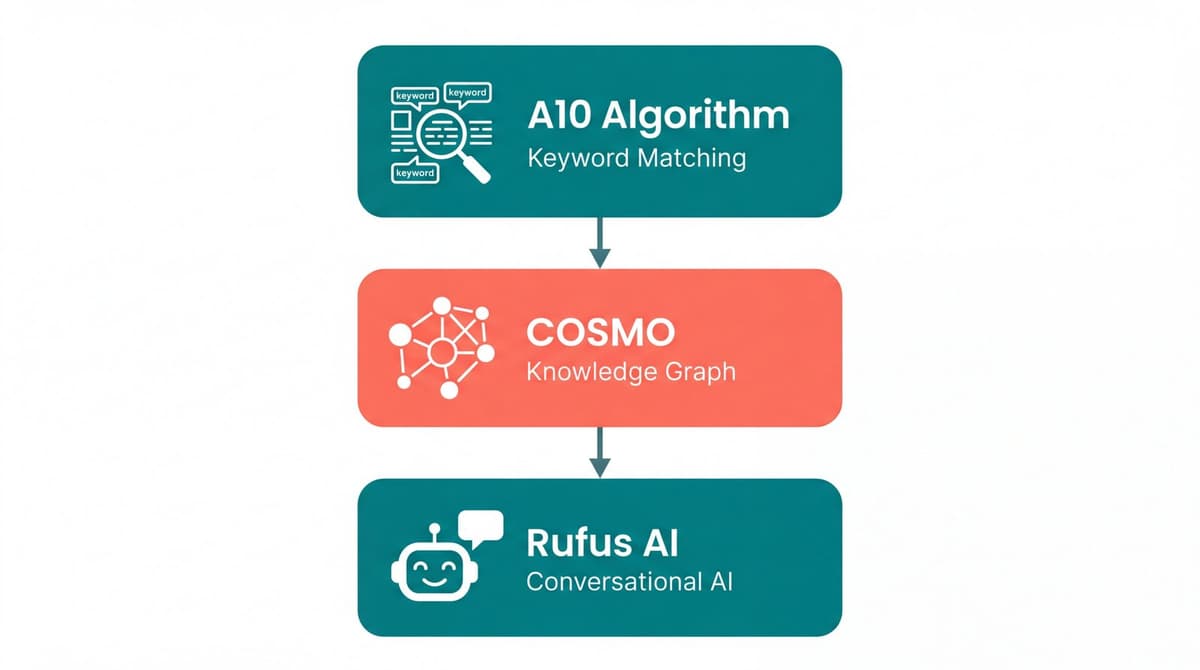
A10 Algorithm (Keyword Matching)
The A10 algorithm matches keywords in search queries to keywords in listings. This traditional system still forms the foundation of Amazon search.
What A10 rewards: - Keyword relevance and strategic placement - Sales velocity and conversion history - Click-through rate from search results - Seller authority and account health
Optimization approach: Place primary keywords in titles and bullet points. Use backend search terms for secondary and long-tail variations. This foundation remains essential.
COSMO (Semantic Knowledge Graph)
COSMO moves beyond literal keyword matching. It understands relationships between products, attributes, and customer intent. When Amazon tested COSMO on 10% of U.S. search traffic, purchases increased 0.7% and shopper engagement rose 8%.
What COSMO rewards: - Product attributes matching shopper intent - Content connecting features to real-world use cases - Listings that resolve buyer uncertainty
Optimization approach: Write copy that answers "why," not just "what." Instead of "Stainless Steel Garlic Press," write "Garlic Press — Easy Squeeze, Dishwasher Safe, No Peeling Required."
Rufus AI (Conversational Discovery)
Rufus is Amazon's generative AI shopping assistant. It reads entire listings including title, bullets, description, A+ Content, images, reviews, and Q&A. Over 250 million shoppers have used Rufus, and users convert at 60% higher rates than non-users.
What Rufus rewards: - Natural language matching real shopper questions - Detailed product attributes (materials, dimensions, compatibility) - Strong review sentiment and Q&A coverage - Images with clear, readable text (Rufus uses OCR)
Optimization approach: Write listings as conversations, not keyword templates. Answer the questions customers actually ask.
💡 Pro Tip: AI coding agents like OpenClaw, Claude Code, and Codex can audit your listings automatically. Copy this command into your AI agent to install the Listing Optimization skill:
npx skills add nexscope-ai/Amazon-Skills --skill amazon-listing-optimization -gOnce installed, ask your AI agent to score your listings across 8 dimensions, find keyword gaps, and get specific improvement recommendations.
Amazon Product Title Optimization
The product title carries more ranking weight than any other listing element. It appears in search results, browser tabs, and forms the basis of Amazon's initial relevance assessment.
Title Formula for Better Rankings
Effective titles follow a consistent structure:
[Brand] + [Primary Keyword] + [Key Feature 1] + [Key Feature 2] + [Size/Quantity/Variant]
Example for a yoga mat:
ProFlex Yoga Mat — Extra Thick 6mm, Non-Slip Surface, 72" x 24", with Carrying Strap
This formula places the primary keyword early while including attributes shoppers filter by.
Character Limits by Category
Amazon enforces different title limits across categories:
| Category | Character Limit |
|---|---|
| Most categories | 200 characters |
| Clothing & Accessories | 80 characters |
| Electronics | 200 characters |
| Home & Kitchen | 200 characters |
| Beauty | 200 characters |
Mobile devices display only the first 80 characters. Place primary keywords and essential information within this threshold.
Title Mistakes That Kill Conversions
Keyword stuffing: "Yoga Mat Yoga Mats Exercise Mat Workout Mat Fitness Mat" repels shoppers and triggers algorithm penalties.
Missing key attributes: Titles without size, quantity, or variant information frustrate shoppers who cannot determine product fit from search results.
ALL CAPS or excessive punctuation: These formatting choices appear unprofessional and may violate Amazon's style guidelines.
Brand name buried: Leading with the brand name establishes credibility immediately. Unknown brands benefit from this positioning.
Amazon Bullet Points That Rank and Convert
Bullet points serve dual purposes: ranking for secondary keywords and persuading shoppers to purchase. Each bullet should accomplish both.
The Benefit-First Framework
Lead every bullet with the outcome, then explain the feature that delivers it.
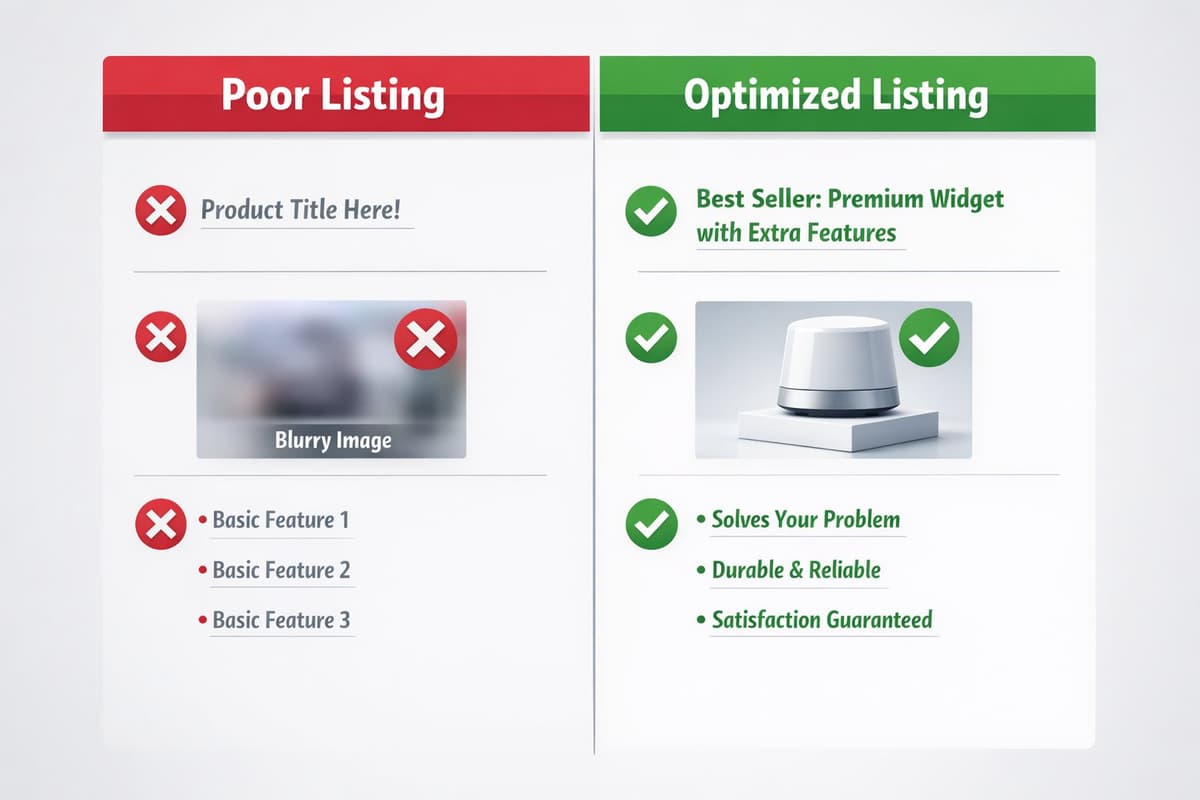
Weak: "Made with 304 stainless steel construction" Strong: "Resists Rust for Years — 304 stainless steel construction withstands daily use and dishwasher cleaning without corrosion"
The strong version answers "why should I care?" before describing the feature.
Addressing Buyer Objections in Bullets
Review competitor products to identify common complaints. Address those concerns directly in bullet points.
If competitors receive complaints about: - Durability: "Built to Last — Double-reinforced stitching tested to 50,000 cycles" - Size confusion: "Perfect Fit Guaranteed — Detailed size chart included, easy 30-day exchanges" - Setup difficulty: "Ready in 5 Minutes — No tools required, illustrated quick-start guide included"
Preemptive objection handling increases conversion rates by reducing purchase hesitation.
Keyword Placement in Bullet Points
Distribute secondary keywords naturally across all five bullets. Avoid repeating the same keyword multiple times. Each bullet should target different search terms while maintaining readability.
Bullet 1: Primary benefit + primary keyword variation Bullet 2: Secondary benefit + use case keyword Bullet 3: Feature detail + material/specification keyword Bullet 4: Objection handling + comparison keyword Bullet 5: Guarantee/support + brand differentiator
Amazon Product Images That Drive Sales
Images influence both click-through rate from search results and conversion rate on product pages. In 2026, images also feed data to Rufus AI through optical character recognition.
Main Image Requirements
The main image appears in search results and determines click-through rate.
Technical requirements: - Pure white background (RGB 255, 255, 255) - Product fills 85% or more of frame - Minimum 1000 pixels on longest side (enables zoom) - No text, logos, or watermarks - No props, accessories, or lifestyle elements
Best practices: - Show the actual product customers receive - Use professional photography with proper lighting - Display the product at an angle that shows dimensionality - Ensure color accuracy matches physical product
Infographic Best Practices
Secondary images (slots 2-6) should include infographics that communicate features, dimensions, and benefits.
Effective infographic elements: - Feature callouts with icons and brief text - Dimension diagrams with measurements - Before/after comparisons - Package contents layout - Material and certification badges
Rufus optimization: Use clear, standard fonts. Rufus cannot reliably read cursive, heavily stylized, or low-contrast text. Every text element on images becomes searchable content.
Lifestyle and Comparison Images
Lifestyle images show products in real-world contexts. A standing desk in a home office. A backpack on a hiking trail. These images help Rufus understand use-case contexts and match products to intent-based queries.
Comparison images display your product against alternatives or previous versions. Include specific metrics: "30% lighter," "2x battery life," "50% more capacity." Rufus reads these comparisons and uses them to answer shopper questions.
A+ Content Optimization for Amazon Listings
A+ Content (formerly Enhanced Brand Content) allows brand-registered sellers to add rich media below the standard product description. This prime real estate influences both conversion and, increasingly, search visibility.
When A+ Content Impacts Rankings
Amazon has confirmed that A+ Content text is now indexed for search. While the ranking weight remains lower than titles and bullets, A+ Content provides additional keyword real estate.
A+ Content delivers highest impact for: - Products requiring detailed explanation - Higher-priced items where trust-building matters - Categories with educated buyers who research thoroughly - Products with visual differentiation from competitors
Module Selection Strategy
Amazon offers multiple A+ Content modules. Strategic selection maximizes impact.
High-converting modules: - Comparison chart: Positions your product against alternatives - Standard image with text: Explains key benefits with supporting visuals - Product description with image: Detailed feature explanation - Banner image: Brand storytelling and lifestyle positioning
Module sequence: Lead with the strongest benefit, follow with supporting evidence, close with brand story and trust elements.
A+ Content SEO Tips
- Include primary and secondary keywords naturally in A+ Content text
- Use image alt-text fields for additional keyword placement
- Structure content around questions shoppers ask
- Update A+ Content seasonally to maintain freshness signals
💡 Pro Tip: Use your AI agent to research high-converting keywords before writing A+ Content. Install with
npx skills add nexscope-ai/Amazon-Skills --skill amazon-keyword-research -gto discover keyword opportunities across 12 marketplaces.
Amazon Backend Keywords Strategy
Backend keywords provide additional indexing opportunities without cluttering customer-facing content. Amazon allows 250 bytes of backend search terms.
The 250-Byte Limit Explained
Amazon measures backend keywords in bytes, not characters. Standard ASCII characters use 1 byte each. Special characters and non-English letters may use 2-4 bytes.
Maximizing the 250-byte limit: - Use single spaces between words (no commas or semicolons needed) - Do not repeat words already in title or bullets - Include singular or plural forms, not both - Skip articles (a, an, the) and prepositions
What to Include and Exclude
Include: - Spelling variations and common misspellings - Synonyms not used in visible content - Spanish translations (for U.S. marketplace) - Abbreviations and acronyms - Related search terms from Search Term Reports
Exclude: - Brand names (yours or competitors') - ASINs - Offensive or irrelevant terms - Subjective claims (best, cheapest, #1) - Repeated words from visible content
Backend Keyword Mistakes
- Exceeding the byte limit: Amazon ignores all backend keywords if the limit is exceeded, not just the overflow.
- Wasting space on duplicates: Every word already in titles or bullets wastes precious backend space.
- Including competitor brand names: This violates Amazon policy and risks account penalties.
- Never updating: Search behavior evolves. Revisit backend keywords quarterly to capture new opportunities.
Amazon Listing Audit Checklist
Use this checklist to evaluate listing optimization completeness:
Title: - [ ] Primary keyword in first 80 characters - [ ] Brand name included - [ ] Key attributes (size, quantity, variant) present - [ ] Under category character limit - [ ] Readable and grammatically correct
Bullet Points: - [ ] All 5 bullets utilized - [ ] Each bullet leads with benefit - [ ] Secondary keywords distributed naturally - [ ] Common objections addressed - [ ] Specific details (measurements, materials) included
Images: - [ ] Main image on white background, product fills 85%+ - [ ] Minimum 6 images uploaded - [ ] Infographics with readable text - [ ] Lifestyle images showing use context - [ ] Comparison or size chart included
A+ Content: - [ ] Brand-registered and A+ Content enabled - [ ] Primary keywords included in A+ text - [ ] Comparison chart module utilized - [ ] Mobile-optimized module selection - [ ] No broken images or formatting issues
Backend Keywords: - [ ] Under 250-byte limit - [ ] No duplicates from visible content - [ ] Misspellings and synonyms included - [ ] No competitor brand names - [ ] Updated within last 90 days
Common Amazon Listing Optimization Mistakes
Avoiding these errors prevents wasted effort and lost sales.
- Mistake 1: Optimizing for keywords over conversions — Rankings matter only if listings convert traffic into sales. Keyword-stuffed content that reads poorly reduces conversion rates, which ultimately hurts rankings.
- Mistake 2: Ignoring mobile experience — Over 60% of Amazon traffic comes from mobile devices. Titles truncate at 80 characters. Bullet points display differently. Images must work at small sizes. Test every listing element on mobile.
- Mistake 3: Copying competitor listings — Duplicate content provides no differentiation. Amazon's algorithm may also penalize identical or near-identical content across listings.
- Mistake 4: Set-and-forget mentality — Search trends change. Competitors update their listings. New keywords emerge. Quarterly listing audits maintain competitive positioning.
- Mistake 5: Neglecting reviews and Q&A — Rufus AI reads reviews and Q&A extensively. Negative reviews mentioning missing features signal content gaps. Unanswered questions represent conversion leaks. Monitor and respond systematically.
Nexscope provides structured ecommerce data that teams can use in focused web tools or connect to their existing Agent through API, MCP, or Skills. Ready workflows include Keyword to Ads, Video Clone, and Buy Box Repricer.
Conclusion
Amazon listing optimization in 2026 requires satisfying three distinct systems: the A10 keyword algorithm, the COSMO semantic graph, and the Rufus AI assistant. Listings that serve only one system leave visibility and conversions on the table.
Start with titles that place primary keywords early while remaining readable. Build bullet points that lead with benefits and naturally incorporate secondary keywords. Create images that inform both human shoppers and AI systems. Develop A+ Content that builds trust and provides additional ranking signals. Maintain backend keywords that capture variations without wasting space.
Quarterly audits ensure listings remain competitive as search behavior evolves and competitors adapt. The sellers who treat listing optimization as an ongoing discipline rather than a one-time task consistently outperform those who set and forget.
Connect Ecommerce Data to Your Agent
Use Nexscope through API, MCP, or Skills, or open a ready seller workflow.
Explore Ecommerce Data →1,000 free credits • API, MCP & Skills
Frequently Asked Questions
How often should I update my Amazon listings? Review listings quarterly at minimum. Update immediately when launching promotions, adding product variations, or noticing conversion rate declines. Search trends shift seasonally, and competitors continuously optimize their content.
Does A+ Content help with Amazon SEO? Yes. Amazon now indexes A+ Content text for search. While ranking weight is lower than titles and bullets, A+ Content provides additional keyword real estate and improves conversion rates, which indirectly boosts rankings.
What is the ideal Amazon product title length? Stay under 200 characters for most categories, but prioritize placing essential information within the first 80 characters. Mobile devices truncate titles at this threshold, and shoppers scan rather than read.
How many keywords should I use in bullet points? Each bullet point should include 1-2 secondary keywords integrated naturally. Across all five bullets, target 8-12 unique secondary keywords. Never sacrifice readability for keyword density.
Do backend keywords still matter in 2026? Yes. Backend keywords provide indexing for terms that do not fit naturally in customer-facing content. They capture misspellings, synonyms, and long-tail variations that drive incremental traffic.
How do I optimize listings for Amazon Rufus AI? Write in natural language that answers real customer questions. Include detailed specifications (dimensions, materials, compatibility). Use clear, readable text on images. Address common concerns in bullet points and Q&A sections.
Sources
- Amazon Seller Central. (2026). Product listing optimization guide. Retrieved from sellercentral.amazon.com
- Incrementum Digital. (2026). Amazon listing optimization for brands. Retrieved from incrementumdigital.com
- Fortune. (2025). Amazon Rufus AI drives $10 billion in sales. Retrieved from fortune.com
- The Drum. (2026). Rufus users convert 60% higher. Retrieved from thedrum.com