

Amazon PPC Optimization: 10 Tactics to Lower ACoS and Boost Profits

Running Amazon PPC campaigns is easy. Running them profitably is hard.
Most sellers launch campaigns, watch ACoS climb past 50%, and either keep bleeding money or shut everything down. Neither approach works.
The difference between profitable and unprofitable campaigns usually comes down to optimization—the ongoing adjustments that turn wasted ad spend into actual sales. This guide covers 10 tactics that consistently lower ACoS while maintaining or increasing total sales.
No fluff, no theory. Just the optimization moves that work.
What Is Amazon PPC Optimization?
Amazon PPC optimization is the process of improving campaign performance through bid adjustments, keyword refinement, targeting changes, and budget allocation. The goal: spend less to generate more sales (or spend the same to generate significantly more).
Key Metrics to Track
Before optimizing anything, understand what you're measuring:
| Metric | What It Means | Target Range |
|---|---|---|
| ACoS | Ad spend ÷ ad revenue | 15–30% (varies by margin) |
| TACoS | Ad spend ÷ total revenue | 5–15% |
| CTR | Clicks ÷ impressions | >0.4% |
| CVR | Orders ÷ clicks | >10% |
| CPC | Cost per click | Category dependent |
| ROAS | Revenue ÷ ad spend | >3x |
ACoS vs TACoS: Which Matters More?
ACoS tells you how efficient your ads are. TACoS tells you how ads impact your entire business.
A 40% ACoS looks terrible until you realize those ads drove organic ranking improvements that increased total sales by 50%. That's why experienced sellers watch TACoS more than ACoS—it captures the full picture.
Target TACoS: 8–12% for established products, 15–20% acceptable during launch phase.
10 Optimization Tactics That Actually Work
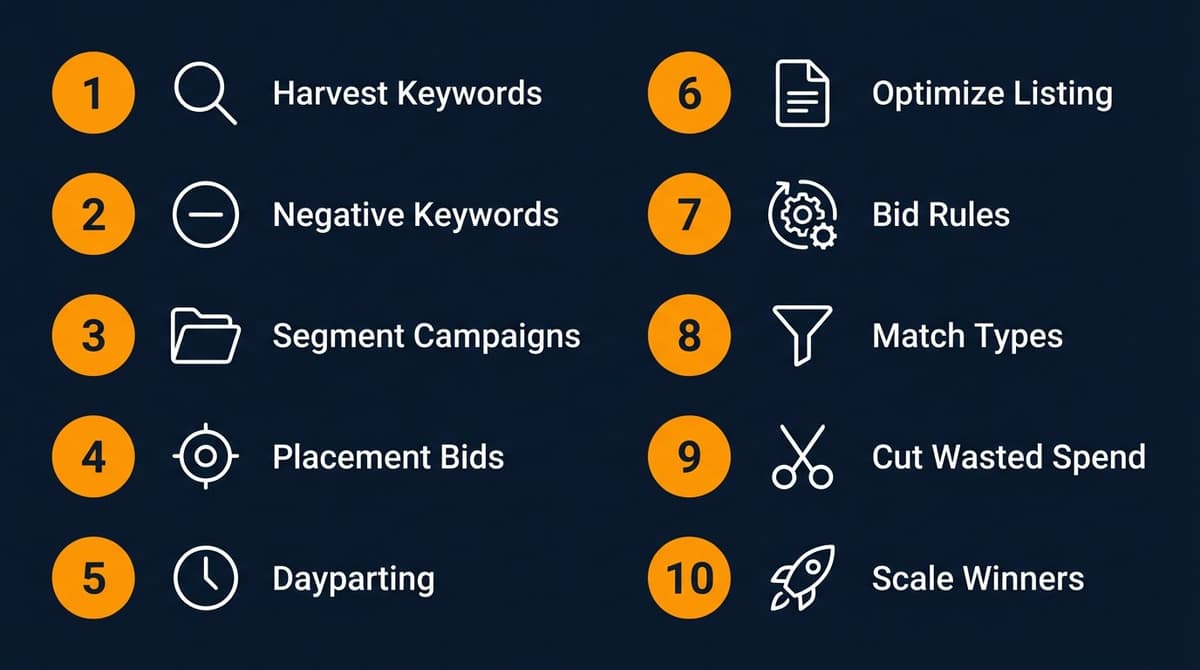
Tactic 1: Harvest Keywords from Auto Campaigns
Auto campaigns are discovery tools, not set-and-forget profit machines.
How It Works
- Run auto campaigns with reasonable bids ($0.50–$1.00 to start)
- Wait 2–4 weeks for data to accumulate
- Download the Search Term Report
- Identify converting search terms (orders > 0, ACoS below target)
- Add those exact terms to manual campaigns
- Negate them in the auto campaign
Why It Matters
Auto campaigns often find keywords you'd never think to target. But they're inefficient—Amazon shows your ads for irrelevant terms too. Harvesting moves winners to controlled environments where you set the bids.
Pro Tip
Set auto campaigns to "close match" only. Loose match and substitutes generate too much irrelevant traffic.
Tactic 2: Build a Negative Keyword List
Every click that doesn't convert wastes money. Negative keywords prevent those clicks.
What to Negate
- Irrelevant terms: "free," "cheap," "used" (if selling new)
- Wrong products: Competitor products that don't convert
- Information seekers: "how to," "what is," "reviews"
- High-spend, zero-conversion terms: Any keyword with 20+ clicks and 0 orders
How to Find Negatives
- Search Term Report → filter by clicks > 15, orders = 0
- Look for patterns (certain words, competitor names)
- Add as phrase match negatives (more restrictive) or exact match (surgical)
Negative Keyword Maintenance
Review weekly during launch, bi-weekly for mature campaigns. A healthy campaign might have 50–200 negative keywords.
Tactic 3: Segment Campaigns by Performance
One campaign with 100 keywords is unmanageable. Break it up.
Campaign Structure
| Campaign Type | Purpose | Keywords |
|---|---|---|
| Exact - Top Performers | Maximize profitable winners | 10–20 proven converters |
| Exact - Testing | Evaluate new keywords | 20–50 potential keywords |
| Phrase - Discovery | Find new variations | Broad themes |
| Auto - Close Match | Continuous discovery | Amazon decides |
Why Segmentation Works
- Different bid strategies for different keyword types
- Easier to see what's working vs. what's draining budget
- Prevents one bad keyword from destroying your whole budget
Tactic 4: Adjust Bids by Placement
Amazon lets you increase bids for specific placements. Use it.
Placement Options
- Top of Search (first page): Premium placement, highest conversion
- Product Pages: Lower intent, but cheaper clicks
- Rest of Search: Everything else
How to Optimize
- Check placement data in Campaign Manager → Placements tab
- If Top of Search converts well but you're not winning it, increase bid adjustment (up to 900%)
- If Product Pages have high ACoS, don't add adjustments there
Typical Pattern
Most sellers see best performance from Top of Search. A 50–100% bid increase for that placement often improves overall campaign efficiency.
Tactic 5: Use Dayparting (Budget Scheduling)
Not all hours convert equally. Why pay the same bid at 3 AM as 3 PM?
How to Identify Peak Hours
- Download hourly performance data from Amazon (Brand Analytics or third-party tools)
- Map conversion rates by hour
- Most US sellers see peaks: 8–10 AM, 12–2 PM, 7–10 PM Eastern
Implementation Options
- Manual: Pause campaigns during low-conversion hours
- Rules-based: Use Amazon's budget rules
- Third-party tools: Automated dayparting with bid multipliers
Caution
Dayparting requires significant data. Don't implement until you have 30+ days of hourly performance data.
Tactic 6: Optimize Your Listing First
The best PPC optimization happens outside of PPC.
A 5% conversion rate listing will always have higher ACoS than a 15% conversion rate listing—even with identical bids and keywords.
Listing Elements That Impact CVR
| Element | Impact on CVR | Priority |
|---|---|---|
| Main image | High | ★★★★★ |
| Price | High | ★★★★★ |
| Reviews/rating | High | ★★★★★ |
| Title | Medium | ★★★★ |
| Bullet points | Medium | ★★★ |
| A+ Content | Medium | ★★★ |
| Secondary images | Medium | ★★★ |
Before Increasing Ad Spend
Ask: "Would I click and buy this product?" If the answer is hesitant, fix the listing before scaling ads. Learn more in our guide to Amazon listing optimization.
Tactic 7: Implement Bid Rules
Manual bid adjustments don't scale. Rules do.
Rule Examples
- If ACoS > 50% and clicks > 20: Reduce bid by 20%
- If ACoS < 20% and impressions > 1000: Increase bid by 15%
- If clicks > 30 and orders = 0: Pause keyword
Where to Set Rules
- Amazon Campaign Manager: Basic rules available
- Third-party tools: More sophisticated conditions (Helium 10, Perpetua, Pacvue)
Rule Frequency
Run rules weekly at minimum. Daily for high-spend campaigns during launches or promotions.
Tactic 8: Test Match Types Strategically
Exact, phrase, and broad match aren't interchangeable. Each serves a purpose.
Match Type Comparison
| Match Type | Reach | Control | Best For |
|---|---|---|---|
| Exact | Low | High | Proven converters |
| Phrase | Medium | Medium | Variations of good keywords |
| Broad | High | Low | Discovery only |
Optimization Approach
- Start keywords in phrase or broad match
- Monitor search term reports
- Graduate winners to exact match with dedicated bids
- Keep phrase/broad running at lower bids for discovery
Tactic 9: Track and Reduce Wasted Spend
Most campaigns waste 20–40% of their budget on non-converting clicks.
Weekly Wasted Spend Audit
- Pull Search Term Report
- Calculate: Total spend on terms with 0 orders
- That's your wasted spend
How to Reduce It
- Add those terms as negatives
- Tighten match types (broad → phrase → exact)
- Lower bids on high-spend, low-conversion keywords
- Pause keywords with consistently poor performance
Benchmark
Aim for wasted spend under 15% of total ad spend. Under 10% is excellent.
Tactic 10: Scale Winners, Cut Losers
Optimization isn't just about fixing problems—it's about doubling down on what works.
Identify Winners
- Keywords with ACoS 10%+ below target
- Consistent conversion over 30+ days
- Room to increase impression share
Scale Tactics
- Increase bids by 10–20%
- Move to dedicated campaigns with higher budgets
- Test placement adjustments
- Add related long-tail variations
Cut Tactics
For keywords that don't improve after 60 days: - Reduce bids to minimal ($0.15–$0.25) - Pause entirely if no conversions - Don't keep feeding losers hoping they'll turn around
Optimization Schedule: When to Do What
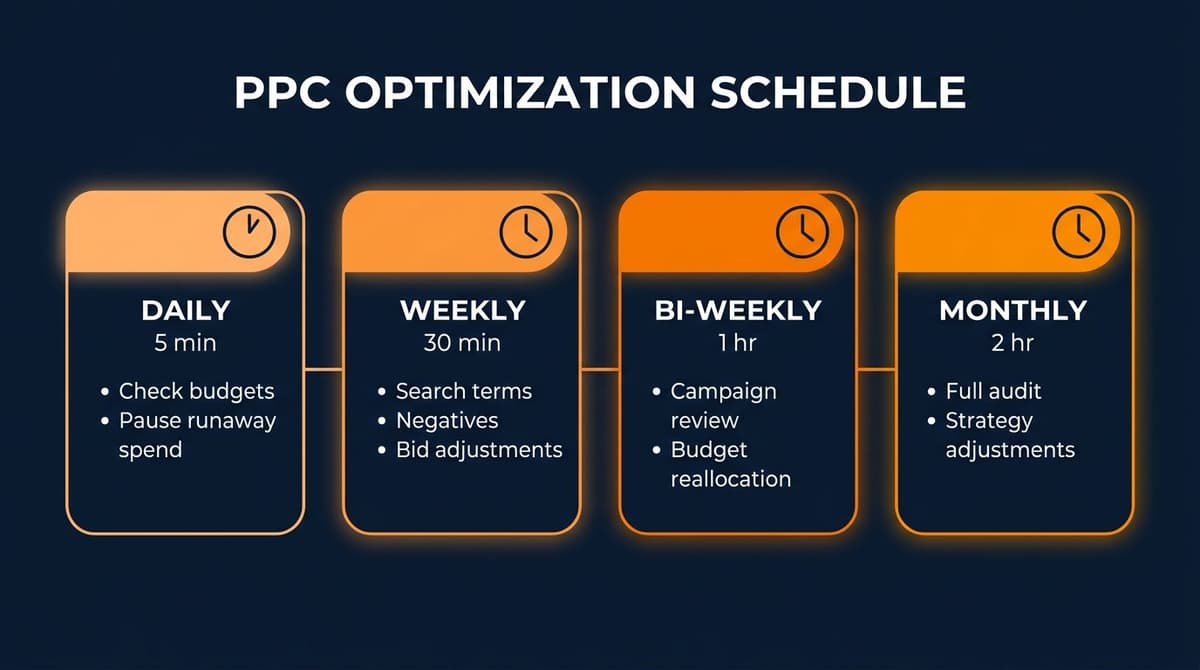
Daily (5 minutes)
- Check budget pacing
- Pause any runaway spend
- Review top-spend keywords
Weekly (30 minutes)
- Download Search Term Report
- Add negatives (10–20 per week typical)
- Harvest converting search terms
- Adjust bids on outliers
Bi-Weekly (1 hour)
- Review campaign-level performance
- Reallocate budget between campaigns
- Check placement performance
Monthly (2 hours)
- Full campaign audit
- Match type analysis
- Wasted spend calculation
- Strategy adjustments
Common Optimization Mistakes
1. Optimizing Too Fast
Making bid changes after 3 days of data leads to overreaction. Wait for statistical significance (usually 20+ clicks per keyword minimum).
2. Ignoring TACoS
Obsessing over ACoS while TACoS creeps up means your ads aren't driving organic growth. Both metrics matter.
3. Killing Campaigns During Launch
New campaigns need 2–4 weeks to learn. Amazon's algorithm needs data. Don't judge Day 3 results.
4. Single Campaign Structure
One campaign with everything mixed together is impossible to optimize. Segmentation enables precision.
5. Neglecting the Listing
No amount of PPC optimization fixes a bad listing. If CVR is below category average, fix the listing first.
Conclusion
Amazon PPC optimization isn't a one-time task—it's an ongoing process of testing, measuring, and adjusting.
The 10 tactics covered here work because they're based on data, not guesswork:
- Harvest keywords from auto campaigns
- Build robust negative keyword lists
- Segment campaigns by performance
- Adjust bids by placement
- Implement dayparting
- Optimize your listing first
- Use bid rules for automation
- Test match types strategically
- Track and reduce wasted spend
- Scale winners, cut losers
Start with one or two tactics. Master them. Then add more. Consistent small improvements compound into significant profit gains over time.
Need Help Analyzing Your Amazon PPC?
Nexscope provides ecommerce data for research and campaign planning, plus a Keyword to Ads workflow for turning product and keyword inputs into an Amazon campaign plan.
Connect Ecommerce Data to Your Agent
Use Nexscope through API, MCP, or Skills, or open a ready seller workflow.
Explore Ecommerce Data →1,000 free credits • API, MCP & Skills
FAQs
What is a good ACoS for Amazon PPC?
It depends on your profit margins. For most products, 20–30% ACoS is sustainable. If your profit margin is 40%, ACoS up to 35% still leaves profit. High-margin products can tolerate higher ACoS; low-margin products need tighter control.
How often should I optimize Amazon PPC campaigns?
Review campaigns weekly at minimum. Check search terms, add negatives, and adjust outlier bids. Monthly deep audits cover strategy-level changes. Avoid daily changes unless you're managing high-spend campaigns during critical periods.
Should I use automatic or manual campaigns?
Both. Auto campaigns discover keywords you'd miss. Manual campaigns give you control over bids and targeting. The best approach: run both, harvest winners from auto into manual, and negate harvested terms in auto to avoid duplication.
How long before I see results from PPC optimization?
Allow 2–4 weeks after implementing changes. Amazon's algorithm needs time to adjust, and you need data to measure impact. Major strategy changes (new campaign structure) may take 4–6 weeks to fully evaluate.
What's the difference between ACoS and TACoS?
ACoS measures ad efficiency (ad spend ÷ ad revenue). TACoS measures advertising impact on total business (ad spend ÷ total revenue including organic). TACoS is more important for long-term strategy because it captures how ads drive organic ranking improvements.
How do I lower ACoS without losing sales?
Focus on efficiency, not just cuts. Add negatives to eliminate wasted spend. Improve listing CVR so each click converts better. Shift budget from losers to winners. Lower bids on high-ACoS keywords gradually rather than pausing entirely.
Sources
- Amazon Advertising Help Center
- Jungle Scout: Amazon Advertising Benchmarks 2026
- Ad Badger: Amazon PPC Statistics Report
- Helium 10: State of Amazon Seller Report