
5 Best Free Amazon Sales Estimator Tools for 2026

Knowing how many units a product sells before investing is the difference between a profitable launch and expensive inventory sitting in a warehouse. Amazon does not publicly share sales data, but sellers have developed reliable methods to estimate competitor sales and validate market demand.
This guide covers five free Amazon sales estimator tools and three proven methods to calculate product sales volume. Each approach serves different use cases, and combining multiple methods produces the most accurate results.
Why Estimate Amazon Sales?
Accurate sales estimates inform every major business decision in Amazon selling:
Product Research Validation
Before investing in inventory, sellers need to confirm sufficient demand exists. A product ranking well in search results may still sell only a few units daily. Sales estimates reveal whether the market supports another competitor.
Competitive Analysis
Understanding how much competitors sell helps sellers position their products effectively. A market where the top 10 products each sell 500+ units monthly offers different opportunities than one where the leader sells 50 units.
Market Size Calculation
Estimating sales across the top 20-50 products in a niche reveals total market size. This data determines whether a category can support the revenue goals of a business.
Inventory Planning
Sales velocity estimates help sellers plan inventory purchases and avoid stockouts or overstocking. Accurate projections reduce storage fees and maintain healthy cash flow.
Investment Decisions
Whether launching a new product or acquiring an existing brand, sales data validates the financial opportunity. Investors and aggregators rely heavily on sales estimates for due diligence.
How BSR (Best Seller Rank) Works
Best Seller Rank (BSR) forms the foundation of most Amazon sales estimation methods. Understanding how BSR functions improves the accuracy of any estimation approach.
What Is BSR?
BSR is a numerical ranking Amazon assigns to products based on recent sales performance within their categories. A product with BSR #1 in Kitchen & Dining sells more than any other product in that category.
Every product receives a BSR in its main category and may receive additional rankings in subcategories. A cutting board might have: - BSR #5,432 in Kitchen & Dining (main category) - BSR #12 in Cutting Boards (subcategory)
How Amazon Calculates BSR
Amazon's exact BSR algorithm is proprietary, but testing has revealed key characteristics:
Recency matters most. A single sale can dramatically improve BSR for products with infrequent sales. Recent sales weight more heavily than historical sales.
Relative performance drives ranking. BSR reflects how a product performs compared to others in the category. During high-volume shopping periods, even products with increased sales may see BSR drop if competitors increase more.
Updates occur hourly. BSR changes frequently based on rolling sales windows. A product's BSR at 9 AM may differ significantly from its BSR at 3 PM.
BSR Varies by Category
The same BSR number represents vastly different sales volumes across categories. BSR #1,000 in Cell Phones & Accessories might represent 100+ daily sales, while BSR #1,000 in Musical Instruments might represent 5 daily sales.
This variance occurs because category size differs dramatically. Cell Phones & Accessories contains millions of products with enormous aggregate sales volume. Smaller categories have fewer products and lower total sales.
This is why using category-specific sales estimation tools matters. A generic BSR-to-sales formula produces inaccurate results.
5 Free Amazon Sales Estimator Tools
Several tools offer free Amazon sales estimation. Each uses different data sources and algorithms, producing varying results for the same product.
1. Jungle Scout Sales Estimator
Jungle Scout's free estimator is the most widely used tool in the industry. Their AccuSales™ algorithm analyzes data from millions of products to predict daily, weekly, and monthly sales.
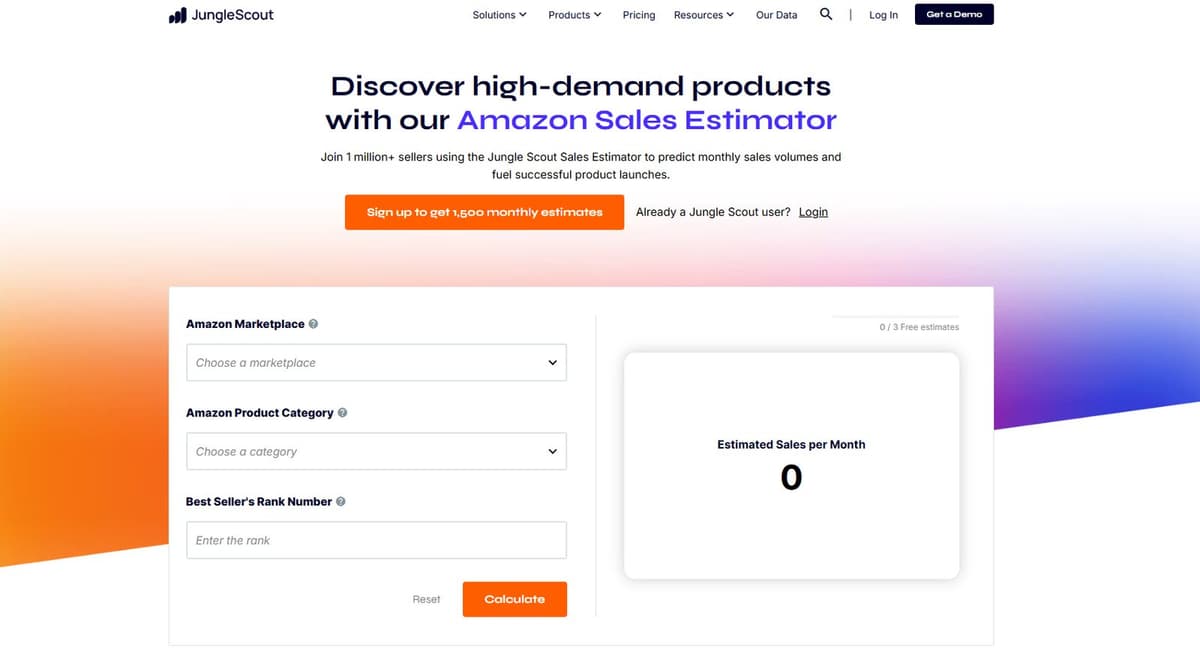
How to use it
- Find the product's BSR on its Amazon listing
- Visit the Jungle Scout Sales Estimator page
- Select the Amazon Marketplace (US, UK, Germany, etc.)
- Choose the Amazon Product Category
- Enter the Best Seller's Rank Number
- Click Calculate to view Estimated Sales per Month
Strengths
- Extensive database from years of tracking
- Regularly updated algorithm
- Supports multiple marketplaces
- 3 free estimates without account
Limitations
- Free version limited to 3 estimates
- No historical data without paid subscription
2. Helium 10 Sales Estimator
Helium 10 offers a free web-based sales estimator that calculates both revenue and unit sales. The tool also integrates with their Chrome extension for on-page estimates.
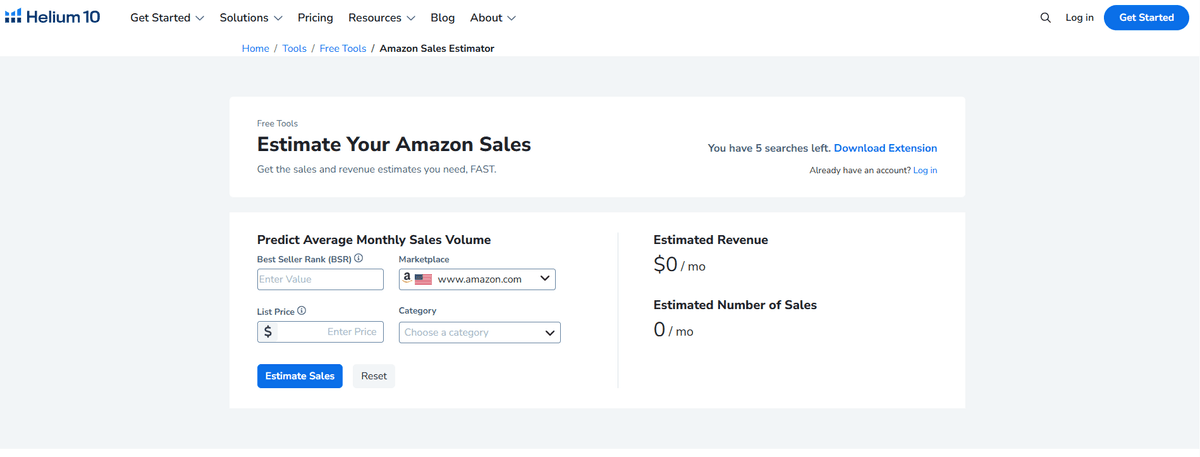
How to use it
- Enter the Best Seller Rank (BSR)
- Select the Marketplace (default: amazon.com)
- Choose a Category
- Optionally enter List Price for revenue estimate
- Click Estimate Sales to view monthly revenue and units
Strengths
- Shows both revenue and unit estimates
- 5 free searches without login
- Part of a comprehensive tool ecosystem
Limitations
- Limited free searches
- Some features locked behind paid plans
3. AMZScout Sales Estimator
AMZScout provides a straightforward 3-step BSR-to-sales calculator with a clean, visual interface.
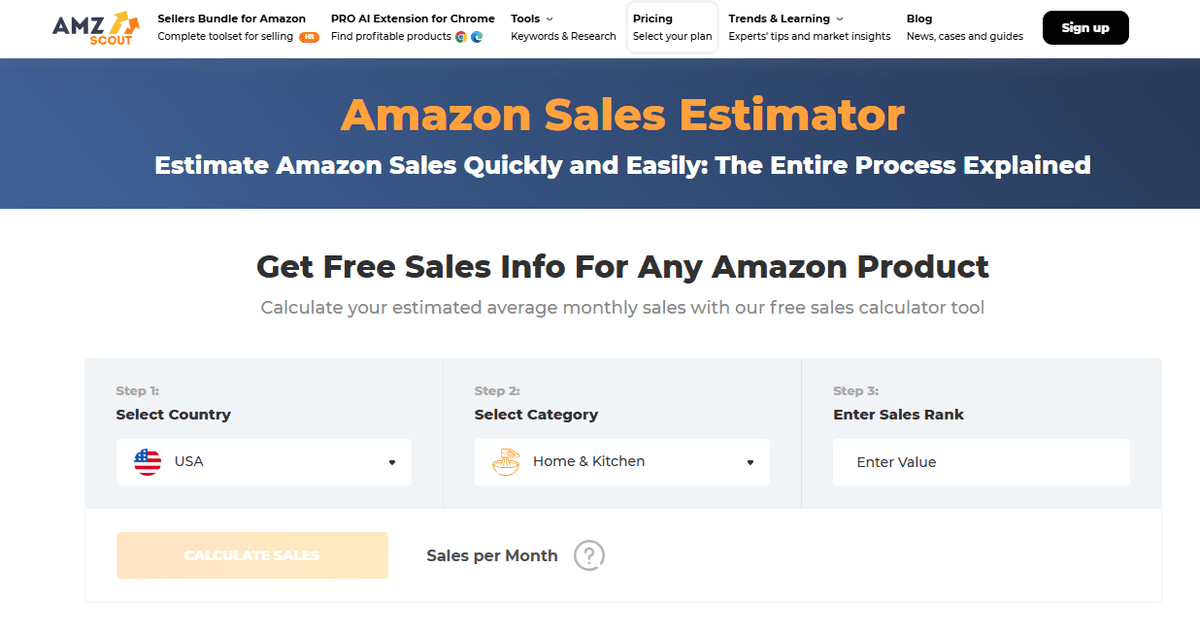
How to use it
- Select Country (USA, UK, Germany, etc.)
- Select Category (Home & Kitchen, Electronics, etc.)
- Enter the Sales Rank value
- Click Calculate Sales to view Sales per Month
Strengths
- Simple 3-step interface
- No account required
- Visual step-by-step guidance
Limitations
- Less robust database than larger competitors
4. Nexscope Ecommerce Data
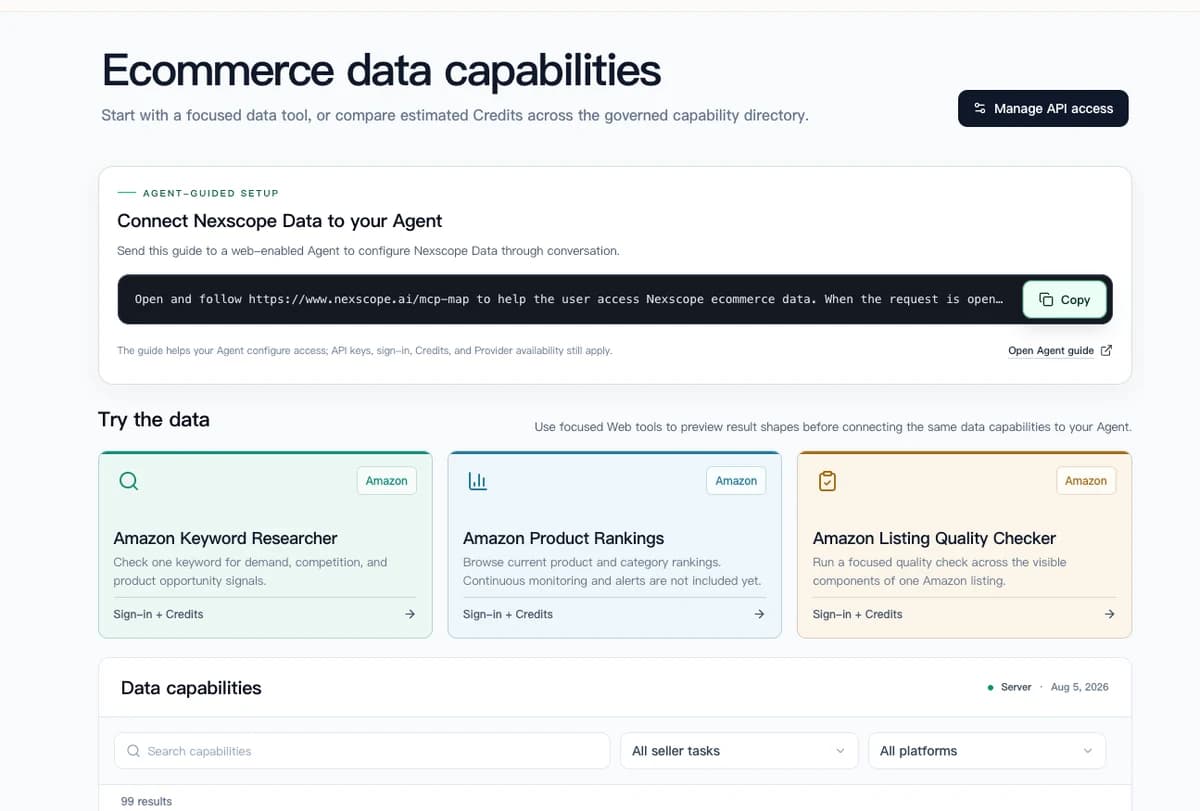
Nexscope provides structured ecommerce data that teams can use in focused web tools or connect to their existing Agent through API, MCP, or Skills. Ready workflows include Keyword to Ads, Video Clone, and Buy Box Repricer.
Already have your own AI agent?
Install the free Amazon Sales Estimator skill directly into Claude, OpenClaw, Cursor, Codex, or any compatible agent:
npx skills add https://github.com/nexscope-ai/Amazon-Skills/tree/main/amazon-sales-estimator --skill amazon-sales-estimator
We have more e-commerce skills available for keyword research, listing optimization, competitor analysis, and more. Browse all available skills on Nexscope SkillHub:

Do not have an AI agent yet?
Nexscope provides structured ecommerce data that teams can use in focused web tools or connect to their existing Agent through API, MCP, or Skills. Ready workflows include Keyword to Ads, Video Clone, and Buy Box Repricer.
5. Amazon Revenue Calculator
Amazon's official Revenue Calculator helps sellers project their own revenue and profitability based on assumed sales volumes. While it does not estimate competitor sales, it provides accurate fee breakdowns essential for profit calculations.
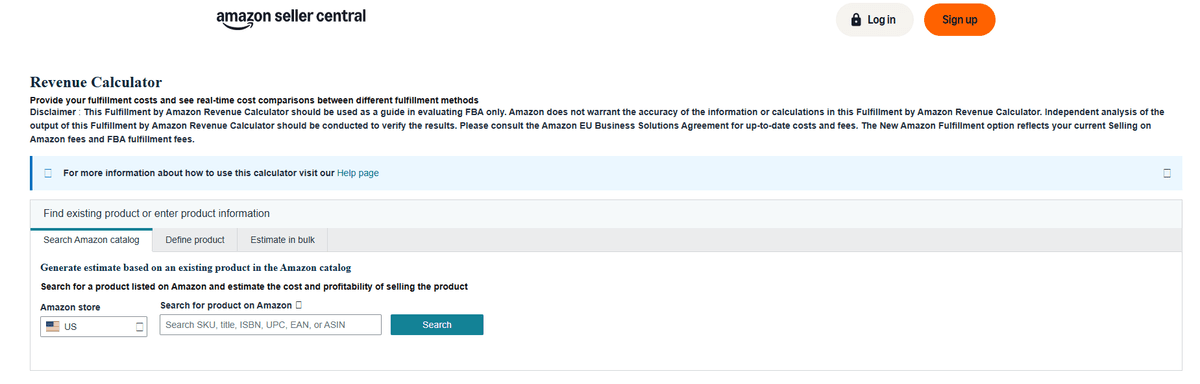
How to use it
- Log into Amazon Seller Central
- Open the Revenue Calculator (under Pricing menu)
- Search for a product by SKU, title, ISBN, UPC, EAN, or ASIN
- Or define a new product manually
- Input your cost and view profit projections for FBA vs FBM
Strengths
- Official Amazon data on fees
- Accurate profitability calculations
- Bulk estimation available
Limitations
- Does not estimate competitor sales
- Requires Seller Central account
3 Proven Methods to Estimate Sales
Beyond using tools, experienced sellers employ manual methods that sometimes produce more accurate results than automated estimators.
Method 1: The 999 Cart Method
The 999 cart method reveals exact inventory levels for products using Fulfilled by Amazon (FBA).
How it works
- Add a product to your Amazon cart
- Change the quantity to 999
- Amazon displays the maximum available quantity
- Check again 24 hours later
- The difference equals units sold in that period
Example
- Day 1: Maximum quantity available = 847 units
- Day 2: Maximum quantity available = 812 units
- Sales in 24 hours = 35 units
- Estimated monthly sales = 35 × 30 = 1,050 units
Strengths
- Reveals actual inventory changes
- Works regardless of BSR
Limitations
- Only works for FBA products with inventory under ~1,000 units
- Time-consuming for multiple products
- Does not account for restocking during the measurement period
Method 2: Review Velocity Analysis
Review velocity provides a proxy for sales velocity based on the assumption that a consistent percentage of buyers leave reviews.
How it works
- Record the current review count for a product
- Check again after 30 days
- Calculate new reviews added
- Multiply by an estimated review rate factor
Review rate assumptions
- Electronics: ~1-2% of buyers leave reviews
- Consumables: ~0.5-1% of buyers leave reviews
- General products: ~1-3% of buyers leave reviews
Example
- January 1: 500 reviews
- February 1: 540 reviews
- New reviews: 40
- Assuming 2% review rate: 40 ÷ 0.02 = 2,000 units sold
Strengths
- Works for any product with reviews
- Reveals long-term sales trends
- Does not require daily tracking
Limitations
- Review rates vary significantly by category and price point
- Seller manipulation (review incentives) skews data
- Amazon's review filtering affects visible counts
Method 3: BSR Tracking Over Time
Single-point BSR readings provide limited insight. Tracking BSR over time reveals sales consistency and trend direction.
How it works
- Record a product's BSR daily for 1-2 weeks
- Note the highest (worst) and lowest (best) BSR
- Calculate the average BSR
- Use the average BSR in sales estimation tools
Why this matters
A product might show BSR #5,000 when you check, but its 7-day average might be #15,000. The single reading caught a temporary spike from a promotion or external traffic. The average provides a more realistic sales estimate.
Tools for BSR tracking
- Keepa (free tier tracks BSR history)
- CamelCamelCamel (limited BSR data)
- Helium 10 (paid feature)
Strengths
- Reveals true sales consistency
- Identifies promotional spikes vs organic sales
- Shows seasonal patterns
Limitations
- Requires time to collect data
- Manual tracking is tedious without tools
How to Use Sales Estimates for Product Research
Raw sales numbers mean nothing without context. Here's how to apply sales estimates to make better product decisions.
Calculating Market Size
To estimate total market size for a niche:
- Search the main keyword on Amazon
- Estimate sales for the top 20-50 products
- Sum the total monthly units and revenue
Example: Bamboo Cutting Boards - Top 20 products: 15,000 total monthly units - Average selling price: $25 - Estimated market size: $375,000/month
Assessing Competition Intensity
Compare individual product sales to understand competitive dynamics:
High concentration (risky)
- Market dominated by one seller; difficult entry
Low concentration (opportunity)
- Sales distributed across many sellers; room for newcomers
Setting Realistic Sales Goals
Use competitor sales as benchmarks:
- Conservative target: Match the #10-15 ranked product
- Moderate target: Match the #5-10 ranked product
- Aggressive target: Match the top 3-5 products
New products rarely achieve top-3 status immediately. Setting realistic expectations prevents disappointment and poor inventory decisions.
Validating Minimum Order Quantities
Suppliers often require minimum orders of 500-1,000 units. Sales estimates determine whether you can sell through inventory in a reasonable timeframe.
Example calculation
- Estimated monthly sales for similar products: 200 units
- Minimum order from supplier: 1,000 units
- Time to sell through: 5 months
- Decision: Acceptable if product is not seasonal
Accuracy and Limitations
No sales estimation method is perfectly accurate. Understanding limitations prevents overconfidence in projections.
Expected Accuracy Ranges
Industry testing suggests these accuracy ranges:
| Method | Accuracy Range |
|---|---|
| Jungle Scout/Helium 10 | ±30-50% |
| 999 Cart Method | ±10-15% (for applicable products) |
| Review Velocity | ±40-60% |
| BSR Tracking Average | ±25-40% |
Factors That Reduce Accuracy
Seasonal products: Estimation tools use recent data. Checking a Christmas product in February produces misleadingly low estimates.
New products: Products with limited sales history have volatile BSR that does not yet reflect true demand.
Promotional activity: Lightning deals, coupons, and external traffic cause temporary BSR improvements that do not represent baseline sales.
Category changes: Products can change categories, affecting BSR comparisons over time.
Multiple variations: Parent listings with many child ASINs may show combined BSR, making individual variant estimates difficult.
Cross-Referencing for Better Accuracy
The most reliable approach combines multiple methods:
- Use 2-3 different estimation tools
- Track BSR over 7+ days
- Apply the 999 cart method if applicable
- Check review velocity as a sanity check
If all methods point to similar conclusions, confidence increases. If estimates vary wildly, additional research is needed.
Common Mistakes to Avoid
Relying on Single BSR Readings
BSR fluctuates hourly. A single reading might catch a product at its daily peak or trough. Always track over multiple days or use tools that show BSR history.
Ignoring Category Differences
BSR #10,000 means entirely different things in different categories. Always select the correct category in estimation tools, and understand that main category BSR provides more reliable estimates than subcategory BSR.
Trusting One Tool Exclusively
No estimation tool has perfect data. Cross-reference multiple sources and treat all estimates as approximations, not facts.
Forgetting About Seasonality
A product selling 1,000 units in December might sell 100 units in March. Check historical BSR data (via Keepa or similar tools) to understand seasonal patterns before projecting annual sales.
Confusing Revenue with Profit
Sales estimates show units or revenue, not profit. A product selling $50,000 monthly might have $40,000 in costs. Always pair sales estimates with profitability analysis.
Conclusion
Estimating Amazon sales accurately requires combining multiple tools and methods. The five free tools covered — Jungle Scout, Helium 10, AMZScout, Nexscope Ecommerce Data, and Amazon's Revenue Calculator — each provide valuable data points. The three manual methods — 999 cart tracking, review velocity analysis, and BSR monitoring — add precision where automated tools fall short.
The most successful sellers treat sales estimates as one input among many. Combine sales data with competitive analysis, profitability calculations, and sourcing realities to make informed product decisions.
Start with free tools to validate initial product ideas. As your business grows, consider AI-powered solutions that automate the entire research workflow.
Nexscope provides structured ecommerce data that teams can use in focused web tools or connect to their existing Agent through API, MCP, or Skills. Ready workflows include Keyword to Ads, Video Clone, and Buy Box Repricer.
Browse 200+ ready-to-use skills on SkillHub, or install skills directly into your existing AI agent:
npx nexscope install

Connect Ecommerce Data to Your Agent
Use Nexscope through API, MCP, or Skills, or open a ready seller workflow.
Explore Ecommerce Data →1,000 free credits • API, MCP & Skills
Frequently Asked Questions
How accurate are Amazon sales estimators?
Free Amazon sales estimators typically achieve 30-50% accuracy. Accuracy improves when combining multiple tools and methods. The 999 cart method provides the highest accuracy (within 10-15%) but only works for FBA products with limited inventory. For best results, cross-reference at least two different estimation approaches.
What is BSR and how does it relate to sales?
BSR (Best Seller Rank) is Amazon's ranking system based on recent sales performance within a category. Lower BSR numbers indicate higher sales. The relationship between BSR and actual sales varies by category — BSR #1,000 in Electronics represents far more sales than BSR #1,000 in Musical Instruments. Sales estimation tools account for these category differences.
Can I see exact Amazon sales data?
Amazon does not publicly share exact sales data for individual products. Sellers can only see their own sales in Seller Central. For competitor products, estimation methods provide approximations based on BSR, review velocity, and inventory tracking. Only Amazon has access to actual transaction data.
How often does Amazon BSR update?
Amazon updates BSR hourly based on recent sales activity. A product's BSR can change significantly throughout a single day. For accurate sales estimates, track BSR over multiple days and use the average rather than relying on single readings.
Why do different tools show different sales estimates?
Each estimation tool uses different algorithms, data sources, and category calibration methods. Jungle Scout's AccuSales algorithm differs from Helium 10's approach. Neither has perfect data. Treat discrepancies as a reminder that all estimates are approximations. When tools disagree significantly, investigate further using manual methods.
How do I estimate sales for a product with no reviews?
For products without reviews, use BSR-based estimation tools and the 999 cart method (if applicable). Review velocity analysis obviously cannot work without reviews. New products with limited sales history tend to have volatile BSR, so track over multiple days before drawing conclusions about typical sales volume.
Sources
- Jungle Scout. "Amazon Sales Estimator - Estimate Monthly Sales Volume per Product." Accessed April 2026. junglescout.com/estimator
- Helium 10. "FREE Amazon Sales Estimator | Profitability Rank Calculator." Accessed April 2026. helium10.com/tools/free/amazon-sales-estimator
- Amazon. "How to estimate Amazon sales (for free)." Sell on Amazon Blog. Accessed April 2026. sell.amazon.com/blog/amazon-sales-estimator
- AMZScout. "Free Amazon Sales Estimator Tool." Accessed April 2026. amzscout.net/sales-estimator
- ProfitGuru. "Amazon Sales Estimator - Estimate Monthly Sales Volume per Product." Accessed April 2026. profitguru.com/calculator/sales