
Nexscope logo

Buy Box Repricer.
Smarter, Safer Amazon Repricing.

Nexscope Buy Box Repricer uses real-time and historical Amazon data to make smarter pricing decisions, helping you win more Featured Offers without sacrificing margin, with alerts first and guarded automation when ready.

Nexscope Buy Box Repricer workflow showing market context, price recommendation, and safety limits
Animated Nexscope Buy Box Repricer workflow showing market context, price recommendation, and safety limits.
  • Real-time seller signals
  • 30-day market context
  • Profit-first safety limits
Win MoreFeatured Offers ProtectYour Profit AvoidPrice Wars ReactIn Real Time AutomateSafely StayIn Control

01 Historical Buy Box Data

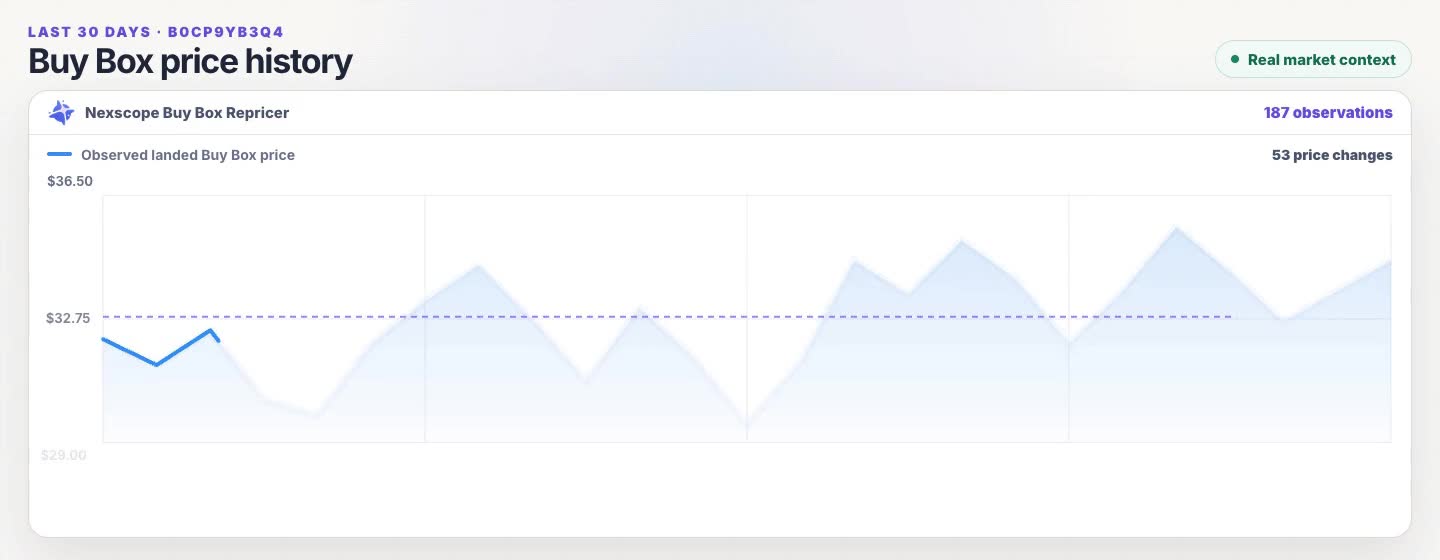
Track 30 Days Of Buy Box Movement.

Move across the curve to inspect each date, observed landed price, and change from the previous point before you reprice.

Last 30 days

Buy Box Price History

Hover or use the arrow keys to inspect each recorded change.

187 observations Updated Jul 17 · 10:36
Observed landed Buy Box price 30-day average 53 price changes
Demo data illustrates the interaction; connected seller data populates the production view.

02 Connected Amazon Data

See Your Featured Offer Status, Competitors, And Eligibility.

See whether you hold the Featured Offer, who is competing for it, how wide the price gap is, and whether your listing is eligible to keep competing.

Nexscope connected Amazon data visual for a blue dumbbell listing showing the Featured Offer holder, price gap, competitors, and eligibility
Illustrative Demo values. Connected Amazon data supplies the seller-specific price, visible offers, fulfillment status, and eligibility checks.

03 Price Recommendation

Test A Smarter Price Without Sacrificing Profit.

Nexscope turns the goal selected for each SKU into a suggested price, shows the estimated profit impact and Featured Offer competitiveness, and blocks moves that cross active protection limits.

Nexscope Buy Box Repricer example showing a product, suggested price, estimated unit profit, Featured Offer opportunity, and active safety limits
Illustrative Demo values. Business outcomes vary by SKU, marketplace conditions, selected target, and active safety limits.

04 Operating Modes

Choose Your Repricing Mode And Keep Control.

Start with Alerts Only, then enable Guarded Automation after you approve the first bounded test.

Alerts Only

Review Recommendations Before Anything Changes.

  • Review market changes and recommendations yourself
  • See Featured Offer, price-gap, and eligibility changes
  • Keep recommendation and block reasons visible for review
  • No automatic Amazon price writes
  • Pause or switch modes per SKU
Guarded Automation

Approve The First Test, Then Automate Within Guardrails.

  • Seller approval is required before the first bounded test
  • Only explicitly enabled SKUs can run in this mode
  • Every move stays within saved profit and movement limits
  • Failed checks block the price write
  • Each decision and write result stays visible for review

How It Works

Start With An ASIN, Then Connect Your Amazon Store.

01

Start With An ASIN

Enter a product ASIN to review 30 days of Buy Box price history without connecting your store.

02

Review The Market

Use the price history and market context for an initial Buy Box analysis.

03

Connect Your Amazon Store

Connect your Amazon store when you want seller-specific data, alerts, or repricing.

04

Choose Alerts Or Automation

Stay in Alerts Only, or approve one bounded first test before Guarded Automation.

Approach Comparison

Go Beyond Basic
Automatic Amazon Repricing.

See how Amazon Automate Pricing and Nexscope support different levels of market context, protection, and seller control.

Comparison of Amazon Automate Pricing and Nexscope Buy Box Repricer
Comparison Area Amazon Automate Pricing Native Rule Automation Nexscope Buy Box Repricer Market Context With Guardrails More Seller Control
01Getting Started
Seller Central setupProfessional selling account and active offers required
Start before connectingReview an ASIN first, then connect your Amazon store when ready
02Pricing Approach
Rule driven repricingUses predefined or custom pricing rules
Goal aware recommendationsCombines market context, your selected goal, and active safety limits
03Market Review
Pricing history and reportsReview 30 day history alongside Seller Central business reports
One connected market viewSee Buy Box history, visible offers, price gaps, and eligibility together
04Profit Protection
Price boundariesUses a required minimum price and optional maximum price
Profit checks before actionChecks profit and movement limits before a candidate price can advance
05Seller Control
Automation after setupRepricing starts after rules, products, and limits are configured
Alerts before automationReview recommendations first, then approve one bounded test
06Decision Output
Pricing rule resultExecutes the active rule and records pricing history
Decision with reasonsSee the suggested move, projected effects, and why a price write is blocked
01Getting Started
Amazon
Seller Central setup

Professional selling account and active offers required

Nexscope
Start before connecting

Review an ASIN first, then connect your Amazon store when ready

02Pricing Approach
Amazon
Rule driven repricing

Uses predefined or custom pricing rules

Nexscope
Goal aware recommendations

Combines market context, your selected goal, and active safety limits

03Market Review
Amazon
Pricing history and reports

Review 30 day history alongside Seller Central business reports

Nexscope
One connected market view

See Buy Box history, visible offers, price gaps, and eligibility together

04Profit Protection
Amazon
Price boundaries

Uses a required minimum price and optional maximum price

Nexscope
Profit checks before action

Checks profit and movement limits before a candidate price can advance

05Seller Control
Amazon
Automation after setup

Repricing starts after rules, products, and limits are configured

Nexscope
Alerts before automation

Review recommendations first, then approve one bounded test

06Decision Output
Amazon
Pricing rule result

Executes the active rule and records pricing history

Nexscope
Decision with reasons

See the suggested move, projected effects, and why a price write is blocked

FAQ

Frequently Asked Questions.

What sellers should understand before turning a recommendation into automation.

What Is The Amazon Featured Offer?+

The Featured Offer is the offer Amazon highlights for a product and customer context. Nexscope keeps Winning, Not winning, No Featured Offer, and Out of stock as distinct states.

Does Nexscope Guarantee The Featured Offer?+

No. Featured Offer eligibility and outcomes depend on Amazon and marketplace conditions. Nexscope helps sellers evaluate and audit pricing decisions within configured boundaries.

Does Nexscope Always Lower My Price?+

No. Nexscope can recommend holding, lowering, or carefully raising a price depending on the selected goal, market signals, and active profit and movement limits.

What Happens After Nexscope Evaluates A Price?+

Nexscope returns Ready for Approval, No Change Needed, or Write Blocked. This decision is separate from the Featured Offer status reported by Amazon.

Can I Use Alerts Without Automatic Repricing?+

Yes. Alerts and recommendations can monitor relevant changes without authorizing automatic price writes.

Can Nexscope Monitor Multiple SKUs?+

Yes. Nexscope can monitor multiple SKUs independently, with separate market signals, pricing goals, operating modes, and safety limits for each SKU.

How Does Guarded Automation Start?+

An eligible candidate passes safety checks, the seller approves one bounded Canary test, Nexscope verifies the result, and the seller explicitly enables ongoing automation for that SKU.

Can Nexscope Change Prices Automatically?+

Yes. After you connect your Amazon store, approve the first bounded test, and explicitly enable Guarded Automation for a SKU, Nexscope can apply eligible price changes automatically. Every change must stay within your saved profit and movement limits, and failed safety checks block the write.

Your Next Price Decision Starts Here

Compete For The Featured Offer.
Keep Margin In The Decision.

Start with clear recommendations and stay in control of every step toward automation.

Reprice Your First Product