

How to Do Amazon Keyword Research That Actually Drives Sales

Most Amazon sellers get keyword research completely wrong. They stuff their listings with random words, copy competitors blindly, or pick keywords based on gut feeling instead of data.
The result? Listings that rank for nothing, waste ad spend on irrelevant terms, and lose sales to competitors who actually understand how Amazon search works.
Keyword research isn't just about finding popular search terms. It's about finding the right terms—words your target customers actually use when they're ready to buy. This guide shows you exactly how to find those keywords, where to use them, and how to turn search data into sales.
What Is Amazon Keyword Research?
Amazon keyword research is the process of identifying the specific words and phrases shoppers type into Amazon's search bar when looking for products like yours.
Unlike Google, where people search for information, Amazon shoppers search with buying intent. They're not researching—they're ready to purchase. This makes Amazon keyword research fundamentally different from traditional SEO.
Why It Matters
- Visibility — Your product only appears in search results if your listing contains the keywords shoppers use
- Relevance — Amazon's algorithm ranks products higher when keywords match search intent
- Advertising — PPC campaigns target keywords; wrong keywords mean wasted ad spend
- Conversion — The right keywords attract buyers, not just browsers
A product with perfect reviews and competitive pricing will still fail if nobody can find it. Even the best listing optimization efforts fall flat without the right keywords. Keywords are how customers discover your listing in a marketplace with millions of products.
How Amazon's Search Algorithm Works
Amazon's A10 algorithm determines which products appear for any given search. Understanding how it works helps you choose better keywords.
Key Ranking Factors
- Relevance — Does your listing contain the search term? Is it in the title, bullets, or backend?
- Sales velocity — Products that sell well for a keyword rank higher for that keyword
- Conversion rate — If shoppers click and buy, Amazon shows your product more often
- Click-through rate — Compelling titles and images earn more clicks from search results
- Customer satisfaction — Reviews, returns, and seller metrics all factor in
The Keyword-Sales Feedback Loop
Here's how it works in practice:
- You add a keyword to your listing
- Your product appears in search results for that keyword
- Shoppers click and (hopefully) buy
- Amazon sees your product converts well for that term
- Your ranking improves, bringing more visibility
- More sales reinforce your position
This is why picking the right keywords from the start matters so much. Ranking for irrelevant keywords brings clicks that don't convert, which actually hurts your ranking over time.
Types of Amazon Keywords
Not all keywords are equal. Understanding the different types helps you build a complete keyword strategy.
Main Keywords (Head Terms)
High-volume, competitive keywords that describe your product category.
- Example: "yoga mat", "wireless earbuds", "dog treats"
- Volume: 50,000+ monthly searches
- Competition: Very high
- Use: Title, key bullet points
Long-Tail Keywords
Longer, more specific phrases with lower volume but higher purchase intent.
- Example: "extra thick yoga mat for bad knees", "wireless earbuds for small ears"
- Volume: 100-5,000 monthly searches
- Competition: Lower
- Use: Bullets, description, backend
Backend Keywords
Hidden keywords that don't appear in your listing but help Amazon index your product.
- Example: Misspellings, Spanish translations, alternate names
- Character limit: 249 bytes
- Use: Seller Central backend search terms field
Competitor Keywords
Keywords your competitors rank for that you might be missing.
- Found through: Reverse ASIN lookup tools
- Use: Fill gaps in your keyword coverage
Seasonal Keywords
Keywords that spike during specific times of year.
- Example: "Christmas gifts for dad", "back to school supplies"
- Use: Update listings before peak seasons
How to Do Amazon Keyword Research (Step-by-Step)
Follow this process to build a comprehensive keyword list for any product.
Step 1: Start with Seed Keywords
Begin with the obvious terms that describe your product. Think like a customer—what would you type to find this item?
Brainstorm Sources
- Your product name and category
- Main features and benefits
- Problems your product solves
- Materials, colors, sizes
- Use cases and occasions
For a yoga mat, seed keywords might include: yoga mat, exercise mat, workout mat, fitness mat, gym mat, stretching mat.
Step 2: Expand with Amazon Autocomplete
Type your seed keywords into Amazon's search bar and note the suggestions. These are real searches from real customers.
How to Use It
- Type your seed keyword
- Add each letter of the alphabet after it (yoga mat a, yoga mat b, yoga mat c...)
- Note all relevant suggestions
- Repeat for your top seed keywords
This free method reveals exactly what shoppers search for. Amazon only suggests terms people actually use.
Step 3: Analyze Competitor Listings
Study the top-ranking products for your main keywords. This competitor analysis reveals their keyword strategy. What terms do they use?
What to Check
- Product titles (what keywords lead?)
- Bullet points (what features/benefits are highlighted?)
- Product descriptions
- A+ Content headings
Don't just copy—understand why they chose those words. Look for patterns across multiple successful listings.
Step 4: Use Keyword Research Tools
Tools provide search volume data and keyword suggestions you can't find manually.
Key Metrics to Evaluate
- Search volume — How many times per month is this keyword searched?
- Competition/difficulty — How hard is it to rank for this term?
- Relevance — Does this keyword actually describe your product?
- Trend — Is search volume growing or declining?
Prioritize keywords with decent volume (1,000+) and manageable competition for your product's current strength.
Step 5: Validate with Opportunity Analysis
Before finalizing your keyword list, check the actual market opportunity. A high-volume keyword means nothing if the market is oversaturated.
What to Analyze
- Number of competing products
- Average review counts of top results
- Price points and margins
- Sales estimates for top sellers
This step separates amateurs from professionals. Anyone can find popular keywords—smart sellers find profitable ones.
Validate Keywords with Nexscope Opportunity Finder
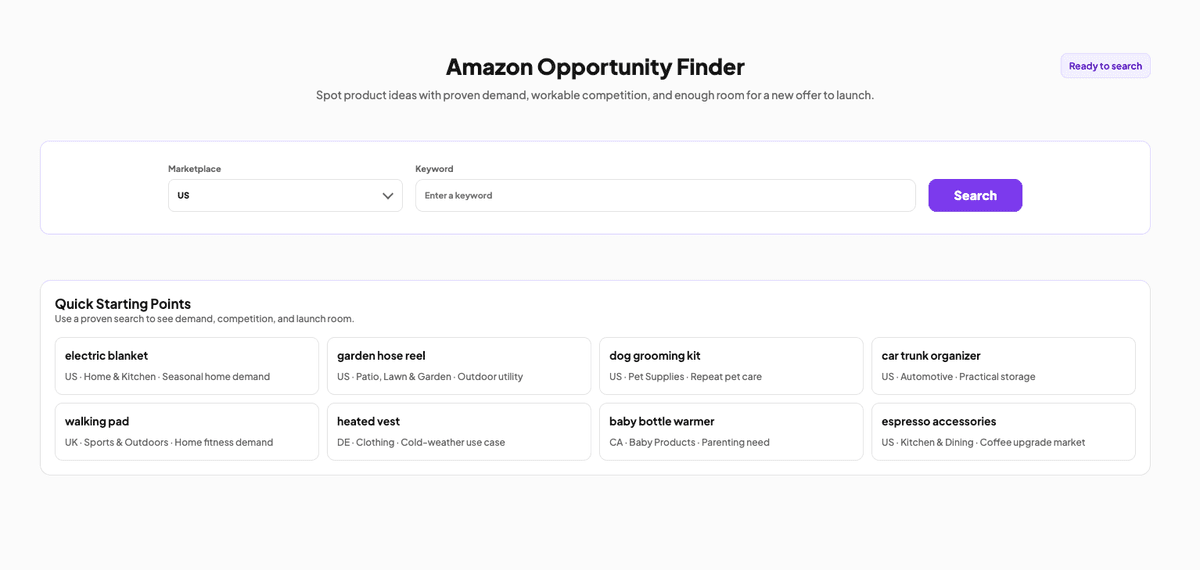
Instead of jumping between multiple tools, Nexscope's Amazon Opportunity Finder lets you validate keywords instantly. Enter any keyword and see:
- Search volume and trends
- Competition level
- Estimated sales for top products
- Market saturation indicators
- Opportunity score
It's built for the validation step—turning keyword ideas into data-backed decisions. No more guessing whether a keyword is worth targeting.
Best Amazon Keyword Research Tools
Here's a quick comparison of popular keyword research tools:
| Tool | Best For | Price |
|---|---|---|
| Helium 10 | Comprehensive research, Cerebro reverse ASIN | $39-249/mo |
| Jungle Scout | Beginners, keyword scout | $49-129/mo |
| Merchant Words | Large keyword database | $35-149/mo |
| Amazon Autocomplete | Free seed keyword expansion | Free |
| Nexscope Opportunity Finder | Quick validation + market analysis | Free tier available |
Most sellers use a combination—free tools for brainstorming, paid tools for volume data, and validation tools to confirm opportunities.
Where to Use Your Keywords
Finding keywords is only half the battle. Placing them strategically maximizes their impact.
Product Title (Most Important)
Amazon weighs title keywords heavily. Front-load your most important terms.
Best Practices
- Lead with main keyword
- Include brand name
- Add key features (size, quantity, material)
- Stay under 200 characters
- Make it readable, not just keyword-stuffed
Example
"Yoga Mat Thick 1/2 Inch - Non-Slip Exercise Mat for Home Workout, Pilates, Stretching - 72x24 with Carrying Strap"
Bullet Points
Use bullets to incorporate secondary keywords naturally while highlighting benefits.
Structure Each Bullet
- Start with a benefit or feature in caps
- Include 1-2 relevant keywords
- Explain why it matters to the customer
- Keep under 500 characters per bullet
Backend Search Terms
This hidden field is for keywords that don't fit naturally in your listing.
What to Include
- Misspellings (yoga matt, yogamat)
- Synonyms you didn't use
- Spanish/other language terms
- Competitor brand names (if allowed in your category)
- Abbreviations and alternate names
What to Avoid
- Repeating words already in your listing
- Punctuation and filler words
- Subjective claims (best, amazing)
- Competitor brand names (in restricted categories)
Product Description & A+ Content
Use remaining keywords here, but prioritize readability over keyword density. A+ Content should sell, not stuff.
Common Keyword Research Mistakes
Avoid these errors that tank listings:
-
Targeting only high-volume keywords — You'll never rank against established competitors. Mix in long-tail terms.
-
Ignoring search intent — "Yoga mat" and "yoga mat cleaner" attract completely different buyers.
-
Keyword stuffing — Unreadable listings hurt conversion rates, which hurts ranking.
-
Never updating keywords — Search trends change. Review and refresh quarterly.
-
Skipping backend terms — Free real estate for keywords that don't fit elsewhere.
-
Copying competitors exactly — You need differentiation, not duplication.
Finding Low-Competition Keywords
The real opportunity is in keywords your competitors overlook.
Look for Keyword Gaps
Compare your listing to top competitors. Which keywords do they rank for that you don't? These gaps represent quick wins.
Target Emerging Trends
New product categories and trending terms have less competition. Monitor:
- Amazon Movers & Shakers
- Google Trends
- Social media product discussions
- Seasonal shifts
Go Niche
Instead of "yoga mat", try "yoga mat for tall people" or "yoga mat for hardwood floors". Lower volume, but buyers searching these terms know exactly what they want.
Use Question Keywords
"How to", "what is", and "best for" keywords often have lower competition and high intent. They're also great for A+ Content and product descriptions.
Conclusion
Amazon keyword research isn't a one-time task—it's an ongoing process that directly impacts your sales. The sellers who win are the ones who:
- Research systematically instead of guessing
- Balance high-volume terms with achievable long-tail keywords
- Validate opportunities before committing resources
- Place keywords strategically across their entire listing
- Update their strategy as the market evolves
Start with the fundamentals: seed keywords, autocomplete, competitor analysis. Then use data tools to validate volume and competition. Finally, place your keywords where they'll have the most impact.
The difference between a listing that sells and one that sits is often just a few well-researched keywords.
Supercharge Your Amazon Research with Nexscope
Nexscope provides structured ecommerce data and focused seller workflows. Teams can use Nexscope's web tools directly or connect governed capabilities to their existing Agent through API, MCP, or Skills. Ready workflows include Keyword to Ads, Video Clone, and Buy Box Repricer.
Key Features
- Agent-ready access — Connect ecommerce capabilities through API, MCP, or Skills
- Live data — Real-time pulls from Amazon, TikTok Shop, Jungle Scout, Keepa, eBay, Walmart, Google Trends
- Keyword validation — Check search volume, competition, and opportunity scores instantly
- Competitor analysis — See what keywords top sellers rank for
- Context memory — Remembers your niche, products, and past research
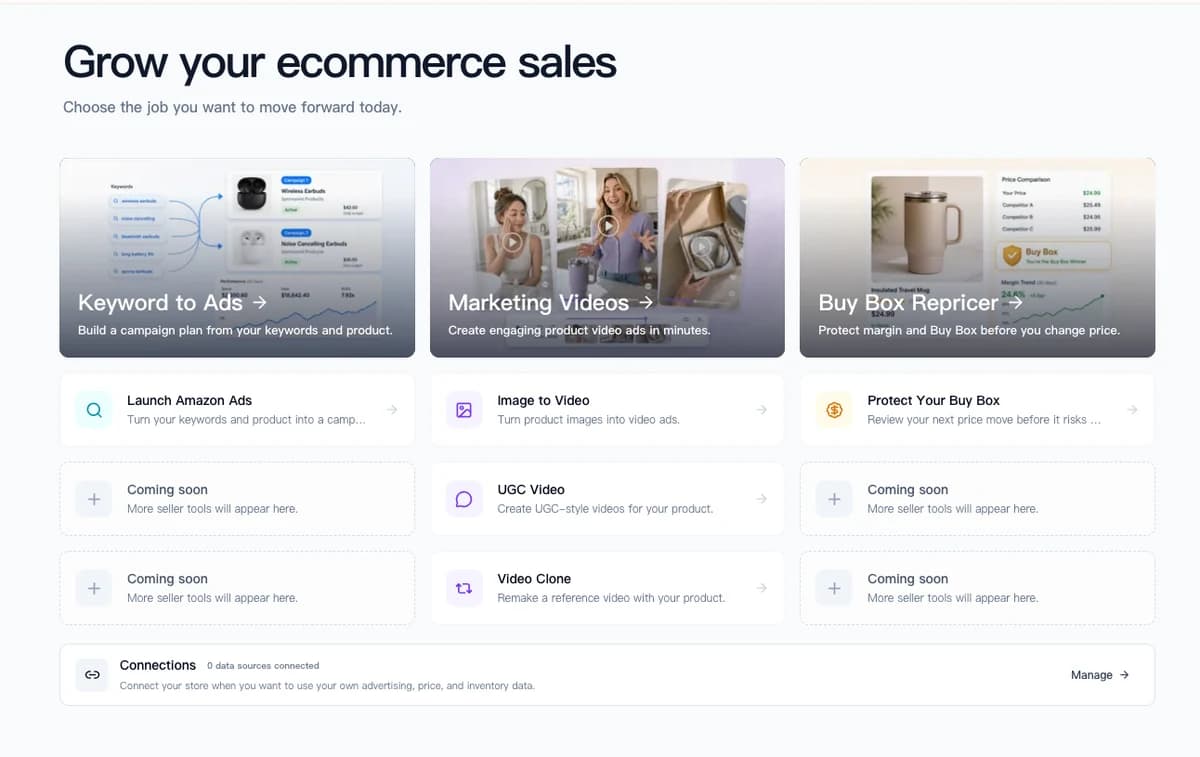
Use the Amazon Keyword Researcher to validate demand and competition, then move selected keywords into the Keyword to Ads workflow.
Connect Ecommerce Data to Your Agent
Use Nexscope through API, MCP, or Skills, or open a ready seller workflow.
Explore Ecommerce Data →1,000 free credits • API, MCP & Skills
FAQ
What is the best free Amazon keyword research tool?
Amazon's own autocomplete is the best free starting point—it shows real search suggestions from actual shoppers. For volume data, Helium 10 offers a limited free tier, and tools like Sonar by Sellics provide free keyword suggestions. Combine autocomplete brainstorming with a free tool for basic volume estimates before investing in paid options.
How many keywords should I use in my Amazon listing?
There's no magic number, but aim for quality over quantity. Your title should include 3-5 key terms naturally. Bullets can incorporate 10-15 secondary keywords across all five points. Backend search terms have a 249-byte limit—fill it with unique, relevant terms. Focus on relevance; irrelevant keywords hurt conversion rates even if they bring traffic.
How often should I update my Amazon keywords?
Review your keywords quarterly at minimum. Update them when you notice ranking drops, before seasonal peaks, after algorithm changes, or when launching PPC campaigns. Use Search Query Performance reports in Brand Analytics (if available) to see which keywords actually drive your sales and adjust accordingly.
What are backend keywords and why do they matter?
Backend keywords are hidden search terms you add in Seller Central that customers never see. They help Amazon index your product for additional searches without cluttering your visible listing. Use them for misspellings, synonyms, Spanish translations, and terms that don't fit naturally in your title or bullets.
Should I target high-volume or low-competition keywords?
Both, strategically. High-volume keywords build visibility but are hard to rank for without sales history. Low-competition long-tail keywords are easier to win and often convert better because searchers know exactly what they want. Start with achievable long-tail terms to build sales velocity, then expand to competitive head terms as your listing strengthens.
How do I find keywords my competitors are using?
Use reverse ASIN lookup tools like Helium 10's Cerebro or Jungle Scout's Keyword Scout. Enter a competitor's ASIN and see which keywords they rank for. Compare multiple top competitors to find common keywords you're missing and identify gaps where you could differentiate.
What's the difference between Amazon keyword research and Google SEO?
Amazon shoppers have buying intent—they're searching to purchase, not to learn. This means conversion rate matters more than click volume. Amazon's algorithm also weighs sales velocity heavily, so ranking depends on actually selling products, not just attracting visitors. Keywords should focus on product attributes and purchase triggers rather than informational queries.
Can I use competitor brand names as keywords?
Generally no, especially in backend search terms. Amazon prohibits using competitor brand names in most categories, and doing so can result in listing suppression or account warnings. Some categories have different rules, so check Amazon's current guidelines. Focus on generic product terms and your own brand instead.
Sources
- Amazon Seller Central. (2026). Optimize Your Product Discoverability. Retrieved from sellercentral.amazon.com
- Jungle Scout. (2026). State of the Amazon Seller Report. Retrieved from junglescout.com
- Helium 10. (2026). Amazon Keyword Research Guide. Retrieved from helium10.com
- SalesDuo. (2026). Best Amazon Keyword Research Tools for 2026. Retrieved from salesduo.com
- Amazon. (2026). Search Term Optimization Guidelines. Retrieved from sellercentral.amazon.com