

How to Do Amazon SEO and Rank Higher in 2026

Amazon SEO is the process of optimizing your product listings to rank higher in Amazon's search results. Unlike Google, Amazon's algorithm focuses on purchase intent—it wants to show products most likely to sell.
In this guide, you'll learn exactly how Amazon's A10 algorithm works, which ranking factors matter most, and how to optimize every element of your listing for maximum visibility.
What Is Amazon SEO?
Amazon SEO (Search Engine Optimization) means optimizing product listings so they appear higher when shoppers search for relevant keywords.
Amazon SEO vs Google SEO
| Factor | Google SEO | Amazon SEO |
|---|---|---|
| Goal | Answer questions, provide information | Sell products |
| Ranking signals | Backlinks, content quality, site authority | Sales velocity, conversion rate, relevance |
| User intent | Informational, navigational, transactional | Almost entirely transactional |
| Algorithm | PageRank, BERT, etc. | A10 (formerly A9) |
The key difference: Amazon rewards listings that convert. If a product sells well after someone clicks, Amazon shows it to more people.
Why Amazon SEO Matters
70% of Amazon Shoppers Never Go Past Page 1
According to multiple seller surveys, the vast majority of purchases happen on the first page of search results. Products on page 2 or beyond are essentially invisible.
Organic Rankings = Free Traffic
Unlike Amazon PPC where sellers pay per click, organic rankings bring free traffic. A well-optimized listing generates consistent sales without ad spend.
The Flywheel Effect
Better rankings → More visibility → More sales → Better rankings
Amazon SEO creates a positive feedback loop. Once a listing starts ranking well, sales velocity increases, which further improves rankings.
How Amazon's A10 Algorithm Works
Amazon's search algorithm (commonly called A10) determines which products appear for any given search query. While Amazon doesn't publish the exact formula, sellers have identified key ranking factors through testing.
Primary Ranking Factors
Keyword Relevance
Does the listing contain the keywords shoppers searched for? Amazon checks: - Product title - Bullet points - Product description - Backend search terms - Brand name
Sales Velocity
How many units sell per day/week? Products with higher sales velocity rank higher. This explains why new products often struggle—they need initial sales to kickstart the algorithm.
Conversion Rate
What percentage of visitors actually buy? A listing with 1,000 views and 100 sales (10% conversion) outranks a listing with 1,000 views and 50 sales (5% conversion).
Reviews and Ratings
More reviews and higher ratings signal product quality. Amazon wants to show products that customers love.
Price Competitiveness
Extremely high prices compared to similar products can hurt rankings. Amazon wants to offer competitive prices to shoppers.
Inventory and Fulfillment
Products in stock and using FBA often get a ranking boost. Out-of-stock products drop quickly.
Secondary Ranking Factors
- Click-through rate (CTR): How often shoppers click from search results
- Time on page: How long shoppers spend viewing the listing
- External traffic: Traffic from outside Amazon (social media, Google, etc.)
- Seller authority: Overall seller metrics and history
Amazon SEO: Step-by-Step Optimization
Step 1: Keyword Research
Before writing anything, sellers need to know which keywords to target.
What Makes a Good Amazon Keyword?
- High search volume: People actually search for it
- Relevant to the product: Matches what's being sold
- Reasonable competition: Realistic to rank for
- Purchase intent: Shoppers using this keyword want to buy
How to Find Amazon Keywords
Method 1: Amazon Autocomplete
Start typing in Amazon's search bar and note what suggestions appear. These are real searches from real shoppers.
Method 2: Competitor Analysis
Look at top-ranking competitors for the main keyword. What keywords appear in their titles and bullets?
Method 3: AI-Powered Research
Tools like Nexscope automate keyword research by analyzing competitor listings, search volume data, and keyword gaps.
With Nexscope's Amazon Keyword Researcher and Keyword to Ads workflow, sellers can: - Get keyword suggestions based on products - Analyze competitor keyword strategies - Find high-volume, low-competition keywords - Identify keyword gaps in current listings
Keyword Research Output
The goal is to end up with: - 1 primary keyword: Main target (goes in title) - 5-10 secondary keywords: Important variations (go in bullets/description) - 20-50 long-tail keywords: Specific phrases (go in backend)
Step 2: Title Optimization
The title is the most important on-page SEO element.
Amazon Title Guidelines
- Maximum 200 characters (aim for 150-180)
- First 80 characters are critical (this is what shows on mobile)
- Include the primary keyword early (preferably in first 80 characters)
Title Formula
[Brand] + [Primary Keyword] + [Key Feature 1] + [Key Feature 2] + [Size/Quantity/Variant]
Title Examples
❌ Bad Title:
XYZ Brand Water Bottle Best Quality Premium BPA Free Plastic Bottle for Gym Sports Office Home Use Men Women Kids
✅ Good Title:
XYZ Insulated Water Bottle 32oz - Stainless Steel, BPA-Free, Keeps Drinks Cold 24 Hours - Leak-Proof Sports Bottle for Gym & Outdoor
Title Optimization Tips
- Put the primary keyword in the first 80 characters
- Don't keyword stuff—it hurts readability and conversion
- Include the brand name (required by Amazon)
- Add differentiating features (size, material, use case)
- Use proper capitalization (Title Case, not ALL CAPS)
Step 3: Bullet Points Optimization
Bullet points (Key Product Features) appear prominently on listings and are indexed for search.
Bullet Point Guidelines
- 5 bullets maximum (use all 5)
- Up to 500 characters each (aim for 200-300)
- Start with a benefit, then explain the feature
Bullet Point Formula
[BENEFIT IN CAPS] - [Feature explanation with keywords naturally included]
Bullet Point Example
- ✅ STAYS COLD FOR 24 HOURS - Double-wall vacuum insulation keeps drinks ice cold all day. Perfect for long hikes, gym sessions, or hot summer days.
- ✅ LEAK-PROOF DESIGN - The secure twist-top lid creates an airtight seal. Toss it in a gym bag without worrying about spills or leaks.
- ✅ PREMIUM STAINLESS STEEL - Made from 18/8 food-grade stainless steel. No plastic taste, no rust, no BPA. Safe for users and the environment.
- ✅ FITS STANDARD CUP HOLDERS - 32oz capacity in a slim design that fits most car cup holders and bike bottle cages. Take it anywhere.
- ✅ LIFETIME WARRANTY - The manufacturer stands behind products. If anything goes wrong, contact for a free replacement. No questions asked.
Bullet Point Tips
- Lead with benefits, not features
- Include secondary keywords naturally
- Address common customer questions/concerns
- Use formatting (caps for benefit headers) to improve scannability
- Don't repeat information from the title
Step 4: Backend Keywords
Backend search terms are hidden keywords that Amazon indexes but shoppers don't see.
Backend Keyword Guidelines
- 250 bytes maximum (not characters—special characters use more bytes)
- Don't repeat words already in title or bullets
- Use single spaces between words (no commas or punctuation needed)
- Include misspellings and alternate spellings
What to Include in Backend Keywords
- Synonyms (water bottle → drink container, hydration flask)
- Misspellings (stainles steel, waterbottle)
- Spanish/other language terms if relevant
- Related use cases (camping, hiking, office)
- Long-tail variations
Backend Keyword Example
waterbottle drink container hydration flask thermos insulated tumbler workout fitness exercise camping hiking office desk hot cold beverages stainles steel metallic reusable eco friendly sustainable gym bottle sport athletic
Backend Keyword Tips
- Use all 250 bytes
- Don't repeat words (Amazon only counts each word once)
- Don't include brand name or ASINs
- Don't use subjective claims (best, amazing, top quality)
- Focus on keywords that couldn't fit naturally in visible content
Step 5: Product Description & A+ Content
The product description appears below the fold but is still indexed by Amazon.
Standard Description
Without Brand Registry: - 2,000 characters maximum - Use basic HTML formatting (bold, line breaks) - Include additional keywords naturally - Expand on features and benefits from bullets
A+ Content (Enhanced Brand Content)
With Brand Registry: - Replace the text description with rich media - Add comparison charts, lifestyle images, brand story - A+ Content doesn't directly help SEO rankings - But it significantly improves conversion rate (which helps rankings indirectly)
A+ Content Tips
- Focus on conversion, not keywords
- Use high-quality lifestyle images
- Include a comparison chart for multiple products
- Tell the brand story
- Address common objections
Step 6: Image Optimization
Images don't directly impact Amazon SEO rankings, but they massively impact conversion rate—which affects rankings.
Main Image Requirements
- Pure white background (RGB 255, 255, 255)
- Product fills 85%+ of the frame
- No text, logos, or watermarks
- Minimum 1000px on longest side (for zoom functionality)
Secondary Image Strategy
Use the 6 additional image slots strategically:
- Infographic: Key features and dimensions
- Lifestyle shot: Product in use
- Scale reference: Product next to common object
- Feature callouts: Close-ups of important features
- Package contents: What's included
- Comparison: Product vs competitors (if allowed in category)
Step 7: Pricing Strategy
Price affects both conversion rate and Buy Box eligibility.
Pricing Tips
- Research competitor pricing before setting prices
- Consider margins and advertising costs
- Test different price points
- Use Amazon's Automate Pricing tool for competitive categories
Monitor Competitor Prices
Prices change constantly. Use tools to track competitor pricing and adjust strategy accordingly.
How to Use Nexscope for Amazon SEO
Instead of manually researching keywords and analyzing competitors, Nexscope automates the entire process. Here's how to get started:
Step 1: Sign Up for Nexscope
Go to nexscope.ai and create an account. New users get 3 days free with 1,000 credits—enough to run extensive keyword research and listing optimization, even using the most advanced Claude Opus 4.6 model.
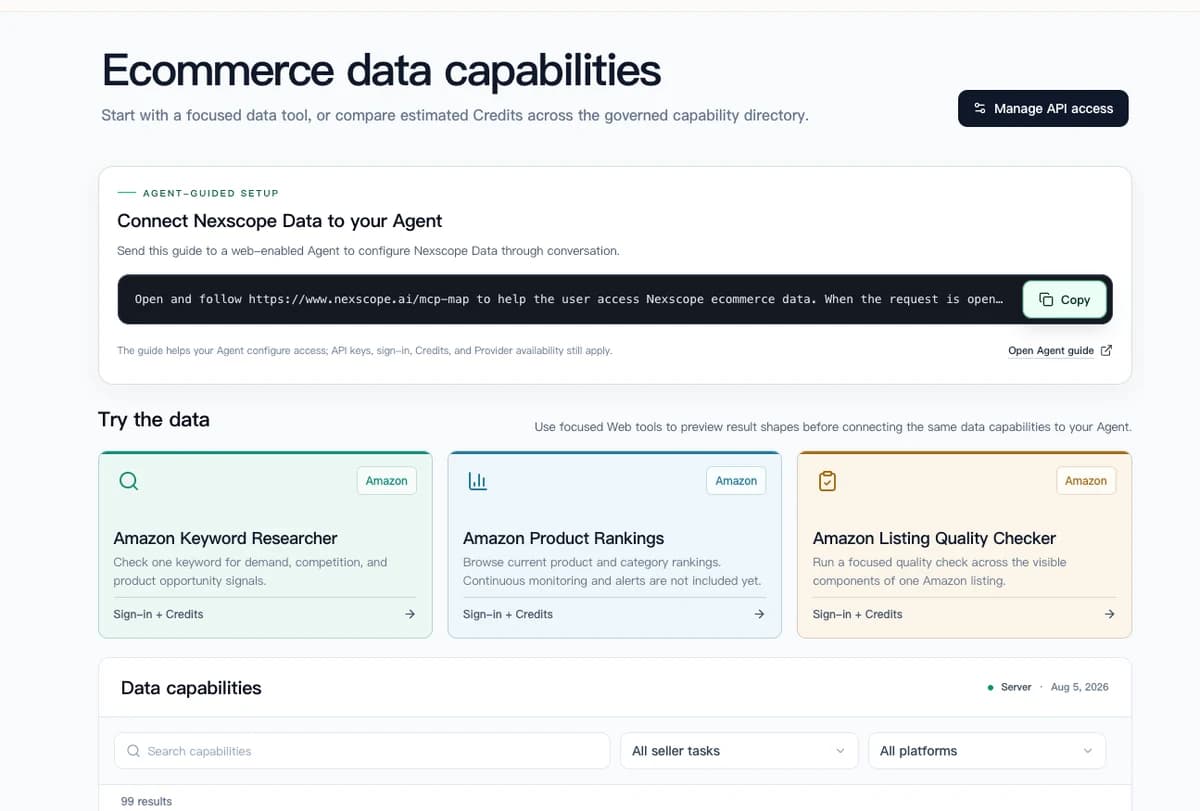
Step 2: Open Amazon Keyword Researcher
Use the focused keyword tool to review demand, competition, and product opportunity signals. You can then connect the same ecommerce data to your Agent through API, MCP, or Skills.
Step 3: Enter Your Product Details
Enter your product or seed keyword—for example, "stainless steel water bottle 32oz" or "silicone kitchen utensil set."
Step 4: Get Results
Nexscope analyzes search data, competitor listings, and market trends, then returns a comprehensive report:
- Prioritized keyword list with search volume
- Title and bullet point suggestions
- Backend keyword recommendations
- Competitor keyword gaps
- Amazon Brand Analytics (ABA) validation
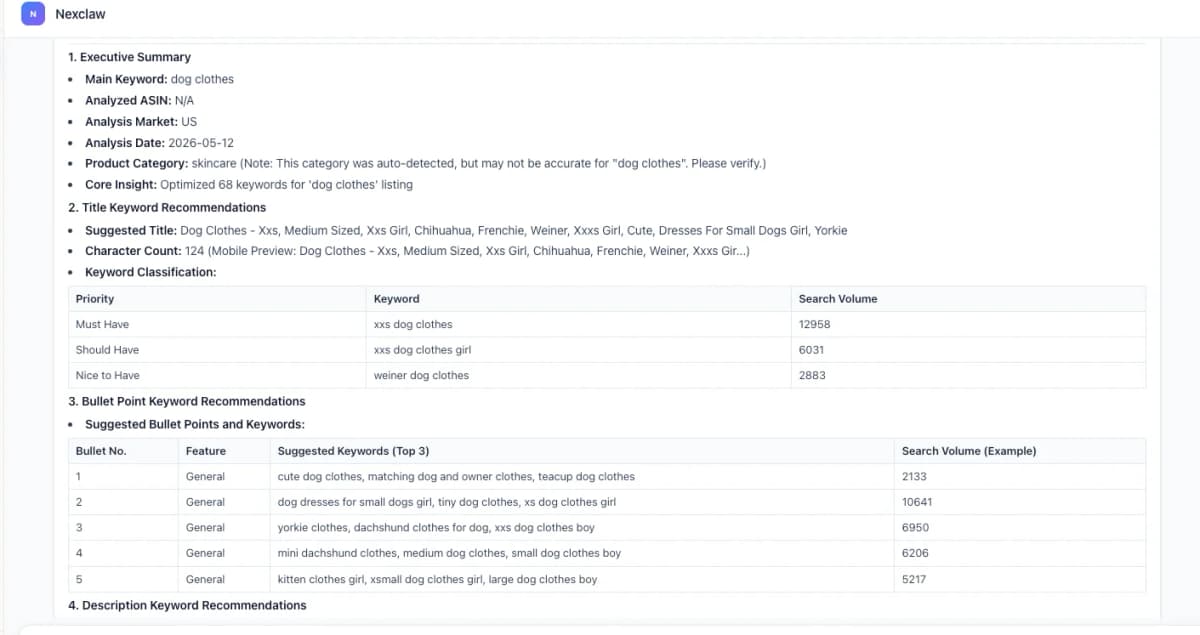
The report includes actionable recommendations and insights based on competitor analysis:
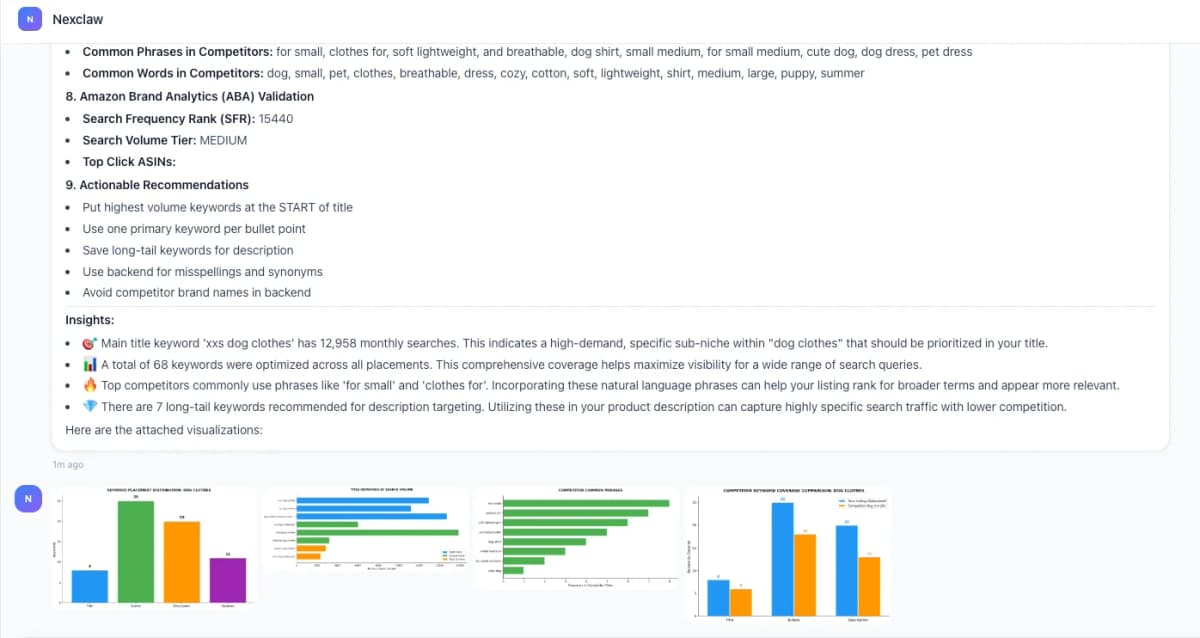
The entire process takes seconds instead of hours of manual research.
Try Nexscope Free → 3 Days + 1,000 Credits
Common Amazon SEO Mistakes
- Keyword Stuffing — Cramming keywords unnaturally into titles and bullets hurts readability and conversion. Amazon's algorithm understands relevance without exact-match spam.
- Ignoring Backend Keywords — Many sellers leave backend search terms empty or don't use the full 250 bytes. This is free real estate for additional keywords.
- Copying Competitor Listings — If a listing looks exactly like everyone else's, there's no differentiation. Plus, Amazon may flag duplicate content.
- Not Monitoring Competitors — Competitors are constantly optimizing. Without tracking their changes, sellers fall behind.
- Focusing Only on Keywords — Keywords get people to listings. Conversion keeps rankings. Don't neglect images, A+ Content, pricing, and reviews.
- Set It and Forget It — Amazon SEO isn't a one-time task. Search trends change, competitors adjust, and Amazon's algorithm evolves. Review and update listings regularly.
Conclusion
Amazon SEO comes down to two things:
- Relevance: Make sure Amazon understands what's being sold (keywords)
- Performance: Make sure the listing converts (content, images, price, reviews)
Start with thorough keyword research, optimize every element of the listing, and monitor performance over time.
Nexscope provides structured ecommerce data and focused seller workflows. Teams can use Nexscope's web tools directly or connect governed capabilities to their existing Agent through API, MCP, or Skills. Ready workflows include Keyword to Ads, Video Clone, and Buy Box Repricer.
New users get 3 days free with 1,000 credits. No credit card required.
Connect Ecommerce Data to Your Agent
Use Nexscope through API, MCP, or Skills, or open a ready seller workflow.
Explore Ecommerce Data →1,000 free credits • API, MCP & Skills
Frequently Asked Questions
How long does it take to rank on Amazon?
New listings typically take 2-4 weeks to start ranking for target keywords. However, reaching page 1 for competitive keywords can take months and requires consistent sales velocity.
Does Amazon PPC help organic rankings?
Yes, indirectly. PPC drives sales, and sales velocity is a key ranking factor. Many sellers use PPC to jumpstart rankings for new products, then reduce ad spend as organic rankings improve.
How often should I update my listing?
Review listings monthly. Check for new relevant keywords to add, underperforming keywords to replace, competitor changes to respond to, and seasonal adjustments.
Can I rank for keywords not in my listing?
Amazon may show products for related keywords based on sales history and customer behavior, but listings rank much better for keywords that appear in them.
Is Amazon SEO different for different categories?
The fundamentals are the same, but competition levels vary dramatically. Highly competitive categories (electronics, supplements) require more aggressive optimization than niche categories.
Do reviews affect SEO rankings?
Yes. More reviews and higher ratings signal product quality. They don't directly impact keyword rankings, but they affect conversion rate (which impacts rankings).
Sources
- Amazon Seller Central. (2026). Optimize Your Listings. Retrieved from sellercentral.amazon.com
- Amazon Advertising. (2026). Amazon SEO Guide. Retrieved from advertising.amazon.com
- Feedvisor. (2025). Amazon A10 Algorithm Study. Retrieved from feedvisor.com