

How to Set Up TikTok Ads Manager and Run Your First Campaign

TikTok has evolved from a dance video app into one of the most powerful advertising platforms for e-commerce. With over 1.5 billion monthly active users and 39% of users purchasing products they discovered on the platform, TikTok Ads Manager has become essential for brands targeting younger audiences.
But getting started can feel overwhelming. Campaign objectives, pixel tracking, bidding strategies, audience targeting—there's a lot to configure before your first ad goes live.
This guide walks through the entire process in 7 steps. By the end, you'll have a working TikTok ad campaign ready to drive traffic and sales.
What Is TikTok Ads Manager?
TikTok Ads Manager is the self-serve platform where businesses create, manage, and optimize advertising campaigns on TikTok. It's part of TikTok Business Center, which also includes tools for managing creator partnerships, commerce, and analytics.
Campaign Structure
TikTok Ads Manager uses a three-level hierarchy:
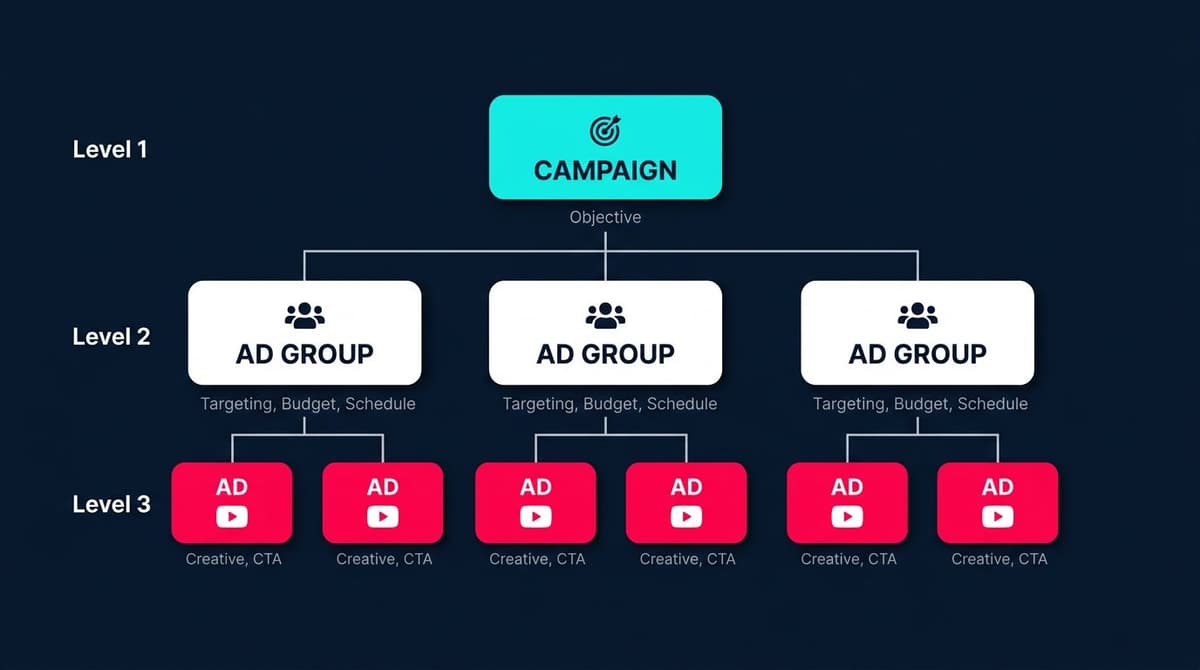
- Campaign: The top level where you set your advertising objective (awareness, consideration, or conversion)
- Ad Group: Where you define targeting, budget, schedule, and bidding strategy
- Ad: The actual creative—video, images, copy, and call-to-action
Understanding this structure matters because settings at each level affect what options are available below. Choose the wrong campaign objective, and certain targeting options disappear.
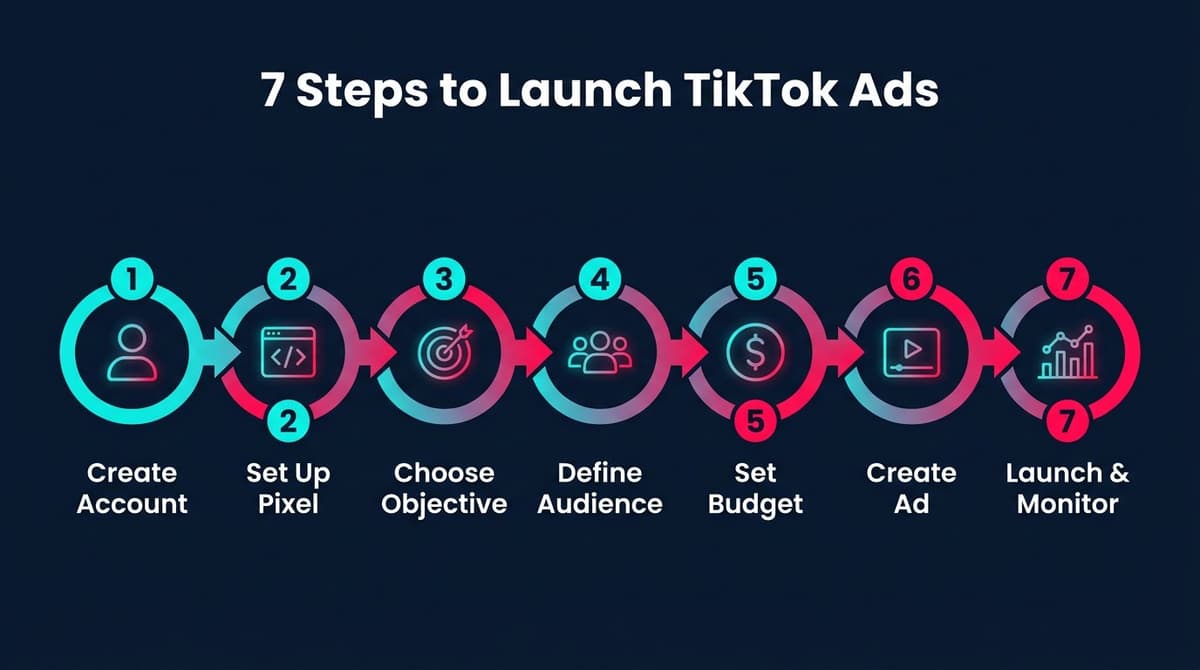
7 Steps to Launch Your First TikTok Ad
Step 1: Create Your TikTok Ads Manager Account
Start by visiting ads.tiktok.com and clicking "Create an Ad."
What You'll Need
- Business email address
- Business name and website
- Industry category
- Payment method (credit card or PayPal)
Account Approval
After submitting your information, TikTok reviews your account. Most accounts get approved within 24 hours, but some industries face additional scrutiny. Restricted categories include gambling, adult content, and certain health products.
Use a business email domain rather than Gmail or Yahoo. It speeds up approval and looks more professional.
Step 2: Set Up TikTok Pixel for Conversion Tracking
Before spending any money on ads, install the TikTok Pixel. Without it, you can't track conversions, build retargeting audiences, or optimize campaigns for purchases.
What TikTok Pixel Does
- Tracks website visitors and their actions
- Measures ad performance (add to cart, purchases, sign-ups)
- Builds custom audiences for retargeting
- Enables conversion-optimized bidding
For Shopify Stores
- Go to TikTok Ads Manager → Tools → Events
- Click "Set Up Web Events"
- Select "Shopify" as your platform
- Follow the prompts to connect your store
For Other Platforms
- Choose "Manually Install Pixel Code"
- Copy the base code and paste it in your website's
<head>section - Add event codes for specific actions (ViewContent, AddToCart, Purchase)
Verify Installation
Use the TikTok Pixel Helper Chrome extension to confirm the pixel fires correctly on your website.
Step 3: Choose Your Campaign Objective
When creating a new campaign, TikTok asks what you want to achieve. This choice determines which optimization options and ad formats are available.
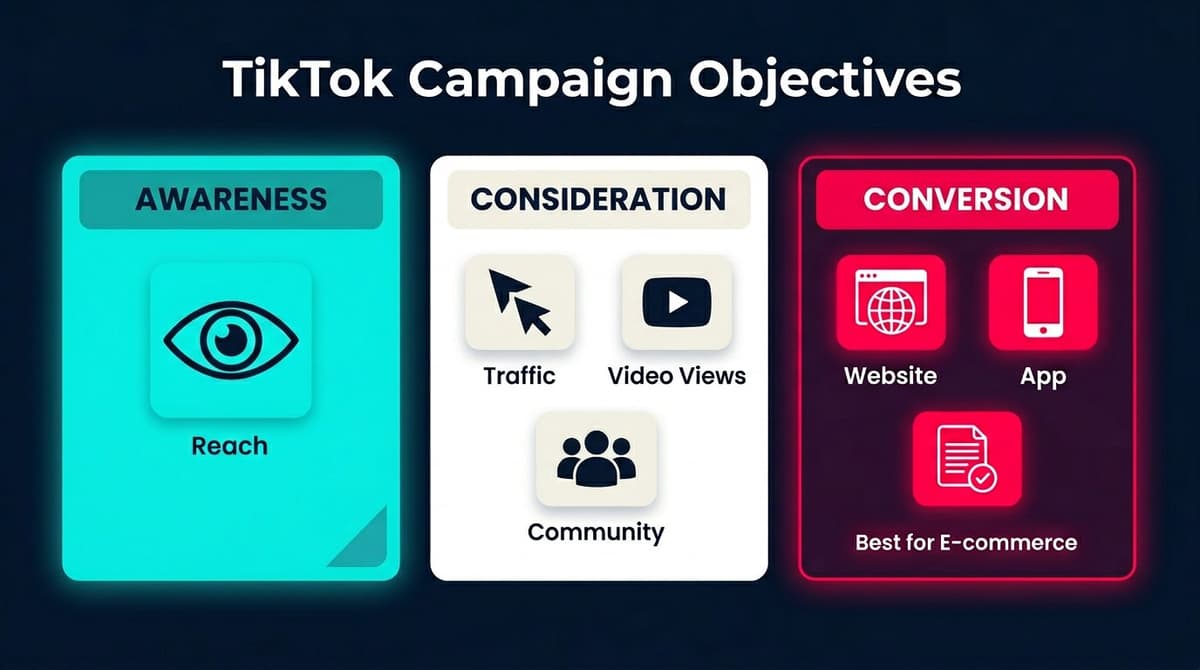
Awareness Objectives
- Reach: Show your ad to the maximum number of people
Consideration Objectives
- Traffic: Drive clicks to your website or app
- Video Views: Get more people to watch your video content
- Community Interaction: Increase followers and profile visits
Conversion Objectives
- Website Conversions: Optimize for specific actions (purchases, sign-ups)
- App Promotion: Drive app installs and in-app events
- Lead Generation: Collect leads directly within TikTok
Which One for E-commerce?
Start with "Website Conversions" if you have the pixel installed and want sales. Use "Traffic" if you're testing creative or building initial data.
Step 4: Define Your Target Audience
TikTok offers robust targeting options to reach the right users.
Demographics
- Location (country, state, city)
- Age (13-17, 18-24, 25-34, 35-44, 45-54, 55+)
- Gender
- Language
Interests and Behaviors
- Interest categories (beauty, fashion, gaming, fitness, etc.)
- Purchase intent signals
- Video interaction behaviors
- Creator interaction patterns
Device Targeting
- Operating system (iOS, Android)
- Device model
- Connection type (WiFi, cellular)
- Carrier
Custom Audiences
- Website visitors (requires pixel)
- Customer lists (email, phone numbers)
- App activity
- Engagement audiences (people who interacted with your content)
Lookalike Audiences
- Find new users similar to your existing customers
- Choose similarity level (narrow for precision, broad for scale)
Targeting Tip
Start broader than you think necessary. TikTok's algorithm learns quickly and will find the right users within your targeting parameters. Overly narrow targeting limits the algorithm's ability to optimize.
Step 5: Set Budget and Bidding Strategy
TikTok requires minimum budgets at both campaign and ad group levels.
Minimum Budgets
- Campaign level: $50/day (or $500 lifetime)
- Ad group level: $20/day
Budget Types
- Daily budget: Spend up to this amount each day
- Lifetime budget: Spread spending across the campaign duration
Bidding Strategies
| Strategy | Best For | How It Works |
|---|---|---|
| Cost Cap | Controlling CPA | TikTok tries to keep your cost per action at or below your target |
| Maximum Delivery | Spending full budget | TikTok optimizes for most conversions within budget |
| Bid Cap | Strict cost control | You set the maximum bid per action |
For Beginners
Use Maximum Delivery with a daily budget. Let TikTok's algorithm learn before adding cost constraints.
Realistic Budget Expectations
- Testing phase: $1,000-3,000/month minimum
- Scaling phase: $5,000-10,000/month
- Plan for 2-4 weeks before judging performance
Step 6: Create Your Ad Creative
TikTok is a creative-first platform. The best targeting and bidding won't save a boring ad.
Video Specifications
- Aspect ratio: 9:16 (vertical), 1:1 (square), or 16:9 (horizontal)
- Resolution: 720p minimum (1080p recommended)
- Duration: 5-60 seconds (9-15 seconds performs best)
- File size: Up to 500MB
- Format: MP4, MOV, MPEG, AVI
What Works on TikTok
- Native-looking content that doesn't feel like an ad
- Hook in the first 1-2 seconds
- Real people over polished production
- Trending sounds and music
- Text overlays for viewers watching without sound
- Clear call-to-action
Ad Formats for E-commerce
- In-Feed Ads: Appear in the For You feed, blend with organic content
- Spark Ads: Boost existing organic posts (yours or creators')
- Video Shopping Ads: Feature products with shopping functionality—ideal if you're selling on TikTok Shop
- Carousel Ads: Multiple images users can swipe through
Creative Tip
Create 3-5 variations of each ad concept. Test different hooks, calls-to-action, and visual styles. TikTok's algorithm will identify winners quickly.
Step 7: Launch and Monitor Performance
Before hitting publish, review all settings: - Pixel events are tracking correctly - Budget and schedule are set - Targeting makes sense for your product - Creative meets specifications
Key Metrics to Monitor
| Metric | What It Tells You | Good Benchmark |
|---|---|---|
| CTR | How compelling your ad is | >1% for in-feed ads |
| CPC | Cost efficiency of clicks | Varies by industry |
| CVR | Conversion rate from clicks | 2-5% for e-commerce |
| ROAS | Return on ad spend | 2-4x depending on margins |
| CPM | Cost to reach 1,000 people | $5-15 typical |
Optimization Actions
- Low CTR → Test new hooks and creative angles
- High CTR, low CVR → Check landing page experience
- High CPC → Broaden targeting or refresh creative
- Declining performance → Creative fatigue, add new variations
Learning Phase
TikTok needs approximately 50 conversions per ad group to exit the learning phase. During this time, avoid making major changes that reset the learning process.
5 Common Mistakes to Avoid
1. Setting Budgets Too Low
With a $20/day ad group minimum, some advertisers try to run multiple ad groups at minimum spend. The result: none of them get enough data to optimize properly.
Fix: Consolidate budget into fewer ad groups. Better to have one ad group at $100/day than five at $20/day.
2. Skipping Pixel Setup
Running traffic campaigns without conversion tracking wastes money. You'll never know which ads actually drive sales.
Fix: Install the pixel before launching any campaigns. Verify it's tracking all key events (ViewContent, AddToCart, InitiateCheckout, Purchase).
3. Making Ads That Look Like Ads
Polished, corporate-style video ads underperform on TikTok. Users scroll past anything that feels like traditional advertising.
Fix: Study organic TikTok content in your niche. Match the style, pacing, and energy. Use creators or user-generated content when possible.
4. Targeting Too Narrowly
Restricting your audience to a tiny slice of users limits TikTok's optimization algorithm. The platform needs room to find the best converters.
Fix: Start with broader targeting and let performance data guide narrowing. Use exclusions (existing customers, converters) rather than narrow inclusions.
5. Giving Up Too Early
TikTok ads often take 2-4 weeks to optimize properly. Advertisers who kill campaigns after a few days never see the algorithm stabilize.
Fix: Commit to a testing budget and timeline before launching. Judge results after sufficient data, not after day two.
Conclusion
Setting up TikTok Ads Manager takes some initial configuration, but the 7-step process is straightforward:
- Create your account
- Install the pixel
- Choose your objective
- Define your audience
- Set budget and bidding
- Create compelling ads
- Launch and optimize
The brands winning on TikTok aren't necessarily the ones with the biggest budgets. They're the ones creating native-feeling content, testing constantly, and giving the algorithm time to learn.
For e-commerce sellers already using TikTok Shop, Ads Manager becomes even more powerful. Combine organic content, paid ads, and shopping features for a complete TikTok commerce strategy. Not sure what to sell? Check out trending products on TikTok Shop to find high-demand items.
Looking to scale your TikTok operations? AI tools built for TikTok Shop sellers can automate research, content creation, and analytics.
Want Help Analyzing TikTok Performance?
Managing TikTok campaigns alongside Amazon, Shopify, and other channels gets complicated fast. Nexscope provides ecommerce data for seller research and can connect the required capabilities to an existing Agent through API, MCP, or Skills.
Connect Ecommerce Data to Your Agent
Use Nexscope through API, MCP, or Skills, or open a ready seller workflow.
Explore Ecommerce Data →1,000 free credits • API, MCP & Skills
FAQs
Is TikTok Ads Manager free to use?
Yes, creating an account and using the platform is free. You only pay when your ads run. Minimum budgets start at $50/day at the campaign level and $20/day per ad group.
How much should I budget for my first TikTok campaign?
Plan for $1,000-3,000 for initial testing over 2-4 weeks. This allows enough data for the algorithm to optimize and for you to test multiple creative approaches. Going below this often leads to inconclusive results.
What's the difference between TikTok Ads Manager and TikTok Business Center?
TikTok Business Center is the umbrella platform that includes Ads Manager, creator management, commerce tools, and analytics. Ads Manager is specifically the tool for creating and managing paid advertising campaigns.
Can I run TikTok ads without a TikTok account?
Yes, you can create ads through TikTok Ads Manager without having a TikTok profile. However, having an active organic presence helps build credibility and provides content for Spark Ads.
How long before I see results from TikTok ads?
Expect 1-2 weeks for the algorithm to exit the learning phase (requires ~50 conversions per ad group). Meaningful performance patterns typically emerge after 2-4 weeks of consistent spending.
What's the best ad format for e-commerce?
In-Feed Ads and Spark Ads work well for most e-commerce brands. Video Shopping Ads are ideal if you're selling on TikTok Shop. Test multiple formats to see what resonates with your specific audience.
Sources
- TikTok for Business: Ads Manager Help Center
- TikTok Advertising Policies
- Shopify: TikTok Ads in 2026
- Statista: TikTok Monthly Active Users