

How to Start Selling on Amazon in 2026: AI-Powered Guide

Starting an Amazon business in 2026 gives you access to tools that did not exist two years ago. AI can now handle product research, write your listings, analyze competitors, and automate daily operations. New sellers who use these tools compete effectively against established businesses from day one. This guide walks through every step of launching your Amazon store, with specific AI applications at each stage. You will learn how to set up your seller account, find profitable products, create optimized listings, and build automated workflows using OpenClaw and other AI tools.
Why 2026 Is the Best Time to Start (AI Advantage)
Amazon announced several AI-powered features for sellers in late 2025 and early 2026. The Seller Assistant now uses generative AI to answer questions, suggest optimizations, and guide new sellers through complex processes. A+ Content creation that previously took weeks now takes minutes with Amazon's built-in AI tools.
Beyond Amazon's native features, third-party AI agents have matured significantly. OpenClaw and similar tools can execute multi-step tasks autonomously. They browse websites, analyze data, generate content, and integrate with your existing workflows through messaging apps.
This creates an opportunity for new sellers. The traditional advantage of established sellers was experience and accumulated knowledge. AI compresses the learning curve. A new seller using AI tools can make data-driven decisions that match or exceed what experienced sellers achieve through intuition.
The barrier to entry has also dropped. Amazon's referral bonuses now exceed $50,000 in potential incentives for new sellers. Combined with AI tools that reduce the time investment required, starting an Amazon business is more accessible than ever.
Step 1 — Choose Your Selling Model
Before listing your first product, you need to make two fundamental decisions: your seller plan type and your fulfillment method.
Individual vs Professional Plan
Amazon offers two seller plans. The Individual plan charges $0.99 per item sold with no monthly fee. The Professional plan costs $39.99 per month with no per-item fee.
The math is straightforward. If you sell more than 40 items per month, the Professional plan saves money. But the Professional plan also unlocks features that matter regardless of volume:
- Access to restricted categories
- Eligibility for the Buy Box
- Bulk listing tools
- Advertising capabilities
- Detailed business reports
Most serious sellers start with the Professional plan. The features justify the cost even at low volumes.
FBA vs FBM: Which One to Start With
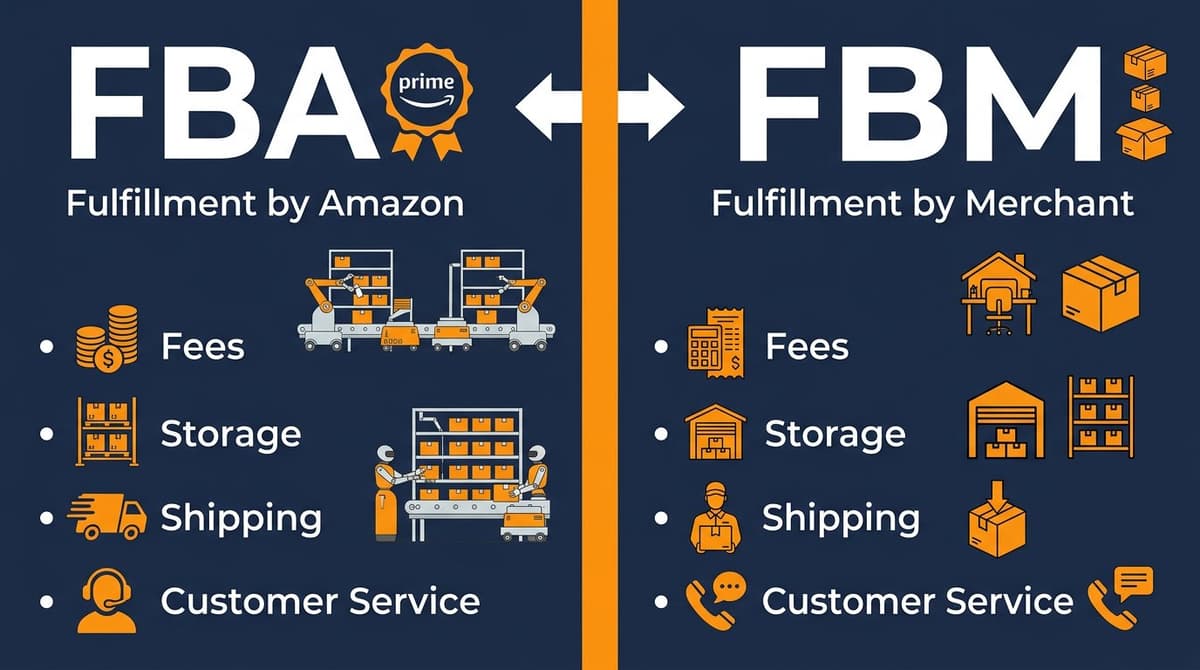
FBA (Fulfillment by Amazon) means Amazon stores your inventory, ships orders, and handles customer service. FBM (Fulfillment by Merchant) means you handle everything yourself.
FBA advantages for beginners: - Prime badge increases conversion rates - No need for warehouse space - Amazon handles returns and customer service - Better Buy Box eligibility
FBM advantages: - Lower fees for large or heavy items - More control over inventory - Better margins on slow-moving products
For most new sellers, FBA provides the easiest path to first sales. The Prime badge alone can increase conversion rates by 25% or more. Start with FBA, then consider FBM for specific products where the fee structure makes sense.
How AI Helps You Decide
AI tools can calculate the true cost comparison between FBA and FBM for your specific products. Feed your product dimensions, weight, and expected selling price into an AI agent, and it will compute storage fees, fulfillment fees, and projected margins for both options.
💡 Pro Tip: Calculate your exact FBA fees and profit margins before committing to a product. Install the FBA calculator skill with
npx skills add nexscope-ai/Amazon-Skills --skill amazon-fba-calculator -gto get complete fee breakdowns, ROI projections, and FBA vs FBM comparisons.
Step 2 — Find Your First Product (AI Product Research)
Product selection determines success or failure more than any other factor. Most failed Amazon businesses chose products with too much competition, insufficient demand, or margins too thin to survive advertising costs.
What Makes a Good First Product
Strong first products share common characteristics:
- Selling price between $20-50: High enough for healthy margins, low enough to encourage impulse purchases
- Lightweight and small: Keeps FBA fees manageable
- Non-seasonal: Consistent demand throughout the year
- Room for differentiation: Opportunity to improve on existing products
- No dominant brand: Categories without a single seller controlling 50%+ market share
Avoid products that require complex compliance (supplements, electronics with batteries), have high return rates (clothing, shoes), or compete directly with Amazon's own brands.
Using AI for Market Analysis
Traditional product research required hours of manual spreadsheet work. AI transforms this process. You can describe the type of product you want to sell, and AI agents will research the market, analyze competitors, and return structured data.
Effective AI prompts for product research:
- "Find 10 products in the home organization category with monthly revenue above $10,000 and fewer than 200 reviews on the top listing"
- "Analyze the top 5 competitors for bamboo drawer organizers and identify gaps in their product offerings"
- "Calculate the average profit margin for products in the kitchen gadgets category priced between $25-35"
Validating Demand with Data
Before committing to a product, validate demand through multiple data points:
- Search volume: How many people search for this product monthly?
- Sales velocity: How many units do top sellers move daily?
- Review velocity: How quickly are competitors gaining reviews?
- Price trends: Is the category experiencing price compression?
AI can gather and synthesize this data from multiple sources. The output should be a clear recommendation with supporting evidence.
💡 Pro Tip: Validate product demand before investing. Install the keyword research skill with
npx skills add nexscope-ai/Amazon-Skills --skill amazon-keyword-research -gfor search volume data, and the sales estimator withnpx skills add nexscope-ai/Amazon-Skills --skill amazon-sales-estimator -gto project monthly revenue from any ASIN or keyword.
Step 3 — Source Your Product
Once you identify a winning product, you need to find a supplier who can manufacture it at a cost that leaves room for profit.
Domestic vs Overseas Suppliers
Domestic suppliers (US-based) offer faster shipping, easier communication, and simpler quality control. They also cost more. Overseas suppliers, primarily in China, offer lower per-unit costs but require larger minimum orders and longer lead times.
For most private label products, Chinese suppliers remain the cost-effective choice. The savings on manufacturing often exceed 50% compared to domestic options.
Alibaba and 1688 Sourcing Basics
Alibaba connects international buyers with Chinese manufacturers. Most suppliers on Alibaba speak English and accept smaller orders from new businesses.
1688.com is Alibaba's domestic Chinese platform. Prices are typically 20-30% lower than Alibaba, but suppliers rarely speak English and expect local business practices.
When evaluating suppliers: - Check their transaction history and response rate - Request samples before placing large orders - Verify they can provide required certifications - Negotiate pricing based on order volume
AI-Assisted Supplier Communication
Language barriers complicate overseas sourcing. AI translation has improved dramatically. You can write your supplier communications in English, have AI translate to Chinese, and reverse the process for responses.
Beyond translation, AI can help you: - Draft professional inquiry emails - Negotiate pricing with appropriate cultural context - Analyze supplier quotes for hidden costs - Generate quality control checklists
💡 Pro Tip: OpenClaw can manage your supplier communications across time zones. Set up automated follow-ups and translation workflows to keep sourcing conversations moving without manual intervention.
Step 4 — Create Your Amazon Seller Account
With your product and supplier identified, create your Amazon Seller Central account.
Documents You Need
Amazon requires identity and business verification. Prepare these documents before starting:
- Government-issued ID (passport or driver's license)
- Bank account statement or credit card statement
- Business address (can be home address for individual sellers)
- Phone number for verification
- Tax information (SSN for individuals, EIN for businesses)
International sellers need additional documentation proving business registration in their home country.
Step-by-Step Registration
- Go to sell.amazon.com and click "Sign up"
- Choose between Individual and Professional selling plans
- Enter your business information (or personal information for individual sellers)
- Provide identity verification documents
- Add your bank account for deposits
- Complete tax information
- Verify your phone number
The process takes 15-30 minutes if you have all documents ready.
Common Approval Issues and Fixes
Amazon may request additional verification, especially for new sellers. Common issues include:
Document quality: Photos must be clear with all corners visible. Retake any blurry images.
Address mismatch: Your documents should show consistent addresses. Bank statements with different addresses trigger additional review.
Restricted categories: Some categories require approval before listing. Don't attempt to list in restricted categories until you receive explicit approval.
If Amazon suspends your application, respond promptly with the requested documentation. Most legitimate sellers receive approval within 1-2 weeks.
Step 5 — List Your Product (AI Listing Optimization)
Your product listing directly impacts search ranking and conversion rates. Every element matters: title, images, bullet points, description, and backend keywords.
Writing Titles That Rank
Amazon titles should include your primary keywords while remaining readable. The formula:
Brand Name + Primary Keyword + Key Features + Size/Quantity
Example: "HomeOrg Bamboo Drawer Organizer, Expandable Kitchen Utensil Holder with 8 Compartments, Natural Wood"
Keep titles under 200 characters. Front-load important keywords since mobile users see only the first 80 characters.
Bullet Points and Descriptions
Bullet points appear prominently on the listing page. Each bullet should highlight a specific benefit:
- Lead with the benefit, follow with the feature
- Include relevant keywords naturally
- Address common customer questions
- Keep each bullet under 500 characters
The product description provides space for storytelling and additional keywords. Use short paragraphs and break up text for readability.
Backend Keywords
Amazon allows 250 bytes of backend search terms that customers never see. Use this space for:
- Alternate spellings
- Related terms you could not fit in visible content
- Common misspellings
- Spanish translations (for US marketplace)
Do not repeat words already in your title or bullets. Do not include brand names of competitors.
AI Tools for Listing Creation
AI excels at generating listing content. Provide your product details, target keywords, and competitor examples. The AI returns optimized titles, bullets, and descriptions.
Amazon's built-in AI can now generate listings from a single product image. Upload a photo, and AI extracts features and writes initial content. You should review and refine this output rather than using it directly.
💡 Pro Tip: Create optimized listings that rank and convert. Install the listing optimization skill with
npx skills add nexscope-ai/Amazon-Skills --skill amazon-listing-optimization -gto generate keyword-rich titles, bullet points, and descriptions, or audit existing listings with 8-dimension scoring.
Step 6 — Launch and Get Your First Sales
A new listing with zero reviews faces an uphill battle. Your launch strategy should generate initial sales velocity and gather reviews while staying within Amazon's terms of service.
Pricing Strategy for New Sellers
Consider launching at a lower price point to generate initial sales velocity. Amazon's algorithm favors products with strong sales history. A lower launch price builds that history faster.
Calculate your breakeven price including: - Product cost - FBA fees - Estimated PPC spend - Amazon referral fee (typically 15%)
Price at or near breakeven for your first 50-100 units. Once you establish sales velocity and gather reviews, gradually increase to your target price.
Getting Initial Reviews (Without Breaking TOS)
Amazon strictly prohibits incentivized reviews. Violations can result in permanent account suspension. Legitimate methods for gathering reviews include:
Amazon Vine: Enroll your product in Amazon's official review program. You provide free units, and Vine reviewers write honest reviews.
Request a Review button: Amazon's built-in tool sends review requests to customers. Use it consistently for every order.
Product inserts: Include a card asking for feedback. Do not offer incentives or direct customers to leave positive reviews.
Quality product: The best review strategy is selling something people genuinely like. Focus on product quality and customer experience.
Amazon PPC Basics
Amazon Pay-Per-Click advertising puts your product in front of shoppers searching for relevant keywords. For new products, PPC is essential for visibility.
Start with automatic campaigns. Amazon's algorithm identifies relevant search terms and displays your ads accordingly. After gathering data (typically 2 weeks), create manual campaigns targeting your best-performing keywords.
Set daily budgets you can sustain. New products often require higher ad spend before achieving organic ranking. Budget $20-50 daily for your launch period.
💡 Pro Tip: Build profitable PPC campaigns from day one. Install the PPC campaign skill with
npx skills add nexscope-ai/Amazon-Skills --skill amazon-ppc-campaign -gto create optimized campaign structures, manage bids, and identify negative keywords that drain your budget.
Step 7 — Scale with Automation
Once your first product generates consistent sales, systemize your operations before adding more products. Automation prevents the chaos that derails many growing Amazon businesses.
What to Automate First
Prioritize automating tasks that are: - Repetitive and predictable - Time-consuming but low-skill - Prone to human error
Common automation targets: - Inventory reorder alerts - Review monitoring and response - Competitor price tracking - Sales and profit reporting - Customer message responses
AI Agents for Daily Operations
AI agents can now handle complex operational tasks. Unlike simple automation rules, agents understand context and make decisions.
Examples of agent-powered automation: - Monitor competitor listings and alert you to price changes or new features - Analyze customer reviews across your catalog and identify product improvement opportunities - Generate weekly performance reports with actionable recommendations - Draft responses to customer questions based on your product knowledge
Building Your AI-Powered Workflow
Start with a single workflow and expand gradually. A recommended first automation:
- Agent monitors your seller account daily
- Checks inventory levels against sales velocity
- Alerts you when products need reordering
- Drafts purchase orders for your suppliers
- Sends the order when you approve
This single workflow prevents stockouts, one of the most damaging issues for Amazon sellers.
Nexscope provides structured ecommerce data that teams can use in focused web tools or connect to their existing Agent through API, MCP, or Skills. Ready workflows include Keyword to Ads, Video Clone, and Buy Box Repricer.
Common Mistakes New Sellers Make
Learning from others' failures accelerates your success. These mistakes consistently derail new Amazon businesses:
Choosing products based on personal interest rather than data. Your opinion about what should sell matters less than what actually sells. Let data drive product decisions.
Ignoring competition analysis. Understanding competitor strengths and weaknesses reveals opportunities. Study top sellers in your category before launching.
Launching without listing optimization. A poorly optimized listing wastes your advertising budget. Invest time in keyword research and compelling copy before spending on PPC.
Manual processes that do not scale. Tasks you handle manually with one product become overwhelming with ten products. Build automation from the start.
Underestimating working capital requirements. Amazon holds payments for new sellers. Factor in inventory costs, advertising spend, and cash flow timing when planning your budget.
Conclusion
Starting an Amazon business in 2026 combines proven ecommerce fundamentals with powerful new AI capabilities. The sellers who succeed will be those who leverage automation effectively.
Key Takeaways:
- Choose FBA for your first products to benefit from Prime eligibility and simplified operations
- Use AI tools for product research to make data-driven decisions rather than guessing
- Optimize every element of your listing before spending on advertising
- Build automation workflows early to scale without chaos
- Monitor competitors and customer feedback continuously with AI agents
Next Steps:
- Create your Amazon Seller Central account with the Professional plan
- Set up OpenClaw to automate your product research workflow
- Identify your first product using the criteria in this guide
- Source samples from multiple suppliers before committing
- Create an optimized listing using AI-generated content as your starting point
The opportunity is real, and the tools are ready. Your next step is to start.
Connect Ecommerce Data to Your Agent
Use Nexscope through API, MCP, or Skills, or open a ready seller workflow.
Explore Ecommerce Data →1,000 free credits • API, MCP & Skills
Frequently Asked Questions
How much money do I need to start selling on Amazon?
A realistic starting budget ranges from $2,000 to $5,000. This covers initial inventory ($1,000-2,500), product samples ($200-500), Amazon Professional seller fees ($40/month), product photography ($100-300), and initial advertising budget ($500-1,000). You can start with less by choosing lower-cost products, but undercapitalization limits your options and increases risk.
Can I sell on Amazon without inventory (dropshipping)?
Amazon permits dropshipping under specific conditions. You must be the seller of record, your business information must appear on all packing slips and invoices, and you cannot purchase from other retailers like Walmart for fulfillment. Most dropshipping arrangements violate these requirements. Wholesale and private label models offer better long-term potential.
How long does it take to make your first sale?
With proper launch execution, most sellers make their first sale within 1-2 weeks of listing. Factors that speed up first sales include competitive pricing, PPC advertising from day one, and launching in categories with consistent demand. Some sellers report sales within hours of listing, while others in competitive categories wait weeks.
Is Amazon FBA still profitable in 2026?
Yes, but margins have compressed compared to earlier years. Successful FBA sellers in 2026 typically operate on 15-25% net profit margins after all fees and advertising costs. Profitability requires careful product selection, operational efficiency, and effective use of automation. The sellers who struggle are those who compete purely on price without differentiation.
What AI tools do successful Amazon sellers use?
Successful sellers use AI across multiple functions. For product research, tools analyze market data and identify opportunities. For listing optimization, AI generates and tests copy variations. For operations, AI agents monitor inventory, track competitors, and automate reporting. OpenClaw has emerged as a popular choice because it integrates multiple capabilities into a single autonomous agent.
How can OpenClaw help new Amazon sellers?
OpenClaw functions as an autonomous AI assistant that executes multi-step tasks. For Amazon sellers, it can research product opportunities by analyzing market data, generate optimized listing content, monitor competitor activity, analyze customer reviews for insights, and automate routine operational tasks. The key advantage is that OpenClaw works autonomously once configured, reducing the time investment required to run your business.
Sources
-
Amazon Seller Central. (2026). How to sell on Amazon: Beginner's guide. Retrieved from sell.amazon.com
-
Amazon News. (2025). Amazon unveils new AI-powered tools to help sellers. Retrieved from aboutamazon.com
-
Jungle Scout. (2026). State of the Amazon Seller Report 2026. Retrieved from junglescout.com
-
Entrepreneur. (2026). How to Use AI to Boost Your Amazon Sales, Rankings and Reviews. Retrieved from entrepreneur.com
-
SmartScout. (2024). How to Use AI for Successful Amazon Selling. Retrieved from smartscout.com