

What Is Keyword Harvesting and How to Do It on Amazon

Keyword harvesting is the process of finding high-performing search terms in your auto campaigns and moving them to manual campaigns for better control and optimization. Instead of letting Amazon decide how much to bid on winning keywords, you take over and manage them directly.
It's one of the most effective ways to improve your Amazon PPC performance—turning broad discovery into precise targeting.
This guide explains what keyword harvesting is, why it matters, and exactly how to do it step-by-step.
What Is Keyword Harvesting?
Keyword harvesting is a PPC strategy where you identify successful search terms from automatic campaigns and move them into manual campaigns for more precise control.
The Core Concept
When you run an auto campaign, Amazon shows your ads for search terms it thinks are relevant. Some work great—others waste money. Harvesting means picking the winners and giving them their own home where you control the bids.
Why It Matters for Amazon PPC
Without harvesting, you're letting Amazon decide everything: - Which search terms trigger your ads - How much you pay per click - When and where your ads appear
With harvesting, you take control of your best performers: - Set exact bids for proven keywords - Allocate more budget to what works - Stop overpaying for broad matches - Build a library of profitable keywords over time
Think of auto campaigns as exploration and manual campaigns as exploitation. Harvesting is how you turn discoveries into assets.
How Keyword Harvesting Works
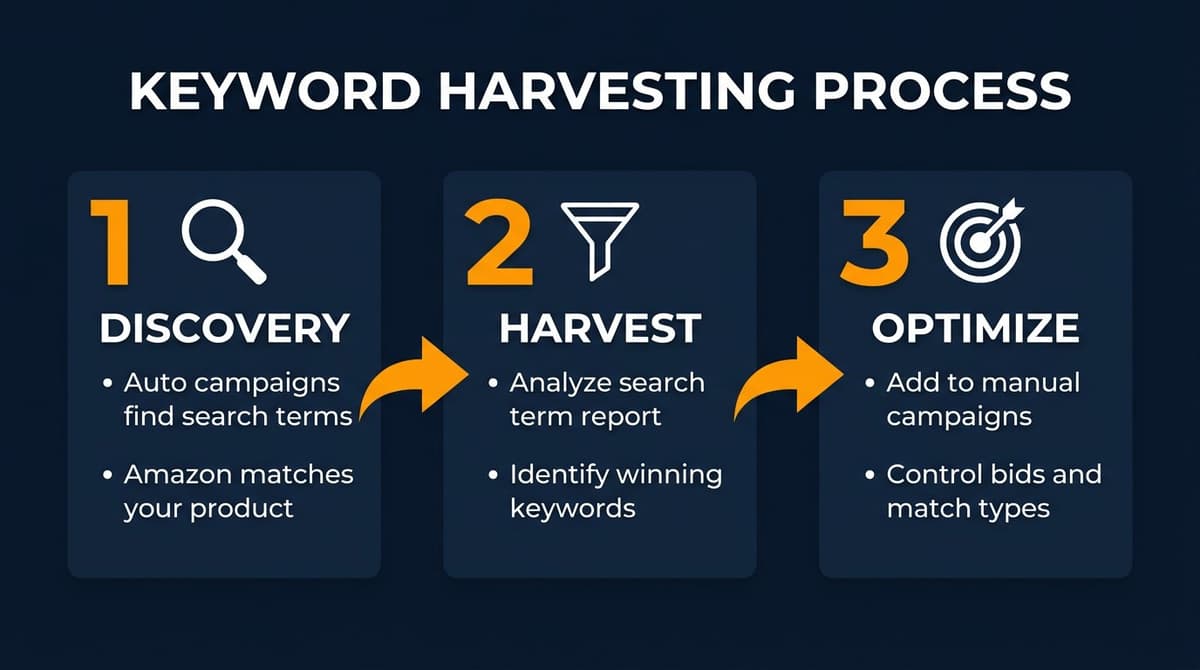
The harvesting process follows three phases:
Phase 1: Discovery (Auto Campaigns)
You launch automatic campaigns and let Amazon find search terms for you.
What Happens in Auto Campaigns
- Amazon analyzes your listing (title, bullets, description, backend keywords)
- It matches your product to customer searches it considers relevant
- You get impressions, clicks, and (hopefully) sales
- Amazon generates a "Search Term Report" showing exactly what customers searched
Auto campaigns cast a wide net. Some catches are gold; others are junk.
Phase 2: Harvest (Identify Winners)
After collecting enough data, you analyze the search term report to find keywords worth keeping.
What Makes a Keyword Worth Harvesting
| Metric | Good Sign |
|---|---|
| Sales | At least 1-2 conversions |
| ACoS | Below your target (often <30%) |
| Click volume | Enough clicks to trust the data (10-20+) |
| Relevance | Actually describes your product |
Not every keyword that converts is worth harvesting. You want consistent performers, not one-time flukes.
Phase 3: Optimization (Manual Campaigns)
You add harvested keywords to manual campaigns with specific match types and bids.
Why Move to Manual
- Control: Set exact bids per keyword instead of campaign-level bids
- Match types: Choose exact, phrase, or broad match strategically
- Budget allocation: Direct more spend toward proven winners
- Negative keywords: Exclude unwanted variations more precisely
Step-by-Step Keyword Harvesting Process
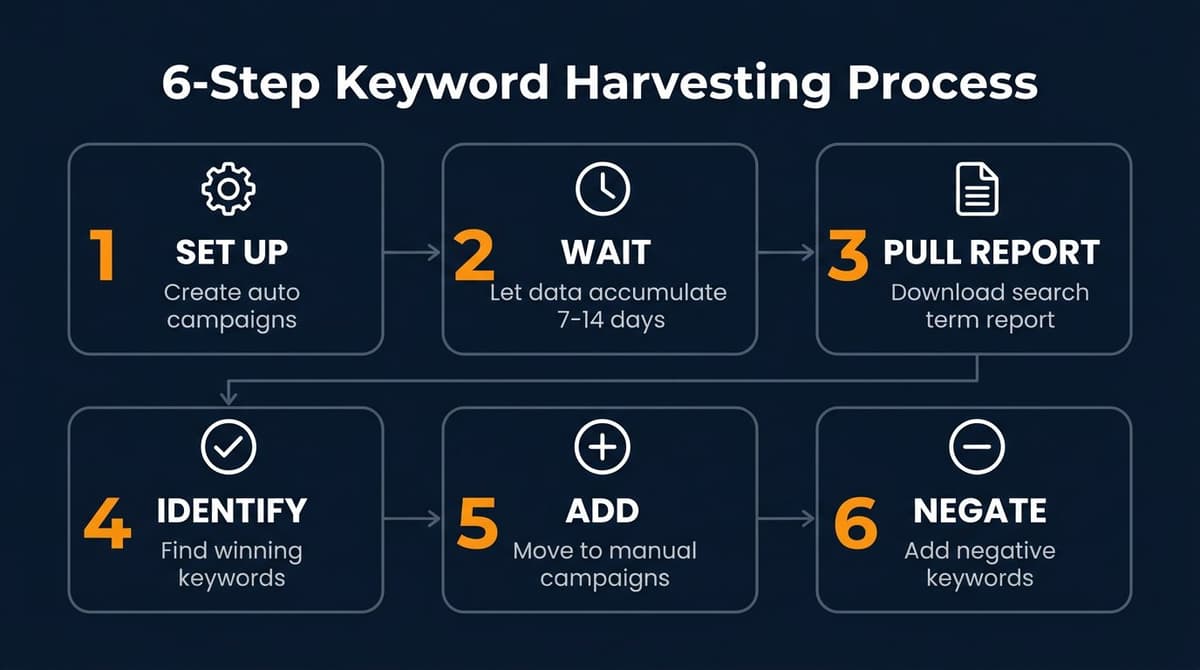
Step 1: Set Up Auto Campaigns
If you don't already have auto campaigns running, create one for each product (or product group).
Auto Campaign Settings
- Targeting: Automatic
- Default bid: Start moderate ($0.50-1.00 depending on category)
- Budget: Enough to gather data ($10-20/day minimum)
- Bidding strategy: Dynamic bids - down only (safer for discovery)
Let It Run
Don't touch it for at least 7-14 days. You need data before harvesting.
Step 2: Pull Your Search Term Report
After gathering data, download your search term report from Seller Central.
How to Access It
- Go to Campaign Manager
- Click Measurement & Reporting → Sponsored Ads Reports
- Select Search Term Report
- Choose your date range (last 30-60 days works well)
- Download the report
This report shows every search term that triggered your ads, along with impressions, clicks, spend, sales, and ACoS.
Step 3: Identify Winning Keywords
Open the report and filter for harvesting candidates.
Filtering Criteria
Look for search terms that meet ALL of these: - Orders ≥ 1 (has converted) - ACoS ≤ your target (profitable) - Clicks ≥ 10 (statistically meaningful)
Example Analysis
| Search Term | Clicks | Orders | ACoS | Harvest? |
|---|---|---|---|---|
| silicone spatula set | 45 | 6 | 18% | ✅ Yes |
| kitchen utensils | 120 | 2 | 65% | ❌ No (high ACoS) |
| red spatula | 8 | 1 | 22% | ⚠️ Maybe (low clicks) |
| spatula | 200 | 3 | 80% | ❌ No (too broad, poor ACoS) |
"Silicone spatula set" is a clear winner—good volume, good conversion, good ACoS. That gets harvested.
Step 4: Add Winners to Manual Campaigns
Create a manual campaign (or add to an existing one) and add your harvested keywords.
Campaign Structure Options
Option A: Single Manual Campaign - Add all harvested keywords to one campaign - Simpler to manage - Good for beginners
Option B: Segmented Campaigns - Separate campaigns by match type (exact vs phrase) - Or by performance tier (top performers vs testing) - More control, more work
Choosing Match Types
| Match Type | Use When |
|---|---|
| Exact | High confidence, proven converter |
| Phrase | Want to capture variations |
| Broad | Still exploring (usually stay in auto) |
For most harvested keywords, start with exact match. You already know the specific term works—no need for Amazon to add variations.
Step 5: Set Your Bids
Your harvested keywords deserve strategic bids, not default ones.
Bidding Approach
- Start at your current CPC: Check what you were paying in the auto campaign
- Adjust based on ACoS target: If ACoS was 15% and target is 25%, you have room to bid higher
- Monitor and optimize: Increase bids for keywords that maintain good ACoS; decrease for those that slip
Step 6: Negate in Auto Campaign (Optional)
To avoid competing with yourself, add harvested keywords as negatives in your auto campaign.
Why Negate
If the same keyword triggers both your auto and manual campaigns, you're: - Bidding against yourself - Splitting data between campaigns - Losing control over which campaign wins
How to Negate
- Go to your auto campaign
- Click Negative Targeting
- Add the harvested keyword as negative exact
Some sellers skip this step intentionally, letting both campaigns run and reviewing performance. There's no single right answer—test what works for you.
Keyword Harvesting Best Practices
Wait for Enough Data
Minimum Thresholds Before Harvesting
- Time: At least 7-14 days
- Clicks per keyword: 10-20 minimum
- Orders: At least 1-2 conversions
Harvesting too early means acting on noise, not signal.
Harvest Regularly
Set a schedule—weekly or bi-weekly works for most sellers.
Harvesting Routine
- Pull search term report
- Filter for winners
- Add to manual campaigns
- Update negative keywords
- Review manual campaign performance
Consistency compounds. A keyword you harvest today might become your top performer in six months.
Don't Ignore High-Spend, No-Sale Keywords
Harvesting isn't just about winners. Your search term report also reveals losers.
What to Do with Losers
- High spend, zero sales: Add as negative keyword immediately
- High spend, low sales (poor ACoS): Consider negating or reducing bids
- Irrelevant terms: Negative exact match, always
Cutting waste is just as valuable as finding winners.
Common Mistakes to Avoid
Mistake 1: Harvesting Too Soon
One sale doesn't make a keyword a winner. You need enough data to trust the pattern.
The Fix
Wait for statistical significance. A keyword with 2 sales from 50 clicks (4% conversion) is more trustworthy than 1 sale from 5 clicks (20% conversion that might be a fluke).
Mistake 2: Only Using Exact Match
Exact match gives you control, but phrase match can capture valuable variations you haven't discovered yet.
The Fix
Consider testing proven keywords in phrase match too. "Silicone spatula set" as phrase match might catch "best silicone spatula set" or "silicone spatula set for cooking."
Mistake 3: Setting and Forgetting
Harvesting isn't a one-time task. Your market changes, competitors change, and keyword performance changes.
The Fix
Review harvested keywords monthly. Pause underperformers. Increase bids on stars. Keep the cycle going.
Mistake 4: No Negative Keyword Strategy
If you harvest winners but don't negate losers, you're only doing half the job.
The Fix
For every harvesting session, also review search terms with high spend and no conversions. Negative those aggressively.
Conclusion
Keyword harvesting is moving winning search terms from auto campaigns to manual campaigns where you control the bids and match types. It's a core part of any successful Amazon PPC optimization strategy.
The process: 1. Run auto campaigns to discover search terms 2. Analyze search term reports 3. Identify profitable keywords (good ACoS, enough data) 4. Add to manual campaigns with strategic bids 5. Optionally negate in auto to avoid overlap 6. Repeat regularly
It's not complicated, but it requires consistency. Sellers who harvest regularly build a library of proven keywords that compound over time.
Start with one product. Pull the report. Find one winner. Move it to manual. That's harvesting—and it works.
Want to Automate Your PPC Analysis?
Nexscope provides structured ecommerce data that teams can use in focused web tools or connect to their existing Agent through API, MCP, or Skills. Ready workflows include Keyword to Ads, Video Clone, and Buy Box Repricer.
Want to find harvesting opportunities? Ask: "Which keywords from my auto campaign should I move to manual?"
Need help with bids? Ask: "What should I bid on this keyword given my target ACoS?"
Teams can reuse the same governed data capability across browser-based research, internal tools, and their Agent environment.
Connect Ecommerce Data to Your Agent
Use Nexscope through API, MCP, or Skills, or open a ready seller workflow.
Explore Ecommerce Data →1,000 free credits • API, MCP & Skills
FAQs
What does "harvest keywords" mean?
Harvesting keywords means identifying high-performing search terms from your automatic PPC campaigns and moving them to manual campaigns. This gives you more control over bids, match types, and budget allocation for your proven winners.
How often should I harvest keywords?
Most sellers harvest weekly or bi-weekly. The key is consistency—regular harvesting builds your keyword library over time. At minimum, review your search term reports once per month.
Should I use exact or phrase match for harvested keywords?
Start with exact match for high-confidence keywords that have proven conversion data. Consider adding phrase match for keywords where you want to capture close variations. Avoid broad match for harvested keywords—that's what auto campaigns are for.
Do I need to negate harvested keywords in my auto campaign?
It's optional but often recommended. Negating prevents your auto and manual campaigns from competing on the same keyword. Some sellers prefer to let both run and compare performance. Test what works for your account.
How many clicks should a keyword have before harvesting?
Wait for at least 10-20 clicks before making harvesting decisions. One sale from 3 clicks isn't reliable data. You want enough volume to trust that the keyword genuinely converts, not just got lucky once.
Sources
- Amazon Advertising: Search Term Reports
- Amazon Seller Central: Campaign Manager Documentation