

How to Run a $10K/Month Shopify Store with 9 Claude Prompts

Claude prompts for Shopify can help a solo operator handle the work that usually gets split across product research, supplier checks, product page copy, ads, email, offers, and weekly analysis. The hard part is not opening a Shopify store. The hard part is keeping it moving after the product goes live.
A small Shopify store still needs decisions every week. Which product should get the first test budget? Which supplier looks risky? Which complaint should the product page answer before the shopper asks it? Which ad hook deserves another $50? Which number says the store is improving, and which number says it is burning cash?
This guide rewrites a practical one-person Shopify operating system into nine reusable AI prompts. The goal is not to pretend that prompts create guaranteed revenue. The goal is to show how a lean ecommerce operator can turn repeatable work into clearer decisions, faster drafts, and a tighter weekly review loop.
Why Shopify Sellers Need Prompt Workflows
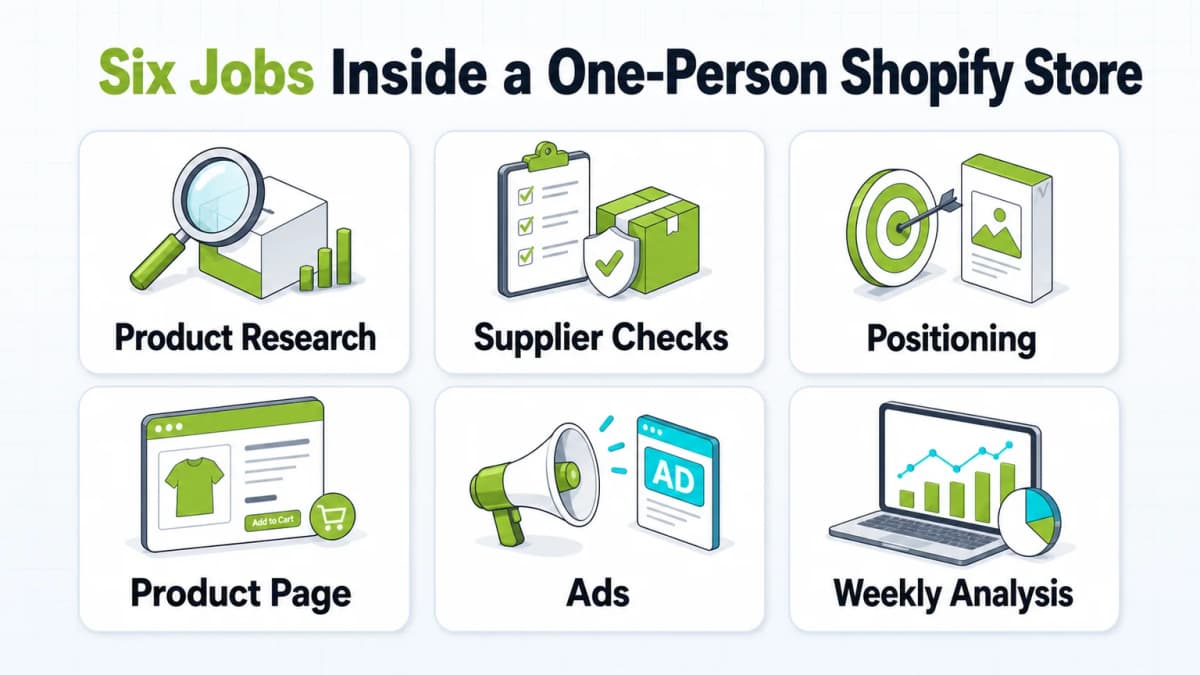
The first product is only the visible part of a Shopify store. Once the product is listed, the operator still has to write copy, check suppliers, make ads, answer objections, read analytics, improve offers, and decide what to test next. A product can have real demand and still lose money if the page is vague, the supplier is unreliable, the shipping promise is unclear, or the ad attracts the wrong traffic.
For a solo operator, AI is useful when it turns messy work into a decision format:
- Product ideas become ranked opportunities.
- Supplier reviews become risk verdicts.
- Competitor complaints become page copy.
- Ad ideas become shootable scripts.
- Weekly metrics become one action to fix.
The useful output is not a prettier paragraph. The useful output is a decision the operator can verify and act on. Shopify's current pricing page and Claude's plan page show why a lean AI-assisted setup can keep fixed costs lower than hiring a full small team early, but prompts still do not remove accountability. The seller still decides what to test, which supplier to trust, which claim is honest, and whether the numbers justify more budget.
The nine prompts below are intentionally specific because vague prompts produce attractive but weak answers. Use them as working templates, then verify every important claim before spending money.
Prompt 1: Product Research Without Fake Precision
Most product research fails when a seller chases what already looks popular. By the time a product is clearly trending, many stores are already selling it. The better starting point is a repeated, annoying problem that buyers understand quickly.
Copy this prompt
Use this prompt to force ranked, verifiable product ideas:
Act as a dropshipping product strategist who has launched and reviewed 200+ ecommerce products.

Goal: Find 5 product opportunities that could be tested on a Shopify store within the next 30 days.

If web research is available, cite the source behind every factual number, including price, demand, competition, and shipping assumptions. If web research is not available, label every factual claim with "[Assumption: verify before spending money]". Do not invent precise statistics.

Hard filters:
- Solves a repeated annoying problem, not a one-time novelty
- Retail price can reasonably sit between $29 and $79
- Search results are not dominated by one obvious brand
- Can be sourced from AliExpress, CJdropshipping, or a comparable supplier with delivery expectations that can be stated honestly
- A 5-second silent video can show the before-and-after result

For each surviving product, provide:
1. One-sentence product description
2. Exact search phrases buyers might use on Google, TikTok, or Amazon
3. Buyer profile and the specific moment when the problem happens
4. Estimated cost, retail price, and gross margin, with assumptions labeled
5. The angle current sellers are missing
6. The most likely reason the product could fail

Rank the 5 products. If the first test budget were $200, say which product should get it and why.

End with a 5-point verification checklist to complete before spending money.
How to use it
Claude can organize research, but the seller should still verify supplier cost, shipping time, current competitor pages, search demand, social content volume, return risk, and basic compliance. A product that looks good in a prompt can still fail because the supplier takes too long, the category is restricted, or the visual before-and-after is weak.
What to verify
The most important line is the ranking. The seller should not leave the prompt with "interesting ideas." The seller should leave with one product to test first and a checklist that prevents false confidence.
Prompt 2: Supplier Risk Review Before the First Order
Supplier risk can kill a store faster than weak copy. Late shipping, damaged packaging, wrong variants, and refund complaints can turn a promising product into payment holds and chargebacks.
Copy this prompt
The prompt needs raw evidence, not just a supplier name. Paste the store name, rating, order count, years active, claimed shipping time, the 10 most recent full reviews, and the 5 worst recent reviews.
Act as a skeptical supplier risk analyst.

Data:
[Paste supplier name, rating, total orders, years active, claimed shipping time, latest 10 full reviews, and latest 5 worst reviews.]

Assess whether this supplier is safe enough for a real Shopify test order. If the evidence is too thin, say "Unknown". Do not guess to sound helpful.

Check:
- Reviews clustered in a suspicious time window
- Gap between claimed shipping time and buyer-reported delivery time
- Complaints about product quality, packaging, wrong item, or missing item
- Mentions of refunds, damage, or never received
- Signs that old reviews describe a different product
- Whether recent 30-60 day reviews should outweigh old positive reviews

Output:
Verdict: Green / Yellow / Red / Unknown
Confidence: High / Medium / Low
Three-sentence reasoning, with each sentence tied to evidence
If Yellow, Red, or Unknown: give two search phrases to find better suppliers
How to use it
- Shipping mismatch: The supplier claims 7-10 days, but buyers mention three or four weeks.
- Variant confusion: Reviews mention wrong color, size, plug, material, or model.
- Quality drift: Older reviews are strong, but recent reviews mention a changed product.
- Evidence gap: There are too few recent reviews to trust the supplier.
What to verify
A green verdict can justify a small test order. A yellow verdict should usually trigger a sample order first. A red verdict should stop the product from moving forward. Unknown is a valid answer because thin data is still risk.
Prompt 3: Positioning From Competitor Listings and Bad Reviews
Competitor listings show what the market already says. Bad reviews show what the market still feels. Together, they reveal the positioning gap.
Copy this prompt
Act as a sharp ecommerce strategist. The goal is to enter a market with existing sellers and find a real positioning gap. Be direct. If there is no meaningful gap, say so.

Competitor pages:
[Paste the top 3 product listings or product pages.]

Unhappy customer reviews:
[Paste 20-30 one-star, two-star, and three-star reviews.]

Answer:
1. The three angles competitors rely on most, one sentence each
2. Whether competitors are all making the same messaging mistake
3. The top 3 complaints ranked by frequency, with approximate count, a short quote, and whether each is product, shipping, or expectation related
4. One position that appears open, plus the honest reason it may be open
5. Two exact product page lines that should answer the top complaint before it appears
6. The positive review themes that the page should emphasize more clearly

Do not suggest "add reviews" or "use better photos" unless the evidence supports the exact reason.
How to use it
If the top listings all promise the same benefit, another store does not need a louder version of the same claim. It needs the objection competitors ignore. That objection might be shipping time, fit, confusing setup, unclear sizing, weak packaging, missing instructions, or a product page that hides a limitation until after purchase.
This logic also applies beyond Shopify. In Amazon and marketplace research, listing optimization often starts with the same question: what does the buyer need to understand before buying?
What to verify
If buyers complain about slow shipping, the page should state the delivery expectation near the top. If buyers complain that the product is smaller than expected, the page should show dimensions clearly. If buyers complain that setup is confusing, the page should include a simple step visual.
The strongest conversion copy often answers the objection before the shopper names it.
Prompt 4: Product Page Copy That Sounds Human
Supplier product descriptions often read like translated catalogs. A Shopify product page needs a cleaner job: explain one problem, show the outcome, reduce doubt, and make the next click feel reasonable.
Copy this prompt
Use the prompt below after the product, buyer, price, supplier copy, and a few real reviews are available.
Rewrite this into product page copy that sounds like a real person recommending something useful, not a catalog.

Product: [Name]
Supplier copy: [Paste supplier copy]
Real reviews: [Paste 3-4 reviews, including one mixed review]
Buyer: [Specific customer and problem]
Price: $[X]
Tone: Direct, calm, slightly restrained, never pushy

Give two versions for testing.

Each version:
- First line: the one problem this product solves. It must stand alone on mobile.
- Three benefits written as outcomes, not features.
- One short paragraph explaining why people keep using it. Do not invent reviews.
- Final sentence that can lead into the buy button without fake urgency.

Each version must be under 180 words.
Version A: calm and plain.
Version B: slightly sharper.

After both versions, identify any line that could appear on any generic product page, then rewrite it.
How to use it
The A/B test should not change everything at once. Keep the price, images, and offer stable. Test the first line, benefit framing, and objection handling. If traffic is low, do not overread early results. The goal is to learn which promise gets shoppers to continue.
What to verify
Weak copy often says "premium quality," "perfect for everyday use," "must-have," or "game changer." These lines can fit any product, which means they help no product. Replace them with a specific outcome, such as "keeps cables off the floor under a standing desk" or "shows the fill line clearly before the bag overflows."
Prompt 5: Short-Form Ad Scripts for TikTok and Reels
TikTok and Reels ads work best when they look native to the feed. Overproduced creative can read as an ad before the viewer understands the problem. The prompt should force a real shooting plan, not just a clever script.
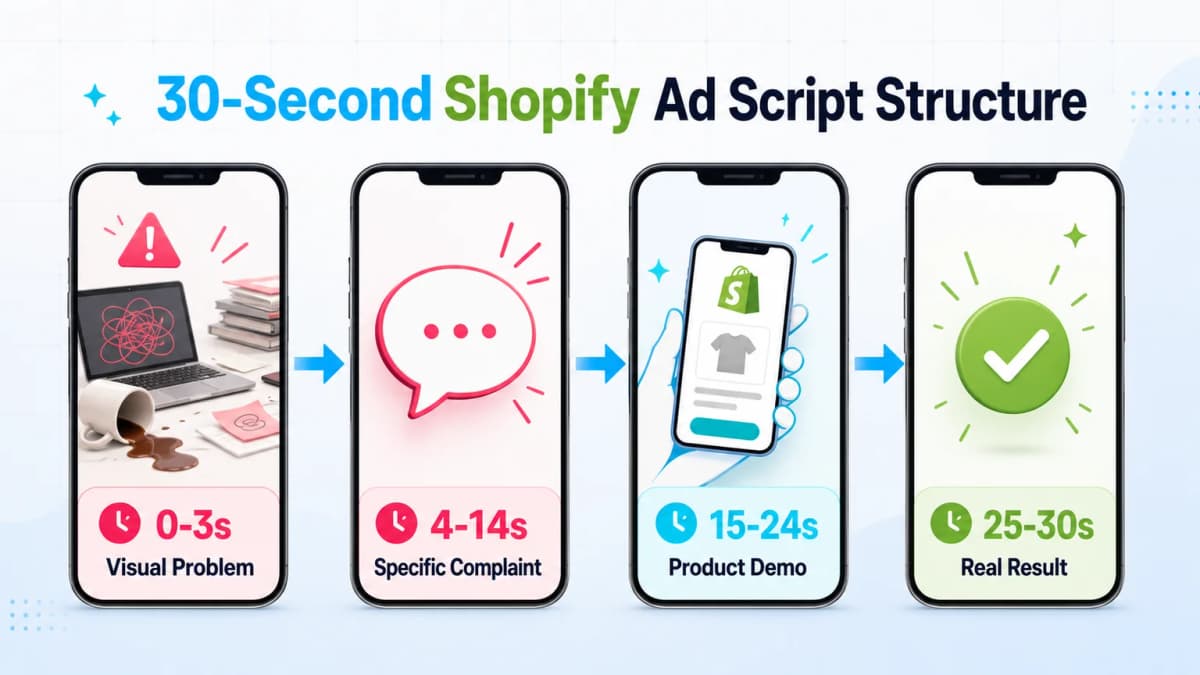
Copy this prompt
Write a 30-second vertical video script for TikTok and Reels. It should feel like a real person filmed it on a phone, not a brand ad.

Product: [Name] - [single most important benefit]
Audience: [specific person in a specific situation]
Setting: Phone camera, real room, normal mess visible

Provide:
- A 4-row storyboard table with time, visual, and exact spoken line
- 0-3 seconds: show the problem visually without explaining it
- 4-14 seconds: describe the problem like a friend complaining
- 15-24 seconds: show one product feature in one continuous shot
- 25-30 seconds: show one real result, then a light CTA
- 4 alternative first-3-second hooks, each based on a physical action that can be filmed alone
- One sentence explaining why each hook could stop the scroll

Ban these phrases: "game changer", "you need this", "are you tired of", "POV", "this changed my life", "I just found out".

Everything must be filmable in a normal apartment with a phone and no extra actor.
How to use it
The first three seconds should show the problem visually. If the product solves tangled cords, show the tangled cords. If it fixes messy cabinet storage, show the cabinet. The viewer should understand the problem even with the sound off.
TikTok's ad guidance recommends using creative elements such as text overlays, transitions, stickers, and a clear CTA. That does not mean the video should feel loud. It means the viewer should never be confused about what is happening.
What to verify
The banned phrase list matters because AI models often default to familiar social ad cliches. A better script sounds plain, specific, and physical. It should describe what appears on screen rather than tell the viewer how to feel.
Prompt 6: Weekly Shopify Analysis That Finds the Bottleneck
The weekly review prompt is the operating loop. Without it, the seller keeps making new pages and new ads without knowing what broke.
Copy this prompt
Act as a direct ecommerce analyst. Be honest and specific. Here is this week's Shopify store data.

Gross margin information:
Selling price: $[X]
Product plus shipping cost: $[X]
Payment and platform fee estimate: $[X]

This week:
Sessions: [X]
Conversion rate: [X%]
Average order value: $[X]
Cart abandonment rate: [X%]
Returning visitor share: [X%]
Top 3 products by revenue and units: [...]
Highest return-rate product: [...]
Traffic source split: [...]
Ad spend: $[X]
Ad-attributed revenue: $[X]
ROAS: [X]

First calculate:
- Break-even ROAS and whether current ROAS is above or below it
- A reasonable conversion-rate range for this product and price point, with assumptions labeled

Then answer in six short paragraphs:
1. The biggest leak in the funnel
2. Which product should get more budget this week and why
3. Which product should be paused and why
4. Whether ad spend is buying real shoppers or low-quality traffic
5. What returning visitor share suggests about product-market fit
6. What will break first if nothing changes for two weeks

End with the most important one-digit number and the single action to take this week.
How to use it
Break-even ROAS shows the minimum ad return needed before the store loses money on paid traffic. A rough formula is:
Break-even ROAS = Selling price / (Selling price - product cost - shipping - variable fees)
If a product sells for $49 and variable cost is $22, contribution margin before ads is $27. Break-even ROAS is 49 / 27, or about 1.81. If the current ROAS is below that number, the ad is likely losing money before fixed costs.
What to verify
Shopify's behavior reports include a conversion rate breakdown that visualizes the path from sessions to checkout. That structure matters because "sales are low" is not a diagnosis. The problem might be traffic quality, product page trust, add-to-cart friction, checkout abandonment, or weak retargeting.
The last line is the real value. A weekly review should end in one action, not ten ideas.
Prompt 7: Email Automation After the First Sale
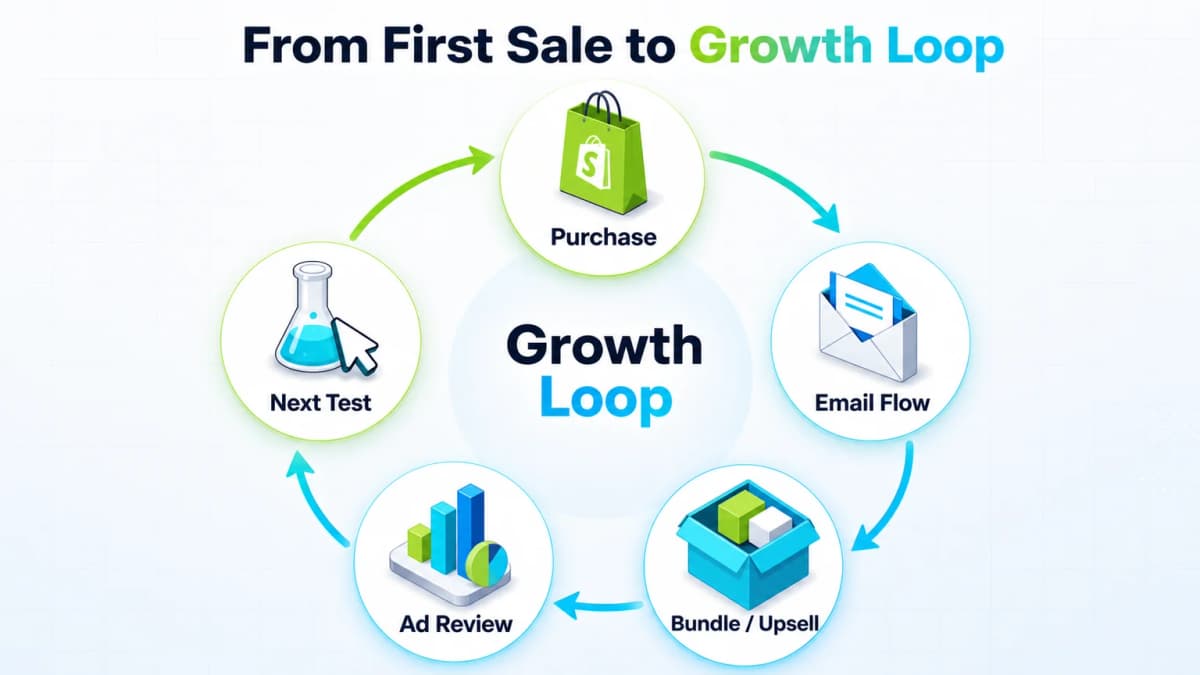
Most stores focus heavily on the first order, then go quiet after purchase. A simple post-purchase flow can set expectations, reduce support questions, request feedback, and introduce a natural second product. Once the first orders start, the store needs retention, average order value, and creative learning. This prompt starts that loop.
Copy this prompt
Write a 5-email post-purchase automation flow for a Shopify store.

Voice: Human, short, no corporate language.
Product: [Name and one-sentence description]
Buyer: [Specific buyer]
Shipping expectation: [X] business days

Email 1, immediately after purchase: Confirm the order in plain language, state shipping expectations honestly, and say what to expect next. No upsell.
Email 2, day 3: Give one genuinely useful tip under 80 words.
Email 3, one day after delivery: Follow up and ask one question. No link. Under 40 words.
Email 4, day 14: Recommend one product that naturally pairs with the purchase and explain why. No discount.
Email 5, day 30: Request a review and ask the buyer to mention one specific thing. One button.

For each email, provide two subject lines and body copy under 100 words.
No emojis, no all caps, no fake urgency.
How to use it
Put this flow into Klaviyo, Shopify Email, Omnisend, or another email tool only after editing the shipping promise and product recommendations. The strongest version is short, useful, and honest about delivery timing.
What to verify
Check that each email matches the real fulfillment timeline, support policy, and product usage experience. Do not recommend a second product unless it genuinely pairs with the first purchase.
Prompt 8: Offer Strategy to Increase Average Order Value
More traffic is expensive. Better order value is often faster to test. The offer prompt should calculate profit impact, not just make bundles sound attractive.
Copy this prompt
Act as a conversion strategist focused on increasing average order value without damaging margin.

Store:
Main product: [Name, retail price, cost]
Other products: [List prices and costs]
Current average order value: $[X]
Buyer: [Who they are]

Provide:
1. One 2-3 product bundle that feels like a better deal while increasing gross margin. Show the math.
2. One post-purchase upsell, including product, price, and why the buyer would accept after checkout.
3. One "buy two for [specific benefit]" reason that is not just a discount.
4. One exact plain-language line of copy for each offer.

For each option, estimate impact on profit per order and say which test should run first.

Do not recommend free shipping unless the math shows profit improves.
How to use it
Use this prompt after the store has at least one product with real orders. The seller should give Claude actual costs, prices, and buyer context so the output is based on profit, not generic bundle advice.
What to verify
Check the math before launching. A higher average order value is not useful if discounts, shipping, returns, or payment fees reduce profit per order.
Prompt 9: Ad Iteration From Real Results
The ad prompt creates scripts. The iteration prompt reads what happened. This is the difference between random testing and compounding creative learning.
Copy this prompt
Act as a social media ad strategist. Read this batch of video ad results and decide what the next batch should test.

For each ad:
[Paste hook, opening visual, spend, impressions, CTR, CPC, add-to-carts, purchases, and comments if available.]

Answer:
1. Which ad won and the most likely reason: hook, problem framing, offer, product, or sample noise
2. Which ads should be turned off now and which need more spend before judgment
3. The shared pattern among winners and what the weak hooks lacked
4. Three new hooks for the next batch, based on the winners
5. Whether the problem is creative, offer, or product, and how to tell

If the sample is too small, say so and estimate the minimum spend or clicks needed before trusting the result.
How to use it
Run this after a batch of ads has enough impressions and clicks to compare. The goal is to identify a pattern in winning hooks, not to keep asking for unrelated new ideas.
What to verify
Do not trust a winner from a tiny sample. If spend, clicks, or purchases are too low, the correct conclusion may be that the seller needs more data before choosing the next creative direction.
After a few cycles, the store stops guessing at hooks. It starts building a small internal library of what buyers actually respond to.
How to Use These Prompts Without Turning the Store Into Guesswork
The prompts work best when the seller is strict about evidence. AI can sound confident even when the input is thin. The prompt has to create friction against that confidence.
Always label assumptions
Every prompt that touches product demand, pricing, margins, delivery time, or performance benchmarks should include one sentence:
If the data is not provided or cannot be verified, label the claim as an assumption and tell the seller exactly how to verify it.
That sentence prevents many expensive mistakes.
Verify supplier, margin, shipping, and ad data
The seller should manually verify:
- Supplier unit cost, variants, and minimum order quantity
- Recent review quality and shipping complaints
- Real shipping time by destination market
- Payment fee, platform fee, refund rate, and expected returns
- Ad platform data after enough clicks to make a decision
- Product claims, safety restrictions, and compliance risk
This matters for any platform, not only Shopify. Sellers using Amazon workflows face the same evidence problem when choosing products, reading reviews, or building PPC campaigns.
Keep the final decision human
AI should generate the shortlist, the draft, the risk summary, and the decision frame. The seller still approves the product, the promise, the supplier, the budget, and the next test. That is the practical line between automation and careless delegation.
Nexscope: A Claude Alternative Built for Ecommerce Workflows
Claude is useful for general prompts: structuring thinking, drafting product pages, summarizing review complaints, and turning messy notes into a clearer weekly action. For ecommerce sellers, the limitation is that a general chat workflow still depends heavily on what the seller manually pastes in.
Nexscope is a Claude alternative built specifically for ecommerce workflows. Instead of starting from a blank chat box, sellers can work with live ecommerce data and dedicated skills for review analysis, product research, patent and IP risk checks, keyword research, market research, competitor research, product sourcing, pricing analysis, image generation, and video generation.
Why ecommerce sellers may choose Nexscope over a general Claude workflow:
- Real ecommerce context: Use signals from sources such as Amazon, TikTok Shop, Jungle Scout, Google Trends, Amazon Brand Analytics, and more.
- Seller-specific skills: Run product research, review analysis, competitor research, keyword research, sourcing, pricing, and IP risk checks with workflows designed for ecommerce operators.
- Less manual setup: Start from ecommerce tasks instead of rebuilding the same long prompt structure every time.
- Decision-ready outputs: Move from open-ended answers to structured research, risk checks, opportunity rankings, listing gaps, and creative directions.
- Creative execution support: Create or plan product visuals, lifestyle scenes, short-form product videos, and ad creatives through image generation and video generation.
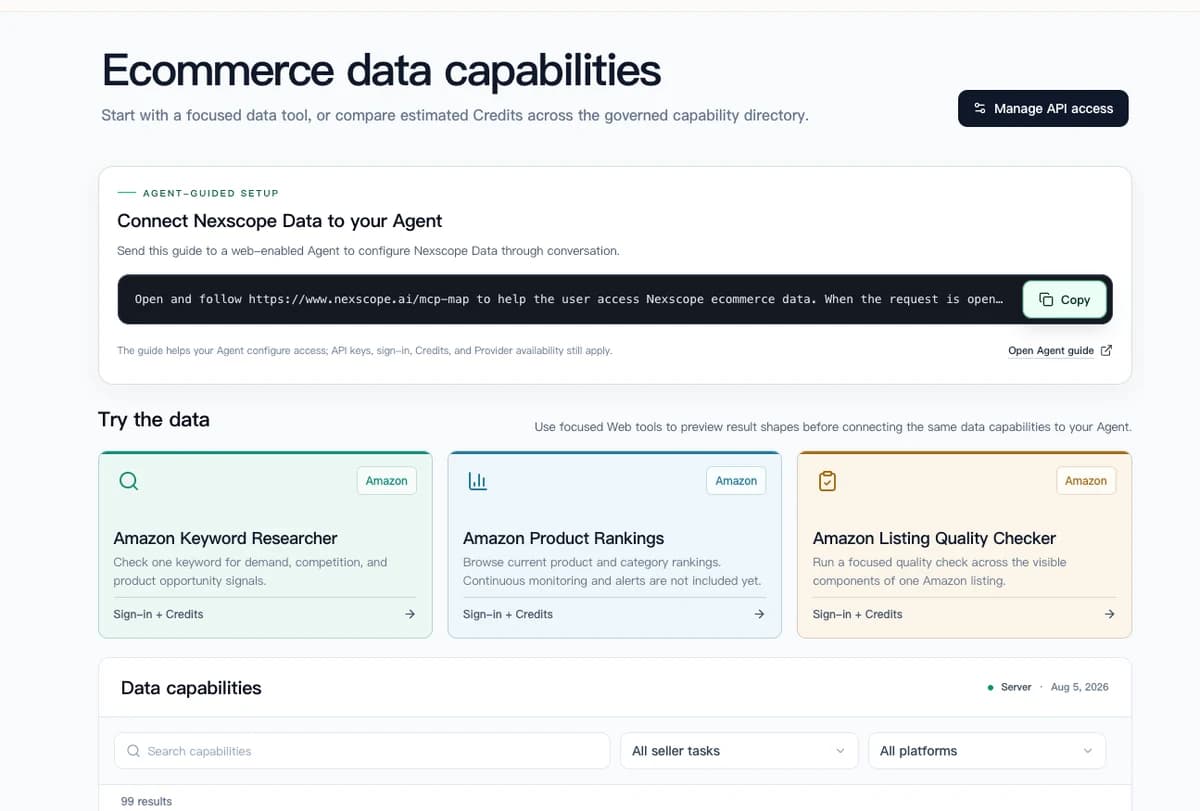
Use Claude prompts for general repeatable thinking. Use Nexscope as the ecommerce-focused alternative when those prompts need live market data, seller-specific skills, and a clearer path from research to action.
Use Nexscope for Ecommerce Decisions That Need Live Data
Move beyond reusable Claude prompts with ecommerce-focused skills, live market signals, review analysis, product research, sourcing, pricing, and creative workflows in one AI agent.
Get Started Free →No coding required • Instant access
Conclusion
A one-person Shopify store does not need prompts because prompts are trendy. It needs prompts because the operator cannot do product strategy, supplier review, page copy, creative testing, email, offers, and analytics with the same level of attention every night.
The nine prompts above turn those repeated jobs into structured workflows:
- Research finds product problems worth testing.
- Supplier review avoids obvious fulfillment risk.
- Angle analysis turns competitor reviews into positioning.
- Page copy makes the product easier to understand.
- Ad scripts create shootable short-form tests.
- Weekly analysis shows the real bottleneck.
- Email, offers, and iteration keep the store improving after the first sale.
The number of prompts is not the advantage. The advantage is removing the seller as the bottleneck for every repeatable task while keeping the final decision human.
Frequently Asked Questions
Can Claude really help run a Shopify store?
Claude can help with research structure, supplier review, product page copy, ad scripts, email flows, offer ideas, and weekly analytics reviews. It should not be treated as a fully autonomous store operator. A seller still needs to verify supplier data, margins, shipping promises, product claims, ad results, and customer feedback before making decisions.
What are the best Claude prompts for Shopify beginners?
The best beginner prompts cover product research, supplier risk, product page copy, ad scripts, and weekly metrics. Those five areas give a new store the highest leverage because they affect what gets tested, whether fulfillment is realistic, how the product is explained, how traffic is acquired, and what gets fixed each week.
Can AI choose winning Shopify products?
AI can create a ranked product shortlist and explain why each idea may work or fail. It cannot guarantee a winning product. Product demand, supplier reliability, creative quality, pricing, shipping time, and buyer expectations still have to be tested with real market evidence.
How should Shopify sellers verify AI-generated product research?
Sellers should verify product cost, delivery time, recent supplier reviews, competing product pages, search demand, social content volume, ad restrictions, return risk, and basic compliance. Any AI-generated number that does not have a clear source should be treated as an assumption until checked manually.
Can Claude write product pages and ads?
Claude can draft product pages and ad scripts, especially when it receives real supplier copy, reviews, buyer details, and product constraints. The seller should remove generic claims, check that the promise is true, and test multiple versions rather than trusting the first output.
How often should a Shopify seller review store data with AI?
A weekly review is a practical cadence for small stores. The seller can paste sessions, conversion rate, AOV, cart abandonment, traffic sources, ad spend, ROAS, top products, and return issues into a structured prompt. The output should end with one number and one action for the week.
What should not be delegated to AI in a Shopify store?
Final decisions should stay human. AI should not approve legal claims, confirm supplier reliability, decide ad budget without performance data, promise shipping times, handle sensitive customer situations without review, or publish product claims that the seller cannot verify.
Sources
- Shopify. (2026). Pricing: Find the Right Plan for Your Business. Retrieved from shopify.com
- Anthropic. (2026). Choose a Claude Plan. Retrieved from support.claude.com
- Shopify Help Center. (2026). Behavior Reports. Retrieved from help.shopify.com
- TikTok Ads Manager. (2026). Creative Best Practices for Performance Ads. Retrieved from ads.tiktok.com
- TikTok Ads Manager. (2025). About Creative Center. Retrieved from ads.tiktok.com