

Shopify SEO Checklist: 12 Steps to Grow Organic Traffic

A Shopify SEO checklist helps store owners turn scattered optimization tasks into a repeatable system. Without one, it is easy to install an SEO app, update a few meta descriptions, and still miss the pages that actually drive revenue: collections, product pages, buyer guides, and technical templates.
Search is also changing. Google still matters, but shoppers now discover products through AI Overviews, ChatGPT, Perplexity, Gemini, and marketplace-style recommendation systems. A modern Shopify SEO process should make every important page easier for search engines and AI systems to understand, cite, and recommend.
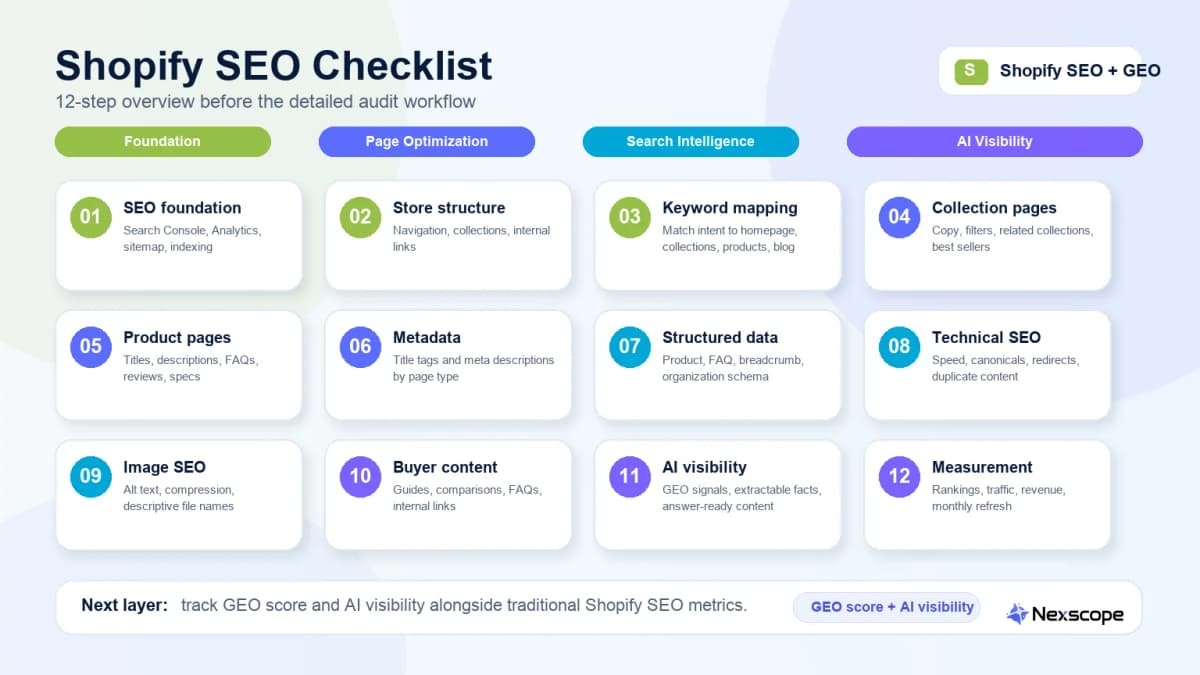
This checklist organizes Shopify SEO into 12 practical steps. It starts with the technical foundation, moves through collection and product page optimization, then adds structured data and AI visibility readiness so the store is not only easier to rank, but easier to understand.
Shopify SEO Checklist: Quick Priority Table
| Step | Area | Priority | Page Type | What to Check |
|---|---|---|---|---|
| 1 | SEO foundation | High | Whole store | Search Console, Analytics, sitemap, indexing |
| 2 | Store architecture | High | Homepage, collections | Navigation, collection depth, internal links |
| 3 | Keyword mapping | High | All ranking pages | One primary intent per page |
| 4 | Collection SEO | High | Collection pages | Intro copy, filters, internal links, intent match |
| 5 | Product SEO | High | Product pages | Titles, descriptions, FAQs, reviews, specs |
| 6 | Metadata | Medium | All pages | Title tags and meta descriptions |
| 7 | Structured data | High | Products, breadcrumbs, FAQs | Product schema, review schema, FAQ schema |
| 8 | Technical SEO | High | Theme and templates | Speed, canonicals, redirects, duplicate content |
| 9 | Image SEO | Medium | Product and collection pages | Alt text, compression, file names |
| 10 | Content SEO | Medium | Blog and guides | Buyer questions, comparison pages, buying guides |
| 11 | AI visibility | High | Product, collection, FAQ content | Entity clarity, answer-ready content, source signals |
| 12 | Measurement | High | Whole store | Rankings, traffic, revenue, refresh schedule |
The highest-impact Shopify SEO work usually happens on collection pages, product pages, and technical templates. Blog content supports the store, but it should not replace optimization on pages that can convert visitors into buyers.
1. Set Up the SEO Foundation First
Before changing page copy, make sure search engines can find, crawl, and measure the store. This is the part of the checklist that prevents wasted content work.
Connect Google Search Console and Analytics
Google Search Console shows which queries trigger impressions, which pages receive clicks, and which pages have indexing or enhancement issues. Google Analytics helps connect organic traffic to engagement and revenue.
Check:
- Search Console is verified for the correct domain.
- The preferred domain version is consistent across Shopify, Search Console, and analytics tools.
- Product, collection, blog, and homepage traffic can be segmented.
- Organic sessions and revenue are visible in analytics reporting.
Submit and Check the Shopify Sitemap
Shopify automatically generates sitemap files, usually available at /sitemap.xml. Submitting the sitemap does not guarantee rankings, but it helps Google discover important pages faster.
Check:
- The sitemap is submitted in Google Search Console.
- The sitemap includes products, collections, pages, and blog posts.
- Deleted or redirected URLs are not still being treated as priority pages.
- Important collection and product URLs are indexable.
Confirm Indexing for Key Pages
Not every page needs to rank, but every revenue-driving page should be indexable unless there is a deliberate reason to exclude it.
Prioritize:
- Homepage
- Top collection pages
- Best-selling product pages
- High-margin product pages
- Buying guides and comparison articles
- Brand trust pages, such as About and shipping pages
If a page is not indexed, inspect the URL in Search Console before rewriting content. Indexing issues often come from noindex rules, canonical conflicts, duplicate templates, weak internal linking, or thin page content.
2. Fix Store Structure Before Optimizing Content
Shopify stores often lose SEO value because the site structure is too flat, too deep, or too dependent on filters. Search engines and shoppers should both understand how products are grouped.
Keep Collections Close to the Homepage
Important collection pages should be reachable within a few clicks from the homepage. If a collection matters for revenue, it should not be buried in a menu, hidden behind faceted filters, or only accessible from a product page.
Useful collection structures include:
- Category collections, such as
Women's Running Shoes - Use-case collections, such as
Gifts for New Parents - Material or feature collections, such as
Leather Crossbody Bags - Problem-solution collections, such as
Skincare for Dry Skin
Use Clear Navigation and Internal Links
Navigation should reflect how shoppers search. A store can have strong products and still underperform if its internal links do not help search engines identify priority pages.
Check:
- Main navigation links to major collections.
- Collection pages link to related collections where helpful.
- Blog posts link back to relevant product and collection pages.
- Best-selling products receive internal links from collections, guides, and comparison pages.
For stores built with AI-assisted workflows, tools and planning processes should still result in clear site architecture. AI can help generate product pages and collections, but structure still needs editorial control. Nexscope has also covered how AI can help build Shopify stores, but the SEO value depends on how the store is organized after launch.
Avoid Orphan Product Pages
An orphan product page has no meaningful internal links pointing to it. Search engines may still discover it through the sitemap, but it has fewer signals showing that the page matters.
Fix this by linking important products from:
- Relevant collection pages
- Buying guides
- Gift guides
- Comparison articles
- Homepage modules
- Related product widgets
3. Map Keywords to the Right Shopify Page Types
Keyword research is not just a list of phrases. For Shopify SEO, every keyword needs a page type.
Homepage Keywords
The homepage should usually target the brand name and broad store positioning. It can support category terms, but it rarely ranks well for every product keyword.
Good homepage keyword targets:
- Brand name
- Store category
- Brand plus product category
- Brand plus use case
Collection Page Keywords
Collection pages are usually the best target for category and commercial-intent keywords. If a shopper searches for a product type, the best result is often a collection, not a single product.
Examples:
organic cotton baby clotheswaterproof hiking backpacksvegan leather tote bagsdesk lamps for small spaces
Product Page Keywords
Product pages should focus on specific product names, variations, attributes, and purchase-ready queries.
Examples:
- Product name plus brand
- Product type plus material
- Product type plus size
- Product type plus feature
- Product type plus problem solved
Blog Keywords
Blog content should answer buyer questions before the shopper is ready to choose a product. It should also link to the right collection or product page.
Examples:
how to choose a hiking backpackbest fabric for summer dressesceramic vs stainless steel cookwarehow to style a crossbody bag
A strong Shopify SEO checklist maps each keyword to one page type before copy is written. This prevents the homepage, collection pages, product pages, and blog posts from competing against each other.
4. Optimize Shopify Collection Pages
Collection pages are one of the biggest missed opportunities in Shopify SEO. Many stores leave them as product grids with a short title and no helpful context.
Add Useful Collection Copy
Collection copy should help shoppers choose. It should not be a long block of generic SEO text at the bottom of the page.
Useful collection copy can include:
- Who the collection is for
- What problem the products solve
- Key materials, sizes, or features
- How to choose between products
- Links to related collections
- Short FAQs
Use Search Intent in Collection Titles
Collection titles should match how shoppers search. A title like New Arrivals may be useful for navigation, but it is rarely enough for SEO.
Better collection title examples:
Women's Waterproof Hiking JacketsOrganic Cotton Baby PajamasSmall Space Desk LampsVegan Leather Work Totes
Add Internal Links to Best-Selling Products
Collection pages can help product pages rank by passing internal link signals. If a product is a best seller, high-margin item, or strategic launch product, make sure it receives clear links from the relevant collection.
Consider adding:
- Featured product modules
- Staff picks
- Best seller sections
- Comparison rows
- Buying guidance blocks
5. Optimize Shopify Product Pages
Product pages need to convince both search engines and buyers. A product page with only a manufacturer description, a few photos, and a price is usually too thin to rank or convert well.
Write Product Titles for Search and Buyers
Product titles should be descriptive without becoming keyword-stuffed. A good title includes the product type and the most important differentiator.
Examples:
Linen Button-Down Shirt for Warm WeatherCeramic Pour-Over Coffee DripperWaterproof Travel Backpack with Laptop Sleeve
Avoid titles that only use internal names or vague branding, such as The Luna, unless the brand already has strong search demand.
Replace Manufacturer Descriptions
Duplicate manufacturer descriptions are common in Shopify stores, especially dropshipping and resale catalogs. They create weak differentiation and can make many product pages look nearly identical.
A stronger product description should include:
- Main use case
- Key benefits
- Materials or specs
- Size or compatibility details
- What makes the product different
- Care instructions when relevant
- Shipping or bundle information when relevant
Add FAQs, Specs, Reviews, and Use Cases
Product pages should answer the questions a shopper would ask before purchase. This also helps AI systems extract clearer product facts.
Useful product-page content includes:
- Size and fit details
- Materials and ingredients
- Compatibility
- Warranty
- Shipping times
- Use cases
- Review snippets
- Product FAQs
This is also where ecommerce teams can use customer reviews as a source of SEO insight. Review patterns often reveal missing buyer questions, unclear product claims, and language shoppers use naturally. Content around Amazon listing optimization follows the same principle: the best page copy often comes from real buyer language, not internal product jargon.
6. Improve Title Tags and Meta Descriptions
Title tags and meta descriptions do not fix weak pages by themselves, but they influence relevance and click-through behavior.
Title Tag Formula for Shopify Pages
Use page-specific formulas instead of writing every title from scratch.
Examples:
- Homepage:
Brand Name | Product Category for Audience - Collection:
Product Type for Use Case | Brand Name - Product:
Product Name - Main Benefit | Brand Name - Blog:
Question or Guide Topic | Brand Name
Keep titles readable. If the main keyword makes the title awkward, rewrite the title instead of forcing exact-match phrasing.
Meta Description Formula for Product and Collection Pages
Meta descriptions should help the searcher decide whether the page is relevant.
Useful formulas:
- Collection:
Shop [product type] designed for [use case]. Compare [features], find the right fit, and order from [brand]. - Product:
Discover [product name], built for [use case] with [key feature]. See details, reviews, sizing, and shipping options. - Blog:
Use this guide to [solve problem], compare options, and choose the right [product/category] for [use case].
Common Metadata Mistakes
Avoid:
- Same title tag across many products
- Same meta description across many collections
- Titles that start with the brand name on every page
- Keyword stuffing
- Descriptions that do not match the page content
7. Add Product Schema and Structured Data
Structured data helps search engines understand product facts. It can also support rich results, product snippets, and clearer AI extraction.
Check Product Schema
Product schema should accurately reflect what is visible on the page. Do not mark up content that users cannot see.
Important product fields include:
- Product name
- Image
- Description
- Brand
- SKU or product identifier
- Offers
- Price
- Availability
- Review or aggregate rating when available and compliant
Add Review, FAQ, Breadcrumb, and Organization Schema
Structured data should support the whole store, not just individual products.
Useful schema types for Shopify stores include:
- Product
- BreadcrumbList
- Organization
- FAQPage
- Article
- Review or AggregateRating when eligible
Test Rich Results
Use Google's testing tools to validate structured data. Errors do not always block rankings, but they can prevent rich results or create confusing signals.
Check:
- Required fields are present.
- Product prices match the visible page.
- Availability is accurate.
- Reviews are not marked up incorrectly.
- FAQ content is visible on the page.
8. Fix Technical Shopify SEO Issues
Technical SEO is where many Shopify stores lose crawl efficiency and ranking potential. Some issues are theme-related, while others come from apps, migrations, filters, or duplicate templates.
Page Speed and Core Web Vitals
Shopify themes, apps, product media, and tracking scripts can slow pages down. Speed matters for user experience and can affect SEO performance.
Check:
- Largest images are compressed.
- Unused apps are removed.
- Product media is not oversized.
- Third-party scripts are necessary.
- Mobile performance is acceptable.
Robots.txt and Canonicals
Shopify allows some control over robots.txt and canonical behavior, but stores should be careful when changing crawl rules.
Check:
- Important pages are not blocked.
- Canonical tags point to the correct page.
- Variant and filter URLs do not create unnecessary duplicate indexable pages.
- Search result pages are not accidentally indexed.
Duplicate Content
Duplicate content can come from product variants, tags, filters, copied descriptions, and collection paths.
Fixes may include:
- Unique product descriptions
- Proper canonical tags
- Better collection copy
- Consolidated thin pages
- Cleaner internal linking
Broken Links and Redirects
Product deletions, collection changes, and migrations can create broken links. Redirects should preserve useful traffic and avoid redirect chains.
Check:
- Deleted product URLs redirect to the closest relevant alternative.
- Old collection URLs redirect to current collections.
- Internal links do not point to redirected URLs when they can point directly to the final page.
- 404 pages are monitored after catalog updates.
9. Optimize Images for Search and Conversion
Images matter twice. They help shoppers understand the product, and they help search systems understand the page.
Use Descriptive Alt Text
Alt text should describe the image clearly. It should not be a place to stuff keywords.
Better alt text examples:
Black waterproof hiking backpack with front zipper pocket and laptop sleeveOrganic cotton baby pajamas in sage green with snap buttonsCeramic pour-over coffee dripper on a kitchen counter
Compress Large Product Images
Large images can slow down product and collection pages. Use high-quality compression and modern image formats when possible.
Check:
- Product images are clear but not unnecessarily large.
- Collection thumbnails load quickly.
- Lifestyle images are optimized for mobile.
- Hero banners do not hurt the first contentful paint.
Name Files Before Uploading
Descriptive file names are a small signal, but they also help content teams manage assets.
Example:
- Weak:
IMG_4921.jpg - Better:
waterproof-hiking-backpack-black.jpg
Need Listing-Ready Product Images? Nexscope Product Photography Service
SEO can bring shoppers to a product page, but product images often decide whether those shoppers keep reading, trust the product, and add it to cart. If a Shopify store needs fresh listing visuals, PDP images, model shots, studio product photos, lifestyle scenes, or ad-ready creatives, Nexscope's Product Photography Service can help ecommerce brands create visuals for Shopify, Amazon, TikTok Shop, Walmart, and DTC stores.
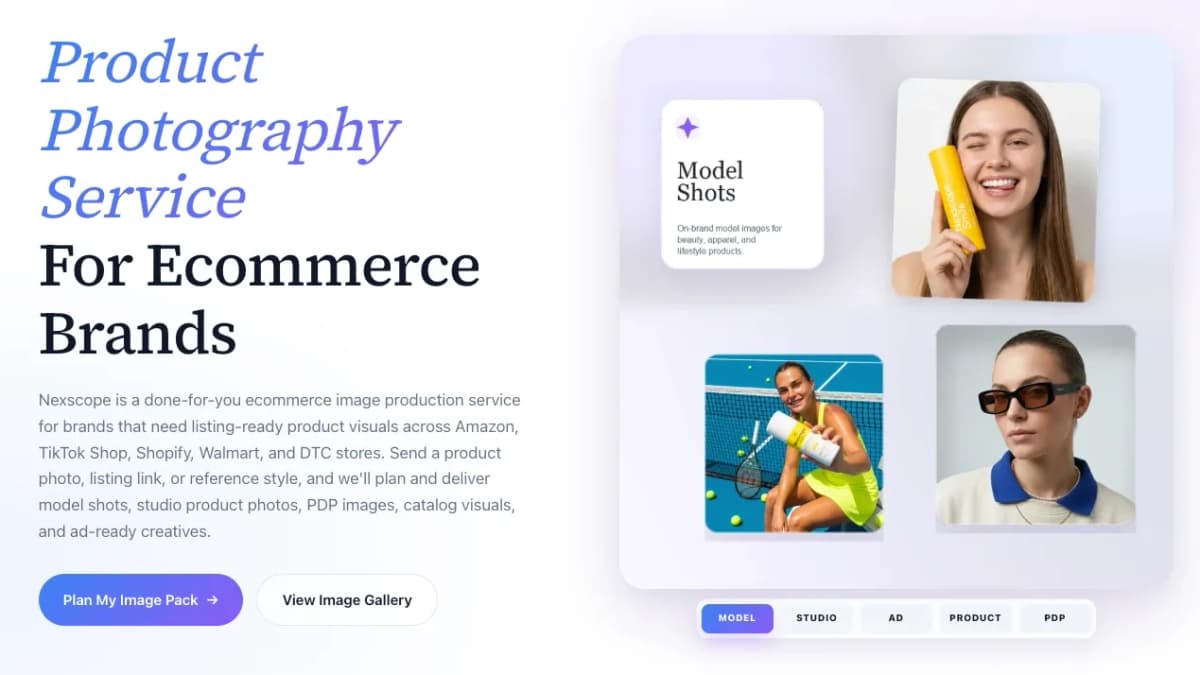
The service is useful when a product page has traffic but weak conversion signals: unclear hero images, thin lifestyle context, inconsistent PDP visuals, or creative assets that do not explain the product's value. Better visuals should still match the real product accurately, but stronger product imagery can improve the conversion side of SEO traffic.
Need Listing-Ready Product Images?
Nexscope Product Photography Service helps ecommerce brands create model shots, studio product photos, PDP images, lifestyle scenes, and ad-ready creatives for Shopify and marketplace listings.
Plan My Image Pack →10. Build Blog Content Around Buyer Questions
Blog content should not exist just to publish more posts. It should answer buyer questions that connect to products and collections.
Write Buying Guides
Buying guides work well when shoppers need help choosing between products.
Examples:
How to Choose a Hiking BackpackBest Desk Lamps for Small ApartmentsWhat to Look for in Organic Baby Pajamas
Compare Product Types
Comparison content helps shoppers evaluate options and gives search engines more context about the category.
Examples:
Ceramic vs Stainless Steel CookwareLinen vs Cotton ShirtsHard Shell vs Soft Shell Luggage
Answer Pre-Purchase Questions
Pre-purchase questions are especially useful for AI search visibility because they are often phrased conversationally.
Examples:
What size backpack fits under an airplane seat?Are linen shirts good for humid weather?What is the best lamp for eye strain?
Link Blog Posts Back to Collections and Products
Blog posts should support commercial pages. A guide that attracts traffic but never links to relevant products leaves revenue on the table.
Natural links can point to:
- Category collections
- Best-selling products
- Comparison pages
- Product bundles
- Related educational guides
11. Prepare Your Store for AI Search and GEO
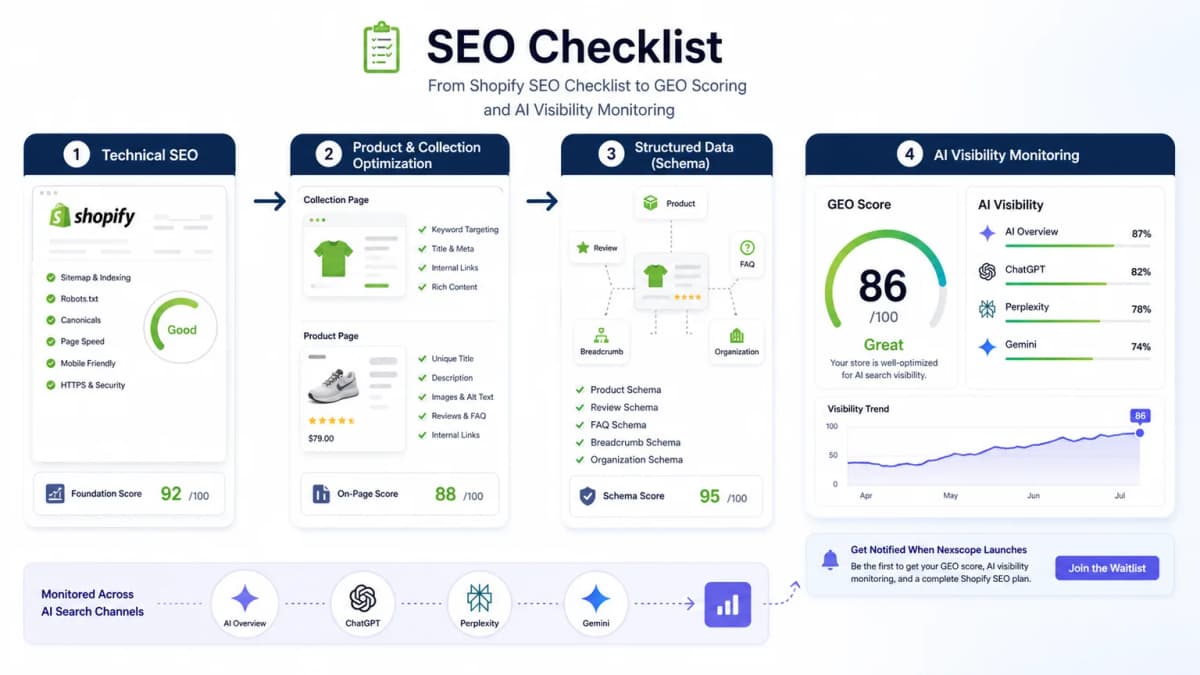
SEO is no longer only about ranking in a list of blue links. AI systems summarize, compare, cite, and recommend. That makes clarity, structure, and trust signals more important.
Answer Conversational Queries
AI search often responds to full questions. Shopify stores should include concise answers to questions shoppers actually ask.
Examples:
Which backpack is best for weekend travel?Is this fabric safe for sensitive skin?What size should be chosen between two sizes?Can this product be used outdoors?
Product FAQs, collection FAQs, and buying guides can all support these queries.
Make Product Facts Easy to Extract
AI systems need clean facts. Product pages should make important details easy to find.
Useful extractable facts include:
- Product category
- Materials
- Dimensions
- Compatibility
- Use case
- Price range
- Availability
- Shipping region
- Warranty
- Review signals
Build Entity Signals Around Brand, Products, and Categories
Entity signals help search systems understand what the brand sells and how its products relate to a category.
Strengthen entity clarity with:
- Consistent brand name
- Clear About page
- Organization schema
- Product schema
- Category-specific collection pages
- Authoritative buying guides
- Consistent product naming
Monitor AI Visibility, Not Just Rankings
Traditional rank tracking does not show whether a store appears in AI summaries, product recommendations, or answer-style search experiences.
Nexscope now offers an AI Product Visibility Tool for ecommerce teams. Shopify and marketplace sellers can use it to understand:
- Whether a product appears in AI shopping answers
- Where it ranks and how often it becomes the primary recommendation
- Which competing products appear instead
- Which sources and product signals AI systems rely on
- What actions can improve product visibility over time
The tool checks product-level visibility across ChatGPT, Claude, Gemini, and DeepSeek using a product name, URL, or ASIN. Learn more about the AI Product Visibility Tool, or launch a check directly to benchmark mentions, rankings, citations, competitors, and recommendation gaps.
See Whether AI Shopping Answers Recommend Your Product
Check product mentions, rankings, citations, competing recommendations, and the visibility gaps to address next.
Run an AI Visibility Check →Use a product URL, name, or ASIN • Instant workflow
12. Track Rankings, Traffic, and Revenue
SEO should be measured by more than impressions. A Shopify SEO checklist should connect optimization work to traffic, engagement, and sales.
Track Organic Traffic by Page Type
Segment organic performance by:
- Homepage
- Collection pages
- Product pages
- Blog posts
- Brand pages
This helps identify whether SEO improvements are reaching commercial pages or only driving informational traffic.
Monitor Queries in Search Console
Search Console query data shows how Google understands each page.
Look for:
- Queries that match the page intent
- Irrelevant queries that suggest unclear content
- High-impression, low-click terms
- Collection pages that rank for product terms
- Product pages that rank for category terms
Watch Collection and Product Page Conversion
Organic traffic only matters if the page can move shoppers forward.
Track:
- Add-to-cart rate
- Product page conversion
- Collection page engagement
- Revenue from organic sessions
- Assisted conversions from blog posts
Refresh the Checklist Every Month
Shopify SEO is not a one-time setup. Products change, collections change, search demand changes, and AI search behavior changes.
Monthly review should include:
- New indexing issues
- Declining pages
- New product launches
- Collection copy gaps
- Structured data errors
- Top queries and missed opportunities
- Competitor changes in AI and Google results
Shopify SEO Checklist by Page Type
| Page Type | SEO Checks |
|---|---|
| Homepage | Brand positioning, main category links, title tag, meta description, internal links to key collections |
| Collection pages | Keyword-matched title, useful intro copy, internal links, filters, FAQs, unique content |
| Product pages | Descriptive title, unique description, specs, FAQs, reviews, image alt text, product schema |
| Blog posts | Buyer questions, comparison content, internal links to collections, FAQ section, sources |
| Technical templates | Canonicals, indexability, speed, structured data, redirects, mobile usability |
Common Shopify SEO Mistakes to Avoid
- Relying only on SEO apps - Apps can help with metadata, schema, redirects, and audits, but they do not replace strategy, content quality, or page intent.
- Using duplicate product descriptions - Copied supplier descriptions make product pages weaker and less useful.
- Ignoring collection pages - Collection pages often have better commercial intent than blog posts.
- Optimizing for keywords without buyer intent - A page should match what the searcher wants to compare, learn, or buy.
- Forgetting structured data - Product and FAQ schema can help search engines understand the page more clearly.
- Treating AI search as separate from SEO - AI visibility depends on clear content, structured data, entity signals, and trusted sources.
Conclusion
A strong Shopify SEO checklist starts with the basics: indexing, site structure, keyword mapping, and clean technical templates. The biggest growth opportunities usually come next, through better collection pages, stronger product pages, structured data, buyer-focused content, and ongoing measurement.
For many Shopify teams, the hard part is not knowing that SEO matters. The hard part is deciding what to fix first, which collection pages deserve attention, why product pages are not converting, and how to turn an audit into a practical execution plan.
Need Expert Help? Nexscope E-commerce Growth Services
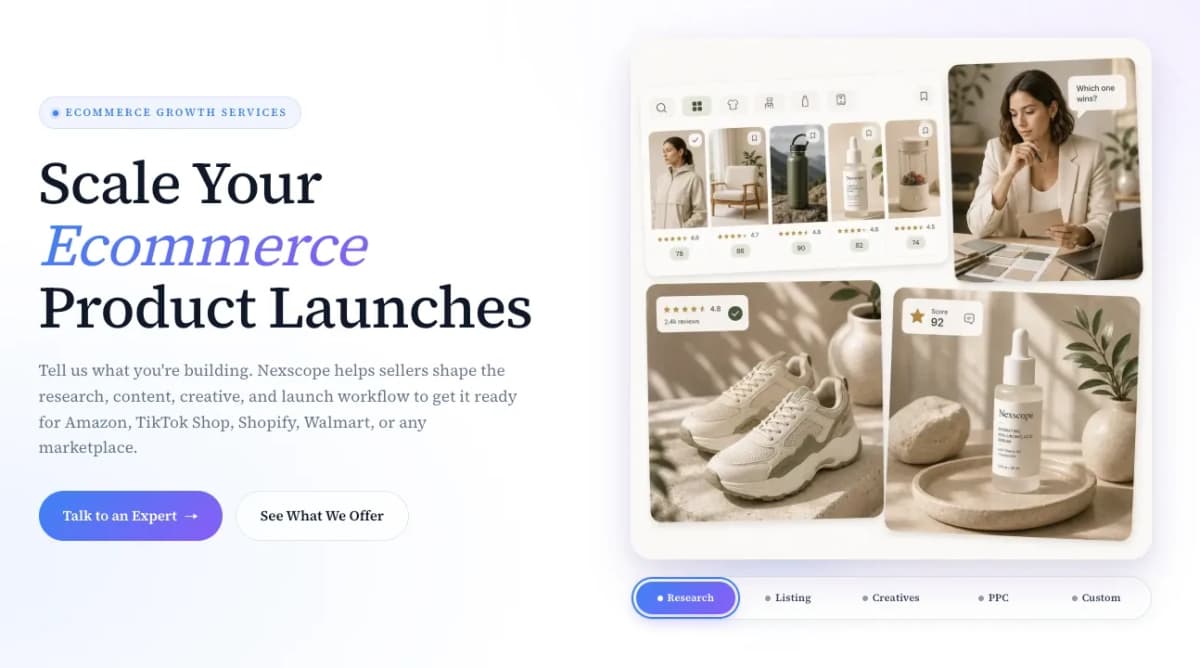
Nexscope's E-commerce Growth Services can help Shopify and marketplace sellers review their store, identify SEO and conversion gaps, and create a clear optimization plan. The team can support product research, competitor and review analysis, listing optimization, AI product creatives, marketplace PPC, and custom ecommerce growth workflows.
If a Shopify store needs a practical SEO review, Nexscope's SEO experts can audit the store structure, collection pages, product pages, metadata, content gaps, and technical issues, then provide recommendations on what to optimize first.
Get a Shopify SEO Review From Nexscope Experts
Nexscope E-commerce Growth Services can review your Shopify store, identify SEO and conversion gaps, and turn the audit into a practical optimization plan.
Talk to a Nexscope Expert →Frequently Asked Questions
What is a Shopify SEO checklist?
A Shopify SEO checklist is a repeatable set of tasks used to improve how a Shopify store appears in search results. It usually includes technical setup, keyword mapping, collection page optimization, product page optimization, structured data, image SEO, internal links, blog content, and performance tracking. A modern checklist should also include AI search readiness because shoppers increasingly discover products through answer engines and AI summaries.
How often should a Shopify store run an SEO audit?
A Shopify store should run a light SEO audit every month and a deeper audit every quarter. Monthly checks should cover indexing issues, broken links, structured data errors, page speed changes, and declining pages. Quarterly audits should review keyword mapping, collection strategy, product page quality, blog performance, competitor changes, and AI visibility signals.
Is Shopify good for SEO?
Shopify can be good for SEO when the store has clean architecture, useful collection pages, optimized product content, structured data, fast pages, and strong internal links. The platform handles many basics, such as sitemaps and canonical tags, but store owners still need to optimize page content, navigation, product descriptions, and buyer-focused guides.
What is the most important Shopify SEO task?
The most important task is making sure the right page targets the right search intent. Collection pages should usually target category and commercial keywords, product pages should target specific product queries, and blog posts should answer buyer questions. Without this mapping, pages can compete against each other or attract traffic that does not convert.
Do Shopify SEO apps replace manual optimization?
No. Shopify SEO apps can help automate checks, metadata, redirects, schema, or image compression, but they do not replace strategy. Manual optimization is still needed for keyword mapping, collection copy, product descriptions, buyer FAQs, content planning, internal linking, and conversion-focused page improvements.
How do collection pages help Shopify SEO?
Collection pages help Shopify SEO because they can target category-level buying intent. A shopper searching for a product type often wants to compare multiple options, not land on one individual product immediately. Well-optimized collection pages can rank for commercial keywords, pass internal link value to products, and guide shoppers toward the right item.
Does schema markup help Shopify stores rank?
Schema markup is not a guaranteed ranking boost, but it helps search engines understand product details, breadcrumbs, reviews, FAQs, and organizational information. This can support rich results and make product facts easier to interpret. It is also useful for AI search readiness because clear structured information helps systems extract and summarize page content.
How does AI search change Shopify SEO?
AI search changes Shopify SEO by making clear answers, structured data, entity signals, and trustworthy product facts more important. Stores need more than keyword usage. They need pages that explain who the product is for, what makes it different, how it compares, what shoppers ask before buying, and why the brand can be trusted.
Sources
- Shopify. (2026). The 50-Point SEO Checklist for Online Stores. Retrieved from shopify.com
- Shopify. (2026). Shopify SEO: How to Optimize Your Store. Retrieved from shopify.com
- Google Search Central. (2026). Search Engine Optimization Starter Guide. Retrieved from developers.google.com
- Google Search Central. (2026). Intro to Structured Data Markup in Google Search. Retrieved from developers.google.com
- web.dev. (2026). Core Web Vitals. Retrieved from web.dev