

Claude Code E-Commerce Automation: 5 Practical Use Cases

Claude Code isn't ChatGPT with a command line interface. It's fundamentally different.
When you ask ChatGPT to analyze an advertising report, it gives you a framework. When you ask Claude Code the same thing, it reads your CSV file, runs Python to calculate ACoS anomalies, generates an Excel diagnostic report, and saves it to your specified folder—all automatically.
One outputs text. The other outputs actions.
This distinction matters for e-commerce sellers. The repetitive operations that consume hours daily—product research, listing optimization, ad analysis, inventory management—can now run through Claude Code as automated workflows.
This guide covers five practical use cases, from basic data retrieval to full operational automation.
Understanding the Three-Layer Architecture
Before diving into use cases, you need to understand how Claude Code works for e-commerce.
Layer 1: The Engine
Claude Code itself—the execution layer that runs all operations.
Layer 2: Data Pipelines (MCP)
MCP stands for Model Context Protocol. It's a standard protocol that lets Claude Code connect to external data sources. Connect it to Amazon's SP-API and you can pull seller data. Connect it to the Amazon Ads API and you can access advertising metrics directly. Connect it to Shopify's AI Toolkit and you can manage your store from the terminal.
Claude Code doesn't come with this data built in. MCP is how it reaches out to get information.
Layer 3: Business Logic (Skills)
This is the critical layer. A Skill is your operational SOP written as code that AI can execute repeatedly.
The difference from prompt templates? Prompt templates require manual copy-paste, parameter changes, and watching the AI run each time. A Skill is a file that defines triggers, data sources, processing logic, and output formats. Write it once, and it works across different product categories and marketplaces.
If you want pre-built e-commerce skills instead of writing your own, platforms like Nexscope SkillHub offer 100+ ready-to-use skills for Amazon, Shopify, TikTok Shop, and other platforms.
Here's a sample configuration file (CLAUDE.md) for e-commerce operations:
# E-Commerce Operations Context

## Business Information
- Primary platforms: Amazon US + Shopify
- Category: Outdoor sports equipment
- Operations rhythm: Weekly ad reviews, bi-weekly product selection

## Data Sources
- Amazon SP-API: Seller data (configured)
- Amazon Ads API: Advertising data (refresh token configured)

## Work Standards
- All analysis must be based on real data—no fabricated numbers
- Output reports in English, keep product names as-is
- Ad diagnostic thresholds: ACoS > 30% flagged as warning, > 50% flagged as critical

## Prohibited Actions
- Cannot auto-adjust ad bids (requires manual confirmation)
- Cannot auto-modify live listings (requires manual review)
- Cannot send customer emails directly (generate drafts for review)
Place this file in your project root. Claude Code reads it on every startup—essentially an onboarding document that tells the AI what your business is, what the rules are, and what's allowed versus forbidden.
Use Case 1: Product Research in 5 Minutes
Traditional product research takes hours. Pull market data, analyze competitors, check keyword difficulty, assess seasonality. With Claude Code connected to the right data sources, this compresses to minutes.
How It Works
- Connect an e-commerce data MCP (Amazon SP-API or third-party tools)
- Create a "Product Research Skill" that chains multiple data calls
- Input a category keyword
- Receive a complete report: competitor matrix, price distribution, monthly sales estimates, down to ASIN level
Mining Customer Complaints for Product Ideas
The more interesting application is using Claude Code to scrape buyer complaints from Reddit and reverse-engineer product opportunities.
Subreddits like r/BuyItForLife and category-specific communities contain real users complaining about product quality. For example, in gardening communities, users consistently complain about expandable garden hoses that burst after a few uses—the core issue being latex or rubber inner tubes that fail quickly.
One comment: "Bought one of those generic expanding hoses on Amazon, literally exploded after the second use"—70 upvotes.
From this complaint, you can reverse-engineer a product direction: three-layer TPU inner tube with genuine multi-year warranty. The demand exists, the pain point is clear, and the market isn't solving it well.
Traditional product research asks "what's selling?" Reddit-based research asks "what are customers unhappy about?" Completely different approach.
For automated product research workflows, consider the amazon-product-research skill:
nexscope skill install amazon-product-research
Use Case 2: Listing Optimization for Three Algorithms
Amazon now runs three algorithms evaluating your listings. Most sellers only know about A10.
A10: Keyword Matching
A10 looks at keyword matching—this one everyone knows.
COSMO: Semantic Intent
COSMO looks at semantic intent. It doesn't just match keywords; it understands what a user searching "birthday gift for girlfriend" actually wants. Scene words and audience words matter more than raw keywords.
Rufus: Amazon's AI Shopping Assistant
Rufus is Amazon's AI shopping assistant. It needs quantifiable facts to answer user questions. Writing "ultra-quiet" doesn't register. Writing "45 dB operating noise" gives Rufus something to cite.
You can create a Listing Skill that takes product attributes, competitor analysis, and keyword data as inputs, then generates listings optimized for all three algorithms simultaneously. The same Skill can output localized versions for multiple marketplaces in one run.
Pre-built listing optimization skills are available on Nexscope SkillHub. Install with one command:
nexscope skill install amazon-listing-optimization
Advertising Analysis at Scale
Connect the Amazon Ads API and ad reports pull automatically. ACoS anomalies get flagged, negative keyword suggestions generate alongside them, and contribution changes per campaign get tracked over time.
Here's the key insight:
Without API integration, you do weekly ad reviews—52 iterations per year. With API integration, you run daily diagnostics—365 iterations per year.
That's not a 10% difference. It's a 7x difference. Over six months, your advertising efficiency structurally diverges from sellers still manually reviewing reports.
For more on Amazon PPC optimization, see our dedicated guide. You can also install the PPC automation skill:
nexscope skill install amazon-ppc-campaign
Use Case 3: Shopify Store Management from Terminal
Shopify officially released their AI Toolkit on April 10, 2026. It directly supports Claude Code, Cursor, VS Code, and similar tools for managing stores from the terminal.
This isn't a third-party plugin. Shopify built it.
What You Can Do
- Batch-edit 20 product descriptions with one command
- Query inventory, flag low-stock items, find products priced below cost
- Generate meta descriptions for 300 products in an hour
- Clone and modify themes safely
The Safe Theme Editing Workflow
Shopify themes apply immediately—edit wrong and there's no undo. The safe SOP:
- Clone current theme
- Make changes on the clone
- Preview and confirm
- Publish only if everything looks right
Write this four-step process as a Skill, and Claude Code follows it automatically every time. No accidental live theme modifications.
Competitor Analysis Bonus
View Page Source on a competitor's site, feed the HTML to Claude Code, and it can clone the layout with different content. Useful for rapidly prototyping store designs.
Warning: Shopify AI Toolkit's code telemetry is enabled by default, sending code snippets to Shopify servers. Set OPT_OUT_INSTRUMENTATION=true to disable.
For a deeper dive into Shopify automation, see our guide on how to use AI to build a profitable Shopify store.
Use Case 4: SEO and GEO for AI Search Visibility
SEO everyone does. GEO most e-commerce sellers haven't heard of.
GEO stands for Generative Engine Optimization—making AI search engines proactively recommend your products.
What does this mean? When a user asks ChatGPT "which pet water bottle has the best leak-proof design," can your product appear in the answer?
According to HubSpot's 2026 State of Marketing report, traffic from AI search engines converts at 6x the rate of traditional search.
Calculate what that traffic is worth.
How to Optimize for GEO
- Schema markup so AI can read structured data
- Comparison data tables instead of pure text descriptions
- Direct answers to user questions instead of roundabout content
Programmatic SEO at Scale
Use Claude Code for pSEO—programmatically generating long-tail pages. "New York buy pet water cup," "LA buy pet water cup"—location + category combinations templated to generate thousands of pages.
People on Twitter have shared generating 10,000 SEO pages in 48 hours using Claude Code.
The Major Pitfall
Someone used Excel to bulk-replace content across 5,000 pages. Google flagged it as large-scale content abuse. Domain permanently banned.
The critical distinction: AI must execute your SEO logic—you define keyword strategy, content standards, quality thresholds. AI handles scale. Don't let AI generate content unsupervised.
Claude Code's Hook system enables this: after writing content, automatically trigger an SEO check. Pass the check, push to Shopify via API. Fail the check, flag for revision.
For more on AI-driven content strategy, see AI Shopping Is Replacing Google Search.
Use Case 5: Daily Operations Automation
Restock forecasting, customer email classification, competitor price monitoring.
Each task isn't complex individually. Stacked together, they consume hours daily.
Examples of Small Tools That Compound
- 90-day sales trend analysis + safety stock calculation for restock prediction
- Customer emails auto-classified by type + response templates generated
- Hourly competitor price scraping with change alerts pushed to Slack
None of these are large projects. Combined, they save 2-3 hours daily.
The Core Advantage
You can build tools customized to your specific business logic. No need to buy generic SaaS or conform to someone else's product design. One seller's restock logic differs completely from another's. Generic tools hit 60% effectiveness at best. Custom-built tools hit 90%.
For more automation ideas, see 8 Ways AI Agents Can Automate Your Amazon Business.
The Progression Path
Looking across these five use cases, there's a clear capability progression:
- Query data (product research)
- Operate platforms (listings + advertising)
- Official integrations (Shopify)
- Traffic acquisition (SEO + GEO)
- Daily maintenance (automation)
This is also the recommended learning sequence.
When to Use Claude Code vs. Other Tools
Three conditions should all be met for a task to be worth automating:
- High frequency — at least weekly
- Standardizable process — you can write an SOP
- Quantifiable results — you can measure time or money saved
Product research, ad diagnostics, SEO page generation—all three conditions met.
Customer negotiations, brand positioning, supply chain relationship management—none met.
Use this framework to decide which operational tasks should become Skills.
Getting Started
Step 1: Install Claude Code and Configure MCP
Claude Code requires a Claude Pro subscription ($20/month). Installation documentation: code.claude.com/docs
After installation, configure your MCP data sources. Example configuration for an e-commerce data provider:
{
  "mcpServers": {
    "ecommerce-data": {
      "command": "npx",
      "args": ["-y", "ecommerce-mcp-server"],
      "env": {
        "API_KEY": "your-api-key"
      }
    }
  }
}
Step 2: Write Your First Skill
Pick your most repetitive operational task. Weekly ad report analysis works well:
- Check overall ACoS
- Review contribution changes per campaign
- Find keywords with ACoS anomalies
- Generate negative keyword suggestions and bid adjustment recommendations
Write this flow as a Skill file. Claude Code executes this logic consistently every time.
Step 3: Chain Skills Together
Product research Skill outputs feed directly into Listing Skill—no manual data transfer. Listing Skill outputs can trigger Advertising Skill to generate corresponding keyword targeting plans.
Skill chaining is the fundamental difference between Claude Code and one-off prompt templates. It's an expandable system, not a disposable tool.
Cost Comparison
| Tool | Monthly Cost |
|---|---|
| Claude Code (Pro subscription) | $20 |
| Third-party e-commerce data MCP | $10–$100 |
| Total | $30–$120 |
Compare to:
| Tool | Monthly Cost |
|---|---|
| Perpetua (Amazon ads SaaS) | $500+ |
| Helium 10 suite | $99 |
| Full-service e-commerce agency | $2,000+ |
Claude Code's cost efficiency is an order of magnitude better—if you're willing to invest the setup time.
The Easier Alternative: Nexscope
Not everyone wants to spend days configuring Claude Code, writing Skills, and connecting MCPs. If you want the power of an AI coding agent without the setup complexity, Nexscope offers a simpler path.
What Is Nexscope?
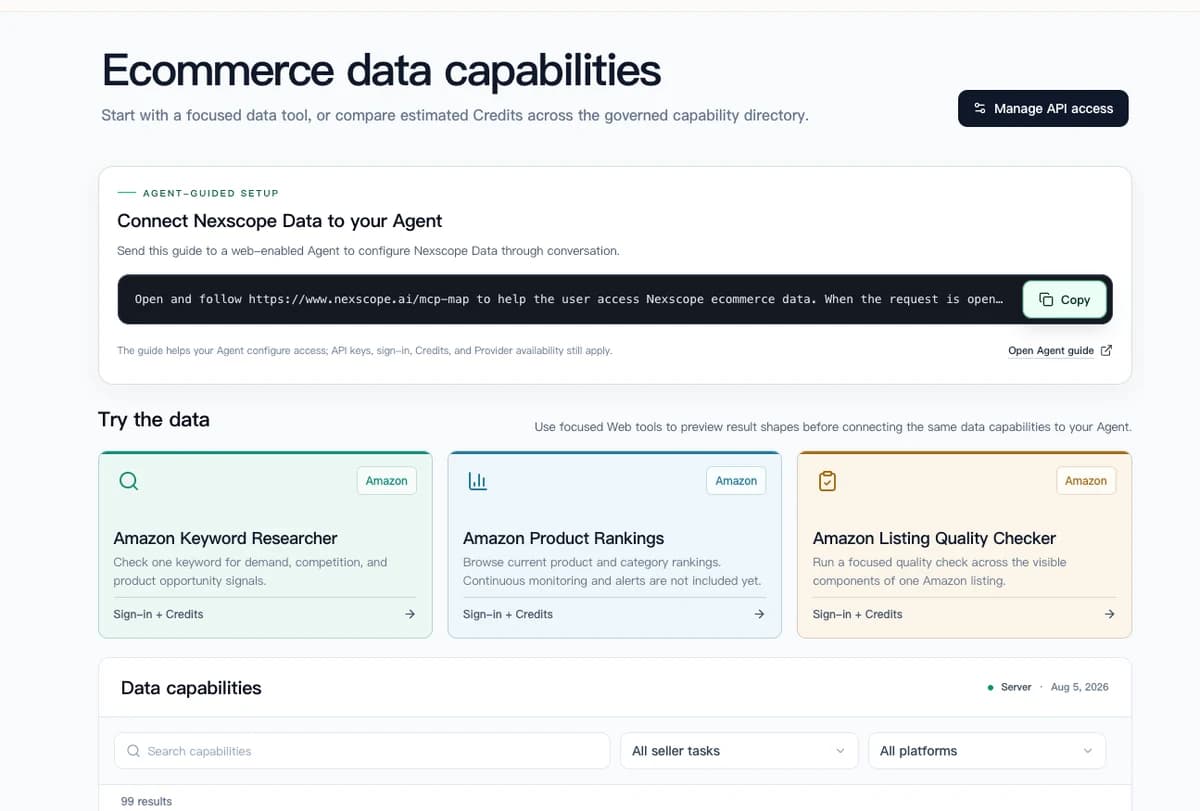
Nexscope provides structured ecommerce data that teams can use in focused web tools or connect to their existing Agent through API, MCP, or Skills. Ready workflows include Keyword to Ads, Video Clone, and Buy Box Repricer.
Key Features
- Pre-Built Expert Skills — 100+ skills written by e-commerce experts covering product research, listing optimization, PPC management, competitor analysis, and more
- Live Data Integration — Real-time access to Jungle Scout, Google Trends, Amazon Search, TikTok Echotik, and PatSnap patent data
- Context Memory — Remembers your niche, profit goals, and past research. Gets smarter over time as you use it
- Multi-Platform Access — Chat via Telegram, WhatsApp, Discord, or web. No Seller Central login required
- Professional Reports — Generates downloadable PDF/Excel reports with charts, tables, and actionable recommendations
- Scheduled Monitoring — Set up automated alerts for competitor price changes, keyword ranking shifts, and inventory levels. Get notified via Telegram, Discord, or email
Core Capabilities
- Product Research — Input a category or product idea, get opportunity scores, growth rates, competition density, and patent risk assessment—all in one query
- Competitor Analysis — Analyze competitor keywords, listing structure, pricing strategy, and market share. Identify gaps you can exploit
- Market Validation — Cross-reference demand across Amazon, TikTok Shop, and Google Trends. Validate ideas before investing in inventory
- Patent Risk Scanning — Check design patents, utility patents, and trademarks across CN/US/EU databases. Avoid IP lawsuits before they happen
Claude Code vs. Nexscope
| Aspect | Claude Code | Nexscope |
|---|---|---|
| Setup time | Days to weeks | Minutes |
| Technical skill required | Moderate to high | None |
| E-commerce skills | Write your own | 100+ pre-built |
| Data connections | Configure MCPs yourself | Pre-configured |
| Monthly cost | $20 + MCP costs | Subscription-based |
| Best for | Developers, custom workflows | Sellers who want results fast |
If you enjoy building systems and want maximum flexibility, Claude Code is powerful. If you want to ask questions and get answers immediately, Nexscope removes the friction.
Get Started
Visit nexscope.ai to try the agent, or explore the SkillHub to see available skills.
Connect Ecommerce Data to Your Agent
Use Nexscope through API, MCP, or Skills, or open a ready seller workflow.
Explore Ecommerce Data →1,000 free credits • API, MCP & Skills
Frequently Asked Questions
What's the difference between Claude Code and ChatGPT?
ChatGPT outputs text responses. Claude Code runs on your local machine, reads files, calls APIs, writes and executes code, and produces deliverables like reports and data files. One answers questions; the other completes tasks.
Do I need to know how to code to use Claude Code?
Basic familiarity helps, but it's not required. Claude Code writes its own code based on your instructions. You need to understand what you want done and be able to review outputs, but you don't need to write Python yourself.
What data sources can Claude Code connect to?
Through MCP, Claude Code can connect to Amazon SP-API, Amazon Ads API, Shopify, and various third-party e-commerce data providers. The ecosystem is expanding as more providers build MCP integrations.
Is it safe to let Claude Code modify my live listings or ads?
Only if you configure it that way—which you shouldn't, at least initially. Use the CLAUDE.md configuration file to explicitly prohibit automated modifications to live assets. Generate drafts and recommendations for human review.
How long does it take to set up a useful Claude Code workflow?
Basic setup takes an afternoon. A production-ready Skill for a specific task might take a few days of iteration. The investment pays off when you're running that task repeatedly.
Sources
- Anthropic. (2026). Claude Code Documentation. Retrieved from code.claude.com
- Shopify. (2026). Shopify AI Toolkit Release Notes. Retrieved from shopify.dev
- HubSpot. (2026). State of Marketing Report. Retrieved from hubspot.com