

How to Find Amazon Competitor Keywords for Better Sales

Finding Amazon competitor keywords can reveal how shoppers describe products, which searches established listings appear for, and where a seller's own listing or advertising coverage is thin. The difficult part is separating a useful keyword signal from a term that is popular, branded, irrelevant, or supported only by a third-party estimate.
Copying phrases from the first successful listing rarely solves that problem. A high-ranking ASIN may serve a different buyer, sit in another price tier, or convert because of its reviews, price, delivery promise, and brand recognition. Its title alone cannot show which keyword caused a sale.
A stronger process compares several relevant ASINs, combines reverse ASIN estimates with visible shopper language, validates the best candidates against seller-owned Amazon data, and assigns each term to a specific use. The following workflow explains how to find Amazon competitor keywords without claiming access to data that Amazon does not expose.
Why Competitor Keywords Matter
Competitor research connects a seller's assumptions with language already visible in the market. Repeated terms across comparable listings can reveal category vocabulary, attributes, use cases, buyer types, compatibility needs, and problems shoppers want a product to solve. It can also expose a keyword gap: a relevant query covered by several competing ASINs but missing from the seller's listing, advertising, or rank tracking.
The result supports both Amazon keyword research and broader competitor analysis. Listing teams can improve product language, while PPC teams can build controlled tests.
The workflow uses three evidence layers that should remain separate:
- Observable: Listing copy, reviews, Q&A, suggestions, and search results.
- Estimated: Reverse ASIN rank, demand, competition, and traffic metrics.
- First-party: Performance for the seller's own brand, ASINs, and campaigns.
A reverse ASIN tool estimates which queries a competing product ranks for. It does not reveal that competitor's private backend terms, campaign report, or conversion data. Repetition is a research signal, not proof that a keyword caused sales.
6-Step Competitor Keyword Workflow
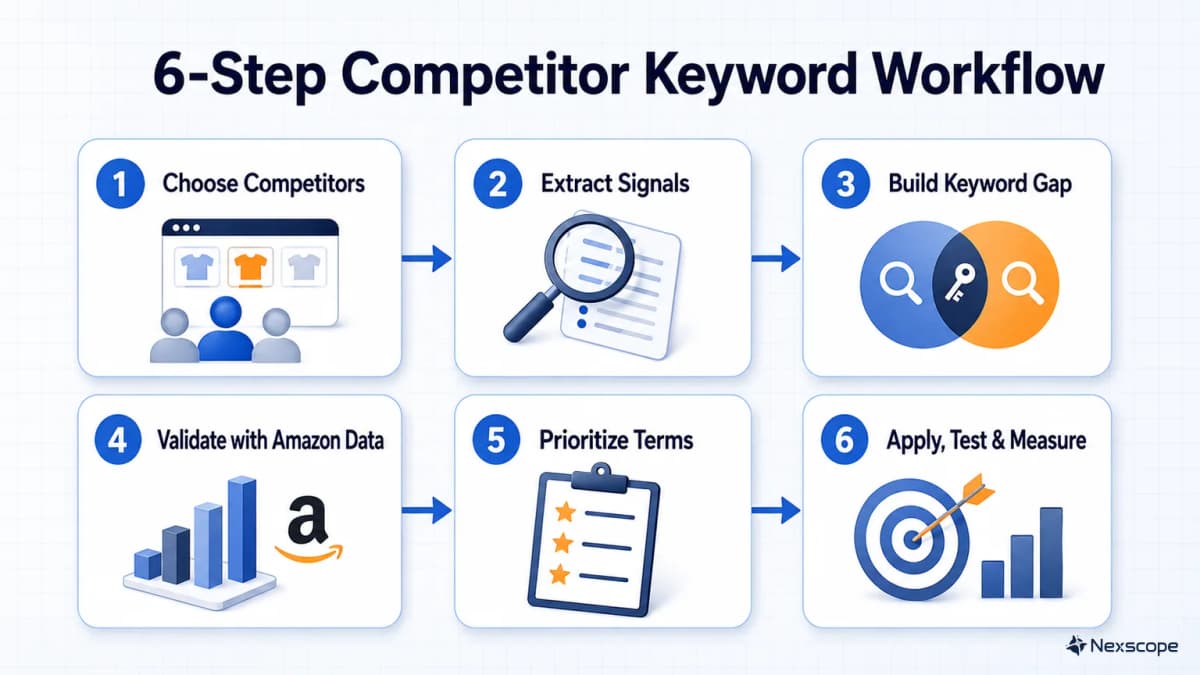
The six steps below move from broad discovery to controlled deployment. Each step produces an output that becomes the input for the next one, which keeps keyword collection from turning into an unfiltered spreadsheet.
Step 1: Choose Comparable Competitors
Keyword quality depends on competitor quality. A category bestseller is not automatically the best benchmark. A premium product, multipack, refill, accessory, and entry-level alternative may appear for similar searches while serving different purchase intentions.
Start with the seller's core product and write down the comparison boundaries:
- Use case: What job is the product purchased to do?
- Buyer: Who uses it, and who makes the purchase decision?
- Specification: Which material, size, quantity, compatibility, or form factor defines the product?
- Price band: Which listings compete for the same budget and value expectation?
- Marketplace: Which Amazon country and language are being researched?
Search Amazon using several seed phrases, then collect five to ten ASINs rather than relying on one leader. A balanced set can include close substitutes, products with strong organic visibility, and listings that appear frequently in sponsored placements. Record the ASIN, visible title, price, rating, review count, category, main differentiators, observed placement, and research date.
The final set should pass a simple question: would the same shopper realistically compare this product with the seller's offer during one purchase decision? If the answer is no, the ASIN is likely to introduce noise. Dominant brands can still provide category-language ideas, but they should not define the entire benchmark when their authority, review base, or pricing is impossible to match.
Step 2: Extract Keyword Signals
Run every selected ASIN through the same reverse ASIN research tool and export the available keyword fields. These often include estimated organic position, sponsored position, search demand, competing products, and a relevance or traffic score. Retain the tool name, marketplace, export date, and original metric labels so estimates do not later become mislabeled as Amazon facts.
Next, inspect the visible listing and customer language. Capture phrases from:
- Product titles, bullets, descriptions, and A+ Content
- Repeated attributes such as material, size, capacity, fit, and compatibility
- Use cases, audiences, occasions, and problem-solution wording
- Reviews that explain why shoppers purchased, returned, compared, or replaced the item
- Q&A language that exposes uncertainty before purchase
- Amazon search suggestions for relevant seed phrases
Amazon's own keyword research guidance recommends using sources such as the Amazon search bar, Product Opportunity Explorer, Brand Analytics, advertising data, and keyword research tools. These inputs answer different questions. Search suggestions show common query completions. Visible listings show seller-facing language. Reviews and Q&A show customer language. Reverse ASIN tools estimate search visibility.
Do not copy claims from reviews or competing listings into a product page without verification. A phrase such as “dishwasher safe” may be a valuable keyword signal, but it is also a factual product claim. It belongs in copy only if the seller's product documentation supports it.
The output of this step is a raw evidence table, not a final keyword list. One row can contain the keyword, source ASIN, evidence type, estimated metrics, visible context, marketplace, and collection date.
Step 3: Build the Keyword Gap
Raw exports usually contain capitalization differences, close variants, irrelevant phrases, competitor brand names, and terms tied to features the seller does not offer. Normalize the data before scoring it.
Convert terms to a consistent case, trim punctuation, and group close variants only when they express the same shopping intent. Singular and plural forms can often share a cluster, but materially different modifiers should remain separate. “Water bottle,” “water bottle with straw,” and “kids water bottle” may lead to different results and buyers, so merging them would hide useful distinctions.
Then count how many comparable ASINs support each term. A keyword found across four close competitors is usually a stronger category signal than a phrase tied to one unusual listing. Compare the consensus list against four seller-owned areas:
- Visible listing copy
- Backend search terms
- PPC targets and search terms
- Tracked organic and sponsored positions
The gap table can stay compact:
| Keyword candidate | Competitor coverage | Seller coverage | Evidence status | Next action |
|---|---|---|---|---|
| leakproof insulated bottle | 5 of 7 ASINs | Missing | Relevant feature verified | Test in bullet and PPC |
| water bottle with straw | 4 of 7 ASINs | PPC only | Orders recorded | Add to visible copy if accurate |
| replacement bottle lid | 2 of 7 ASINs | Missing | Product does not include replacement lid | Exclude |
| competitor brand + bottle | 3 of 7 ASINs | Missing | Branded query | Separate policy review |
This table prevents a common error: treating every competitor keyword as an opportunity. A missing term is valuable only when the product matches the intent and the seller has a credible destination for it.
Step 4: Validate With Amazon Data
Third-party research expands the candidate pool. Amazon's first-party reports show how the seller's own products and ads perform against real shopping activity.
For eligible brands, Amazon Brand Analytics includes Search Query Performance, Top Search Terms, and Search Catalog Performance dashboards. Amazon states that access requires a Professional selling account and Brand Representative status for a brand enrolled in Amazon Brand Registry.
Search Query Performance can be reviewed at brand or ASIN level. It includes query-level measures such as query volume, impressions, clicks, cart adds, purchases, and the brand's share of performance. Those fields help distinguish several situations:
- High query demand, low impression share: The ASIN may need stronger relevance, visibility, or advertising coverage.
- Impressions without clicks: The main image, title, price, rating, or offer may be weakening appeal.
- Clicks without cart adds or purchases: The detail page, product fit, reviews, price, or offer may not satisfy the query.
- Strong purchase evidence: The term deserves protection and may justify more exact targeting or clearer listing placement.
Top Search Terms provides a market-level view of popular searches and the top products customers clicked after using a term. Search Catalog Performance provides a product-focused view of the search funnel. Neither report reveals another seller's private keyword settings.
Advertising data adds another first-party layer. Amazon Ads says the Sponsored Products search term report includes customer searches that produced at least one ad click. Sellers can use it to identify high-performing searches and create negative keyword or product targets for queries that miss campaign goals. A discovered competitor term that already produces orders for the seller carries stronger evidence than a high-volume estimate with no clicks or sales.
Step 5: Prioritize the Best Terms
Use relevance as a gate before demand. If the product does not satisfy the query, search volume cannot make the keyword useful. Remove terms tied to unsupported materials, sizes, audiences, accessories, or benefits.
Score the remaining terms using a small set of decision factors:
- Competitor consensus: How many comparable ASINs appear for or visibly use the term?
- Demand: Does Amazon or a third-party provider show meaningful search activity?
- Rankability: How strong and relevant are the current results, and can the listing compete on offer quality?
- Conversion evidence: Has the seller earned clicks, cart adds, orders, or efficient ad results from the query?
- Placement fit: Does the term belong in visible copy, backend search terms, PPC, or monitoring only?
| Keyword | Relevance | Competitor count | Demand estimate | Seller evidence | Destination | Priority |
|---|---|---|---|---|---|---|
| insulated water bottle | Pass | High | High | Purchases | Title or bullet, exact PPC | High |
| leakproof bottle for gym | Pass | Medium | Medium | Clicks, no orders yet | Bullet, phrase PPC test | Medium |
| gallon water bottle | Fail | High | High | None | Exclude | None |
| competitor brand bottle | Separate review | Medium | Medium | None | Possible ad test only | Hold |
This model does not need a complicated universal formula. The order of operations matters more: relevance first, then evidence strength, then destination. Terms with strong relevance and first-party purchase evidence rise to the top. Relevant terms supported only by estimates enter a controlled experiment queue.
Competitor brand names require separate treatment. They should not be inserted into listing copy by default. Advertising use depends on the current marketplace rules, Amazon Ads policies, trademark considerations, and the exact creative context. Generic phrases learned from competitor research can move through the normal workflow. Branded phrases should remain isolated until that review is complete.
Step 6: Apply, Test, and Measure
Assign each approved term to one job. Keyword stuffing creates unreadable copy and makes measurement harder.
- Title: Reserve space for the clearest high-relevance product phrase and the attributes shoppers need to identify the item.
- Bullets and description: Use important feature, use-case, audience, and compatibility phrases where the product facts support them. Effective listing optimization keeps the copy readable and buyer-focused.
- Backend search terms: Add relevant synonyms, abbreviations, and variants that do not fit naturally in visible copy. Avoid using this field as a dumping ground for irrelevant or unverified terms.
- PPC: Move proven queries into controlled exact-match targeting. Use phrase or broad match to explore relevant variations, then add negatives when actual search terms fail the relevance or performance threshold.
Amazon Ads describes broad, phrase, and exact match as different levels of reach and control. Its keyword targeting guide also recommends reviewing search-term and keyword reports, promoting useful discoveries, and using negative keywords to limit irrelevant traffic. The correct structure depends on campaign goals, budget, and data volume.
Record a baseline before changing the listing or campaign. Useful measures include organic position, search-query impressions, click share, cart-add share, purchase share, sessions, unit session percentage, ad clicks, orders, ACoS, and ROAS. Not every seller will have every metric, so the test plan should state what is available.
Avoid changing the title, bullets, backend terms, bids, match types, and negatives at the same time. Use controlled batches and a consistent observation window long enough to gather meaningful traffic. Low-volume terms may need more time than high-volume terms. The team's Amazon PPC strategy should define the keep, expand, reduce, or exclude rule before the test starts.
At the end of each review window, update the keyword record with the change date, destination, performance movement, and decision. This creates a repeatable loop: discover, validate, prioritize, deploy, measure, and refresh.
Common Research Mistakes
- Choosing category neighbors instead of direct competitors: A visually similar product can serve another buyer or use case. Apply the same-product test before keeping its ASIN.
- Calling estimates first-party data: Reverse ASIN position, volume, and sales fields should retain their provider and observation date. They do not expose a competitor's private account data.
- Prioritizing volume before relevance: A broad term can generate impressions and clicks while attracting shoppers who would never buy the product.
- Copying claims with keywords: Competitor bullets and customer reviews can suggest vocabulary, but product claims still require the seller's own evidence.
- Mixing generic and branded intent: A category phrase and a competitor trademark create different listing, advertising, and legal decisions.
- Changing every field at once: Simultaneous listing and campaign edits make it difficult to determine which action changed performance.
- Ignoring the baseline: Without a timestamped record of rankings, funnel metrics, and ad results, improvement becomes an impression rather than a measurable result.
Conclusion
The most reliable way to find Amazon competitor keywords is to compare several truly similar ASINs, collect both tool-based and visible language signals, build a relevance-filtered gap, validate the strongest terms with seller-owned Amazon reports, and test each keyword in the right destination. This sequence turns a large export into a small set of defensible actions.
When recurring research needs structured inputs across many products, Nexscope provides Amazon product, competitor, keyword, review, sales, and market data through REST API or MCP. Ecommerce teams can connect supported data to their own Agent and workflows while keeping estimated fields, source coverage, freshness, and missing values visible. The workflow still requires seller-owned Amazon reports for account-specific click and conversion validation.

Frequently Asked Questions
Can You See a Competitor's Backend Keywords on Amazon?
No. Sellers cannot directly view another seller's private backend search terms, advertising search-term reports, or conversion data. Reverse ASIN tools estimate the queries for which an ASIN appears in organic or sponsored results. Visible listing copy, reviews, Q&A, and search results provide additional observable signals. These sources can produce strong keyword candidates, but they should not be described as a direct export of a competitor's private account settings.
What Is a Reverse ASIN Lookup?
A reverse ASIN lookup starts with an Amazon product identifier and returns keywords that a research provider associates with that product's search visibility. Depending on the provider, the export may include estimated organic rank, sponsored rank, search demand, competition, or traffic. The results are useful for discovery and comparison across multiple ASINs. They remain provider estimates unless Amazon itself supplies and defines the metric.
How Many Competitor ASINs Should Sellers Analyze?
Five to ten comparable ASINs is a practical starting set for many products. It is large enough to reveal repeated category language without creating an unmanageable export. Quality matters more than the exact number. Each ASIN should serve a similar buyer, use case, specification, price band, and marketplace. A smaller set of close substitutes is more useful than dozens of loose category neighbors.
How Can Sellers Judge Keyword Relevance?
Start with the product promise. The item should genuinely satisfy the query's product type, use case, audience, material, size, and compatibility. Then review the current Amazon results to see whether shoppers receive comparable offers. A keyword fails the relevance gate when it depends on a feature the product lacks, describes an accessory instead of the main item, or attracts a materially different buyer.
Where Should Competitor Keywords Go in a Listing?
The clearest high-relevance product phrase usually belongs in the title, while feature, benefit, audience, use-case, and compatibility phrases can fit naturally in bullets or descriptions when the claims are accurate. Relevant synonyms and variants that would make visible copy awkward can be considered for backend search terms. Valuable but unproven terms are often better tested in PPC before receiving prominent listing placement.
Can Sellers Bid on a Competitor's Brand Name?
Competitor brand terms should be separated from generic category keywords and reviewed under current Amazon Ads policy, marketplace rules, trademark requirements, and the exact creative context. A seller should not place a competitor's trademark in listing copy by default. Advertising eligibility does not automatically make every use appropriate, so brands should confirm current policy and seek qualified legal guidance when the risk is material.
How Often Should Competitor Keyword Research Be Refreshed?
Refresh timing should follow how quickly the category changes. A stable niche may only need a quarterly review, while seasonal, trend-driven, or promotion-heavy categories may need monthly or event-based checks. A refresh is also useful after a major listing change, product launch, new competitor entry, or sustained ranking decline. Keep the marketplace, source, and observation date attached to every export so changes remain comparable.
Sources
- Amazon. (2024). Improve Product Visibility Through Effective Amazon Keyword Research. Retrieved from sell.amazon.com
- Amazon. (2025). What Is Amazon Brand Analytics? Retrieved from sell.amazon.com
- Amazon. (2026). Amazon Brand Analytics. Retrieved from sell.amazon.com
- Amazon Ads. (2026). Search Term Report for Sponsored Products. Retrieved from advertising.amazon.com
- Amazon Ads. (2026). What Is Keyword Targeting? Retrieved from advertising.amazon.com