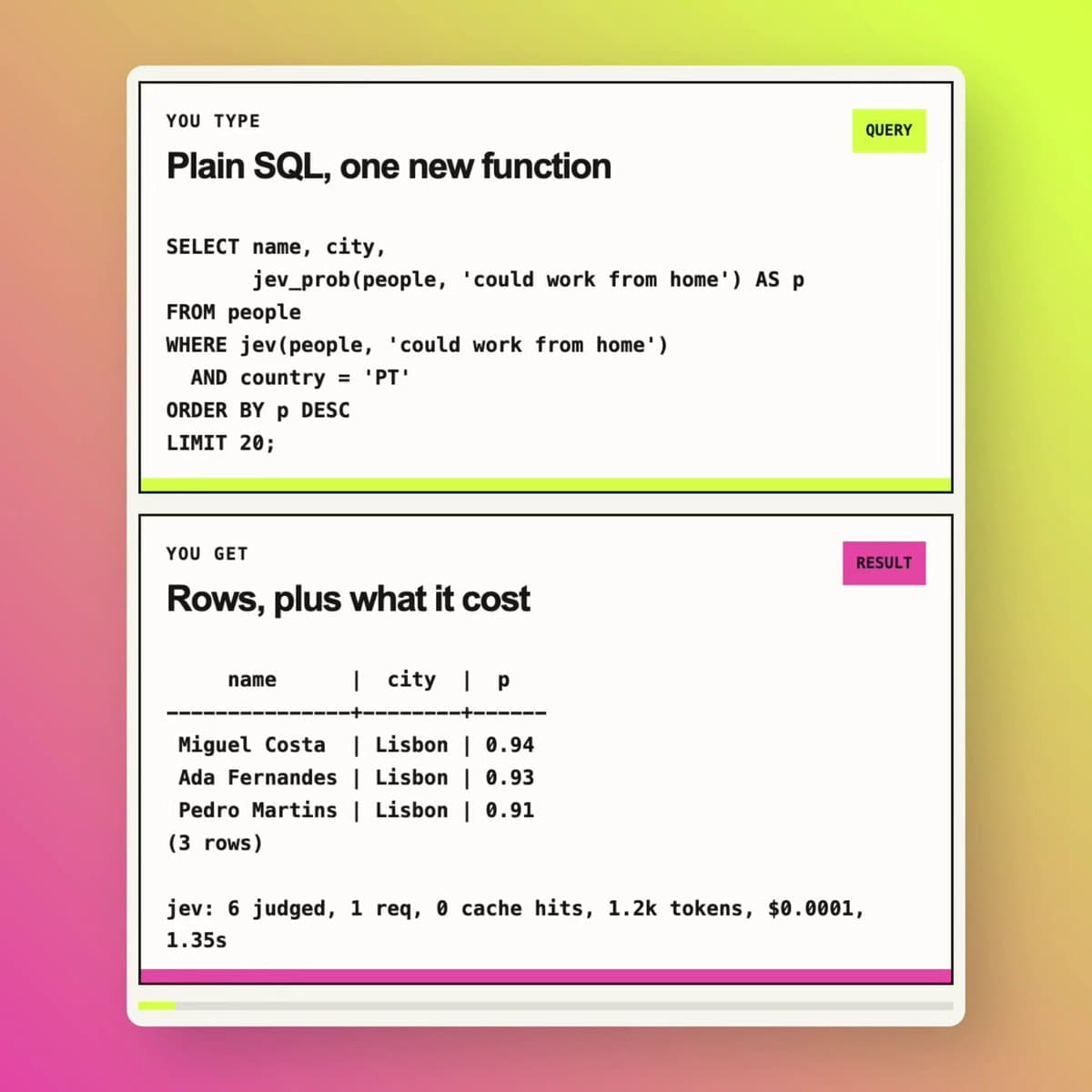
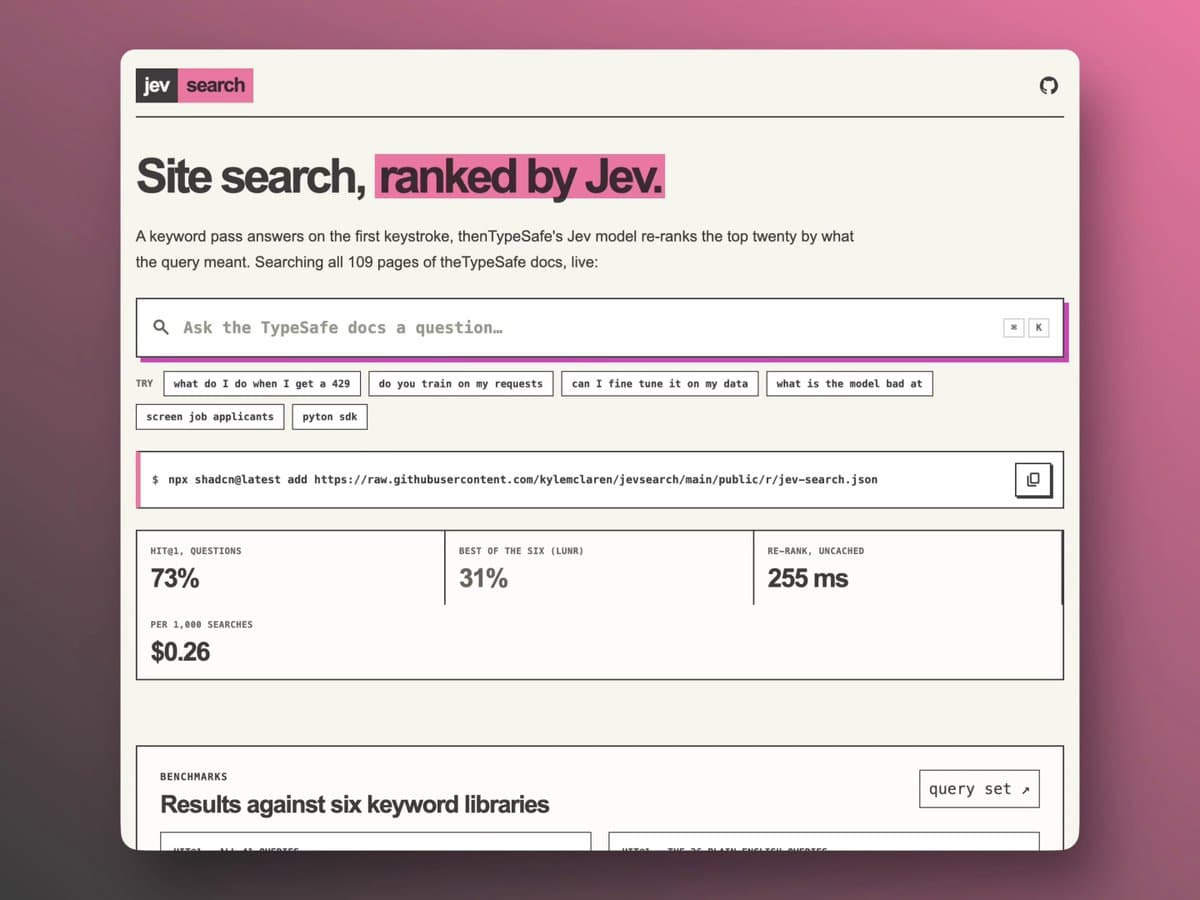
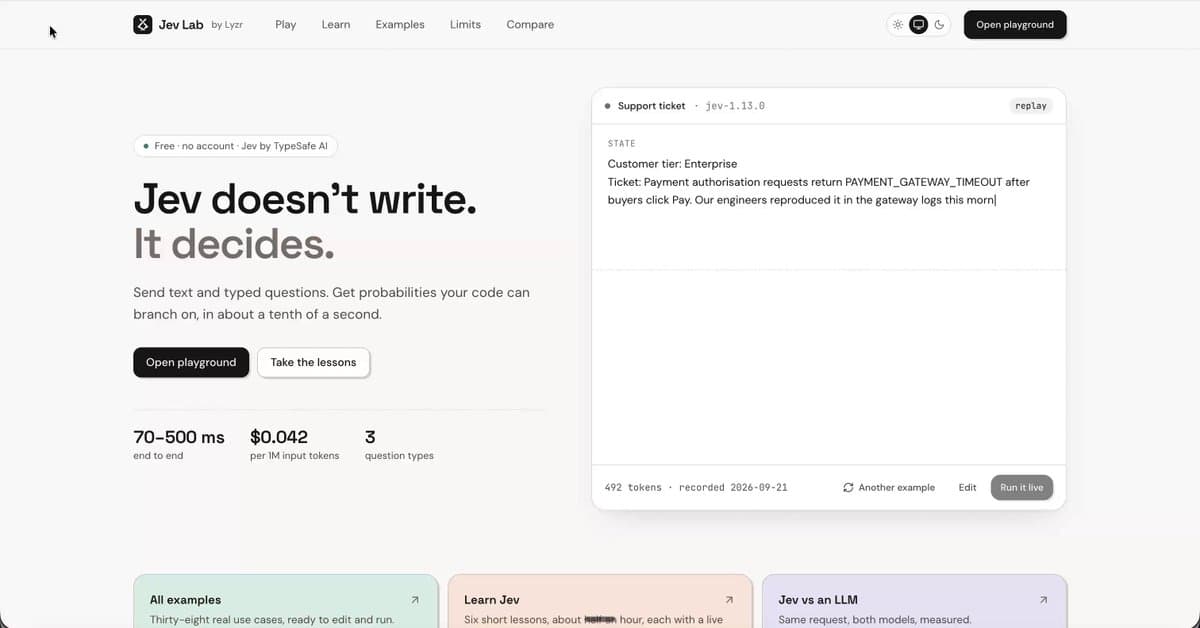
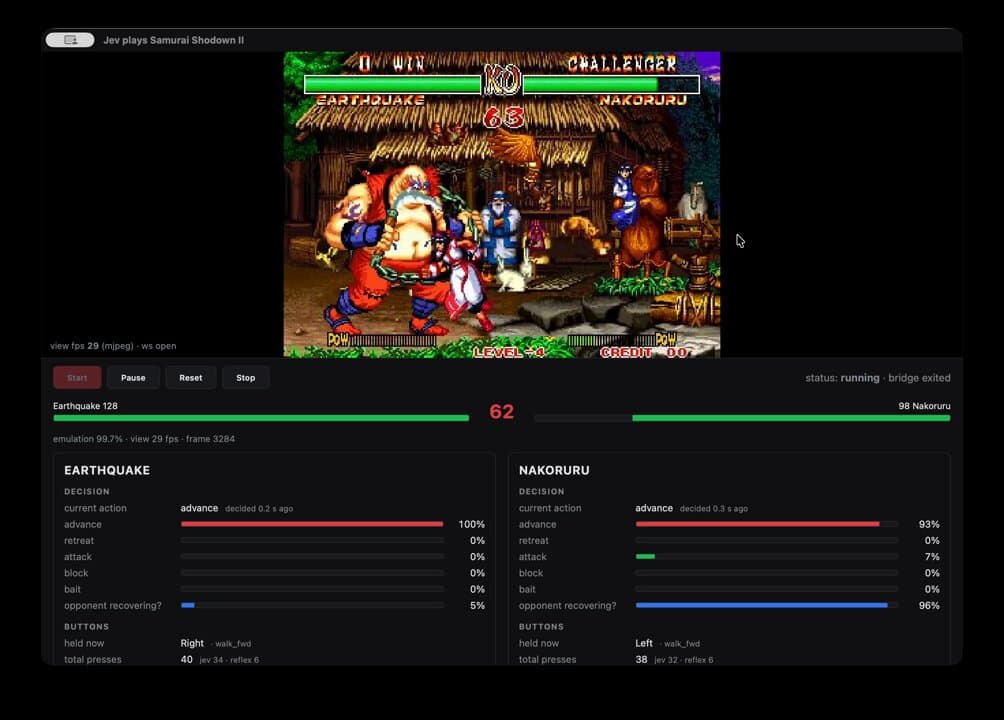
Jev is a System One AI model from TypeSafe AI for structured decisions. Give it context and a typed question; get a choice, score, or probability your software can use.
Explore 184 practical ideas. Open a card for an example, required inputs, and current API fit.
184 use casesIdeas to build with Jev. API support is explained in each card.
SEOIdea
Search intent analysis
Sort searches by whether people want to learn, compare products, buy, or find a specific website.
A search phrase and the possible reasons for searching.
“Best running shoes for beginners” → comparing options before buying.
Sort searches by whether people want to learn, compare products, buy, or find a specific website. Choose the labels or review rules first, then use the result to organize work or highlight what needs attention.
Explore the available Jev APIs below. This idea is not a built-in Jev Evaluate preset; implementing it requires a separate custom workflow.
SEOIdea
Page title relevance
Compare a page title with its target search phrase.
The target search phrase and your page title.
A winter-coat title for a summer-jacket search → review the match.
Compare a page title with its target search phrase. Send the required text to the matching Jev Evaluate preset and review its returned assessment. The checks are fixed by the API.
The Jev Evaluate API includes a seo_relevance preset for a query and page text. It evaluates relevance; it does not predict search rankings.
SEOIdea
Search description relevance
Assess whether a search snippet addresses the intended search phrase.
A search phrase and the description shown under your page title.
A price-focused search with no pricing context in the description → review relevance.
Assess whether a search snippet addresses the intended search phrase. Send the required text to the matching Jev Evaluate preset and review its returned assessment. The checks are fixed by the API.
The Jev Evaluate API includes a seo_relevance preset for a query and page text. It evaluates relevance; it does not predict search rankings.
SEOIdea
Off-topic content checks
Flag article sections that drift away from the target topic.
Your article sections and the main question the article should answer.
A long company history inside a setup guide → check whether it belongs.
Flag article sections that drift away from the target topic. Send the required text to the matching Jev Evaluate preset and review its returned assessment. The checks are fixed by the API.
The Jev Evaluate API includes a seo_relevance preset for a query and page text. It evaluates relevance; it does not predict search rankings.
SEOIdea
Internal link matching
Choose the most useful page to link to from a paragraph in your article.
The paragraph where a link will appear and a list of possible pages.
A paragraph about returns → choose the returns policy over the homepage.
Choose the most useful page to link to from a paragraph in your article. Choose the labels or review rules first, then use the result to organize work or highlight what needs attention.
Explore the available Jev APIs below. This idea is not a built-in Jev Evaluate preset; implementing it requires a separate custom workflow.
SEOIdea
Link text checks
Compare proposed anchor text with the destination page’s content.
The clickable words and the content of the page they lead to.
“See pricing” linking to a tutorial → mismatch.
Compare proposed anchor text with the destination page’s content. Choose the labels or review rules first, then use the result to organize work or highlight what needs attention.
Explore the available Jev APIs below. This idea is not a built-in Jev Evaluate preset; implementing it requires a separate custom workflow.
SEOIdea
Keyword grouping
Assign keywords to your chosen topic groups.
Search phrases and the topic groups you want to use.
“Waterproof hiking boots” and “rain hiking shoes” → wet-weather footwear.
Assign keywords to your chosen topic groups. Choose the labels or review rules first, then use the result to organize work or highlight what needs attention.
Jev Route can help you discover relevant data APIs or supported evaluation presets. Call the matched API separately to use it. This full workflow is not a built-in Jev Evaluate preset.
SEOIdea
Search-to-page matching
Choose the most relevant page from your existing page inventory.
A search phrase and summaries of your existing pages.
“How to clean suede” → the care guide rather than a product page.
Choose the most relevant page from your existing page inventory. Choose the labels or review rules first, then use the result to organize work or highlight what needs attention.
Explore the available Jev APIs below. This idea is not a built-in Jev Evaluate preset; implementing it requires a separate custom workflow.
SEOIdea
Overlapping content checks
Flag page pairs that appear to serve the same search purpose for review.
Two page summaries and the searches each is meant to serve.
Two beginner setup guides covering the same steps → review together.
Flag page pairs that appear to serve the same search purpose for review. Choose the labels or review rules first, then use the result to organize work or highlight what needs attention.
Explore the available Jev APIs below. This idea is not a built-in Jev Evaluate preset; implementing it requires a separate custom workflow.
SEOIdea
Content update priorities
Score supplied page-change evidence against your editorial review checklist.
Article excerpts, changes since publication and your review criteria.
An article describing a retired feature → put it in the review queue.
Score supplied page-change evidence against your editorial review checklist. Choose the labels or review rules first, then use the result to organize work or highlight what needs attention.
Explore the available Jev APIs below. This idea is not a built-in Jev Evaluate preset; implementing it requires a separate custom workflow.
SEOIdea
Search result categories
Label supplied results as products, categories, guides, forums, or other types.
Search-result titles, descriptions and a list of page types.
A result titled “10 best…” → comparison article.
Label supplied results as products, categories, guides, forums, or other types. Choose the labels or review rules first, then use the result to organize work or highlight what needs attention.
Explore the available Jev APIs below. This idea is not a built-in Jev Evaluate preset; implementing it requires a separate custom workflow.
SEOIdea
FAQ relevance
Assess whether proposed questions fit a page’s topic and audience.
The page topic and a list of proposed questions.
A shipping question on a delivery page → relevant.
Assess whether proposed questions fit a page’s topic and audience. Choose the labels or review rules first, then use the result to organize work or highlight what needs attention.
Explore the available Jev APIs below. This idea is not a built-in Jev Evaluate preset; implementing it requires a separate custom workflow.
SEOIdea
Local search relevance
Review a local search phrase, page text and the area your business serves.
A local search phrase, page text and the area your business serves.
A Manchester service page for a London search → location mismatch.
Compare a local search phrase, page text and the area your business serves. Use a choice or review flag to highlight whether the information meets the requirements you set.
Explore the available Jev APIs below. This idea is not a built-in Jev Evaluate preset; implementing it requires a separate custom workflow.
SEOIdea
Article introduction checks
Review the target question and the opening paragraphs.
The target question and the opening paragraphs.
A how-to article that begins with unrelated history → review the opening.
Compare the target question and the opening paragraphs. Use a choice or review flag to highlight whether the information meets the requirements you set.
Jev Route can help you discover relevant data APIs or supported evaluation presets. Call the matched API separately to use it. This full workflow is not a built-in Jev Evaluate preset.
SEOIdea
Missing topic checks
Review reader questions and the current guide text.
Reader questions and the current guide text.
A setup guide with no instructions for connecting an account → coverage gap.
Compare reader questions and the current guide text. Use a choice or review flag to highlight whether the information meets the requirements you set.
Jev Route can help you discover relevant data APIs or supported evaluation presets. Call the matched API separately to use it. This full workflow is not a built-in Jev Evaluate preset.
SEOIdea
Image description checks
Review a written image description, proposed alt text and surrounding content.
A written image description, proposed alt text and surrounding content.
Alt text about a laptop for a described phone image → mismatch.
Compare a written image description, proposed alt text and surrounding content. Use a choice or review flag to highlight whether the information meets the requirements you set.
Explore the available Jev APIs below. This idea is not a built-in Jev Evaluate preset; implementing it requires a separate custom workflow.
SEOIdea
Clearer section headings
Review section text and the proposed heading.
Section text and the proposed heading.
“Other things” above delivery information → unclear heading.
Compare section text and the proposed heading. Use a choice or review flag to highlight whether the information meets the requirements you set.
Explore the available Jev APIs below. This idea is not a built-in Jev Evaluate preset; implementing it requires a separate custom workflow.
SEOIdea
Keyword idea screening
Review candidate keywords and the products or services you actually offer.
Candidate keywords and the products or services you actually offer.
A used-car search for a new-car-only dealer → poor fit.
Compare candidate keywords and the products or services you actually offer. Use a choice or review flag to highlight whether the information meets the requirements you set.
Jev Route can help you discover relevant data APIs or supported evaluation presets. Call the matched API separately to use it. This full workflow is not a built-in Jev Evaluate preset.
SEOIdea
Product link relevance
Review the article passage and candidate product descriptions.
The article passage and candidate product descriptions.
A guide explaining a supported product use → relevant product-link candidate.
Compare the article passage and candidate product descriptions. Use a choice or review flag to highlight whether the information meets the requirements you set.
Explore the available Jev APIs below. This idea is not a built-in Jev Evaluate preset; implementing it requires a separate custom workflow.
SEOIdea
Comparison page checks
Review a comparison query and the page text.
A comparison query and the page text.
A page describes only one option → incomplete comparison.
Compare a comparison query and the page text. Use a choice or review flag to highlight whether the information meets the requirements you set.
Explore the available Jev APIs below. This idea is not a built-in Jev Evaluate preset; implementing it requires a separate custom workflow.
SEOIdea
Translation meaning checks
Review the original copy, translated copy and facts that must remain unchanged.
The original copy, translated copy and facts that must remain unchanged.
A delivery promise changes from weeks to days → review translation.
Compare the original copy, translated copy and facts that must remain unchanged. Use a choice or review flag to highlight whether the information meets the requirements you set.
Explore the available Jev APIs below. This idea is not a built-in Jev Evaluate preset; implementing it requires a separate custom workflow.
SEOIdea
Pre-purchase content matching
Review page excerpts and a list of common buyer questions.
Page excerpts and a list of common buyer questions.
A page explaining returns → helps with return-policy concerns.
Compare page excerpts and a list of common buyer questions. Use a choice or review flag to highlight whether the information meets the requirements you set.
Explore the available Jev APIs below. This idea is not a built-in Jev Evaluate preset; implementing it requires a separate custom workflow.
MarketingIdea
Advertising claim checks
Compare an advertising promise with the supplied supporting evidence.
The claim and the evidence your team has approved.
“Lasts 48 hours” with a test showing 24 hours → unsupported by that evidence.
Compare an advertising promise with the supplied supporting evidence. Choose the labels or review rules first, then use the result to organize work or highlight what needs attention.
Explore the available Jev APIs below. This idea is not a built-in Jev Evaluate preset; implementing it requires a separate custom workflow.
MarketingIdea
Ad hook analysis
Label an ad’s opening as a question, story, pain point, comparison, or offer.
Ad opening lines or transcripts and the hook types you want to compare.
“Still spending hours editing?” → opens with a problem.
Label an ad’s opening as a question, story, pain point, comparison, or offer. Choose the labels or review rules first, then use the result to organize work or highlight what needs attention.
Explore the available Jev APIs below. This idea is not a built-in Jev Evaluate preset; implementing it requires a separate custom workflow.
MarketingIdea
Ad format categories
Classify supplied ad descriptions into demo, testimonial, tutorial, or other formats.
Ad descriptions or transcripts and labels such as demo, testimonial and tutorial.
A customer explaining their experience → testimonial.
Classify supplied ad descriptions into demo, testimonial, tutorial, or other formats. Choose the labels or review rules first, then use the result to organize work or highlight what needs attention.
Explore the available Jev APIs below. This idea is not a built-in Jev Evaluate preset; implementing it requires a separate custom workflow.
MarketingIdea
Messages for new visitors
Assign copy to a your chosen customer-awareness framework.
The copy and what the audience already knows about the problem.
An unexplained product name in an introductory ad → review for new visitors.
Assign copy to a your chosen customer-awareness framework. Choose the labels or review rules first, then use the result to organize work or highlight what needs attention.
Explore the available Jev APIs below. This idea is not a built-in Jev Evaluate preset; implementing it requires a separate custom workflow.
MarketingIdea
Ad and landing page matching
Compare an ad’s offer with the supplied landing-page text.
The ad promise and the landing-page offer.
“Free delivery” in the ad but paid delivery on the page → review the mismatch.
Compare an ad’s offer with the supplied landing-page text. Choose the labels or review rules first, then use the result to organize work or highlight what needs attention.
Jev Route can help you discover relevant data APIs or supported evaluation presets. Call the matched API separately to use it. This full workflow is not a built-in Jev Evaluate preset.
MarketingIdea
Call-to-action checks
Assess whether a call to action matches the stated campaign objective.
The campaign goal and the button text.
An event-registration campaign with “Buy now” → review the action.
Assess whether a call to action matches the stated campaign objective. Choose the labels or review rules first, then use the result to organize work or highlight what needs attention.
Explore the available Jev APIs below. This idea is not a built-in Jev Evaluate preset; implementing it requires a separate custom workflow.
MarketingIdea
Audience and ad matching
Select relevant creatives from a set of options using stated audience criteria.
Audience needs and the candidate ad copy.
A time-saving message for busy store owners → possible match.
Select relevant creatives from a set of options using stated audience criteria. Choose the labels or review rules first, then use the result to organize work or highlight what needs attention.
Explore the available Jev APIs below. This idea is not a built-in Jev Evaluate preset; implementing it requires a separate custom workflow.
MarketingIdea
Competitor messaging analysis
Classify competitor copy by the benefits and differentiators it emphasizes.
Competitor page or ad excerpts and benefit categories.
Repeated mentions of same-day service → speed.
Classify competitor copy by the benefits and differentiators it emphasizes. Choose the labels or review rules first, then use the result to organize work or highlight what needs attention.
Explore the available Jev APIs below. This idea is not a built-in Jev Evaluate preset; implementing it requires a separate custom workflow.
MarketingIdea
Limited-time offer checks
Flag scarcity and deadline claims lacking support in supplied offer details.
The ad copy and confirmed promotion dates or stock conditions.
“Ends tonight” with no documented end date → needs review.
Flag scarcity and deadline claims lacking support in supplied offer details. Choose the labels or review rules first, then use the result to organize work or highlight what needs attention.
Explore the available Jev APIs below. This idea is not a built-in Jev Evaluate preset; implementing it requires a separate custom workflow.
MarketingIdea
Brand voice checks
Assess campaign copy against a provided brand-message checklist.
Campaign copy and a short list of brand writing rules.
A pushy slogan for a calm, helpful brand → tone review.
Assess campaign copy against a provided brand-message checklist. Choose the labels or review rules first, then use the result to organize work or highlight what needs attention.
Explore the available Jev APIs below. This idea is not a built-in Jev Evaluate preset; implementing it requires a separate custom workflow.
MarketingIdea
Campaign feedback sorting
Group comments into pricing, messaging, creative, targeting, or other themes.
Campaign comments and the feedback categories you care about.
“I don’t understand the offer” → message clarity.
Group comments into pricing, messaging, creative, targeting, or other themes. Choose the labels or review rules first, then use the result to organize work or highlight what needs attention.
Explore the available Jev APIs below. This idea is not a built-in Jev Evaluate preset; implementing it requires a separate custom workflow.
MarketingIdea
Marketing request routing
Send briefs to your chosen content, design, paid-media, or analytics queues.
An incoming brief and the responsibilities of each team.
A request for a banner → design queue.
Send briefs to your chosen content, design, paid-media, or analytics queues. Choose the labels or review rules first, then use the result to organize work or highlight what needs attention.
Explore the available Jev APIs below. This idea is not a built-in Jev Evaluate preset; implementing it requires a separate custom workflow.
MarketingIdea
Email subject checks
Review the subject line and email body.
The subject line and email body.
“Your invoice” above a sales promotion → misleading mismatch.
Compare the subject line and email body. Use a choice or review flag to highlight whether the information meets the requirements you set.
Explore the available Jev APIs below. This idea is not a built-in Jev Evaluate preset; implementing it requires a separate custom workflow.
MarketingIdea
Customer quote matching
Review approved customer quotes and the campaign message.
Approved customer quotes and the campaign message.
A quote about easy setup → supports an onboarding message.
Compare approved customer quotes and the campaign message. Use a choice or review flag to highlight whether the information meets the requirements you set.
Explore the available Jev APIs below. This idea is not a built-in Jev Evaluate preset; implementing it requires a separate custom workflow.
MarketingIdea
Discount message checks
Review promotion text and confirmed offer conditions.
Promotion text and confirmed offer conditions.
A members-only discount described as available to everyone → review.
Compare promotion text and confirmed offer conditions. Use a choice or review flag to highlight whether the information meets the requirements you set.
Explore the available Jev APIs below. This idea is not a built-in Jev Evaluate preset; implementing it requires a separate custom workflow.
MarketingIdea
Creator and campaign matching
Review creator descriptions and your campaign requirements.
Creator descriptions and your campaign requirements.
A home-cooking creator for a kitchen-tool demonstration → possible fit.
Compare creator descriptions and your campaign requirements. Use a choice or review flag to highlight whether the information meets the requirements you set.
Explore the available Jev APIs below. This idea is not a built-in Jev Evaluate preset; implementing it requires a separate custom workflow.
MarketingIdea
Campaign checklist review
Review the campaign draft and an approved checklist.
The campaign draft and an approved checklist.
An event ad missing the date → incomplete.
Compare the campaign draft and an approved checklist. Use a choice or review flag to highlight whether the information meets the requirements you set.
Explore the available Jev APIs below. This idea is not a built-in Jev Evaluate preset; implementing it requires a separate custom workflow.
MarketingIdea
Customer pain-point analysis
Review ad copy and the customer problems you track.
Ad copy and the customer problems you track.
“Stop switching between five apps” → fragmented workflow.
Compare ad copy and the customer problems you track. Use a choice or review flag to highlight whether the information meets the requirements you set.
Explore the available Jev APIs below. This idea is not a built-in Jev Evaluate preset; implementing it requires a separate custom workflow.
MarketingIdea
Testimonial claim checks
Review testimonial wording and the approved evidence.
Testimonial wording and the approved evidence.
One person’s result framed as guaranteed for everyone → review.
Compare testimonial wording and the approved evidence. Use a choice or review flag to highlight whether the information meets the requirements you set.
Explore the available Jev APIs below. This idea is not a built-in Jev Evaluate preset; implementing it requires a separate custom workflow.
MarketingIdea
Outdated campaign pricing
Review campaign copy and confirmed current pricing.
Campaign copy and confirmed current pricing.
An email advertising the previous price → update candidate.
Compare campaign copy and confirmed current pricing. Use a choice or review flag to highlight whether the information meets the requirements you set.
Explore the available Jev APIs below. This idea is not a built-in Jev Evaluate preset; implementing it requires a separate custom workflow.
EcommerceIdea
Product listing relevance
Compare product titles and descriptions with a shopper’s search phrase.
A shopper’s search phrase and product title or description.
A travel-mug search matched with a ceramic desk mug → review suitability.
Compare product titles and descriptions with a shopper’s search phrase. Choose the labels or review rules first, then use the result to organize work or highlight what needs attention.
Jev Route can help you discover relevant data APIs or supported evaluation presets. Call the matched API separately to use it. This full workflow is not a built-in Jev Evaluate preset.
EcommerceIdea
Product claim checks
Compare listing claims with the product specifications you supply.
Listing claims and confirmed product specifications.
“Dishwasher safe” without supporting care instructions → needs checking.
Compare listing claims with the product specifications you supply. Choose the labels or review rules first, then use the result to organize work or highlight what needs attention.
Jev Route can help you discover relevant data APIs or supported evaluation presets. Call the matched API separately to use it. This full workflow is not a built-in Jev Evaluate preset.
EcommerceIdea
Product review analysis
Label feedback by quality, fit, delivery, packaging, or usability.
Review text and topics such as sizing, quality, delivery and packaging.
“The sleeves are too short” → sizing and fit.
Label feedback by quality, fit, delivery, packaging, or usability. Choose the labels or review rules first, then use the result to organize work or highlight what needs attention.
Jev Route can help you discover relevant data APIs or supported evaluation presets. Call the matched API separately to use it. This full workflow is not a built-in Jev Evaluate preset.
EcommerceIdea
Purchase objection analysis
Identify which your chosen buying concerns appear in a review or question.
Customer questions or reviews and a list of buying concerns.
“Will this fit a small desk?” → uncertainty about size.
Identify which your chosen buying concerns appear in a review or question. Choose the labels or review rules first, then use the result to organize work or highlight what needs attention.
Jev Route can help you discover relevant data APIs or supported evaluation presets. Call the matched API separately to use it. This full workflow is not a built-in Jev Evaluate preset.
EcommerceIdea
Return reason analysis
Group return messages into fit, damage, expectation, delivery, or other reasons.
Return messages and the reason categories your store uses.
“It arrived cracked” → damaged item.
Group return messages into fit, damage, expectation, delivery, or other reasons. Choose the labels or review rules first, then use the result to organize work or highlight what needs attention.
Explore the available Jev APIs below. This idea is not a built-in Jev Evaluate preset; implementing it requires a separate custom workflow.
EcommerceIdea
Product category matching
Select an appropriate category from your category list.
Product facts and your existing store categories.
An insulated lunch bag → lunch bags and food storage.
Select an appropriate category from your category list. Choose the labels or review rules first, then use the result to organize work or highlight what needs attention.
Jev Route can help you discover relevant data APIs or supported evaluation presets. Call the matched API separately to use it. This full workflow is not a built-in Jev Evaluate preset.
EcommerceIdea
Conflicting product details
Flag differences in meaning between supplied product attributes and listing text.
The listing text and the structured product specifications.
The title says cotton while the material field says polyester → mismatch.
Flag differences in meaning between supplied product attributes and listing text. Choose the labels or review rules first, then use the result to organize work or highlight what needs attention.
Jev Route can help you discover relevant data APIs or supported evaluation presets. Call the matched API separately to use it. This full workflow is not a built-in Jev Evaluate preset.
EcommerceIdea
Product answer checks
Compare proposed answers with the supplied product facts.
The customer’s question, your draft answer and confirmed product facts.
An answer promising outdoor use for an indoor-only product → review.
Compare proposed answers with the supplied product facts. Choose the labels or review rules first, then use the result to organize work or highlight what needs attention.
Jev Route can help you discover relevant data APIs or supported evaluation presets. Call the matched API separately to use it. This full workflow is not a built-in Jev Evaluate preset.
EcommerceIdea
Supplier message routing
Classify sourcing messages by samples, minimum order, customization, or delivery.
The supplier message and the people handling samples, pricing and shipping.
“Can you send a sample?” → samples contact.
Classify sourcing messages by samples, minimum order, customization, or delivery. Choose the labels or review rules first, then use the result to organize work or highlight what needs attention.
Explore the available Jev APIs below. This idea is not a built-in Jev Evaluate preset; implementing it requires a separate custom workflow.
EcommerceIdea
Product recommendations by need
Rank supplied possibles against explicit customer requirements.
The customer’s requirements and facts about available products.
A cabin bag within the stated airline dimensions → candidate match.
Rank supplied possibles against explicit customer requirements. Choose the labels or review rules first, then use the result to organize work or highlight what needs attention.
Jev Route can help you discover relevant data APIs or supported evaluation presets. Call the matched API separately to use it. This full workflow is not a built-in Jev Evaluate preset.
EcommerceIdea
Product collection matching
Assign products to collections such as travel, gifting, or home office.
Product details and your seasonal or themed collections.
A compact power bank → travel essentials.
Assign products to collections such as travel, gifting, or home office. Choose the labels or review rules first, then use the result to organize work or highlight what needs attention.
Jev Route can help you discover relevant data APIs or supported evaluation presets. Call the matched API separately to use it. This full workflow is not a built-in Jev Evaluate preset.
EcommerceIdea
Review pattern screening
Flag supplied review text for defined patterns that deserve human review.
Review text and specific patterns your team wants to investigate.
Repeated promotional links → send for review, not proof of a fake review.
Flag supplied review text for defined patterns that deserve human review. Choose the labels or review rules first, then use the result to organize work or highlight what needs attention.
Jev Route can help you discover relevant data APIs or supported evaluation presets. Call the matched API separately to use it. This full workflow is not a built-in Jev Evaluate preset.
EcommerceIdea
Sizing complaint analysis
Review product reviews and the sizing issues you want to track.
Product reviews and the sizing issues you want to track.
“Usually wear M, but this was too tight” → runs small.
Compare product reviews and the sizing issues you want to track. Use a choice or review flag to highlight whether the information meets the requirements you set.
Jev Route can help you discover relevant data APIs or supported evaluation presets. Call the matched API separately to use it. This full workflow is not a built-in Jev Evaluate preset.
EcommerceIdea
Packaging complaint analysis
Review review text and packaging issue categories.
Review text and packaging issue categories.
“The box was crushed but the item was fine” → packaging damage.
Compare review text and packaging issue categories. Use a choice or review flag to highlight whether the information meets the requirements you set.
Jev Route can help you discover relevant data APIs or supported evaluation presets. Call the matched API separately to use it. This full workflow is not a built-in Jev Evaluate preset.
EcommerceIdea
Customer favorite features
Review reviews and product-benefit categories.
Reviews and product-benefit categories.
Repeated praise for easy cleaning → cleaning convenience.
Compare reviews and product-benefit categories. Use a choice or review flag to highlight whether the information meets the requirements you set.
Jev Route can help you discover relevant data APIs or supported evaluation presets. Call the matched API separately to use it. This full workflow is not a built-in Jev Evaluate preset.
EcommerceIdea
Product FAQ ideas
Review customer questions and the existing product FAQ.
Customer questions and the existing product FAQ.
Repeated questions about charging time → FAQ candidate.
Compare customer questions and the existing product FAQ. Use a choice or review flag to highlight whether the information meets the requirements you set.
Explore the available Jev APIs below. This idea is not a built-in Jev Evaluate preset; implementing it requires a separate custom workflow.
EcommerceIdea
Package contents checks
Review listing text and the confirmed package contents.
Listing text and the confirmed package contents.
A listing implies a charger is included when it is not → mismatch.
Compare listing text and the confirmed package contents. Use a choice or review flag to highlight whether the information meets the requirements you set.
Jev Route can help you discover relevant data APIs or supported evaluation presets. Call the matched API separately to use it. This full workflow is not a built-in Jev Evaluate preset.
EcommerceIdea
Product variant clarity
Review variant names and product attributes.
Variant names and product attributes.
Two sizes both labeled “standard” → unclear variant names.
Compare variant names and product attributes. Use a choice or review flag to highlight whether the information meets the requirements you set.
Jev Route can help you discover relevant data APIs or supported evaluation presets. Call the matched API separately to use it. This full workflow is not a built-in Jev Evaluate preset.
EcommerceIdea
Size guide coverage
Review a shopper question and the size guide.
A shopper question and the size guide.
A question about sleeve length with only chest measurements supplied → missing detail.
Compare a shopper question and the size guide. Use a choice or review flag to highlight whether the information meets the requirements you set.
Explore the available Jev APIs below. This idea is not a built-in Jev Evaluate preset; implementing it requires a separate custom workflow.
EcommerceIdea
Gift product matching
Review a gift brief and candidate product details.
A gift brief and candidate product details.
A compact beginner kit within the stated budget → candidate gift.
Compare a gift brief and candidate product details. Use a choice or review flag to highlight whether the information meets the requirements you set.
Jev Route can help you discover relevant data APIs or supported evaluation presets. Call the matched API separately to use it. This full workflow is not a built-in Jev Evaluate preset.
EcommerceIdea
Product comparison selection
Review product details and the features the buyer wants to compare.
Product details and the features the buyer wants to compare.
Two products serving the same task → comparison candidates.
Compare product details and the features the buyer wants to compare. Use a choice or review flag to highlight whether the information meets the requirements you set.
Jev Route can help you discover relevant data APIs or supported evaluation presets. Call the matched API separately to use it. This full workflow is not a built-in Jev Evaluate preset.
EcommerceIdea
Supplier product matching
Review the sourcing requirements and candidate supplier listings.
The sourcing requirements and candidate supplier listings.
A listing below the requested minimum material standard → exclude for review.
Compare the sourcing requirements and candidate supplier listings. Use a choice or review flag to highlight whether the information meets the requirements you set.
Jev Route can help you discover relevant data APIs or supported evaluation presets. Call the matched API separately to use it. This full workflow is not a built-in Jev Evaluate preset.
EcommerceIdea
Delivery promise checks
Review a product-page delivery statement and the current shipping policy.
A product-page delivery statement and the current shipping policy.
“Ships worldwide” when certain regions are excluded → review.
Compare a product-page delivery statement and the current shipping policy. Use a choice or review flag to highlight whether the information meets the requirements you set.
Explore the available Jev APIs below. This idea is not a built-in Jev Evaluate preset; implementing it requires a separate custom workflow.
EcommerceIdea
Off-topic product reviews
Review reviews and the product’s identity and features.
Reviews and the product’s identity and features.
A review discussing shoe laces on a mug listing → possible mismatch.
Compare reviews and the product’s identity and features. Use a choice or review flag to highlight whether the information meets the requirements you set.
Jev Route can help you discover relevant data APIs or supported evaluation presets. Call the matched API separately to use it. This full workflow is not a built-in Jev Evaluate preset.
Content & SocialIdea
Source-based answer checks
Assess whether a statement is supported by a supplied source passage.
Your answer and the exact source passage used to write it.
The answer promises a refund within 7 days but the source says 14 → unsupported.
Assess whether a statement is supported by a supplied source passage. Send the required text to the matching Jev Evaluate preset and review its returned assessment. The checks are fixed by the API.
The Jev Evaluate API includes an evidence_check preset for a claim and source text. It checks the supplied passage, not every source on the web.
Content & SocialIdea
Social post topics
Assign posts to an established content category list.
Post text and your content topics.
A post about packing orders → fulfillment.
Assign posts to an established content category list. Choose the labels or review rules first, then use the result to organize work or highlight what needs attention.
Explore the available Jev APIs below. This idea is not a built-in Jev Evaluate preset; implementing it requires a separate custom workflow.
Content & SocialIdea
Social post formats
Label posts as announcements, tutorials, opinions, questions, or stories.
Post text and the formats you track.
A numbered setup walkthrough → tutorial.
Label posts as announcements, tutorials, opinions, questions, or stories. Choose the labels or review rules first, then use the result to organize work or highlight what needs attention.
Explore the available Jev APIs below. This idea is not a built-in Jev Evaluate preset; implementing it requires a separate custom workflow.
Content & SocialIdea
Audience question priorities
Score comments against your response-priority checklist.
Comments and clear rules for urgent or useful replies.
A question about a broken checkout → higher response priority.
Score comments against your response-priority checklist. Choose the labels or review rules first, then use the result to organize work or highlight what needs attention.
Explore the available Jev APIs below. This idea is not a built-in Jev Evaluate preset; implementing it requires a separate custom workflow.
Content & SocialIdea
Comment spam screening
Flag supplied comments that match defined spam criteria.
Comments and your community’s spam rules.
An unrelated discount link repeated under posts → review as spam.
Flag supplied comments that match defined spam criteria. Choose the labels or review rules first, then use the result to organize work or highlight what needs attention.
Explore the available Jev APIs below. This idea is not a built-in Jev Evaluate preset; implementing it requires a separate custom workflow.
Content & SocialIdea
Content tone checks
Assess a draft against a specific tone checklist.
A draft and examples of the tone you want.
Sarcastic wording in a customer-help article → review tone.
Assess a draft against a specific tone checklist. Choose the labels or review rules first, then use the result to organize work or highlight what needs attention.
Explore the available Jev APIs below. This idea is not a built-in Jev Evaluate preset; implementing it requires a separate custom workflow.
Content & SocialIdea
Newsletter story selection
Rank available items against your newsletter’s audience and scope.
Candidate stories and a description of your readers.
A store-conversion study for an ecommerce newsletter → relevant candidate.
Rank available items against your newsletter’s audience and scope. Choose the labels or review rules first, then use the result to organize work or highlight what needs attention.
Explore the available Jev APIs below. This idea is not a built-in Jev Evaluate preset; implementing it requires a separate custom workflow.
Content & SocialIdea
Video transcript topics
Classify supplied transcript passages by topic or purpose.
A written transcript split into passages and your topic list.
A passage explaining camera setup → filming tips.
Classify supplied transcript passages by topic or purpose. Choose the labels or review rules first, then use the result to organize work or highlight what needs attention.
Explore the available Jev APIs below. This idea is not a built-in Jev Evaluate preset; implementing it requires a separate custom workflow.
Content & SocialIdea
Headline accuracy checks
Assess whether a headline accurately reflects the supplied article.
The headline and article text.
A headline promising five methods but an article covering two → mismatch.
Assess whether a headline accurately reflects the supplied article. Choose the labels or review rules first, then use the result to organize work or highlight what needs attention.
Explore the available Jev APIs below. This idea is not a built-in Jev Evaluate preset; implementing it requires a separate custom workflow.
Content & SocialIdea
Community report routing
Assign reports to spam, abuse, product feedback, or other moderation queues.
The report and your moderation categories.
A report about repeated unsolicited links → spam queue.
Assign reports to spam, abuse, product feedback, or other moderation queues. Choose the labels or review rules first, then use the result to organize work or highlight what needs attention.
Explore the available Jev APIs below. This idea is not a built-in Jev Evaluate preset; implementing it requires a separate custom workflow.
Content & SocialIdea
Sponsored content disclosures
Assess whether provided promotional content includes the required disclosure language.
Post text and the disclosure wording your team requires.
A paid partnership caption with no required disclosure text → review.
Assess whether provided promotional content includes the required disclosure language. Choose the labels or review rules first, then use the result to organize work or highlight what needs attention.
Explore the available Jev APIs below. This idea is not a built-in Jev Evaluate preset; implementing it requires a separate custom workflow.
Content & SocialIdea
Relevant brand mentions
Filter supplied brand mentions for relevance to your product or campaign.
Mention text and context identifying your company or product.
A post using the same word for an unrelated product → exclude.
Filter supplied brand mentions for relevance to your product or campaign. Choose the labels or review rules first, then use the result to organize work or highlight what needs attention.
Explore the available Jev APIs below. This idea is not a built-in Jev Evaluate preset; implementing it requires a separate custom workflow.
Content & SocialIdea
Video title checks
Review a video title and its written transcript.
A video title and its written transcript.
A title promising a tutorial but a transcript containing only an announcement → mismatch.
Compare a video title and its written transcript. Use a choice or review flag to highlight whether the information meets the requirements you set.
Explore the available Jev APIs below. This idea is not a built-in Jev Evaluate preset; implementing it requires a separate custom workflow.
Content & SocialIdea
Audience-led video ideas
Review audience comments and your channel topics.
Audience comments and your channel topics.
A repeated request for a setup demonstration → video topic candidate.
Compare audience comments and your channel topics. Use a choice or review flag to highlight whether the information meets the requirements you set.
Explore the available Jev APIs below. This idea is not a built-in Jev Evaluate preset; implementing it requires a separate custom workflow.
Content & SocialIdea
Social caption accuracy
Review the caption and confirmed product or promotion facts.
The caption and confirmed product or promotion facts.
The caption mentions a bundle that is not included → review.
Compare the caption and confirmed product or promotion facts. Use a choice or review flag to highlight whether the information meets the requirements you set.
Explore the available Jev APIs below. This idea is not a built-in Jev Evaluate preset; implementing it requires a separate custom workflow.
Content & SocialIdea
Existing content reuse
Review existing post text and the new campaign brief.
Existing post text and the new campaign brief.
An evergreen setup tip relevant to the new product launch → reuse candidate.
Compare existing post text and the new campaign brief. Use a choice or review flag to highlight whether the information meets the requirements you set.
Explore the available Jev APIs below. This idea is not a built-in Jev Evaluate preset; implementing it requires a separate custom workflow.
Support & OperationsIdea
Customer request routing
Choose the right support queue for an incoming request.
The customer message and your support teams.
“I was charged twice” → billing support.
Choose the right support queue for an incoming request. Choose the labels or review rules first, then use the result to organize work or highlight what needs attention.
Explore the available Jev APIs below. This idea is not a built-in Jev Evaluate preset; implementing it requires a separate custom workflow.
Support & OperationsIdea
Support request priorities
Rate urgency against a defined escalation checklist.
Customer messages and your urgency rules.
A store unable to accept orders → urgent under a checkout-outage rule.
Rate urgency against a defined escalation checklist. Choose the labels or review rules first, then use the result to organize work or highlight what needs attention.
Explore the available Jev APIs below. This idea is not a built-in Jev Evaluate preset; implementing it requires a separate custom workflow.
Support & OperationsIdea
Customer reply risk checks
Flag draft responses that match preset risk criteria.
A draft reply and the checks supported by the response-review preset.
A reply containing a password → flag before sending.
Flag draft responses that match preset risk criteria. Send the required text to the matching Jev Evaluate preset and review its returned assessment. The checks are fixed by the API.
Jev Evaluate offers fixed response_guardrails checks. This is a review aid, not a guarantee that a reply is safe or policy-compliant.
Support & OperationsIdea
Customer sentiment analysis
Label the sentiment expressed in a supplied message.
The customer’s message and sentiment labels.
“That fixed it, thanks!” → positive.
Label the sentiment expressed in a supplied message. Choose the labels or review rules first, then use the result to organize work or highlight what needs attention.
Explore the available Jev APIs below. This idea is not a built-in Jev Evaluate preset; implementing it requires a separate custom workflow.
Support & OperationsIdea
Unanswered customer questions
Check whether a conversation still contains an unanswered request.
The conversation and the customer’s explicit requests.
A reply explains shipping but ignores the refund question → still unresolved.
Check whether a conversation still contains an unanswered request. Choose the labels or review rules first, then use the result to organize work or highlight what needs attention.
Explore the available Jev APIs below. This idea is not a built-in Jev Evaluate preset; implementing it requires a separate custom workflow.
Support & OperationsIdea
Help article matching
Rank supplied articles against the customer’s question.
The customer question and candidate help articles.
A password-reset question → account recovery article.
Rank supplied articles against the customer’s question. Choose the labels or review rules first, then use the result to organize work or highlight what needs attention.
Explore the available Jev APIs below. This idea is not a built-in Jev Evaluate preset; implementing it requires a separate custom workflow.
Support & OperationsIdea
Complete customer replies
Assess whether a draft addresses each explicit customer concern.
The customer’s questions and the proposed reply.
A customer asks about price and delivery; only price is answered → incomplete.
Assess whether a draft addresses each explicit customer concern. Choose the labels or review rules first, then use the result to organize work or highlight what needs attention.
Explore the available Jev APIs below. This idea is not a built-in Jev Evaluate preset; implementing it requires a separate custom workflow.
Support & OperationsIdea
Human support handoffs
Identify requests that meet your human-escalation conditions.
The conversation and your handoff rules.
A request your bot cannot resolve after two attempts → human handoff.
Identify requests that meet your human-escalation conditions. Choose the labels or review rules first, then use the result to organize work or highlight what needs attention.
Explore the available Jev APIs below. This idea is not a built-in Jev Evaluate preset; implementing it requires a separate custom workflow.
Support & OperationsIdea
Missing ticket details
Check whether a ticket contains the facts needed for the next step.
The support request and the information needed to investigate.
An order problem without an order number → ask for the order number.
Check whether a ticket contains the facts needed for the next step. Choose the labels or review rules first, then use the result to organize work or highlight what needs attention.
Explore the available Jev APIs below. This idea is not a built-in Jev Evaluate preset; implementing it requires a separate custom workflow.
Support & OperationsIdea
Cancellation reason analysis
Group stated cancellation reasons for later analysis.
Cancellation feedback and the reasons you track.
“We no longer need it” → changed needs.
Group stated cancellation reasons for later analysis. Choose the labels or review rules first, then use the result to organize work or highlight what needs attention.
Explore the available Jev APIs below. This idea is not a built-in Jev Evaluate preset; implementing it requires a separate custom workflow.
Support & OperationsIdea
Support policy checks
Compare a proposed response with the supplied policy text.
A draft answer and the relevant policy passage.
A refund promise outside the supplied policy → review.
Compare a proposed response with the supplied policy text. Choose the labels or review rules first, then use the result to organize work or highlight what needs attention.
Explore the available Jev APIs below. This idea is not a built-in Jev Evaluate preset; implementing it requires a separate custom workflow.
Support & OperationsIdea
Support language routing
Select a language or regional support queue from the available options.
The message and available language-support queues.
A Spanish-language request → Spanish support.
Select a language or regional support queue from the available options. Choose the labels or review rules first, then use the result to organize work or highlight what needs attention.
Explore the available Jev APIs below. This idea is not a built-in Jev Evaluate preset; implementing it requires a separate custom workflow.
Support & OperationsIdea
Repeat customer issues
Review the current message and the earlier support conversation.
The current message and the earlier support conversation.
The same unresolved delivery complaint → continuing issue.
Compare the current message and the earlier support conversation. Use a choice or review flag to highlight whether the information meets the requirements you set.
Explore the available Jev APIs below. This idea is not a built-in Jev Evaluate preset; implementing it requires a separate custom workflow.
Support & OperationsIdea
Troubleshooting step matching
Review the customer’s symptoms and available troubleshooting steps.
The customer’s symptoms and available troubleshooting steps.
A login step suggested for a billing issue → poor match.
Compare the customer’s symptoms and available troubleshooting steps. Use a choice or review flag to highlight whether the information meets the requirements you set.
Explore the available Jev APIs below. This idea is not a built-in Jev Evaluate preset; implementing it requires a separate custom workflow.
Support & OperationsIdea
Customer resolution checks
Review the latest reply and the issue that was being resolved.
The latest reply and the issue that was being resolved.
“I can log in now” → explicit confirmation for a login problem.
Compare the latest reply and the issue that was being resolved. Use a choice or review flag to highlight whether the information meets the requirements you set.
Explore the available Jev APIs below. This idea is not a built-in Jev Evaluate preset; implementing it requires a separate custom workflow.
Sales & CRMIdea
Incoming sales inquiry sorting
Separate sales questions, partnership requests, support issues, and spam.
The inquiry and labels such as sales, support, partnership and spam.
“Can we book a demo?” → sales.
Separate sales questions, partnership requests, support issues, and spam. Choose the labels or review rules first, then use the result to organize work or highlight what needs attention.
Explore the available Jev APIs below. This idea is not a built-in Jev Evaluate preset; implementing it requires a separate custom workflow.
Sales & CRMIdea
Customer fit checks
Score an inquiry against explicit company-fit criteria.
The inquiry and your explicit business-fit criteria.
A request for a supported product at the required scale → possible fit.
Score an inquiry against explicit company-fit criteria. Choose the labels or review rules first, then use the result to organize work or highlight what needs attention.
Explore the available Jev APIs below. This idea is not a built-in Jev Evaluate preset; implementing it requires a separate custom workflow.
Sales & CRMIdea
Buying signal detection
Flag mentions of budget, timing, evaluation, or implementation needs.
The prospect’s message and buying signals you track.
“Can we start next month?” → timing signal.
Flag mentions of budget, timing, evaluation, or implementation needs. Choose the labels or review rules first, then use the result to organize work or highlight what needs attention.
Explore the available Jev APIs below. This idea is not a built-in Jev Evaluate preset; implementing it requires a separate custom workflow.
Sales & CRMIdea
Lead-to-product matching
Choose an appropriate product based on the stated use case.
The prospect’s needs and the products you offer.
A request to retrieve product data → data API product line.
Choose an appropriate product based on the stated use case. Choose the labels or review rules first, then use the result to organize work or highlight what needs attention.
Explore the available Jev APIs below. This idea is not a built-in Jev Evaluate preset; implementing it requires a separate custom workflow.
Sales & CRMIdea
Sales objection analysis
Classify objections as price, capability, trust, timing, or another defined type.
Sales messages and objection categories.
“This is outside our budget” → price concern.
Classify objections as price, capability, trust, timing, or another defined type. Choose the labels or review rules first, then use the result to organize work or highlight what needs attention.
Explore the available Jev APIs below. This idea is not a built-in Jev Evaluate preset; implementing it requires a separate custom workflow.
Sales & CRMIdea
Outreach relevance checks
Assess whether a message addresses a prospect’s stated requirements.
The prospect’s stated needs and your draft message.
A prospect asks about integrations but receives a generic pitch → weak match.
Assess whether a message addresses a prospect’s stated requirements. Choose the labels or review rules first, then use the result to organize work or highlight what needs attention.
Explore the available Jev APIs below. This idea is not a built-in Jev Evaluate preset; implementing it requires a separate custom workflow.
Sales & CRMIdea
Sales team routing
Assign an inquiry to an appropriate team using supplied team-assignment rules.
The inquiry and your territory or product-assignment rules.
An enterprise integration request → enterprise sales.
Assign an inquiry to an appropriate team using supplied team-assignment rules. Choose the labels or review rules first, then use the result to organize work or highlight what needs attention.
Explore the available Jev APIs below. This idea is not a built-in Jev Evaluate preset; implementing it requires a separate custom workflow.
Sales & CRMIdea
Sales follow-up commitments
Check whether a meeting transcript contains an explicit next-step commitment.
Meeting notes or a transcript.
“I’ll send the technical guide tomorrow” → explicit follow-up commitment.
Check whether a meeting transcript contains an explicit next-step commitment. Choose the labels or review rules first, then use the result to organize work or highlight what needs attention.
Explore the available Jev APIs below. This idea is not a built-in Jev Evaluate preset; implementing it requires a separate custom workflow.
Sales & CRMIdea
Sales note organization
Organize supplied notes into needs, objections, people involved, and next steps.
The note and categories for needs, objections and next steps.
“Needs SSO before rollout” → product requirement.
Organize supplied notes into needs, objections, people involved, and next steps. Choose the labels or review rules first, then use the result to organize work or highlight what needs attention.
Explore the available Jev APIs below. This idea is not a built-in Jev Evaluate preset; implementing it requires a separate custom workflow.
Sales & CRMIdea
Proposal requirement checks
Assess a proposal against the buyer’s supplied requirements.
The proposal and the buyer’s written requirements.
A required integration is not addressed → review coverage.
Assess a proposal against the buyer’s supplied requirements. Choose the labels or review rules first, then use the result to organize work or highlight what needs attention.
Explore the available Jev APIs below. This idea is not a built-in Jev Evaluate preset; implementing it requires a separate custom workflow.
Sales & CRMIdea
Sales response priorities
Rank requests using explicit age, purpose, and urgency criteria.
Inquiry text, age and your priority rules.
An older message requesting a contract → higher priority under your rules.
Rank requests using explicit age, purpose, and urgency criteria. Choose the labels or review rules first, then use the result to organize work or highlight what needs attention.
Explore the available Jev APIs below. This idea is not a built-in Jev Evaluate preset; implementing it requires a separate custom workflow.
Sales & CRMIdea
Meeting reschedule requests
Classify incoming replies by their scheduling purpose.
The reply and scheduling options.
“Could we do Thursday instead?” → reschedule request.
Classify incoming replies by their scheduling purpose. Choose the labels or review rules first, then use the result to organize work or highlight what needs attention.
Explore the available Jev APIs below. This idea is not a built-in Jev Evaluate preset; implementing it requires a separate custom workflow.
Sales & CRMIdea
Demo matching
Review the prospect’s needs and available demo descriptions.
The prospect’s needs and available demo descriptions.
A request about bulk product data → product-data API demo.
Compare the prospect’s needs and available demo descriptions. Use a choice or review flag to highlight whether the information meets the requirements you set.
Explore the available Jev APIs below. This idea is not a built-in Jev Evaluate preset; implementing it requires a separate custom workflow.
Sales & CRMIdea
Unanswered buyer questions
Review the buyer’s message and the sales reply.
The buyer’s message and the sales reply.
A question about cancellation terms goes unanswered → follow-up needed.
Compare the buyer’s message and the sales reply. Use a choice or review flag to highlight whether the information meets the requirements you set.
Explore the available Jev APIs below. This idea is not a built-in Jev Evaluate preset; implementing it requires a separate custom workflow.
Research & DataIdea
Research paper screening
Assess whether an abstract meets a your chosen topic-inclusion checklist.
The abstract and your inclusion criteria.
A retail forecasting paper for a retail demand review → candidate for reading.
Assess whether an abstract meets a your chosen topic-inclusion checklist. Choose the labels or review rules first, then use the result to organize work or highlight what needs attention.
Explore the available Jev APIs below. This idea is not a built-in Jev Evaluate preset; implementing it requires a separate custom workflow.
Research & DataIdea
Relevant passage selection
Score available passages for relevance to a question.
The question and candidate text passages.
A paragraph with the requested definition → relevant passage.
Score available passages for relevance to a question. Choose the labels or review rules first, then use the result to organize work or highlight what needs attention.
Explore the available Jev APIs below. This idea is not a built-in Jev Evaluate preset; implementing it requires a separate custom workflow.
Research & DataIdea
Survey response themes
Assign open-text answers to a defined set of themes.
Open-ended survey responses and your theme list.
“Setup took too long” → onboarding difficulty.
Assign open-text answers to a defined set of themes. Choose the labels or review rules first, then use the result to organize work or highlight what needs attention.
Explore the available Jev APIs below. This idea is not a built-in Jev Evaluate preset; implementing it requires a separate custom workflow.
Research & DataIdea
Claim and evidence checks
Compare a research claim with the excerpt offered as evidence.
A claim and the passage cited as evidence.
A source describing correlation used to claim causation → unsupported conclusion.
Compare a research claim with the excerpt offered as evidence. Send the required text to the matching Jev Evaluate preset and review its returned assessment. The checks are fixed by the API.
The Jev Evaluate API includes an evidence_check preset for a claim and source text. It checks the supplied passage, not every source on the web.
Research & DataIdea
Conflicting source statements
Flag disagreements between supplied statements for investigation.
Two statements about the same subject and time period.
Two different launch dates → investigate the disagreement.
Flag disagreements between supplied statements for investigation. Choose the labels or review rules first, then use the result to organize work or highlight what needs attention.
Explore the available Jev APIs below. This idea is not a built-in Jev Evaluate preset; implementing it requires a separate custom workflow.
Research & DataIdea
Document topic sorting
Organize documents using a your chosen research category list.
Document text and your topic categories.
A document describing delivery delays → logistics.
Organize documents using a your chosen research category list. Choose the labels or review rules first, then use the result to organize work or highlight what needs attention.
Explore the available Jev APIs below. This idea is not a built-in Jev Evaluate preset; implementing it requires a separate custom workflow.
Research & DataIdea
Irrelevant data filtering
Exclude supplied records that do not meet rules for what belongs in the dataset.
Record text and the criteria for inclusion.
A non-product page inside a product dataset → exclude for review.
Exclude supplied records that do not meet rules for what belongs in the dataset. Choose the labels or review rules first, then use the result to organize work or highlight what needs attention.
Explore the available Jev APIs below. This idea is not a built-in Jev Evaluate preset; implementing it requires a separate custom workflow.
Research & DataIdea
Data label checks
Assess whether existing labels match their accompanying text.
Text samples and their existing labels.
A complaint marked as praise → label review.
Assess whether existing labels match their accompanying text. Choose the labels or review rules first, then use the result to organize work or highlight what needs attention.
Explore the available Jev APIs below. This idea is not a built-in Jev Evaluate preset; implementing it requires a separate custom workflow.
Research & DataIdea
Ambiguous data review
Flag records where available labels are ambiguous for human review.
Text examples and the candidate labels.
A message that contains both praise and a complaint → human review.
Flag records where available labels are ambiguous for human review. Choose the labels or review rules first, then use the result to organize work or highlight what needs attention.
Explore the available Jev APIs below. This idea is not a built-in Jev Evaluate preset; implementing it requires a separate custom workflow.
Research & DataIdea
Company record matching
Assess whether two descriptions plausibly refer to the same entity.
Company descriptions plus known names, domains and locations.
Similar names with different domains → do not merge without review.
Assess whether two descriptions plausibly refer to the same entity. Choose the labels or review rules first, then use the result to organize work or highlight what needs attention.
Explore the available Jev APIs below. This idea is not a built-in Jev Evaluate preset; implementing it requires a separate custom workflow.
Research & DataIdea
Relevant news selection
Select articles relevant to a stated research question.
Article excerpts and a specific research question.
A pricing announcement for the company being studied → relevant.
Select articles relevant to a stated research question. Choose the labels or review rules first, then use the result to organize work or highlight what needs attention.
Explore the available Jev APIs below. This idea is not a built-in Jev Evaluate preset; implementing it requires a separate custom workflow.
Research & DataIdea
Answer relevance checks
Assess whether an answer addresses the supplied question.
A question and the proposed answer.
A question about setup time answered with pricing → off topic.
Assess whether an answer addresses the supplied question. Choose the labels or review rules first, then use the result to organize work or highlight what needs attention.
Explore the available Jev APIs below. This idea is not a built-in Jev Evaluate preset; implementing it requires a separate custom workflow.
Research & DataIdea
Comparison time-period checks
Review the comparison statement and the dates of both source excerpts.
The comparison statement and the dates of both source excerpts.
This month compared with an unspecified period → review comparability.
Compare the comparison statement and the dates of both source excerpts. Use a choice or review flag to highlight whether the information meets the requirements you set.
Explore the available Jev APIs below. This idea is not a built-in Jev Evaluate preset; implementing it requires a separate custom workflow.
DevelopersIdea
Nexscope API discovery
Discover documented APIs from a plain-language task.
A plain-language description of what you want to do.
“Get Amazon product reviews” → look for a matching documented API.
Describe the data you need in everyday language. Jev Route returns matching API documentation so you can choose an endpoint and review its requirements.
Jev Route can help you discover relevant data APIs or supported evaluation presets. Call the matched API separately to use it.
DevelopersIdea
Bug and feature request sorting
Label issues as bugs, features, documentation, or support requests.
The issue text and your issue labels.
“Please add dark mode” → feature request.
Label issues as bugs, features, documentation, or support requests. Choose the labels or review rules first, then use the result to organize work or highlight what needs attention.
Explore the available Jev APIs below. This idea is not a built-in Jev Evaluate preset; implementing it requires a separate custom workflow.
DevelopersIdea
Bug ownership matching
Select the likely owning component from a supplied component list.
A bug report and descriptions of your application components.
A failed payment confirmation → payments team candidate.
Select the likely owning component from a supplied component list. Choose the labels or review rules first, then use the result to organize work or highlight what needs attention.
Explore the available Jev APIs below. This idea is not a built-in Jev Evaluate preset; implementing it requires a separate custom workflow.
DevelopersIdea
Bug report completeness
Assess whether a bug report includes the necessary reproduction information.
The report and your required reproduction details.
No steps or expected result → request more information.
Assess whether a bug report includes the necessary reproduction information. Choose the labels or review rules first, then use the result to organize work or highlight what needs attention.
Explore the available Jev APIs below. This idea is not a built-in Jev Evaluate preset; implementing it requires a separate custom workflow.
DevelopersIdea
Code change review priorities
Classify supplied changes against a defined review-risk checklist.
A description of the change and your review criteria.
A change to access permissions → security-focused review.
Classify supplied changes against a defined review-risk checklist. Choose the labels or review rules first, then use the result to organize work or highlight what needs attention.
Explore the available Jev APIs below. This idea is not a built-in Jev Evaluate preset; implementing it requires a separate custom workflow.
DevelopersIdea
Relevant test selection
Select relevant tests from descriptions of tests and changed behavior.
A description of the changed behavior and available tests.
A checkout validation change → checkout validation tests.
Select relevant tests from descriptions of tests and changed behavior. Choose the labels or review rules first, then use the result to organize work or highlight what needs attention.
Explore the available Jev APIs below. This idea is not a built-in Jev Evaluate preset; implementing it requires a separate custom workflow.
DevelopersIdea
Log message categories
Assign supplied log entries to your chosen incident categories.
Assign supplied log entries to your chosen incident categories. Choose the labels or review rules first, then use the result to organize work or highlight what needs attention.
Explore the available Jev APIs below. This idea is not a built-in Jev Evaluate preset; implementing it requires a separate custom workflow.
DevelopersIdea
Documentation accuracy checks
Compare a documented behavior with the supplied implementation description.
Documentation and a confirmed description of current behavior.
Docs say an option is required but it is optional → documentation review.
Compare a documented behavior with the supplied implementation description. Choose the labels or review rules first, then use the result to organize work or highlight what needs attention.
Explore the available Jev APIs below. This idea is not a built-in Jev Evaluate preset; implementing it requires a separate custom workflow.
DevelopersIdea
Command selection
Match a user’s purpose to documented command possibles.
The task and documented command options.
“List all projects” → choose the listed project-list command.
Match a user’s purpose to documented command possibles. Choose the labels or review rules first, then use the result to organize work or highlight what needs attention.
Explore the available Jev APIs below. This idea is not a built-in Jev Evaluate preset; implementing it requires a separate custom workflow.
DevelopersIdea
Release note selection
Select change entries that belong in a particular release announcement.
Change descriptions and the scope of the release.
An internal-only refactor → omit from customer-facing notes under your rules.
Select change entries that belong in a particular release announcement. Choose the labels or review rules first, then use the result to organize work or highlight what needs attention.
Explore the available Jev APIs below. This idea is not a built-in Jev Evaluate preset; implementing it requires a separate custom workflow.
DevelopersIdea
Dependency update categories
Classify provided update notes by feature, fix, compatibility, or security scope.
Release notes and update categories.
A removed method → compatibility review.
Classify provided update notes by feature, fix, compatibility, or security scope. Choose the labels or review rules first, then use the result to organize work or highlight what needs attention.
Explore the available Jev APIs below. This idea is not a built-in Jev Evaluate preset; implementing it requires a separate custom workflow.
DevelopersIdea
Developer question routing
Match questions to documentation, examples, or support channels.
The question and available documentation or support channels.
An authentication setup question → authentication docs.
Match questions to documentation, examples, or support channels. Choose the labels or review rules first, then use the result to organize work or highlight what needs attention.
Explore the available Jev APIs below. This idea is not a built-in Jev Evaluate preset; implementing it requires a separate custom workflow.
AI AgentsIdea
AI model selection
Select a model from available choices using a supplied task checklist.
The task and the models available with your selection rules.
A simple label assignment → a model allowed for basic classification.
Select a model from available choices using a supplied task checklist. Choose the labels or review rules first, then use the result to organize work or highlight what needs attention. Enforce permissions separately in your application.
Explore the available Jev APIs below. This idea is not a built-in Jev Evaluate preset; implementing it requires a separate custom workflow.
AI AgentsIdea
Next-tool selection
Match the current task state to a list of available tools.
The current task, available tools and their allowed actions.
A request for current weather → weather lookup tool.
Match the current task state to a list of available tools. Choose the labels or review rules first, then use the result to organize work or highlight what needs attention. Enforce permissions separately in your application.
Explore the available Jev APIs below. This idea is not a built-in Jev Evaluate preset; implementing it requires a separate custom workflow.
AI AgentsIdea
Task completion checks
Evaluate observable completion conditions against the agent’s current state.
The observed results and a checklist of completion conditions.
A file exists but required checks failed → task incomplete.
Evaluate observable completion conditions against the agent’s current state. Choose the labels or review rules first, then use the result to organize work or highlight what needs attention. Enforce permissions separately in your application.
Explore the available Jev APIs below. This idea is not a built-in Jev Evaluate preset; implementing it requires a separate custom workflow.
AI AgentsIdea
Action approval checks
Flag proposed actions for human approval under explicit rules.
The proposed action and explicit approval rules.
A proposed external purchase → approval required under your rules.
Flag proposed actions for human approval under explicit rules. Choose the labels or review rules first, then use the result to organize work or highlight what needs attention. Enforce permissions separately in your application.
Explore the available Jev APIs below. This idea is not a built-in Jev Evaluate preset; implementing it requires a separate custom workflow.
AI AgentsIdea
Relevant context selection
Judge which supplied history items remain relevant to the active task.
Conversation excerpts and the current task.
A confirmed delivery date → retain for the scheduling task.
Judge which supplied history items remain relevant to the active task. Choose the labels or review rules first, then use the result to organize work or highlight what needs attention. Enforce permissions separately in your application.
Explore the available Jev APIs below. This idea is not a built-in Jev Evaluate preset; implementing it requires a separate custom workflow.
AI AgentsIdea
Source-grounded AI answers
Compare an agent’s answer with the context it was given.
The answer and the passages available to the assistant.
An invented price absent from the source → unsupported.
Compare an agent’s answer with the context it was given. Send the required text to the matching Jev Evaluate preset and review its returned assessment. The checks are fixed by the API.
The Jev Evaluate API includes an evidence_check preset for a claim and source text. It checks the supplied passage, not every source on the web.
AI AgentsIdea
Instruction conflict checks
Flag supplied content that conflicts with a stated instruction hierarchy.
Text the assistant received and the relevant instruction rules.
An external page telling the assistant to reveal secrets → flag for review.
Flag supplied content that conflicts with a stated instruction hierarchy. Choose the labels or review rules first, then use the result to organize work or highlight what needs attention. Enforce permissions separately in your application.
Explore the available Jev APIs below. This idea is not a built-in Jev Evaluate preset; implementing it requires a separate custom workflow.
AI AgentsIdea
Tool failure recovery
Select retry, alternate tool, clarification, or stop from explicit options.
The error, allowed fallback steps and retry limits.
A temporary timeout within the retry limit → retry candidate.
Select retry, alternate tool, clarification, or stop from explicit options. Choose the labels or review rules first, then use the result to organize work or highlight what needs attention. Enforce permissions separately in your application.
Explore the available Jev APIs below. This idea is not a built-in Jev Evaluate preset; implementing it requires a separate custom workflow.
AI AgentsIdea
Tool result usefulness
Assess whether returned information is sufficient for the next step.
The tool result and facts needed for the next step.
A search result without the requested date → more information needed.
Assess whether returned information is sufficient for the next step. Choose the labels or review rules first, then use the result to organize work or highlight what needs attention. Enforce permissions separately in your application.
Explore the available Jev APIs below. This idea is not a built-in Jev Evaluate preset; implementing it requires a separate custom workflow.
AI AgentsIdea
User clarification matching
Identify which missing task requirement a reply addresses.
The reply and the outstanding questions.
“Next Tuesday” → answers the preferred-date question.
Identify which missing task requirement a reply addresses. Choose the labels or review rules first, then use the result to organize work or highlight what needs attention. Enforce permissions separately in your application.
Explore the available Jev APIs below. This idea is not a built-in Jev Evaluate preset; implementing it requires a separate custom workflow.
AI AgentsIdea
Saved workflow matching
Match a task to a supplied list of skill descriptions.
The task and descriptions of available workflows.
A receipt reconciliation request → expense workflow candidate.
Match a task to a supplied list of skill descriptions. Choose the labels or review rules first, then use the result to organize work or highlight what needs attention. Enforce permissions separately in your application.
Explore the available Jev APIs below. This idea is not a built-in Jev Evaluate preset; implementing it requires a separate custom workflow.
AI AgentsIdea
Repeated action detection
Flag repeated action patterns against a defined progress criterion.
Recent actions and observable progress conditions.
The same failed call repeated with identical inputs → stop and review.
Flag repeated action patterns against a defined progress criterion. Choose the labels or review rules first, then use the result to organize work or highlight what needs attention. Enforce permissions separately in your application.
Explore the available Jev APIs below. This idea is not a built-in Jev Evaluate preset; implementing it requires a separate custom workflow.
Business WorkflowsIdea
Incoming document sorting
Classify documents into invoices, contracts, requests, reports, or other queues.
Document text and your document categories.
A document requesting payment for delivered goods → invoice.
Classify documents into invoices, contracts, requests, reports, or other queues. Choose the labels or review rules first, then use the result to organize work or highlight what needs attention.
Explore the available Jev APIs below. This idea is not a built-in Jev Evaluate preset; implementing it requires a separate custom workflow.
Business WorkflowsIdea
Invoice issue routing
Categorize supplied discrepancies for finance-team review.
Known discrepancies and finance review categories.
A purchase-order mismatch → purchasing review.
Categorize supplied discrepancies for finance-team review. Choose the labels or review rules first, then use the result to organize work or highlight what needs attention.
Explore the available Jev APIs below. This idea is not a built-in Jev Evaluate preset; implementing it requires a separate custom workflow.
Business WorkflowsIdea
Request completeness checks
Assess whether a request includes all required supporting information.
The request and a checklist of required information.
A design request without the required dimensions → incomplete.
Assess whether a request includes all required supporting information. Choose the labels or review rules first, then use the result to organize work or highlight what needs attention.
Explore the available Jev APIs below. This idea is not a built-in Jev Evaluate preset; implementing it requires a separate custom workflow.
Business WorkflowsIdea
Purchase request categories
Match a purchase request to an approved category or review team.
The request and approved purchasing categories.
A request for office chairs → office furniture.
Match a purchase request to an approved category or review team. Choose the labels or review rules first, then use the result to organize work or highlight what needs attention.
Explore the available Jev APIs below. This idea is not a built-in Jev Evaluate preset; implementing it requires a separate custom workflow.
Business WorkflowsIdea
Vendor requirement matching
Assess supplied vendor descriptions against stated requirements.
Vendor descriptions and your stated requirements.
Required weekend support absent from the description → needs clarification.
Assess supplied vendor descriptions against stated requirements. Choose the labels or review rules first, then use the result to organize work or highlight what needs attention.
Explore the available Jev APIs below. This idea is not a built-in Jev Evaluate preset; implementing it requires a separate custom workflow.
Business WorkflowsIdea
Document checklist review
Check whether a document addresses each item in a supplied checklist.
The document and the review checklist.
A project brief with no deadline → missing checklist item.
Check whether a document addresses each item in a supplied checklist. Choose the labels or review rules first, then use the result to organize work or highlight what needs attention.
Explore the available Jev APIs below. This idea is not a built-in Jev Evaluate preset; implementing it requires a separate custom workflow.
Business WorkflowsIdea
Incident report categories
Assign incidents to operational categories using provided definitions.
The report and your incident categories.
An unavailable internal dashboard → service availability.
Assign incidents to operational categories using provided definitions. Choose the labels or review rules first, then use the result to organize work or highlight what needs attention.
Explore the available Jev APIs below. This idea is not a built-in Jev Evaluate preset; implementing it requires a separate custom workflow.
Business WorkflowsIdea
Project handoff readiness
Check whether a work handoff contains the required context and files.
The handoff notes and required deliverables.
No owner or acceptance criteria → not ready for handoff.
Check whether a work handoff contains the required context and files. Choose the labels or review rules first, then use the result to organize work or highlight what needs attention.
Explore the available Jev APIs below. This idea is not a built-in Jev Evaluate preset; implementing it requires a separate custom workflow.
Business WorkflowsIdea
Team feedback routing
Assign feedback to the responsible function or workstream.
Feedback text and team responsibilities.
A confusing payment page → checkout product team.
Assign feedback to the responsible function or workstream. Choose the labels or review rules first, then use the result to organize work or highlight what needs attention.
Explore the available Jev APIs below. This idea is not a built-in Jev Evaluate preset; implementing it requires a separate custom workflow.
Business WorkflowsIdea
Announcement accuracy checks
Compare a proposed announcement with approved source facts.
The announcement draft and approved facts.
A launch date differs from the approved date → review.
Compare a proposed announcement with approved source facts. Choose the labels or review rules first, then use the result to organize work or highlight what needs attention.
Explore the available Jev APIs below. This idea is not a built-in Jev Evaluate preset; implementing it requires a separate custom workflow.
Business WorkflowsIdea
Document review priorities
Score items against explicit complexity and urgency criteria.
Document summaries, deadlines and your priority criteria.
A time-sensitive contract awaiting review → priority candidate.
Score items against explicit complexity and urgency criteria. Choose the labels or review rules first, then use the result to organize work or highlight what needs attention.
Explore the available Jev APIs below. This idea is not a built-in Jev Evaluate preset; implementing it requires a separate custom workflow.
Business WorkflowsIdea
Meeting decision tracking
Distinguish decisions, proposals, questions, and action commitments in a transcript.
Meeting transcript passages.
“Maybe we should launch Friday” → suggestion, not a confirmed decision.
Distinguish decisions, proposals, questions, and action commitments in a transcript. Choose the labels or review rules first, then use the result to organize work or highlight what needs attention.
Explore the available Jev APIs below. This idea is not a built-in Jev Evaluate preset; implementing it requires a separate custom workflow.
Education & LearningIdea
Practice question matching
Select practice items relevant to a learner’s chosen topic.
The lesson topic and available practice questions.
A fractions lesson → fraction exercises.
Select practice items relevant to a learner’s chosen topic. Choose the labels or review rules first, then use the result to organize work or highlight what needs attention. Use this for practice feedback; a teacher should review important assessments.
Explore the available Jev APIs below. This idea is not a built-in Jev Evaluate preset; implementing it requires a separate custom workflow.
Education & LearningIdea
Lesson concept tagging
Assign lesson passages to a defined concept list.
Lesson passages and your concept list.
A passage about equivalent fractions → equivalent fractions.
Assign lesson passages to a defined concept list. Choose the labels or review rules first, then use the result to organize work or highlight what needs attention. Use this for practice feedback; a teacher should review important assessments.
Explore the available Jev APIs below. This idea is not a built-in Jev Evaluate preset; implementing it requires a separate custom workflow.
Education & LearningIdea
Practice answer relevance
Assess whether a practice answer addresses the question asked.
The practice question and the learner’s answer.
A question asking why answered only with a number → incomplete response.
Assess whether a practice answer addresses the question asked. Choose the labels or review rules first, then use the result to organize work or highlight what needs attention. Use this for practice feedback; a teacher should review important assessments.
Explore the available Jev APIs below. This idea is not a built-in Jev Evaluate preset; implementing it requires a separate custom workflow.
Education & LearningIdea
Assignment feedback checks
Check a practice response against an explicit practice feedback checklist.
A practice response and the teacher’s feedback checklist.
The explanation has a claim but no example → example needs work.
Check a practice response against an explicit practice feedback checklist. Choose the labels or review rules first, then use the result to organize work or highlight what needs attention. Use this for practice feedback; a teacher should review important assessments.
Explore the available Jev APIs below. This idea is not a built-in Jev Evaluate preset; implementing it requires a separate custom workflow.
Education & LearningIdea
Learning gap review
Flag missing concepts in a supplied learning explanation.
A learner’s explanation and the prerequisite concepts for the lesson.
Confusing numerator and denominator → revisit fraction basics.
Flag missing concepts in a supplied learning explanation. Choose the labels or review rules first, then use the result to organize work or highlight what needs attention. Use this for practice feedback; a teacher should review important assessments.
Explore the available Jev APIs below. This idea is not a built-in Jev Evaluate preset; implementing it requires a separate custom workflow.
Education & LearningIdea
Teaching example selection
Choose examples that illustrate a stated concept.
The concept and several candidate examples.
Sharing a pizza to explain fractions → relevant example.
Choose examples that illustrate a stated concept. Choose the labels or review rules first, then use the result to organize work or highlight what needs attention. Use this for practice feedback; a teacher should review important assessments.
Explore the available Jev APIs below. This idea is not a built-in Jev Evaluate preset; implementing it requires a separate custom workflow.
Education & LearningIdea
Learner question sorting
Route questions to conceptual, procedural, or troubleshooting help.
The learner’s question and help categories.
“Why does this rule work?” → conceptual explanation.
Route questions to conceptual, procedural, or troubleshooting help. Choose the labels or review rules first, then use the result to organize work or highlight what needs attention. Use this for practice feedback; a teacher should review important assessments.
Explore the available Jev APIs below. This idea is not a built-in Jev Evaluate preset; implementing it requires a separate custom workflow.
Education & LearningIdea
Study summary accuracy
Check whether a learning summary is supported by the provided material.
The summary and assigned reading passage.
A summary adds an event not in the reading → unsupported detail.
Check whether a learning summary is supported by the provided material. Choose the labels or review rules first, then use the result to organize work or highlight what needs attention. Use this for practice feedback; a teacher should review important assessments.
Explore the available Jev APIs below. This idea is not a built-in Jev Evaluate preset; implementing it requires a separate custom workflow.
Education & LearningIdea
Practice question difficulty
Classify practice questions using a defined difficulty checklist.
The question and a teacher-defined difficulty guide.
A multi-step question under that guide → advanced practice.
Classify practice questions using a defined difficulty checklist. Choose the labels or review rules first, then use the result to organize work or highlight what needs attention. Use this for practice feedback; a teacher should review important assessments.
Explore the available Jev APIs below. This idea is not a built-in Jev Evaluate preset; implementing it requires a separate custom workflow.
Education & LearningIdea
Exercise instruction checks
Flag exercise instructions that omit required steps or constraints.
The instructions and the steps students need to follow.
A task asks for a graph without specifying the data → missing instruction.
Flag exercise instructions that omit required steps or constraints. Choose the labels or review rules first, then use the result to organize work or highlight what needs attention. Use this for practice feedback; a teacher should review important assessments.
Explore the available Jev APIs below. This idea is not a built-in Jev Evaluate preset; implementing it requires a separate custom workflow.
Education & LearningIdea
Study resource matching
Match a study goal to a supplied list of materials.
The learning goal and descriptions of available resources.
Preparing for a vocabulary quiz → vocabulary practice set.
Match a study goal to a supplied list of materials. Choose the labels or review rules first, then use the result to organize work or highlight what needs attention. Use this for practice feedback; a teacher should review important assessments.
Explore the available Jev APIs below. This idea is not a built-in Jev Evaluate preset; implementing it requires a separate custom workflow.
Education & LearningIdea
Off-topic practice answers
Flag practice responses that do not address the assigned topic.
The assignment topic and practice response.
A history answer about a different period → topic review.
Flag practice responses that do not address the assigned topic. Choose the labels or review rules first, then use the result to organize work or highlight what needs attention. Use this for practice feedback; a teacher should review important assessments.
Explore the available Jev APIs below. This idea is not a built-in Jev Evaluate preset; implementing it requires a separate custom workflow.
Games & SimulationsIdea
Game character actions
Select a permitted action from structured game state.
The game state and permitted character actions.
Low health with a safe retreat available → retreat candidate.
Select a permitted action from structured game state. Choose the labels or review rules first, then use the result to organize work or highlight what needs attention.
Explore the available Jev APIs below. This idea is not a built-in Jev Evaluate preset; implementing it requires a separate custom workflow.
Games & SimulationsIdea
Game objective priorities
Rank available objectives using explicit scenario criteria.
Available objectives and the scenario’s priorities.
A timed rescue objective → higher priority under your rules.
Rank available objectives using explicit scenario criteria. Choose the labels or review rules first, then use the result to organize work or highlight what needs attention.
Explore the available Jev APIs below. This idea is not a built-in Jev Evaluate preset; implementing it requires a separate custom workflow.
Games & SimulationsIdea
In-game threat assessment
Assess threat categories from supplied simulation game data.
Simulation state and defined threat levels.
A nearby enemy within attack range → immediate threat.
Assess threat categories from supplied simulation game data. Choose the labels or review rules first, then use the result to organize work or highlight what needs attention.
Explore the available Jev APIs below. This idea is not a built-in Jev Evaluate preset; implementing it requires a separate custom workflow.
Games & SimulationsIdea
Character dialogue choices
Select a your chosen dialogue response consistent with character state.
Character context and approved dialogue choices.
A friendly character meeting an ally → friendly greeting.
Select a your chosen dialogue response consistent with character state. Choose the labels or review rules first, then use the result to organize work or highlight what needs attention.
Explore the available Jev APIs below. This idea is not a built-in Jev Evaluate preset; implementing it requires a separate custom workflow.
Games & SimulationsIdea
Game waypoint selection
Choose among valid waypoints provided by a separate navigation system.
Valid waypoints supplied by the game’s navigation system.
A reachable safe waypoint → next destination candidate.
Choose among valid waypoints provided by a separate navigation system. Choose the labels or review rules first, then use the result to organize work or highlight what needs attention.
Explore the available Jev APIs below. This idea is not a built-in Jev Evaluate preset; implementing it requires a separate custom workflow.
Games & SimulationsIdea
Tutorial hint timing
Decide whether a player state meets the conditions for a helpful hint.
Player state and your hint-trigger rules.
Several failed attempts at the same mechanic → show a relevant hint.
Decide whether a player state meets the conditions for a helpful hint. Choose the labels or review rules first, then use the result to organize work or highlight what needs attention.
Explore the available Jev APIs below. This idea is not a built-in Jev Evaluate preset; implementing it requires a separate custom workflow.
Games & SimulationsIdea
Simulation event selection
Select an event from an approved set based on the simulated state.
The simulation state and approved possible events.
A scheduled supply arrival whose conditions are met → eligible event.
Select an event from an approved set based on the simulated state. Choose the labels or review rules first, then use the result to organize work or highlight what needs attention.
Explore the available Jev APIs below. This idea is not a built-in Jev Evaluate preset; implementing it requires a separate custom workflow.
Games & SimulationsIdea
In-game resource priorities
Rank simulated resource needs against a defined objective.
Current resources and the simulation’s objectives.
Low food with enough building material → prioritize food.
Rank simulated resource needs against a defined objective. Choose the labels or review rules first, then use the result to organize work or highlight what needs attention.
Explore the available Jev APIs below. This idea is not a built-in Jev Evaluate preset; implementing it requires a separate custom workflow.
Games & SimulationsIdea
Failed-action recovery
Select a valid fallback when a simulated action fails.
The failed action and valid alternatives.
A blocked route → choose an available alternate path.
Select a valid fallback when a simulated action fails. Choose the labels or review rules first, then use the result to organize work or highlight what needs attention.
Explore the available Jev APIs below. This idea is not a built-in Jev Evaluate preset; implementing it requires a separate custom workflow.
Games & SimulationsIdea
Game objective completion
Evaluate stated win or milestone conditions against supplied state.
Game state and explicit completion conditions.
All required items collected → objective complete.
Evaluate stated win or milestone conditions against supplied state. Choose the labels or review rules first, then use the result to organize work or highlight what needs attention.
Explore the available Jev APIs below. This idea is not a built-in Jev Evaluate preset; implementing it requires a separate custom workflow.
Games & SimulationsIdea
Smart-home simulation actions
Choose among simulated actions using explicit environment rules.
Simulated sensor readings and allowed actions.
An empty simulated room → lights-off candidate under your rules.
Choose among simulated actions using explicit environment rules. Choose the labels or review rules first, then use the result to organize work or highlight what needs attention.
Explore the available Jev APIs below. This idea is not a built-in Jev Evaluate preset; implementing it requires a separate custom workflow.
Games & SimulationsIdea
Playtest feedback analysis
Organize playtest comments by controls, difficulty, pacing, or clarity.
Playtest comments and feedback categories.
“I couldn’t find the jump button” → controls clarity.
Organize playtest comments by controls, difficulty, pacing, or clarity. Choose the labels or review rules first, then use the result to organize work or highlight what needs attention.
Explore the available Jev APIs below. This idea is not a built-in Jev Evaluate preset; implementing it requires a separate custom workflow.
Showing 15 of 184
What people are sharing about Jev on X.
See Jev in action through community demos, tools, and experiments.
Nexscope@Nexscope_ai𝕏
SEO · By Nexscope
10 ways to use Jev for SEO
Explore keyword relevance, internal links and content updates with evidence from Nexscope SEO Data APIs.
49 projectsREADME and repository descriptions reviewed on September 23, 2026.
nexscope-ai/jev-amazon-keyword-checker
A Python CLI combining Nexscope keyword and listing data with Jev relevance checks for Amazon listings.
Applications
browser-use/jev-ultrafast
A browser agent that uses Jev to select browser actions.
Browser & computer use
realZachi/pg-jev
Ask questions about PostgreSQL data through a Jev-powered extension.
Integrations
superagents-lab/jev-search
Combine web search with Jev-based source selection and relevance checks.
Agent tools
gargpratyush/jev-router
Select a model for Claude Code tasks through a Jev-based router.
Agent tools
devagrawal09/jev-review
Use TypeSafe Jev in a staged code-review workflow with a local dashboard.
Agent tools
tamaratran/fast-jev-compaction
A Claude Code plugin that uses Jev to decide which context to retain.
Agent tools
kerpopule/hermes-jev-skills
Jev-based routing, memory and tool-selection skills for agent workflows.
Browser & computer use
monteduro/killmyidea
Ask Jev to assess a startup idea and choose whether to kill it, fix it or ship it.
Demos & utilities
pithings/advocaat
A typed client for asking Jev questions about application data.
Community SDKs
obie/ruby_decision_model
Connect Ruby applications to decision models including Jev.
Community SDKs
dannote/jev
Use Jev decisions inside Elixir and OTP applications.
Community SDKs
spring-ai-community/spring-ai-typesafe
Connect Jev to Java applications and Spring AI.
Community SDKs
Ray-Hughes/jevalyn
Add Jev decisions to Ruby on Rails applications.
Community SDKs
atharvamhaske/typesafe-sdk-go
A community Go client for TypeSafe, with jev-latest as its default model.
Community SDKs
evoke-build/evoke
Use Jev to choose a small program and its arguments from a plain-language request.
Community SDKs
mrnugget/jev-shell-history
Use Jev to rank command-history suggestions in zsh.
Integrations
jexp/neo4jev
Explore Neo4j graph relationships using Jev decisions.
Integrations
thruwire/foreman
An experiment in coordinating software work with Jev.
Agent tools
itsmostafa/typesafe-mcp
A community connector that gives compatible agents access to Jev.
Agent tools
awlevin/typesafe-computer-use
Use TypeSafe Jev to select macOS actions from OCR text and a user goal.
Browser & computer use
wy-coliney/jev-browser-use
A browser automation experiment combining Jev actions with Codex reasoning.
Browser & computer use
jarrodwatts/jev-trader
An experimental Jev trading agent on Monad that chooses actions from order-book data.
Applications
sutro-sh/jev-align
Improve Jev decision functions using human feedback and GEPA.
Applications
fhshaik/typesafe-mario
A Jev agent that plays Super Mario Bros. using emulator state.
Games & robotics
FBddcz/embodied-jev
Experiment with robot decisions using Jev and compatible APIs in a MuJoCo workbench.
Games & robotics
RomanSlack/jev-drone
A simulated camera-guided drone with Jev in its control loop.
Games & robotics
Dimweaker/jev-libero
Experiments in robot control with Jev and LIBERO tasks.
Games & robotics
lykycy123/RoboJEV
Use Jev for two-stage control of a simulated Franka Panda robot in MuJoCo.
Games & robotics
hyperspaceai/jevcache
Cache repeated decisions from Jev-style models.
Demos & utilities
danvega/jev-spring-boot-starter
A Spring Boot starter for connecting Java applications to Jev.
Demos & utilities
TypeSafeAI/typesafe-playground
An independent community playground for Jev scenarios, games and model comparisons.
Demos & utilities
typesafe-ai/typesafe-sdk-js
TypeSafe’s JavaScript and TypeScript client library.
Official SDKs & tools
typesafe-ai/typesafe-sdk-python
TypeSafe’s Python client library.
Official SDKs & tools
featherless-ai/simple-jev
Expose open models through a classifier-style endpoint inspired by Jev.
Research & alternatives
logan-markewich/jeff
A self-hosted Jev alternative built with GliFormer.
Research & alternatives
TheoLeeCJ/SemIf
An independent Jev-inspired alternative using open models; formerly called OpenJev.
Research & alternatives
TianyuCodings/NanoJev
An independent Jev-inspired model project with a training pipeline.
Research & alternatives
wfzyx/von
An open-source decision model presented as a local Jev alternative.
Research & alternatives
razorback16/openjev
An independent Jev-compatible server built on DiffusionGemma.
Research & alternatives
GPT-AGI/OpenJev
An independent implementation of a Jev-compatible decision interface.
Research & alternatives
dhruvmehra/jevbench
A project comparing Jev and other approaches on classification tasks.
Research & alternatives
yibie/awesome-jev
A directory of Jev projects, integrations and community discussions.
Directories
v-modal/awesome-jev-tools
A collection of community tools related to Jev.
Directories
AbdelStark/awesome-typesafe-jev
A guide to Jev clients, demonstrations and evaluation projects.
Directories
wuyoscar/jev-skill
A collection of Jev workflows, use cases and agent skills.
Directories
logicrw/awesome-jev-projects
A searchable directory of Jev projects with GitHub synchronization.
Directories
hellogumbo/awesome-jev
A community collection of Jev projects, SDKs, integrations, and demos.
Directories
ckaraca/awesome-jev
A curated list of Jev tools, experiments, and integrations.
Directories
Showing 9 of 49
Jev AI FAQ
Key details about the model, available Nexscope workflows, and access.
What is Jev AI?
Jev is a decision model developed by TypeSafe AI. It takes context and typed questions and returns bounded answers that software can use.
What can I use Jev for?
Potential applications include classification, relevance scoring, evidence checks, routing, and workflow decisions. The use-case cards describe potential applications. Available Nexscope endpoints cover selected workflows; check the API documentation for current support.
How can I access Jev through Nexscope?
Open the JEV Evaluate or JEV Route API documentation. Nexscope currently exposes fixed evaluation presets and API discovery through REST and MCP, with an API key and an active subscription required.
Do I need a tutorial to explore a use case?
No. Each card describes a task you can explore with structured decisions. Where a related guide is available, the card can link to it. A use-case listing does not mean a hosted tool or tutorial is available.
Is Jev open source?
The Jev model itself is proprietary. Community repositories may provide clients, integrations, or independent alternatives; an OpenJev project is not the official model or its weights.
Does Nexscope develop Jev?
No. TypeSafe AI develops Jev. Nexscope provides selected API workflows and curates this independent resource page.
How do I use Jev through the Nexscope API?
Choose a use case and prepare the text or evidence you want to evaluate. Open the Jev Evaluate API documentation, choose a supported preset, and follow the request example. Review the returned result before using it to trigger an action.
What is the difference between Jev Evaluate and Jev Route?
Jev Evaluate runs supported evaluation presets on your inputs. Jev Route helps you discover a suitable Nexscope API or preset for a task; it does not execute the recommended API. See the Jev Route documentation for its request and response format.
How is Jev different from a text-generating LLM?
Jev returns predefined decisions and probabilities rather than writing free-form text. It can help classify, score or choose a next step; use a text-generating model when you need an article or conversational reply.
Where can I check Jev API pricing?
For access through Nexscope, check the Jev API documentation and Nexscope pricing for current requirements and charges. Provider pricing and Nexscope workflow pricing are separate; this page does not quote a fixed per-call price.
Jev AI: Use Cases, API & GitHub Projects | Nexscope