

Launch a new product
Turn listing images and key benefits into a product introduction for your store or social launch.
AI URL to Video turns your product details and images into a video ad.
Create product video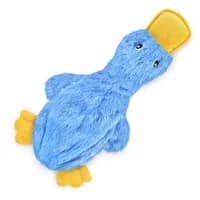
A soft, stuffing-free dog toy with crinkle sounds and a built-in squeaker.
Create a playful product video for the blue Crinkle Duck. Show a golden retriever discovering, carrying, and playing with the toy in a bright, cozy living room.
Less manual prep, more creative control—from your product link to your finished video.
Create product videoAutomatically import your product title, description, selling points, and images. Review and adjust the details without copying everything by hand.
Choose an angle and add an optional discount or promotion. AI drafts your product video script, ready for you to edit, regenerate, or replace with your own.
Choose from 60 AI avatars, upload your own, or create a product-only video. Set the language, aspect ratio, and duration to suit your audience and placement.
AI-generated product videos
Swipe to explore all 5 examples
Create ecommerce product videos for launches, product demos, social ads, and promotions using the listing you already have.
Turn listing images and key benefits into a product introduction for your store or social launch.
Use a product demo script to explain a feature, show an everyday use, or highlight a problem your product solves.
Create new hooks from the same product URL for TikTok, Instagram Reels, or paid social ads without collecting assets again.
Add a discount, coupon code, or seasonal offer to your brief for a video script built around your promotion.
AI URL to Video, also called link to video, turns a product page into a video creation workflow. Nexscope imports your product details and images, helps you draft a script, and generates a product video using the settings you choose.
Nexscope supports Amazon, Shopify, Walmart, Etsy, and eBay product pages. Paste the URL of an individual product listing, then review the imported details and images before creating your video.
Nexscope imports the product title, description, key selling points, and available product images. You can adjust the text and select the images you want to use before generating.
Yes. Add your discount, coupon code, or seasonal offer to the promotion information. Review the generated script to make sure the offer and any conditions are represented correctly.
Yes. Choose a selling angle, review an AI-generated script, regenerate it, or write your own. Finalize your product claims and promotional details before generating the video.
No. Choose from 60 AI avatars for a presenter-led video, upload your own avatar, or make a product-only video. You do not need to film a presenter yourself.
Generation time varies with the selected model, video duration, resolution, and current demand. Importing your listing and drafting a script reduces manual preparation, but there is no fixed completion time for every video.
Create product introductions, demos, presenter-led videos, and promotional ads for TikTok, Instagram Reels, paid social campaigns, or product pages. Choose the aspect ratio, duration, language, and resolution for your intended placement, and review the finished video before publishing.
Paste a product link to create your next video ad.