

How to Sell in Shopee in 7 Steps and Get Your First Orders

Table of Contents
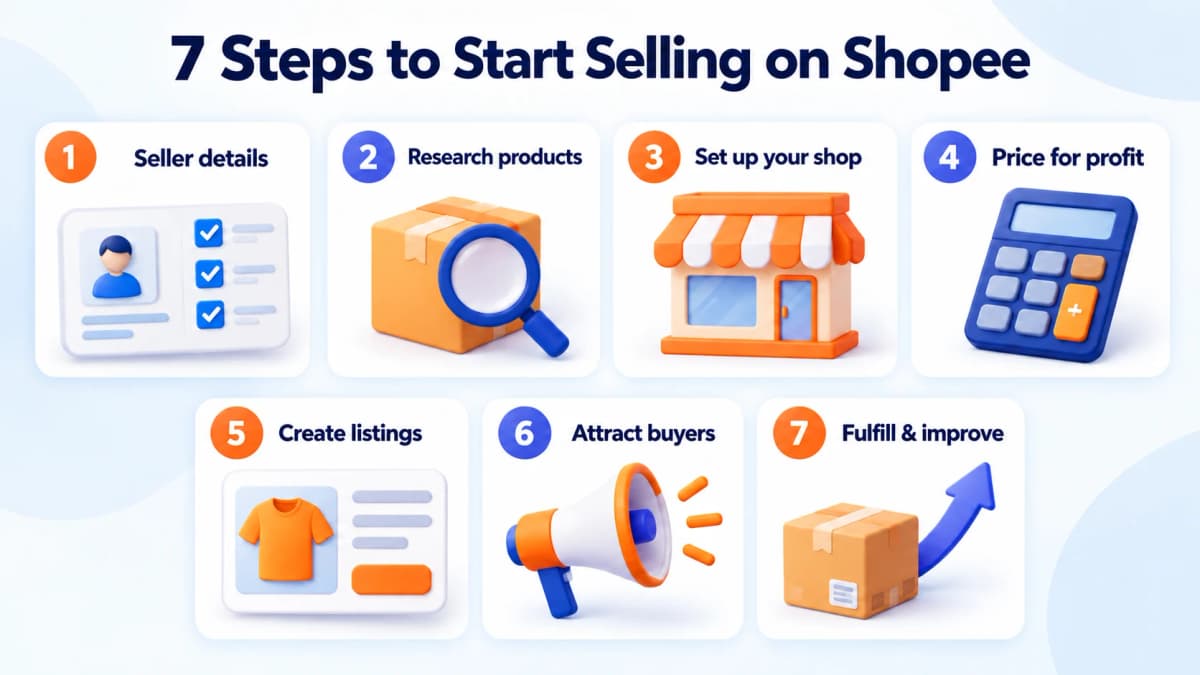
To start selling on Shopee, prepare your seller information, choose products, create your shop, set up payments and shipping, and publish accurate listings. Then bring buyers to those listings and fulfill the orders you receive.
The first important decision comes before you upload a product: can you offer something buyers want at a price that leaves a workable margin? A busy shop can still lose money when discounts, packaging, delivery costs, and advertising consume the earnings from each order.
If you are learning how to sell in Shopee, start with a focused product range and a repeatable daily routine. Research a few candidates, check your costs, and launch listings you can confidently fulfill. The seven steps below take you from preparation to your first orders—and help you decide what to improve afterward.
1. Prepare What You Need to Start Selling
Get your account information and fulfillment arrangements ready before committing to stock. Seller verification, fees, and shipping options depend on your selected Shopee site and seller type; use that site's onboarding requirements when preparing documents.
Seller Information and Verification
Gather the information requested for your application: contact details, identity or business documentation where required, pickup and return addresses, and the supported payout details. Keep names and addresses consistent across the records you submit.
A shopping account is only the starting point. Complete the seller-specific steps shown during onboarding before treating your shop as ready to trade.
Products, Inventory, and Shipping Readiness
Check the product rules for your selected site and category. Then establish how you will source, store, pack, and dispatch each item.
Order a sample before buying a larger batch. Inspect its dimensions, materials, packaging, and actual appearance. A supplier's photograph cannot tell you whether a lid closes securely or a fragile item survives delivery.
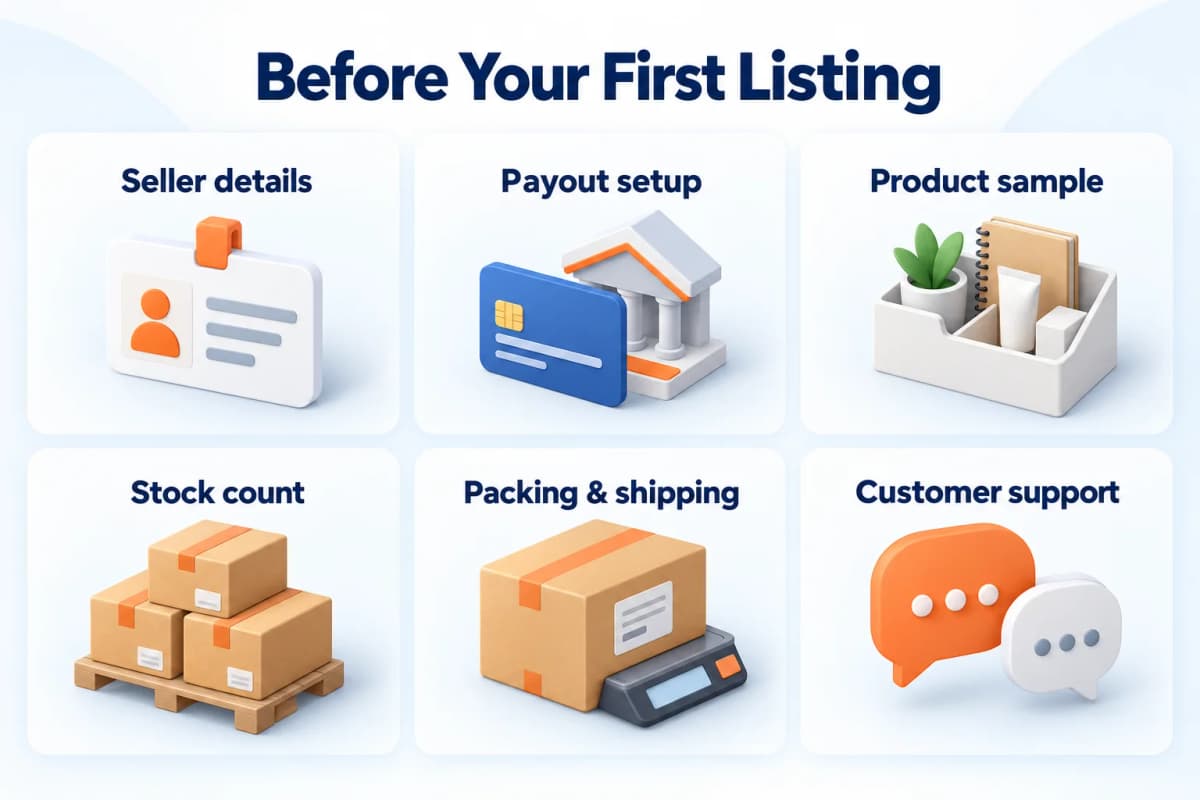
| Preparation | What to have ready |
|---|---|
| Seller information | Contact details and required verification records |
| Payout arrangements | Supported payment details matching the account requirements |
| Product supply | A checked sample, supplier terms, and replenishment lead time |
| Inventory | A reliable count for each sellable variation |
| Shipping | Packed dimensions, weight, packaging, and dispatch arrangements |
| Customer service | Someone responsible for questions, returns, and order issues |
Resolve any gap that could stop you from fulfilling an order before you publish the listing.
2. Research Products Before You Buy Inventory
Choose products by comparing customer needs, competing offers, and your operating costs. Start with a small set of related items so you can understand the category and manage stock without spreading your budget too thin.
Start With a Focused Product Category
Look for a category you can evaluate properly. Consider whether you understand the product, can obtain consistent quality, and can explain why someone should choose your offer.
For example, a seller considering home storage could start with one use case: organizing a small desk. That makes it easier to compare relevant items than searching broadly for everything labeled “home accessories.”
For each candidate, answer three questions:
- What specific problem does the product solve?
- Can you supply and ship it reliably?
- What useful difference can you offer at a sustainable price?
That difference might be a better size selection, clearer instructions, sturdier packaging, or a useful bundle. Choose something you can actually deliver.
Compare Similar Products and Competing Listings
Compare like-for-like offers. A single organizer and a three-piece set should not sit in the same price comparison without adjusting for quantity. Check materials, dimensions, included accessories, and variations before deciding that another seller is cheaper.
Build a simple research sheet with a product link, comparison date, item specification, visible price, seller information, and your estimated sourcing cost. Record the exact variation you inspected. Read available buyer feedback manually to identify recurring questions or product complaints.
Treat visible sales indicators as signals to investigate. Check their period and definition before using them in a forecast. Your own test orders and margins will determine whether the product works for your business.
Build a Product Shortlist With Nexscope
When your comparison grows beyond a handful of listings, structured data makes it easier to organize the research. Nexscope is an ecommerce data platform that teams can connect to their own applications, agents, and workflows through REST API or MCP.
Use Shopee Product Search to search and filter products within a supported Shopee market. Returned product titles, descriptions, and product URLs can help your workflow assemble a candidate list for review.
For the desk-organizer example, search the chosen market, remove unrelated items, and organize comparable products into a shortlist. Add your supplier quotes and sample inspection notes before choosing what to stock. Keep the research date with the list so you know when to revisit it.

Research Your Next Shopee Product
Use Nexscope’s Shopee APIs to search products and bring structured product data into your research workflow.
Explore Shopee APIs →3. Create Your Shopee Seller Account and Set Up Your Shop
Create your account through the official Shopee app or website for your selected market, then follow the seller onboarding flow. Keep your verification records nearby so you can complete the requested information accurately.
Register and Complete Seller Verification
Register using an available sign-up method and complete the contact verification. Open the selling area or Seller Centre and follow the instructions for your seller type.
Review any pending verification requests before moving on. Use account details you can continue to access, and set a strong password. If more than one person will operate the shop, decide who is responsible for account administration and daily order handling.
Set Up Your Shop Profile and Operating Details
Choose a readable shop name and a clear logo or profile image. Write a short description explaining what you sell and the customers you serve.
A focused description is more useful than a broad promise. “Compact storage for desks and small rooms” tells a buyer more than “Your number-one destination for everything.”
Complete the operational settings requested for your shop: pickup and return details, supported payout information, shipping arrangements, and other required fields. Check these against your real working routine. If you can only prepare orders at certain times, plan stock and staffing around the shipping deadlines shown in your account.
4. Price Your Products for Profit
Calculate what remains from an order after its variable costs. Use the current fee schedule for your seller account and category, then add costs that occur outside Shopee, such as procurement and packaging.
Calculate the Full Cost of Each Order
A useful starting calculation is:
Order contribution = sales revenue after seller-funded discounts − product cost − platform charges − packaging − seller-paid shipping − advertising attributable to the order − expected return costs.
This is the amount available to cover fixed business expenses and profit. Keep tax obligations and overhead in your wider business calculation.
Here is an illustrative example using generic currency units. The amounts are assumptions, not Shopee's fee rates.
| Item | Amount |
|---|---|
| Listed selling price | 25.00 |
| Seller-funded discount | −2.00 |
| Product cost | −10.00 |
| Assumed platform charges | −2.50 |
| Packaging | −0.80 |
| Seller-paid shipping | −1.20 |
| Advertising allocated to the order | −2.00 |
| Expected return-cost allowance | −0.50 |
| Contribution before fixed expenses and tax | 6.00 |
The order brings in 23.00 after the discount, but only 6.00 remains under these assumptions. Another 3.00 discount would reduce that contribution to 3.00 if the other costs stayed unchanged.
Set a Price That Leaves Room for Promotions
Work out a minimum acceptable contribution before joining a campaign or creating a voucher. Check which discounts you fund, how applicable fees are calculated, and whether offers can combine.
Compare your finished offer with equivalent listings. If your price is higher, make the reason visible: a larger pack, stronger material, an included accessory, or a service you can reliably provide.
After your first completed orders, compare estimated costs with actual settlement deductions and shipping expenses. Update your pricing sheet before scaling the product.
5. Create Product Listings That Help Buyers Decide
A useful listing makes the product, its specifications, and the purchase options easy to understand. Write it around the questions someone needs answered before ordering.
Write Clear Titles and Product Descriptions
Lead with the product type, then add the attributes that distinguish it. Include a brand only when it accurately identifies the item.
For example:
Stackable Desk Organizer, 3 Compartments, 24 cm, White
This communicates the item and its key specifications without filling the title with unrelated keywords or repeated promotional phrases.
Use short sections in the description for dimensions, materials, intended use, care, compatibility, and package contents. Explain anything that photographs might leave ambiguous, such as whether accessories are included.
To organize reference listings, your own research workflow can retrieve public Shopee product details from a supported product URL. Use the information to identify comparison points and unanswered questions. Write your final listing from your own product specifications and sample checks.
Add Useful Images, Variations, and Stock Details
Plan images around purchasing decisions:
- A main image that clearly shows the item for sale.
- A size image with readable measurements.
- Detail images showing materials, closures, or other important features.
- A package-contents image showing exactly what is included.
- A use-case image that demonstrates scale and function.
Use your own images or assets you have permission to use. Keep colors, sizes, and included quantities consistent across photographs, descriptions, and variation names.
Assign an internal SKU to each sellable variation. Enter accurate stock counts and packed shipping measurements. Before publishing, review the listing on a phone: check whether the main image is clear and whether a buyer can select the right option without guessing.
6. Attract Your First Buyers
Start promoting once the listing answers basic questions and you can fulfill an order. Choose a few products to test so you can see which offers deserve more attention.
Make Your First Offer Easy to Understand
Give buyers a clear reason to consider the item. Present the product's main benefit, package contents, price, and delivery information consistently.
If you use a voucher or bundle, calculate the resulting contribution first. A simple offer is easier to evaluate than several overlapping promotions whose final cost you have not checked.
You can also share the relevant product link with an existing audience. Match the message to a real use case, such as a short demonstration of how the organizer fits on a small desk.
Test Promotions and Ads With a Clear Budget
Use the promotional and advertising options available to your shop with a defined spending limit. Set the goal before the test: qualified visits, orders, or a contribution target after advertising.
Review the full path from impressions to clicks and orders. If people click but do not buy, inspect the offer, delivery cost, variations, and product information before increasing spend.
Keep a record of what you changed and when. Changing the price, main image, title, and advertising at the same time makes the result harder to interpret. Begin with the most obvious issue and compare results over a meaningful period.
Answer Questions and Build Buyer Confidence
Reply with specific information. When a buyer asks whether an item fits a particular space, provide the measurements and relevant image instead of a vague assurance.
Turn repeated questions into listing improvements. If several buyers ask what is included, add a clear contents photograph. If they confuse two sizes, revise the variation names. These changes also reduce repetitive customer-service work.
7. Fulfill Orders and Improve Your Store
Give every order a consistent handling process. Clear records help prevent wrong variations, missed dispatches, and stock discrepancies as order volume grows.
Process Orders and Keep Inventory Accurate
Use a simple daily sequence:
- Review orders and their payment or processing status in Seller Centre.
- Confirm the selected SKU, quantity, and any relevant order details.
- Inspect the product and pack it for the delivery conditions.
- Follow the shipping instructions and deadline shown for the order.
- Record the handoff and reconcile remaining stock.
- Review messages, delivery issues, and after-sales requests.
Separate damaged, reserved, and sellable stock in your own records. When you also sell through another channel, reconcile quantities before accepting more orders than you can fulfill.
Use Early Results to Decide What to Improve
Diagnose the problem before choosing an action.
| What you observe | What to inspect first |
|---|---|
| Few product visits | Listing visibility, category choice, titles, and traffic sources |
| Visits but few orders | Offer clarity, price, shipping cost, images, and variations |
| Orders but little contribution | Discounts, fee deductions, advertising, and fulfillment costs |
| Repeated questions or returns | Product accuracy, dimensions, quality, and packaging |
Compare similar time periods and keep promotional dates in your notes. A temporary campaign spike should not become your normal inventory forecast without further evidence.
Before expanding, check that you have a verified seller account, reliable supply, complete listings, a margin calculation, accurate inventory, and a working order-handling routine.
Common Mistakes to Avoid
-
Buying too much before checking the product. Start with a sample and a manageable quantity. Reorder when you have evidence about quality, customer response, and replenishment time.
-
Matching the cheapest price without matching the specification. Compare quantities, sizes, materials, and delivery terms before deciding what price to compete with.
-
Treating revenue as profit. Reconcile completed orders against actual deductions and variable costs. Watch contribution as well as order count.
-
Paying for traffic before fixing the listing. Make the item and its variations clear before spending more to bring people to the page.
-
Expanding faster than you can fulfill. Add products when you can maintain accurate stock, dependable dispatch, and responsive support.
Conclusion
Learning how to sell in Shopee starts with a practical sequence: prepare your seller account, research a focused product range, calculate your costs, publish clear listings, and build a reliable fulfillment routine. Use your first orders to improve the offer and understand its real economics before increasing inventory or advertising.
Keep product research part of that routine. Nexscope is an ecommerce data platform with two Shopee APIs that support different stages of product research:
- Shopee Product Search API: Search and filter products in a supported Shopee market to build a shortlist for further review.
- Shopee Product Detail API: Retrieve public product details from a supported Shopee product URL to examine a selected listing.
Connect these APIs through REST API or MCP to your own application, agent, or research workflow. Combine the product information with supplier quotes and your operating costs to decide what deserves a small initial test.
Build Your Shopee Product Research Workflow
Connect Nexscope’s Shopee product search and detail APIs to your own tools, apps, or AI agents.
Explore Shopee APIs →Frequently Asked Questions
What do I need to start selling on Shopee?
Prepare your contact information, the verification documents required for your seller type, supported payout details, and pickup and return arrangements. You also need products you can supply, accurate listing information, packaging, and a process for handling orders. Complete the onboarding requirements shown for your selected Shopee site before launching your shop.
How much does it cost to sell on Shopee?
Build your budget around inventory, packaging, applicable platform charges, seller-funded delivery, promotions, and advertising. The relevant fee schedule depends on your selected site, category, seller type, and programmes. Calculate the contribution from an individual order, then account for fixed expenses and taxes separately. Update the estimate using actual deductions from completed orders.
How do I choose products to sell on Shopee?
Start with a category you understand and a supplier you can evaluate. Compare equivalent listings, inspect samples, estimate the complete cost per order, and identify a useful difference you can offer. Use a small initial range to test customer response. Structured product search can help organize candidates, while supplier checks establish whether you can deliver them reliably.
Can I sell on Shopee without holding inventory?
Consider supplier fulfillment only after checking the rules for your selected site and confirming that the arrangement can meet its shipping and service requirements. Agree on stock updates, packaging, dispatch times, and returns with the supplier. Test the process before accepting customer orders. You still need a reliable way to resolve stock shortages and order problems.
How can I get my first orders on Shopee?
Launch a focused offer with clear images, accurate variations, a sustainable price, and practical delivery arrangements. Share relevant listings with an existing audience and test the promotional options available to your shop within a defined budget. Review visits, orders, and contribution together. Improve the weakest part of the buying experience before increasing spend.
Sources
- Shopee. (n.d.). [New to Shopee] How do I create a Shopee account? Retrieved from help.shopee.sg
- Shopee. (n.d.). [New to Shopee] What is Shopee? Retrieved from help.shopee.sg
- Shopee Singapore. (2020). Shopee Seller Education: How to start selling via the Seller Centre. Retrieved from youtube.com