

Nexscope Is Now on DeepSeek Harness for Ecommerce Research and Data

Table of Contents
The Nexscope plugin is now available for DeepSeek Harness, bringing ecommerce data into the same workspace where teams ask questions, analyze results, and prepare research files. Install @nexscope/dsh-nexscope, connect a Nexscope account, and start researching products, keywords, markets, and competitors through a conversation.
Following the launch of Nexscope on Codex, this release gives ecommerce teams another way to connect their preferred AI working environment to Nexscope data. DeepSeek Harness handles the conversation and analysis. Nexscope supplies the supported data, with built-in exports to carry the results into the next stage of work.
Ecommerce Research Inside DeepSeek Harness
Nexscope is an ecommerce data platform that teams can connect to their own agents and workflows through REST API or MCP. The DeepSeek Harness plugin connects to Nexscope's MCP service and makes its published capabilities searchable from the conversation.
A seller can begin with a product category, a competitor, or a specific research question. The plugin finds relevant tools, checks their required inputs, and requests the data needed for the task. DeepSeek Harness can then use the returned information to build a comparison, summarize findings, or prepare an export.
The integration supports OAuth sign-in, capability discovery, data calls, and file exports. Research stays in the user's DeepSeek Harness environment, with Nexscope providing the underlying ecommerce data.
What the Plugin Supports
Products, Keywords, and Competitors
The research catalog covers product discovery, keyword research, market analysis, competitor research, reviews, and advertising data. These capabilities support everyday seller questions: which products to investigate, which terms matter in a category, and what customer feedback reveals about competing listings.
Available marketplace coverage includes Amazon, TikTok, Temu, Shopee, 1688, eBay, Etsy, and Walmart. Data fields and available actions depend on the selected marketplace and tool.
For a product comparison, specify the marketplace and the fields that matter to the decision. For a keyword task, provide the target product or search term. A clear scope helps turn a broad research request into a useful set of records.
On-Demand Capability Discovery
The plugin searches Nexscope's published capability catalog as a task develops. It can inspect a tool's inputs and whether the call consumes credits before running it.
That means users can describe the research goal in plain language instead of starting with an endpoint name. A request to compare competing products can lead to the relevant product tools; a request to investigate customer feedback can lead to review data.
Exports for Further Work
Results can be exported as CSV, JSON, or JSONL. Use CSV for a spreadsheet comparison, JSON for structured records, or JSONL for processing records individually in a downstream workflow.
Ask for the fields needed for the next decision, including product identifiers, marketplace, and available metrics. DeepSeek Harness can organize the retrieved information into a written brief alongside the exported data.
How to Install and Connect Nexscope
Install the package, authorize your Nexscope account, and begin with a focused research task.
1. Add the Plugin
In DeepSeek Harness, open Plugins, select Add plugin, and enter:
@nexscope/dsh-nexscope
Choose Official npm registry and select Install.
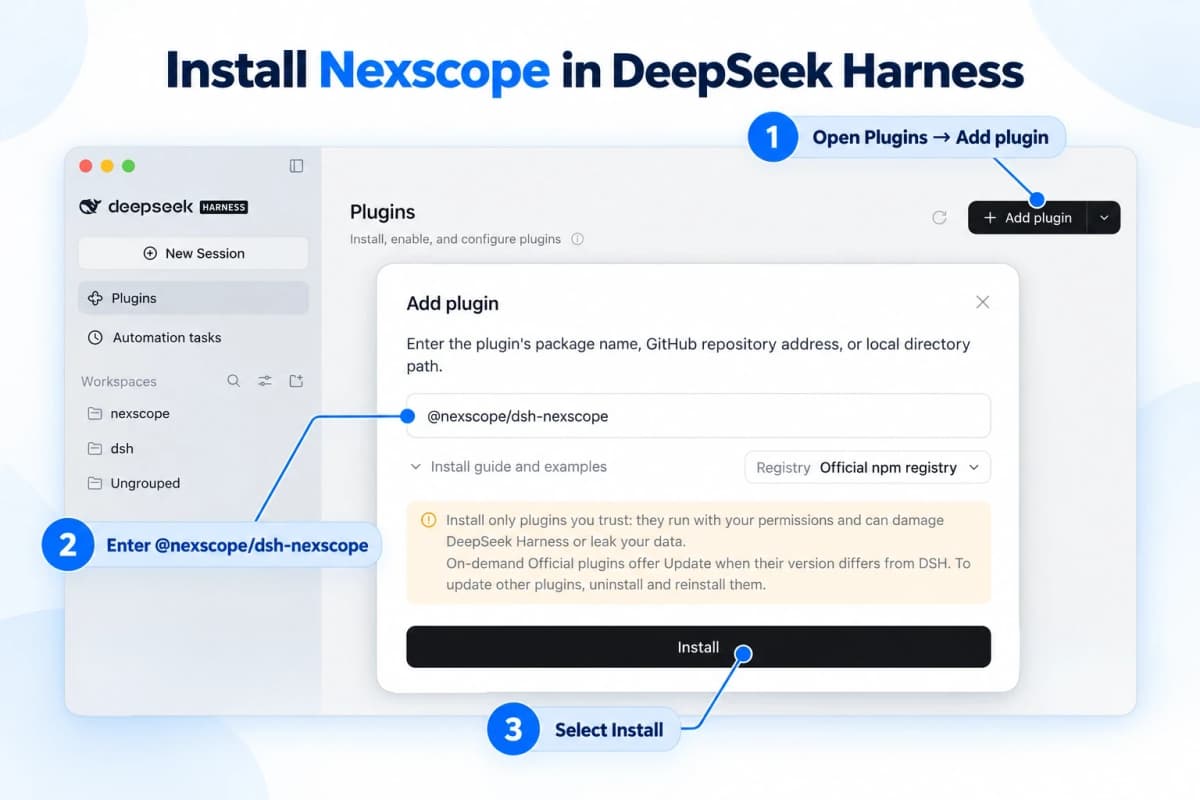
Installation illustration redrawn from the supplied DeepSeek Harness screenshot.
For a command-line installation, use:
dsh plugin --profile web add @nexscope/dsh-nexscope
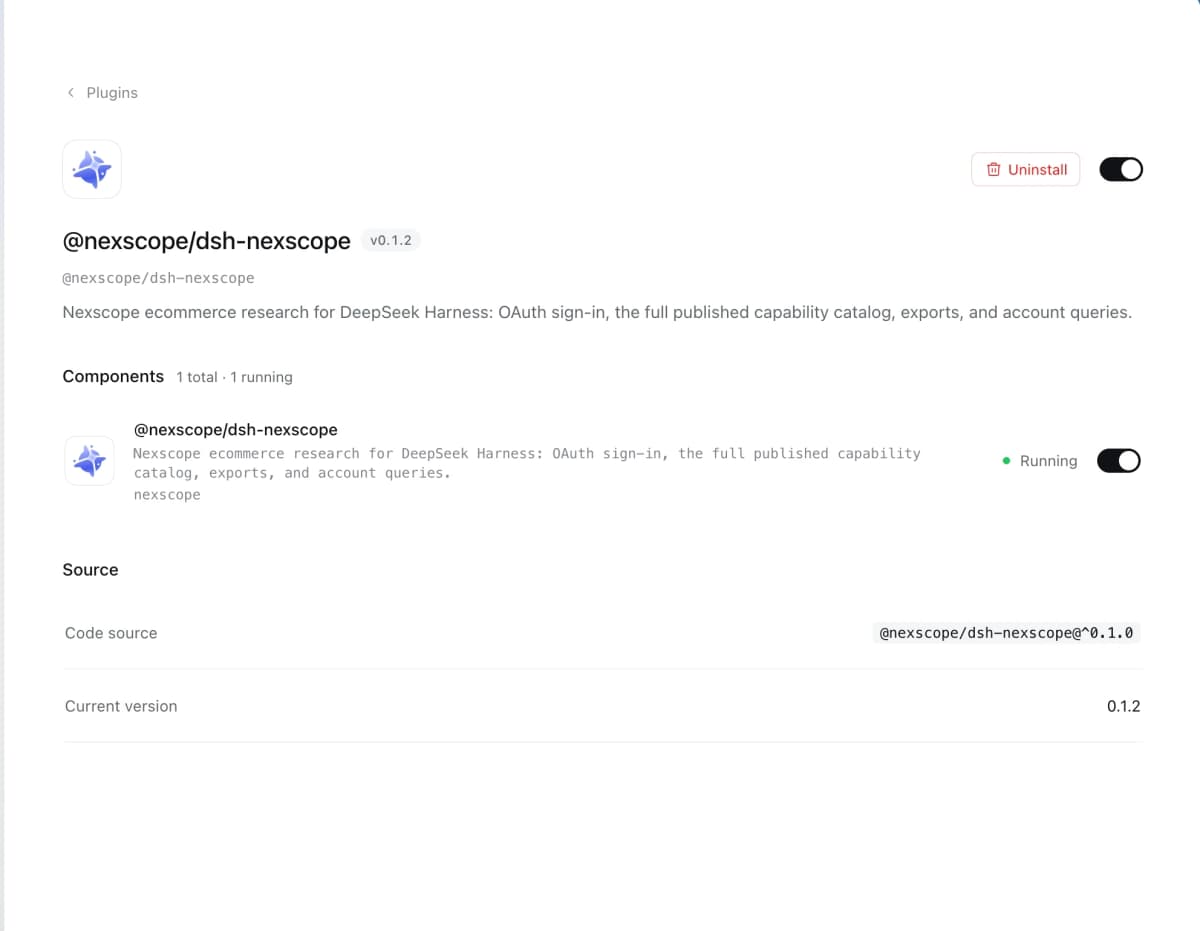
Restart the profile after installation, then check that Nexscope appears in Plugins and its component is enabled and running. Plugin version 0.1.2 supports DeepSeek Harness >=0.2.0-rc.2 <0.3.0.
2. Connect Your Account
Start a conversation and ask:
Connect my Nexscope account so I can use it for ecommerce research.
The plugin opens a Nexscope sign-in page in the browser. Complete the authorization, then return to DeepSeek Harness to continue. Authorization is saved in the Harness credential store and refreshed automatically.
Research tool calls use OAuth, so there is no need to paste an API key into the conversation.
3. Run a Focused Request
Begin with a small task that produces an easy-to-review output:
Use Nexscope to search Amazon US for wireless headphones. Retrieve one page of results and export the available product identifiers, titles, prices, ratings, and review counts to CSV.
Review the returned records, then expand the task into a competitor comparison, keyword analysis, or market brief.
Three Requests to Try First
Product Comparison
Use Nexscope to search Amazon US for insulated water bottles. Retrieve one page of results, compare available prices, ratings, and review counts, and export the product records to CSV. Summarize which products deserve a closer look and why.
This creates an initial comparison set that can guide a more detailed product review.
Competitor Keyword Research
Use Nexscope to research keywords for these Amazon US competitor ASINs: [insert ASINs]. Compare shared and unique terms, include available demand metrics, and save the results as a CSV. Keep unavailable metrics blank.
Use the same marketplace for each ASIN so the results share a consistent research context.
Customer Feedback Analysis
Use Nexscope to retrieve available reviews for this Amazon US ASIN: [insert ASIN]. Group recurring complaints and positive feedback, include representative examples from the returned reviews, and save the records as JSON with a short product-improvement brief.
The exported records give the team material to revisit when discussing product changes or listing priorities.
Account Access and Credits
Nexscope Data APIs use pay-as-you-go Data Credits, with no Data API subscription required. Paid research calls need sufficient credits in the connected account. Creative APIs and creative workflows have separate subscription conditions.
Balance and usage queries use a separate account interface that requires a Nexscope API key configured in the local environment or Harness credential store. This optional setup is separate from OAuth research access. The plugin can call research tools without configuring the account-query API key.
Conclusion
Nexscope on DeepSeek Harness gives ecommerce teams a practical way to connect research questions with product, keyword, market, competitor, and review data. Install the plugin, connect an account, and begin with one focused request and a reusable export.
From there, build on the same conversation to compare products, investigate keywords, or turn customer feedback into a clearer research brief.
Start Researching With Nexscope in DeepSeek Harness
Add the Nexscope plugin in DeepSeek Harness, connect your account, and turn your first ecommerce research question into a usable data export.
Get the Nexscope Plugin →Frequently Asked Questions
What is the Nexscope DeepSeek Harness plugin?
It connects DeepSeek Harness to Nexscope's ecommerce data capabilities through MCP. Users can discover relevant tools, request supported product, keyword, market, competitor, review, and advertising data, and export results for further analysis.
How do I install the plugin?
Open Plugins in DeepSeek Harness, select Add plugin, enter @nexscope/dsh-nexscope, and install it from the official npm registry. Restart the profile after installation and check that the Nexscope component is running.
Do I need an API key?
Research tool calls use browser-based OAuth sign-in. Balance and usage queries require a separately configured Nexscope API key. The account-query setup is optional and does not prevent OAuth-authenticated research calls.
Which export formats are supported?
The plugin exports results to CSV, JSON, and JSONL. Specify the desired format and fields in the request so the output fits the spreadsheet, analysis, or downstream workflow you plan to use.
Is a Nexscope subscription required?
Data API usage follows a pay-as-you-go Data Credits model, with no Data API subscription required. Paid calls need sufficient credits. Creative APIs and creative workflows use separate subscription conditions.
Sources
- Nexscope. (2026). Nexscope for DeepSeek Harness: Package README. Retrieved from registry.npmjs.org
- Nexscope. (2026). @nexscope/dsh-nexscope Version 0.1.2: Package Metadata. Retrieved from registry.npmjs.org