

Amazon Backend Keywords 2026: Complete Guide for Sellers

Amazon backend keywords are hidden search terms that help Amazon understand when a product may be relevant to a shopper's query. They do not appear on the product detail page, but they can expand a listing's searchable vocabulary when the title, bullet points, and description cannot naturally contain every relevant synonym, abbreviation, or alternate product name.
The challenge is not simply finding enough words to fill a field. Sellers need to decide which terms deserve visible placement, remove duplicates, follow Amazon's current formatting and content rules, and measure whether the finished listing is reaching the intended searches. Older advice often recommends punctuation, repeated variants, aggressive misspellings, or an outdated Seller Central path. Those tactics can waste limited space or conflict with Amazon's current guidance.
This 2026 guide explains what backend keywords are, how they differ from frontend and advertising keywords, how to research and prioritize candidates, where to add them in Seller Central, and how to avoid prohibited terms. It also provides a complete workflow and a step-by-step example that sellers can adapt to their own catalog.
What Are Amazon Backend Keywords?
Amazon backend keywords are words and phrases entered in a listing's Generic keyword attribute. Amazon uses these search terms as one of several signals for lexical matching between a shopper's query and a product. Shoppers cannot see the field on the product detail page.
Some sellers call the same concept Amazon generic keywords because of the current attribute name. Others use "backend search terms." In practice, these labels refer to the hidden vocabulary supplied for search matching rather than customer-facing listing copy.
The best backend terms add relevant vocabulary that is missing from the visible listing. Typical candidates include:
- Synonyms, such as "vacuum flask" for an insulated bottle
- Abbreviations that real shoppers use
- Alternate product names used in the target marketplace
- Relevant use cases or audience terms that do not fit naturally in visible copy
- Valid spelling variations that differ from the chosen frontend wording
Backend keywords do not guarantee ranking. They may help establish relevance, but ranking also depends on factors such as sales performance, price, availability, conversion, customer experience, and competition. Amazon also states that it may not use every search term supplied by a seller.
That distinction matters: indexing makes a product eligible to appear; ranking determines where it appears. A backend keyword can support eligibility for a relevant query without making the product competitive enough to reach page one.
Frontend vs. Backend Keywords
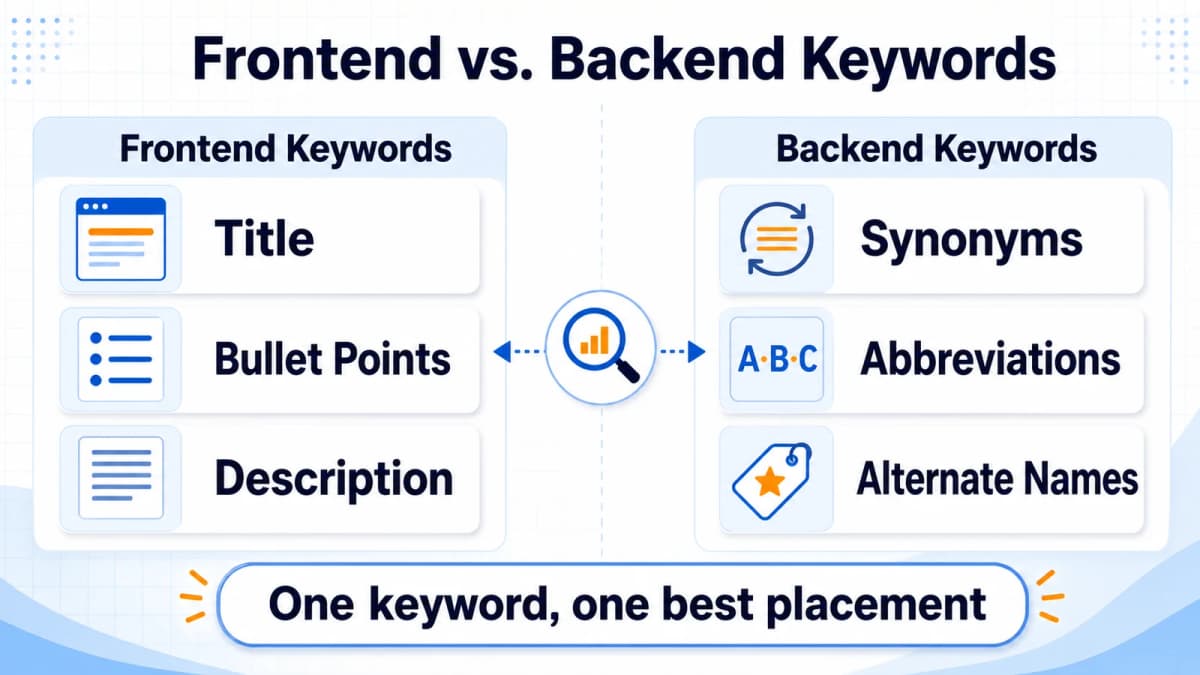
Frontend keywords appear in customer-facing listing content. Backend keywords remain hidden in Seller Central. Both can contribute to relevance, but they serve different merchandising jobs.
| Placement | Visible to shoppers? | Best use | Main constraint |
|---|---|---|---|
| Product title | Yes | Primary product type and highest-priority phrase | Readability, title policy, length |
| Bullet points | Yes | Benefits, features, materials, dimensions, use cases | Conversion-focused copy |
| Description or A+ Content | Yes | Deeper context, comparisons, brand story | Product-type and content rules |
| Generic keyword field | No | Missing synonyms, abbreviations, alternate names | Byte limit and prohibited terms |
High-value, highly relevant phrases usually deserve visible placement because they can help both relevance and conversion. A title that clearly says what the product is gives shoppers immediate confirmation. Backend space should not become a second copy of the title.
This is why Amazon listing optimization starts with keyword placement, not keyword stuffing. A useful rule is: one keyword, one best placement. If a word is already represented in the title or bullets, repeating it in the Generic keyword field generally wastes space.
Amazon Backend Keyword Limits and Official Formatting Rules
Amazon's current public help page explains that the Generic keyword field stops accepting input when the applicable limit is reached. An Amazon moderator also states that the field supports up to 250 bytes. Sellers should treat the live field in their marketplace and product type as the final control because Amazon can change interfaces and attribute rules.
Bytes are not always the same as characters
An English letter, number, or standard space is usually one byte in UTF-8. Many accented letters and non-Latin characters require more than one byte. A 200-character string can therefore exceed 250 bytes if it contains multi-byte characters.
Seller Central handles the field limit, but teams preparing bulk files or keyword sheets should measure UTF-8 bytes before upload. There is no SEO benefit to reaching exactly 250 bytes. A shorter field with highly relevant terms is better than a full field padded with weak traffic.
Current formatting guidance
Amazon recommends the following practices:
- Use spaces to separate words.
- Enter terms in lowercase.
- Avoid punctuation, including commas, semicolons, hyphens, and dashes.
- Do not repeat words already used elsewhere in the search terms.
- Avoid stop words such as "a," "an," "and," "by," "for," "of," "the," and "with."
- Include either the singular or plural form unless the two forms have materially different meanings.
- Add useful synonyms, spelling variations, abbreviations, and alternate names.
- Do not add common misspellings that Amazon already recognizes.
Punctuation and spaces may not count toward the limit in the same way as keyword characters, but Amazon still advises sellers to separate terms with spaces and avoid punctuation. A clean, space-separated string is easier to audit and less likely to carry over outdated formatting practices.
How to Research Amazon Backend Keywords
Keyword research should begin with product truth, then expand into shopper language. Volume alone is not enough. Every candidate must accurately describe the product, its use, or a legitimate buying need.
1. Build a product vocabulary map
Record the product type, materials, dimensions, features, compatibility, audience, use cases, and common alternate names. This creates an evidence boundary. A keyword should not enter the list unless the product can support the implied claim.
For example, a bottle may be relevant to "vacuum flask" and "cycling hydration," but not to "dishwasher safe" unless testing or manufacturer documentation confirms that feature.
2. Read Amazon's search language
Amazon autocomplete can reveal how shoppers extend a seed term with attributes, recipients, occasions, and problems. Competitor titles and bullets can expose category vocabulary, but they should be treated as clues rather than text to copy.
Brand-registered sellers can also use Brand Analytics and Search Query Performance to study query popularity, catalog impressions, clicks, cart adds, and purchases. These first-party sources are especially useful because they connect search language with shopper behavior.
3. Use advertising search terms as evidence
Amazon Ads search term reports show the actual queries that triggered ads. Converting terms can become candidates for organic placement if they are relevant and not already covered. Wasteful or irrelevant queries belong in PPC negatives, not in the backend field.
Backend terms and ad targeting remain separate systems. A profitable PPC query may deserve listing placement, but adding it to the Generic keyword field does not create an ad target or change an ad group's match type.
4. Validate demand and competition before prioritizing
Nexscope's Amazon Keyword Researcher helps sellers expand a seed idea and evaluate related Amazon search terms by marketplace. Its results use demand, concentration among the top three products, and the sales share captured by newer listings to show whether a keyword has traffic and room for a new offer.
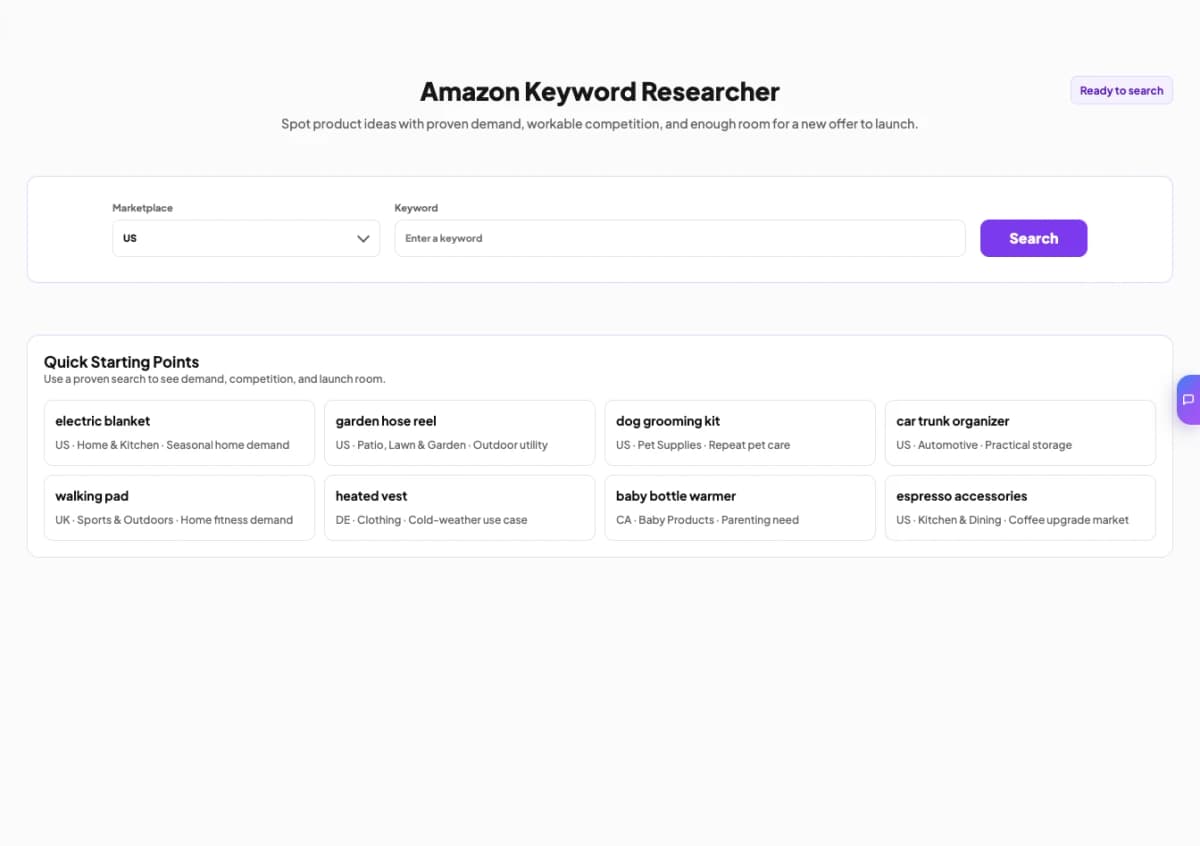
This makes the tool suitable for the discovery and validation stage of backend keyword research. It is not presented as a byte counter, deduplication engine, or automatic backend-field formatter. Sellers should export or record promising terms, then complete the placement, compliance, and byte checks described in the next section.
Turn Keyword Ideas Into a Focused Amazon Search Strategy
Start with a seed term, compare marketplace demand and competitive concentration, then shortlist relevant keywords for your listing, backend search terms, and PPC research.
Research Amazon Keywords →Marketplace-specific keyword discovery • Built for Amazon sellers
How to Prioritize and Process Backend Keywords
The finished Generic keyword field should be the result of a deliberate filter, not a pasted keyword export.
Score every candidate on four dimensions
- Relevance: Does the term accurately match the exact product?
- Demand: Do shoppers use the term in the target marketplace?
- Intent: Does the query suggest the right product and buying need?
- Coverage: Is the term already represented in the title, bullets, or description?
Primary product phrases with strong relevance and demand usually belong in the title. Important attributes and benefits belong in bullets when they help shoppers decide. Relevant synonyms and alternate names that add coverage without improving visible copy belong in the backend field. Advertising-only targets, broad category ideas, and unverified claims should remain outside the field.
| Candidate type | Recommended destination |
|---|---|
| Main product phrase | Title |
| Important feature or benefit | Bullet point |
| Helpful explanatory phrase | Description or A+ Content |
| Relevant synonym missing from visible copy | Generic keyword field |
| Converting ad query | PPC target and possible listing placement |
| Irrelevant traffic | Exclude or add as PPC negative |
| Competitor brand or ASIN | Do not add to backend keywords |
Follow a six-stage workflow
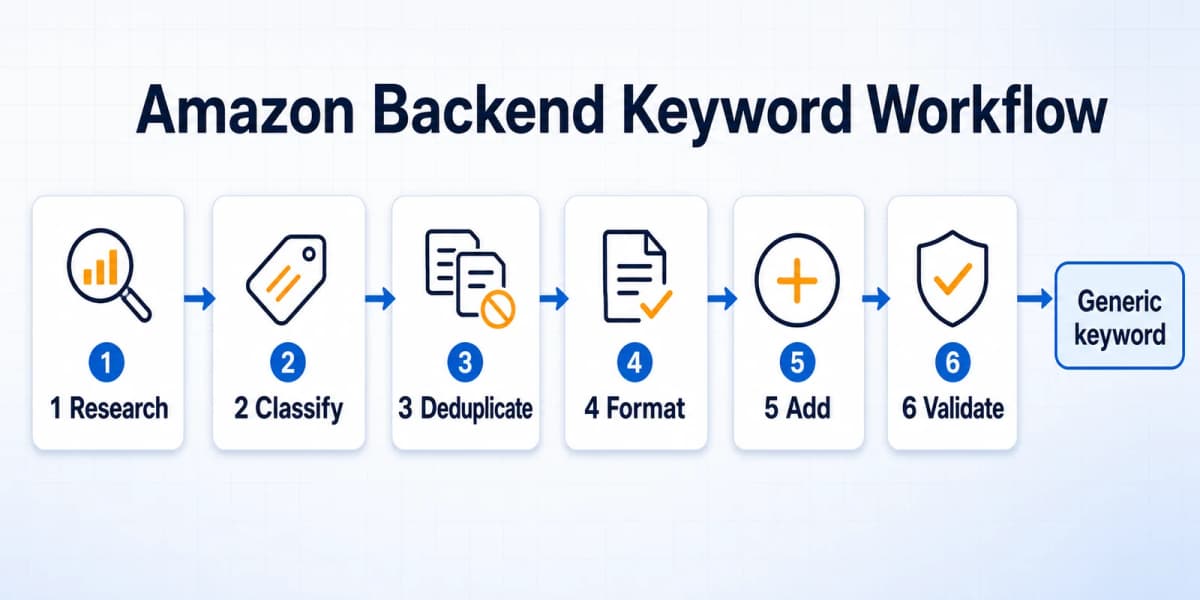
- Research: Gather product vocabulary, Amazon search suggestions, first-party query data, ad search terms, and validated keyword opportunities.
- Classify: Label each term as title, bullet, description, backend, PPC-only, or exclude.
- Deduplicate: Remove words already represented in visible listing content and repeated words inside the backend set.
- Format: Convert the remaining terms to lowercase, remove punctuation and unnecessary stop words, and check UTF-8 bytes.
- Add: Enter the final string in the Generic keyword field or update it through an approved bulk workflow.
- Validate: Confirm the listing processed successfully, then monitor query-level visibility and performance.
This process also reduces keyword cannibalization inside a single listing. It ensures the strongest terms support readable merchandising while the backend field expands coverage efficiently. A broader Amazon keyword research process can feed this workflow, but the backend set should always be the filtered remainder, not the master list.
Prohibited Amazon Backend Keywords
Amazon prohibits search terms that are misleading, abusive, temporarily promotional, or designed to misuse another brand's identity. Sellers should exclude:
- The seller's own brand name or another company's brand name
- ASINs
- Profanity
- Temporary statements such as "new," "now available," or "limited time"
- Subjective claims such as "best," "cheapest," or "amazing"
- Offensive or abusive terms
- Irrelevant high-volume keywords
- Claims the product cannot substantiate
Adding a competitor's trademark is not a clever shortcut to competitor traffic. It conflicts with Amazon's search term policy and can create intellectual property or listing enforcement risk. The same applies to inserting unrelated celebrity names, seasonal events, medical conditions, or product attributes solely because they have search volume.
Relevance should function as a veto. If a keyword would mislead a shopper about what arrives in the package, it should not appear in the title, bullets, backend field, or ad targeting.
How to Add Backend Keywords in Seller Central
Amazon's current interface places backend search terms in the Generic keyword field. The exact labels can vary by marketplace or product type, but the common path is:
- Open Inventory and choose Manage All Inventory or Manage Products.
- Find the product and select Edit.
- Open Product details.
- Locate Generic keyword.
- Enter the cleaned, space-separated keyword string.
- Save the listing and confirm that the update processes successfully.
Older tutorials may direct sellers to a separate "Keywords" or "Search Terms" tab. That path is no longer reliable across the current interface. Searching the edit form for "Generic keyword" is usually faster than looking for the old tab.
For catalog-scale updates, eligible sellers can download a Category Listing Report, edit the Generic keyword value in the appropriate inventory template, and upload a partial update. Bulk changes should be tested on a small set of ASINs before a full catalog upload. A misplaced column, invalid product type, or full-update setting can overwrite unrelated attributes.
Amazon Backend Keywords Example: From Raw List to Final Search Terms
Consider a fictional 24-ounce insulated stainless steel bottle. Its visible listing contains:
Title: Insulated Stainless Steel Water Bottle, 24 oz, Straw Lid
Bullets: Leakproof lid, keeps drinks cold, cup-holder-friendly shape, and food-grade materials.
Research produces the following raw candidates:
water bottle insulated stainless steel bottle 24 oz straw lid leakproof cold vacuum flask thermal sports gym hiking cycling travel hot beverage reusable canteen hydration best thermos
The list needs several corrections:
- Remove
water bottle,insulated,stainless steel,24 oz,straw lid,leakproof, andcoldbecause the visible listing already covers them. - Remove
bestbecause it is a subjective claim. - Remove
thermosbecause it is a protected brand name, even though shoppers sometimes use it generically. - Keep only terms that accurately describe the product and its supported use cases.
The resulting backend string is:
vacuum flask thermal sports gym hiking cycling travel hot beverage reusable canteen hydration
This ASCII-only example is 93 characters and 93 UTF-8 bytes. It does not need to be expanded to the maximum. The remaining space should only be used when research identifies additional relevant, non-duplicative vocabulary.
The final listing can still be improved after launch. If Search Query Performance or advertising data shows that "cycling water bottle" converts strongly, the seller may decide that the phrase deserves visible placement in a bullet. The word cycling can then be removed from the backend string and replaced with another qualified term.
Backend Keywords, PPC, Measurement, and Troubleshooting
Backend keywords are not PPC keywords
Backend keywords provide hidden listing metadata. Amazon Ads keywords control ad eligibility through broad, phrase, or exact match targeting. One does not automatically create the other.
A seller can use the same research to inform both systems, but the execution differs. Backend terms should maximize accurate organic coverage without repetition. Amazon PPC strategy also needs bids, match types, negatives, budgets, placements, and conversion economics.
How to measure whether the update is working
Before changing the field, record the current listing version, date, and query-level baseline. After the update processes, monitor relevant impressions, clicks, cart adds, purchases, organic position, and ad search term performance. Brand Analytics and Search Query Performance can provide first-party evidence for eligible brands.
Avoid replacing the entire field every few days. Frequent, undocumented changes make it difficult to connect an outcome with a specific edit. A controlled testing cycle should hold other major listing variables stable when possible.
Common troubleshooting checks
If expected queries do not improve, sellers should ask:
- Did the listing update process successfully?
- Is the term relevant enough to the exact product?
- Is it already present elsewhere, leaving no new coverage?
- Did the term exceed the field or template limit?
- Does it include prohibited content?
- Is the product indexed but ranking too low to be visible?
- Is the ASIN suppressed, out of stock, or losing the Buy Box?
- Is the query so competitive that relevance alone cannot produce visibility?
Amazon may choose not to use a supplied term. A lack of ranking movement is not proof that the field is broken. It may indicate weak product-query fit, insufficient sales history, poor conversion, or stronger competing offers. Sellers should diagnose the full Amazon SEO system rather than treating backend keywords as an isolated ranking switch.
Build a Repeatable Amazon Keyword System
Amazon backend keywords work best as the final layer of a structured listing strategy. Visible copy should communicate the product clearly and convert qualified shoppers. The Generic keyword field should then add relevant synonyms, abbreviations, alternate names, and use-case language that would make the visible listing awkward or repetitive.
A reliable process is simple to describe but valuable to repeat: research actual shopper language, assign every term to its best destination, remove duplicates, follow Amazon's current rules, add the clean field, and validate performance over time. Sellers who maintain this discipline can expand search coverage without sacrificing listing quality or creating avoidable policy risk.
Research Amazon Keywords Before You Edit the Listing
Expand a seed term, compare shopper demand and competitive concentration, and decide which terms belong in visible copy, the Generic keyword field, or PPC campaigns.
Research Amazon Keywords →Marketplace-specific research • No manual spreadsheet setup
Frequently Asked Questions
What are Amazon backend keywords?
Amazon backend keywords are hidden search terms entered in a product listing's Generic keyword attribute. They help Amazon understand additional relevant vocabulary for the product, including synonyms, abbreviations, spelling variations, and alternate names that do not fit naturally in visible listing copy. Shoppers cannot see these terms on the product detail page. Backend keywords can support indexing for relevant queries, but they do not guarantee high rankings or replace strong titles, bullet points, pricing, availability, conversion, and sales performance.
Are Amazon backend keywords visible to customers?
No. Backend keywords are not displayed in the title, bullets, description, or other customer-facing areas of the product detail page. They are managed inside Seller Central or through approved bulk listing files. Because shoppers cannot see them, they are useful for relevant alternate language that would make visible copy repetitive. Hidden does not mean unrestricted, however. Amazon's prohibited search term rules still apply, and sellers should never insert competitor brands, ASINs, subjective claims, offensive terms, or irrelevant traffic keywords.
What is the Amazon backend keywords limit in 2026?
Amazon's public help page says the Generic keyword field stops accepting input when the applicable limit is reached, while an Amazon moderator identifies a limit of up to 250 bytes. The live Seller Central field and the seller's product type remain the final control. Bytes can differ from character counts when a string contains accented or non-Latin characters. Sellers should measure UTF-8 bytes for bulk workflows and prioritize relevance instead of trying to force the field to reach exactly 250 bytes.
Where are backend keywords in Seller Central?
The current common path is Inventory > Manage All Inventory > Edit > Product details > Generic keyword. Interface labels can vary by marketplace, account, and product type. Older articles may refer to separate Keywords or Search Terms tabs, but those instructions are not reliable for the current interface. If the attribute is not visible, the seller should confirm the product type, permissions, and listing template. Catalog-scale updates may also be completed through the applicable inventory file using a controlled partial update.
Should backend keywords repeat words from the title or bullet points?
Generally, no. Repeating the same words in the Generic keyword field wastes limited space without adding new search vocabulary. Primary phrases should receive the strongest visible placement, while backend terms should cover missing synonyms, abbreviations, alternate names, and relevant use cases. Before submission, sellers should compare the backend list against the title, bullets, description, and the backend string itself. The goal is incremental coverage, not keyword density. If an important backend term later moves into a bullet, it can be removed and replaced with another qualified term.
Should sellers add misspellings to Amazon backend keywords?
Amazon recommends useful spelling variations but says sellers do not need to add common misspellings. Amazon search can often normalize predictable errors, so filling the field with typo variants may waste space. A legitimate regional spelling or alternate form can be useful when shoppers intentionally use both versions. The decision should be based on observed search behavior and relevance, not a list of generated typing mistakes. Each retained variant should add distinct coverage and remain understandable as a real product query.
Can sellers use competitor brand names in backend keywords?
No. Amazon's search term guidance prohibits both the seller's own brand name and other brand names in the Generic keyword field. Competitor brands can also create intellectual property and enforcement risk. Sellers should use neutral product vocabulary, features, materials, use cases, and legitimate alternate names instead. The same caution applies to ASINs, celebrity names, and trademarked terms that shoppers may use generically. If a term identifies a specific brand rather than the product category, it should be excluded.
How are backend keywords different from Amazon PPC keywords?
Backend keywords are hidden listing metadata that can support organic search relevance. PPC keywords are advertising targets configured with match types, bids, budgets, and campaign settings. Adding a backend term does not create an ad target, and adding a PPC keyword does not place the term in the listing. Search term reports can still connect the two workflows: a relevant converting ad query may deserve visible or backend placement, while irrelevant traffic may need a negative keyword. The systems share research, but they require separate execution and measurement.
Sources
- Amazon Seller Central. (2026). Use search terms effectively. Retrieved from sellercentral.amazon.com
- Amazon Seller Forums. (2025). Cannot enter backend keywords to my listing?. Retrieved from sellercentral.amazon.com
- Amazon. (2024). Improve product visibility through effective Amazon keyword research. Retrieved from sell.amazon.com
- Amazon. (2026). What is Amazon Brand Analytics?. Retrieved from sell.amazon.com
- Amazon Ads. (2026). Keyword targeting guide. Retrieved from advertising.amazon.com