

Amazon Listing Rules July 2026: New 75-Character Titles

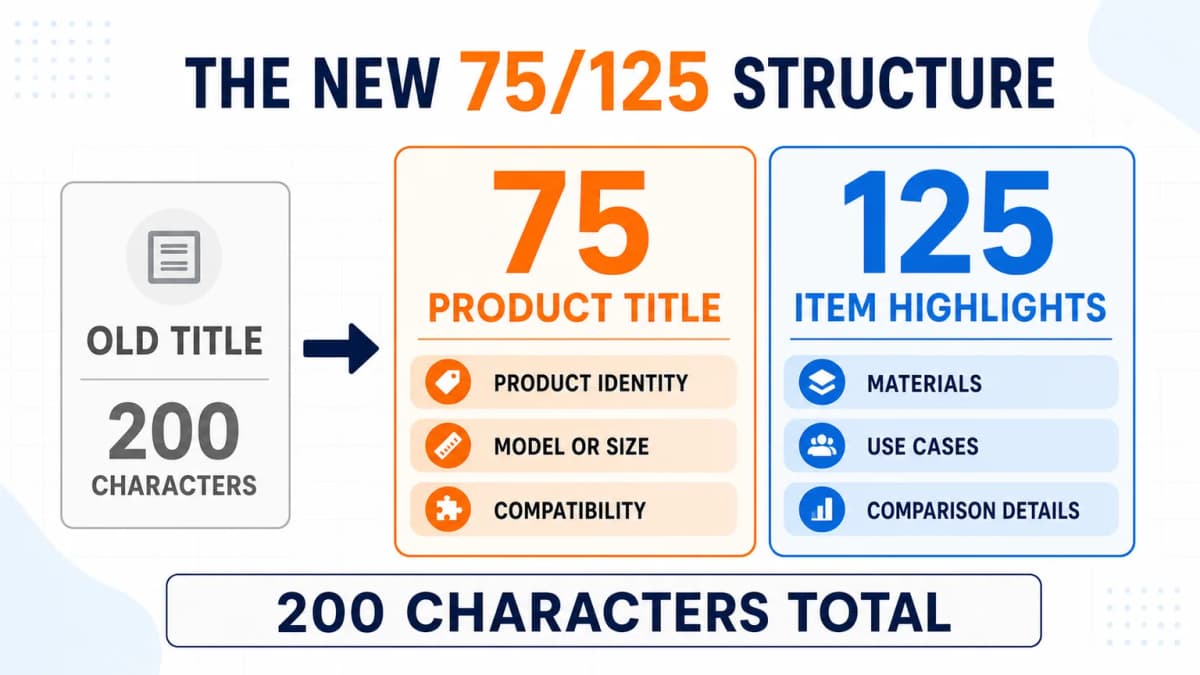
Amazon listing rules are changing on July 27, 2026, and the most visible change is a much shorter product title. For most affected products, Amazon will reduce the title limit from 200 characters to 75 characters including spaces. A new Item Highlights field will provide another 125 characters for materials, recommended use cases, and details that help shoppers compare products.
The update creates a new content structure rather than removing the full 200-character allowance. Sellers still have 200 combined characters, but those characters now serve two different purposes. The title needs to identify the product quickly. Item Highlights should carry useful supporting details that no longer fit in the title.
That split requires more judgment than trimming the end of every existing title. Sellers need to protect product identity, essential specifications, compatibility details, and the most relevant search language while removing repetition and unsupported claims. This guide explains the new limits, what Amazon may do after the deadline, how to divide listing information, and how to migrate a catalog without handing important product decisions to an automated rewrite.
July 2026 Rule Changes
The new limits begin on July 27, 2026.
| Listing field | Current allowance | New allowance |
|---|---|---|
| Product title or Item Name | Up to 200 characters for most categories | 75 characters including spaces |
| Item Highlights | New field | 125 characters including spaces |
| Combined visible allowance | 200 title characters | 200 characters across both fields |
Item Highlights can be used for materials, recommended use cases, and comparison details. Amazon says this content is searchable and can appear with the title in search results and on product detail pages.
- Category exception: Media product types remain excluded.
- Marketplace exceptions: Egypt, Saudi Arabia, Türkiye, and the United Arab Emirates are excluded from the current rollout.
- Existing rules remain: Titles must still avoid prohibited promotions, unnecessary symbols, repeated words, unsupported claims, and information about products not included in the offer.
Multi-marketplace sellers should check local product-type templates before applying one title rule across every feed.
Post-Deadline Title Updates
After July 27, titles over 75 characters will be gradually updated to an AI recommendation. Amazon may reorganize information rather than simply cutting the title at character 75.
Listings remain active, and sellers can continue editing both fields. Brand owners receive 14 days before implementation to review, modify, or approve Amazon's recommendation in Review Listings Changes.
To review a listing, open Manage All Inventory, select Edit, and choose View enhancements. Check product identity, compatibility, quantity, claims, and Item Highlights before accepting a suggestion. Then verify the published search result and detail page.
How to Write Listings After July 27
Writing an Amazon listing under the new rules should begin with product facts and buyer decisions, followed by keyword priorities and field allocation. Starting with a long legacy title and cutting words until it reaches 75 characters can remove essential context while preserving low-value repetition.
Use this workflow to rebuild the listing as one connected product-information system.
Start With Product Facts
Create a verified fact sheet covering the brand, product type, model, variation, size, quantity, materials, compatibility, package contents, use cases, limitations, and supported differentiators. Use specifications, packaging, and approved documentation as the source of truth.
Prioritize Search Language
Group search terms before writing:
- Primary product term: The clearest phrase that names the item
- Purchase-fit terms: Model, size, compatibility, material, or quantity searches
- Feature and use-case terms: Relevant phrases that describe how shoppers compare options
- Synonyms and long-tail terms: Useful language that does not need prominent visible placement
Relevance, purchase intent, and factual accuracy come before search volume. Amazon keyword research can separate core product demand from broad terms that attract the wrong shoppers.
Allocate Each Field
Write the listing in field order:
| Writing step | Field | What to write |
|---|---|---|
| 1 | Product title | Brand, product type, essential model, size, quantity, or compatibility |
| 2 | Item Highlights | Materials, recommended use cases, secondary features, and comparison details |
| 3 | Bullet points | Feature-to-benefit explanations, instructions, evidence, care, and package contents |
| 4 | Backend search terms | Relevant synonyms, abbreviations, alternate names, and long-tail variations |
The title identifies the product. Item Highlights support comparison. Bullets explain benefits and evidence. Relevant alternate vocabulary can move into Amazon backend keywords.
Check Cross-Field Consistency
The title, Highlights, bullets, images, A+ Content, variation labels, and attributes must agree on material, size, quantity, compatibility, and package contents. A "2 Pack" title cannot be paired with an image showing one unit or bullets describing three.
The next two sections provide the detailed writing method for the fields most affected by the policy: the 75-character title and the 125-character Item Highlights attribute.
Build the 75-Character Title
A strong short title protects product identity first. Use this order:
- Required brand
- Primary product term
- Essential model, compatibility, size, quantity, or variant
- One supported differentiator if space remains
Product Identity
Write the shortest accurate answer to "What is being sold?" Use the product name shoppers recognize and avoid broad lifestyle language or promotional wording.
Critical Specifications
Keep details that determine purchase fit, including size, quantity, model, voltage, connector type, variation, or compatibility. Accessories and replacement parts need human review so shortening does not change the meaning of third-party compatibility language.
Keyword Placement
Place the clearest product term early. Remove repeated synonyms, promotions, subjective claims, decorative punctuation, secondary features, and weakly relevant search terms. A shorter title can stop before 75 characters when it already communicates identity and fit.
Write Useful Item Highlights
Use the 125-character field for concise, factual details that help comparison after the product identity is clear.
Materials and Construction
State specific, documented materials when they affect durability, comfort, care, or preference. Use "stainless steel" or "organic cotton" instead of vague phrases such as "premium material."
Recommended Use Cases
Use cases can identify the setting or intended user, such as travel, small kitchens, outdoor use, or beginner practice. Avoid implying medical benefits, certifications, or unsupported performance.
Meaningful Differentiators
Useful differentiators include dishwasher-safe construction, fold-flat storage, or included replacement filters. Avoid empty adjectives such as "amazing" and "high quality."
Use short phrases separated by commas or semicolons. Do not repeat the title or turn Item Highlights into a visible list of backend keywords.
The Move-or-Delete Matrix
Use the following matrix when restructuring an existing long title.
| Information in the old title | Action | Destination |
|---|---|---|
| Product type or core product name | Keep | Title |
| Required brand or model | Keep | Title |
| Critical size, pack count, or compatibility | Keep when purchase fit depends on it | Title |
| Material or construction | Move when it is useful but not identity-critical | Item Highlights |
| Recommended use case | Move | Item Highlights |
| Secondary feature or comparison detail | Move | Item Highlights or bullet points |
| Benefit explanation | Expand | Bullet points |
| Synonym or alternate product name | Move when relevant | Backend search terms |
| Repeated keyword variation | Remove | None |
| Promotional phrase or unsupported superlative | Remove | None |
| Irrelevant traffic keyword | Remove | None |
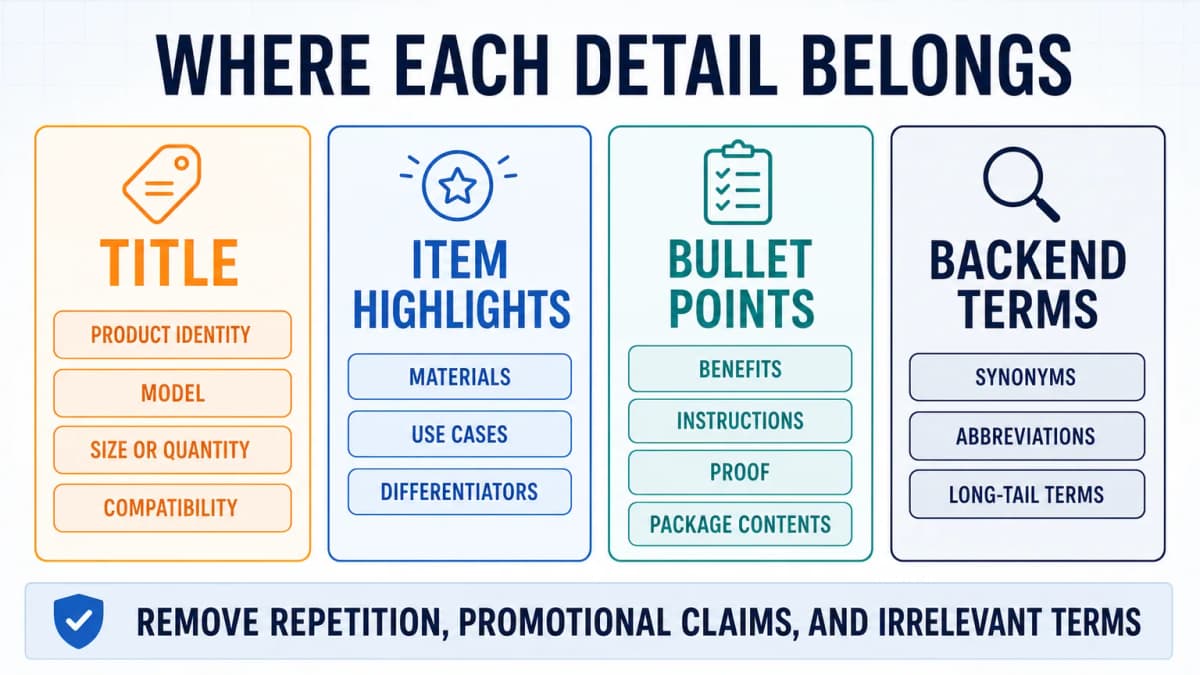
This exercise should happen before rewriting. It prevents an editor from treating all old-title words as equally valuable.
Before-and-After Examples
These examples are illustrative. Category requirements and product facts still control the final wording.
Phone Case
Old title:
AeroGrip Clear Phone Case for iPhone 16 Pro, Compatible with MagSafe Wireless Charging, Shockproof Protective Slim Cover with Raised Camera Edge, Transparent, 1 Pack
New title, 62/75 characters:
AeroGrip iPhone 16 Pro Case, MagSafe Compatible, Clear, 1 Pack
Item Highlights, 79/125 characters:
Shock-absorbing TPU edges, raised camera protection, slim grip for everyday use
Identity and compatibility remain in the title. Construction and protection details move to Highlights.
Facial Cleanser
Old title:
PureKind Gentle Facial Cleanser for Women and Men, Fragrance-Free Daily Face Wash for Sensitive Skin, Non-Drying Gel Formula, Pump Bottle, 8 fl oz
New title, 49/75 characters:
PureKind Facial Cleanser, Fragrance Free, 8 fl oz
Item Highlights, 80/125 characters:
Gentle gel formula for daily cleansing; suitable for sensitive skin; pump bottle
The title keeps identity, formulation, and size. Routine, skin type, texture, and packaging move to Highlights.
Drawer Organizer
Old title:
Oakline Expandable Bamboo Drawer Organizer with Removable Dividers for Kitchen Utensils, Office Supplies, Makeup and Bathroom Storage, 17 to 23 Inches
New title, 56/75 characters:
Oakline Bamboo Drawer Organizer, Expandable, 17 to 23 in
Item Highlights, 86/125 characters:
Adjustable storage tray with removable dividers for kitchen, office, or vanity drawers
The title keeps identity, material, and size. Dividers and use cases move to Highlights.
A Safer Catalog Migration
Large catalogs need a controlled migration.
ASIN Prioritization
Track the marketplace, ASIN, current title length, sales, ad spend, variation family, compatibility risk, proposed copy, and approval status. Prioritize high-revenue listings, complex compatibility, and titles far above the limit.
Draft and Review
Save the current version, classify each phrase, draft both fields, and recheck facts, variants, claims, and attributes. AI-assisted listing optimization can speed up the first draft, but a product-aware reviewer should approve it.
Staged Updates
Update a controlled batch first. Confirm that both fields publish, variation text remains consistent, and no required specification disappears. Then continue by priority group.
Performance Monitoring
Capture a baseline for impressions, click-through rate, conversion, advertising terms, and returns. Use a consistent observation window because price, inventory, ads, competition, and seasonality can change at the same time.
Audit the Full Listing
A compliant title can still sit on a weak product page. Images, bullets, A+ Content, offer details, and trust signals also affect clicks and conversion.
The Nexscope Free Amazon Listing Health Check Tool provides a broader first-pass audit from one ASIN or Amazon product URL. Sellers can choose a supported marketplace and review:
- Listing quality score and prioritized actions
- Title, bullets, images, and A+ Content
- SEO readiness and keyword placement
- Ratings, reviews, price, availability, and trust signals
The report prioritizes the next fixes. It does not replace product knowledge, category policy, or final Seller Central verification.
Find the Listing Issues Costing You Clicks
Check the title, bullets, images, A+ Content, SEO readiness, and trust signals from one ASIN or Amazon product URL.
Run a Free Amazon Listing Health Check →Free report • No coding required • Instant access
Common Update Mistakes
- Cutting at character 75: A mechanical cutoff can remove a model, quantity, or compatibility condition.
- Moving identity into Highlights: The title must identify the product on its own.
- Using Highlights as keyword storage: Repetition adds little comparison value.
- Accepting AI copy without review: Recommendations may miss product context.
- Ignoring variations: Parent and child naming must remain consistent.
- Assuming saved means published: Verify the customer-facing page.
- Promising ranking gains: Amazon confirms searchability, not a guaranteed ranking impact.
Conclusion
The July 2026 rules divide 200 characters into 75 for the title and 125 for Item Highlights. Keep identity and purchase-fit details in the title. Move materials, use cases, and secondary differentiators into Highlights.
Save the current version, prioritize important ASINs, verify facts, test a controlled batch, and monitor performance. Amazon's AI can assist with drafts, but sellers remain responsible for accurate content across the full product page.
Prepare Your Listing for July 2026
Audit the full detail page before shorter titles and Item Highlights go live.
Check Your Amazon Listing Free →Free report • No coding required • Instant access
Frequently Asked Questions
What is Amazon's product title limit in July 2026?
Starting July 27, 2026, affected Amazon product titles must be 75 characters or fewer, including spaces. Media product types are excluded. The current rollout also excludes Egypt, Saudi Arabia, Türkiye, and the United Arab Emirates. Product-type and marketplace guidance may add further formatting requirements. Always confirm the destination marketplace before updating a catalog.
Do spaces count toward the 75-character limit?
Yes. Letters, numbers, spaces, and punctuation all use the allowance. Use a character counter while drafting and verify the saved value in Seller Central. A title does not need to reach exactly 75 characters when a shorter version already communicates product identity and purchase-fit details. Count the final exact string, not its estimated display width.
What are Amazon Item Highlights?
Item Highlights is a new 125-character attribute for materials, recommended use cases, and information that helps customers compare options. Amazon says the content is searchable and can appear with the title in search results and on detail pages. It should add supporting information instead of repeating the title. Use concise, factual phrases that remain consistent with the listing.
Are Item Highlights the same as bullet points?
No. Item Highlights provides short comparison details near the title. Bullet points explain features, benefits, usage, package contents, and objections in greater depth. Use the title for identity, Highlights for quick comparison, and bullets for explanation. Avoid repeating the same sentence across all three fields. Each field should perform a distinct job in the buying journey.
Are Item Highlights searchable?
Yes. Amazon states that Item Highlights are searchable. It has not published a guaranteed ranking weight or confirmed that moving a title keyword preserves the same performance. Keep the clearest product term and purchase-fit information in the title, then monitor results after moving supporting attributes. Test important ASINs before applying the same migration pattern broadly.
What happens if a title remains over 75 characters?
Amazon says titles over 75 characters will be gradually updated to an AI recommendation. Listings remain active, and sellers can continue editing both fields. Brand owners receive 14 days before implementation to review, modify, or approve recommendations. Preparing approved copy early reduces the risk of losing important context. Review the customer-facing page after any approved change publishes.
Should every removed keyword move into Item Highlights?
No. Keep product identity and critical fit information in the title. Move useful materials, use cases, and comparison details into Highlights. Put relevant synonyms and alternate names in backend terms when allowed. Delete repeated, irrelevant, promotional, or unsupported language so every visible phrase adds value. Prioritize clarity over filling every available character.
Sources
- Amazon. (2026). Updates to Improve Your Product Titles Begin on July 27. Retrieved from sellercentral.amazon.com
- Amazon. (2026). Product Title Requirements and Guidelines. Retrieved from sellercentral.amazon.com
- Amazon. (2026). Product Detail Page Rules. Retrieved from sellercentral.amazon.com
- Amazon. (2026). Media Product Types. Retrieved from sellercentral.amazon.com