
Introducing Nexscope CLI: Ecommerce Tools and Product Reports in Your Terminal

Table of Contents
Nexscope CLI is now available as an independent, open-source command-line tool. It brings ecommerce tool discovery, online service calls, and local product comparison reports into the terminal, giving developers and technical ecommerce teams another way to build their research and creative workflows.
Start by comparing product data you already have, explore tools for keyword research, or connect to image and video services for your next campaign. Version 0.1.1 is available on GitHub and PyPI, with a free offline starting point that requires no account or API key.
What Is Nexscope CLI?
Nexscope CLI is a command-line interface for discovering Nexscope tools, inspecting their required inputs, making explicit MCP calls, and generating reports from local product data.
Nexscope provides ecommerce data and creative services that teams can connect to their own applications and agents. The CLI gives those teams commands they can run directly, include in scripts, or have a shell-capable AI coding agent execute. REST APIs and MCP provide the service interfaces; the independent CLI provides a terminal entry point. A Codex plugin is a separate way to use Nexscope inside a supported assistant.
You can use the CLI without installing an AI assistant. It requires Python 3.11 or newer and is released under Apache-2.0.
What Can You Do With Nexscope CLI?
Research Products and Competitors
Use marketplace data tools to investigate candidate products and competing listings. Product-detail capabilities can supply available listing information such as titles, prices, ratings, specifications, and images for further analysis.
For example, a team researching desk lamps could inspect candidate listings, collect relevant fields, and build a comparison for its next sourcing discussion. The dedicated Amazon comparison workflow supports two or three ASINs. Broader capabilities are accessed through the generic tools command, with the inputs and availability of each selected tool.
Plan Keywords and Campaigns
Explore keyword expansion, search-history, and ASIN keyword tools to inform listing content and advertising research. A seed term can lead to related search phrases; competitor ASINs can help identify keywords worth investigating.
The CLI lets you inspect a tool's input schema before supplying a keyword, marketplace, or product identifier. Returned metrics provide inputs for your decisions about relevance, demand, and campaign targeting.
Create Product Images and Videos
The tool catalog also includes creative capabilities for product images, selling-point visuals, and marketing videos. Depending on the selected tool, inputs may include product images, a brief, reference media, and generation settings.
For a new product launch, a developer can connect an available creative tool to a workflow that prepares campaign assets from approved product references. Generation runs through online services, with model-specific access and credit requirements. For an asynchronous job, inspect its status and retrieve the result using the corresponding retrieval tool.
Compare Your Own Product Data
Already have a shortlist in a spreadsheet? Import it as CSV or JSON and export a comparison as HTML, CSV, or Markdown. The local reporting workflow runs without uploading the data or connecting to a Nexscope account.
Reports retain supplied fields and supporting evidence files so teammates can inspect what went into the comparison. Missing values remain unknown, and prices need explicit currencies. This makes the report useful for reviewing a shortlist without inventing sales, profit, or a universal winner.
Use the CLI With an AI Coding Agent
Claude Code, Codex, and other agents that can run shell commands can use Nexscope CLI for product, keyword, and competitor research. The agent can inspect available tools, prepare JSON inputs, preview a request, and save the results for a report or another step in your workflow.
For example, ask an agent to compare two Amazon products and prepare an HTML report. Give it the product identifiers, ask it to inspect the comparison workflow, and review the dry-run plan before approving online requests. This uses the installed CLI through shell commands; a direct MCP connection is a separate integration option.
The 0.1.1 package contains a snapshot of 565 registered MCP tools. You can search that catalog offline; online execution checks the selected server and your account's access.
How to Use Nexscope CLI
1. Install the CLI
Create a virtual environment with Python 3.11 or newer. On macOS or Linux:
python3 -m venv .venv
. .venv/bin/activate
python -m pip install --index-url https://pypi.org/simple nexscope-cli==0.1.1
On Windows PowerShell, use the environment's Python directly:
py -3 -m venv .venv
.\.venv\Scripts\python.exe -m pip install --index-url https://pypi.org/simple nexscope-cli==0.1.1
The commands below use nexscope. In PowerShell, replace that executable with .\.venv\Scripts\nexscope.exe if the environment is not activated.
Check the installation and local prerequisites:
nexscope --version
nexscope doctor --offline
2. Find a Relevant Tool
Search the catalog by task, then inspect the tool you want to use:
nexscope tools list --search amazon_keyword_expansion
nexscope tools describe nexscope_amazon_search
Read the required fields and supported options before preparing a request. To validate an Amazon search input locally, save the following as search.json in your current directory:
{"keyword":"desk lamp"}
Then run:
nexscope tools call nexscope_amazon_search --input search.json --dry-run
This validates the input locally and previews the execution plan, including the call limit and retry behavior, without making a live search request or spending service credits.
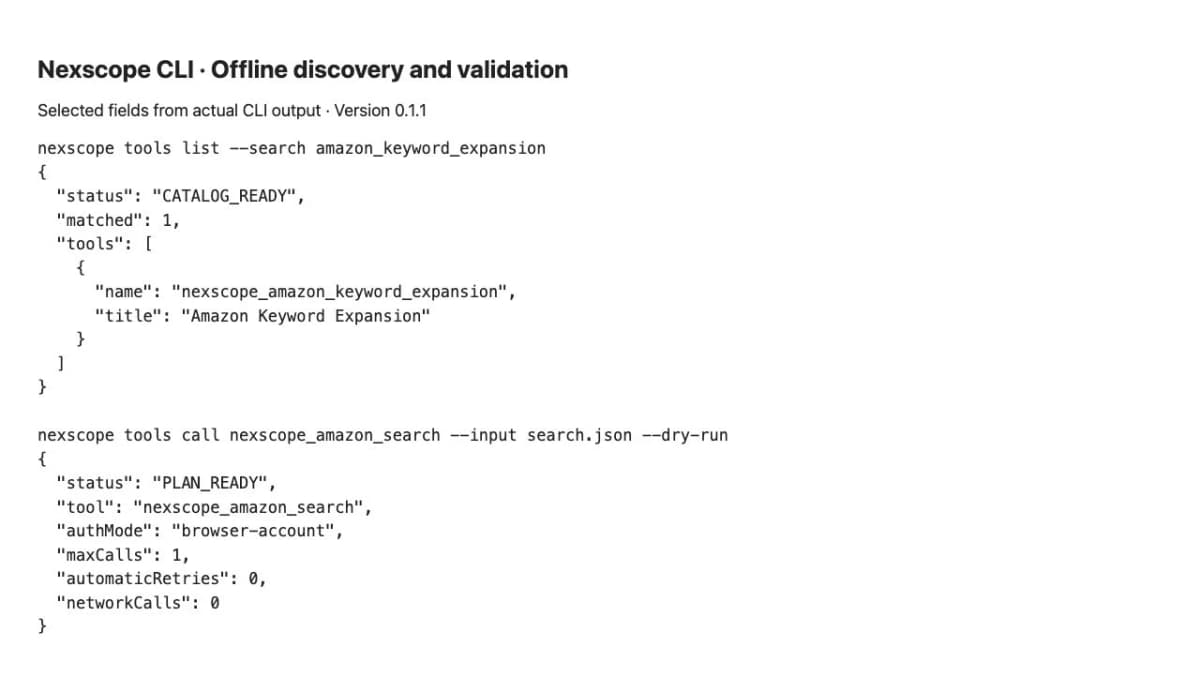
Selected fields from actual CLI output for local discovery and input validation.
3. Generate Your First Report
Try the reporting workflow with fictional sample products:
nexscope report demo --format json --out sample.json
nexscope report compare --input sample.json --format html --out comparison.html
Open comparison.html in your browser. Keep the accompanying .evidence directory with the report so its supporting files remain available. Use fresh output names when running the commands again.
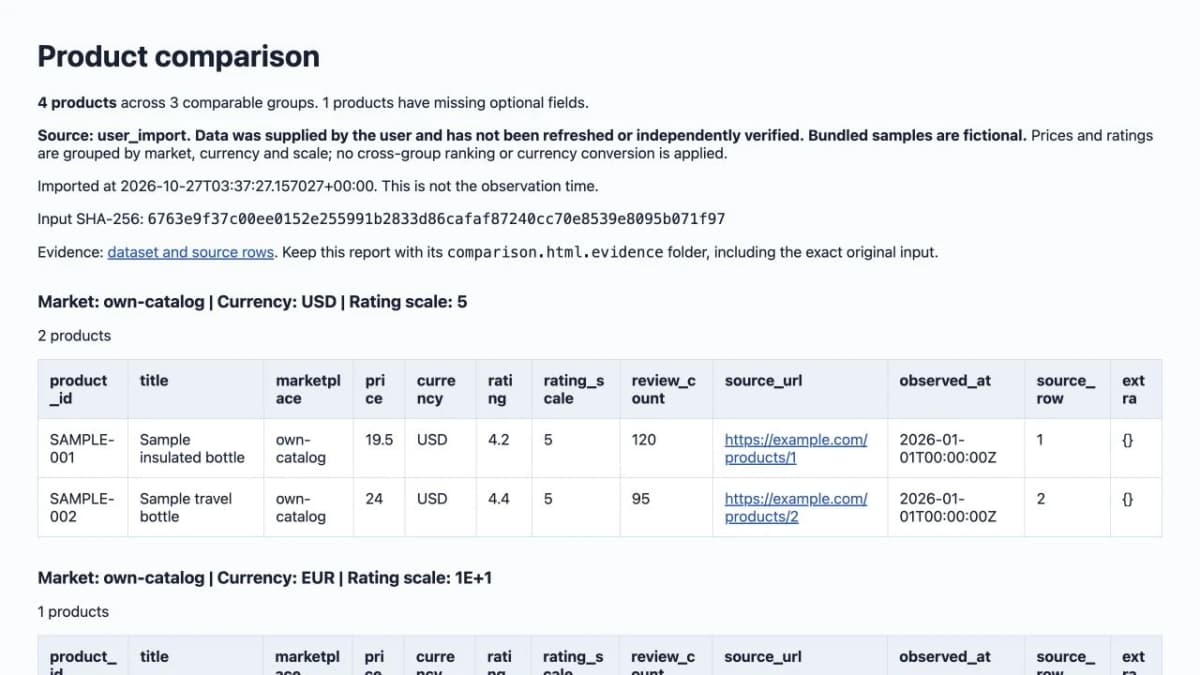
Example report generated from fictional sample data.
To prepare your own input, create a template and inspect the field requirements:
nexscope report template --format csv --out products.csv
nexscope report describe --schema
Fill the template with your products, keeping identifiers as strings and providing explicit currencies for prices. Then export it with:
nexscope report compare --input products.csv --format html --out my-products.html
Use --format csv or --format markdown with a matching output filename when you need another format.
4. Connect for Online Tools
When you are ready to retrieve data or generate creative assets, choose a connection method. Browser-account mode uses a browser sign-in and the operating system's credential store. Explicit API-key mode uses privately configured NEXSCOPE_API_KEY and NEXSCOPE_PROXY_BASE environment variables.
For explicit API-key mode, select --auth-mode env-api-key. A live tool call uses --execute and --allow-paid; tools whose declared effects require approval also need --allow-write.
Follow the repository's CLI tool guide for authentication and execution commands. Inspect the selected tool's inputs, permissions, and credit requirements before enabling an online request. Generic tool calls run one operation at a time, without automatic retries or pagination. A generation response may contain a job status that requires a later result-retrieval call.
5. Add the CLI to Your Agent Workflow
After installing the CLI in an environment your agent can access, add a short instruction block to the project's AGENTS.md for Codex or CLAUDE.md for Claude Code:
Use the nexscope CLI for ecommerce research and comparison reports.
- Run nexscope get-skills to inspect available workflow guidance.
- Inspect tool inputs with nexscope tools describe before calling them.
- Preview requests with --dry-run before using --execute.
- Ask for approval before using --allow-paid or --allow-write.
Then describe the research task in plain language. The agent can run the commands and interpret their output while you review the planned online calls. Configure authentication in the environment where the agent runs; API-key mode requires both NEXSCOPE_API_KEY and NEXSCOPE_PROXY_BASE.
Is Nexscope CLI Free?
The CLI is free to install and use locally. Online Nexscope services have separate access requirements and usage charges.
| What you use | Cost and access |
|---|---|
| CLI installation, bundled catalog, schema inspection, and local dry-runs | Free; no account or online request required |
| CSV/JSON imports and local comparison reports | Free; no API key or upload required |
| Online data tools | Consume applicable credits; Data Credits are available through pay-as-you-go top-ups without a subscription |
| Online image and video tools | Follow the selected creative service's subscription, permissions, and credit rules |
Eligible subscription credits can also cover supported data requests. Data-only top-up credits cannot be used for image or video generation.
New accounts currently receive 1,000 trial credits valid for 3 days, with no credit card required. Trial access varies by service, and video API access is excluded. Check current plans before moving from local examples to online usage. A request limit such as --max-calls limits the number of requests, not their total monetary cost.
Conclusion
Nexscope CLI gives ecommerce teams a practical terminal entry point for product research, keyword planning, creative services, and shareable product reports. Start with the free offline example, then connect online tools as your workflow requires them.
Explore more resources on Nexscope GitHub, and star the CLI repository if it helps your workflow.
When your workflow needs more data or creative capabilities, connect Nexscope APIs to your applications and AI agents:
- Ecommerce data: Research products, prices, reviews, and rankings to compare competitors and identify sourcing opportunities. Coverage spans marketplaces such as Amazon, TikTok Shop, Walmart, eBay, Shopee, and 1688, depending on the endpoint.
- Marketing APIs: Explore keywords, search results, backlinks, competitor ads, and website traffic estimates to plan SEO and campaigns.
- Image and video APIs: Generate and edit product images, create lifestyle scenes, and turn product references into marketing videos.
- MCP for AI agents: Connect supported data tools to MCP-compatible clients such as Codex, Claude Code, and Cursor, so agents can retrieve information for research and analysis workflows.
Build With Nexscope APIs
Connect ecommerce data, marketing insights, and image and video generation to your next workflow.
Explore Nexscope APIs →Frequently Asked Questions
Do I need an account to use Nexscope CLI?
No account is needed for local catalog discovery, schema inspection, dry-runs, or reports from your own files. Online requests require an authenticated connection and the permissions and credits applicable to the selected service.
Can I use the CLI without Codex?
Yes. Nexscope CLI is an independent Python command-line package. You can run it directly in a terminal or include it in your own scripts. A supported assistant or plugin is optional for the standalone CLI.
Can the CLI generate product videos?
It can call available online video-generation tools through the generic MCP tools interface. Inputs, model access, and charges depend on the selected tool. Asynchronous generation requires checking job status and retrieving the completed result.
Can I compare my own CSV or JSON data?
Yes. Local imports support up to 10,000 products within a 10 MiB raw input limit. Product ID and title are required; price and rating fields need their corresponding currency and scale. The dedicated online Amazon comparison workflow has its own two- or three-ASIN limit.
Sources
- Nexscope. (2026). Nexscope CLI README and Complete Tool Catalog. Retrieved from github.com
- Python Package Index. (2026). nexscope-cli 0.1.1. Retrieved from pypi.org
- Nexscope. (2026). Pricing and Credits. Retrieved from nexscope.ai
- Nexscope. (2026). Ecommerce API, SEO and GEO Skills, and Ecommerce APIs Directory. Retrieved from github.com