

What Is an API Key and How Do You Use One Safely?

Table of Contents
Definition: What is an API key?
An API key is a unique code that identifies the application, project, or account making an API request. The provider uses that association to track usage and, depending on the service, help control access.
A weather integration, product research script, or video workflow may ask for an API key before it can run. The key connects those requests to the right provider account. It does not contain the product data, generate the video itself, or automatically identify the person using the application.
The practical questions are straightforward: where to get the key, where to store it, how to send it, and what to check when a request fails. A small product-search example makes that process concrete. First, it helps to separate the interface from the credential: an API defines the available operations and request format; an API key supplies information the provider uses when handling access and usage.
What Is an API Key?
Identity, Access, and Usage
An API key is usually a generated string of characters. Its shape varies by provider: some keys include a recognizable prefix, while others look like a random sequence. A prefix may indicate a key type or environment, but it does not prove the key is valid.
The association behind the string matters more than its appearance. A provider can use that association to attribute requests to a project, apply usage limits, or determine which account pays for an operation. Access may also depend on permissions, an active subscription, available credits, or other authentication controls.
A valid key does not guarantee permission to use every endpoint. For example, a credential may work for one operation while another requires an entitlement the account does not have. Generating a second key will not necessarily change that account-level restriction.
A secret key can also be copied. A request carrying it shows possession of the credential, which is different from proving which person initiated the request. Applications still need their own user authentication and authorization where private user data or sensitive actions are involved.
Secret and Publishable Keys
Most keys used for privileged server requests should remain secret. Anyone who obtains one may be able to make requests within its allowed access and consume the account's resources.
Some services intentionally provide publishable keys for specific browser or mobile operations. Stripe, for example, distinguishes publishable keys from sensitive server-side keys. A publishable key has a deliberately limited role; it does not make other keys from that provider safe to expose.
The labels “public” and “private” also need context. API keys do not automatically form a cryptographic public/private key pair. Follow the provider's stated key type and intended environment rather than inferring behavior from a name.
How API Keys Work
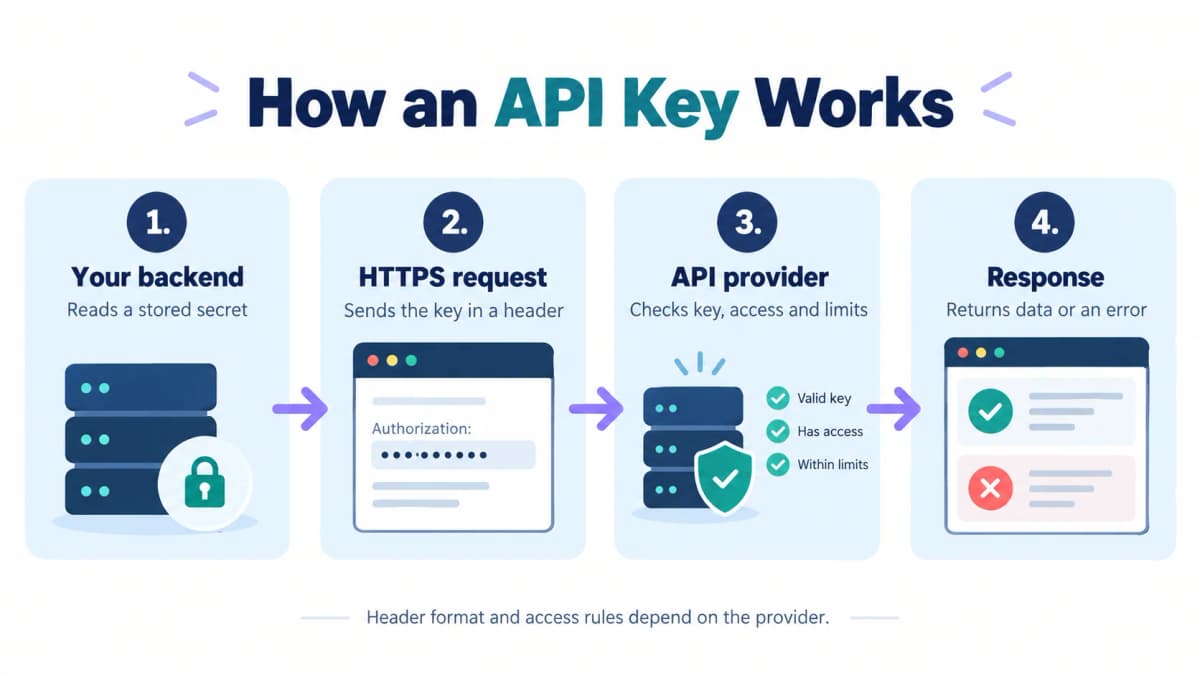
The Request Lifecycle
A typical server-side integration follows this sequence:
- The backend reads the key from its configured secret storage.
- It sends a request to the provider's HTTPS endpoint, including the credential in the required location.
- The provider checks the key and any relevant access, account, and usage conditions.
- The provider processes an allowed request or returns an error.
- The application checks the response before using the result.
Consider a scheduled product lookup. The search keyword tells the API what to find. The key associates the call with the account making it. Changing the keyword changes the requested data; changing the key changes the credential presented with the request.
Headers and Provider Requirements
Two common header patterns are:
Authorization: Bearer YOUR_API_KEY
X-API-Key: YOUR_API_KEY
These are alternative examples, not instructions to send both. YOUR_API_KEY is a placeholder and cannot authenticate a request. Use the exact header name and format required by the service.
The word Bearer describes a way to present a credential. A Bearer header alone does not establish that an integration uses OAuth. Nexscope, for example, accepts an API key in a Bearer authorization header.
Avoid adding secret keys to query strings when a supported header is available. URLs can appear in browser history, analytics, and intermediary logs. Headers still require careful handling: debug logging that captures an Authorization header can expose the same secret.
API Keys, Tokens, and Passwords
The main difference is how each credential is issued and used. Terminology varies across products, so the name alone cannot establish its lifetime or permissions.
| Credential | Typical association | Typical use | Important distinction |
|---|---|---|---|
| API key | An application, project, integration, or account | Programmatic requests and usage attribution | May have restrictions or expiration, depending on the provider |
| OAuth access token | A grant of access to resources | Calling an API within the authorization granted to a client | Can represent delegated user access or an application's own access |
| Password | A login identity | Authenticating a person or account during sign-in | Should not replace a separately issued API credential |
An OAuth integration may obtain an access token after an authorization flow. An API key is often created in an account or project console and supplied directly to an integration. Some providers use “token” for credentials that function much like API keys.
Do not assume every token is short-lived or every API key lasts forever. Likewise, a JWT is a token format, not a universal replacement for API keys. The useful questions are who issues the credential, what it authorizes, how long it works, and how to revoke it.
Get and Use an API Key
Choose the Account and Operation
Start with the provider whose API the application will call. Keys are issued for that provider's service; a key from one platform generally cannot authenticate requests to an unrelated platform.
For a first exercise, choose an operation with inputs and results that are easy to inspect. An Amazon product search uses a familiar search keyword and a page number. This provides a manageable way to examine a request without building a full research application first.
Before sending it, confirm the account can access that operation and check its usage charges. A small request is still a real API operation when run with an active credential.
Create and Store the Key
Sign in to the provider's account console and find its API access or credentials area. For Nexscope, create an API key from API Access. Keep the resulting secret in the backend environment that will make the request.
Where a provider offers multiple projects, environments, or key permissions, choose the intended ones before connecting an application. Do not assume every platform exposes the same controls.
The example below expects an environment variable named NEXSCOPE_API_KEY to have already been populated through the runtime's secret configuration. That name is chosen by the application; it is not the key itself. Avoid pasting a real key into a source file, a shared terminal recording, or an example command saved in chat.
Send a Small Request
This cURL example follows Nexscope's documented Amazon Search request format. It demonstrates the request structure; no authenticated request was executed to produce this article.
# NEXSCOPE_API_KEY must already be set in this server-side shell.
: "${NEXSCOPE_API_KEY:?Set NEXSCOPE_API_KEY securely before running}"

curl --request POST \
  'https://api.nexscope.ai/api/skill-api/v1/skills/amazon-search/run' \
  --header "Authorization: Bearer ${NEXSCOPE_API_KEY}" \
  --header 'Content-Type: application/json' \
  --data '{"keyword":"wireless headphones","page":1}'
The first line stops execution if the variable is empty or unset. The double quotes around the Authorization header allow the shell to substitute the stored value. Single quotes around that header would send the variable expression literally instead.
POST is the required HTTP method. The Authorization header carries the key, and Content-Type identifies the body as JSON. The keyword and page fields specify the search. None of these fields replaces another: a valid key cannot repair malformed JSON or supply a missing required input.
Run credentialed commands only in a trusted environment. Environment variables keep a key out of the source example, but expanded command arguments and diagnostic output can still expose it to local process inspection or logging. Avoid shell tracing and verbose request dumps containing credentials.
Inspect the Response
Separate three checks: did the HTTP exchange complete, did the provider accept or complete the operation, and does the returned data satisfy the task?
For Nexscope, HTTP 200 still requires checking the JSON code; 0 indicates business success or acceptance. Read the endpoint's response fields before using data. An accepted asynchronous task also requires checking its later completion status.
For a product search, inspect the returned results against the requested keyword and page. An empty result deserves a different diagnosis from an authentication failure. Save useful error details and request identifiers when available, while redacting credentials before sharing them.
Common API Key Errors
Start with the complete error response. HTTP conventions are useful clues, but providers can also return their own application-level codes.
| Symptom | Likely area to check | Practical next step |
|---|---|---|
401 Unauthorized |
Missing, invalid, expired, or revoked credentials | Check the configured value, header format, and intended account or environment |
403 Forbidden |
Access policy or permission denial | Check operation access and provider restrictions; do not assume replacing the key will help |
429 Too Many Requests |
Rate or usage limit | Reduce request frequency and follow documented retry timing |
400 Bad Request |
Request syntax or required inputs | Validate JSON, field names, and allowed values |
5xx response |
Provider or upstream failure | Check service status and retry guidance; avoid blindly repeating operations with side effects |
| HTTP 200 with an error in JSON | Provider-specific business failure | Inspect the response body and use its error message or code |
Check simple configuration mistakes before rebuilding the integration: an unset variable, an extra newline in a copied value, or a deployment still using an old secret can all break an otherwise correct request.
Keep retries controlled. A repeated authentication error usually needs a configuration change. A rate limit needs pacing. If a request may have started a paid generation or another non-repeatable action, check its state before resubmitting it.
API Key Security Basics
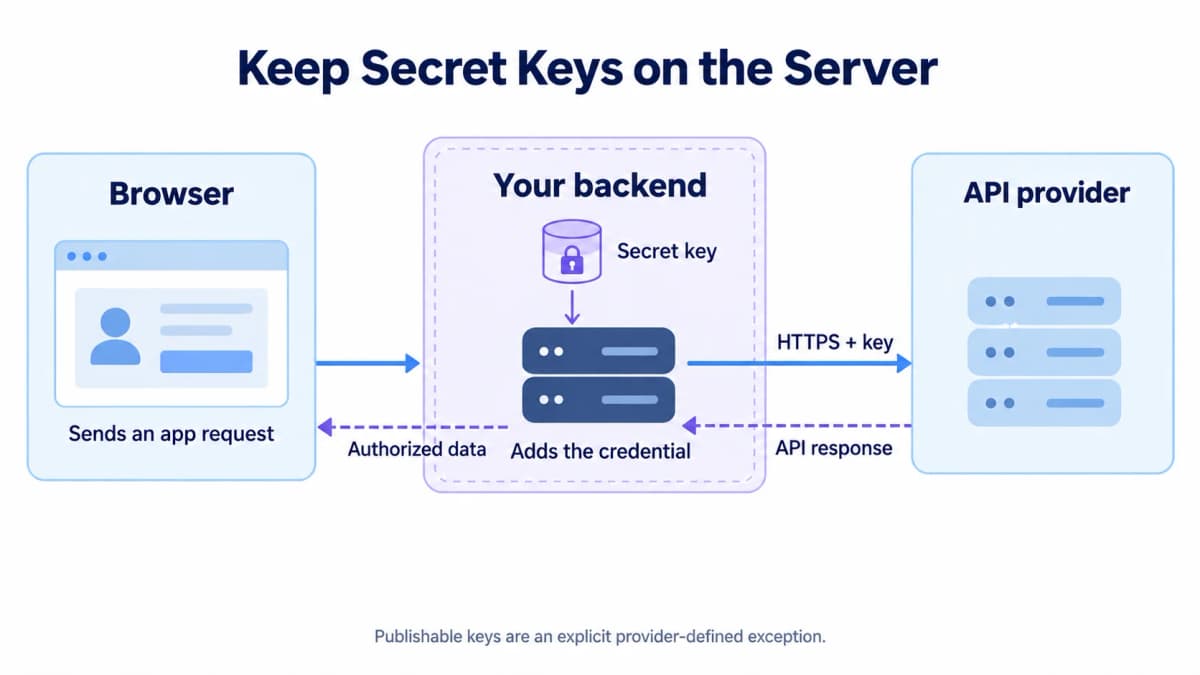
Storage and Restrictions
Keep secret API keys out of browser code, mobile app bundles, public repositories, and screenshots. A frontend variable can be embedded in the downloaded application even if it originally came from an .env file. Renaming it or hiding it behind a UI element does not protect it.
A common architecture sends the user's request to an application backend. The backend checks what the user is allowed to do, adds the provider credential, and returns only the permitted result. That backend also needs controls against abuse; moving a key there does not automatically make an unrestricted proxy safe.
Use managed secret storage where available. Give each integration only the access it needs, and apply supported API or application restrictions. Keep production credentials separate from development when the provider supports that separation. Record the key's owner, purpose, and deployment location without copying the secret into the inventory.
Rotation and Leak Response
Routine rotation and an active leak need different priorities.
For a planned replacement, create the replacement credential, update dependent services, and confirm they work before retiring the old key, where the provider supports overlapping validity. Check scheduled jobs as well as the main application so an infrequent task does not fail later.
If a secret key is exposed, revoke or disable it promptly. Remove the exposed copy, replace the credential in affected systems, and review usage for unexpected activity. Deleting a public file alone cannot make a copied key private again. Keep logs and relevant timestamps for investigation without redistributing the leaked value.
Conclusion
An API key connects a request to the provider's access and usage controls. A working integration requires the correct credential, the correct request format, and a meaningful response check. Keeping the secret in a controlled backend makes the same approach usable beyond the first experiment.
Put Your API Key to Work
Nexscope provides ecommerce data and creative APIs that teams can connect to their own applications and workflows. After establishing a working request, a team can build toward a specific outcome:
- Research products and markets: Bring supported product, price, review, and competitor data into a research process.
- Plan marketing with data: Compare keyword demand and research metrics when planning content or campaigns.
- Create product videos: Submit product images and a creative brief, then retrieve a completed generation for review.
REST API supports application integrations, while MCP connects supported capabilities to a team's own agent. The team retains control of its application logic and workflow.
New users receive 1,000 free trial credits, valid for 3 days, with no credit card required. Data APIs use pay-as-you-go credits. Creative APIs require a separate active subscription, so the Data API trial does not imply free video generation access.
Put Your First API Key to Work
Explore eligible Data APIs with 1,000 free trial credits, valid for 3 days. No credit card required.
Try Nexscope Free →Frequently Asked Questions
Is an API key the same as a password?
An API key is a credential intended for programmatic requests. A password commonly authenticates a login identity. Both can be sensitive, but their purpose and management differ. Use the credential type the API requires, and avoid giving an integration an account password when it supports a separately issued API key.
Can I get an API key for free?
Some providers issue keys without charging for their creation, while API usage has separate pricing, limits, or trial conditions. Creating a key does not imply unlimited free requests. Nexscope offers new users 1,000 free trial credits for 3 days without a credit card; Creative APIs have separate subscription requirements.
Where do I find my API key?
Look in the service provider's account or project console, usually under API Access, Credentials, or Developer Settings. The exact location and required account permissions vary. Some secret values are shown only when created. If a value cannot be recovered, use the provider's replacement process and update the applications that depend on it.
Can I put an API key in browser code?
Only do so when the provider explicitly designates that key for public client-side use. Keep secret keys on a controlled backend. A browser bundle, page source, or network request can reveal a frontend credential. An environment-variable name does not protect a value that the build system includes in public JavaScript.
Do API keys expire?
Expiration depends on the provider and the key's configuration. Some remain valid until revoked; others expire or are restricted by policy. Check the actual lifecycle rather than assuming permanent access. Track which services depend on each key so a planned replacement does not unexpectedly interrupt an application or scheduled job.
What should I do if my API key leaks?
Revoke or disable the exposed secret, replace it in affected systems, and inspect usage for unexpected activity. Remove exposed copies from repositories, logs, or shared files, but treat removal as cleanup rather than proof that nobody copied the key. Contact the provider when unexplained charges or unauthorized activity need investigation.
Sources
- Google Cloud. (n.d.). Best practices for managing API keys. Retrieved from docs.cloud.google.com.
- Stripe. (n.d.). API keys. Retrieved from docs.stripe.com.
- Jones, M., and Hardt, D. (2012). The OAuth 2.0 Authorization Framework: Bearer Token Usage (RFC 6750). Retrieved from rfc-editor.org.
- OWASP. (n.d.). REST Security and Secrets Management Cheat Sheets. Retrieved from cheatsheetseries.owasp.org.
- Nexscope. (n.d.). API Guide and Amazon Search. Retrieved from nexscope.ai.