

What Is ASIN on Amazon? A Complete Guide for New Sellers

What is ASIN on Amazon? An ASIN, or Amazon Standard Identification Number, is a unique 10-character combination of letters and numbers that Amazon uses to identify a product in its catalog. It usually appears in the product page URL, on the detail page, and in Seller Central.
The most important distinction is simple: an ASIN identifies a catalog product, while a seller SKU identifies one seller's inventory record and offer for that product. Several sellers can offer the same item under one ASIN, with different prices, quantities, conditions, and fulfillment methods.
New sellers need this distinction to avoid duplicate listings, inventory mismatches, and inaccurate reporting. This guide explains how to find an Amazon ASIN, how ASINs compare with SKU, UPC, GTIN, FNSKU, and ISBN codes, and how parent and child ASINs organize product variations. It also covers when a seller should match an existing product, when Amazon assigns a new ASIN, and how ASINs support advertising and product research.
What Is ASIN on Amazon?
An ASIN is Amazon's internal catalog identifier for a product. It connects the product detail page, catalog attributes, variation relationships, seller offers, advertising activity, and many reporting workflows to the same catalog record.
ASIN Meaning and Format
ASIN stands for Amazon Standard Identification Number. A standard ASIN contains 10 letters and numbers. For example, B0AB12CD34 has the correct general format, but this is a fictional code and does not identify a real product.
The ASIN belongs to Amazon's catalog system. A seller does not purchase an ASIN from a standards organization. When a genuinely new product is added and approved, Amazon creates the catalog record and assigns the ASIN. When the product already exists, the seller normally adds an offer to the existing ASIN.
Books are a special case. For many books, Amazon may use a 10-digit ISBN as the ASIN. Different editions, bindings, or formats can have different ISBNs and catalog records, so a hardcover, paperback, and ebook should not be assumed to share one identifier.
Product and Offer Structure
An Amazon product detail page represents a catalog item. The shared product data can include the title, brand, model, images, dimensions, and variation attributes. The ASIN is the key Amazon uses to identify that item.
A seller's offer is a separate layer. It can include:
- Seller SKU
- Price and quantity
- Item condition
- Fulfillment method
- Shipping settings
- Seller-specific handling information
Several sellers can attach offers to the same ASIN when they sell the exact same product. This structure helps customers compare available offers without creating a separate detail page for every seller. It also explains why starting to sell on Amazon begins with a careful catalog match, not automatic creation of a new product page.
Where to Find an Amazon ASIN
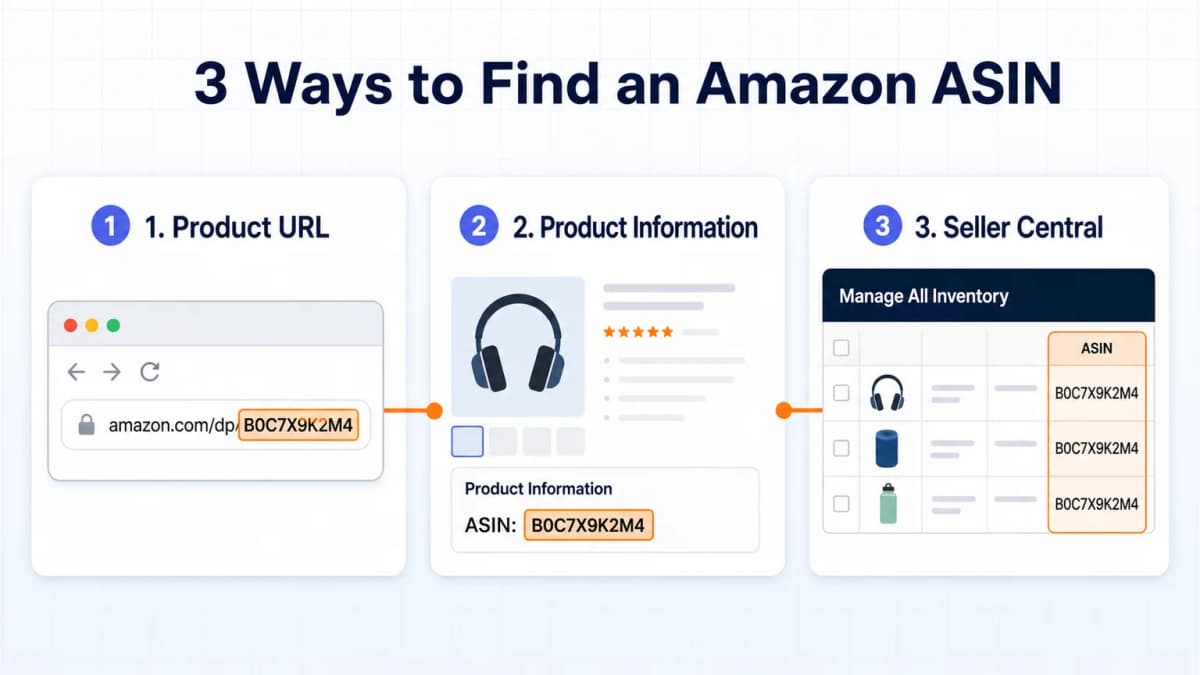
Most ASINs can be found in less than a minute. The product URL is usually the fastest method, while the product information section and Seller Central provide useful alternatives.
Product Page URL
On many Amazon product pages, the ASIN appears after /dp/ in the URL:
https://www.amazon.com/dp/B0AB12CD34
In this fictional example, B0AB12CD34 is the ASIN. Some URLs contain a product title, referral tags, search parameters, or other tracking information. The 10-character code immediately following /dp/ is the relevant part. Amazon also uses other URL patterns in some contexts, so the product information section is a useful confirmation point.
Product Information
Scroll down the product page and look for a section labeled Product Information, Product Details, or Additional Information. The exact label and placement can vary by category, device, and page layout. The ASIN is often listed with attributes such as dimensions, model number, release date, or category rank.
This method also helps confirm the brand, model, size, pack count, and other defining details before the code is saved.
Seller Central
Sellers can find ASINs in Manage All Inventory and in relevant inventory reports or exports. The inventory view generally shows the ASIN alongside the seller SKU, product title, price, quantity, and listing status.
For bulk operations, keep the ASIN and seller SKU in separate columns. Preserving both prevents updates and reports from treating two different identifiers as interchangeable.
ASIN and Other Product IDs
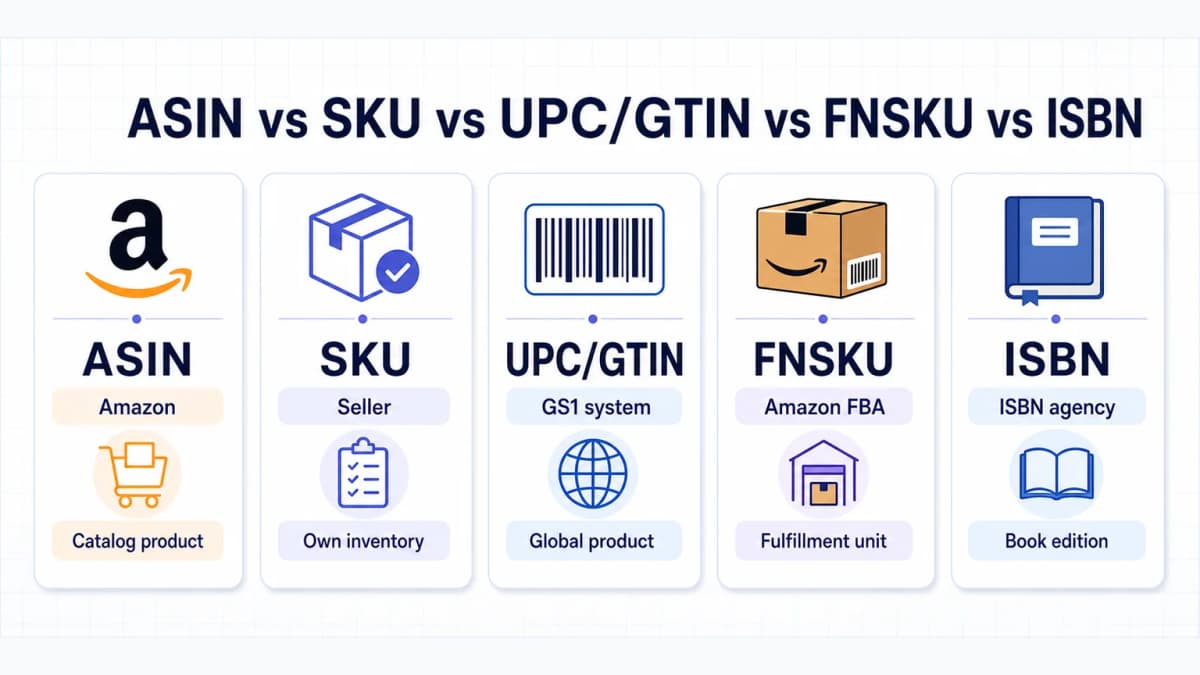
Amazon sellers encounter several identifiers that look similar but belong to different systems. The comparison below shows who issues each identifier, what it identifies, and whether sellers normally share it.
Identifier Comparison
| Identifier | Issuer | Scope | Main purpose | Shared across sellers? |
|---|---|---|---|---|
| ASIN | Amazon | Amazon catalog | Identifies a catalog product | Yes, for the same product |
| SKU | Seller | Seller's system | Manages inventory and offers | No |
| UPC, EAN, or GTIN | GS1 system | Global commerce | Identifies a trade item across channels | Generally, for the same trade item |
| FNSKU | Amazon | FBA fulfillment | Identifies seller-specific inventory units | No |
| ISBN | ISBN agency | Books and publishing | Identifies a particular book edition or format | Depends on the edition and format |
GTIN is the umbrella term for standardized Global Trade Item Numbers. UPC and EAN are common GTIN formats. GS1 states that a GTIN uniquely identifies a trade item, and the brand owner is generally responsible for allocating it. Amazon may use a GTIN to match or create a catalog item, but the ASIN remains Amazon's catalog identifier.
Common Identifier Mix-Ups
An ASIN is not a barcode that a seller buys. It is assigned within Amazon's catalog. A UPC or EAN can be encoded in a scannable barcode and used across multiple retailers.
A SKU is also different. Sellers create their own SKUs to organize inventory, suppliers, warehouses, or offer types. Two sellers offering the same product can share one ASIN while using completely different SKUs.
An FNSKU is used in Fulfillment by Amazon to associate inventory with a seller. It supports unit-level fulfillment handling and should not be treated as a universal product identifier.
Finally, a parent ASIN organizes variation relationships. Customers normally purchase a child ASIN, not the parent record itself.
Parent and Child ASINs
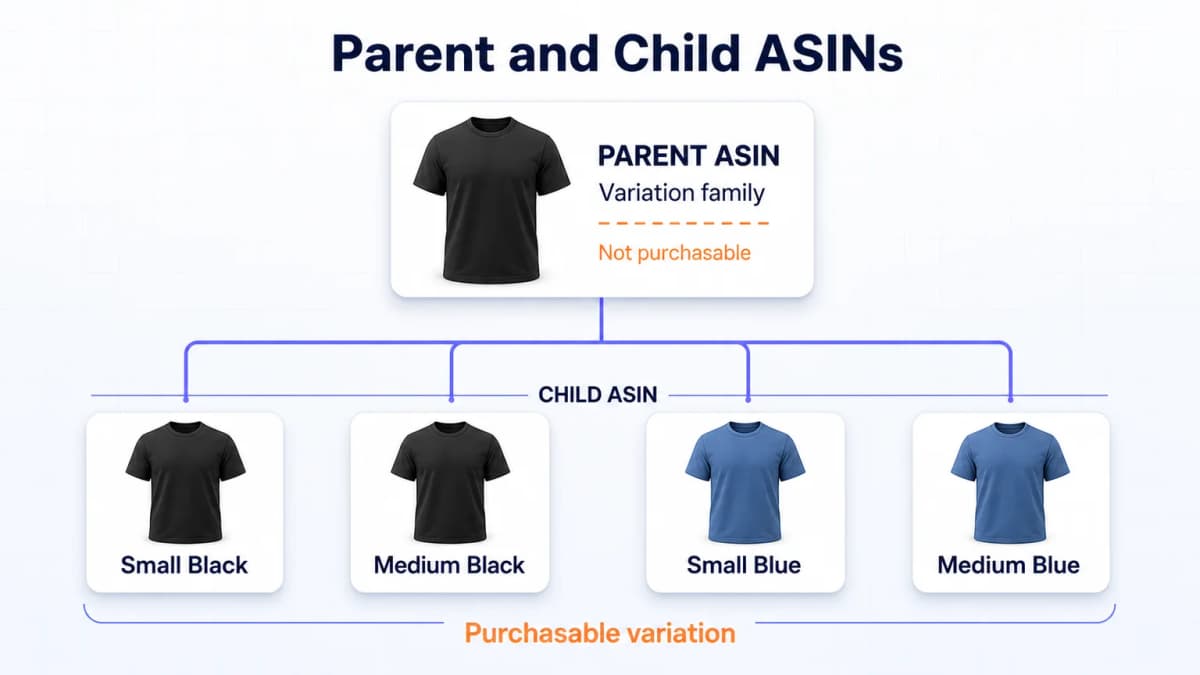
Products offered in multiple approved variations can be organized into a parent-child family. Each purchasable variation has its own child ASIN, while the parent creates the relationship between them.
Variation Families
A parent ASIN is generally a non-purchasable catalog relationship. A child ASIN represents a specific purchasable variation. For example, a shirt might have child ASINs for black in medium, black in large, blue in medium, and blue in large.
Common variation themes include:
- Size
- Color
- Flavor
- Style
- Pack count
Allowed themes depend on the product type, category, and marketplace. Attributes must describe a meaningful difference customers expect to select on the same detail page. Amazon's variation review-sharing rules also make accurate family structure important for customer experience and policy compliance.
Catalog Boundaries
Variation relationships should not be used to combine unrelated products. Different models, functions, brands, or products that do not fit the allowed theme may need separate catalog records. Forcing them into one family can create incorrect detail pages, reviews, inventory mapping, and reporting.
The reverse mistake is creating duplicate ASINs for the same physical product. A new seller, warehouse, price, or fulfillment method does not make the product a new catalog item. If the exact item already exists, the seller should normally attach an offer to the existing ASIN.
Catalog relationships can differ across Amazon marketplaces, so a product identifier or variation family should be verified before reuse elsewhere.
How to Get an ASIN
The workflow depends on whether the exact product already exists. Amazon separates matching an offer from creating a new product detail page.
Match an Existing Product
In Seller Central, search the catalog using a GTIN, product name, model number, brand, or another supported identifier. Before selecting a result, verify the attributes that define the exact trade item:
- Brand and manufacturer
- Model or part number
- Size and color
- Pack quantity
- Edition or format
- Included components
If all defining details match, add the seller's offer to that ASIN and assign a seller SKU. This avoids a duplicate catalog page and keeps comparable offers grouped around the correct product.
Create a New Product
If the exact product is genuinely absent, use Catalog > Add Products or the appropriate listing workflow. Supply complete, accurate attributes, images, category information, and the required product identifier. Amazon assigns the ASIN after the new catalog item is accepted.
Some sellers create multiple listings through inventory files or supported API workflows. The same rule still applies: each submitted record should either match the correct existing item or provide enough valid product data to create a genuinely new catalog item. Amazon's Listings Items API manages seller listings and offers, while the Catalog Items API supports catalog discovery and retrieval. These interfaces serve different layers of the product-and-offer structure.
GTIN Exemption Cases
Some products may qualify for a GTIN exemption. Eligibility and evidence requirements can vary by brand, category, product type, and marketplace. A seller may need product images, brand information, or other proof before Amazon approves the exemption.
An exemption is not a promise that every submission will be accepted. Sellers should check the current Seller Central requirements for the target category and marketplace. After a valid exempt product is created, Amazon still assigns the ASIN.
Why ASINs Matter
ASINs do more than label product pages. They provide a common reference for catalog quality, advertising, reporting, and structured research.
Catalog Accuracy
Matching the correct ASIN keeps a seller's offer connected to the right product title, images, specifications, and variation. This supports cleaner inventory records and reduces conflicts between what the seller intends to offer and what the customer sees.
Accurate identifiers also make Amazon listing optimization more disciplined. Teams can evaluate the correct detail page, variation, and marketplace before changing content or measuring visibility.
Advertising and Reporting
Amazon Ads uses ASINs in product selection, product targeting, and reporting workflows. Advertisers can organize products, compare performance, and decide where to allocate campaign resources at an ASIN level when the relevant campaign and report support it.
An ASIN alone does not prove profitability or demand. Advertising decisions still require the correct account, date range, attribution settings, costs, and conversion data.
Product Research
An ASIN can serve as a stable key for collecting supported product details, images, variations, sales ranks, review signals, keyword visibility, price observations, and related products. The exact fields depend on the source and marketplace.
Evidence types should remain separate:
- Public catalog data describes information visible or retrievable from Amazon's catalog.
- Seller-authorized data comes from a seller account with the necessary permissions.
- Estimated or modeled signals are analytical outputs and should be labeled as estimates.
For teams building repeatable datasets, an ASIN-based Amazon API research workflow can preserve the marketplace, observation time, source, and evidence type beside every result. That context matters when product pages, prices, rankings, and availability change.
Build an ASIN Research Workflow with Nexscope
Once an ASIN has been verified, it can become the starting point for a repeatable product research record. A team may begin with the current listing, then add historical movement, competitive context, keyword visibility, or customer feedback only when those inputs support the decision being made.
Nexscope provides separate Amazon data interfaces for these tasks. Teams can call the documented endpoints through REST API or connect supported data to their own Agent and workflow through MCP where documented. The most useful endpoint depends on the question the ASIN needs to answer.
Listing Data
When the goal is to turn an ASIN into a current product record, start with structured Amazon listing data. The Amazon Product Detail API can return fields such as title, images, bullet points, specifications, A+ content, pricing, ratings, reviews, and variants across supported marketplaces. It fits listing audits, catalog checks, and product-page comparisons.
Price and BSR History
A current price cannot show whether a product is stable, seasonal, or temporarily discounted. An ASIN's price and BSR history can be used to examine supported time-series fields such as price, Best Sellers Rank, ratings, seller counts, Buy Box observations, and monthly sales signals. Coverage and available periods depend on the source and marketplace.
Competitor Discovery
Research often needs to move from one reference product to the surrounding niche. Teams can find related ASINs and screen potential competitors using supported metrics such as traffic, sales, reviews, ratings, price, and margin. This is useful for building a comparison set before deeper listing or market analysis.
Keyword Visibility
To understand how shoppers may discover a product, teams can reverse-lookup ASIN keywords. The documented response can include supported fields such as organic rank, advertising rank, search volume, traffic share, and selected period comparisons. These are research inputs, and they should not be presented as seller-authorized advertising performance unless the underlying source supports that claim.
Review Evidence
Before changing a product or listing, teams can retrieve review data by ASIN with supported marketplace, star-rating, keyword, recency, and buyer filters. Review text can help surface recurring complaints, praised features, and product-improvement themes. Individual comments still need context, and review findings should not be treated as proof of market-wide demand.
Conclusion
An ASIN is Amazon's 10-character identifier for a catalog product. It is shared by sellers offering the same exact item, while each seller manages a separate offer and SKU. Correctly matching that structure helps prevent duplicate pages, variation errors, and reporting confusion.
Build an ASIN Research Record
A practical ASIN record should contain:
- ASIN and marketplace
- Seller SKU, when applicable
- Parent or child status
- GTIN, UPC, EAN, or ISBN, when applicable
- Brand, model, title, size, and pack count
- Source and last verification date
This turns the code into a usable research key while keeping catalog observations, seller-authorized performance, and estimates in labeled fields.
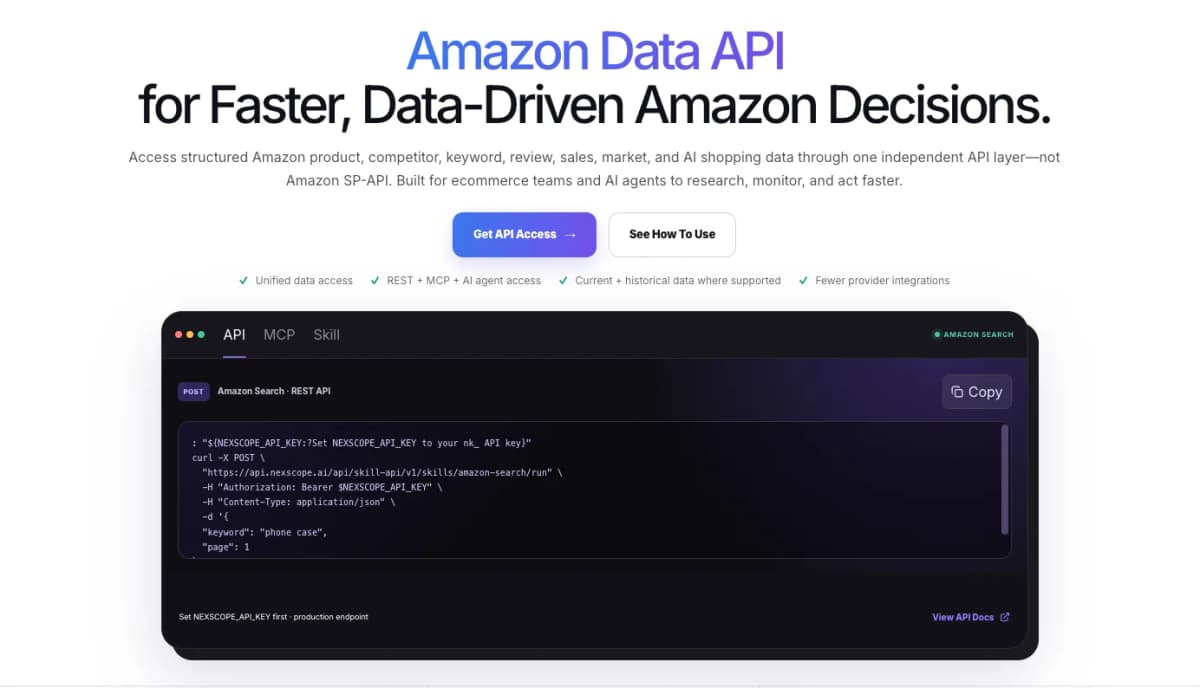
The Amazon Data API brings supported product, competitor, keyword, review, sales, and market interfaces into one Amazon-focused catalog. Each endpoint defines its own inputs, marketplace coverage, response fields, credit use, and evidence boundaries.
Frequently Asked Questions
What does ASIN stand for on Amazon?
ASIN stands for Amazon Standard Identification Number. Amazon uses this 10-character alphanumeric code to identify products in its catalog. The ASIN links a product detail page and its catalog attributes to seller offers, variation relationships, advertising activity, and reporting workflows. It is an Amazon-specific identifier, so it should not be confused with a globally standardized GTIN or a seller-created SKU.
How many characters are in an Amazon ASIN?
An Amazon ASIN contains 10 characters. Most product ASINs use a combination of letters and numbers. Some books may use a 10-digit ISBN as the ASIN. When copying an ASIN from a URL, use the complete 10-character code after /dp/ and exclude any referral tags, query parameters, or other text that follows it.
Where can I find an ASIN on Amazon?
The fastest place is usually the product page URL, where the ASIN often appears immediately after /dp/. It can also appear in the Product Information, Product Details, or Additional Information section of the page. Sellers can find it in Manage All Inventory and relevant exports in Seller Central. Confirm the product attributes before recording the code, especially when several variations look similar.
Is an ASIN the same as a SKU?
No. An ASIN identifies a product in Amazon's shared catalog. A SKU is created by an individual seller to manage that seller's inventory and offer. Multiple sellers can use different SKUs while attaching offers to the same ASIN. A seller can also create different SKUs for operational reasons, but those SKUs do not create new catalog products.
Is an ASIN the same as a UPC or GTIN?
No. A GTIN is a globally standardized identifier for a trade item, and UPC is one common GTIN format. Amazon may use a GTIN to find, match, or create a catalog product. The ASIN is the separate identifier Amazon assigns to the catalog record. Sellers should preserve both when available because they support different systems and validation tasks.
Do parent and child products have different ASINs?
Yes. A parent ASIN is generally a non-purchasable record that connects related variations. Each purchasable child, such as a specific color and size, has its own ASIN. The allowed variation theme depends on the product type and marketplace. Operational data such as price, inventory, and fulfillment should normally reference the relevant child ASIN.
Can the same product have different ASINs in different Amazon marketplaces?
Yes, that can happen. Amazon catalogs and product relationships are managed by marketplace, so an identifier or variation family observed in one country should not automatically be assumed to match another. Before using an ASIN for listing, advertising, reporting, or research, record the marketplace and verify the product page and defining attributes there.
Do sellers create ASINs themselves?
Sellers submit product information, but Amazon assigns the ASIN. If the exact item already exists, the seller should normally match it and add an offer to the existing ASIN. If the product is genuinely new to the catalog, the seller submits the required attributes and product ID through Add Products, a bulk file, or a supported listing workflow. Amazon creates the catalog record and assigns the ASIN after acceptance.
Sources
- Amazon. (2025). Understanding ASIN numbers: Your guide to Amazon's product identification system. Retrieved from sell.amazon.com
- Amazon. (2025). How to create a new ASIN on Amazon. Retrieved from sell.amazon.com
- Amazon Selling Partner API. (2026). Manage Product Listings with the Selling Partner API. Retrieved from developer-docs.amazon.com
- Amazon Ads. (2026). Amazon Ads ASIN selection and promotion strategies. Retrieved from advertising.amazon.com
- GS1. (2024). What is a Global Trade Item Number (GTIN)? Retrieved from support.gs1.org