

Can a Shopify Store Earn $17K With Claude in Just 10 Days?

Using Claude for Shopify store setup can compress weeks of copywriting, theme review, catalog cleanup, and campaign preparation into a focused launch sprint. A source case reports that a 24-year-old operator built a Shopify store in 11 days and generated $17,564 in sales during the second month, with Claude handling much of the execution work.
That story does not prove that a new store will earn $17,000 in 10 days. The reported figure was sales, not profit, and it appeared in the second month rather than during the build period. Product demand, traffic quality, pricing, margins, creative, and fulfillment still determine the commercial result.
What the case does show is how a solo operator can use Claude to organize research, maintain brand context, modify a Shopify theme, prepare product data, write lifecycle emails, and review landing pages. The following 10-day workflow turns those tasks into a practical launch plan while keeping strategic decisions and final approvals with the store operator.
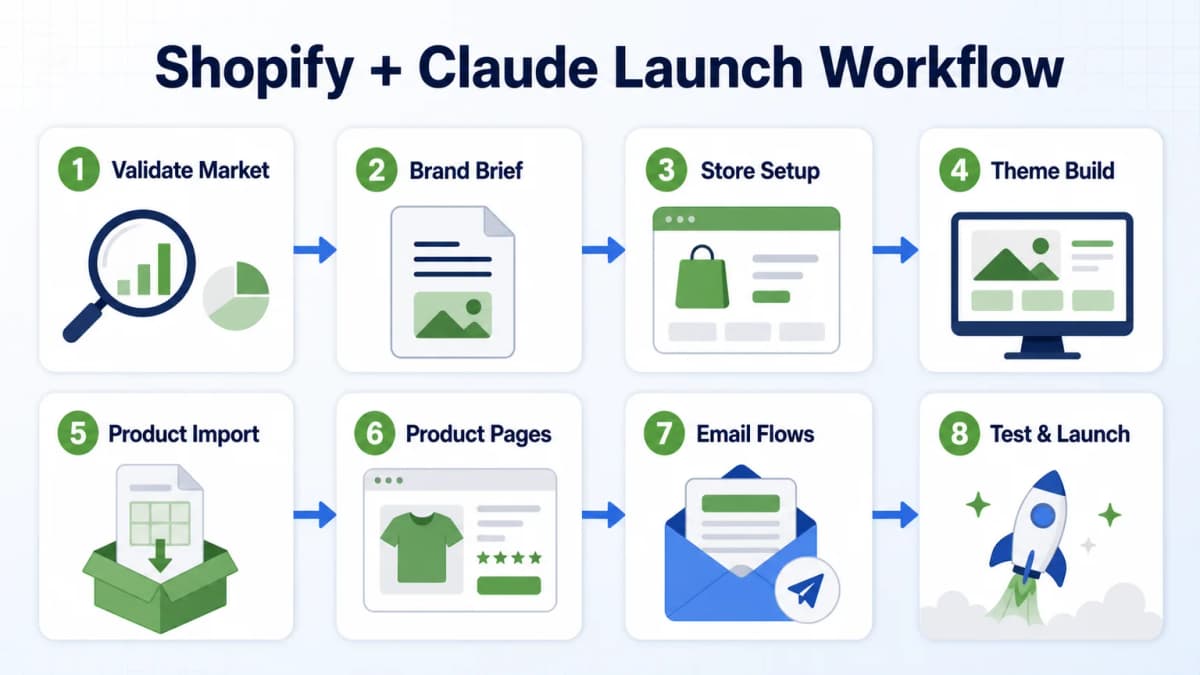
The Lean Shopify and Claude Stack
A lean setup needs only a few core components: Shopify for the storefront and commerce infrastructure, Claude for research and content tasks, a domain, and a supplier or print-on-demand partner when the business does not hold inventory.
Claude is suitable for briefs, product copy, FAQs, email flows, test plans, and structured data cleanup. Claude Code becomes relevant when the task involves reading or editing local Shopify theme files. The distinction matters, but the launch does not need a large collection of overlapping AI tools.
The supplier handles production and fulfillment in a print-on-demand model. Shopify manages products, checkout, payments, orders, customers, and inventory records. Claude reduces repetitive execution work across the workflow. Costs still vary by Shopify plan, Claude plan, domain, apps, samples, and supplier terms, so a sub-$100 software stack should be treated as a lean starting estimate rather than a fixed total business cost.
Validate the Market First
The fastest way to waste a 10-day build sprint is to start with a theme before deciding what the store should sell. A polished homepage cannot rescue a product with weak demand, poor margins, high return risk, or no meaningful difference from existing alternatives.
Market Filters
Before any theme work begins, the product direction should pass a small set of filters:
- Stable demand: Search interest or category activity should exist beyond a short-lived spike.
- Margin room: Product cost, fulfillment, payment fees, returns, discounts, and acquisition costs should leave a realistic contribution margin.
- Manageable returns: Sizing uncertainty, fragility, quality variation, and unclear expectations can quickly erase revenue.
- Competitive space: The category should not be controlled by a small number of brands with overwhelming review, distribution, or pricing advantages.
- Reachable customers: Search, creators, paid media, communities, or partnerships should offer a credible path to the target buyer.
A positive signal in one area is not enough. High demand can attract intense competition. Low competition can indicate limited demand. A useful decision combines several signals and records where estimates or missing data create uncertainty.
Customer Questions
Three questions give Claude the context required for later work:
- Who is most likely to buy the product?
- What specific problem or desired outcome drives the purchase?
- Where do current products fail to satisfy that customer?
These answers should be written as evidence-backed hypotheses, not permanent truths. Customer reviews, competitor pages, search language, price ranges, and store assortments can help confirm or reject them. Broad AI-assisted Shopify operations become more useful when the model receives clear commercial inputs instead of a vague request to find a winning product.
Create a Brand Brief
Once the product direction is credible, the next step is a short project brief. A file such as PRD.md or CLAUDE.md can keep the product facts, customer definition, voice, restrictions, and operating rules available throughout the build.
Brief Structure
The document should include:
- Product: What is being sold, including approved specifications and variants.
- Target customer: Age range, use case, shopping context, and relevant objections.
- Customer problem: The practical need or desired outcome the product addresses.
- Positioning: Why this offer deserves attention within the category.
- Brand voice: Tone, sentence style, level of technical detail, and words to avoid.
- Evidence rules: Claims that are supported, claims that require review, and facts that must never be invented.
Claude Code can load project-level instructions from CLAUDE.md, while a regular Claude conversation can use the same information as an attached or pasted brief. The file does not enforce correctness by itself. It provides persistent context that reduces inconsistent copy and repeated explanations.
Reusable Context
Every later task should reference the same brief. That includes homepage copy, product pages, FAQs, emails, blog content, ad concepts, and customer-service templates.
Without a shared source of truth, AI-generated content often drifts. The homepage may sound premium while product descriptions sound aggressive, or product pages may introduce claims that never appeared in supplier specifications. A concise, reviewed brief gives every output the same commercial foundation.
Customize the Theme Safely
Shopify already provides the commerce layer. The remaining job is to turn an existing theme into a coherent storefront without breaking checkout behavior, mobile layouts, app blocks, or merchant-editable settings.
Theme Audit
Claude Code should inspect the theme before editing it. A useful request is:
Inspect the current Shopify theme structure before making changes.
Identify the files that control the header, homepage sections,
collection cards, product templates, navigation, and mobile layout.
Explain the current data flow and merchant settings.
Do not modify files until the plan is reviewed.
Shopify themes separate layouts, templates, sections, blocks, snippets, assets, and configuration files. Changes should respect that structure instead of adding duplicate CSS or hard-coded content that merchants cannot edit later. Shopify's official AI Toolkit also shows why live documentation, schema awareness, and validation matter when coding tools interact with Shopify projects.
Incremental Changes
Each request should describe one measurable result. For example:
Add a Featured Collection section to the homepage.
Show four products per row on desktop and two on mobile.
Allow the heading, collection, and product count to be edited
through Shopify theme settings. Preserve existing cart and app behavior.
Small changes are easier to review and reverse. A safe workflow uses a duplicate or development theme, previews every change, checks desktop and mobile layouts, and publishes only after human approval. More advanced Claude Code ecommerce automation should follow the same read, plan, edit, test, and approve sequence.
Import Products at Scale
Manual product entry is reasonable for a very small catalog. It becomes a costly source of mistakes when a store has hundreds or thousands of products, variants, images, SKUs, prices, tags, and metadata fields.
Supplier Data Cleanup
The supplier export should remain the factual source. Claude can normalize titles, split fields, map categories, generate handles, standardize tags, and flag missing values. It should not change dimensions, materials, certifications, compatibility, inventory, or other product facts without an approved source.
A suitable instruction is:
Transform this supplier catalog into Shopify product import fields.
Standardize titles, handles, descriptions, SKUs, prices, tags,
product types, SEO titles, and meta descriptions.
Preserve every original specification and flag missing or conflicting data.
Do not invent product attributes.
Import Methods
For medium-sized catalogs, Shopify's product CSV provides a structured import path. The file should be tested with a small batch before the entire catalog is imported. Existing handles, variants, images, and overwrite settings require careful review because a malformed import can create duplicate or incomplete records.
Larger integrations may use the GraphQL Admin API and asynchronous bulk operations. That route requires appropriate app permissions, schema validation, error handling, and status monitoring. AI can prepare transformations and code, but it should not receive unrestricted production write access without review gates.
Rewrite Product Pages
Supplier descriptions are usually written for catalogs, not customers. They often contain dense specifications, inconsistent formatting, repeated language, and little explanation of why the product matters in a real use case.
Product Inputs
Each rewrite should begin with approved source material:
- Product specifications
- Materials and dimensions
- Intended use
- Supported compatibility
- Care or safety instructions
- Shipping and return conditions
- Verified customer language or objections
Claude can then organize those facts into buyer-facing sections. The goal is not to decorate thin data with unsupported claims. It is to make accurate information easier to scan and evaluate.
Page Structure
A practical product-page output includes:
- Core value proposition
- Key benefits tied to verified features
- Use cases
- Target customer
- Features and specifications
- Frequently asked questions
- SEO title and meta description
Unique copy matters because copied supplier descriptions give shoppers little reason to trust one store over another. Product titles, descriptions, image alt text, structured data, collection placement, and internal links should also follow a consistent Shopify SEO checklist.
Before publication, every generated statement should be checked against the source data. Claims such as waterproof, medical-grade, guaranteed, eco-friendly, or compatible with every device require stronger evidence than ordinary feature descriptions.
Build Essential Email Flows
The store launch is incomplete if every visitor must purchase during the first session. Basic lifecycle email flows give interested shoppers another chance to understand the offer and complete a purchase.
Welcome Series
A welcome sequence can introduce the product category, explain the brand's point of view, address a common customer problem, and guide subscribers toward the most relevant collection. The first message should set expectations rather than overwhelm the reader with promotions.
Abandoned Cart
An abandoned-cart sequence should move from reminder to objection handling and then to a measured final prompt. Each email needs one purpose, one primary CTA, and a recommended delay. Discounting should not be automatic if it damages margin or trains customers to wait.
Post-Purchase
Post-purchase messages can confirm product use, provide care guidance, reduce avoidable returns, request feedback at an appropriate time, and introduce a relevant follow-up product. Upsells should match the original purchase rather than sending the same offer to every customer.
Claude can draft the sequence, subject lines, body copy, CTA options, and timing recommendations. Shopify automation settings, marketing consent, deliverability, suppression rules, and final activation still require review. A test order and internal email addresses should be used before any workflow reaches real customers.
Test Landing Pages and Creative
Publishing the store is the beginning of optimization. Traffic from an ad, creator post, search result, or email arrives with different expectations. The landing page must make the product, value, proof, and next action clear for that specific visitor.
Conversion Diagnosis
Claude should diagnose before rewriting. A useful request is:
Review this landing page for a visitor who clicked a paid ad.
Evaluate first-screen clarity, product value, proof, objection handling,
CTA placement, mobile readability, and likely drop-off points.
List the problems and supporting evidence before proposing changes.
This prevents a full redesign based on taste. A stronger ecommerce CRO process identifies the problem page, visitor intent, hypothesis, and success metric before changing an element.
Test Variables
Useful tests include:
- Hero image or product video
- Headline and supporting copy
- Order of product benefits
- Product-image sequence
- Social proof and trust elements
- CTA label and placement
- Offer framing
- Mobile page length
Only one major hypothesis should be tested at a time when attribution matters. The success metric should be selected in advance, such as add-to-cart rate, checkout start rate, completed purchase rate, or revenue per session.
Creative Variations
Product images should test a real communication hypothesis. A lifestyle scene can clarify use context. A close-up can explain material or construction. A comparison frame can make a meaningful difference easier to understand.
When the static source set is incomplete, Nexscope's Product Photography Service can prepare studio shots, model images, PDP visuals, lifestyle scenes, and ad-ready creative before testing begins. Every asset still needs checks for product fidelity, readable details, platform compliance, and claim accuracy.
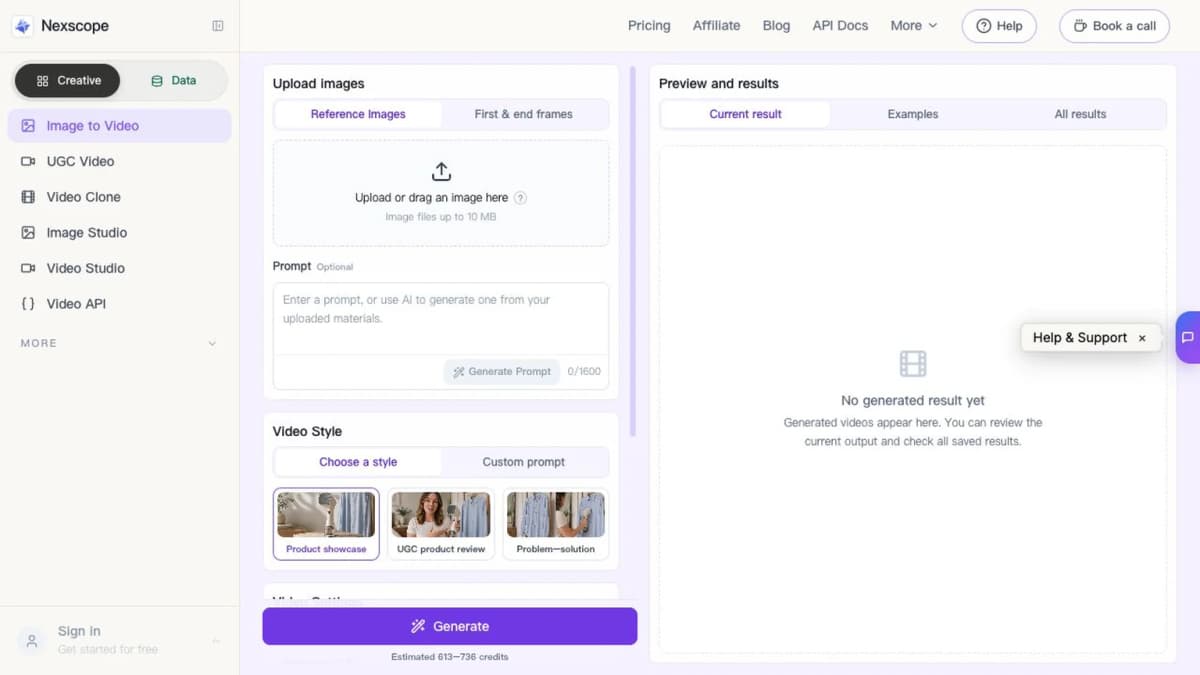
Image to Video Tests
Once the approved source images are ready, video can test how the product story unfolds. A product showcase can demonstrate motion and details. A UGC-style review can add context. A problem-solution sequence can make the use case easier to understand.
Image to Video lets Shopify teams upload reference images, choose a suitable video style, and create variations for product pages, paid ads, and social commerce placements. Each result should be reviewed for product accuracy, pacing, claim boundaries, captions, and platform requirements before launch.
The 10-Day Launch Timeline
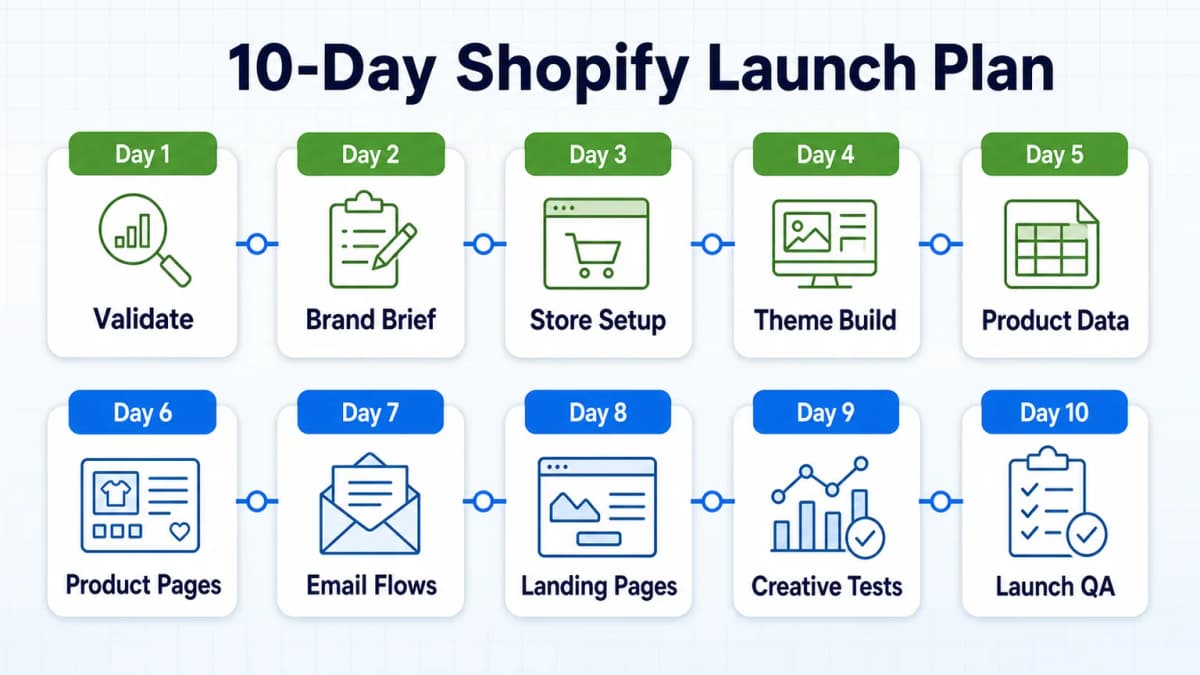
The original case described an 11-day build. The following schedule compresses the same work into a 10-day launch plan. It is a production calendar, not a revenue guarantee.
| Day | Primary Focus | Required Output |
|---|---|---|
| Day 1 | Market validation | Target customer, product hypothesis, risk notes |
| Day 2 | Brand brief | Approved product facts, positioning, voice rules |
| Day 3 | Store foundation | Shopify setup, domain, fulfillment settings, theme copy |
| Day 4 | Theme structure | Header, navigation, homepage sections, mobile plan |
| Day 5 | Product data | Clean supplier file, field mapping, small import test |
| Day 6 | Product pages | Buyer-facing copy, specifications, FAQs, SEO fields |
| Day 7 | Lifecycle email | Welcome, abandoned cart, and post-purchase drafts |
| Day 8 | Landing pages | Visitor-intent review, proof, objections, CTA hierarchy |
| Day 9 | Creative tests | Product images, headline options, offer variations |
| Day 10 | Launch QA | Test order, mobile review, analytics, email checks |
The schedule assumes that the product, supplier, payment setup, shipping rules, and required legal information are available. Missing inputs can delay the project even when Claude completes writing and coding tasks quickly.
Day 10 should end with a controlled launch, not a promise of immediate scale. The first traffic and order data should be used to identify the next bottleneck. Stores with no qualified traffic cannot evaluate conversion, while stores with traffic but no sales need to inspect product-market fit, offer clarity, trust, pricing, and checkout friction.
Human Judgment Still Matters
Claude can review files, transform data, draft content, identify patterns, and produce implementation options. It cannot guarantee that the chosen product deserves demand, that a supplier will deliver consistent quality, or that an advertising channel will acquire customers profitably.
Strategy Decisions
Human judgment remains essential for:
- Selecting the market and product
- Approving claims and compliance language
- Evaluating samples and suppliers
- Setting price and margin thresholds
- Granting system permissions
- Reviewing theme changes
- Choosing test hypotheses
- Deciding when results justify more spending
An AI-generated recommendation is an input to a decision. It is not evidence that the decision is correct.
Revenue Limits
The reported $17,564 figure represents second-month sales from the source case. It does not disclose profit, refunds, advertising spend, product costs, subscription costs, chargebacks, taxes, or the value of the operator's time.
A store can reach the technical launch stage in 10 days. Reaching $17,000 per month depends on demand, traffic, conversion, average order value, repeat purchases, fulfillment, and margin. The useful lesson is the compression of repetitive execution work, not a guaranteed income timeline.
Conclusion
A 10-day Shopify launch becomes more realistic when the work is sequenced correctly. Product validation comes before theme polish. A shared brief comes before content generation. Theme changes are reviewed in a development environment. Product data is imported in controlled batches. Emails and landing pages are tested before traffic scales.
Claude can accelerate each stage, but the quality of its output depends on the quality of the inputs. Product facts, customer language, market demand, competitor patterns, prices, reviews, and trend signals give the workflow a stronger basis than generic prompts alone.
Scale Shopify With Data and Creative
Scaling a Shopify store requires better decisions and more effective creative. Nexscope brings those inputs together for ecommerce teams: structured marketplace data for product, market, keyword, pricing, review, competitor, and trend analysis, plus creative workflows that turn approved product assets into videos for product pages, ads, and social commerce.
Teams can connect supported ecommerce data to their own Agent and workflows through REST API or MCP. Nexscope creative tools can then support video production and testing while the team retains control of product facts, claims, permissions, and final approvals.
This creates a practical growth loop for Shopify: use data to decide what deserves attention, use creative to communicate the value, and use live store results to guide the next iteration.

Frequently Asked Questions
Can Claude build a Shopify store?
Claude can assist with many parts of a Shopify build, including planning page structure, drafting copy, cleaning product data, creating email flows, reviewing conversion problems, and preparing theme-code changes. Claude Code can read and edit local project files when it has the necessary access. Shopify still provides the commerce infrastructure, and a person must configure the store, approve code changes, verify product facts, test checkout behavior, and publish the final theme. Claude accelerates execution but does not independently create a reliable business.
Can a Shopify store earn $17K in 10 days?
It is possible for a store to generate that level of sales, but the source case does not show $17,564 earned during the 10-day build. It reports an 11-day store build and $17,564 in sales during the second month. Sales also differ from profit because advertising, product costs, fulfillment, refunds, apps, payment fees, and taxes reduce the final result. A 10-day schedule is best treated as a launch framework, not an income promise.
Does Shopify require Claude Code?
No. Regular Claude can help with product research, copywriting, FAQs, email drafts, data cleanup, and test planning. Claude Code is useful when the workflow requires reading or changing theme files in a local development environment. Store operators who do not need code changes can use Shopify's theme editor and regular Claude. When code access is required, a duplicate or development theme, limited permissions, version control, preview testing, and human approval reduce the risk of damaging the live storefront.
Can Claude create a Shopify product CSV?
Claude can transform supplier data into fields that match a Shopify product CSV, standardize text, map categories, generate handles, and flag missing values. The output should be tested with a small batch before a full import. Original specifications, SKUs, prices, variants, inventory, image URLs, and compliance fields must be preserved or explicitly reviewed. Claude should not invent attributes to fill empty cells. Larger or recurring catalog operations may require an approved application and Shopify's GraphQL Admin API rather than a one-time CSV.
What should a Shopify brand brief include?
A useful brief includes approved product facts, target customers, customer problems, positioning, brand voice, prohibited language, claim boundaries, required page sections, and links to source materials. It should be concise enough for repeated use across product pages, homepage copy, FAQs, emails, ads, and customer-service templates. A reviewed brief reduces tone drift and unsupported claims. It does not replace fact checking, because supplier information, prices, policies, and customer evidence can change over time.
Which Shopify tasks still need human approval?
Humans should approve product selection, supplier decisions, pricing, profit thresholds, legal and compliance claims, system permissions, production theme changes, product imports, email activation, advertising budgets, and test conclusions. Generated content also needs review for product accuracy, tone, accessibility, and platform policy. AI can identify patterns and propose actions, but it cannot accept financial, legal, operational, or brand risk on behalf of the business. Clear approval gates are especially important when a tool can write to a live store.
Sources
- Shopify. (2026). Theme Architecture. Retrieved from shopify.dev
- Shopify. (2026). Importing Products With a CSV File. Retrieved from help.shopify.com
- Shopify. (2026). Perform Bulk Operations With the GraphQL Admin API. Retrieved from shopify.dev
- Anthropic. (2026). How Claude Remembers Your Project. Retrieved from code.claude.com