

How to Integrate Amazon Seller Messages API Step by Step

Learning how to integrate Amazon Seller Messages API starts with using the correct Amazon service. The official product is the Messaging API v1, part of Amazon's Selling Partner API. It lets a seller application discover which message types are available for a specific order and request that Amazon send an approved, order-related message to the buyer.
The difficult part is not making one HTTP request. A reliable integration must handle seller authorization, regional endpoints, order-specific message availability, schema validation, optional attachments, usage limits, and Amazon's communication rules. It must also avoid a common mistake: treating the Messaging API as a general inbox or marketing automation API. The current reference documents action discovery and permitted send operations, not a general endpoint for downloading a seller's complete message history.
This guide turns those requirements into a production-ready integration workflow covering access setup, LWA authentication, action discovery, attachments, message delivery, testing, monitoring, and failure handling. The examples use placeholders and must be adapted to the message schema returned for the selected order.
Amazon Seller Messages API Overview
Official API Name
"Amazon Seller Messages API" is a useful search phrase, but Amazon calls the service Messaging API v1. It is one API within SP-API, Amazon's REST-based suite for seller and vendor applications.
The Messaging API is available to seller applications. Most operations require the Buyer Communication role. The API works with order-specific actions, so an application must begin with an Amazon order identifier and a marketplace identifier. It cannot assume that every message type is available for every order.
Supported Messaging Scope
The current Messaging API supports a controlled set of seller-to-buyer communications. Depending on the order and marketplace, available actions can include confirming order or delivery details, requesting customization information, providing warranty information, sending a legal disclosure, or sending an invoice.
The normal pattern is:
- Select an order.
- Ask Amazon which message actions are currently allowed.
- Validate the seller's input against the returned schema.
- Upload an attachment when the selected action supports one.
- Call the operation associated with that action.
Amazon determines message availability at request time. Fulfillment state, seller type, marketplace, and the number of messages already sent can affect the actions returned for an order.
Messaging API Boundaries
The Messaging API should be treated as a send-oriented, order-linked service. The current v1 reference documents getMessagingActionsForOrder and operations that send permitted message types. It does not document a general operation for downloading the complete Seller Central inbox or all buyer replies.
That distinction matters when comparing different Amazon product APIs. A system that drafts or sends an allowed order message still needs a separate, documented method for any inbound-message requirement. The Notifications API should not be assumed to deliver buyer replies unless Amazon publishes a notification type that explicitly covers that use case.
The Messaging API also does not replace the Solicitations API. Review and feedback requests follow their own Amazon workflow and policy rules.
Workflow Structure
The workflow separates order selection, action discovery, content collection, attachment preparation, and final delivery into nine implementation steps. Steps 4 through 8 are conditional in practice. If a selected message type does not support custom text or attachments, the integration skips the unsupported work and proceeds to the permitted send operation.
Integration Requirements
Application Access
Before making a production request, the integration needs:
- An approved SP-API developer profile
- A registered public or private seller application
- Authorization from the selling partner
- The Buyer Communication role on the developer profile and application
- An LWA client ID and client secret
- An LWA refresh token
- An Amazon order ID
- A marketplace ID
- The SP-API endpoint for the target selling region
A private seller application can be self-authorized for the organization that owns it. A public application uses an OAuth authorization flow so each selling partner can grant access.
| Application type | Authorization method | Typical use |
|---|---|---|
| Private seller application | Self-authorization | One organization's seller accounts |
| Public seller application | Seller OAuth consent | A service used by multiple sellers |
Buyer Communication Role
Amazon's send-message tutorial requires the Buyer Communication role to be assigned to the developer profile and selected in the application's registration settings. A valid LWA token does not compensate for a missing role.
When a request returns 403, check authorization and role configuration before changing the request body. Also confirm that the token belongs to the selling partner associated with the target order.
Current Authentication Model
SP-API uses Login with Amazon, or LWA, for seller-authorized requests. The application exchanges its refresh token for a temporary access token:
curl --request POST \
  --url 'https://api.amazon.com/auth/o2/token' \
  --header 'content-type: application/x-www-form-urlencoded;charset=UTF-8' \
  --data-urlencode 'grant_type=refresh_token' \
  --data-urlencode 'refresh_token=YOUR_REFRESH_TOKEN' \
  --data-urlencode 'client_id=YOUR_LWA_CLIENT_ID' \
  --data-urlencode 'client_secret=YOUR_LWA_CLIENT_SECRET'
Amazon documents an LWA access-token lifetime of one hour. Cache it securely, refresh it before expiration, and never expose the client secret or refresh token in browser code, logs, public repositories, or support screenshots.
SP-API has not required AWS IAM resources or AWS Signature Version 4 since October 2, 2023. Current calls continue to use LWA access tokens. Older tutorials that require an IAM user, role ARN, or SigV4 signing add obsolete setup work.
Regional Endpoints
The endpoint must match the target marketplace region:
| Selling region | Endpoint |
|---|---|
| North America | https://sellingpartnerapi-na.amazon.com |
| Europe | https://sellingpartnerapi-eu.amazon.com |
| Far East | https://sellingpartnerapi-fe.amazon.com |
A request also needs the marketplace identifier for the store where the order was placed. For example, the US marketplace ID is ATVPDKIKX0DER. Passing an order to the wrong regional endpoint can produce authorization or resource errors that resemble a bad order ID.
9-Step Messaging Integration Workflow
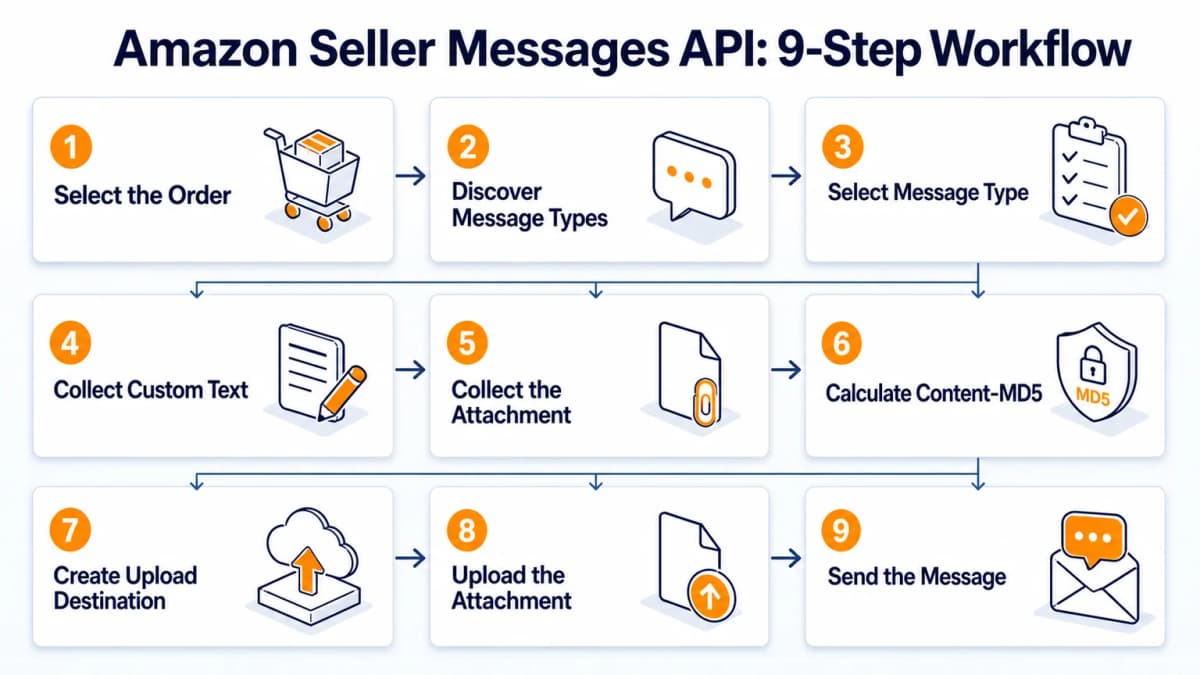
Step 1: Select the Order
Display recent orders that the authorized seller can act on, then associate the seller's selection with its amazonOrderId. The order list may come from an approved Orders API workflow or from the application's own authorized operational store.
Keep data access narrow. The Messaging API needs the order identifier and marketplace context. It does not require an application to collect unrelated buyer data. If a separate Orders API operation returns restricted personal information, follow the Tokens API requirements for that restricted resource.
Step 2: Discover Message Types
Call getMessagingActionsForOrder with the selected order and one marketplace ID:
curl --request GET \
  --url 'https://sellingpartnerapi-na.amazon.com/messaging/v1/orders/ORDER_ID?marketplaceIds=ATVPDKIKX0DER' \
  --header 'accept: application/hal+json' \
  --header 'x-amz-access-token: YOUR_LWA_ACCESS_TOKEN' \
  --header 'x-amz-date: 20260819T120000Z' \
  --header 'user-agent: SellerMessagingApp/1.0 (Language=Python/3.12)'
Amazon returns the actions available for that order. The response uses JSON Hypertext Application Language. The application should inspect the action schemas and links instead of maintaining a static list of message endpoints.
Amazon currently documents a default rate of 1 request per second with a burst of 5 for getMessagingActionsForOrder. The actual limit can vary, so read x-amzn-RateLimit-Limit when Amazon returns it.
Step 3: Select Message Type
Present only the message types returned by Amazon. Store the selected action's title, schema, and href. Those values determine which fields the application can collect and which operation it can call.
This response-driven design prevents several failures:
- Showing a message type that is unavailable for the order
- Accepting text when the operation has no text field
- Accepting attachments when they are not supported
- Calling a path that does not match the selected action
Step 4: Collect Custom Text
Some actions allow a custom message. When the action schema includes a text property such as rawMessageBody, validate the seller's input against the returned restrictions. Enforce required fields, permitted length, and any other constraints before sending.
Schema validation is necessary but not sufficient. The application should also reject promotional language, prohibited review requests, unnecessary external contact information, and other content that conflicts with Amazon's buyer-seller communication rules.
If the action does not support custom text, do not invent a text field. Continue with the supported inputs.
Step 5: Collect the Attachment
Some message types allow attachments such as product instructions, warranty information, legally required documents, or invoices. Use the selected action's schema to determine whether attachments are allowed and what restrictions apply.
Validate at least:
- File type and content type
- File size
- File name and extension
- Business purpose
- Malware scan result
- Retention period
If attachments are not supported, skip Steps 6 through 8.
Step 6: Calculate Content-MD5
Amazon's upload workflow requires a Content-MD5 value. Calculate the MD5 digest from the exact attachment bytes, then Base64-encode the binary digest. A hexadecimal MD5 string is not the same value.
import base64
import hashlib
from pathlib import Path

attachment = Path("warranty.pdf").read_bytes()
content_md5 = base64.b64encode(
    hashlib.md5(attachment).digest()
).decode("ascii")

print(content_md5)
Keep the original bytes unchanged between hashing and upload. Any transformation after calculating the digest can cause the upload to fail validation.
Step 7: Create Upload Destination
Call the Uploads API operation for the selected Messaging resource. The resource path must correspond to the message operation that will use the attachment. Provide the marketplace ID, Content-MD5 value, and content type.
The response includes:
- A presigned upload URL
- Headers required by the upload destination
- An
uploadDestinationId
Save all three. The URL and headers are used for the file upload. The destination ID is referenced in the final Messaging API request.
Step 8: Upload the Attachment
Upload the exact attachment bytes to the presigned URL using the method and headers Amazon provides. This upload targets Amazon's storage destination, so do not attach the LWA token unless the returned instructions explicitly require it.
import requests

with open("warranty.pdf", "rb") as file_handle:
    upload_response = requests.put(
        PRESIGNED_URL,
        headers=UPLOAD_HEADERS,
        data=file_handle,
        timeout=60,
    )

upload_response.raise_for_status()
Do not call the message operation after a failed or ambiguous attachment upload. Record the upload response and retry the upload safely before constructing the final message body.
Step 9: Send the Message
Call the operation associated with the seller's selected action. A customization-details request can resemble the following, but the action schema returned for the actual order remains authoritative:
curl --request POST \
  --url 'https://sellingpartnerapi-na.amazon.com/messaging/v1/orders/ORDER_ID/messages/confirmCustomizationDetails?marketplaceIds=ATVPDKIKX0DER' \
  --header 'content-type: application/json' \
  --header 'x-amz-access-token: YOUR_LWA_ACCESS_TOKEN' \
  --header 'x-amz-date: 20260819T120000Z' \
  --header 'user-agent: SellerMessagingApp/1.0 (Language=Python/3.12)' \
  --data '{
    "text": "Please confirm the spelling requested for this customized order.",
    "attachments": [
      {
        "uploadDestinationId": "UPLOAD_DESTINATION_ID",
        "fileName": "customization-example.pdf"
      }
    ]
  }'
Check the operation reference for its success status and response contract. Amazon's tutorial explains that Amazon emails the message to the buyer; it does not promise a business payload confirming that the buyer read it.
Store the HTTP status, x-amzn-RequestId, order ID, marketplace ID, selected action, and timestamp. Do not log message text or attachment content unless a documented operational need justifies it and the data is protected.
Request and Response Patterns
Python Request Pattern
The following example obtains an LWA access token and discovers available message actions. It intentionally stops before sending so the application can display and validate Amazon's returned options.
import os
import requests

LWA_URL = "https://api.amazon.com/auth/o2/token"
SP_API_BASE = "https://sellingpartnerapi-na.amazon.com"

token_response = requests.post(
    LWA_URL,
    data={
        "grant_type": "refresh_token",
        "refresh_token": os.environ["SP_API_REFRESH_TOKEN"],
        "client_id": os.environ["LWA_CLIENT_ID"],
        "client_secret": os.environ["LWA_CLIENT_SECRET"],
    },
    timeout=30,
)
token_response.raise_for_status()
access_token = token_response.json()["access_token"]

order_id = "ORDER_ID"
marketplace_id = "ATVPDKIKX0DER"

actions_response = requests.get(
    f"{SP_API_BASE}/messaging/v1/orders/{order_id}",
    params={"marketplaceIds": marketplace_id},
    headers={
        "accept": "application/hal+json",
        "x-amz-access-token": access_token,
        "user-agent": "SellerMessagingApp/1.0 (Language=Python/3.12)",
    },
    timeout=30,
)
actions_response.raise_for_status()
actions = actions_response.json()
Production code should cache the token until shortly before expiration, use a shared HTTP client, set connection and read timeouts separately, and redact credentials from exception reports.
HAL Response Parsing
HAL links let Amazon tell the client what can happen next. A robust parser should tolerate an order with no available actions and should not assume that _embedded always contains the same fields.
At minimum, the application should:
- Confirm that the response is valid JSON
- Handle an empty actions collection as a business outcome
- Match the selected schema to the selected link
- Reject unknown or missing required inputs
- Preserve the exact path and query parameters Amazon returns
Attachment Sequence
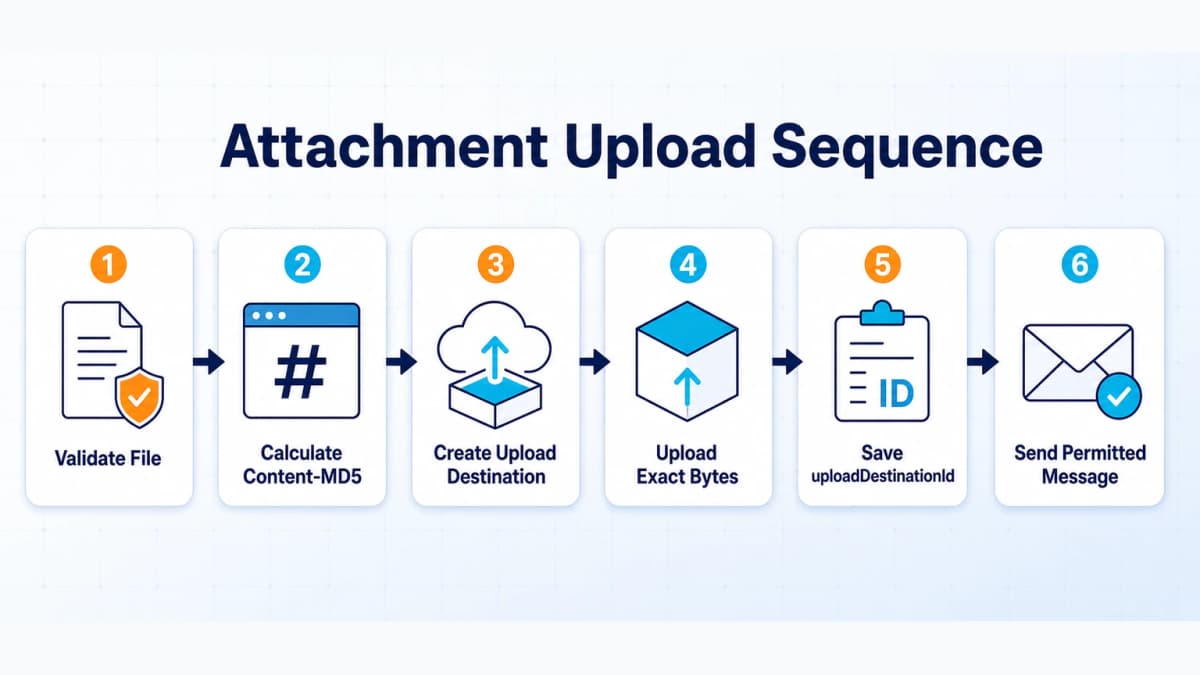
The attachment path is conditional and sequential:
Validate file
→ Calculate Content-MD5
→ Create upload destination
→ Upload exact bytes
→ Save uploadDestinationId
→ Send the permitted message
Treat the destination ID as a short-lived workflow value, not a reusable asset identifier. If the selected order, action, or attachment changes, repeat the action-discovery and upload checks.
Compliance, Errors, and Limits
Communication Rules
Amazon buyer messages must support an allowed order-related purpose. Marketing promotions, coupons, unnecessary external links, attempts to influence positive reviews, and requests to remove or revise negative reviews can violate Amazon's policies and agreements.
Compliance controls should run before the send call:
- Allow only actions returned by Amazon
- Validate content against the action schema
- Flag promotional language and prohibited review language
- Restrict attachments to a documented order-related purpose
- Require human review for uncertain content
- Keep an audit record without exposing sensitive message data
Teams using a user-owned Agent to draft responses should keep the final send behind deterministic policy checks and, where appropriate, human approval. The Agent's prompt does not override Amazon's allowed action or schema.
Common HTTP Errors
| Status | Likely cause | Recommended check |
|---|---|---|
400 |
Invalid or missing parameters | Check order ID, marketplace ID, schema, and JSON body |
403 |
Authorization, role, or token problem | Check seller authorization and Buyer Communication role |
404 |
Order or resource not found | Check order ownership, endpoint region, and action path |
413 |
Request too large | Check attachment and body size restrictions |
415 |
Unsupported media type | Check request and upload Content-Type headers |
429 |
Usage plan exceeded | Read the limit header and apply backoff |
500 or 503 |
Amazon service error | Retry cautiously and retain the request ID |
A 403 description can mention several possible causes. Use the Amazon request ID, response body, token context, and application configuration to narrow the cause instead of guessing.
Rate Limits and Retries
Use x-amzn-RateLimit-Limit when available and coordinate limits across workers that share the same seller-application pair. For 429 and transient 5xx responses, apply exponential backoff with jitter.
Sending deserves extra care. A network timeout can occur after Amazon received the request but before the client received the response. Blindly retrying an ambiguous send can create duplicate buyer messages. An engineering safeguard can hold that request for review, record a deduplication key internally, and retry only when the application can justify that the first request was not accepted.
This deduplication behavior is an application recommendation, not an Amazon-provided idempotency guarantee.
Credential Safety
Amazon requires LWA client secrets to be rotated every 180 days. After rotation, the previous secret expires seven days later. A production system should support overlapping credentials during that transition and alert well before the deadline.
Store client secrets and refresh tokens in a secrets manager. Restrict access by service role, encrypt backups, redact observability data, and rotate immediately after suspected exposure.
Testing and Production Readiness
Static Sandbox Limits
Amazon documents Messaging API v1 with a static sandbox. Static sandbox responses use request-pattern matching and mocked data. They are useful for confirming authentication handling, paths, parameters, response parsing, and error branches.
A successful static sandbox call does not prove that a production order will expose the same message action. Production availability depends on the real order, seller, marketplace, and message history.
Production Checklist
Before enabling live sends, verify:
- Seller authorization is active
- Buyer Communication is approved and selected
- Token refresh works without manual intervention
- Marketplace IDs route to the correct regional endpoint
- Action discovery runs before every new message workflow
- Schema validation blocks unsupported inputs
- Attachment hashing and upload errors stop the send
- Rate-limit handling works across concurrent workers
- Logs redact tokens, text, attachments, and buyer data
- Ambiguous send failures do not trigger blind retries
- Policy checks and approval rules are active
- Alerts include
x-amzn-RequestIdand non-sensitive context
Start with a narrow message type and a controlled seller account. Expand only after production evidence confirms that authorization, monitoring, and compliance controls behave as expected.
Operational Monitoring
Track token-refresh failures, 403 authorization errors, 429 throttling, Amazon 5xx responses, attachment-upload failures, message-operation success rates, and credential-rotation deadlines.
Separate technical success from business delivery. An accepted API request means Amazon accepted the operation under its response contract. It does not show that a buyer read or acted on the email.
Add Ecommerce Data to the Seller Stack
Buyer messaging is one part of seller operations. Product, competitor, keyword, review, pricing, sales, and trend analysis often sit elsewhere in the stack. Those datasets can inform product and market decisions, but they should remain separate from buyer-message authorization and private communication data.
Nexscope provides structured ecommerce data through an independent API layer. Teams can connect supported data to their own Agent through REST API or MCP, or use the same data capabilities inside Nexscope's web product. A Nexscope API key does not replace Amazon LWA credentials and does not grant access to Amazon buyer messages.
Relevant capabilities include:
- Structured Amazon product and market data
- Keyword, review, competitor, price, sales, and trend signals
- REST API and MCP access for a team's own Agent and workflow
- Web access for teams that prefer to work inside Nexscope
- Visible source, freshness, estimate, and missing-data boundaries where supported
This separation keeps each credential tied to its real purpose: Amazon SP-API credentials for authorized seller operations, and Nexscope credentials for supported ecommerce data access. That same data can support workflows built around an Amazon Search API or carefully selected Amazon scraper APIs without being presented as Seller Central account data.

Common Integration Mistakes
Hard-Coded Message Actions
Calling a familiar message endpoint without first discovering the actions available for the order bypasses the core design of the API. An action that worked for one order may be unavailable for another because of marketplace, fulfillment, seller, or prior-message conditions. Always call getMessagingActionsForOrder and bind the selected schema to the selected action path.
Legacy SigV4 Setup
New integrations sometimes copy older examples that create AWS IAM resources and sign every SP-API request. Amazon removed that requirement in October 2023. Retaining obsolete signing code increases setup time and creates unnecessary credential risk. Use the current LWA connection model and the required SP-API headers.
Blind Send Retries
A timeout does not prove that Amazon rejected the send request. Automatically repeating an ambiguous request can create a duplicate buyer message. Record the request context, apply an internal deduplication safeguard, and route uncertain sends for review instead of treating them like an idempotent read request.
Sandbox Overconfidence
Static sandbox responses are mocked. They confirm request shape and parsing behavior, but they do not reproduce the real order conditions that control message availability. Production rollout should begin with a narrow message type, a controlled seller account, non-sensitive logging, and explicit live-send approval.
Credential Confusion
Amazon LWA credentials authorize seller operations. Nexscope credentials authorize supported Nexscope ecommerce data. Neither credential can replace the other. Keeping the two data paths and secret stores separate prevents misleading product behavior and reduces the scope of a credential incident.
Conclusion
A dependable Amazon Messaging API integration begins with the correct access model and remains driven by the actions Amazon returns for each order. The application obtains an LWA access token, selects an order, calls getMessagingActionsForOrder, validates the selected schema, uploads an attachment when permitted, and calls the matching message operation.
Production quality depends on what surrounds those requests. Buyer Communication access, regional routing, policy controls, secrets management, rate-limit handling, cautious retries, and non-sensitive monitoring all need to work before live messages are enabled.
Amazon SP-API remains the authority for seller authorization and buyer messaging. Nexscope supplies a separate ecommerce data layer for research and analysis through REST API, MCP, or the Nexscope web product.
API Documentation
Build With Current Ecommerce API Documentation
Review supported endpoints, authentication, request schemas, response fields, and REST or MCP integration examples before connecting Nexscope ecommerce data.
Explore Nexscope API Docs →REST API • MCP • Structured ecommerce data
Frequently Asked Questions
What is the official name of Amazon Seller Messages API?
Amazon calls the service Messaging API v1, part of the Selling Partner API. "Amazon Seller Messages API" is a common search phrase rather than the formal product name. The API lets seller applications discover the message types available for a specified order and call an operation that requests an approved message to the buyer. Its current reference is send-oriented and does not document a general endpoint for downloading the complete Seller Central inbox or all buyer replies.
How do I integrate Amazon Seller Messages API?
Register a seller application, obtain the Buyer Communication role, complete seller authorization, and exchange the LWA refresh token for an access token. Select an order and call getMessagingActionsForOrder with the order ID and marketplace ID. Let the seller choose one of the returned actions, validate text and attachment inputs against its schema, complete the Uploads API flow when necessary, and call the operation linked to that action. Add policy controls, safe retries, monitoring, and credential rotation before production use.
Can Amazon Messaging API read buyer replies?
The current Messaging API v1 documentation describes discovering available actions and sending permitted order-related messages. It does not document a general operation for retrieving the full buyer-seller message inbox or message history. An application should therefore avoid promising inbox synchronization or automatic reply ingestion based on the Messaging API alone. Any inbound workflow needs a separate Amazon-documented capability that explicitly supports the required data. The Notifications API should not be assumed to provide buyer messages without a matching published notification type.
Which role is required for Amazon Messaging API?
Most Messaging API v1 operations require the Buyer Communication role. Amazon's send-message tutorial states that the role must be assigned to the developer profile and selected on the application's registration page. Some specialized operations can list additional roles, so the current operation reference remains authoritative. When a request returns 403, verify the developer role, application role selection, seller authorization, token status, target seller, and regional endpoint before changing the request body.
Does SP-API still require AWS Signature Version 4?
No. Amazon removed the requirement for AWS IAM resources and AWS Signature Version 4 from SP-API on October 2, 2023. Current requests continue to use Login with Amazon access tokens. Applications still need the appropriate SP-API endpoint and required headers, including x-amz-access-token, x-amz-date, and user-agent. Older examples that build an IAM role or sign each request with SigV4 describe a legacy connection model and should not be used as the default for a new integration.
Why are no messaging actions available for an order?
An empty action list can be a valid business result. Amazon notes that message availability can depend on fulfillment state, seller type, marketplace, and the number of messages already sent for the order. Confirm that the order belongs to the authorized seller, the marketplace ID is correct, the regional endpoint matches the store, and the application has Buyer Communication access. Do not bypass the empty response by calling a hard-coded send endpoint, because the unavailable action may not be permitted for that order.
How do attachments work in Amazon Messaging API?
Attachments are supported only for message types whose returned schema allows them. The application validates the file, calculates a Base64 Content-MD5 value, and calls the Uploads API to create a destination for the matching Messaging resource. It uploads the exact bytes to the returned presigned URL and saves the uploadDestinationId. The final message request includes that ID and the file name. If hashing, destination creation, or upload fails, the application should stop rather than send a message with an invalid attachment reference.
Can Amazon Messaging API be tested in a sandbox?
Yes. Amazon lists Messaging API v1 with a static sandbox. Static sandbox calls return mocked responses based on request-pattern matching, so they are useful for validating request construction, response parsing, authentication handling, and error paths. They do not reproduce the full business logic of a real order. A successful sandbox response therefore does not prove that the same message type will be available in production. Production testing should start narrowly with authorized seller accounts, monitoring, and explicit controls around live sends.
Sources
- Amazon. (2026). Messaging API. Retrieved from developer-docs.amazon.com
- Amazon. (2026). Send a Message. Retrieved from developer-docs.amazon.com
- Amazon. (2026). getMessagingActionsForOrder. Retrieved from developer-docs.amazon.com
- Amazon. (2023). SP-API No Longer Requires AWS IAM or AWS Signature Version 4. Retrieved from developer-docs.amazon.com
- Amazon. (2026). Selling Partner API Policies and Agreements. Retrieved from developer-docs.amazon.com