

How to Rank for Keywords on Amazon: 9-Step Seller Guide

Learning how to rank for keywords on Amazon starts with a simple distinction: adding a search term to a listing may help Amazon understand the product, but it does not guarantee a strong position for that query. A product can be eligible to appear and still sit beyond the range most shoppers browse. It can also rank well for one long-tail phrase while remaining nearly invisible for a broader term.
That gap explains why keyword stuffing rarely solves a ranking problem. Amazon sellers need to select relevant queries, place them in the right listing fields, earn qualified clicks, convert those visits, maintain a competitive offer, and measure performance at the query level. Amazon does not publish the exact weight of each ranking input, so sustainable improvement depends on controlled testing rather than fixed formulas.
This guide provides a nine-step workflow for choosing target keywords, improving listing relevance, using PPC data responsibly, diagnosing stalled rankings, and tracking progress without confusing organic rank, sponsored placement, or Best Sellers Rank.
Amazon Keyword Ranking Basics
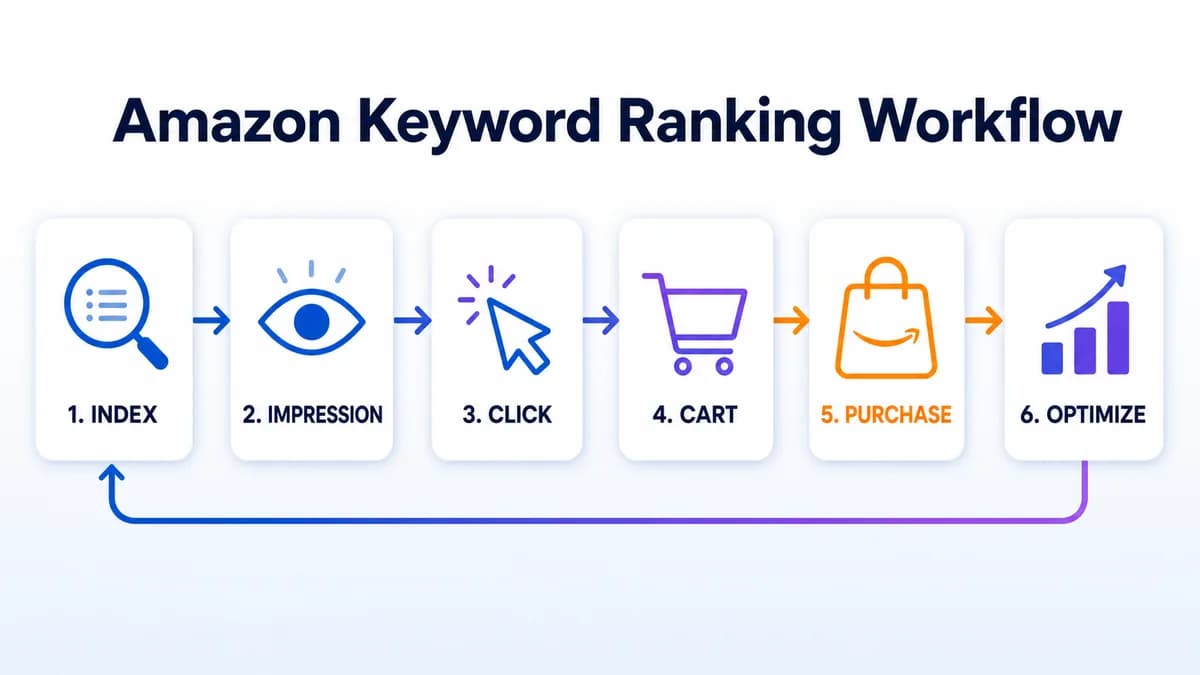
Amazon keyword ranking is query-specific. The same ASIN can appear near the top for a detailed phrase and much lower for a broad category term. Sellers therefore need a keyword-level view instead of treating overall product visibility as one score.
Indexing vs. Ranking
Indexing describes whether a product is eligible to appear for a relevant search. Ranking describes where it appears among the eligible results. A title, product attributes, bullet points, description, and Generic keyword field can help Amazon understand product relevance. Strong placement then depends on the broader offer and customer response.
A product that does not appear for a query has an eligibility or relevance problem. A product that appears at a low position has a ranking problem. That distinction determines whether the next action should be a catalog correction, a keyword placement change, or an offer and conversion review.
Organic Rank, Ads, and BSR
Three Amazon metrics are often mixed together:
- Organic keyword rank is the unpaid position of an ASIN for one shopper query.
- Sponsored placement is the position of an ad triggered through campaign targeting.
- Best Sellers Rank reflects relative sales performance within an Amazon category.
An ASIN can have hundreds of keyword positions, several sponsored placements, and one or more category BSR values. A BSR improvement does not prove that a specific keyword improved. An ad at the top of search also does not mean the product holds the same organic position.
Relevance and Performance
Amazon's seller guidance connects search visibility with keyword research, product titles, descriptions, bullet points, backend search terms, product images, pricing, inventory, listing quality, and account health. These signals influence different parts of the shopping journey.
Relevance helps a product qualify for a query. The search result then needs to earn a click. The detail page and offer need to convert that visit. Competitive pricing, availability, delivery, images, reviews, and clear product information can all affect the shopper's decision.
Amazon does not publish a universal formula for organic keyword ranking. Claims that one field, one sale count, or one advertising setting guarantees page-one placement should be treated cautiously.
9-Step Amazon Keyword Ranking Framework
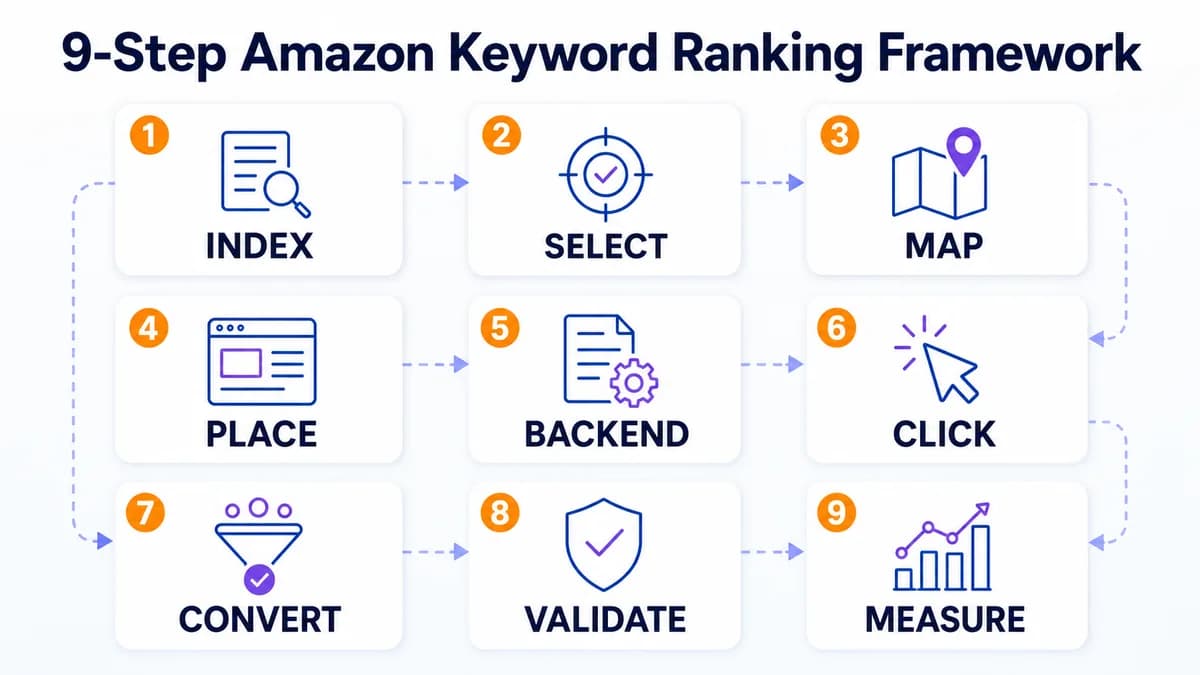
The strongest workflow treats keyword ranking as a sequence. Each step answers a different question, from whether the ASIN can appear to whether the target query produces profitable sales.
1. Confirm Indexing and Eligibility
Start by checking whether the product can appear for the target query. Search from the correct Amazon marketplace and review the result carefully. Search personalization, location, device, and sponsored placements can make manual checks inconsistent, so use the same method when establishing a baseline.
If the product does not appear, review:
- Listing status: Check for suppressions, missing required attributes, or catalog errors.
- Marketplace and category: Confirm that the ASIN is listed in the intended store and product type.
- Keyword relevance: Make sure the query accurately describes the product.
- Listing fields: Verify that essential product terms appear in appropriate visible or backend fields.
- Offer eligibility: Check inventory, purchasability, and any policy restrictions.
Resolve eligibility issues before spending more on traffic. Advertising cannot fix an ASIN that is ineligible for the intended offer or inaccurately categorized.
2. Select Winnable Target Keywords
High search demand can be attractive, but demand alone does not make a keyword valuable. A useful target needs product relevance, commercial intent, sufficient demand, realistic competition, and a clear path to conversion.
Build a shortlist with four roles:
- Primary keywords: The clearest product-category terms with strong purchase intent.
- Secondary keywords: Important features, materials, audiences, sizes, or use cases.
- Long-tail keywords: Specific phrases that often have clearer intent and narrower competition.
- Test keywords: Plausible terms that still need PPC or query-performance evidence.
A structured Amazon keyword research process should examine relevance before volume. Broad terms can introduce the product to more shoppers, while focused long-tail phrases may offer a more realistic first ranking target.
The Nexscope free Amazon Keyword Research Tool helps sellers expand one seed keyword and compare related opportunities. Sellers can review demand, competition signals, revenue potential, new-launch share, search-rank trends, and sample ASINs before deciding which terms deserve listing and PPC investment.
The tool supports discovery and prioritization. It does not report an ASIN's exact live organic position or automatically rewrite a listing.

Free Amazon Keyword Research
Turn One Seed Keyword Into a Prioritized Shortlist
Compare related opportunities, demand, competition signals, revenue potential, launch activity, trends, and sample products before committing listing space or PPC budget.
Research Amazon Keywords Free →3. Map Keywords by Role
Assign each shortlisted term to one destination before editing the listing. This prevents repetition and keeps the most valuable language in the most visible fields.
| Keyword role | Best destination | Main purpose |
|---|---|---|
| Primary product term | Title and core attributes | Clarify the product immediately |
| Important modifiers | Bullets and description | Match features and buying intent |
| Relevant alternate language | Generic keyword field | Expand searchable vocabulary |
| Unproven queries | PPC tests | Collect click and conversion evidence |
| Established converting terms | Exact-match campaigns and listing review | Focus budget and content decisions |
Keep the map specific to one ASIN. Closely related products can share part of a keyword universe, but each listing needs a distinct priority set based on its actual features and customer use case.
4. Optimize Frontend Placement
Visible listing content serves both search relevance and shoppers. Place the clearest primary term in the title when it fits naturally, then use bullets and descriptions for secondary attributes and use cases. Product attributes such as material, size, color, quantity, and compatibility should be complete and accurate.
Effective listing optimization protects readability:
- Title: State the brand, product type, and decisive attributes without turning the title into a keyword list.
- Bullet points: Connect features to practical benefits and buying objections.
- Description or A+ Content: Explain use cases, specifications, care, compatibility, and differentiators.
- Product attributes: Complete the structured fields that help Amazon classify and filter products.
Amazon's seller guidance warns that keyword stuffing can create a poor customer experience and hurt rankings. Use a valuable phrase once where it makes sense, then use natural variations only when they improve clarity.
5. Complete Backend Search Terms
The Generic keyword field can add relevant language that would make visible copy repetitive or awkward. Appropriate candidates include synonyms, abbreviations, alternate product names, and valid marketplace-specific wording.
Current Amazon guidance directs sellers to edit a listing's Product details and use the Generic keyword field. It also recommends lowercase text, spaces between words, and avoiding redundant or irrelevant terms. Exact limits and accepted content can vary by category, marketplace, and listing interface, so the rules shown in Seller Central should take precedence.
Treat backend search terms as an indexing layer:
- Add relevant vocabulary missing from visible content.
- Remove duplicate words that use limited field space.
- Exclude competitor brands, ASINs, promotional claims, and prohibited terms.
- Keep spelling variations only when shoppers genuinely use them.
- Recheck the field after major catalog or marketplace changes.
Backend keywords can support relevance, but they do not guarantee a high organic position.
6. Improve Click-Through Rate
Once the ASIN receives impressions, the search result needs to earn clicks from qualified shoppers. A low click rate can indicate that the query is too broad, the main image is weak, the title is unclear, or the offer is less attractive than surrounding results.
Review the elements visible on the search results page:
- Main image quality and product clarity
- Title relevance to the query
- Price and coupon presentation
- Rating and review count
- Delivery promise and Prime eligibility
- Pack size, color, or variation clarity
Avoid changing every element at once. Test one meaningful variable, record the date, and compare a sufficient period before drawing a conclusion. Brand Registry sellers may also be eligible for Amazon's Manage Your Experiments tools for supported content tests.
7. Improve Conversion Rate
Clicks without purchases signal a mismatch somewhere between the query, product, content, and offer. The listing may attract the wrong audience, leave a critical question unanswered, or lose to stronger alternatives on price, reviews, delivery, or perceived value.
Review the product detail page from the target shopper's perspective:
- Does the product exactly satisfy the query?
- Do the images show scale, use, contents, and important features?
- Are compatibility and limitations easy to understand?
- Does the offer remain competitive after shipping and discounts?
- Are variations, inventory, and delivery options available?
- Do reviews reveal repeated concerns that the listing does not address?
Conversion work should stay truthful. Images and copy can explain real advantages, but they cannot compensate for a product that does not match the query or a price that the market rejects.
8. Validate Keywords With PPC
Amazon Ads can generate immediate visibility and provide query data. Use broad or automatic targeting for controlled discovery, then review the Search term report to identify the actual shopper queries that generated clicks and orders. Amazon Ads supports broad, phrase, and exact keyword match types, each offering a different level of targeting control.
Relevant, converting queries can move into focused exact-match campaigns and become candidates for listing placement. Irrelevant or wasteful queries can be excluded with negative targeting. This process is commonly called keyword harvesting.
Amazon has not published a rule stating that ad spend directly raises organic rank. PPC creates visibility, sales opportunities, and evidence about shopper behavior. Organic movement should be evaluated separately from sponsored position and advertising spend.
9. Measure and Iterate
Track the complete query funnel instead of watching position alone. Brand Registry sellers with access to Brand Analytics can use Search Query Performance and related dashboards to review query volume, impressions, clicks, cart adds, purchases, and the brand or ASIN share of those actions.
Useful weekly fields include:
| Metric | Diagnostic question |
|---|---|
| Organic position | Is unpaid visibility improving consistently? |
| Sponsored position | Is ad visibility being mistaken for organic rank? |
| Impressions | Is the ASIN eligible and visible for the query? |
| Click rate | Does the search result earn attention? |
| Cart adds | Does the offer create buying consideration? |
| Purchases and conversion | Does the product satisfy query intent? |
| PPC spend and sales | Is paid validation financially sustainable? |
| Inventory and price | Did operational changes affect performance? |
Daily collection can create a useful history, but decisions usually benefit from a longer review window. Keyword rank tracking becomes valuable when it connects movement to listing edits, promotions, price changes, inventory events, and PPC adjustments.
Keyword Ranking Diagnostics
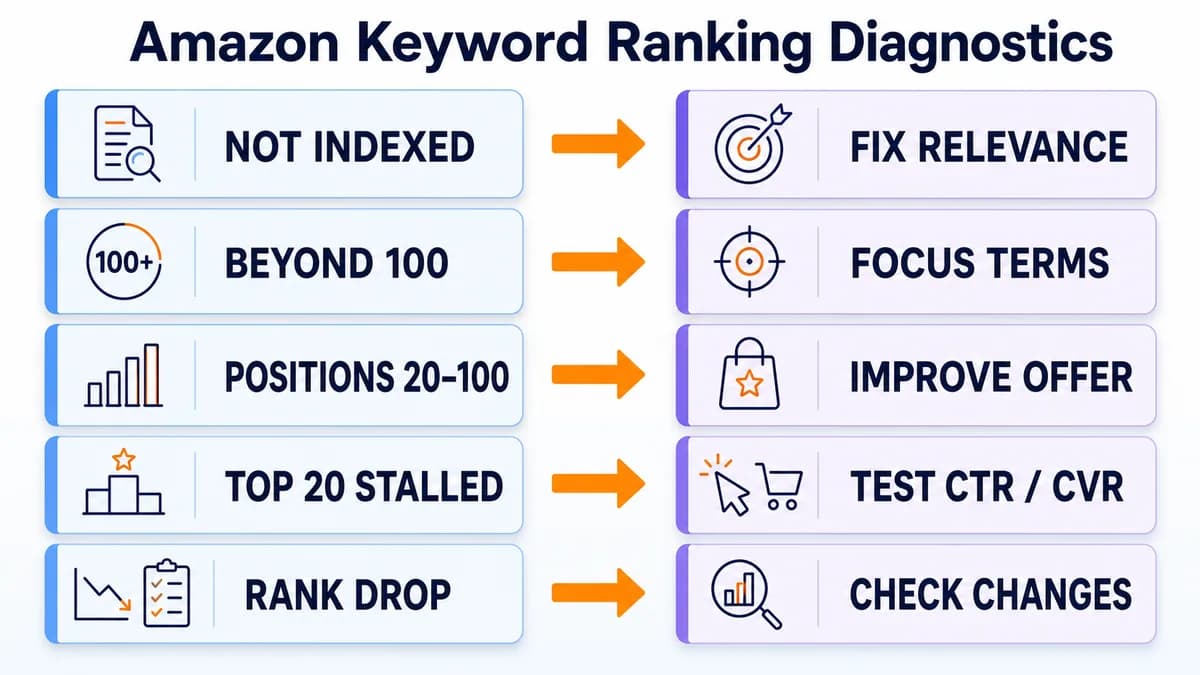
A ranking problem becomes easier to solve when it is classified by stage. Use the current position and funnel data to choose the next action.
Not Indexed
Confirm product relevance, marketplace, category, required attributes, listing status, and keyword placement. Add the term only if it accurately describes the product. A query that does not match the product should be removed from the target list rather than forced into the listing.
Beyond Position 100
The ASIN has some relevance but little competitive visibility. Focus on a smaller set of long-tail terms, improve visible content, compare the offer with page-one products, and run controlled PPC tests. More keywords will usually dilute attention at this stage.
Positions 20 to 100
Review the gap between the ASIN and products on the first page. Compare image quality, price, rating, review depth, delivery, pack size, and product fit. Search Query Performance can help determine whether the largest loss occurs at impressions, clicks, cart adds, or purchases.
Top 20 but Stalled
Small improvements can matter more near page one. Test the main image, title clarity, coupon, price, delivery, and detail-page objections. Protect inventory and avoid major listing rewrites that remove terms already contributing to qualified traffic.
Sudden Rank Loss
Create an event timeline before editing the listing. Check inventory interruptions, price changes, coupon expiration, content edits, variation changes, rating movement, campaign reductions, seasonality, and new competitors. A single-day fluctuation rarely justifies a full rewrite.
New and Mature ASIN Playbooks
New Product Launch
New products have limited performance history. Start with several highly relevant, attainable queries rather than one broad category term. Make the listing complete before sending traffic, use PPC to collect search-term evidence, and watch conversion closely. Early traffic is expensive when the offer does not match the query.
Established Listing Recovery
Existing ASINs provide more evidence. Compare current performance with a period before the decline, then isolate changes in rank, impressions, click rate, conversion, price, inventory, reviews, and advertising. Preserve stable elements while testing the weakest stage of the funnel.
Seasonal Keyword Cycles
Seasonal demand can change rank, traffic, and conversion at the same time. Compare year-over-year periods when possible and prepare content, inventory, and campaigns before demand peaks. Remove temporary seasonal language after the event if it no longer describes current shopper intent.
Common Ranking Mistakes
- Targeting volume without relevance: Broad traffic can produce weak conversion and wasted spend.
- Repeating the same keyword everywhere: Repetition reduces readability and uses space that could cover useful attributes.
- Confusing indexing with ranking: A backend term may make an ASIN eligible without making it competitive.
- Treating PPC as a rank guarantee: Ads provide visibility and data, while organic results require separate measurement.
- Tracking position without funnel metrics: Rank changes have little meaning without impressions, clicks, cart adds, purchases, and profitability.
- Changing multiple variables together: Simultaneous title, image, price, and campaign changes make attribution difficult.
- Ignoring inventory and offer stability: Out-of-stock periods, delivery changes, and uncompetitive pricing can undermine earlier gains.
- Reacting to daily volatility: A consistent trend matters more than one isolated movement.
Conclusion: Build Repeatable Rankings
Ranking for Amazon keywords requires a connected process: confirm eligibility, choose relevant and attainable terms, map them to the right fields, improve the search result and detail page, validate queries with PPC data, and measure the full funnel. The goal is a smaller set of commercially useful keywords that produce qualified traffic and profitable sales.
The fastest starting point is a defensible keyword shortlist. The Nexscope free Amazon Keyword Research Tool helps sellers compare related terms, demand, competition signals, revenue potential, launch activity, trends, and sample products before committing listing space or ad budget. Ranking still depends on execution, customer response, offer quality, and ongoing measurement.
Free Amazon Keyword Research Tool
Build a Stronger Amazon Keyword Shortlist
Compare related search opportunities and product samples before deciding which terms deserve listing placement, PPC validation, and ongoing rank measurement.
Start Amazon Keyword Research Free →Frequently Asked Questions
How long does it take to rank for a keyword on Amazon?
Amazon does not publish a guaranteed ranking timeline. A relevant long-tail keyword for an established ASIN may move sooner than a broad term for a new product, but competition, conversion, price, reviews, inventory, and advertising all affect the result. Sellers should establish a baseline, record listing and campaign changes, and evaluate trends across a meaningful period. A fixed promise such as seven days or a specific sales count is not supported by Amazon's public guidance.
How many keywords should an Amazon listing target?
There is no universal number. A listing should prioritize the terms that accurately describe the product and match buyer intent. A practical map includes several primary and secondary terms, additional long-tail phrases, and relevant alternate vocabulary for backend fields. Large keyword exports should be filtered before use. Focusing on a defensible shortlist makes listing placement, PPC testing, and rank measurement easier to manage.
Does Amazon PPC improve organic keyword ranking?
Amazon Ads can create visibility, clicks, sales opportunities, and search-term data, but Amazon has not published a rule that ad spend directly increases organic rank. Sellers should use PPC to discover queries, validate relevance, and measure conversion. Organic position and sponsored placement need separate tracking. If a term produces paid sales but organic rank remains unchanged, the seller should review listing relevance, click-through rate, conversion, competition, and offer quality.
Why is a product indexed but not ranking?
Indexing means the ASIN is eligible to appear for the query. High ranking requires stronger competitive performance. The product may have lower click appeal, weaker conversion, fewer reviews, a less attractive price, slower delivery, limited inventory, or a weaker match to shopper intent than products above it. Sellers should locate the largest funnel drop across impressions, clicks, cart adds, and purchases before changing the listing.
Where should Amazon keywords be placed?
The primary product term usually belongs in the title when it fits naturally. Important attributes and secondary terms can appear in bullet points, structured product fields, and the description. Relevant synonyms, abbreviations, and alternate names that do not fit visible copy can go in the Generic keyword field. Unproven terms are better tested through controlled advertising before they displace stronger listing language.
Do backend keywords still matter?
Backend keywords can expand the relevant vocabulary associated with a product. They are useful for synonyms, abbreviations, and alternate names that would make visible content repetitive. They mainly support relevance and indexing. They do not guarantee a strong position and cannot replace accurate product attributes, readable copy, competitive pricing, availability, conversion, or customer satisfaction. Sellers should follow the current rules shown in Seller Central for the product category and marketplace.
How often should keyword rankings be checked?
Collection frequency and decision frequency can differ. Daily rank collection creates a useful history for important launch terms, while weekly reviews are often more appropriate for optimization decisions. Long-tail or lower-priority terms may need only monthly review. Sellers should avoid rewriting listings in response to isolated daily changes. The best review combines position history with impressions, clicks, purchases, PPC activity, price, inventory, and dated change notes.
Sources
- Amazon. (2025). Amazon SEO: 7 Ways to Improve Your Product's Search Rankings. Retrieved from sell.amazon.com
- Amazon. (2024). Improve Product Visibility Through Effective Amazon Keyword Research. Retrieved from sell.amazon.com
- Amazon. (2025). Amazon Brand Analytics: Get Data to Grow Your Business. Retrieved from sell.amazon.com
- Amazon Ads. (n.d.). 3 Steps to Help Start or Improve Your Keyword Strategy. Retrieved from advertising.amazon.com
- Amazon Ads. (n.d.). Getting Started Guide for Sponsored Ads. Retrieved from advertising.amazon.com