

How to Source Products From 1688 for Temu With Codex

Table of Contents
To source products from 1688 for Temu with Codex, start with a defined product brief, connect the marketplace data, and carry the evidence into a listing draft. The repetitive work usually sits between decisions: copying competitor prices, translating supplier descriptions, matching variants, and transferring the same specifications into another spreadsheet. A missing material, an outdated quote, or a mismatched SKU can follow the product through every stage.
Nexscope provides Temu and 1688 data through REST APIs and MCP, so Codex can retrieve research inputs and organize them in the team's own workspace. A practical workflow combines Temu market comparisons, 1688 supplier discovery, confirmed product specifications, and a reusable listing checklist. A desktop organizer serves as the working example below. The output is a reviewable sourcing decision and listing package, with clear points for the team to approve the product, supplier, and final action.
Step 1: Research the Temu Market Before Choosing a Product
Begin with a narrow comparison set. A desktop organizer with drawers competes with a different set of products than a pen holder or a large shelving unit. Define the use case, target market, approximate dimensions, and expected selling format before searching.
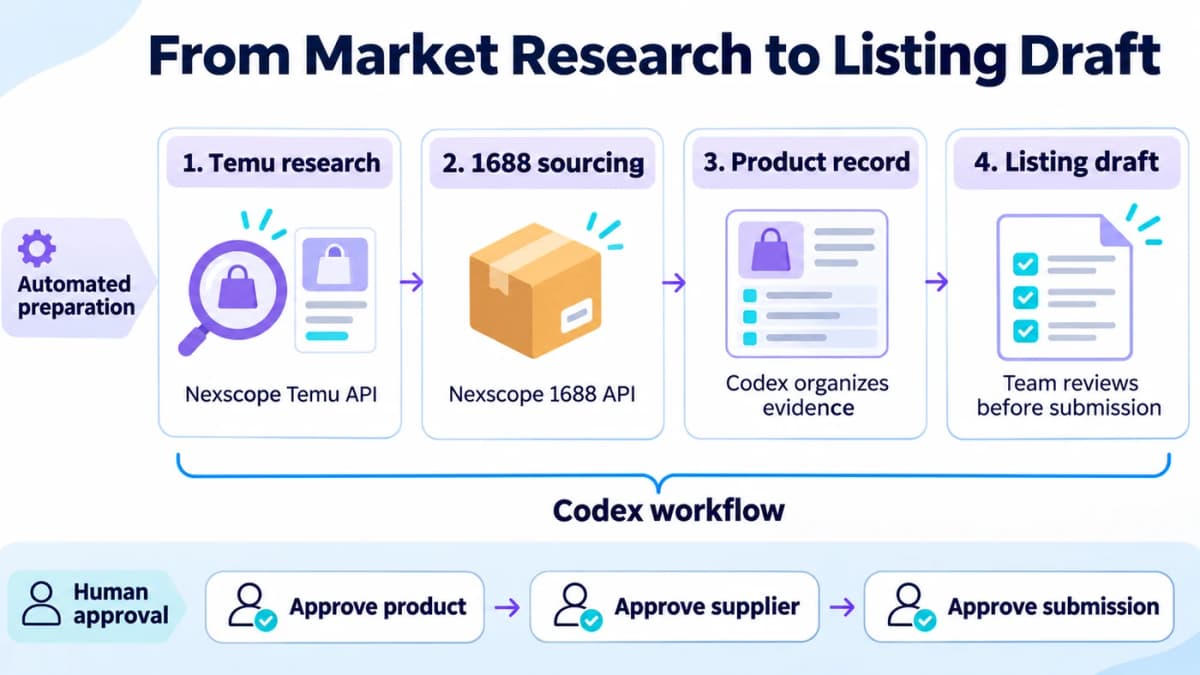
Market and supplier data feed the same workflow; people approve the decisions that move the product forward.
Connect the data to Codex
With the Codex CLI installed, add Nexscope as a remote MCP server and authenticate through the supported sign-in flow:
codex mcp add nexscope --url https://api.nexscope.ai/mcp
codex mcp login nexscope
If the client uses an API key instead, configure it through the client's credential mechanism. Keep credentials out of prompts, shared files, and screenshots. Nexscope's MCP connection instructions include the server address and supported authentication options.
Refresh the connection, then ask Codex to list the available Nexscope tools. Confirm that the Temu product query and 1688 product search tools are available before running research. This separates connection setup from credit-consuming data requests. Teams using scripts can call the REST APIs instead.
Build a comparable shortlist
Codex needs observable product data to compare the market. Use Nexscope's Temu product search to retrieve candidates by keyword and narrow them with supported price, category, sales, and rating filters. Retain product IDs so the same candidate can be recognized across research runs.
A starter request for the MCP tool nexscope_temu_product_source_query can use these arguments:
{
  "searchKey": "desktop organizer",
  "page": 1,
  "pageSize": 20
}
For the first pass, ask Codex to compare:
- Price positioning: The spread among genuinely comparable products.
- Sales signals: Available daily, weekly, or monthly indicators, kept in separate columns.
- Customer response: Ratings and review counts, with missing values preserved.
- Product fit: The design, size, and use case that make each item relevant.
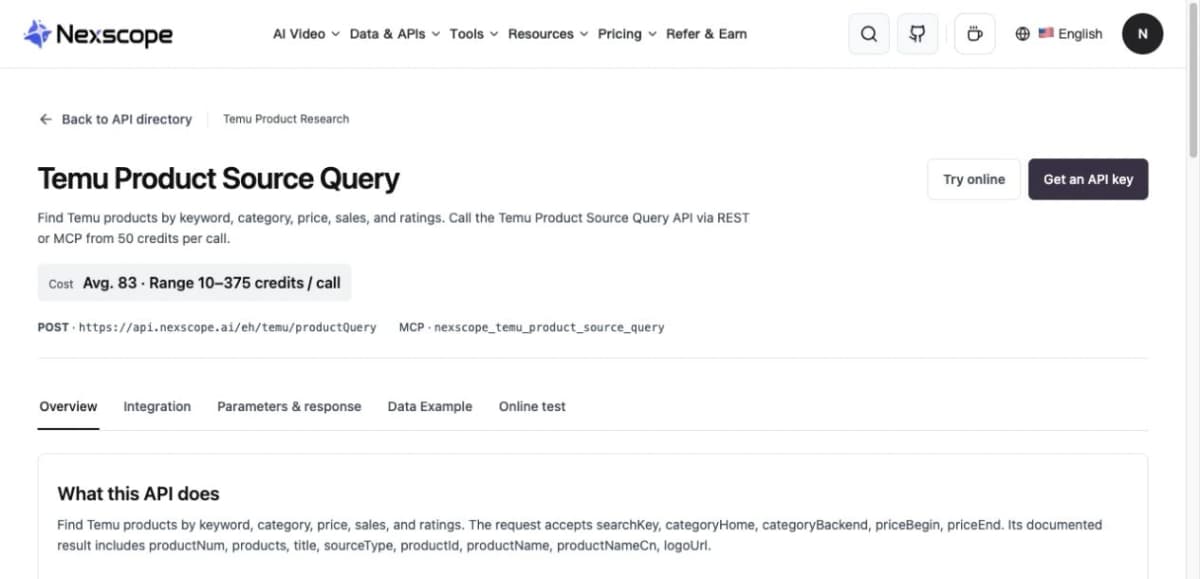
Temu Product Source Query supports structured product screening through REST API and MCP.
The retrieved set is a research sample. Deduplicate it before calculating price ranges, and keep the query, retrieval date, and any supplied data-period labels with the results. Review counts can help prioritize inspection; review-text analysis requires the actual reviews.
Turn findings into a sourcing brief
A useful shortlist should explain what to search for next. For the organizer example, the brief might specify a compact footprint, removable dividers, two proposed color options, and packaging suitable for the selected delivery route. These are procurement requirements to validate with suppliers.
Use this task prompt after the connection is ready:
Research desktop organizers for the specified Temu market using the
connected Nexscope tools. Start with one page of relevant products.

Save a deduplicated comparison table with product IDs, prices,
available sales indicators, ratings, review counts, and retrieval time.
Keep missing values blank and list them separately.

Explain which product formats are comparable. Turn the findings into
a sourcing brief with required dimensions, materials, variant options,
and a target cost range supplied by the team.

Return a shortlist and the questions that must be resolved before
supplier selection. Do not contact suppliers or place orders.
The team's research decision should identify a specific product proposition and the evidence still needed to justify it.
Step 2: Find Matching Products on 1688
Translate the approved brief into supplier search terms. Include the product type and whichever material, size, or function matters most. Search a few focused combinations rather than combining every requirement into one long query.
Search by specifications
Pass Chinese keywords to Nexscope's 1688 product search. Codex can prepare the Chinese terms from the English sourcing brief, then organize the returned offer IDs, product links, indicative prices, minimum quantities, and supplier information where available.
For example, these arguments search for desktop storage products:
{
  "keyWord": "桌面收纳盒",
  "pageIndex": 1,
  "pageSize": 20,
  "searchType": 1
}
Use the MCP tool nexscope_1688_product_search for this request. Preserve the returned currency and unit alongside each price. A per-piece quote and a per-set quote need different cost calculations.
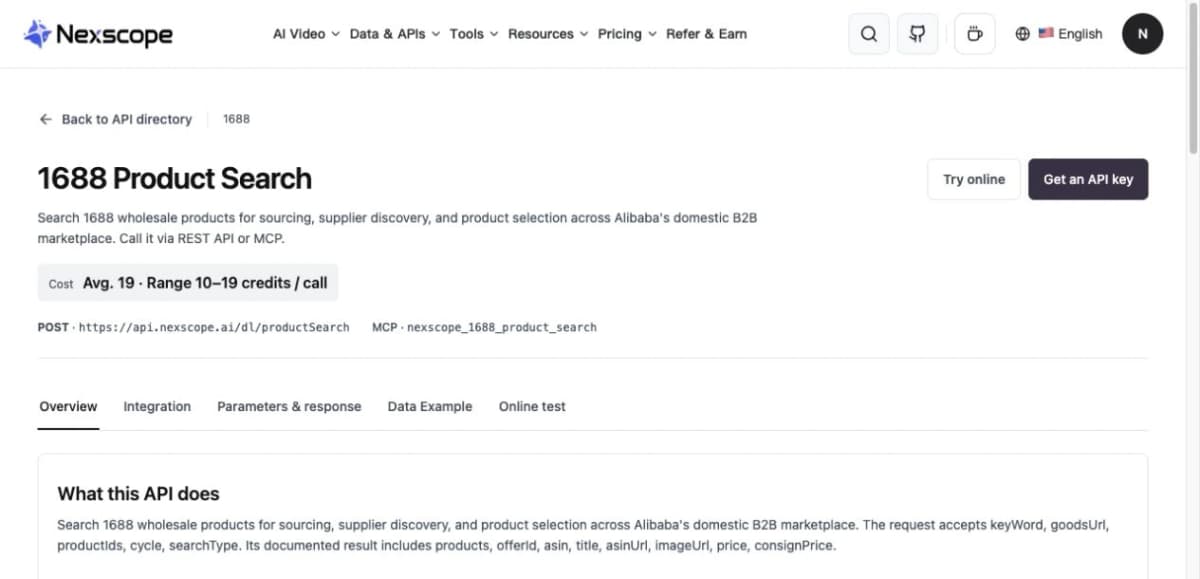
1688 Product Search supplies candidate offers for a sourcing comparison.
Check visual matches
If shape or appearance is central to the brief, a separate 1688 image search can find visually similar offers from an image URL. Check the dimensions, material, construction, and included components before treating a visual match as an equivalent product.
Compare offers consistently
Shortlist three to five relevant offers and compare them against the same purchasing requirements. A supplier with several suitable variants may simplify sampling, but that convenience still needs to be weighed against quality, price, and delivery terms.
| Comparison field | What to record | What needs confirmation |
|---|---|---|
| Product identity | Offer ID, link, selected variant | Exact item and included parts |
| Price | Listed amount, currency, quantity tier | Quote for the intended order |
| Minimum quantity | Available MOQ information | MOQ by color or variant |
| Packaging | Available packaging information | Packed dimensions and weight |
| Supply timing | Available dispatch information | Sample and production lead times |
| Product evidence | Material and attribute information | Sample quality and relevant documents |
Keep supplier questions specific: Which colors are available for the chosen size? Does the quoted price include dividers? What packaging is used? What changes at the planned order quantity? Where can the supplier ship?
Codex can prepare a consistent inquiry and merge the replies into this table. The buyer should approve the recipients and message before it is sent.
Check the economics
Calculate expected contribution using the seller's applicable commercial model:
Expected contribution per unit = expected net receipts − procurement − freight and fulfillment − other seller-borne variable costs.
Include packaging, inspection, returns, or advertising when the seller actually bears those costs. Keep fees already deducted from net receipts out of the expense total to avoid double counting. Use the relevant Temu account terms rather than importing an Amazon FBA cost model.
Have Codex separate confirmed costs from assumptions and unresolved inputs. A missing freight quote should leave the decision incomplete. The comparison becomes useful when the team can see which supplier remains viable after realistic delivery and operating costs.
Step 3: Prepare a Temu Listing Draft From Verified Information
Once a supplier and proposed variants have been selected, consolidate the product facts before writing sales copy. A short specification sheet is easier to review than a translated supplier page containing unrelated variants and promotional claims.
Retrieve the selected offer
Use the selected offer ID to retrieve 1688 product and SKU details. Codex can organize available images, attributes, SKU information, pricing structures, and logistics details into the product record.
Compare those fields with the supplier's quote and sample findings. If the listing, quote, and sample disagree, record the conflict and resolve it before approval. A supplier listing's certification claim needs supporting documentation for the selected product.
Build the listing package
Generate the draft from the confirmed specification sheet:
- Title: Product type, defining feature, and a verified distinguishing specification.
- Description: Intended use, material, dimensions, included components, and relevant care instructions.
- Variant map: Each proposed Temu variant matched to one supplier SKU.
- Image checklist: Required views, dimensions, labels, and any translation work.
- Open fields: Missing attributes or documents that prevent submission.
For a small organizer, this might mean keeping the external dimensions separate from drawer dimensions and showing which accessories are included. Use images the team has permission to publish. When replacing Chinese labels, check the underlying measurements and claims against the approved specification sheet.
Prepare a Temu listing package from the approved product record.

Use only confirmed facts for titles, descriptions, attributes, and
image labels. Keep supplier SKU identifiers in the variant mapping.
Flag any conflict between the quote, product data, and sample notes.

Return the proposed title, description, variant table, image checklist,
and unresolved required fields for the selected market and category.
Mark the package as DRAFT and stop before account submission.
Check the actual Temu Seller Center requirements for the selected market, category, and account before mapping fields. The Nexscope data queries described here retrieve research and supplier information. Submitting a listing requires a separately configured, authorized seller workflow.
Step 4: Connect Every Stage With One Product Record
Give each product project a stable internal ID and store the research, supplier comparison, and draft under it. That record lets the next stage reuse confirmed information without repeating the search or losing the reason a supplier was selected.
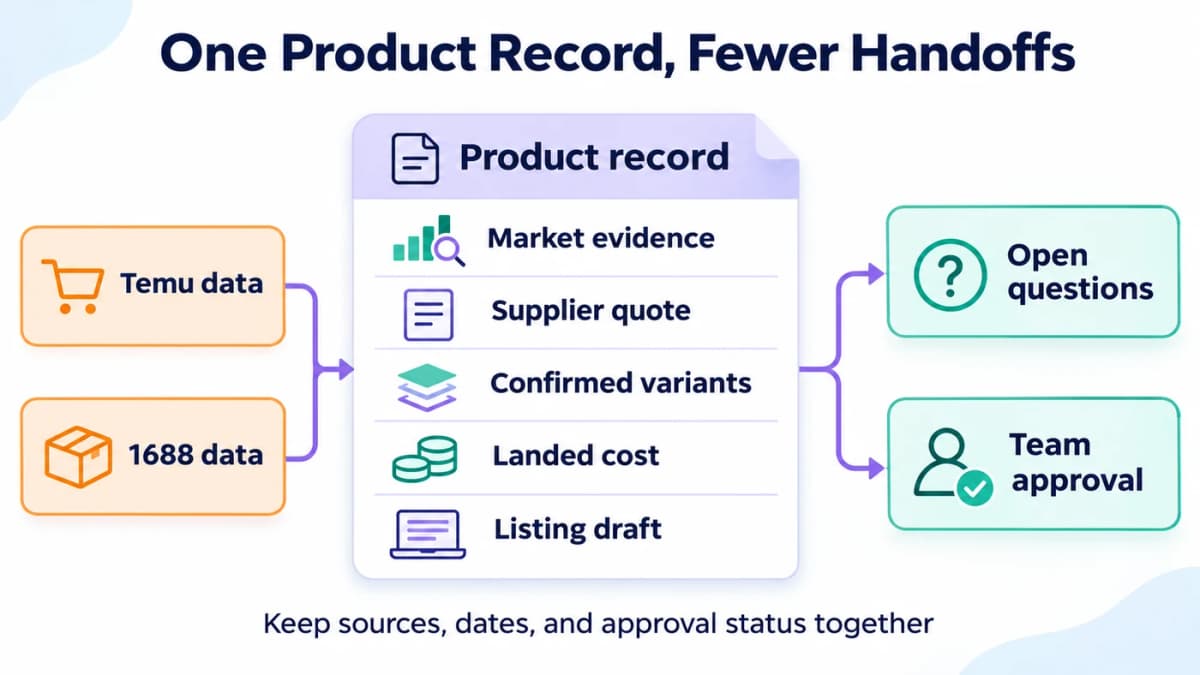
Keep the source evidence, unresolved questions, and approval status with the same product.
Use a shared handoff template
| Record section | Required content | Used for |
|---|---|---|
| Project | Internal ID, market, category, owner | Keeping the work scoped |
| Research | Temu IDs, queries, retrieval dates, findings | Justifying the product direction |
| Sourcing | 1688 offer IDs, supplier replies, quote date | Comparing supply options |
| Specifications | Confirmed material, dimensions, variant map | Drafting accurate content |
| Economics | Currency, quantity basis, costs, assumptions | Reviewing contribution |
| Listing package | Title, description, images, missing fields | Preparing submission |
| Decisions | Status, approver, date, scope approved | Controlling the next action |
Use explicit statuses such as Researching, Awaiting quote, Sample review, Draft ready, and Approved for submission. Assign someone to each open question. A status should explain what can happen next and what is still blocking progress.
When a quote changes, update the cost calculation and flag the previous sourcing decision for review. When a selected SKU changes, revisit the title, image list, and variant table. These dependencies are what make the shared record useful.
Save the repeatable instructions
After reviewing one complete product workflow, ask Codex to turn the approved procedure into a reusable Skill. Keep its instructions focused on:
- The brief and files needed to start.
- The data tools used at each stage.
- The required comparison tables and product record.
- The treatment of missing, conflicting, or stale information.
- The exact decisions that require approval.
OpenAI's Skills workflow supports storing instructions in SKILL.md, with supporting templates, references, and scripts when needed. A team can preserve the supplier comparison format and listing checks while updating the relevant section when its operating requirements change.
Step 5: Keep Three Decisions With Your Team
The workflow should bring a concise decision package to the responsible person at three points.
Approve the product direction
Review the target customer, comparable Temu products, expected positioning, and cost assumptions. Approval should identify the product requirements that procurement may pursue. A popular product still needs a workable offer and cost structure.
Approve the supply plan
Confirm the supplier, sample findings, selected variants, quantities, packaging, and delivery route. Record whether the approval covers requesting a sample, negotiating a quote, or making a purchase. Those actions create different commitments.
Approve submission or purchasing
Review the final listing package and any purchase request separately. Confirm the scope, amount where relevant, and responsible operator. After execution, retain the actual submission or order reference before updating the record to completed.
Common mistakes to avoid
Several mistakes can make a complete-looking workflow unreliable:
- Treating missing data as zero. Keep unknown ratings, costs, and quantities visible.
- Comparing different products. Match dimensions, materials, pack sizes, and variants first.
- Using a catalog price as a final quote. Confirm the quantity tier, currency, packaging, and delivery terms.
- Assuming one-piece dispatch solves Temu fulfillment. Confirm the actual shipping route and account requirements. Temu's Local Seller Program is designed around fulfillment within the seller's local market.
- Marking a draft as published. Save the platform confirmation before reporting a listing as submitted or live.
Conclusion
A useful 1688-to-Temu workflow carries the same product evidence from market research into sourcing, costing, and listing preparation. Codex can organize those tasks around a consistent brief and product record, while the team controls the commercial decisions.
Nexscope gives this workflow two relevant data inputs:
- Temu market data for comparing candidate products and their observable market signals.
- 1688 sourcing data for discovering offers and checking the selected product's details.
Connect them to the team's own Codex environment through MCP or REST API, then start with one product category and one reviewable sourcing brief. Keep the output small enough to inspect before expanding the workflow.
Connect Codex to Nexscope
Bring Temu research and 1688 sourcing data into one repeatable workflow.
Get Your Nexscope API Key →Frequently Asked Questions
How can Codex access Nexscope's Temu and 1688 APIs?
Connect Nexscope as a remote MCP server, complete authentication, and confirm that the relevant tools appear in Codex. The workflow can then request product research and sourcing data through those tools. A developer can also use REST requests from an authorized script. In either case, the account needs access and sufficient credits for the requested calls.
What does each platform contribute to the workflow?
Temu research helps define the market comparison and the product proposition. 1688 research helps identify potential supply options for that proposition. Codex joins the research with supplier replies, confirmed specifications, cost assumptions, and draft content. Keep the marketplace product ID and supplier offer ID separate so the team can trace each piece of evidence to its source.
Can a 1688 supplier fulfill individual orders?
Some offers support single-piece purchasing or distribution arrangements. Confirm the selected SKU, price, minimum quantity, destination, and dispatch terms directly with the supplier. An individual-order arrangement also needs a workable fulfillment route for the Temu account. Domestic dispatch to a forwarding warehouse and delivery to an overseas consumer are different services and should be priced and verified separately.
Can Nexscope's Temu product query publish a listing?
The product query used in this workflow supplies research data. Publishing requires access to the seller account and an appropriate submission method. Codex can prepare a field mapping and review package, then use a separately authorized seller integration where available. The team should confirm the draft before submission and retain the platform's actual response afterward.
What should happen when product information is missing?
Keep the field unresolved, identify who can confirm it, and state which decision depends on the answer. A missing packed weight blocks a reliable freight estimate; an uncertain material blocks related listing claims. Codex can consolidate these questions into a review queue. The workflow resumes once the responsible person supplies the evidence needed for that stage.
Sources
- OpenAI. (n.d.). Model Context Protocol. Retrieved from learn.chatgpt.com
- OpenAI. (n.d.). Save workflows as skills. Retrieved from learn.chatgpt.com
- Temu. (2025). Temu Expands Marketplace Access for Small Businesses on Shopify. Retrieved from temu.com