
What Is MCP and How Does an MCP Server Work?

Table of Contents
MCP, short for Model Context Protocol, is an open standard that lets AI applications connect to external tools and data sources. An MCP server is the program that makes a particular set of those capabilities available. It might expose a document search, a database query, or a product research tool that an AI application can request during a conversation.
That distinction matters when an answer depends on information outside the conversation. A model can explain how to compare products, but researching a specific market requires actual product records. MCP provides a common interface for requesting that information; the connected service supplies the data, and the AI application uses the result.
For teams evaluating AI workflows, the useful questions are concrete: What can this server do? Which data does it access? What permissions does it need? This guide explains what an MCP server does, how the components work together, and how to start with a small, useful task.
What Is MCP?
Model Context Protocol defines a shared way for an AI application to discover and use capabilities provided by another system. Those capabilities can include callable tools, readable resources, and reusable prompts.
Anthropic introduced MCP in November 2024. Its purpose is interoperability: different applications and services can implement the same protocol rather than inventing a separate interaction format for every pairing.
The Integration Problem
Consider a team with several AI applications and several business systems. Each application needs to know what a service offers, which inputs an operation accepts, and how results come back. Repeating that work for every combination creates maintenance overhead.
MCP gives those integrations a common structure. A service exposes supported capabilities through a server, and a compatible application communicates through an MCP client. Developers still implement the underlying operations, permissions, and error handling, but they can reuse the protocol interface across compatible applications.
What MCP Standardizes
MCP standardizes the exchange between clients and servers, including capability descriptions and messages for requesting operations or retrieving context. That helps an application work out which tools are relevant and what arguments they require.
The application still supplies the model, conversation experience, and workflow logic. The service still supplies its actual capabilities and data. For an ecommerce team, this means a product-data connection and a store-management connection can serve different purposes even when both use MCP.
What Is an MCP Server?
An MCP server is software that exposes tools, resources, or prompts through the Model Context Protocol. The word “server” describes its role in the interaction. It may run as a process on your computer or as a remotely hosted service.
For example, a document server might offer a tool that searches an approved folder. A product-data server might offer a tool that searches a marketplace. The server receives a request, performs the supported operation, and returns a result.
Tools, Resources, and Prompts
These three capability types solve different needs:
| Capability | Purpose | Illustrative example |
|---|---|---|
| Tools | Run an operation with structured inputs | Search products using a keyword and marketplace |
| Resources | Supply content the application can read as context | Read a document or database schema |
| Prompts | Provide reusable instruction templates | Start a predefined research task |
A server can implement the capabilities it needs. Supporting tools does not imply that it also offers resources and prompts. Likewise, an application may support some server features more fully than others.
Tool descriptions and input schemas are especially useful because they explain what an operation does and what information it accepts. A clearly defined product search is easier to use correctly than an ambiguous instruction to “get ecommerce data.”
Local and Remote Servers
Local MCP servers commonly run as subprocesses launched by the client, exchanging messages through standard input and output, or stdio. Remote servers commonly use Streamable HTTP, allowing the client to send requests to a hosted endpoint.
The choice affects setup and operations. A local server requires software to run in your environment. A remote service requires network access and its documented authentication. Either can connect to sensitive systems, so evaluate the specific implementation and access scope.
How Does MCP Work?
MCP separates the AI application from the service that supplies tools or context. Understanding the roles makes setup and troubleshooting easier.
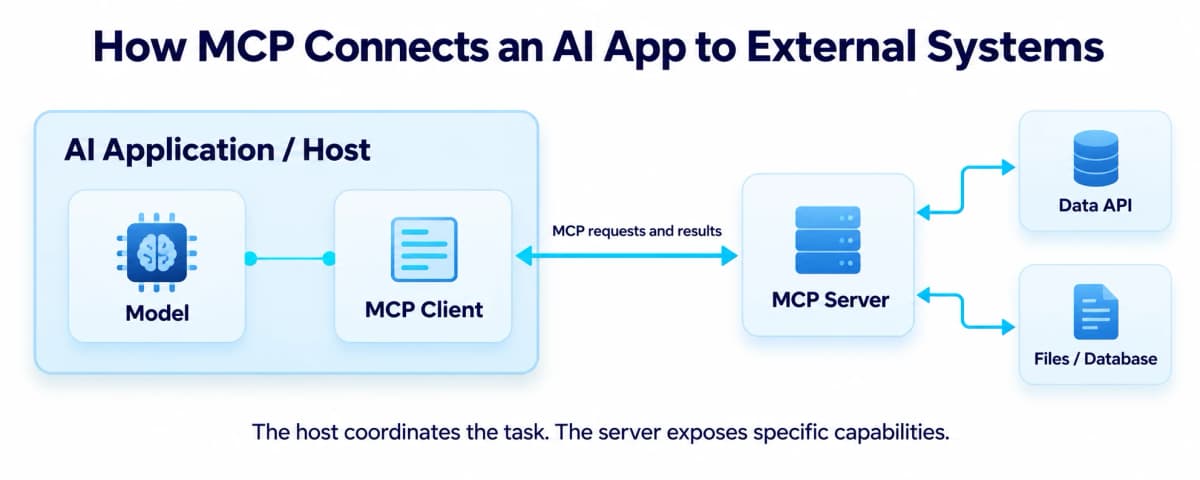
Host, Client, and Server
| Component | Responsibility | Example role |
|---|---|---|
| Host | Coordinates the AI experience, clients, context, and user permissions | The application where you submit a research request |
| Client | Handles MCP communication with a particular server | The host's protocol component for that connection |
| Server | Exposes specific capabilities and handles requests | A service offering product search |
| Underlying system | Provides the actual data or action | A marketplace data API or document repository |
One host can manage several clients, each associated with a server. The language model helps interpret the task and select relevant tools; the host coordinates their use. The server performs its supported operation against the underlying system.
From Request to Result
Suppose you ask an AI application to find products matching a research brief. A typical tool workflow looks like this:
- Discover capabilities. The application obtains the server's tool descriptions and input schemas.
- Resolve the request. The application identifies a suitable tool and gathers inputs such as keyword and marketplace.
- Apply access controls. The host and service apply their configured permissions and approval requirements.
- Call the tool. The client sends the structured request, and the server performs the operation.
- Use the result. The application receives the output and uses it to answer, compare records, or plan another step.
The current MCP revision, dated July 28, 2026, makes requests self-contained, carrying their protocol version and client capabilities. Older tutorials may describe initialization handshakes and protocol sessions from earlier revisions. Match implementation details to the version supported by your application and server.
Practical MCP Server Examples
The best starting point is a task whose required input and expected output are easy to describe. These examples show how that applies across different kinds of work.
Files and Documents
A document connection could help an assistant find an approved policy or summarize a project folder. A useful request names the folder, the topic, and the evidence the answer should include.
For example: “Find the current returns policy in the approved operations folder and identify the rules for damaged items.” The result should make the relevant document identifiable. Restricting access to the needed folder also keeps unrelated files outside the task.
Business Applications
A business-system connection might expose customer lookup, ticket search, or calendar availability. Reading a ticket and changing its status are separate capabilities, with different access requirements.
The same distinction applies to Shopify workflows: developer context, storefront interactions, and merchant administration have different interfaces and permissions. Choose a server by the operation it supports, rather than assuming a platform name means access to everything in that account.
Ecommerce Product Research
Product research needs current records that match a specific market. If you are evaluating travel organizers for Amazon US, the first useful step is to collect comparable listings before asking an AI to judge differentiation or price positioning.
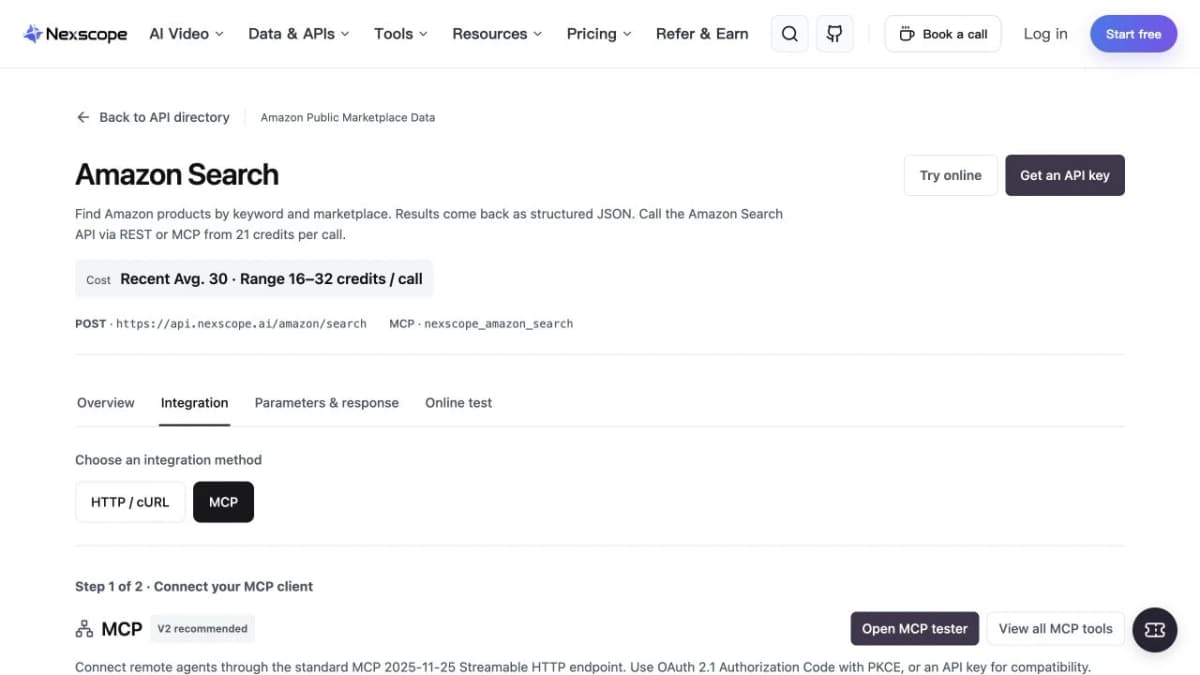
Nexscope is an ecommerce data platform that gives teams structured data to use in their own applications, agents, and workflows. Its supported Data APIs can be accessed through REST API or MCP. For this task, an Amazon product search retrieves candidates by keyword and marketplace, with documented fields including product identifiers, titles, brands, and prices where returned.
An illustrative research request is:
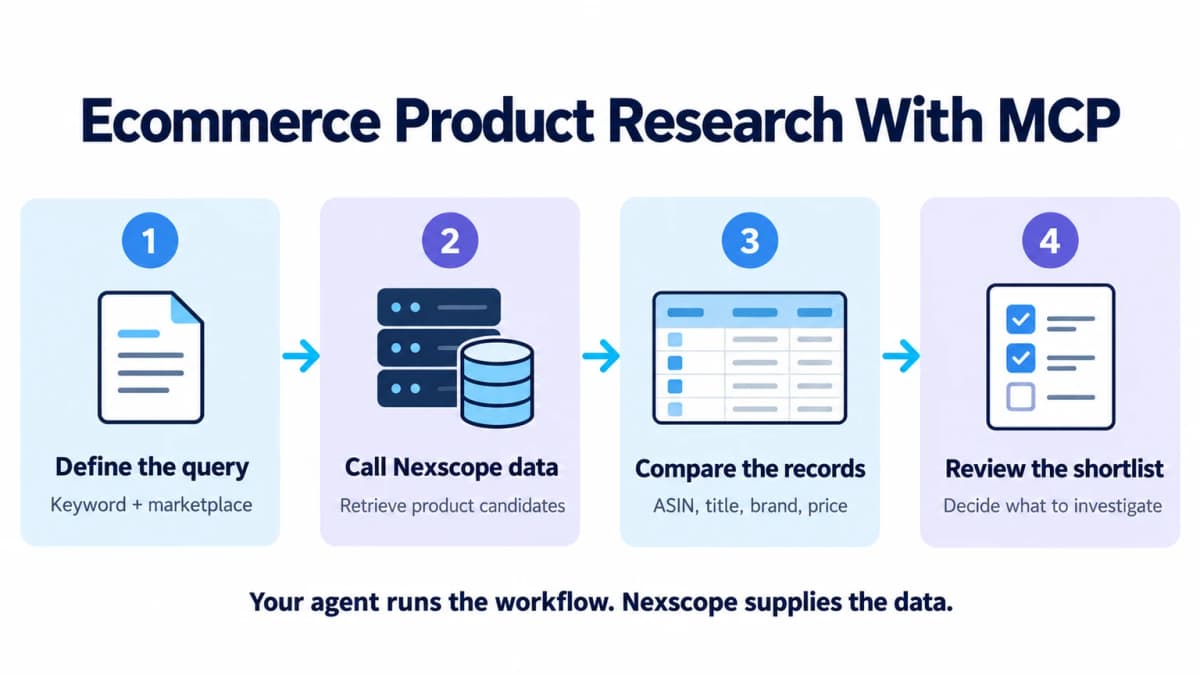
Search Amazon US for travel organizers. Compare the returned products by title, brand, and available price. Keep each ASIN attached to its row, mark missing values, and identify which candidates need further investigation.
The workflow has three distinct parts:
- Set the research scope. Supply the keyword and marketplace, and define the comparison fields.
- Retrieve product candidates. The connected Nexscope tool returns the search data.
- Analyze the evidence. Your agent organizes the returned records, identifies patterns, and explains what needs another query.
This produces a shortlist you can inspect. Search results establish which listings were returned; evaluating demand, profitability, or customer complaints requires the corresponding evidence. Keep those follow-up questions separate so the analysis does not silently fill gaps with assumptions.
To extend the workflow, choose the relevant capability from Nexscope's ecommerce data catalog, then check its supported inputs, fields, and access method. Your team retains its own model, prompts, and decision process while Nexscope supplies the requested data.
Connect product data to your research workflow
Start with one marketplace query, inspect the returned records, and build your comparison around the data you receive.
Get Your Nexscope API Key →MCP vs API
An API defines how software interacts with a service. MCP defines a common interface through which AI applications can discover and use exposed capabilities. An MCP server can wrap an existing API, translate a tool request into an API call, and return the result.
| Question | Direct API integration | MCP integration |
|---|---|---|
| How is an operation selected? | Application code selects the endpoint | The AI application can select an exposed tool using its description and schema |
| How are inputs supplied? | Code builds the documented request | The application gathers arguments for the tool |
| Who implements the business capability? | The underlying service | The underlying service, reached through the MCP server |
| Where are access rules enforced? | In the application and service | In the host, server, and underlying service |
| When is it useful? | Defined application logic and backend workflows | Interactive research and tool use across compatible AI applications |
Choose a direct API when your application already knows exactly which operation to run. Choose MCP when a compatible AI application needs to discover and use the service's tools during a task. A team can use both access methods for different parts of the same workflow.
How to Start Using an MCP Server
Start with one connection and one task. A small setup makes it easier to confirm that the tool, permissions, and output match your expectations.
Choose a Compatible Application
Check your application's documentation for supported MCP transports, authentication methods, and server features. A remote HTTP endpoint and a local launch command require different configuration.
Decide what the first successful result should look like before connecting. “Return product candidates for this keyword and marketplace” is easier to verify than “automate product research.”
Connect a Trusted Server
Use the provider's documented server or an implementation your team has reviewed. Confirm who operates it, which system it accesses, and what it can read or change.
For Nexscope, the MCP tool map connects the available capabilities to their integration guidance. Select the task you need and follow its current setup instructions. Store credentials in the supported configuration or secret mechanism for your environment.
Nexscope connects to compatible AI agents and applications through MCP, including Codex, Claude Code, and Cursor. You keep your own agent and workflow while giving it access to supported Nexscope capabilities.
Paste this setup prompt into your AI agent to get started:
Set up Nexscope for me — read and follow https://www.nexscope.ai/agents.mdFollow your agent's setup steps, authorize access when prompted, and ask which Nexscope tools it can use to check the connection.
Test a Read-Only Task
Run a narrow lookup with inputs you can recognize. Inspect the actual returned records before moving to a larger analysis.
Check four things: the correct market or account, the expected fields, the operation's success status, and any usage charge. If a field is absent, preserve it as missing. If the call fails, resolve the failure before asking the model to produce a completed research report.
MCP Security and Limitations
Connecting tools expands what an AI application can access and do. The practical controls belong in the application, server, and connected service.
Permissions and Credentials
Grant the access needed for the task. Product research may need read access; publishing a listing or changing an ad campaign needs a separate action policy.
Keep credentials out of public repositories, shared screenshots, and article examples. Confirm the account and resource scope before granting access. For local servers, review the software being launched because it runs within your environment's permissions.
Untrusted Tool Output
A document, product description, or tool response can contain instructions written by someone else. Treat that content as input for the task. It should not override the user's instructions or authorize unrelated actions.
For example, a product page containing a request to upload private files does not make that request part of a product comparison. Hosts and workflows need to preserve that boundary when combining external text with model reasoning.
Data Quality and Errors
MCP delivers access to a capability; the usefulness of the result depends on the source and query. Compare equivalent marketplaces, dates, currencies, and identifiers when organizing research.
Tool availability also differs from operation success. A server may expose a search tool while an individual call fails because of invalid inputs, authentication, or an upstream error. Ask the application to distinguish returned data, missing fields, and failed requests. That makes the final analysis easier to audit and improves the next research step.
Conclusion
MCP gives AI applications a shared interface for external tools and context. An MCP server exposes specific capabilities, while the host coordinates their use and brings the results into the task.
Build Ecommerce Workflows With Nexscope
An ecommerce research workflow becomes useful when your agent can work with the product, market, and customer information needed for a specific decision. Nexscope supplies structured ecommerce data that you can connect to your own AI agent or application through REST API or supported MCP tools.
Use that connection to build workflows around the questions your team already asks:
- Product and competitor research: collect product candidates, compare available listing details and prices, and organize a shortlist for further investigation.
- Keyword and market research: bring supported keyword, ranking, and trend data into your planning process to assess search demand and market context.
- Customer feedback analysis: retrieve supported review data so your agent can group recurring concerns and identify product or listing improvements.
- Creative production: once the research brief is ready, use image and video generation to develop product visuals and campaign assets from approved inputs. Creative APIs use a separate subscription model.
You keep control of the agent, model, prompts, and workflow. Nexscope provides the selected data or creative capability; your application decides how to use the results and which actions need review. Compatible MCP applications include Codex, Claude Code, and Cursor, so you can start in an environment your team already uses.
Begin with one clear task, such as comparing travel organizers on Amazon US. Connect Nexscope using the setup prompt above, check which tools are available, and inspect the first result. From there, add the evidence your next decision needs, whether that is customer feedback, keyword research, or a creative brief.
Build your first ecommerce data workflow
Get an API key and connect a supported Nexscope data capability through REST API or MCP. Data APIs use pay-as-you-go credits without a Data API subscription.
Get Your Nexscope API Key →Frequently Asked Questions
What does MCP stand for?
MCP stands for Model Context Protocol. In AI, it is an open standard for connecting applications to external tools, resources, and prompts. The application communicates through an MCP client, and a server exposes the supported capabilities. What the application can actually do depends on the tools and access permissions available in that connection.
What is the meaning of MCP server?
An MCP server is a program that makes specific capabilities available through Model Context Protocol. It can expose operations such as searching documents, querying product data, or accessing another service. It may run locally or remotely. The server handles the supported request and returns information that the AI application can use in its response or workflow.
What is the difference between an MCP client and server?
The client handles protocol communication on the AI application's side. The server exposes capabilities and handles requests for them. The host application creates and coordinates clients, manages the conversation, and applies its permission policies. A host can use multiple clients to work with different servers while keeping those connections and their responsibilities distinct.
Does MCP replace APIs?
MCP can sit alongside existing APIs. A server often translates an MCP tool call into a request to an underlying API. That API still supplies the business operation and data. Direct API access suits defined application logic, while MCP helps compatible AI applications discover and use exposed capabilities during an interactive task. Teams can choose either route for a particular workflow.
Do I need to build my own MCP server?
You can connect an existing server when it exposes the capability you need and works with your application. Build a custom server when your team needs to expose an internal system, curate a smaller tool set, or implement a specialized operation. In either case, check supported inputs, authentication, permissions, and output before relying on it for a business workflow.
Is MCP free to use?
MCP is an open standard, but connected products may have their own charges. The AI application, hosted server, underlying API, or compute provider can charge for usage. Nexscope Data APIs use pay-as-you-go Data Credits. Review the selected capability's usage information and your account's available credits before running a query or scheduling repeated calls.
Sources
- Anthropic. 2024. Introducing the Model Context Protocol. anthropic.com
- Model Context Protocol. 2026. Architecture and Transport Specifications, Revision 2026-07-28. modelcontextprotocol.io
- Model Context Protocol. 2026. Server Features: Tools, Resources, and Prompts. modelcontextprotocol.io
- Model Context Protocol. 2026. Security Best Practices. modelcontextprotocol.io
- Nexscope. 2026. Amazon Search API, Ecommerce Data APIs, and MCP Tool Map. nexscope.ai