
5 AI Tools Every Amazon Seller Should Use in 2026

AI skills have become non-negotiable for competitive Amazon sellers. The tools available in 2026 go far beyond basic chatbots—they can research products, write listings, monitor competitors, generate images, and even automate API integrations.
The difference between sellers who use AI effectively and those who don't is widening every month. This guide covers 5 AI tools that deliver real operational value, with specific workflows for Amazon use cases.
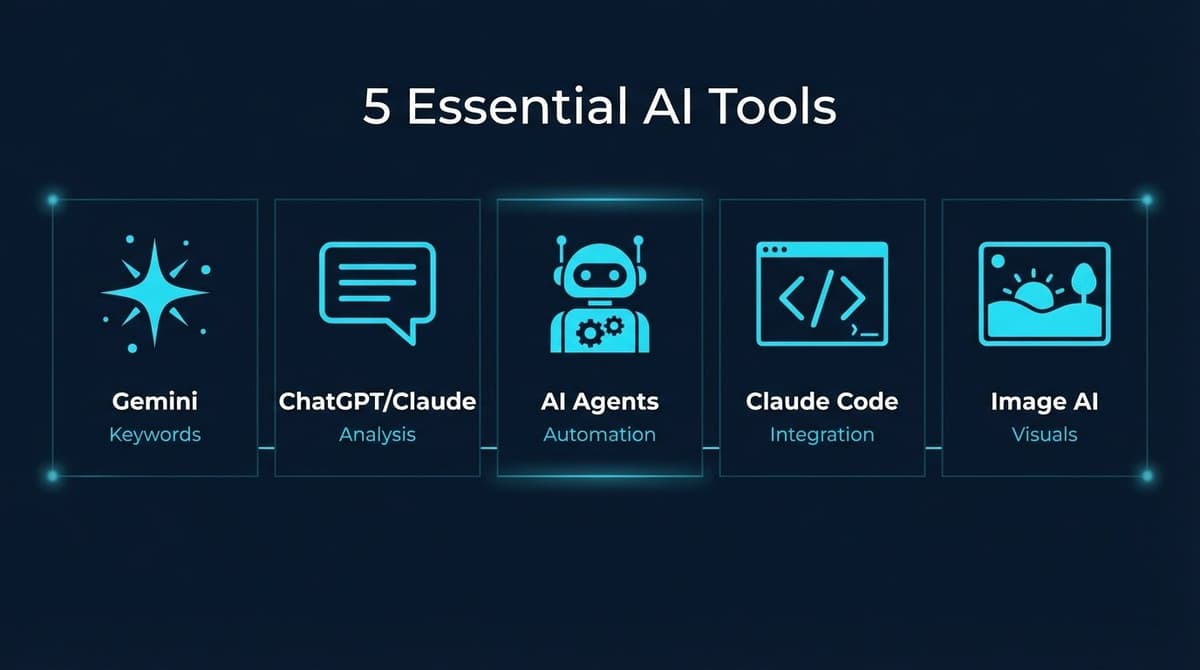
1. Gemini — Listing Optimization and Keyword Analysis
Google's Gemini excels at structured data analysis, making it ideal for keyword research and listing optimization workflows.
Best Use Cases
- Keyword frequency analysis: Upload a competitor keyword list, get word root frequency counts
- Listing generation: Transform keyword data into optimized titles and bullet points
- Multi-language content: Generate listings in German, Spanish, Italian with native phrasing
Practical Workflow: Keyword-Driven Listing Creation
Step 1: Export competitor keywords from Helium 10, Jungle Scout, or similar tools. Clean and deduplicate.
Step 2: Upload to Gemini with this prompt:
Analyze this keyword list. Count the frequency of each word root.
Output a table with: Word Root | Frequency | Example Keywords
Sort by frequency descending.
Step 3: Identify high-frequency word roots. These represent core search intent.
Step 4: Generate the listing:
Reference these competitor listings for structure:
[ASIN 1], [ASIN 2]

Using the word root analysis above, generate:
- Title (200 characters max, highest-frequency roots first)
- 5 bullet points (each addressing a different search intent)
- Product description (include remaining word roots naturally)

Higher frequency = higher priority placement.
Why Gemini Works Well
Gemini handles large datasets better than most models. Uploading a 500-keyword spreadsheet and getting structured analysis back is straightforward. The output follows instructions precisely, which matters for SEO-focused content.
2. ChatGPT / Claude — Review Analysis and Market Research
For unstructured text analysis—reviews, competitor research, market trends—ChatGPT and Claude remain the go-to options.
Best Use Cases
- Review sentiment analysis: Extract common complaints and feature requests
- Competitor positioning: Analyze how competitors describe similar products
- Market gap identification: Find underserved customer needs from review data
Practical Workflow: Review Mining for Product Improvement
Step 1: Export reviews from your product and 3-5 competitors. Tools like Helium 10 Review Insights or manual export work.
Step 2: Upload to Claude with this prompt:
Analyze these Amazon reviews for [product category].

Identify:
1. Top 5 complaints (with frequency estimate)
2. Top 5 praised features
3. Feature requests that appear 3+ times
4. Quality issues mentioned (defects, durability, etc.)

For each finding, include 2-3 example quotes.
Step 3: Use findings to: - Update product specifications with supplier - Revise listing to address common concerns proactively - Identify differentiation opportunities
ChatGPT vs Claude
Both work well for review analysis. Claude tends to provide more nuanced analysis with longer context. ChatGPT is faster for quick queries. Many sellers use both depending on the task.
3. AI Agents (OpenClaw, Cursor) — Full Automation
AI agents go beyond chat interfaces. They can browse the web, execute code, manage files, and chain multiple actions together.
Best Use Cases
- Automated product research: Scrape bestseller lists, compile reports
- Competitor monitoring: Check competitor prices and listings on schedule
- Multi-language localization: Not just translation—cultural adaptation
- Social media intelligence: Gather market insights from Reddit, forums
Practical Workflow: Automated Competitor Report
With an AI agent like OpenClaw, you can set up recurring tasks:
Every Monday at 9 AM:
1. Check these 10 competitor ASINs for price changes
2. Screenshot any listing changes (images, titles, bullets)
3. Compile into a report with week-over-week comparison
4. Send summary to Slack/Discord
The agent handles the execution. You review the output.
Installing Amazon Skills
AI agents support "skills"—pre-built capabilities for specific tasks. For Amazon sellers:
# Install all Amazon automation skills
npx skills add nexscope-ai/Amazon-Skills -g
This adds 50+ Amazon-specific automations: - Keyword research - Competitor analysis - Inventory monitoring - Review tracking - PPC optimization
💡 Pro Tip: Skills are free and open-source. Browse all skills at Nexscope SkillHub
4. Claude Code with MCP — SP-API Automation
For sellers with technical resources (or willingness to learn), Claude Code with Model Context Protocol (MCP) enables direct Amazon SP-API automation.
What This Enables
- Automated report pulls: Sales reports, inventory levels, advertising metrics
- Programmatic listing updates: Bulk price changes, inventory adjustments
- Custom dashboards: Real-time data from your Amazon account
- Multi-account management: Aggregate data across marketplaces
Example: Automated Daily Sales Report
# Claude Code can write and execute SP-API scripts

from sp_api.api import Sales
from sp_api.base import Marketplaces

# Pull yesterday's sales
sales = Sales(marketplace=Marketplaces.US)
response = sales.get_order_metrics(
    interval='2026-04-09T00:00:00--2026-04-09T23:59:59',
    granularity='Day'
)

# Format and send to Slack
# ... (Claude Code handles the integration)
Who Should Use This
This approach suits sellers who: - Have multiple brands or high SKU counts - Need custom reporting beyond Seller Central - Want to build proprietary tools - Have developer resources or are willing to learn
For most sellers, pre-built AI agent skills provide 80% of the value with 20% of the complexity.
5. AI Image & Video Generators — Product Content
AI-generated visuals have transformed ecommerce content creation. In 2026, sellers can create professional lifestyle photos, infographics, and product videos without expensive photoshoots.
Best Use Cases
- Lifestyle images: Product in context (kitchen, office, outdoors)
- Background replacement: Transform white-background shots into styled scenes
- Infographic overlays: Feature callouts, size comparisons
- A+ Content modules: Brand story visuals, comparison charts
- Product videos: 360° showcases, lifestyle clips, ad creatives
Top Image Generation Models (2026)
| Model | Best For | Strengths |
|---|---|---|
| Midjourney V8 | Artistic/lifestyle shots | Highest aesthetic quality, consistent style |
| Flux 2 Pro | Hero product shots | Fast generation, photorealistic output |
| Ideogram V3 | Products with text | Best text rendering (labels, packaging) |
| Recraft V4 | Brand-consistent visuals | Vector + raster, style control |
| GPT Image 1.5 | Quick iterations | Integrated with ChatGPT workflow |
| Seedream | Bulk lifestyle images | Cost-effective at scale |
Top Video Generation Models (2026)
| Model | Best For | Strengths |
|---|---|---|
| Kling 3.0 | Product showcases | Character consistency, smooth motion |
| Veo 3.1 | Cinematic quality | Google's latest, high fidelity |
| Runway Gen-4.5 | Creative control | Best editing tools, motion brush |
| Seedance 2.0 | Audio-video sync | Native audio generation |
| Luma Ray3 | Quick product videos | Fast, cost-effective |
| Wan 2.6 | Open-source option | Self-hostable, no API limits |
Practical Workflow: AI Product Video Creation
Step 1: Start with a clean product photo or your main listing image.
Step 2: Use Kling 3.0 or Veo 3.1 with a prompt like:
Create a 10-second product showcase video.
The [wireless earbuds] rotate slowly on a reflective surface.
Soft studio lighting, dark gradient background.
Camera slowly zooms in. Professional commercial style.
Step 3: Generate 2-3 variations, select the best.
Step 4: Add text overlays and call-to-action in a video editor if needed.
Where to Access These Models
- Midjourney: Discord or midjourney.com
- Flux/Ideogram/Recraft: Direct websites or via API platforms (Replicate, FAL.AI)
- Kling/Seedance: kling.ai, FAL.AI
- Veo: Google AI Studio
- Runway: runway.ml
Amazon Compliance Note
AI-generated images and videos are permitted on Amazon as long as they accurately represent the product. Avoid: - Misleading scale or proportions - Features the product doesn't have - Backgrounds that misrepresent use context
Comparison: Which Tool for Which Task?
| Task | Best Tool | Why |
|---|---|---|
| Keyword analysis | Gemini | Handles large datasets, structured output |
| Review mining | Claude | Nuanced analysis, long context |
| Listing writing | ChatGPT/Claude | Natural language, brand voice |
| Competitor monitoring | AI Agents | Automation, scheduling |
| SP-API integration | Claude Code | Code generation, debugging |
| Product images | Flux 2 Pro/Midjourney V8 | Photorealistic, high aesthetic quality |
| Product videos | Kling 3.0/Veo 3.1 | Smooth motion, cinematic quality |
| Bulk operations | AI Agents + Skills | Pre-built workflows |
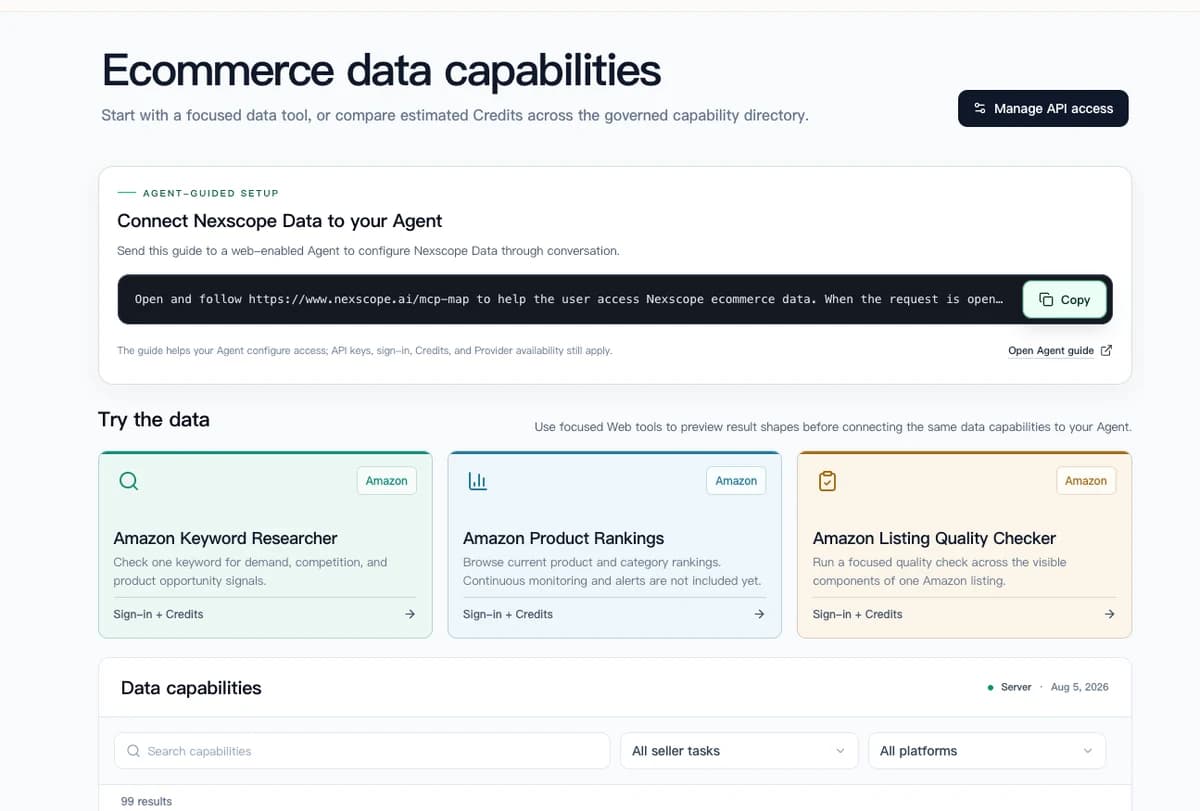
A Better Way: Connect Ecommerce Data to Your Agent
Managing multiple AI tools across different platforms is time-consuming. Every task requires switching contexts, copying data between tools, and learning different interfaces.
Nexscope adds ecommerce data and focused seller workflows to the stack:
- Focused data tools: Preview keyword, ranking, listing, and other ecommerce result shapes before integrating them
- Agent connections: Bring governed capabilities into an existing Agent through API, MCP, or Skills
- Ready workflows: Move defined jobs into Keyword to Ads, Video Clone, or Buy Box Repricer
This lets teams keep the Agent environment they already use while adding structured ecommerce capabilities behind it.
Getting Started: Recommended Stack
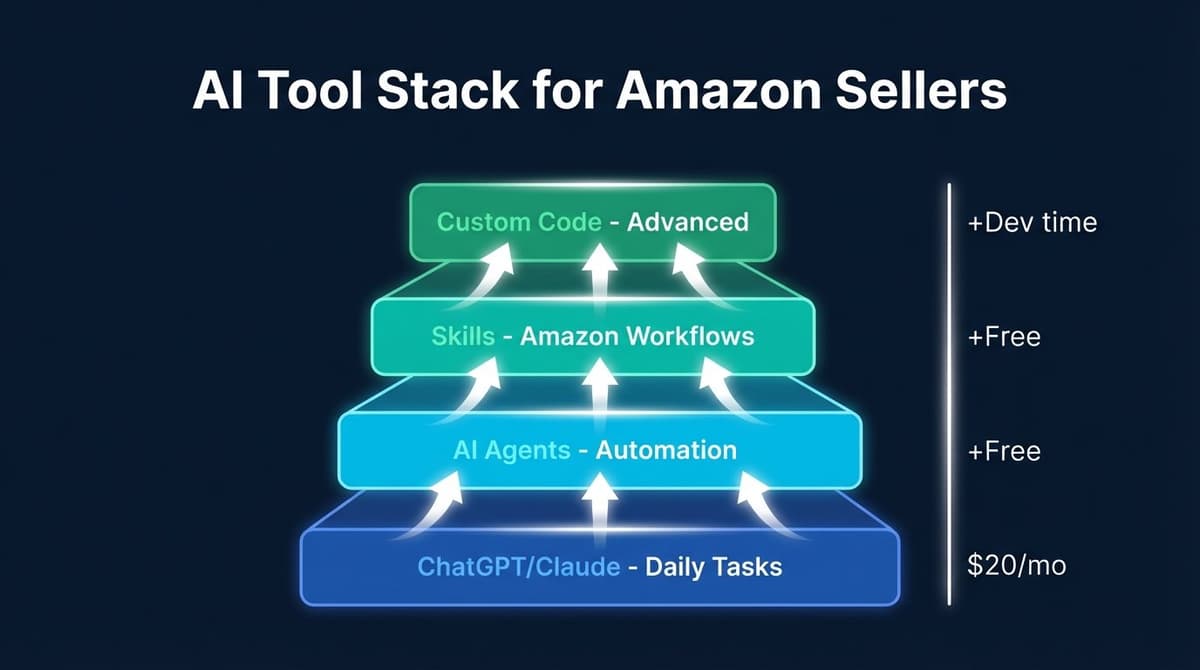
For most Amazon sellers, this combination covers 90% of AI use cases:
- ChatGPT or Claude — Daily queries, quick analysis ($20/month)
- AI agent automation — Automation, monitoring (free tier available)
- Amazon Skills — Pre-built workflows (free)
- Image generator — As needed for listings ($10-30/month)
Total cost: $30-50/month for significant operational improvement.
Or extend the Agent you already use with Nexscope ecommerce data through API, MCP, or Skills.
Conclusion
AI tools for Amazon sellers have matured beyond novelty. In 2026, they're operational necessities:
- Gemini — Structured keyword and data analysis
- ChatGPT/Claude — Unstructured text analysis, content creation
- AI Agents — Automation and monitoring
- Claude Code — Technical integrations
- Image & Video generators — Visual content creation
The sellers gaining competitive advantage aren't using AI occasionally—they're building AI into daily workflows.
The simplest path forward: Keep the Agent environment that already fits the team, then connect Nexscope ecommerce data through API, MCP, or Skills.
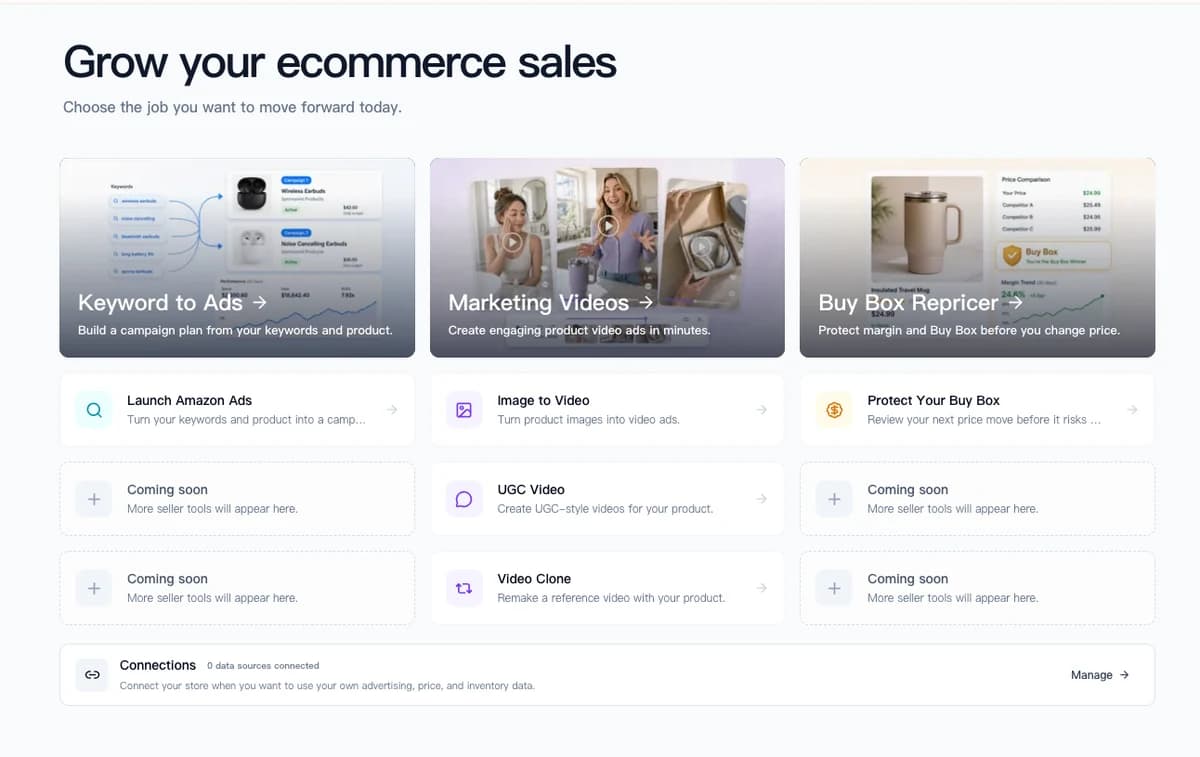
Nexscope supports structured ecommerce data access and three ready seller workflows:
- API, MCP, and Skills: Add ecommerce data to an existing Agent or internal tool
- Keyword to Ads: Turn product and keyword inputs into an Amazon campaign plan
- Video Clone: Recreate a reference product video with the seller's own product
- Buy Box Repricer: Review price changes against margin and Buy Box risk
This approach adds governed ecommerce capabilities without requiring sellers to replace the Agent or workflow tools they already use.
Connect Ecommerce Data to Your Agent
Use Nexscope through API, MCP, or Skills, or open a ready seller workflow.
Explore Ecommerce Data →1,000 free credits • API, MCP & Skills
FAQs
Which AI tool should I start with as a beginner?
Start with ChatGPT or Claude for listing optimization and review analysis. Once comfortable, connect Nexscope ecommerce data to your Agent through API, MCP, or Skills.
Are AI-generated listings against Amazon's Terms of Service?
No. Amazon permits AI-assisted content creation. The listing must accurately describe the product and comply with category requirements. AI is a tool for creation, not a compliance bypass.
How much do these AI tools cost monthly?
Basic usage: $20-50/month. ChatGPT Plus or Claude Pro runs $20/month. AI agents often have free tiers. Image generators range from free to $60/month depending on volume.
Can AI tools connect directly to my Amazon Seller Central?
Not directly through chat interfaces. SP-API integration requires code (Claude Code can help write it) or third-party tools. AI agent skills provide pre-built connections for common tasks.
Do I need coding skills to use AI for Amazon selling?
No. Chat-based tools (Gemini, ChatGPT, Claude) require no coding. AI agents with skills provide automation without code. Only SP-API integration requires technical knowledge—and even that can be AI-assisted.
Sources
- Amazon Seller Central documentation
- Tool pricing pages (as of April 2026)
- Seller community surveys on AI tool adoption