
AI Agents for Ecommerce: 5 Workflows to Build With Grok Bot

Table of Contents
AI agents for ecommerce become useful when a business gives them a repeatable job and a clear definition of done. A growth team might need three video briefs based on current customer questions. A product manager might need recurring complaints grouped by product variant. Both tasks involve gathering evidence, making judgments, and handing a usable result to someone else. The value comes from completing that sequence reliably.
Grok Bot provides a place to organize this work across persistent Bots, connected apps, and a cloud computer. The five workflow designs below cover content and ads, SEO and GEO, customer insights, localization, and internal tools. Each includes inputs, responsibilities, deliverables, and a starter prompt. Begin with the workflow that already consumes time every week, then add specialist roles when the work has a stable handoff. That makes communication between agents part of a defined business process, with a concrete output to review.
The Five Workflows at a Glance
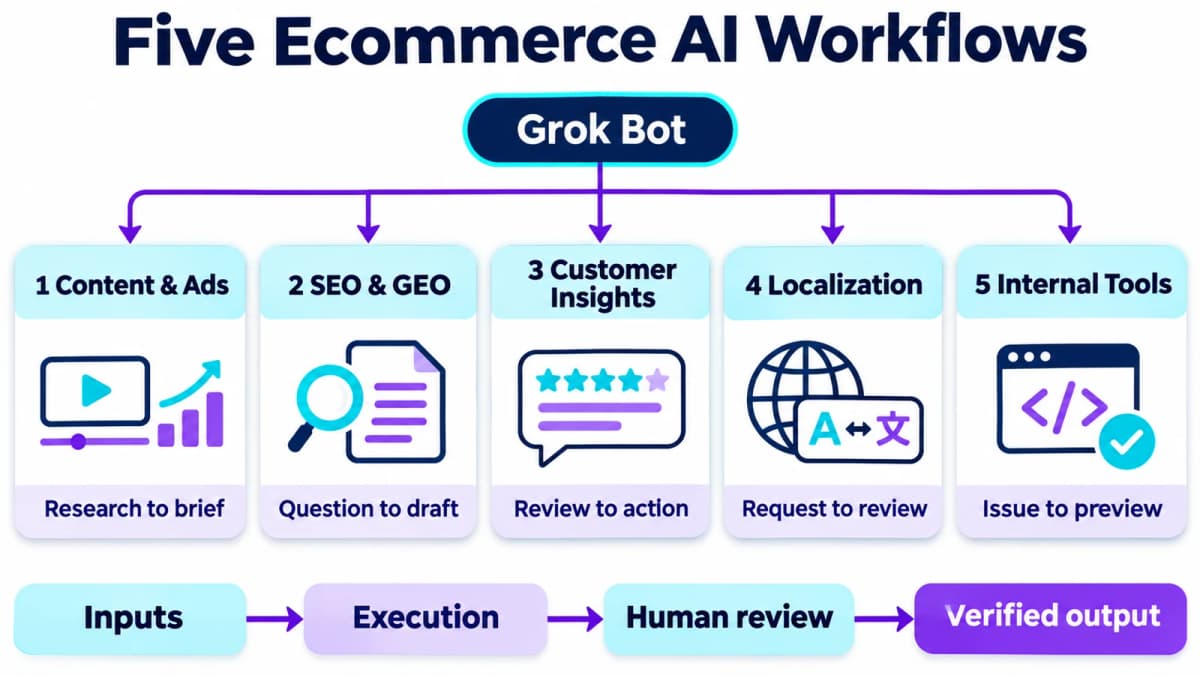
| Workflow | Starting input | Useful deliverable | Business owner |
|---|---|---|---|
| Content and ad monitoring | Creative references and account reports | Video briefs and an exception report | Growth lead |
| SEO and GEO content | Customer questions and search evidence | Reviewed article and channel drafts | Content editor |
| Customer insights | Reviews and support feedback | Product actions and messaging opportunities | Product manager |
| Localization and operations | Approved copy and a target market | Localized copy with review notes | Market owner |
| Internal tools | A recurring operational problem | Tested preview and release notes | Product or engineering lead |
These are five ways to organize work. A small team can start with one Bot per workflow and separate research, drafting, and review responsibilities later.
Set Up the Shared Workflow
Create One Accountable Owner
In Grok Bot, choose New Bot, name it for the business function, and give it an initial assignment. State its source material, expected output, and responsibilities in the first message. A primary Bot can serve as the main contact and coordinate other Bots. The official setup guidance also supports asking an existing Bot to create a more focused one when a recurring job needs its own owner.
For a pilot, choose one product line and one market. Give the owner a product fact sheet, approved claims, brand vocabulary, and the location of the output folder or task board. Add a named human reviewer and a definition of completion, such as “three briefs with source evidence, ready for the video producer.”
Make Handoffs Explicit
A shared board in Notion or an existing project system can hold the work. Use a small set of statuses: Queued, Working, Blocked, Review, Done. Each task should carry enough context for the next person or Bot to continue without reconstructing a conversation.
| Field | What to record |
|---|---|
| Task ID | A unique reference retained across retries |
| Scope | Product, market, language, and reporting period |
| Evidence | Source links or files, collection date, and relevant excerpts |
| Owner | The Bot responsible for the next deliverable |
| Acceptance criteria | The specific checks that make the output usable |
| Result | Artifact location, review decision, and next action |
Connect the required apps before running the pilot. Grok Bot supports app connections and custom MCP servers; its browser can cover tasks that need visual interaction. Its Bots share cloud files and signed-in sessions, so separate role names do not provide account isolation.
Add Scheduling After a Successful Run
Complete one real task, correct the output, and save the method as a skill. A routine can then trigger that process on a schedule or a supported event, including a webhook. Specify the owner, time zone, inputs, and destination in the routine.
Keep fixed calculations and duplicate detection in code where practical. Let the model handle interpretation and drafting. For example, a script can identify which campaign rows changed; the Bot can explain which changes deserve investigation. Record blocked runs separately from completed ones so a missing report never looks like an uneventful day.
1. TikTok Content and Ad Monitoring
The first workflow connects creative research with campaign feedback. Its output is a short production queue and a focused account review that a growth lead can act on.
From References to Video Briefs
Give the researcher a defined list of relevant accounts, public creative references, and approved product facts. For each reference, record the audience problem, opening hook, demonstration, offer, and visible engagement signals. Keep the source and observation date with the notes.
The drafting role turns a promising angle into an original brief. A brief should identify the audience, scene sequence, on-screen copy, product evidence, and call to action. If a reference demonstrates durability, for example, the new brief should use a test the seller can actually perform with its own product. It should not inherit the reference product's claims.
Evaluate the brief against a practical question: could a producer shoot it without returning for basic product information? Missing dimensions, unsupported comparisons, or unclear demonstrations belong in the revision queue.
From Account Data to Investigation
Use authorized ad-account reports for spend and conversion performance. Public engagement metrics belong in creative research; they do not establish a competitor's CPA or ROAS.
Keep reporting windows, currencies, and attribution settings consistent. An exception report should show the campaign, observed change, data freshness, plausible explanations, and next diagnostic step. A ROAS decline might warrant checking conversion tracking, stock availability, or a landing-page change before changing the bid.
Starter prompt
Set up a weekly content-and-ads workflow for the selected product line.
First list the product facts, reference accounts, and account reports
needed for a complete run. Use the connected sources already approved.

Return two artifacts:
1. Three original video briefs with audience, hook, scenes, product
   evidence, and CTA. Keep reference URLs in the research notes.
2. An ad exception table with reporting period, spend, conversions,
   CPA, ROAS, observed changes, and the next diagnostic check.

Write the artifacts to the shared board with a named growth reviewer.
Keep ad changes and publishing as separate review tasks. Show any
missing report or attribution mismatch before recommending an action.
Start by measuring how many briefs pass review and how much time the growth lead spends resolving each alert. Those measures reveal whether the workflow reduces work or simply produces more material to inspect.
2. SEO and GEO Content Operations
This workflow turns repeated buyer questions into useful, searchable content. SEO addresses discovery through search engines; GEO adds attention to how AI answers represent the topic and cite supporting material.
Build a Question-Based Queue
Collect questions from support conversations, search data, and relevant community discussions. Group them by the decision a reader needs to make. “Which size fits a narrow shelf?” and “How much weight can this shelf hold?” require different evidence even if they concern the same product.
Add target market, search intent, product relevance, and the existing page that might already answer the question. Comparing keyword demand and difficulty through Nexscope’s connected MCP tool can help prioritize the queue. Retain the provider, market, and data date with each metric; a missing value should remain missing.
For AI-answer research, save the actual question, engine, date, response, and citations. Review which customer questions the brand's own pages answer well and which need clearer evidence. Treat each captured answer as an observation from that query, rather than a universal visibility score.
Separate Drafting From Distribution
Approve the content brief before drafting. It should define the reader's decision, essential evidence, planned examples, and the role of the article in the store's content library.
Have the editor check product claims, comparisons, source support, and usefulness. Then adapt the approved article into channel-specific drafts. A social post should make a complete point in the channel's format; it should not simply reproduce the introduction with a link attached.
Starter prompt
Build a content queue for the chosen product category and US audience.
Use support questions, the approved search dataset, and current public
sources. For each topic, record the buyer decision, primary query,
available demand metrics, existing site coverage, and needed evidence.

Select one topic for editorial review and prepare its outline.
After outline approval, create an English article with concrete
examples and source-backed claims. Add a comparison table or FAQ
only where it helps the reader make the decision.

Prepare separate X and LinkedIn drafts after the article is approved.
Keep the article and social drafts in Review until the editor selects
the publication destinations and approves the final versions.
Track revisions by reason: weak evidence, repeated content, product inaccuracies, or poor intent fit. Recurring revisions should become explicit instructions in the writing skill.
3. Voice of Customer Analysis
Customer feedback becomes more useful when it connects a complaint to a product decision and a communication task. This workflow produces both, with evidence that the responsible teams can inspect.
Preserve the Context of Each Review
Choose a product set, marketplace, date range, and sampling rule. Combine authorized support exports with relevant public product feedback. For an Amazon-focused input, product reviews can provide review text, ratings, dates, and product identifiers through Nexscope’s connected MCP tool.
Keep variant and market differences visible. A complaint about a small travel size should not silently become a finding about the full-size product. Deduplicate records before calculating theme counts, and retain the original wording alongside any translated or summarized version.
Tag the sample by purchase motivation, use situation, reported problem, requested improvement, and the language customers use. Review ambiguous examples manually before extending the classification to the rest of the sample.
Produce Two Action Queues
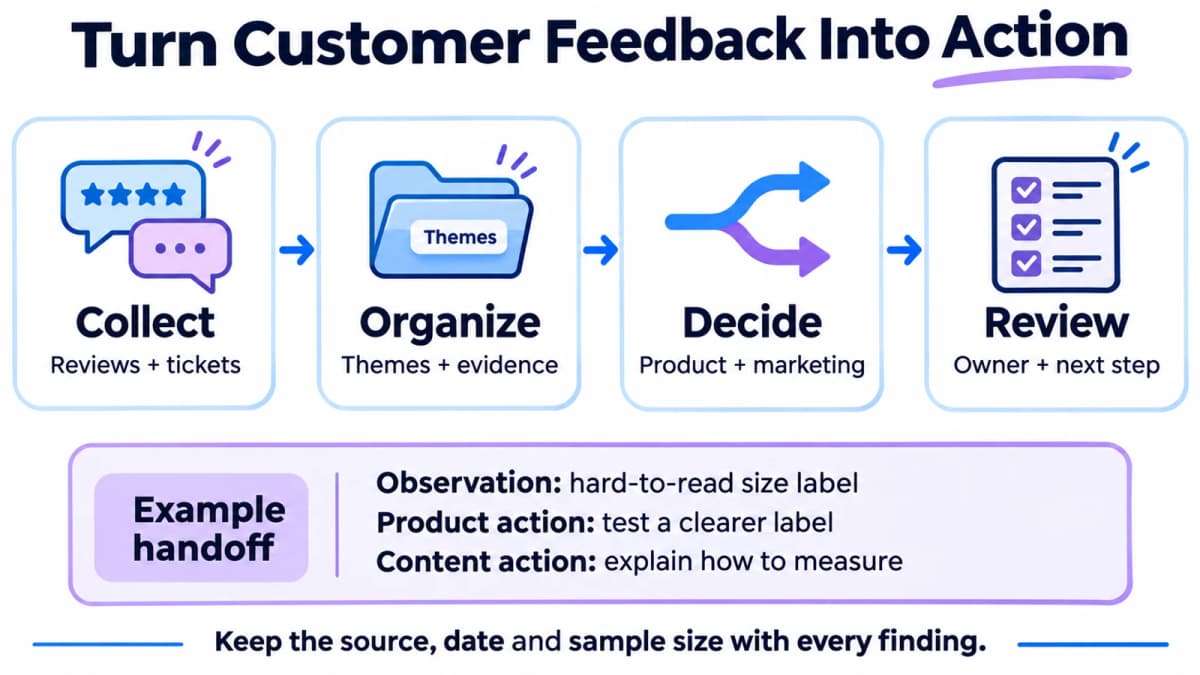
For an illustrative sizing complaint, the product queue might request a clearer label or a fit test. The content queue might request a measurement diagram and a short demonstration. Both should link back to the same evidence group.
| Output | Minimum useful detail |
|---|---|
| Product recommendation | Observed issue, affected variant, supporting records, proposed test |
| Content opportunity | Buyer question, evidence needed, suitable format, intended audience |
| Review decision | Responsible owner, priority, next step, decision date |
Report theme frequency within the collected sample. If the input deliberately contains low-star reviews, label it as a complaint sample and keep its proportions separate from overall customer satisfaction.
Starter prompt
Analyze the supplied review and support records for the selected SKUs.
Document the collection window, rating selection, and sample size.
Remove duplicates and preserve product variant, source, date, and ID.

Group feedback into usage situations, reported problems, requested
improvements, and customer vocabulary. Attach supporting record IDs
to every theme. Keep uncertain classifications in a review group.

Deliver a product-testing backlog and a content-question backlog.
For each item, state the observation, proposed action, evidence,
owner, and acceptance criterion. Calculate percentages only against
the stated sample and identify themes that can overlap.
The useful connection is between evidence and action. A long list of complaints without an owner or next step leaves the product team with the same prioritization problem it had before.
4. Localization and Internal Operations
A localization workflow helps distributed teams request consistent product copy without repeatedly briefing a translator from scratch. The input should include approved source copy, destination market, channel, length limits, and a product glossary.
Build a Complete Request
Use a form, shared task board, or connected messaging channel to capture requests. Require the requester to identify the audience and placement: a German product-page heading and a French video caption have different requirements.
Have the language role produce the localized copy, a short explanation of important choices, and unresolved questions. Preserve measurements, product specifications, warranty terms, and other facts exactly unless the approved localization rules call for a conversion. Give a market reviewer the final decision on idiom, tone, and customer-facing use.
For a product interface, inspect the text inside the actual layout. A translation can read well in a document and still overflow a button or make an error message hard to understand.
Route Events Efficiently
When several internal tools submit requests, an event gateway can normalize payloads and reject duplicates before invoking the agent. A Cloudflare Worker is one implementation option. Cloudflare also supports scheduled Workers through Cron Triggers, which use UTC schedules.
Give each request a stable ID and store its status. A retry should continue the same request instead of generating another translation and another notification. The same event pattern can support operational alerts: a deterministic check detects a changed condition, then a Bot prepares a relevant explanation.
Starter prompt
Create a localization intake workflow using the connected task board.
Required fields: request ID, approved source copy, target locale,
channel, character limits, glossary, and reviewer.

For each complete request, return localized copy, important language
choices, and questions that need a market owner's decision. Preserve
approved product facts. For interface copy, include a layout check.

Store the output under the original request ID and mark it Review.
For repeated events, return the existing status instead of creating
another task. Test one request and one duplicate before scheduling
or connecting an external event trigger.
5. Internal Tool Development
Recurring work often exposes a small tool opportunity: a review triage form, a localization queue, or a report viewer. The development workflow begins with the operational problem and ends with a tested preview.
Define a Small Release
Ask the product role to document the user, input, desired output, and acceptance criteria. “Build a dashboard” is too broad. “Let the market owner filter pending translations by locale and approve one version” defines an interaction that can be tested.
The design role should produce a prototype that includes normal, empty, error, and long-text states. The development role then works from the approved scope, with a branch or equivalent isolated change set.
Grok Bot's documentation describes delegating coding work to Cursor Cloud Agents. A team can also design an authorized local execution setup around its existing coding environment. Specify the repository, permitted working directory, invocation method, and artifact destination before dispatching a task.
Review the Running Result
QA should exercise the preview against the acceptance criteria. Include the main user action, invalid input, recovery after failure, and the target language layouts. Attach reproduction steps and screenshots to failures so the developer can fix the exact problem.
A passing preview is evidence for review. Keep the release task tied to the reviewed change and record production verification after deployment, including the relevant page or service behavior.
Starter prompt
Turn the selected localization-queue problem into a small tool brief.
Define the user journey, required fields, permissions, empty states,
error states, and testable acceptance criteria.

Create a prototype for review. After the scope is approved, prepare
the implementation in the selected repository and return the change
summary, checks run, and preview URL. Use only the authorized coding
environment and keep the task ID attached to all artifacts.

Test the preview with short and long localized text, invalid inputs,
and a repeat submission. Attach reproduction steps to any failure.
Prepare a release checklist for the reviewer after the checks pass.
Conclusion
Choose the workflow with the clearest inputs and the most repetitive handoff. Run a small pilot, inspect the result, and correct the instructions before expanding the role structure. Review completion time, acceptance rate, manual corrections, and cost per accepted deliverable. These measures make it possible to compare the workflow with the process it replaces.
Connect the Data With Nexscope
Research and content workflows need current product facts and market evidence. Nexscope MCP supplies ecommerce, marketing, and social media data, plus creative tools, that teams can connect to their own agents and workflows. For this Grok Bot workflow, use its remote MCP server at https://api.nexscope.ai/mcp and complete the authentication described in the MCP guide. Confirm that Grok Bot can discover the required tool before requesting data.
Key Features
- Ecommerce Data APIs: bring relevant product, price, and review evidence into research tasks.
- Marketing APIs: add keyword, search-result, and competitor research to content planning.
- Social Media APIs: bring social-platform data into audience research and content planning, with available inputs and outputs depending on the selected tool.
- AI Image & Video APIs: support creative production after the brief and product claims have been reviewed.
The team retains control of its agent, prompts, tools, and review process. Start with one supported data request and inspect its output before adding it to a recurring job.
New users receive 1,000 trial credits valid for three days, with no credit card required. Data APIs use pay-as-you-go Data Credits. Creative APIs have a separate subscription requirement.
Connect Nexscope to Grok Bot
Connect Nexscope to your AI assistant and start with one keyword or product-review research task.
Connect Nexscope →Frequently Asked Questions
What are AI agents for ecommerce?
AI agents for ecommerce use instructions and connected tools to carry out business tasks such as reviewing feedback, researching products, preparing content, or investigating operational changes. A useful workflow defines the input, the decisions the agent can make, and the output a business owner needs. This article focuses on seller operations rather than agents that shop on a consumer's behalf.
How many Grok Bots does a small ecommerce team need?
Begin with one owner for the first workflow. Split out a specialist when a recurring responsibility needs different instructions, context, or review criteria. For example, research and writing may eventually need separate owners. Five workflow designs do not require twenty Bots; the right number depends on whether each role has enough distinct work to justify the handoff.
Can Grok Bot run while a laptop is closed?
The official FAQ says cloud work can continue when the laptop or app is closed. Local execution is a separate setting that requires permission to run commands on the user's computer. For a workflow that depends on local files or software, include that computer's availability in the run requirements. Keep the execution location explicit when setting up recurring work.
Can a single prompt create the whole workflow?
A prompt can describe responsibilities and request a setup, but the workflow also needs connected accounts, accessible inputs, an output destination, and a successful test run. Use the starter prompts to define the job. Complete missing connections, review the first result, and then save the proven process for repetition. Treat the delivered artifact as the completion check.
Which workflow should a seller automate first?
Choose a recurring task with available data and an easily reviewed output. A weekly feedback summary or content brief is often a practical pilot because the owner can compare the result with the underlying evidence. Record the time spent reviewing and correcting it. Expand only when the accepted output is useful enough to justify the workflow's operating cost.
Sources
- xAI. Accessed November 2026. Create and Manage Bots; How Grok Bot Works. docs.x.ai.
- xAI. Accessed November 2026. Skills and Routines; Use the Computer and Apps; Frequently Asked Questions. docs.x.ai.
- Cloudflare. Accessed November 2026. Cron Triggers. developers.cloudflare.com.
- Nexscope. Accessed November 2026. Keyword Metrics; Amazon Reviews List. nexscope.ai.
- Nexscope. Accessed November 2026. Unified Ecommerce APIs With One Key. nexscope.ai.