

How to Audit Listings for Amazon Alexa Shopping in 4 Steps

Shopping questions are becoming more specific. A buyer may still search for “65W USB-C charger,” but Alexa for Shopping also lets them ask: “Which compact charger can power my MacBook and iPhone during business trips?”
For the listing, that question exposes a practical problem: are the facts needed to answer it actually on the page? Port-level wattage, charging protocols, supported devices, plug design, included accessories, safety information, price, availability, and customer evidence may all affect the answer. When those details are missing, scattered, or contradictory, neither shoppers nor a shopping assistant can judge product fit with confidence.
The four-step process below shows how to find those gaps, place the missing answers in the right listing fields, test whether the page supports useful answers, and prioritize fixes using business data. That gives the audit a practical standard: every important answer should be explicit, consistent, and supportable. The goal is clearer product information, not speculative tricks for an undisclosed ranking system.
Amazon Listing Audit for Alexa Shopping
This is an audit of the information on an Amazon product detail page. It checks whether the listing gives Alexa for Shopping enough clear, consistent, and supportable product facts to answer buyer questions about fit, compatibility, specifications, use cases, safety, and comparisons. It does not audit Alexa’s algorithm, a seller account, ad performance, or Alexa-attributed sales.
Amazon renamed Rufus to Alexa for Shopping on May 13, 2026. Amazon says the assistant uses product catalog information, customer reviews, community Q&A, shopping context, and information from across the web to support product research and recommendations. Amazon does not publish a complete recommendation formula or field-by-field weighting system.
The audit therefore concentrates on information sellers can verify and control. It evaluates four areas of the product page.
Purchase Intent Coverage
The listing should make it possible to determine:
- Who the product is designed for
- Which problem it solves
- Where and when it can be used
- Which devices, sizes, systems, or environments it supports
- Which limitations could change the purchase decision
Broad category keywords establish product identity. Scenario, compatibility, and constraint details help determine whether the product fits a specific request.
Product Data Clarity
Product facts should be explicit rather than implied. The audit should check dimensions, materials, capacity, wattage, compatible models, package contents, care instructions, warranty terms, and recommended uses. The relevant fields depend on the category.
For example, “65W charger” does not explain whether 65W applies to one port or all ports combined. “European travel adapter” does not establish which countries it supports or whether it converts voltage.
Evidence and Boundaries
Every important claim needs a supportable fact. A listing should also state product boundaries when they affect safety, compatibility, or returns.
- “Leakproof” needs an accurate description of the seal, lock, orientation, or test conditions.
- “MacBook compatible” needs supported models, protocols, and realistic output information.
- “For European travel” needs plug-country coverage and a clear voltage-conversion limitation.
Clear boundaries help buyers reject products that do not fit. That can reduce avoidable confusion and returns.
Answer Consistency
The title, Item Highlights, bullets, images, A+ Content, backend attributes, variations, reviews, and Q&A should describe the same product. Conflicting dimensions, pack counts, materials, or compatibility statements create uncertainty.
Use five audit statuses:
- Complete: The question has a clear, supported answer.
- Partial: Some information is present, but an important condition is missing.
- Missing: The page provides no usable answer.
- Conflicting: Two or more fields disagree.
- Unverified: The page makes a claim without available product evidence.
Step 1 Map Buyer Questions
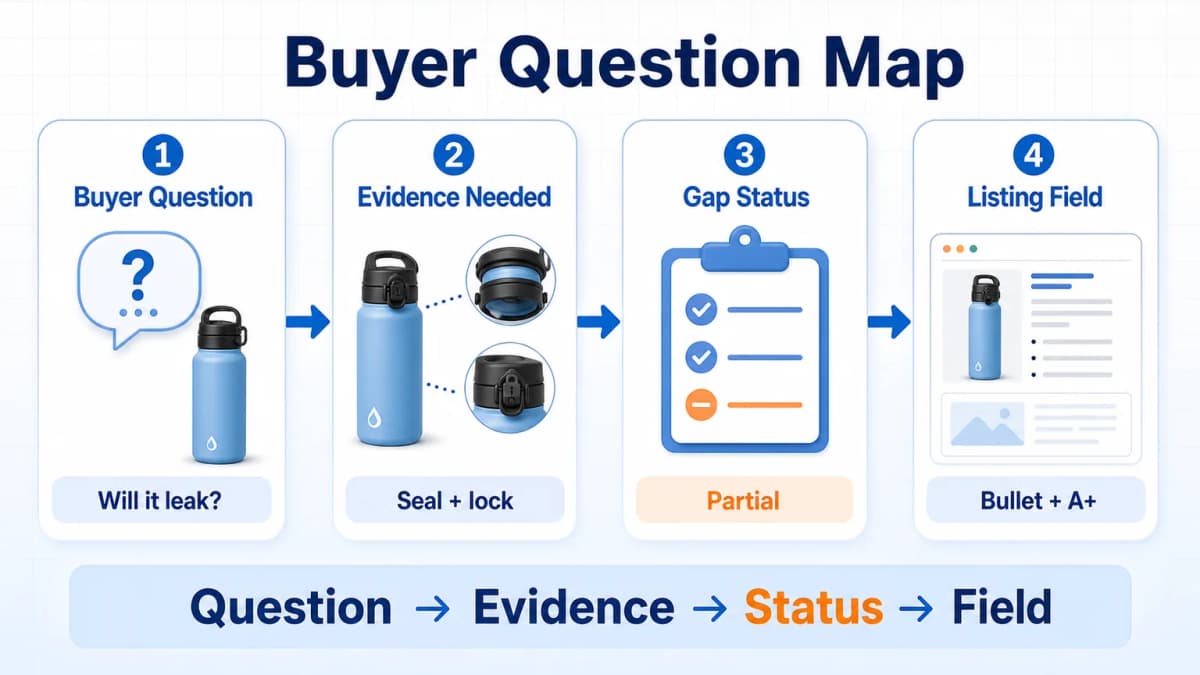
The audit starts with buyer language. Rewriting the title first can make the page cleaner while leaving the main purchase questions unanswered.
Find Real Question Sources
Collect questions from signals connected to actual shopping decisions:
- Reviews on the seller’s product
- One-star to three-star competitor reviews
- Customer Q&A
- Return reasons and support messages
- PPC search terms
- Brand Analytics Search Query Performance
- YouTube, Reddit, and independent product reviews
- Questions buyers ask during sales conversations
Amazon keyword research still matters. The question map adds context around the keyword, such as user, activity, device, constraint, and expected outcome.
Group Questions by Decision
Organize the question set into decision categories:
- Product fit: Is it suitable for this user, size, or environment?
- Use cases: Can it handle travel, hiking, office, vehicle, or outdoor use?
- Specifications: What are the dimensions, capacity, output, or runtime?
- Compatibility: Does it work with a specific device, model, plug, or accessory?
- Safety and materials: What is it made from, and which warnings apply?
- Package contents: Which cables, adapters, lids, or replacement parts are included?
- Product limitations: What can the product not do?
- Comparisons: Which measurable differences separate it from alternatives?
This structure prevents an audit from becoming a random collection of long-tail phrases.
Build the Audit Worksheet
Use one row per question:
| Buyer Question | Required Evidence | Current Answer | Status | Listing Field |
|---|---|---|---|---|
| Will it leak in a backpack? | Seal and lock design | “Leakproof” only | Partial | Highlight, bullet, A+ |
| Is 65W single-port output? | Port-level power table | Not stated | Missing | Bullet, comparison image |
| Is this a voltage converter? | Usage limitation | Not stated | Missing | Bullet, Q&A |
| Which dog size fits 19 oz? | Capacity guidance | Small and medium dogs | Complete | Highlight, bullet |
Prioritize questions that determine compatibility, safety, product fit, or returns. Decorative copy can wait.
Step 2 Audit Listing Fields
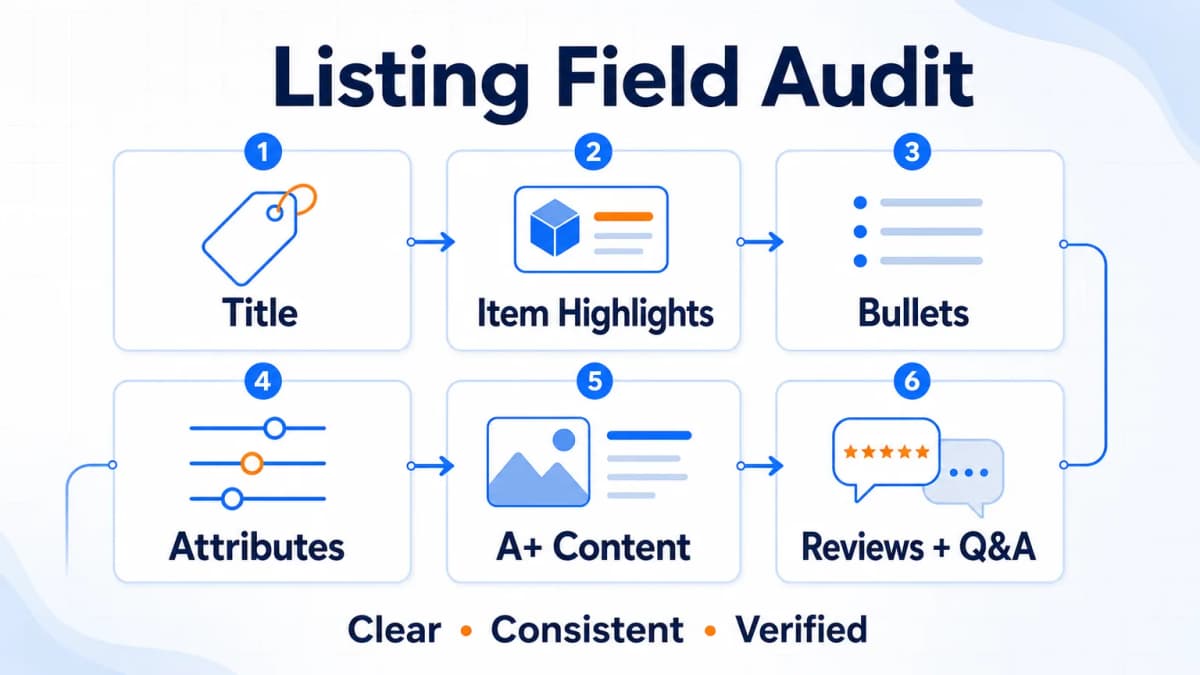
The second step assigns answers to the correct locations. Repeating the same phrase across every field wastes space and can still leave the underlying product data incomplete.
Audit the Product Title
The title should identify the product and include the most important purchase-fit detail. It should remain readable on mobile and follow the current product-type rules.
Amazon’s July 2026 title and Item Highlights update limits titles in most non-media categories to 75 characters and adds a 125-character Item Highlights field. Marketplace and product-type details still require Seller Central verification.
Title audit questions:
- Can a buyer identify the product without reading the bullets?
- Is the primary product term present?
- Is the highest-impact differentiator included?
- Are model, size, quantity, or compatibility details included when essential?
- Are promotional claims or repeated keywords consuming space?
Audit Item Highlights
Item Highlights should add materials, recommended uses, compatibility, capacity, or comparison details. It should not repeat the title as a compressed keyword list.
For a travel charger, a useful Highlight could identify supported devices, the foldable plug, and the intended travel use. Port allocation and charging protocols need more room and belong in bullets, structured data, or a comparison image.
Audit Bullets and Attributes
Each bullet should answer one important buyer question. A practical five-bullet structure is:
- Core use and outcome
- Primary use cases
- Key feature with measurable detail
- Material, safety, or compatibility
- Product limits and package contents
Replace vague statements such as “premium quality,” “easy to use,” and “perfect gift” with verifiable details. Backend attributes should carry exact values for size, material, capacity, wattage, target user, compatible models, package quantity, and variation relationships.
Audit A+ and Images
Images and A+ Content should help a buyer evaluate the product:
- Show realistic use environments
- Explain operating steps
- Compare dimensions or capacities
- Present compatible devices
- Clarify included components
- Demonstrate a product mechanism
- Explain safety conditions and limitations
A portable dog water bottle can show hiking, car travel, backpack storage, one-hand operation, water return, and lock position. A charger can show port allocation, plug design, included cable status, and device compatibility.
Amazon has not disclosed how Alexa for Shopping weights each visual element. The immediate value is clearer customer decision support and a more consistent product page.
Audit Reviews and Q&A
Reviews provide evidence about real use, while Q&A can expose information the listing failed to explain.
Check whether repeated feedback supports or contradicts the page:
- If buyers repeatedly praise backpack leak resistance, that evidence supports the use case.
- If buyers repeatedly report leaks, the product or expectation needs correction.
- If customers keep asking whether a charger includes a cable, package contents are unclear.
- If customers confuse an adapter with a voltage converter, the limitation needs greater visibility.
A copy update cannot repair a product defect. Resolve the product, packaging, instructions, or support issue first when the evidence points beyond content.
Step 3 Test Shopping Answers

The third step tests whether the audited page can answer the question set without inventing facts.
Use a Constrained Prompt
Use a prompt that limits the AI to supplied product information:
Act as an Amazon shopping assistant. Based only on the listing information below, generate 20 questions a U.S. buyer may ask before purchasing. Answer each question using only the supplied product information. Mark every answer that is missing, ambiguous, contradictory, or unsupported. Do not infer specifications, compatibility, certifications, or package contents.
Include the title, Item Highlights, bullets, description, attributes, A+ text, Q&A, and a summary of relevant review themes. Do not include private customer data.
Score Answer Quality
Score each response using the same five audit statuses:
- Complete
- Partial
- Missing
- Conflicting
- Unverified
Then record the missing evidence and the correct destination field. This turns AI output into an actionable audit rather than generic rewriting advice.
Compare Against Competitors
Run the same question set against three to five competing listings. Compare:
- Information completeness
- Use-case coverage
- Specification clarity
- Compatibility detail
- Product limitations
- Review support
- Contradictions
The objective is to find decision information competitors explain better. Copying competitor claims is unsafe because their specifications may not apply to the audited product.
Require Human Verification
AI can identify missing answers. It cannot verify the physical product.
Require a product owner or qualified reviewer to confirm:
- Materials and dimensions
- Port output and charging protocols
- Device and model compatibility
- Safety certifications
- Test methods and conditions
- Medical or performance claims
- Included components
- Warranty and care instructions
Only validated facts should move into the listing.
A free editorial review of your product page can provide another perspective on unclear facts and unanswered buyer questions using your public listing and submitted materials.
Step 4 Prioritize Validated Fixes
The fourth step converts findings into controlled changes. A page with 40 gaps should not receive 40 simultaneous edits without priorities or evidence.
Rank Gaps by Risk
Use this order:
- Safety and compliance gaps
- Compatibility gaps
- Missing specifications
- Product limitation gaps
- High-frequency purchase objections
- Use-case gaps
- Comparison and readability improvements
This order places customer harm, listing accuracy, and return risk ahead of cosmetic improvements.
Record Evidence and Owners
For every planned edit, record:
- Buyer question
- Required fact
- Evidence source
- Current audit status
- Target listing field
- Responsible owner
- Review deadline
- Publication status
The evidence source might be a specification sheet, packaging file, engineering test, compliance certificate, customer support record, or verified product sample.
Run Controlled Updates
Use a recoverable workflow:
- Export or save the current listing.
- Record a performance baseline.
- Select a small set of priority ASINs.
- Fix the highest-risk gaps.
- Verify the customer-facing page after publication.
- Observe a consistent comparison window.
- Expand only after reviewing results and catalog accuracy.
Price, inventory, promotion, ads, reviews, competitors, and seasonality can affect results at the same time. Document those conditions.
Measure Business Outcomes
Track:
- Click-through rate
- Conversion rate
- Search Query Performance
- Long-tail search terms
- Ads Prompts performance
- Return reasons
- Q&A volume
- Review themes
Amazon Ads says Sponsored Products prompts and Sponsored Brands prompts can use first-party signals from detail pages, Brand Stores, and campaign data. Their report can include prompt text, impressions, clicks, CTR, CPC, spend, sales, ACoS, ROAS, and seven-day orders and units for eligible U.S. advertisers.
These metrics can show whether the overall product page and advertising experience improved. They do not prove that Alexa caused a specific order.
A Practical Listing Audit Example
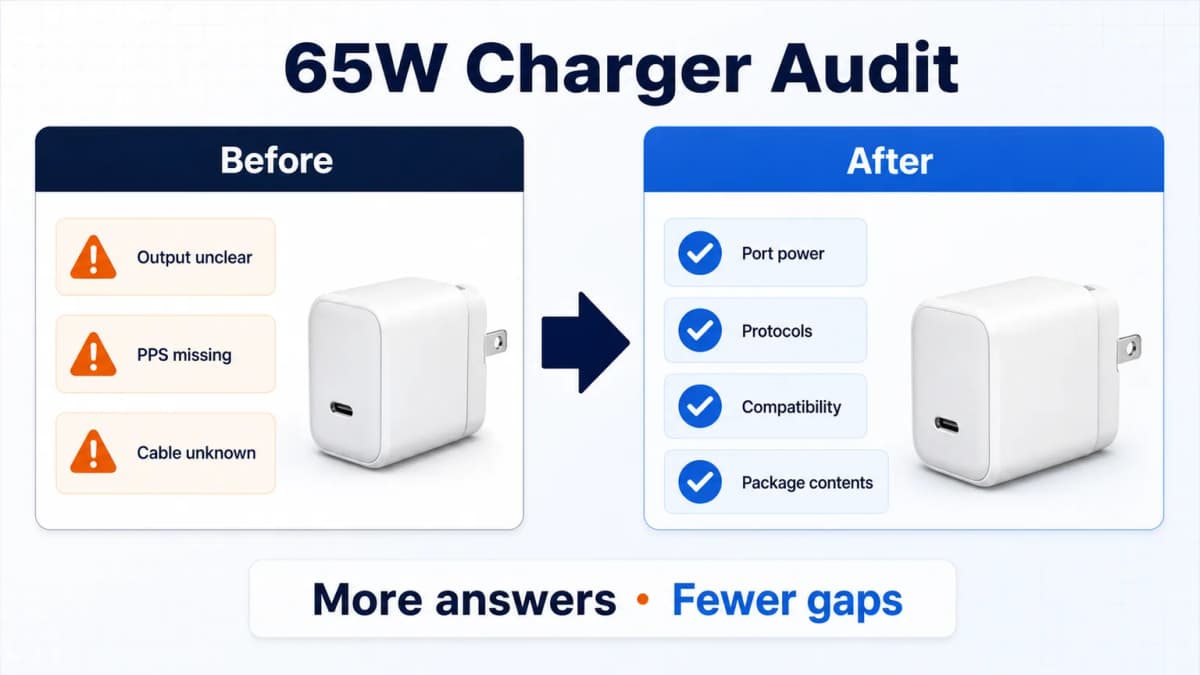
The following example applies the audit to a compact 65W GaN travel charger listing. The original page includes these terms:
- 65W
- GaN
- USB-C
- MacBook
- iPhone
- Samsung
- Travel charger
The keyword coverage looks broad, but the page still fails several purchase questions.
Original Information Gaps
A buyer may need to know:
- Is 65W the output of one port or all ports combined?
- How is power distributed when two devices charge together?
- Does the charger support USB Power Delivery and PPS?
- Which MacBook models are supported?
- Does it include a charging cable?
- Does it have a foldable plug?
- Which safety protections are present?
- What happens to output under sustained load?
Device names cannot replace port-level specifications.
Revised Field Structure
After product verification, distribute the answers:
- Title: Product type, maximum verified output, GaN, and a critical travel feature
- Item Highlights: Supported device groups, foldable plug, and travel use
- Bullet 1: Single-port and total output
- Bullet 2: Multi-port power allocation
- Bullet 3: Supported protocols and compatible device classes
- Bullet 4: Safety protection and test conditions
- Bullet 5: Package contents and usage limitations
- A+ Content: Port allocation table and device compatibility chart
- Attributes: Port count, plug type, wattage, protocol, dimensions, and included components
- Q&A: Edge cases that need more explanation
Answer Test Results
Run the same 20-question set before and after the verified edits. A useful result might look like this:
| Audit Status | Before | After |
|---|---|---|
| Complete | 7 | 17 |
| Partial | 5 | 2 |
| Missing | 6 | 1 |
| Conflicting | 1 | 0 |
| Unverified | 1 | 0 |
This table measures information coverage. It does not measure Alexa ranking or guarantee recommendation exposure.
Validation Plan
Record the exact publication date and compare:
- CTR and conversion
- Charger-related long-tail terms
- Compatibility questions
- Return reasons
- Review language
- Ads Prompts performance when available
Do not assume a fixed conversion lift. A claim such as a 22% conversion increase needs a documented baseline, sample, observation window, and performance report before it can be treated as a verified result.
Seven-Day Audit Plan
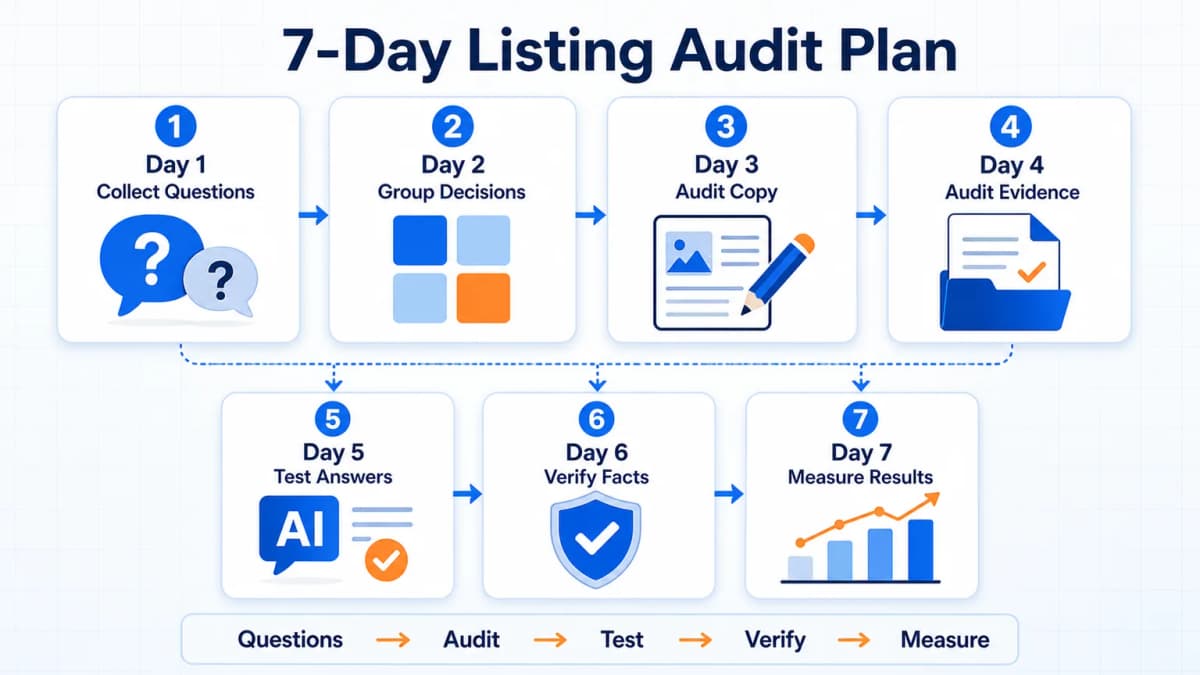
- Day 1: Collect 30 buyer questions from reviews, Q&A, returns, search terms, and support.
- Day 2: Group questions by fit, use case, specification, compatibility, safety, limits, and comparison.
- Day 3: Audit the title, Item Highlights, bullets, and backend attributes.
- Day 4: Audit images, A+ Content, reviews, Q&A, package contents, and variations.
- Day 5: Run the constrained AI answer test and competitor comparison.
- Day 6: Verify facts, assign owners, and prepare high-priority edits.
- Day 7: Publish a controlled set of changes, verify the live page, and start the measurement window.
The seven-day plan creates an initial audit cycle. High-risk findings should move faster when safety, compliance, or materially incorrect product data is involved.
Common Audit Mistakes
Running a Generic Audit
A general overview of Alexa capabilities cannot reveal whether a specific listing answers category-level purchase questions. Each audit needs a product-specific question set, accurate category fields, and verified evidence.
Treating Keywords as Questions
A keyword list identifies demand language. It does not automatically explain user context, compatibility, product limits, or required evidence.
Letting AI Invent Answers
An unconstrained model may fill gaps with plausible specifications. Use supplied data only, label unsupported answers, and require human verification.
Updating Every Field Together
Large simultaneous changes make accuracy checks and performance interpretation harder. Use evidence-backed priorities and a recoverable update plan.
Claiming Alexa Attribution
Seller Central does not provide a complete personalized Alexa attribution dashboard. Indirect business metrics and repeated question tests are useful signals, not confirmed Alexa sales attribution.
Turn Listing Gaps Into Clearer Answers
Auditing one ASIN is manageable. Auditing a catalog requires systematic review mining, keyword research, competitor comparison, evidence tracking, and consistent scoring.
Nexscope provides structured ecommerce data and focused seller workflows. Teams can use Nexscope's web tools directly or connect governed capabilities to their existing Agent through API, MCP, or Skills. Ready workflows include Keyword to Ads, Video Clone, and Buy Box Repricer.
The AI Agent supports the research and organization process. Product owners remain responsible for validating specifications, compliance, compatibility, and customer-facing claims.
Conclusion
This audit turns buyer questions into a structured product-information review. The four steps are straightforward:
- Map buyer questions.
- Audit every relevant listing field.
- Test shopping answers with constrained AI.
- Prioritize verified fixes and measure the results.
The strongest product page clearly communicates identity, fit, specifications, evidence, and limitations. That clarity supports buyers, customer service, advertising, classic search, and conversational shopping without relying on unsupported claims about Alexa rankings or guaranteed conversion gains.
Connect Ecommerce Data to Your Agent
Use Nexscope through API, MCP, or Skills, or open a ready seller workflow.
Explore Ecommerce Data →Table of Contents
Frequently Asked Questions
What is an Alexa for Shopping listing audit?
An Alexa for Shopping listing audit checks whether an Amazon product page can answer the scenario, specification, compatibility, safety, and comparison questions buyers may ask during conversational shopping. It reviews the title, Item Highlights, bullets, attributes, images, A+ Content, reviews, Q&A, and variations for missing, conflicting, or unsupported information. The audit improves product clarity, but it does not reveal Amazon’s recommendation algorithm.
Which Amazon listing fields should be audited?
Audit every field that can affect product identity or purchase fit. This normally includes the title, Item Highlights, bullets, description, structured attributes, images, A+ Content, variation data, package contents, reviews, and Q&A. Category-specific fields may also be critical. A charger needs port and protocol details, while a pet product may need size, capacity, material, and care information.
How many buyer questions should sellers test?
Twenty to thirty questions are enough for an initial audit of one product. The set should include broad category questions, long-tail use cases, compatibility, product comparisons, package contents, common objections, and important limitations. Keep the wording stable when comparing listing versions. A larger catalog should maintain a reusable category-level question bank plus product-specific questions.
Can AI verify Amazon product claims?
No. AI can compare supplied listing fields, find missing answers, detect contradictions, and organize buyer questions. It cannot inspect the physical product or confirm materials, dimensions, wattage, certifications, compatibility, or test conditions. Every customer-facing claim needs verification from product documentation, testing, compliance records, packaging, or a qualified product owner.
How often should sellers run the audit?
Run a full audit before launch, after material product or packaging changes, and when repeated reviews, Q&A, returns, or support tickets reveal confusion. Priority listings should also receive periodic reviews as Amazon fields and shopping experiences change. Smaller controlled checks can follow major title, attribute, A+, or variation updates.
Can a listing audit guarantee Alexa recommendations?
No. Amazon does not publish a complete Alexa for Shopping recommendation formula, and personalized answers can vary by question, account context, price, location, delivery promise, inventory, and other conditions. A listing audit improves the quality and consistency of product information. It cannot guarantee recommendation exposure, rank, traffic, or a fixed conversion increase.
Sources
- Amazon Staff. (2026). Amazon’s Next-Generation AI Assistant for Shopping. Retrieved from aboutamazon.com
- Amazon Ads. (2026). Sponsored Products Prompts and Sponsored Brands Prompts. Retrieved from advertising.amazon.com
- Amazon Seller Central. (2026). Product Title and Item Highlights Update. Retrieved from sellercentral.amazon.com
- Amazon Staff. (2026). Amazon Price History Feature. Retrieved from aboutamazon.com