
Gemini 4 Pro vs GPT-6 Astra: 5 Demos Ahead of Its Release?

Editorial concept illustration. The cover does not show outputs from either model.
Gemini 4 Pro is attracting attention for a surprisingly tangible reason: people are sharing things that move, come apart, and respond to clicks. A mechanical butterfly spreads its wings. A wristwatch separates into labeled layers. A WALL-E recreation comes with a panel of behavior controls. Alongside those builds, developers are comparing code-drawn cats and game controllers with outputs labeled GPT-6 Astra. The results have made the prospect of a new Gemini release much more interesting than another list of promised features.
There is one important distinction at the outset. As of September 20, 2026, the Google model catalog checked for this article does not list Gemini 4 Pro. That name is being used by the community for a suspected model behind recent Arena results. The five examples below explain what is visible in the shared material, where GPT-6 Astra enters the comparison, and what still needs confirmation. Three involve reported Astra comparisons; the butterfly and WALL-E examples add context. These are early community demonstrations, not a controlled five-task benchmark.
Is Gemini 4 Pro Already on Arena?
The excitement centers on unusually polished coding results associated with Gemini-labeled entries on Arena. Developers have suggested that an experimental checkpoint is appearing under a Flash name, with reports mentioning both 3.8 and 3.7 labels. That interpretation remains unconfirmed.
Google's published model catalog separately lists Gemini 3.8 Flash and Gemini 3.7 Flash, alongside Gemini 3.1 Pro in preview. A familiar model label, a distinctive coding style, or an impressive result cannot independently establish that a hidden checkpoint is Gemini 4 Pro.
For the comparisons below, “Gemini 4 Pro” follows the label used in the shared demonstrations. The useful question is what the resulting software actually does. The strongest examples combine a recognizable object, working controls, and a presentation that makes those controls easy to understand.
Five Demos Worth a Closer Look
| Demo | Reported comparison | What to look at |
|---|---|---|
| Mechanical butterfly | Fable 5.1 Max | Wing movement, mechanical detail, and interactive views |
| Exploded-view watch | GPT-6 Astra and Fable 5 | Component separation and inspection controls |
| WALL-E recreation | Standalone example | Character detail and the behavior interface |
| SVG cat | GPT-6 Astra | Proportions, silhouette, and distinctive features |
| SVG game controller | GPT-6 Astra | Shape, button placement, shading, and consistency |
1. A Moving Mechanical Butterfly
The butterfly is the most immediate attention-grabber. The shared comparison attributed to YouWare shows two elaborate mechanical insects, with illuminated wings and metallic structures. The presentation labels the builds Gemini 4 Pro and Fable 5.1 Max.
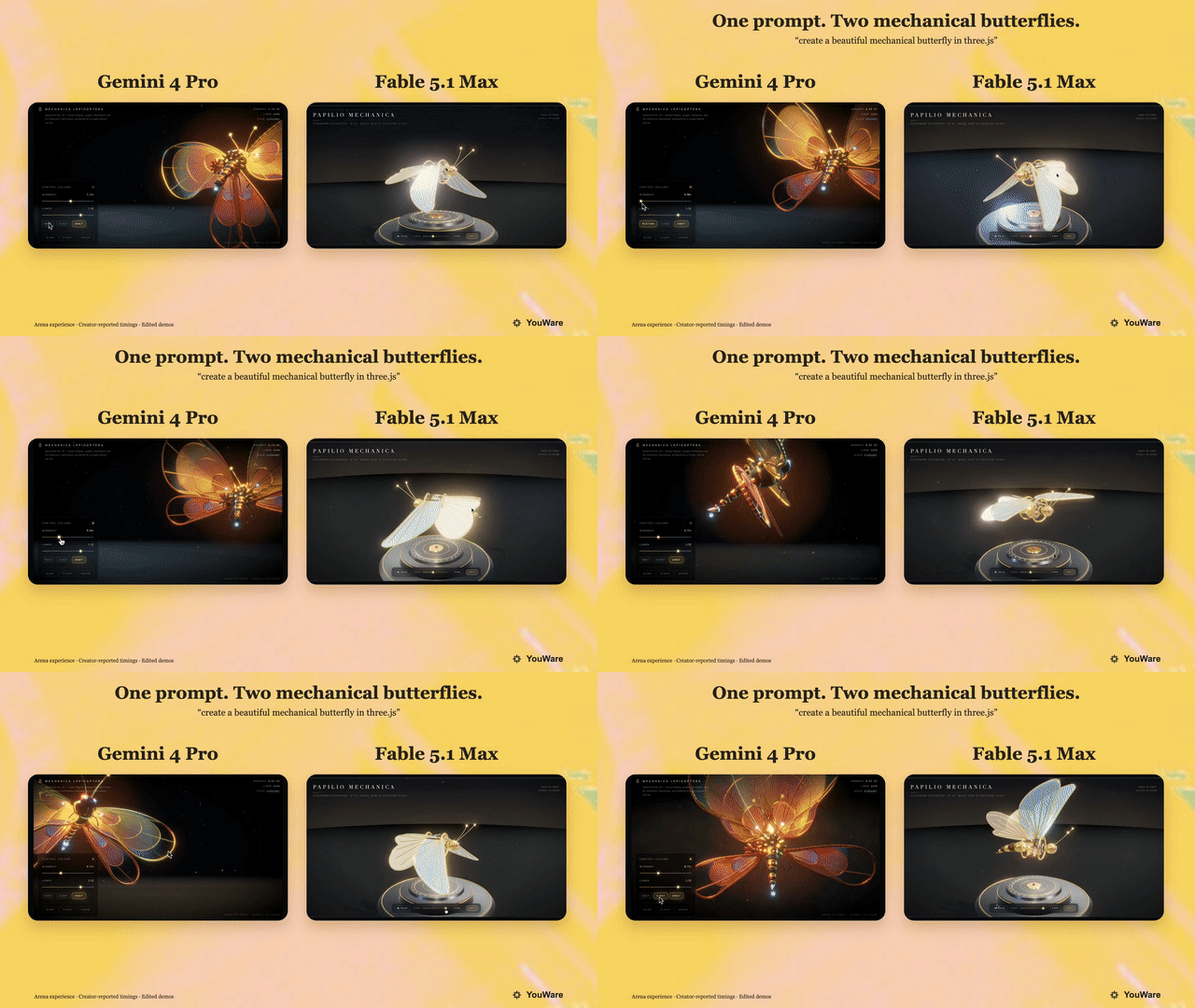
Comparison credited to YouWare. Labels and timing claims belong to the creator; the model identity is unconfirmed.
The accompanying post reports approximately ten minutes for the Gemini-labeled build and thirty minutes for Fable. Those are creator-reported times for this example, not a general speed benchmark. The available material does not establish identical retry counts, editing effort, or execution settings.
A separate butterfly demonstration attributed to Bee adds a particularly useful interaction: the insect can be shown as separated components, with labels identifying parts. A flight control and alternative views appear in the interface. That gives viewers several ways to inspect the same object instead of watching it from a single fixed angle.
Three.js makes it possible to build and display 3D scenes in a browser. In a demo like this, the model-generated code needs to arrange the parts, animate them, and connect the controls. The appeal is easy to understand without reading that code: a short description has become something a visitor can explore.
2. A Watch That Comes Apart
The watch is the clearest product-display example. The circulated comparison places a Gemini-labeled build beside versions labeled Fable 5 and GPT-6 Astra. Its main attraction is the exploded view, where the watch separates into layers so the viewer can inspect its construction.
A public watch demo linked in the surrounding discussion was accessible during this review. Its interface includes dial finishes, camera presets, a disassembly slider, movement-speed controls, and a component inspector. Clicking Disassemble changed the watch to an exploded view and exposed labels for six assemblies.
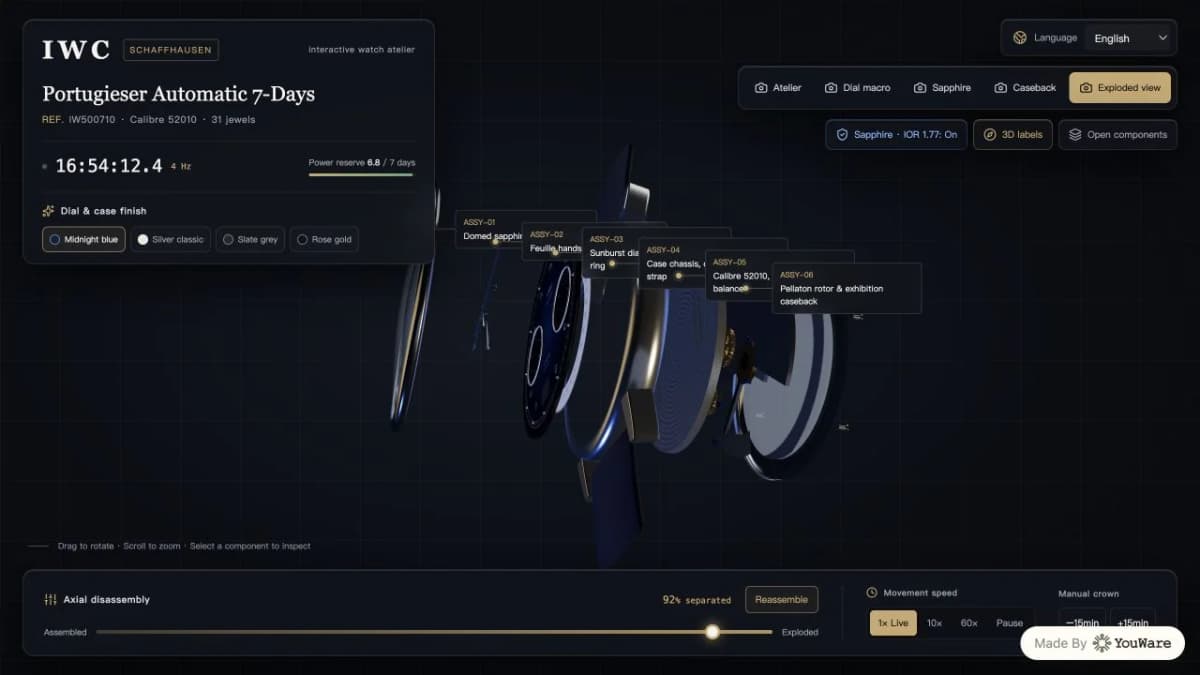
Screenshot captured from the public YouWare-hosted watch demo on September 20, 2026. The live interaction was checked; the underlying model attribution was not independently established.
This is a concrete example of what makes the comparison interesting. A visitor can move from the complete object to its individual layers, then return to the assembled view. A similar interaction could explain a product's construction or help a designer discuss alternative layouts.
The rendered parts and technical labels should not be treated as verified engineering specifications. A convincing watch model can still contain invented dimensions or inaccurate mechanisms. The demo establishes an interactive presentation, while manufacturing accuracy would require a separate check against authoritative product information.
3. WALL-E With Behavior Controls
The WALL-E example uses another instantly recognizable subject. The available video preview shows the character's binocular-like eyes, weathered box-shaped body, tracks, and articulated arms, alongside a substantial control panel.
The visible interface offers camera presets and environmental modes, plus behavior buttons labeled with actions such as “Curious,” “Wave,” and “Scan.” Separate sliders address the neck, shoulder, and gripper. These are concrete details that make the build feel like a small character playground.
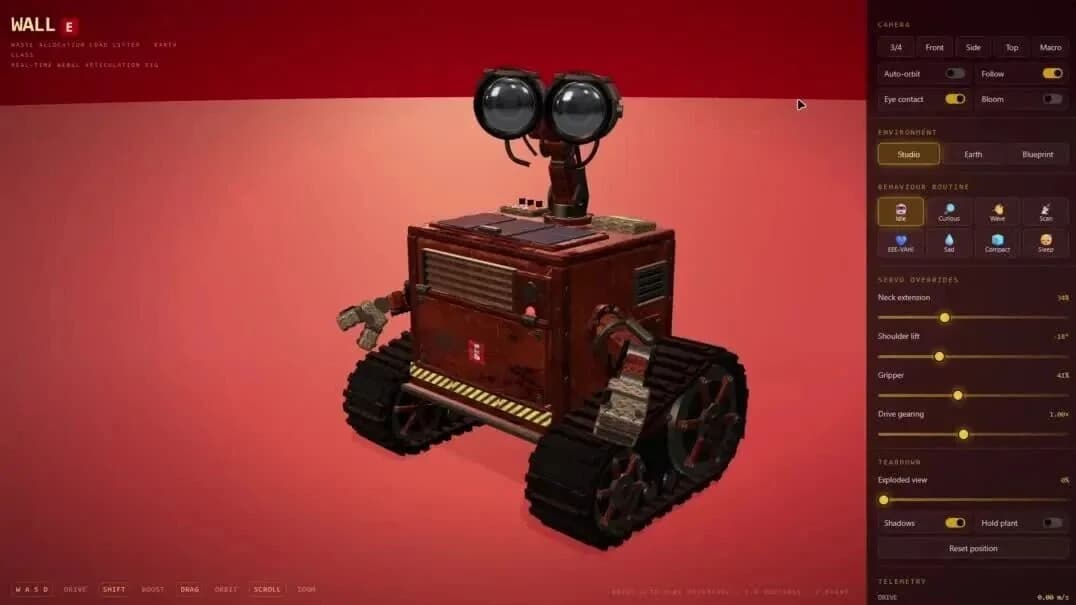
Shared demo preview. Control labels are visible; their behavior has not been independently tested.
The shared account says the model added animation and interaction beyond the original request. Without the complete prompt and generation history, that part remains a creator claim. The visible interface can be described directly; the behavior of every control has not been independently tested here.
This example broadens the story beyond model-versus-model rankings. Character demos ask whether the generated software presents recognizable details and gives users clear ways to interact. A comparable technique could support an original animated mascot or an interactive explainer, with the character and artwork developed for that project.
4. Two Different SVG Cats
The cat comparison attributed to Harshith is simpler, which makes its differences easier to see. Both displayed outputs depict an orange striped cat in profile. The Gemini-labeled image has a relatively lean silhouette and long legs; the Astra-labeled image has a rounder body and different facial proportions.

Gemini-labeled output in the community comparison attributed to Harshith.

Astra-labeled output from the same displayed comparison. Generation settings were not independently verified.
Those visible differences give the reader something specific to compare. Does the silhouette match the requested type of cat? Are the legs positioned convincingly? Do the ears, muzzle, and markings form a coherent animal? A preference for one drawing is meaningful as a design judgment, even when it does not establish a universal model winner.
SVG describes graphics using shapes and paths. A genuine SVG output can be inspected and edited as code. However, a screenshot of the result does not reveal how clean that code is, whether it scales correctly, or how easily a developer can revise it.
For practical use, the next request might be to change the pose or simplify the drawing for a small icon. That follow-up would test whether the model can preserve the character while making a targeted edit, something a single side-by-side image cannot show.
5. Two Convincing Game Controllers
The controller comparison is a useful counterweight to the more enthusiastic claims. The displayed Gemini and Astra outputs both depict recognizable Xbox-style controllers with analog sticks, a directional pad, colored face buttons, curved grips, and soft shadows.
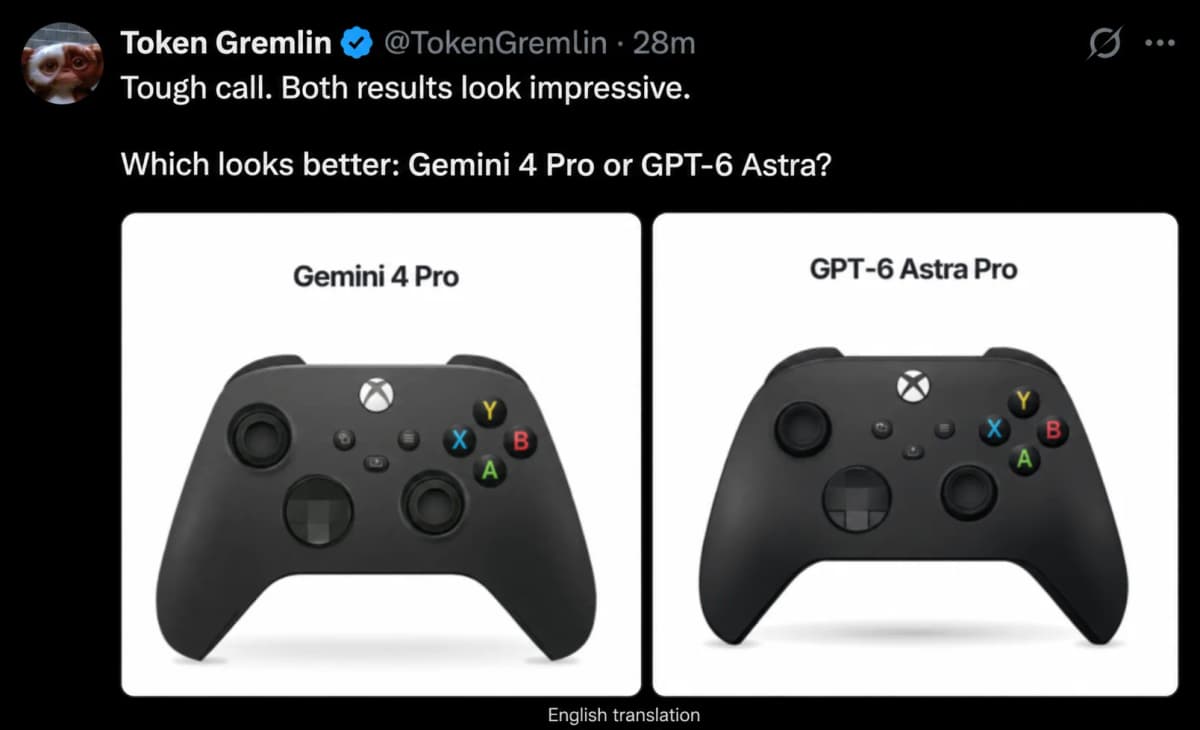
English editorial adaptation of the comparison attributed to Token Gremlin. Text was translated with an image-editing tool; this is not an original screenshot or a reproduced benchmark.
The differences are more subtle than in the cat example. Viewers can compare the spacing between controls, the outline of each grip, and the shading around recessed buttons. Both images communicate the object clearly at a glance.
A still controller image does not establish that its buttons are interactive. Any claim about clickable controls or animated feedback needs the running page or a recording of those actions. The comparison available here supports a discussion of visual output, not a claim that both versions implement a working input device.
This is also why the five demos should stay separate. A model can produce a more appealing cat in one sample, a comparable controller in another, and a richer watch interface in a third. The useful assessment identifies those strengths task by task.
What the Comparisons Actually Establish
Visual Quality and Functionality
The early results make a good case for watching browser-based creative coding closely. They show a range of subjects, from simple vector illustrations to interfaces around complex 3D objects. The watch also provides a live example of an interaction that can be inspected directly.
A stronger head-to-head evaluation would keep the prompt, available tools, time budget, and allowed revisions consistent. It would then compare successful runs, broken controls, visual quality, and the effort needed to make one requested change. That would help distinguish an attractive selected result from a dependable workflow.
Benchmark and Pricing Claims
An unofficial comparison table circulating with the demos includes model scores, context-window sizes, and prices. Its figures are not treated as verified specifications here because the underlying official release documentation and reproducible test configuration have not been established.
The same distinction applies to development cost. Even a fast first result may need time for debugging, responsive layouts, accessibility, and performance work. The commercially useful measure is the time required to reach an acceptable finished result.
What Is Known About the Release?
The checked Google catalog provides no Gemini 4 Pro entry, and the sources verified for this article do not establish a launch date, public API identifier, or price. The demos explain the anticipation; they do not provide a release schedule.
A separate Wall Street Journal report describes a Gemini cybersecurity test that reached real companies. Its accessible text places the incident in May and says Google subsequently confirmed it. That report does not establish that the model was Gemini 4 Pro or that it was the checkpoint behind these coding demos. It should not be used as launch evidence.
The practical signals to watch are an official announcement, a model card, documented access, and published pricing. Until those appear, testing an available Gemini model does not guarantee access to the model being discussed in these clips.
Conclusion
The most interesting part of the Gemini 4 Pro versus GPT-6 Astra discussion is the software on display: a butterfly with explorable parts, a watch that separates into layers, a character interface, and two straightforward visual comparisons. Together, they make the prospect of a new Gemini release worth following. They also show why a useful comparison needs more detail than declaring an overall winner.
Bring AI Into Your Creative Workflow
These demos show how AI can turn a visual idea into something people can explore. For ecommerce teams, everyday creative work also includes product images, background edits, virtual try-on, and promotional videos.
Nexscope Creative APIs let teams connect supported image and video models and ecommerce creative workflows to their own applications through REST APIs. You can generate a product image, remove its background, or create a promotional video using the documented inputs for each API.
Create Images and Videos With Nexscope
Explore image and video models alongside workflows for product cutouts, virtual try-on, and promotional creatives.
Explore Creative APIs →Frequently Asked Questions
Has Gemini 4 Pro been released?
As of September 20, 2026, the Google model catalog checked for this article does not list Gemini 4 Pro. Community posts use the name for a suspected model associated with recent Arena coding results. That attribution should remain separate from an official release. A confirmed announcement, documented model identifier, and access instructions would provide firmer evidence.
Is Gemini 4 Pro better than GPT-6 Astra?
The shared watch, cat, and controller examples invite comparisons, but they do not establish an overall winner. Their prompts, settings, retries, and complete generation histories have not all been independently verified. Readers can compare the visible results while reserving broader conclusions for repeatable tests that include functionality, editing effort, and unsuccessful runs.
Can the model generate interactive 3D objects?
The reported demonstrations include browser-based 3D objects with controls, and the public watch page reviewed here supports a working disassembly interaction. That establishes what the page can do. It does not independently identify the model that produced it, the amount of human editing involved, or the accuracy of the object's technical specifications.
Are the cat and controller examples image generation?
They are presented as SVG coding examples. SVG represents a drawing with structured shapes and paths that a browser can display. This differs from generating a conventional raster image. The visible screenshot shows the rendered result, but access to the underlying file is needed to assess its code structure, editability, and behavior when resized.
Can developers access the same model shown in Arena?
The public model catalog should be used to identify documented API models. A community attribution attached to an Arena result does not guarantee that the same checkpoint is available through an API or another product. Access and pricing should be checked against official documentation before a developer chooses a model for an application or estimates its operating costs.
Sources
- Google AI for Developers. (2026). Models. ai.google.dev
- Three.js. (n.d.). Documentation. threejs.org
- MDN Web Docs. (n.d.). SVG: Scalable Vector Graphics. developer.mozilla.org
-
Woo, E., and McMillan, R. (2026). Gemini Hacked Three Companies in First Known Breakout by Google's AI. wsj.com
-
YouWare-hosted demo. (n.d.). Portugieser Automatic 7-Days: Interactive Watch Atelier. iwc6.youware.app