

How to Use Shopify MCP With Codex for One or More Stores

Shopify MCP can give Codex useful Shopify development context, but store operations require more than installing one server. A reliable setup needs the right Shopify interface, explicit access scopes, a secure authentication method, and a clear rule for deciding which store a task belongs to. Those details become especially important when one team manages several brands.
For a single store, the goal is a verified connection that can answer a simple read-only question before any modification is allowed. For multiple stores, each brand needs its own identity, credentials, and approval policy. Codex should resolve the brand first, confirm the target store, and then use only the tools required for that task.
This guide explains how Shopify MCP fits into that architecture, where the Shopify Admin API is still required, how to separate read and write access, and how to organize single-store and multi-store workflows without exposing credentials or sending changes to the wrong storefront.
Shopify MCP and Admin Access
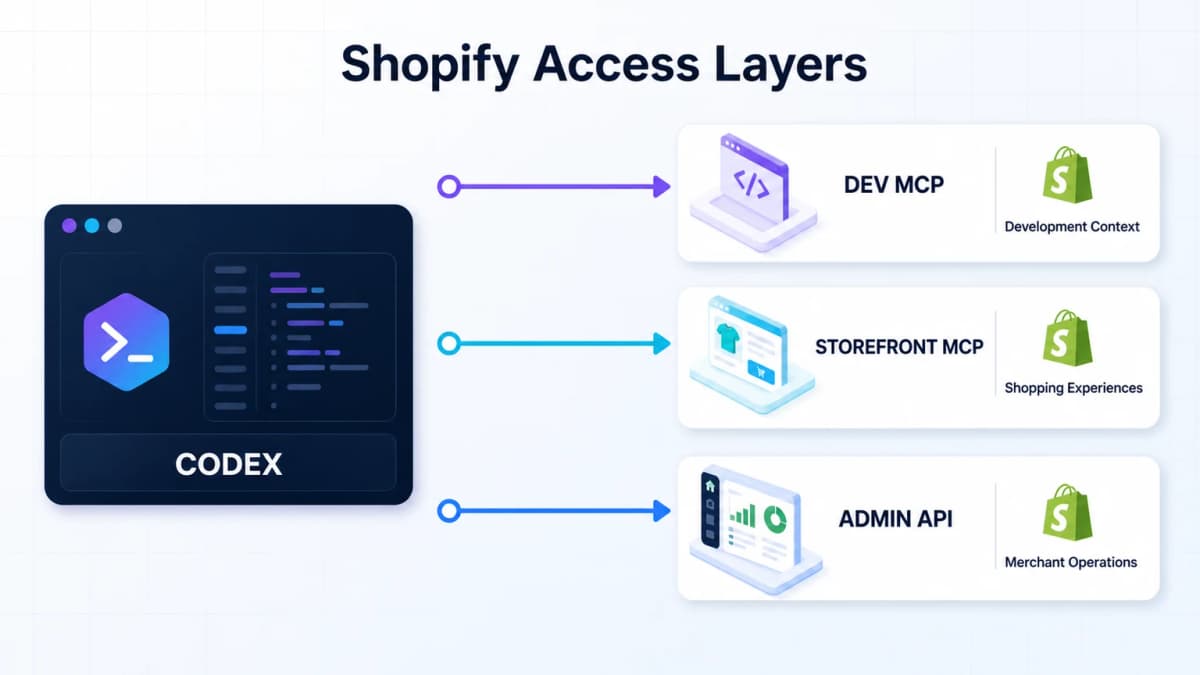
The term Shopify MCP can describe several different Shopify interfaces. They serve different users and do not provide the same access. A team should identify the required interface before configuring Codex.
Development Context
Shopify's Dev MCP server helps an MCP-compatible development environment work with Shopify development resources. It is useful for current documentation, API schemas, Polaris components, and supported development workflows. This is the most direct MCP server to configure when Codex is helping build or review Shopify code.
Codex supports local STDIO MCP servers and stores their configuration in its MCP settings. A minimal Shopify Dev MCP entry can use Shopify's official package:
[mcp_servers.shopify_dev_mcp]
command = "npx"
args = ["-y", "@shopify/dev-mcp@latest"]
default_tools_approval_mode = "prompt"
After configuration, the active server should appear in Codex's MCP server list. This setup gives Codex access to the tools exposed by Shopify Dev MCP. It does not grant access to a merchant's orders, products, pages, or live theme by itself.
Shopify's broader AI Toolkit also connects supported development environments with Shopify resources. The available capabilities still depend on the specific server, skill, CLI command, or store integration that has been configured.
Storefront Commerce
Shopify Storefront MCP supports customer-facing commerce experiences. Its documented use cases include product discovery, cart actions, store policies, customer account tasks, order tracking, and returns.
That makes Storefront MCP relevant when a team is building a shopping assistant or an agent-facing storefront experience. It should not be treated as a general merchant-admin connection for editing products, changing pages, reviewing private operational data, or modifying a theme.
Admin Operations
Merchant operations usually rely on Shopify's GraphQL Admin API, Shopify CLI, an installed app, or a custom MCP server that wraps approved Admin API actions. The integration layer may expose tools such as get_orders, update_product, or create_preview_theme, but Shopify access scopes still determine what those tools can read or change.
This distinction keeps the architecture clear:
- Shopify Dev MCP supplies development context and supported developer tools.
- Storefront MCP supports shopper-facing catalog, cart, policy, and account experiences.
- GraphQL Admin API or Shopify CLI handles authenticated merchant operations.
- Codex tool policy determines when those available operations require user approval.
Connect a Single Store
A single-store setup should start with the narrowest useful workflow. The first goal is reliable identity and read access, followed by controlled write access only when it is needed.
1. Define the Task
List the work Codex is expected to support before creating an app or requesting scopes. Common task groups include:
- Order and sales analysis
- Product and collection review
- Product title, description, and SEO updates
- Blog and page maintenance
- Theme development and preview testing
- Performance diagnosis
This inventory prevents an analytics-only connection from receiving unnecessary write access. It also prevents a later task from failing because the integration was never given the required Shopify scope.
2. Choose Authentication
For a store that belongs to the same Shopify organization as the Dev Dashboard app, Shopify supports the client credentials grant. The app exchanges its Client ID and Client secret for a short-lived access token. The token expires after 24 hours, so the integration should refresh it programmatically before expiry.
For a client's store or another organization's store, the client credentials grant does not apply. That setup needs a supported merchant authorization flow, such as an authorization code grant, or a Shopify CLI workflow that handles authentication.
Never paste a Shopify Client secret or access token into a Codex prompt, a Markdown file, or a Git repository. Store secrets in environment variables or an approved secret manager, and expose only the resulting tools to Codex.
3. Register the Connection
Give the connection a stable name that identifies both the brand and environment. For example:
brand-north-shopify-production
brand-north-shopify-preview
The Shopify admin URL normally contains a store handle in this form:
https://admin.shopify.com/store/store-a
The corresponding Shopify subdomain is usually:
store-a.myshopify.com
The integration needs this stable Shopify identity during setup. Daily prompts can use the brand name after the mapping has been saved and verified.
4. Verify Store Identity
Run a read-only identity check before requesting sales data. The response should confirm the expected store name or handle and any supported identifiers such as currency or timezone. Then run a narrow operational test, such as aggregate orders and sales for the last seven completed days.
A successful test must return real store data from the expected shop. A connected MCP server, a completed OAuth screen, or a valid token does not prove that Codex selected the correct store or received the required scopes.
Choose Store Permissions
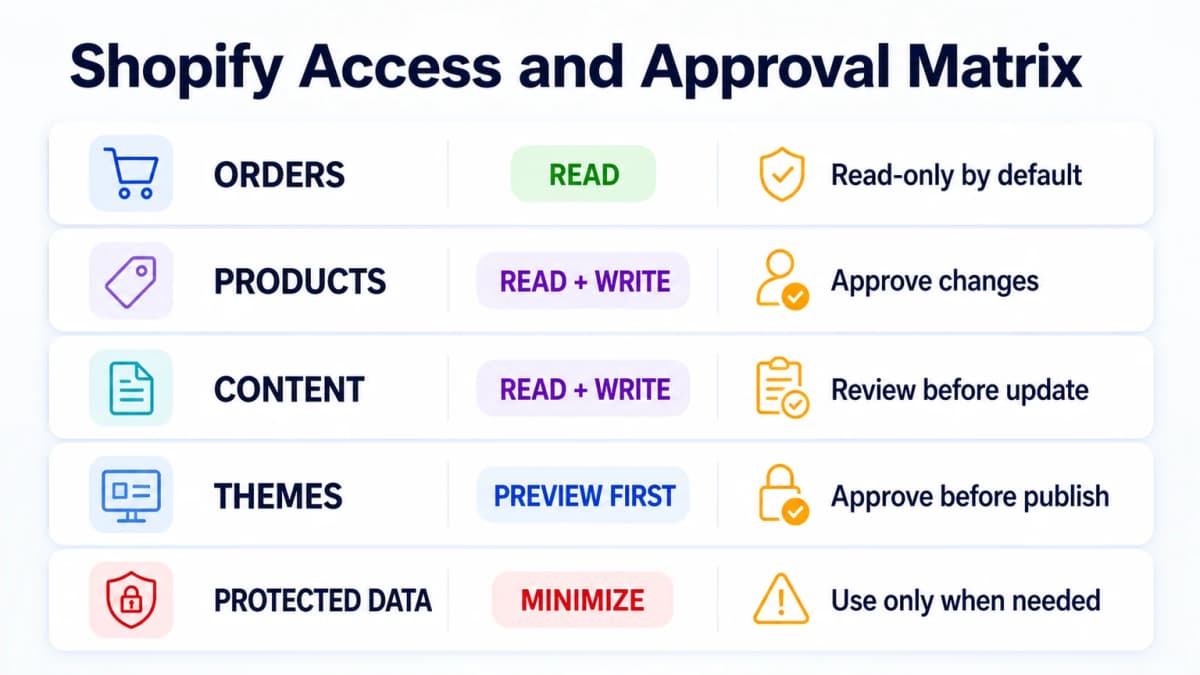
Shopify access scopes control what an installed app can read and write. Codex approvals control whether an available tool may run. Both layers matter, and one does not replace the other.
| Operational need | Shopify access | Recommended Codex rule |
|---|---|---|
| Analyze recent orders | read_orders |
Read-only by default |
| Review products and collections | read_products |
Read-only by default |
| Update product content | write_products |
Show a diff and request approval |
| Update pages or blog content | write_content |
Show proposed changes first |
| Inspect a theme | read_themes or theme repository access |
Read-only diagnosis |
| Modify a theme | write_themes, Shopify CLI, or theme repository access |
Use a preview and require approval |
| Access older order history | read_all_orders plus the required order scope |
Confirm approval and data need |
Read Access
Order, product, inventory, content, and theme data use separate scopes. An app created only for sales reporting should request the minimum read scopes needed for those reports. Customer and order resources can include protected customer data, so a workflow should prefer aggregated metrics when individual customer details are unnecessary.
The standard order scope covers the most recent 60 days. Older history requires additional access. Teams should define the reporting window before assuming a connector can retrieve every historical order.
Write Access
Shopify documents that a write scope includes the corresponding read access. For example, write_products includes product read access. That does not mean a team should grant write access to every store connection.
A safer operating policy separates suggestion from execution:
- Read the current resource.
- Produce a proposed change or diff.
- Validate required fields and platform rules.
- Ask for approval.
- Apply the change.
- Read the resource again to verify the result.
This sequence is especially important for product handles, redirects, navigation, theme code, and high-traffic landing pages.
Protected Data
Some Shopify resources expose protected customer data. An app may need Shopify approval before those fields are available outside development stores. Missing protected fields should be reported as unavailable rather than inferred from partial responses.
Do not request customer-level data when aggregate orders, revenue, units, refunds, or product performance can answer the business question. This reduces risk and keeps the integration easier to review.
Run Store Operations Safely
Once identity and permissions are verified, Codex can participate in store workflows through the configured tools. The action remains limited by the tools, Shopify scopes, and approval policy available in that environment.
Sales Analysis
A read-only workflow can summarize orders, gross sales, discounts, refunds, taxes, shipping, and net sales when the integration exposes the required fields. The prompt should define the store, timezone, currency, date window, and comparison period.
For example, a seven-day comparison should use two adjacent seven-day windows in the same store timezone. The response should separate Shopify order facts from analytics events or advertising attribution. A paid-media click and a Shopify order may be related, but the connection alone does not prove causation.
Product and Content Updates
Codex can review product titles, descriptions, collections, metadata, pages, and blog content when the store integration exposes those resources. A team that uses AI to build a Shopify store should keep the same approval discipline after launch.
A product update workflow should return:
- Current title and proposed title
- Current description and proposed description
- SEO title and meta description changes
- Claims or product facts that need verification
- Expected redirects when a handle changes
- A clear list of fields that will be written
The update should run only after the proposed values are approved. A verification read should confirm that Shopify saved the intended fields.
Themes and Performance
Theme work needs a development workflow in addition to API access. Codex can inspect theme code when it has access through Shopify CLI, a theme repository, or an approved Admin API integration. Changes should go to a development or preview theme first.
Performance diagnosis may also require browser measurements, image inspection, app-script analysis, and rendered-page testing. Theme access alone cannot identify every cause of slow loading. The final report should separate measured issues from likely causes and show the expected risk of each change.
Technical Shopify GEO optimization can follow the same preview-first process for structured data, crawl controls, content hierarchy, and machine-readable product information.
Manage Multiple Stores
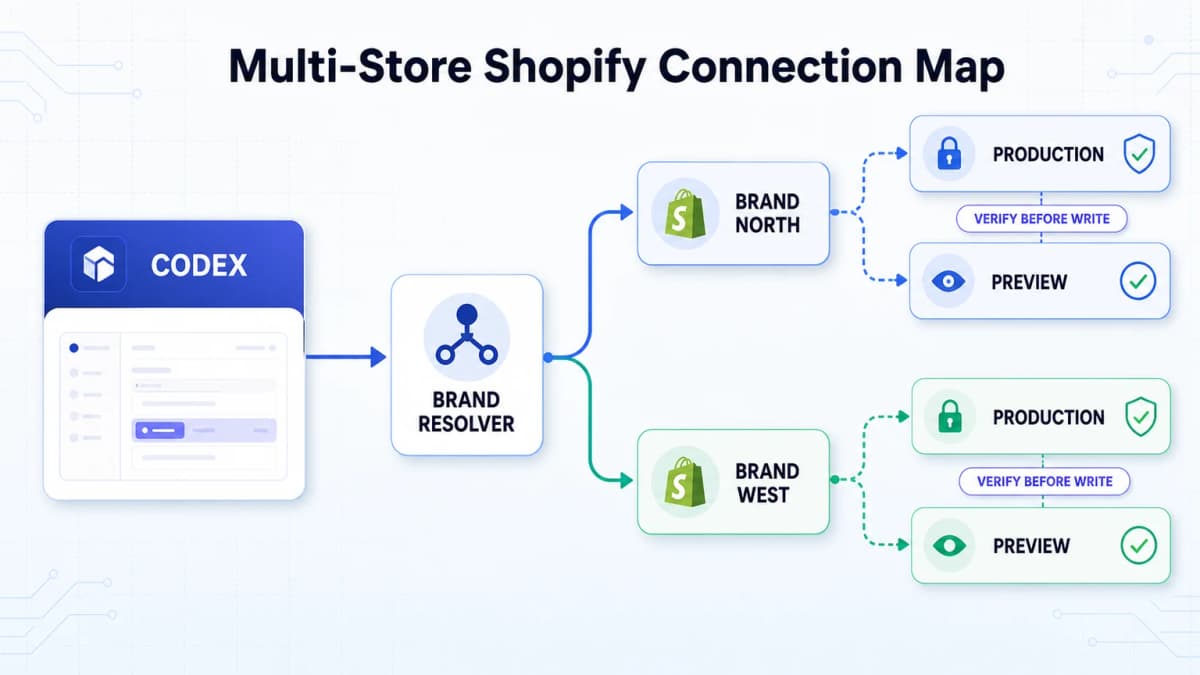
Multi-store management is an identity problem before it is an automation problem. A session that remembers only the last authorized store can easily return data from the wrong brand or send an approved change to the wrong storefront.
Separate Credentials
Each store should have an independent connection and credential set. Do not reuse one environment variable name for several stores when the active value can change silently. A clear naming system makes the target visible during configuration and incident review.
| Brand | Shopify store | Connection name | Default mode |
|---|---|---|---|
| Brand North | brand-north.myshopify.com |
brand-north-shopify-production |
Read-only |
| Brand West | brand-west.myshopify.com |
brand-west-shopify-production |
Read-only |
| Brand North Preview | Development theme or dev store | brand-north-shopify-preview |
Controlled writes |
No secret values belong in this map. It should contain references to approved connections, not credentials.
Resolve the Brand
Codex should map a plain-language brand name to one exact connection. Variants such as the legal company name, storefront name, and internal abbreviation can point to the same canonical brand record.
If a prompt omits the brand and more than one store is available, the workflow should stop before querying private data or running a write. Guessing from the most recently used connection is unsafe.
Run a Preflight Check
Every write workflow should begin with a compact preflight response:
Brand: Brand North
Store: brand-north.myshopify.com
Environment: Preview
Operation: Update product description
Write approval: Required
The user can verify the target before Codex prepares or applies the change. For high-impact tasks, the final approval should repeat the brand, store, resource, and fields that will change.
Build a Brand Data Map
A Shopify store rarely operates in isolation. The same brand may also use GA4, Google Search Console, Google Ads, a product feed, and marketplace data. Cross-channel analysis works only when every source points to the same brand and comparable reporting window.
A practical map can record:
| Field | Brand North example |
|---|---|
| Canonical brand name | Brand North |
| Shopify connection | brand-north-shopify-production |
| GA4 property | Approved Brand North property |
| Search Console property | Brand North production domain |
| Google Ads account | Approved Brand North customer account |
| Store timezone | America/New_York |
| Reporting currency | USD |
| Write policy | Preview and approval required |
This mapping allows a prompt such as "review Brand North's last seven completed days" to resolve each approved source. The workflow should still report data availability separately. A working Shopify connection does not confirm that GA4 is fresh, Search Console has completed ingestion, or ad attribution is available.
Matched windows also matter. Shopify revenue should not be compared with a partial GA4 day or a Search Console window that ends earlier. Each result should retain its source, timezone, date range, and refresh status.
Use Better Codex Prompts
Good prompts identify the brand, operation, mode, window, and approval boundary. They do not need to repeat technical credentials or every scope name.
Read-Only Sales Review
Use the Brand North Shopify production connection in read-only mode.
Summarize orders and sales for the last seven completed days in the store timezone.
Compare them with the previous seven completed days.
Show the resolved store before querying and report any unavailable fields.
Product Content Review
Use the Brand West Shopify production connection.
Review the title, description, and SEO fields for product handle [handle].
Return a field-by-field proposal and explain any factual claims that need verification.
Do not write changes until approval is given.
Theme Performance Review
Use the Brand North preview environment.
Measure the mobile product-page experience and inspect the accessible theme code.
Rank issues by measured impact, propose a minimal patch, and show the diff.
Do not publish or modify the live theme.
Cross-Channel Review
Review Brand North for the last seven completed days.
Combine Shopify order facts with the approved GA4 and Search Console sources.
Use matched date windows, label every source, and keep attribution gaps explicit.
Do not describe correlation as proven causation.
Common Mistakes to Avoid
- Treating Shopify Dev MCP as store-admin access. It provides development context and tools, while merchant operations need a separate authenticated path.
- Saving secrets in prompts or repositories. Client secrets and tokens belong in environment variables or a secret manager.
- Granting broad write access immediately. Start with read access and add specific write scopes when a reviewed workflow requires them.
- Relying on the active login. Multi-store teams need a deterministic brand-to-connection map.
- Editing the live theme first. Use a development or preview theme, review the diff, test the rendered page, and publish only after approval.
- Skipping result verification. Read the affected Shopify resource again after every write and confirm that the intended store was changed.
Conclusion
Shopify MCP is useful when its role is defined precisely. Shopify Dev MCP gives Codex current development context. Storefront MCP supports shopper-facing commerce. Authenticated Admin API or Shopify CLI workflows provide store operations. A dependable setup connects those interfaces deliberately instead of assuming one installation unlocks every capability.
Single-store teams should verify identity with a read-only query before adding write access. Multi-store teams should maintain separate connections, resolve every request through a brand map, and repeat the target store before a write. Product, content, and theme changes should always follow a propose, approve, execute, and verify sequence.
Power Codex With Ecommerce Data MCP
Shopify gives Codex first-party evidence from the connected store, such as products, orders, inventory, customers, content, and theme resources. It does not provide the wider market evidence needed to answer questions such as which products are gaining demand, how competitors position and price similar items, or which complaints appear repeatedly in marketplace reviews.
Nexscope ecommerce data MCP adds that external layer to a user-controlled Codex or Agent workflow. Nexscope makes structured ecommerce capabilities available through MCP and REST API, covering product discovery, keyword and trend research, competitor and pricing analysis, review insights, rankings, and sales signals. The Agent, model, prompts, store credentials, and approval policy remain in the team's own environment.
In practice, Codex can use Nexscope data to validate demand, compare competitor listings and prices, and identify review gaps before proposing a new Shopify product or rewriting an existing listing. The Shopify connection then supplies the store-specific context and, after approval, applies the change to the correct store. For a multi-store setup, keep the Nexscope research result attached to the same brand map used for Shopify routing so market evidence from one category or region is not applied to the wrong storefront.
Frequently Asked Questions
Does Shopify Dev MCP connect Codex to store data?
Shopify Dev MCP gives an MCP-compatible development environment access to Shopify development resources and supported tools. Installing it does not automatically authorize Codex to read a merchant's private orders, edit products, update pages, or change a live theme. Those tasks require a separate authenticated integration, such as an installed Shopify app using the GraphQL Admin API or a Shopify CLI workflow. The app also needs the required Shopify access scopes, and Codex should have an approval policy for write operations.
Can Codex manage multiple Shopify stores?
Codex can work with multiple Shopify stores when each store has a separate, verified connection and the workflow maintains a deterministic brand map. A prompt should resolve the brand to one store before reading data. Every write should repeat the brand, Shopify domain, environment, resource, and proposed fields before approval. A setup that depends only on the currently logged-in store or the most recent authorization can select the wrong storefront and should not be used for unattended multi-store operations.
Which Shopify permissions does Codex need?
The required permissions depend on the task. Order analysis commonly needs read_orders, product review needs read_products, product changes need write_products, page or blog changes need write_content, and theme changes may need write_themes or an approved Shopify CLI or repository workflow. Teams should request only the scopes needed for the defined operation. Protected customer data can require additional Shopify approval, and aggregate reporting should be preferred when customer-level records are unnecessary.
Is a Client secret an Admin API token?
No. For a Dev Dashboard app using the client credentials grant, the Client ID and Client secret identify the app. The integration exchanges them programmatically for an access token and then sends that token with GraphQL Admin API requests. Shopify documents that these access tokens expire after 24 hours. Client credentials work only when the app and store belong to the same Shopify organization. Client stores outside that organization need a supported merchant authorization flow.
Should Codex edit a live Shopify theme directly?
Direct live-theme editing should not be the default workflow. Codex should inspect the accessible code, prepare a minimal diff, and apply it to a development or preview theme. The team can then test layout, navigation, product forms, app blocks, analytics, structured data, and mobile performance before publishing. The final live release should require explicit approval. A separate theme repository or Shopify CLI workflow also gives the team a clearer change history and an easier rollback path.
How can a team verify the correct store?
The connection should expose a read-only identity check that returns the expected store name, Shopify handle, or another supported stable identifier. The result can also include currency and timezone when those fields are available. Multi-store workflows should display the resolved brand, Shopify domain, environment, and operation before querying sensitive data or preparing a write. After any approved change, Codex should read the same resource again and confirm that the expected store contains the intended value.
Can Shopify MCP replace the Admin API?
Shopify's MCP and Admin API surfaces solve different problems. Dev MCP supplies development context, while Storefront MCP supports customer-facing shopping experiences. Merchant-admin tasks still require authenticated access to Shopify resources through the GraphQL Admin API, Shopify CLI, or a tool layer built on top of them. A custom MCP server can wrap Admin API operations and present them as tools to Codex, but the underlying Shopify authentication, access scopes, protected-data rules, and rate limits still apply.
Sources
- Shopify. (2026). Use Polaris With the Shopify Dev MCP Server. Retrieved from shopify.dev
- Shopify. (2026). Storefront MCP. Retrieved from shopify.dev
- Shopify. (2026). Manage Access Scopes. Retrieved from shopify.dev
- Shopify. (2026). Authenticate an App for Stores in Your Organization. Retrieved from shopify.dev
- OpenAI. (2026). Model Context Protocol. Retrieved from learn.chatgpt.com