
GPT Image 2.6 Brings GIFs and Faster Image Editing
Table of Contents
GPT Image 2.6 puts a practical question in front of ecommerce creative teams: which parts of producing a campaign can become quicker without making the product less accurate? A playful animation may attract attention, but a usable asset still needs the right packaging, readable details, and a clear message.
OpenAI announced Images 2.6 on November 4, 2026, adding GIF creation alongside faster image generation and more controlled editing. The update reaches ChatGPT, Codex, and the API. For sellers, the most useful starting point is a small, well-defined creative task.
GIF Creation in ChatGPT
Images 2.6 brings animated GIFs into the creative workflow, including character animation and product-related loops. OpenAI illustrates the feature with expressive characters and sketches developed into animated subjects.

Official OpenAI API example: a nine-frame Sunburst animation with 200 milliseconds per frame.
Give Each Loop One Job
For an ecommerce team, a sensible first experiment is one movement with one communication goal. A mascot can acknowledge a successful action. Steam rising from a mug can establish a warm setting. A small animated flourish can draw attention to a seasonal campaign.
Start with a short brief:
- Subject: Identify the product or character that must remain recognizable.
- Movement: Specify one action, such as a blink, wave, or gentle sway.
- Fixed details: Name the colors, proportions, label, and camera angle that should stay unchanged.
- Loop: Explain how the final pose should return to the first.
An original prompt to try:
Create a short looping animation of a cheerful paper shopping-bag mascot giving one small wave. Keep the camera fixed, the background pale blue, and the character's shape and colors unchanged. Return to the starting pose. No text or logos.
For a real product, use an approved reference and review the entire loop before adding it to a campaign.
Flare and Sunburst Compared
OpenAI reports 50% faster image generation for Images 2.6. The announcement cites generation in as little as six seconds for Flare at low quality; that figure is not a turnaround promise for every request.
| Model | Official emphasis | Suggested first evaluation |
|---|---|---|
| GPT-Image-2.6 Flare | Fast generation and editing | Compare several compositions for a campaign concept |
| GPT-Image-2.6 Sunburst | Detailed compositions and editing | Refine an approved composition through specific changes |
Use these evaluation tasks as a starting point, then compare both models on actual product references before choosing a default.
Measure Approved Assets
Raw generation time captures only part of a creative workflow. A fast draft that changes a bottle cap or invents label text still needs correction. Record the total time from brief to approval, including review and revisions.
For a useful comparison, keep the reference image, prompt, dimensions, and requested quality consistent. Score three things: product accuracy, composition, and time spent fixing the result. Save rejected outputs as well as successful ones so the final choice reflects the whole batch.
More Control Over Edits
Mark the Intended Change
Image markup lets a team indicate the part of an image that needs attention. In OpenAI's example, a marked vase is replaced while the surrounding room remains recognizable.
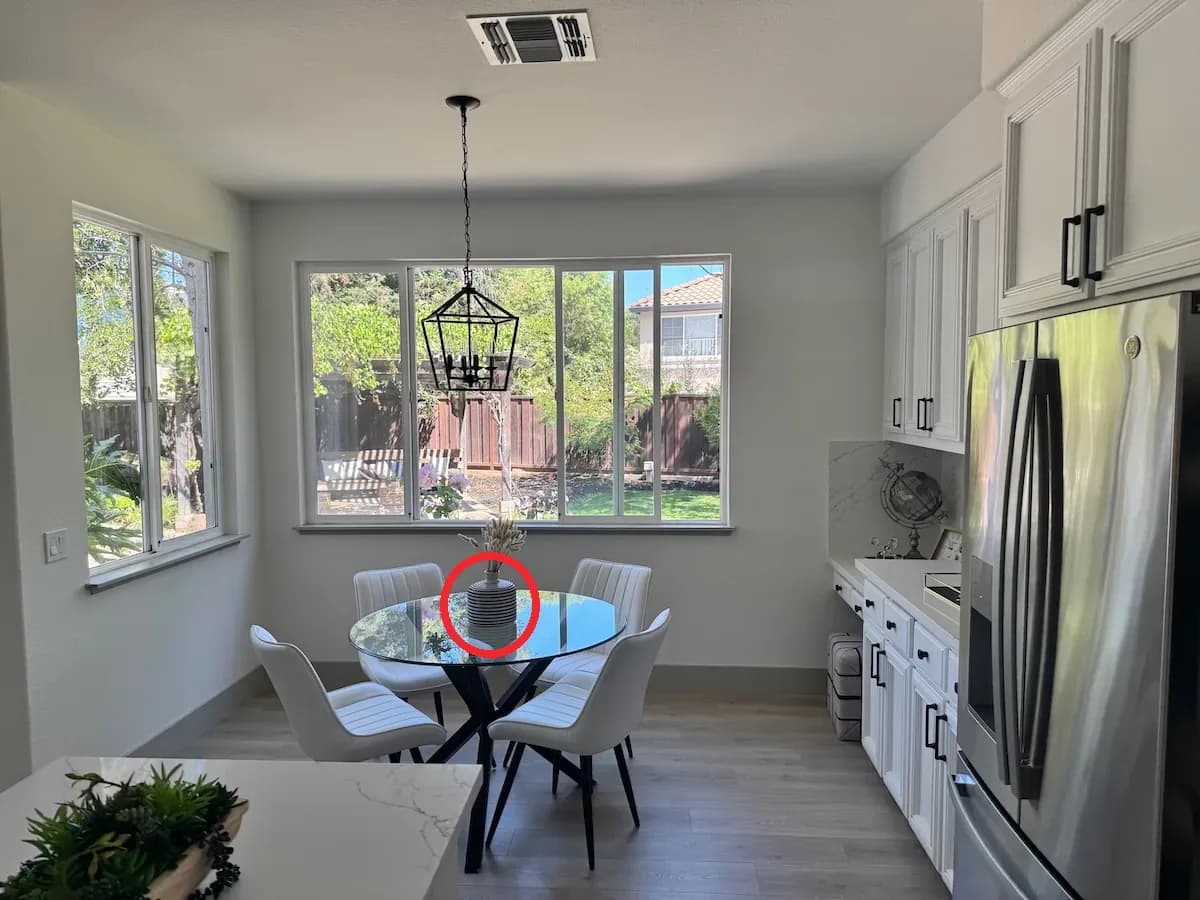
Input: the red circle identifies the vase. Image: OpenAI.
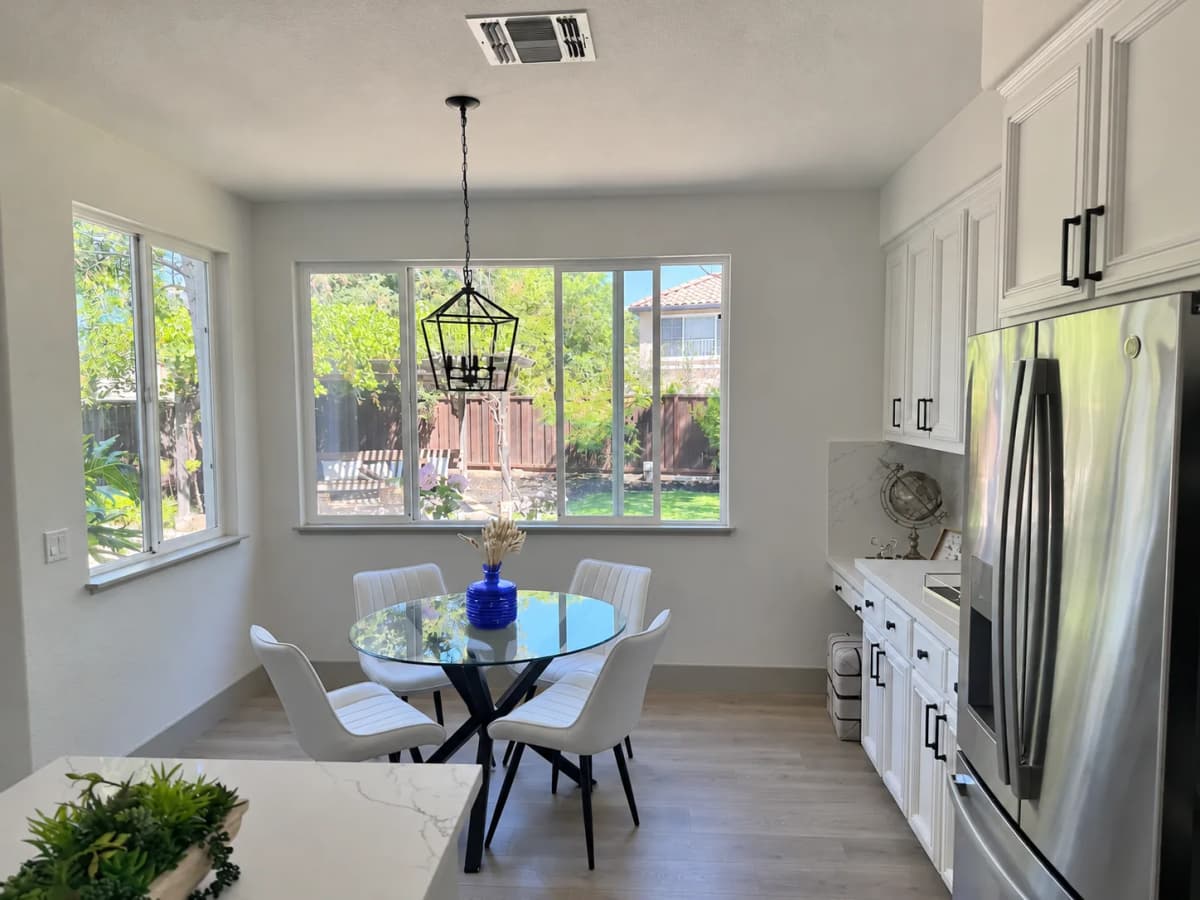
Result: GPT-Image-2.6 Flare changes the selected object. Images: OpenAI.
For product imagery, make the instruction equally specific: change the background, remove a distracting prop, or adjust the surface beneath the item. State which product details must remain fixed. After each edit, compare the full result against the approved reference, including areas outside the requested change.
Separate Planning From Detail
The API's complexity setting controls planning, while quality controls rendering detail. OpenAI recommends low complexity for many focused edits; denser scenes may benefit from higher settings.
For a campaign team, the practical habit is to change one variable at a time. If the composition is wrong, clarify the layout before requesting more detail. If the composition works but a material looks unconvincing, evaluate rendering settings without rewriting the entire brief.
GIF and SVG API Outputs
The generation endpoint supports output_format: "gif" and output_format: "svg". The image edit endpoint supports neither output format.
| Output | Key controls or conditions |
|---|---|
| GIF | frame_count: 2–64; frame_duration_ms: 20–2000, rounded to 10 ms |
| SVG | Set n to 1; output contains static vector content |
GIF frame size and count must fit the request's pixel budget. Neither format supports streaming.
Choose the Format for the Placement
Choose a GIF when repeated motion serves a purpose. Choose SVG when the deliverable needs editable vector shapes. For photographic product work, evaluate a suitable raster format instead of treating vector output as a universal upgrade.
The destination should drive the brief. A small email visual, a landing-page illustration, and a campaign banner have different space and readability requirements. Review the asset at its intended display size and on the actual destination before approving it.
Pricing and Availability
OpenAI says Images 2.6 is available globally across ChatGPT and Codex subscription tiers, on web, desktop, and mobile. Flare and Sunburst are also available through the API.
The official API pricing table lists the following rates for both 2.6 models:
| Token category | Price per 1 million tokens |
|---|---|
| Text input | $5.00 |
| Image input | $8.00 |
| Image output | $30.00 |
These match the listed rates for the corresponding 2.5 models. They are token prices, not fixed prices per finished image or GIF.
For budgeting, compare cost per approved asset. That includes rejected candidates and revision rounds. Use a representative pilot before estimating a large campaign's production cost; an attractive unit price does not reveal how much review a particular product will require.
Conclusion
Start with one product, one placement, and one measurable creative objective. Prepare an approved reference, generate a limited set of candidates, and record the changes required before approval. Expand the workflow when it produces reliable assets and a useful time saving.
Explore More Image and Video Models With Nexscope
Nexscope offers more image and video generation models through API and MCP access, giving teams more options for product visuals, campaign assets, and marketing videos.
- Image generation: Explore models for product images, lifestyle scenes, and creative variations.
- Video generation: Explore models for product demos, campaign videos, and social content.
- API & MCP integration: Connect image and video models to your own applications, agents, and creative workflows through API or MCP.
Explore More Image & Video Models
Explore more image and video generation models through API and MCP for your next creative project.
Explore Image & Video Models →Frequently Asked Questions
What is the best first project for a seller?
A small campaign concept is a useful starting point: one product, one background, and a single intended placement. Decide in advance which details must remain exact. Compare the generated result with an approved product photograph, then record the correction time. This produces a more useful evaluation than choosing only the most impressive image from an unrestricted batch.
Should a team use Flare or Sunburst?
Choose based on the task and a controlled comparison. Flare's speed emphasis makes it a candidate for early composition work; Sunburst's detail emphasis makes it a candidate for refinement. Those are starting hypotheses, not universal rankings. Test the same brief with both models and compare product accuracy, review effort, and the final cost of an approved asset.
What should a product animation prompt include?
Specify the subject, one movement, fixed visual details, and the return to the starting pose. Keep the first experiment simple enough to inspect frame by frame. For a branded product, provide an approved reference and check the silhouette, label, color, and accessories throughout the animation. A loop should communicate something useful without implying a feature the real product does not have.
Does unchanged token pricing mean unchanged production cost?
No. The listed token rates describe billing units; production cost also depends on usage and how many attempts a team needs. Compare a representative batch of briefs and include revision time in the evaluation. A fair budget uses cost per approved deliverable, with unsuccessful candidates included, rather than the cost of the cheapest individual request.
How should teams review generated product images?
Use a repeatable checklist: match the shape and proportions, inspect the label, verify included accessories, and check shadows and reflections. Review any implied size or performance claim against the real product. Finally, inspect the asset in its intended placement. A visual that looks convincing at full size may lose important information when cropped or displayed as a small thumbnail.
Sources
- OpenAI. (2026). Introducing Images 2.6. Retrieved from openai.com
- OpenAI. (2026). Image generation. Retrieved from developers.openai.com
- OpenAI. (2026). Pricing. Retrieved from developers.openai.com
- OpenAI. (2026). GPT-Image-2.6 Flare Model. Retrieved from developers.openai.com
- OpenAI. (2026). GPT-Image-2.6 Sunburst Model. Retrieved from developers.openai.com