

How to Add Keywords to Shopify Website: Complete SEO Guide

Anyone searching for “how to add keywords to Shopify website” is usually looking for the right fields, not a hidden keyword box. Shopify SEO keywords need to be placed across the fields that describe each page to shoppers and search engines, including the page title, body content, headings, meta description, URL handle, and image alt text.
The best placement depends on the page type. A homepage should explain the brand and its main category. A collection page should target a category or commercial phrase. A product page should describe one specific product and its important attributes. A blog post should answer an informational question and connect readers to relevant products or collections.
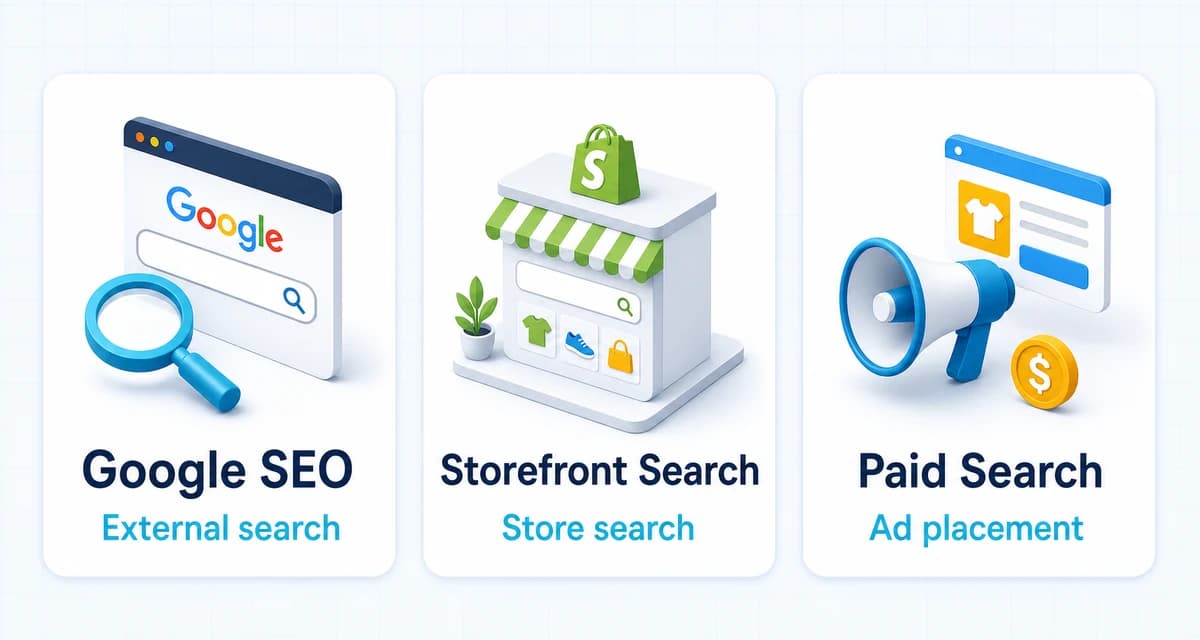
This guide explains how to add keywords to a Shopify website step by step. It covers product pages, collections, the homepage, regular pages, and blog posts. It also explains the difference between Google SEO keywords, Shopify storefront search settings, and paid search keywords, so store owners can optimize the right field for the right outcome.
The Short Answer
To add keywords to a Shopify website, choose a primary keyword for a specific page, then place it naturally in the page title, visible content, main heading, meta description, URL handle, and relevant image alt text. The exact fields vary slightly by page type, but the goal stays the same: make the page topic clear to people and search engines.
Shopify's own SEO guidance identifies four core content areas: page titles, meta descriptions, image alt text, and body content. The platform also lets store owners edit URLs and use the page title to generate the main H1 heading on products, collections, webpages, and blog posts.
| Page type | Primary keyword focus | Main fields to update |
|---|---|---|
| Homepage | Brand and broad category | Homepage title, meta description, visible heading, homepage copy |
| Collection | Category or commercial phrase | Collection title, description, SEO title, meta description, URL |
| Product | Specific product and attributes | Product title, description, SEO title, meta description, URL, alt text |
| Webpage | Service, brand, or trust topic | Page title, content, H1, SEO title, meta description, URL |
| Blog post | Informational question | Post title, content, headings, SEO title, meta description, URL |
There is no shortcut where a store owner enters a list of phrases and automatically ranks for them. Keyword research, page assignment, useful content, and consistent measurement still matter.
What Shopify Keywords Mean
One Primary Topic
A Shopify keyword is a word or phrase that reflects what a customer searches for. It can describe a product, a category, a use case, a problem, or a question.
For planning purposes, each important page should have one primary topic. A product page might target organic cotton baby pajamas. A collection page might target organic baby pajamas. A blog post might target how to choose baby pajamas for sensitive skin.
This is a content planning rule, not a Google quota. A page can rank for related variations without repeating the same phrase in every paragraph. The primary topic gives the page direction. Supporting terms add useful detail.
No Meta Keywords
Shopify does not provide a separate SEO field where store owners can paste a list of meta keywords. Google also states that the meta keywords tag has no effect on Google Search indexing or ranking.
The useful fields are visible and editorial. They include the title, description, headings, body copy, URL, and image alt text. If a Shopify SEO app shows a field called keywords, check what the field actually changes before treating it as a ranking signal.
Natural Language
Keywords should fit the sentence that contains them. A product description such as waterproof hiking backpack for travel can be useful when it introduces the product naturally. A line such as waterproof backpack hiking backpack travel backpack best backpack makes the page harder to read and gives shoppers less information.
Use the keyword where it helps answer the customer's question. Add the material, size, color, use case, compatibility, or benefit that makes the page more specific. Search engines can use the surrounding content to understand the topic and intent.
Build a Keyword Map
Keyword placement works better when the keyword is assigned to the right page before any copy is edited. A keyword map prevents the homepage, collections, products, and blog posts from competing against one another.
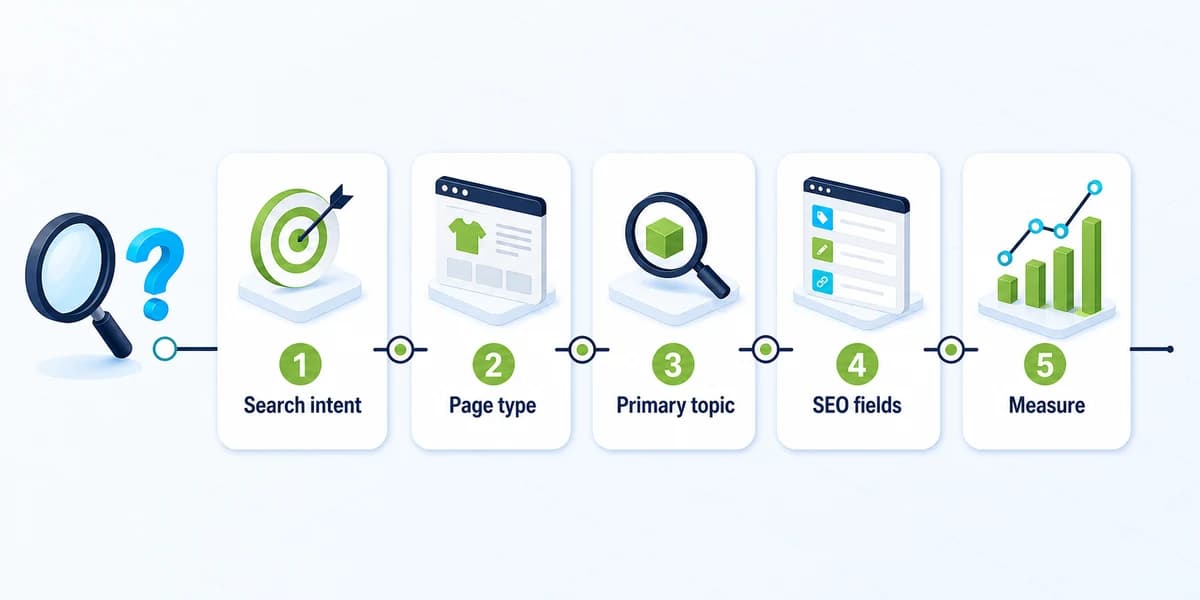
Choose Search Intent
Search intent describes what the searcher wants to accomplish. The same store may need pages for several types of intent:
- Informational: The searcher wants an explanation, such as
how to clean a leather handbag. - Commercial investigation: The searcher is comparing options, such as
best leather handbags for work. - Transactional: The searcher is ready to buy, such as
black leather work handbag. - Navigational: The searcher wants a specific brand, collection, or store page.
Match the page to the intent. A blog post can answer a question and guide the reader toward a collection. A collection page can present multiple products for a category query. A product page should provide enough detail for a specific buying decision.
Match Page Types
Use a simple map before editing:
| Search query | Best page type | Reason |
|---|---|---|
eco friendly running shoes |
Collection | The searcher may want to compare several products |
women's waterproof trail shoes |
Product or collection | The correct choice depends on catalog depth and SERP intent |
how to choose trail running shoes |
Blog post | The searcher wants guidance before choosing |
Brand Name running shoes |
Homepage or brand page | The query is primarily navigational |
If search results are mostly collection pages, a product page may struggle to match the query even when its copy contains the phrase. Review the current results before assigning broad category keywords to individual products.
Prevent Page Overlap
Avoid giving five pages the same primary keyword. That creates uncertainty about which URL should rank and can make it harder to measure performance.
A practical keyword map can use these columns:
| URL | Page type | Primary keyword | Supporting terms | Search intent | Status |
|---|---|---|---|---|---|
/collections/waterproof-backpacks |
Collection | waterproof backpacks | hiking, travel, laptop | Commercial | Draft |
/products/black-waterproof-backpack |
Product | black waterproof backpack | laptop sleeve, carry-on | Transactional | Live |
/blogs/news/how-to-choose-a-backpack |
Blog | how to choose a travel backpack | size, features, fit | Informational | Draft |
This map also gives the content team a place to record changes. When Search Console later shows new queries, the map can be updated instead of creating another page immediately.
Add Keywords to Product Pages
Product pages usually need the most specific keyword treatment because they must serve both search intent and purchase intent. The page should explain what the product is, who it is for, what makes it different, and how it should be used.
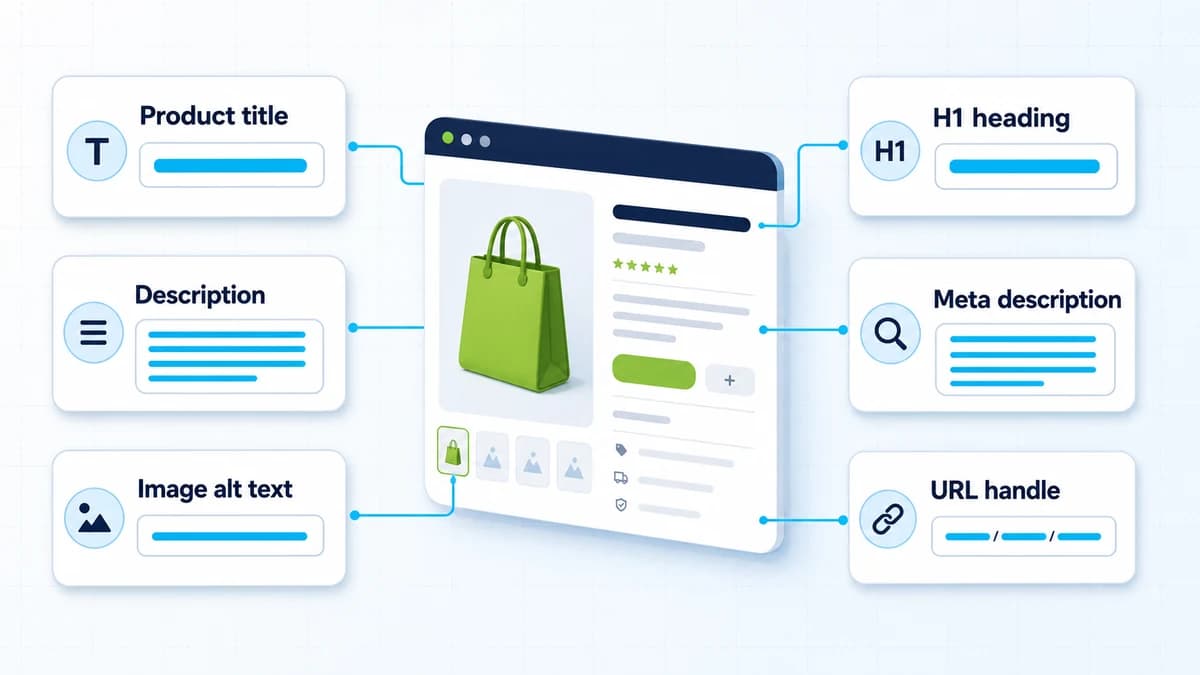
Edit Product Content
From the Shopify admin, open Products and select the product to optimize.
Update the product title so it identifies the product clearly. If the primary keyword describes the product accurately, place it near the beginning. Add one or two useful qualifiers such as material, size, audience, color, compatibility, or use case.
For example:
- Weak:
The Luna - Better:
Organic Cotton Baby Pajamas - More specific:
Organic Cotton Baby Pajamas for Sensitive Skin
The final title should still sound like a product name. It should not become a list of keyword variations.
Next, improve the product description. Put the main product phrase in a natural opening sentence, then use the rest of the copy to explain benefits, specifications, sizing, compatibility, care, shipping, or warranty details. Use bullets when shoppers need to scan several features.
Shopify's help guidance recommends unique, descriptive content and warns against copying manufacturer text that may appear on many other websites. A product page should add information that helps a customer make a decision.
Edit Search Listing
Scroll to the Search engine listing section and select the edit option. Depending on the current Shopify admin layout, the fields may appear under a pencil icon or an Edit website SEO control.
Update these fields:
- Page title: Write a unique title with the primary keyword and the most useful product detail. Keep it around 60 characters to reduce truncation in search results.
- Meta description: Summarize the product and its main benefit in plain language. Include the keyword naturally and keep the description around 160 characters.
- URL handle: Use a short, readable, hyphen-separated phrase that matches the product. Avoid adding every possible variation.
Shopify allows longer inputs in some fields, but search engines may shorten what they display. The visible snippet is also generated by the search engine, so a page title or meta description can be rewritten when another passage appears more relevant to the query.
Do not change a live URL casually. If a product handle needs to change, preserve the old address with a redirect and update internal links to point directly to the final URL.
Describe Product Images
Open the product image in the Media section and select Edit alt text. Write a short description of what the image shows. Use the page's keyword only when it accurately describes the image.
Examples:
- Weak:
backpack backpack waterproof backpack travel backpack - Better:
Black waterproof hiking backpack with padded laptop sleeve
Alt text supports accessibility as well as image understanding. It should describe the image for someone who cannot see it. A keyword that does not describe the image creates a poor experience and weakens the content signal.
Use a Page Example
Suppose a store sells an insulated stainless steel water bottle. The keyword map assigns insulated stainless steel water bottle as the primary topic and 32 oz insulated water bottle as a supporting variation.
| Field | Example |
|---|---|
| Product title | Insulated Stainless Steel Water Bottle, 32 oz |
| Product description opening | This 32 oz insulated stainless steel water bottle keeps drinks cold for long commutes and outdoor days. |
| SEO page title | 32 oz Insulated Stainless Steel Water Bottle |
| Meta description | Shop a 32 oz insulated stainless steel water bottle with a leak-resistant lid, durable finish, and everyday carry design. |
| URL handle | insulated-stainless-steel-water-bottle |
| Image alt text | 32 oz stainless steel water bottle with insulated design |
The example uses related language without forcing the exact phrase into every field. The product page remains readable, specific, and useful.
Optimize Collection Pages
Collection pages often match broader commercial searches better than individual product pages because they let shoppers compare several products. They also give the store a place to explain the category before the product grid.
Write Collection Copy
Open Products, select Collections, and choose the collection to edit. Use the collection title to state what the group contains. Use the description to explain who the collection is for, how the products differ, and which features matter.
For a collection targeting waterproof hiking backpacks, useful content might cover:
- Typical hiking and travel use cases
- Capacity and laptop compatibility
- Waterproof materials and closures
- Fit and carrying comfort
- Links to related collections or buying guides
Avoid adding a large block of generic text just to repeat the category phrase. Collection copy should help shoppers decide what to compare.
Edit Collection SEO
Use the collection's Search engine listing editor to update its page title, meta description, and URL handle. Keep the SEO title focused on the collection's category and most important differentiator.
Example:
- Collection title:
Waterproof Hiking Backpacks - SEO title:
Waterproof Hiking Backpacks for Travel - Meta description:
Compare waterproof hiking backpacks for travel, day hikes, and commuting. Find the right capacity, fit, and laptop protection. - URL handle:
waterproof-hiking-backpacks
Each collection should have its own wording. Reusing the same meta description across every category makes the store harder to interpret and gives shoppers less reason to click.
Connect Navigation
Keyword work continues through the store's navigation and internal links. Use clear collection names in the main menu, link relevant blog posts to collections, and connect products to their appropriate collections.
Shopify's SEO guidance recommends a logical hierarchy from homepage to collections to products. A strong navigation structure helps shoppers find products and helps search engines understand which pages are important.
Update Homepage, Pages, and Posts
Shopify pages outside the catalog also need a clear keyword assignment. The homepage should explain the brand. Webpages should serve a defined business or trust purpose. Blog posts should answer questions and support commercial pages.
Optimize Homepage
Go to Online Store > Preferences. In the Social sharing image and SEO section, add the homepage title and meta description.
Use the homepage for the store's broadest relevant topic. A skincare brand might target natural skincare products, while a store focused on travel gear might target carry-on travel accessories.
The homepage does not need to target every product category. Use navigation and collection pages to distribute more specific keywords across the site.
The visible homepage heading and opening copy should support the same positioning. If the SEO title says Natural Skincare Products but the visible page only says Welcome to Our Store, the page gives visitors and search engines less context.
Edit Store Pages
Go to Online Store > Pages, open the page, and edit its content and Search engine listing.
Use one clear topic per page:
- About page: brand, expertise, and audience
- Shipping page: delivery locations and shipping information
- Contact page: contact intent and support access
- Service page: service category and customer outcome
Do not force commercial product keywords into policies or support pages where they do not belong. Relevance matters more than inserting a keyword into every available field.
Optimize Blog Posts
Go to Content > Blog posts and open the post. Shopify lets store owners edit the post title, content, featured image, and search engine listing.
Use the blog post title as the main H1 and place the informational keyword in the opening paragraph. Add related questions as subheadings. Link from the post to a relevant collection or product page when the connection is useful to the reader.
For example, a post targeting how to choose a travel backpack can link to a travel backpack collection. The post answers the research question, while the collection lets the reader compare products.
Blog posts should not repeat the same product description found on a product page. Give the post a distinct purpose, such as explaining selection criteria, comparing materials, or answering a pre-purchase question.
Shopify's current blog workflow is documented in its Help Center. The admin path is Content > Blog posts, and the search engine listing editor includes the page title, meta description, and URL handle.
Separate Search Systems
The phrase “Shopify keywords” can refer to several different systems. Keeping them separate prevents the wrong optimization work.
Google SEO
Google SEO keywords belong in the content and metadata that search engines crawl. Relevant surfaces include:
- Page titles and H1 headings
- Product, collection, page, and blog content
- Meta descriptions
- URL handles
- Descriptive image alt text
- Relevant internal links
These fields help communicate what a page is about. They do not guarantee rankings. Search visibility also depends on content quality, site structure, links, authority, technical accessibility, and the match between the page and the query.
Storefront Search
Shopify Search & Discovery controls the search experience inside the online store. Its synonyms and product boosts can help customers find products through the store's own search bar.
Those settings are separate from Google SEO. A synonym configured for Shopify storefront search does not automatically make a page rank for that term in Google. A well-optimized Google title does not automatically create a synonym in the store's internal search.
Use Search & Discovery when the problem is “customers search this way in the store but do not find the right products.” Use SEO fields when the problem is “the page is not clear or visible in external search.”
Paid Search
Google Ads keywords belong to advertising campaigns. They help determine when an ad can enter an auction and how the campaign is organized. Organic SEO keywords belong to the page content and structure.
A store may use the same customer language in both systems, but the workflows are different. Do not add a long list of paid-search terms to product copy and expect that to improve organic ranking.
Verify and Track Changes
Adding keywords is an implementation step. The next step is checking that Shopify saved the intended fields and that search engines can access the page.
Check Live Pages
After saving, open the live URL and check:
- The visible title and main heading describe the page accurately.
- The product or collection copy includes useful, unique information.
- The SEO title and meta description match the page's purpose.
- The URL handle is readable and does not contain unnecessary variations.
- Images have descriptive alt text.
- Internal links point to the final URLs.
To verify the output rather than relying only on the admin preview, view the page source and look for the <title> tag and the meta description near the top of the document. Search engines can rewrite the displayed title or description, but the source confirms whether the page is outputting the fields that were entered.
Monitor Search Console
Google Search Console can show which queries generate impressions and clicks for a page. Use it to answer practical questions:
- Is the page receiving impressions for the intended topic?
- Are unexpected queries suggesting that the page is unclear?
- Does the page receive impressions but few clicks?
- Is a collection page ranking for a product term, or vice versa?
- Are important pages indexed?
There is no reliable fixed timeline for a keyword edit to produce a ranking change. Google may need to recrawl and reprocess the page, and it can choose a different title or description in the results. Use URL Inspection when a page needs to be recrawled, then evaluate performance over a meaningful period instead of checking the result immediately.
For a broader store-level review covering technical SEO, site structure, collection pages, product pages, images, and measurement, the Shopify SEO checklist provides the next layer of work beyond keyword placement.
Improve AI Readability
Search behavior increasingly includes conversational and AI-assisted discovery. After the core SEO fields are updated, Nexscope offers a GEO Score Checker that reviews a Shopify URL for page structure, metadata, image SEO, structured data, trust signals, and AI citation readiness.
The GEO score is a page-readiness diagnostic. It does not guarantee that an AI system will mention or recommend a product. For a deeper explanation of the relationship between Shopify SEO, structured content, and AI search, the Shopify GEO guide covers the technical layer separately.
Common Keyword Mistakes
Keyword Stuffing
Repeating a keyword in every heading, sentence, image field, and product tag does not create a stronger page. It reduces readability and can make the content look manipulative.
Use the phrase where it helps explain the product or answer the query. Then add natural attributes, use cases, and related terms.
Duplicate Targets
Do not assign the same category phrase to the homepage, every product, and multiple collections without a clear reason. Give each page a distinct job:
- Homepage: broad brand and category positioning
- Collection: category comparison
- Product: specific product and attributes
- Blog: question or buying guidance
If two pages genuinely need to address similar terms, make the difference in intent and content clear. Otherwise, consolidate or revise the keyword map.
Broken URLs
Changing a URL handle can break old links and remove useful signals from the previous address. Change handles only when there is a clear benefit. Create the appropriate redirect, update internal links, and check the old URL after publishing.
Tags Confusion
Product tags are useful for organization, filtering, and store operations. They are not a replacement for the SEO fields that describe a page to Google.
Put the target topic in the page title, visible content, headings, meta description, URL, and relevant alt text. Use product tags for the internal workflows they actually support.
Conclusion
The practical answer to “how to add keywords to a Shopify website” is a page-by-page workflow:
- Choose a primary topic and assign it to the right page type.
- Add the keyword naturally to the page title, content, heading, metadata, URL, and relevant image alt text.
- Check the live output, monitor Search Console, and update the keyword map as real queries appear.
Keyword placement gives a Shopify store a clearer content foundation. It does not replace useful product information, sound site structure, internal links, technical accessibility, or authority signals.
Need Expert Shopify SEO Help?
Optimizing one Shopify page is manageable. Managing keyword intent across a large catalog, collections, metadata, internal links, and conversion content requires a repeatable process. Nexscope's E-commerce Growth Services can help review a Shopify store, identify SEO and conversion gaps, prepare keyword-ready content, and recommend the next optimization priorities.
Get Expert Shopify SEO Support
Turn keyword research into clearer Shopify pages, stronger store structure, and a repeatable growth workflow.
Talk to an Expert →Frequently Asked Questions
How do I add keywords to a Shopify website?
Choose a primary keyword for the page, then add it naturally to the page title, visible content, main heading, meta description, URL handle, and relevant image alt text. The exact Shopify path depends on the page type. Products are edited from Products, collections from Products > Collections, webpages from Online Store > Pages, the homepage from Online Store > Preferences, and blog posts from Content > Blog posts. Save the page and verify the live output before monitoring performance in Google Search Console.
Where do I put SEO keywords in Shopify?
The main SEO surfaces are the page title, body content, H1 or page heading, meta description, URL handle, and image alt text. Place the keyword only where it accurately describes the page or image. The homepage, collection pages, product pages, webpages, and blog posts should each target the intent that matches their role in the store. There is no need to paste a long keyword list into a hidden field.
Does Shopify have a meta keywords field?
Shopify does not provide a dedicated field that functions as a Google SEO meta keywords tag. Google Search Central states that the meta keywords tag has no effect on Google Search indexing or ranking. Store owners should focus on visible page content, descriptive titles, meta descriptions, headings, readable URLs, and image alt text. If an SEO app uses the word “keywords,” inspect what it changes before treating that feature as a Google ranking signal.
Do Shopify product tags help SEO?
Product tags can help organize products and support store operations such as filtering or collection workflows. They should not be treated as a substitute for the SEO fields that describe a page to Google. Put the target topic in the product title, description, heading, meta description, URL handle, and relevant image alt text. Use product tags for the internal organization purpose they support, and avoid stuffing them with phrases that do not help customers.
How many keywords should I use on one Shopify page?
A practical content plan usually starts with one primary keyword and a small set of closely related variations. This is a planning guideline, not a Google-required number. The page should cover one clear topic and use related terms when they add useful information about attributes, use cases, questions, or benefits. Trying to target many unrelated keywords on one page can weaken the page's focus and make the copy harder to read.
Do Shopify Search and Discovery synonyms affect Google rankings?
No. Shopify Search & Discovery synonyms affect searches performed inside the online store. They can help a shopper find relevant products when the shopper uses a different term in the store's search bar. They do not directly change how Google ranks the product page. External SEO requires updates to the page content, headings, metadata, URLs, images, and broader site signals. Treat storefront search optimization and Google SEO as related customer-discovery tasks with separate controls.
How long does it take for Shopify SEO changes to appear in Google?
There is no guaranteed fixed timeline. Google may need to recrawl and reprocess the page after it is updated, and Google can choose to rewrite the title or description shown in results. Use Google Search Console's URL Inspection tool when a page needs a recrawl request, then evaluate impressions, clicks, queries, and rankings over time. A change that is technically saved in Shopify is not the same as a guaranteed ranking improvement.
Sources
- Shopify Help Center. (2026). Adding keywords for SEO to your Shopify store. Retrieved from help.shopify.com
- Shopify Help Center. (2026). SEO overview. Retrieved from help.shopify.com
- Shopify Help Center. (2026). Adding and managing blog posts. Retrieved from help.shopify.com
- Shopify Help Center. (2026). Modifying search with Shopify Search & Discovery. Retrieved from help.shopify.com
- Google Search Central. (2025). Meta tags and attributes that Google supports. Retrieved from developers.google.com