

How to Bulk Optimize Shopify Product SEO With Codex

Table of Contents
Shopify product SEO becomes harder to manage when every listing needs individual attention. A catalog of 100 products can mean reviewing 400 copy fields: product titles, descriptions, SEO titles, and meta descriptions. Repeated wording, missing specifications, and poorly matched keywords make that work more complicated than replacing a few phrases.
A six-step workflow makes the job manageable. Start with the store’s product export, add search and page data from Nexscope, then use Codex to prepare drafts, compare changes, and check the full batch. The example scope is 100 products, with three reviewed first to establish the writing standard. Product facts stay under the merchant’s control throughout.
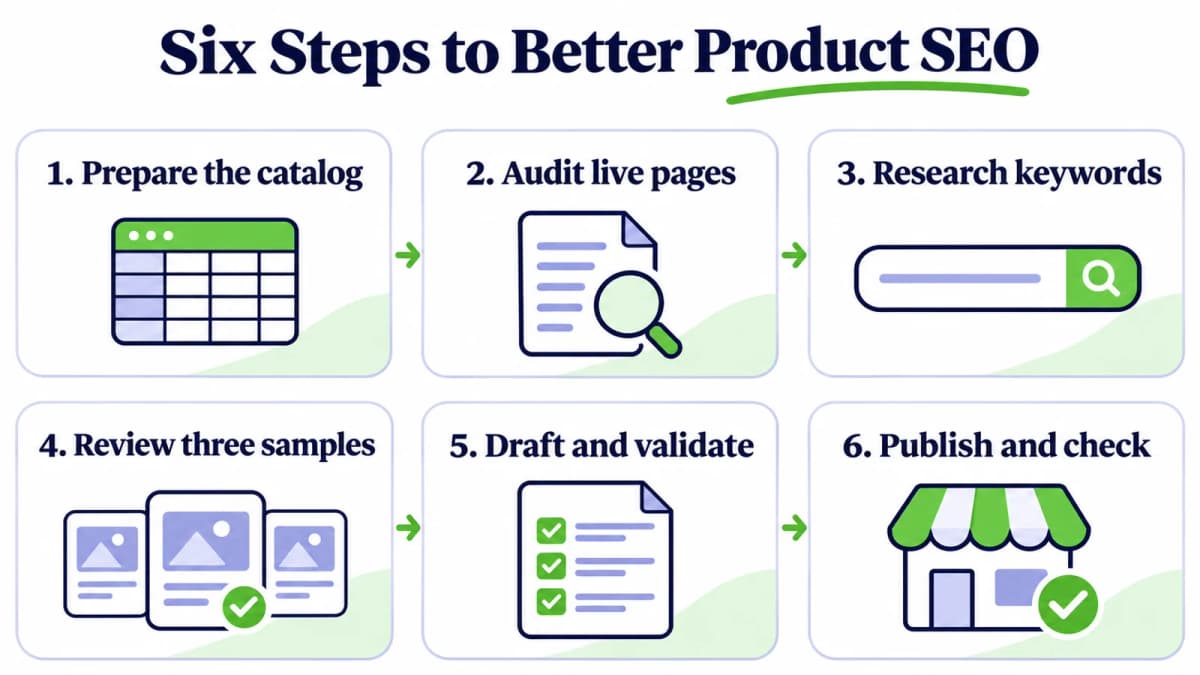
The six-step workflow combines product facts, search data, drafting, and review.
Step 1: Prepare Your Product Catalog
Start in Shopify admin with Products → Export, selecting the products included in the project. Keep the downloaded file unchanged and create a separate working copy.
Count products by their handle, not by CSV rows. A product may occupy several rows because of variants or additional images. Preserve those relationships when preparing the working table.
Separate Source Data From Drafts
Use three groups of information:
| Group | Contents | Purpose |
|---|---|---|
| Original catalog | Product identifiers, handles, descriptions, variants, prices, image references | Preserve the store’s source data |
| Research table | Public URL, verified attributes, target keyword, page observations | Supply context for decisions |
| Draft review | Proposed copy, change reasons, unresolved questions, approval status | Review changes before applying them |
Keep the exact headers from the store export. Use a separate audit table for convenient labels such as product_key, primary_keyword, and review_status; those are working fields, not instructions to add columns to the Shopify import.
If the catalog does not contain enough detail to distinguish products, collect supplier specifications, approved product sheets, or merchant confirmations before drafting. Capacity, dimensions, materials, compatibility, and package contents often determine what can be said accurately.
Add Market Context Where Useful
For competitor research, Shopify product queries can find publicly researched products using keywords or product/store URLs. Codex can organize returned titles, links, prices, and other available fields into a separate research CSV.
This is useful for understanding how comparable products are positioned. Keep competitor information separate from facts about the store’s own products. Use the Shopify export for the catalog that will eventually be updated.
Prompt: Prepare the Catalog
Read the Shopify product export in this project. Preserve the original file.
Identify the actual header names and group related rows by product handle.
Count unique products, variant rows, and additional image rows separately.

Create a working audit table for the selected 100 products. Include a stable
product key, handle, public URL where available, existing copy, and verified
product attributes. Preserve row order and all product/variant relationships.

List missing information and ambiguous mappings. Do not invent attributes,
rewrite copy, or modify the live store. Save a preparation summary.
The first deliverable is a usable catalog with a clear product count and a list of missing information.
Step 2: Audit Existing Product Pages
Before generating replacement text, establish what needs improvement. Review the catalog across the four target fields and inspect the corresponding public product pages.
Prioritize these questions:
- Product title: Does it identify the item and its meaningful attributes?
- Product description: Does it answer practical buying questions using supported facts?
- SEO title: Does it describe the specific page without repeated keyword variations?
- Meta description: Does it summarize something useful and distinctive about the product?
Record examples alongside each issue. “Needs improvement” is too vague to guide a batch rewrite; “describes three different lunch boxes with the same paragraph and omits their capacities” gives Codex a concrete task.
Compare Exported and Live Values
An empty SEO field in a Shopify export can be misleading. Shopify exports customized SEO values; when those values have not been saved manually, the export can be blank while the page uses automatically generated information.
Use page SEO evidence to collect the available title, description, H1, canonical, and content for each public URL. Store the observation time and retain missing fields as missing.
Keep exported values and observed page values in separate columns. If a page cannot be retrieved, assign it a review status rather than recording every SEO element as absent.
Build an Actionable Baseline
Classify each product into one of three queues:
| Queue | Example | Next action |
|---|---|---|
| Ready to draft | Complete facts, weak description | Research keywords and prepare copy |
| Needs product information | Missing size or compatibility | Ask the merchant to supply evidence |
| Needs page investigation | Unexpected canonical or unavailable URL | Investigate the page before rewriting |
A useful baseline includes the number of products checked, issue counts, representative examples, and the products that could not be assessed. Keep content changes separate from technical issues that require theme or store configuration work.
Prompt: Establish the Baseline
Audit all selected products without changing their copy. Check clarity,
repeated titles, template-like descriptions, missing buying information,
and mismatches between product facts and target terms.

For available public URLs, use the connected Nexscope Page SEO Evidence tool
or configured REST integration. Record returned page values separately from
the Shopify export, including collection time and missing-data reasons.
Do not treat blank exported SEO fields as proof of missing live tags.

Produce an issue summary, specific examples, and prioritized review queues.
Report actual coverage. Do not substitute invented observations for failures.
Before running API-backed prompts, make the relevant Nexscope tools available through MCP or a configured REST integration. A prompt names the desired work; the connected tool supplies the external data.
Step 3: Match Products to Search Demand
A plausible keyword still needs to match the product and the searcher’s intended destination. Build a keyword map before rewriting the catalog.
For example, a lunch-box store could investigate “stainless steel lunch box,” “lunch box with divider,” and “how to clean a steel lunch box.” These phrases describe different needs. Some may suit product or collection pages; others may belong in supporting content.
Expand Relevant Terms
Begin with a small set of seeds for each product category. Add only attributes supported by the product information.
Use keyword expansion to gather related terms and suggestions. Research shared categories first, then map candidates to individual products. That avoids repeating identical research for closely related SKUs.
For the documented endpoint, use US English inputs and request up to 20 suggestions per call. Treat the returned phrases as candidates to assess, not automatic instructions to add them to every listing.
Compare Demand and Difficulty
Next, compare keyword search volume and difficulty. The Keyword Metrics endpoint accepts up to 20 keywords per request with market: "US" and language: "en".
Deduplicate candidate terms before submitting batches. Save the returned measurements and any available update timestamps. Missing values remain unknown rather than becoming zero.
Evaluate relevance first, followed by search demand and ranking difficulty. Keep advertising competition and organic keyword difficulty separate. A higher-volume phrase that describes a feature the product lacks should be excluded.
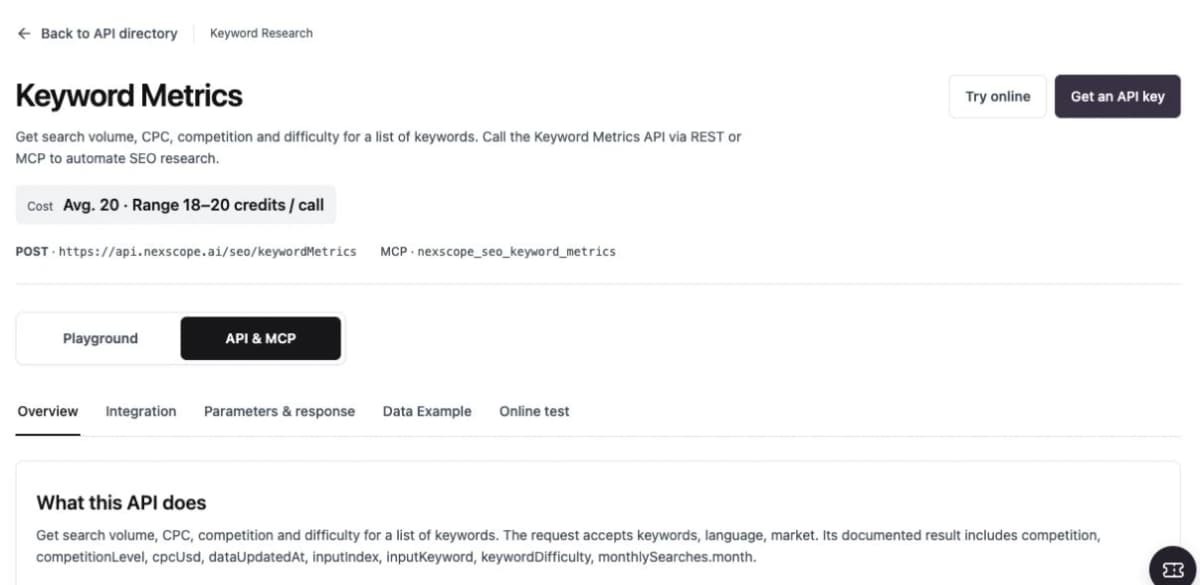
Nexscope Keyword Metrics API documentation. Captured November 3, 2026.
Check the Search Results
Inspect Google search results for shortlisted terms to see which page formats compete: individual products, category collections, comparisons, or informational articles. The documented request supports US English desktop results, with up to 10 results per keyword.
If a query’s results mostly help shoppers compare a category, consider assigning it to a collection page. Give an individual product a more specific focus supported by its attributes. Apply Shopify keyword placement consistently across the relevant title, description, and SEO fields.
The mapping table should contain the product key, candidate term, selected primary term, available metrics, intended page type, and the reason for the decision. Leave unresolved mappings in the review queue.
Prompt: Build the Keyword Map
Group the selected products by category and verified attributes. Use the
connected Nexscope keyword tools to expand relevant seeds and check demand.
Deduplicate terms and respect each endpoint's input limits and market scope.

For shortlisted terms, inspect Google SERP data to assess page-type fit.
Recommend a primary keyword and a small set of related terms per product.
Route broader category or informational terms to suitable page types.

Save keyword_map.csv with measured fields, missing-data status, and a short
selection reason. Do not invent metrics or assign unsupported product claims.
Step 4: Review Three Products Before Scaling
Choose three products that expose different writing challenges: one with complete specifications, one with missing information, and one that resembles another item in the catalog.
Ask Codex to draft the four target fields and display the original and proposed values together. Include the facts supporting each change and any questions requiring a merchant decision.
Establish the Writing Standard
Use these rules for the sample:
- Lead with the product’s identity and the attributes buyers need to distinguish it.
- Explain practical uses through verified features.
- Include the primary phrase naturally where it fits.
- Keep product descriptions specific to the item.
- Write clear, concise SEO titles and descriptive meta summaries.
- Leave unsupported claims out of the proposed copy.
Google recommends descriptive title text and discourages keyword stuffing. Meta descriptions should accurately summarize the page; Google may use page content to generate a different snippet for a particular query.
Example: A Supported Rewrite
Consider an illustrative product whose approved facts are limited to a stainless steel body, a 1,000 mL capacity, and a removable divider.
| Field | Existing copy | Proposed copy |
|---|---|---|
| Product title | Lunch Box Large | 1,000 mL Stainless Steel Lunch Box With Removable Divider |
| Description | A premium lunch box for everyday use. | Pack lunch in a 1,000 mL stainless steel box with a removable divider. Use the divider to separate food or remove it to make room for a larger portion. |
| SEO title | Lunch Box Large | Stainless Steel Lunch Box With Divider, 1,000 mL |
| Meta description | Shop our premium lunch box today. | Explore a 1,000 mL stainless steel lunch box with a removable divider for flexible food packing. Review product details before choosing your lunch container. |
The revised description uses the supplied specifications. Leak resistance, microwave suitability, dishwasher safety, and temperature retention remain outside the copy until confirmed.
For the product with missing facts, a useful result may be a partial rewrite plus two precise questions. For similar products, the review may reveal that the source information needs improvement before their descriptions can be meaningfully differentiated.
Prompt: Draft the Sample
Select three representative products from the audit: one with complete facts,
one with missing attributes, and one similar to another product.

Draft the product title, product description, SEO title, and meta description
using the keyword map and verified facts. Show original and proposed values
side by side, with a reason and supporting facts for each material change.

Use natural US English. Flag unsupported claims and unresolved distinctions.
Keep identifiers, handles, prices, and variant data unchanged. Stop after the
sample so the merchant can approve or revise the writing standard.
Approve the standard before applying it to the remaining products. That review should settle tone, factual boundaries, and the treatment of incomplete records.
Step 5: Bulk Optimize and Validate the Catalog
Once the sample is approved, process the remaining products in manageable batches. A practical starting point is 10–20 products per batch, adjusted to the amount of source material and review work.
Keep the approved sample in the final catalog, so the total remains 100 products rather than 100 new drafts plus the sample. Track each product as drafted, checked, awaiting information, or approved.
Generate Distinct Product Copy
Ask Codex to use the same editorial rules while adapting the content to each product’s buying considerations.
A lunch box may need capacity and compartment details. A replacement lid needs compatible models and package contents. A carrying bag needs dimensions and fit information. Sharing a writing standard does not require sharing the same paragraph structure.
Store proposed values in new working columns. Preserve the source snapshot so every change can be reviewed or reversed.
Validate the Entire Batch
Run deterministic checks for file integrity, then review content quality:
| Check | What to verify |
|---|---|
| Product coverage | Every selected product appears exactly once in the review table |
| Source preservation | Original values and source files remain unchanged |
| Scope | Only the approved copy fields have proposed edits |
| Relationships | Product, variant, and image associations remain intact |
| Formatting | CSV quoting, line breaks, encoding, and description HTML parse correctly |
| Repetition | Exact matches and near-duplicate passages are flagged |
| Factual support | New claims trace to approved product information |
| Keyword use | Wording reads naturally and fits the product |
Check unpublished drafts locally. Website duplicate-content tools inspect crawled pages; use scripts and editorial review to compare the CSV text before publication.
Review similar wording in context. Shared dimensions or care instructions can be accurate across products. Focus revisions on generic passages that hide meaningful differences, and keep unresolved facts in the merchant’s queue.
Prompt: Generate and Check the Batch
Apply the approved sample standard to the remaining selected products in
batches. Preserve approved sample drafts and all original data.

Create proposed values for the four target copy fields, plus change reasons,
fact references, and review status in the working table. Check exact and
near-duplicate copy, unsupported claims, keyword repetition, and valid HTML.

Validate product coverage, source values, and variant/image associations.
Write failed checks to a separate report. Keep unresolved products pending.
Do not publish or overwrite the source export.
Step 6: Export Approved Changes and Check Live Pages
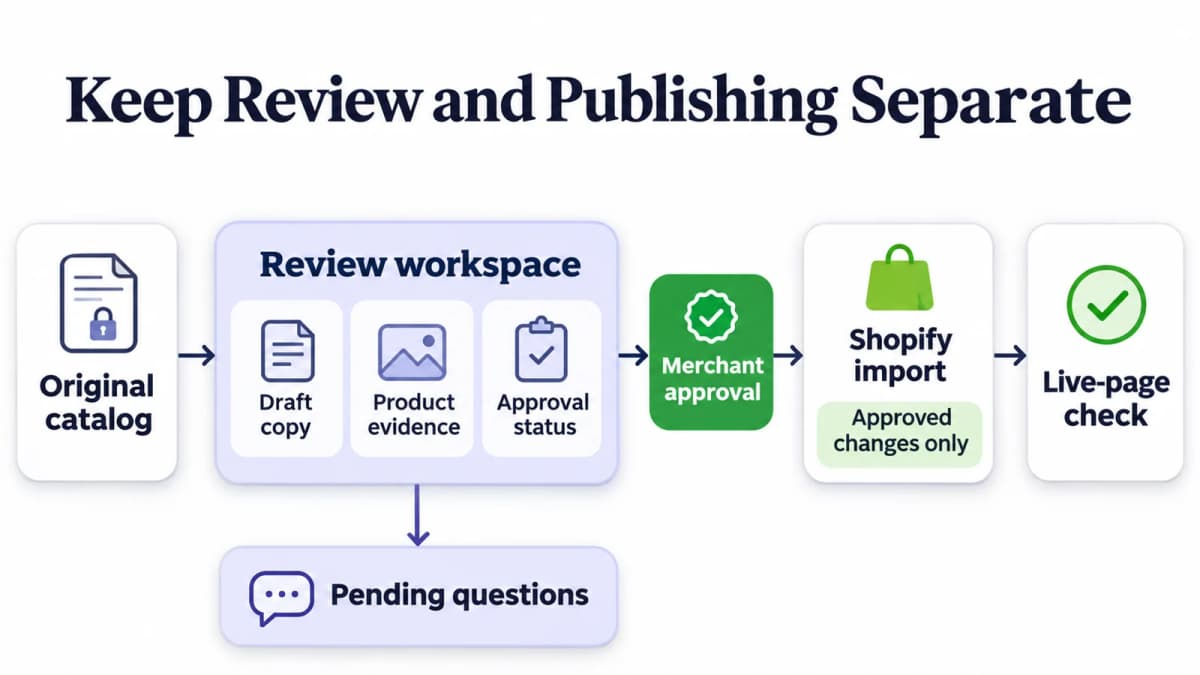
Keep review notes and pending questions separate from the approved Shopify import.
Prepare separate files for different purposes:
- Review table: All proposed copy, evidence, decisions, and unresolved questions.
- Shopify import: Approved changes mapped to the current Shopify CSV format.
- Change log: Original and approved values, keyed to the correct product.
- Pending list: Products awaiting information or a separate technical fix.
Build the import from the original export structure. Apply only approved copy changes and validate the result against Shopify’s current column requirements. Remove research-only fields from the upload file. Reconcile the selected products against a fresh export before importing if the store has changed during drafting.
For direct updates through a Shopify connection with Codex, verify the target store and merchant write access separately. The Nexscope research connection supplies data for the workflow; applying edits requires the appropriate Shopify access.
Check a Small Published Batch
Apply the approved changes to a small group first. Inspect the product display and the resulting page source, then check that variant choices, prices, images, and existing URLs still behave as expected.
After the check passes, continue with the remaining approved products. Recollect page evidence and compare it with the expected values. Theme-generated suffixes or app-managed tags may explain differences between saved fields and rendered pages.
For a wider crawl review, duplicate page tags can identify repeated titles or meta descriptions within an existing crawl. Supply the required crawl task_id and inspect the returned coverage. Keep crawler task identifiers distinct from API call identifiers.
Measure Changes Separately
The completion report should show what actually happened: products reviewed, drafts approved, changes applied, checks passed, and items still pending.
Track search performance separately after publication. Compare the changed URLs over equivalent periods, considering search queries, impressions, clicks, and relevant store outcomes alongside seasonal or promotional changes. Broader Shopify SEO checks help keep technical and site-structure issues visible while product copy is being improved.
Prompt: Prepare the Handoff
Prepare a review table, a Shopify-compatible import containing approved
changes, a before-and-after change log, and a pending-items list.

Map edits to the original export structure. Remove working/research fields
from the import and verify that non-target values and relationships remain
unchanged. Identify any differences from the latest store export that need
reconciliation. Generate a small-batch publishing checklist.

After approved changes are applied, compare observed page values with the
expected copy and report actual coverage and remaining issues. Keep copy
completion statistics separate from measured search performance.
Common Mistakes to Avoid
Starting with incomplete product facts. Ask for the specific missing attribute before expanding a vague description into a detailed claim.
Treating a keyword list as a writing template. Select terms that match the item and the intended page type. Keep each description useful to a shopper.
Confusing a research CSV with a store export. Public product data helps market research. Store-specific identifiers and variant relationships must come from the store’s own records.
Removing every repeated phrase. Shared factual wording can be appropriate. Use meaningful product differences to guide revisions.
Importing the review spreadsheet directly. Research notes, similarity flags, and proposed fields belong in the review artifact. Prepare a separate validated Shopify import.
Reporting finished copy as improved rankings. Track publication accuracy first, then measure search performance over time.
Conclusion
Bulk Shopify product SEO works best as a sequence of decisions: prepare the catalog, audit existing pages, research demand, approve a sample, validate the full batch, and check the published changes.
Connect Your Shopify SEO Workflow to Nexscope
Nexscope provides ecommerce and SEO data that teams can connect to their own Codex workflows through REST API or MCP. For a product optimization project, it helps bring three useful inputs into the same process:
- Page-level SEO evidence: Collect available titles, descriptions, headings, and canonical information from public product URLs with Page SEO Evidence, then compare the observations with the store export.
- Keyword demand and difficulty: Use Keyword Metrics to prioritize relevant terms using search volume, keyword difficulty, and available monthly search history.
- Search-result context: Review competing page types and ranking positions with Google SERP to help decide whether a term belongs on a product page, collection, or supporting article.
Codex can organize these inputs into keyword maps, copy drafts, and review files. Start with three products, approve the writing standard, and expand to the rest of the catalog with a consistent review process.
Build Your Product SEO Workflow
Connect Nexscope search and page data to Codex, and prepare the inputs for your next Shopify product optimization batch.
Get Your Nexscope API Key →Frequently Asked Questions
Can Codex optimize 100 Shopify products at once?
Codex can help process a catalog containing 100 products by reading files, drafting copy, and running checks in a configured workspace. A staged workflow makes review easier: approve a small sample, process the remaining products in batches, and validate the combined output. Keep a product-level manifest so every selected item is accounted for, including products waiting for more information.
Can Nexscope replace the Shopify product export?
Use the Shopify export as the source for updates to an existing store. Nexscope Shopify Product Query supports market and competitor research, while Page SEO Evidence collects available information from public URLs. These inputs can enrich an audit, but the update file still needs the store’s own product identifiers and relationships. Keep public research and store-authoritative records separate throughout the workflow.
Which fields should be optimized first?
Start with the product title, product description, SEO title, and meta description. They give the project a defined scope and allow clear before-and-after comparisons. Prioritize products with enough verified information to improve their copy. Keep handles, prices, variants, and other operational fields outside the rewrite scope unless a separate change has been deliberately planned and reviewed.
Why is a Shopify meta description blank in the export?
Shopify exports saved custom SEO values. When a product has no manually customized SEO description, that field can be blank even though the storefront generates description information from existing content. Inspect the live page before marking a missing-tag issue. Record exported and observed values separately so the audit distinguishes a missing override from an actual page problem.
How should duplicate descriptions be checked before publishing?
Compare the proposed description fields locally, using exact-match checks and similarity review across products. Flag repeated paragraphs, unsupported differences, and generic wording that could describe any item. Then review the flagged groups against their product facts. After publication, crawl-based tools can investigate duplication on the website using valid crawl tasks and the pages covered by those tasks.
Sources
- Shopify. (n.d.). Exporting products. Retrieved from help.shopify.com
- Shopify. (n.d.). Using CSV files to import and export products. Retrieved from help.shopify.com
- Google Search Central. (n.d.). Influencing your title links in search results. Retrieved from developers.google.com
- Google Search Central. (n.d.). Control your snippets in search results. Retrieved from developers.google.com
- Nexscope. (n.d.). API Documentation: Shopify Product Query, Page SEO Evidence, Keyword Expansion, Keyword Metrics, Google SERP, and Duplicate Page Tags. Retrieved from nexscope.ai