

Manus 2.0 Brings Studio, Automations, and Cue AI Together

Manus 2.0 brings several parts of AI-assisted work into the same product story: producing something, revising it, and keeping related tasks moving. Alongside the update, Manus has introduced Cue, a separate app for personal agents. Together, the announcements raise a practical question: how much of a project can someone delegate while still shaping the result?
For a small business, the answer matters beyond the first impressive demo. A video may need a corrected product shot. An automated task may need a clear stopping point. A personal assistant may need to distinguish a useful suggestion from a decision that belongs to its owner. This article combines the release details into a guide to the architecture, creative tools, ongoing workflows, and personal-agent features. Product capabilities are described from the official announcement and Help Center, checked on September 29, 2026. The analysis focuses on what those changes mean for everyday work; it is not a hands-on performance review.
What Is Manus 2.0 and What Has Changed?
Manus announced version 2.0 on September 28, following its September 1 statement that the company had resumed independent operations under its founding team. That earlier statement emphasized deeper involvement in daily workflows. The new release gives that direction a more concrete product shape.
The components address different parts of a task:
| Component | Main role |
|---|---|
| Cascade | Organize agent execution |
| Manus Studio | Create and revise project outputs |
| Cloud Computer | Provide a dedicated running environment |
| Automations | Start work when a connected event occurs |
| Remote Control | Direct authorized computer activity from a phone |
| Cue | Organize personal agents and delegated tasks |
The release connects three working patterns: making an output, operating a workflow, and delegating personal work. Studio addresses the artifact in front of the user. Cloud environments and triggers support work that continues between interactions. Cue gives personal delegation its own application.
What Is Cascade and How Does It Improve Efficiency?
How Cascade Loads Capabilities on Demand
Cascade is Manus's updated internal agent framework. It introduces specialized capabilities as a project needs them, while retaining a connected project context.
A writing task and a game-building task need different tools. Loading both sets of capabilities into every session can introduce unnecessary context. Cascade's approach is to keep the initial project lightweight and expand its working capabilities when needed. Briefs, pages, videos, and automations can remain associated with the same project as the work develops.
What the Cascade Performance Numbers Mean
Manus reports these improvements over its previous system:
| Measure | Reported reduction |
|---|---|
| Token consumption | 23.2% |
| Task completion time | 28.2% |
| Running cost | 32% |
All three figures come from one tested configuration. They are vendor-reported results, not a universal average or a promise that customer bills will fall by the same amount.
The broader product aim is to make a larger collection of capabilities practical to use. Efficiency becomes more relevant as an agent moves from occasional assignments toward repeated work throughout the day.
What Are the Key Features of Manus Studio?
Manus Studio upgrades the desktop workspace around a collaborative editing model. The AI can produce an initial result, and the user can continue shaping the project directly.
How Manus Makes Video Timelines Editable
The Video Editor exposes clips, images, text, motion graphics, and audio as separate timeline elements. Users can replace music, insert their own footage, adjust an animation, preview the result, and export it. They can also ask Manus to continue editing from the manually revised project. Its stated use cases include 30–60-second product ads, AI UGC, tutorials, vlogs, and data-driven motion graphics.
For ecommerce teams, the important consequence is control over revisions. A product's packaging, color, or dimensions may need to remain exact even when the surrounding creative changes. An editable project offers a clearer place to make those corrections than another loosely specified generation request.
For teams developing product video ideas, this makes the initial generation one stage of production. The same project can move between AI assistance and direct editing as different kinds of changes become necessary.
How Alchemy Mode Guides Video Creation
Alchemy combines video generation and code generation for AI-led creative direction. Manus presents it as a quality-focused option; its claims about improved visual detail and pacing should be read as product positioning rather than independent test results.
It gives users a starting point when they have an idea but have not worked out the visual treatment. The result remains available on the timeline for refinement, so choosing an AI-led creative pass does not remove the later editing stage.
How Game Dev Supports Playable Projects
Game Dev combines generation with editable assets and code. It supports playable starting templates, web distribution, and a Cloud Computer route for multiplayer hosting.
The editing panel brings the running game, assets, and code into the same working process. A creator can change a character or scene without intending to rebuild the entire project. When multiplayer is needed, the hosting environment becomes part of the setup. This connects creative generation with the infrastructure required for other people to join.
How Manus 2.0 Keeps Work Running Across Devices
Creative work has an obvious artifact to inspect. Ongoing work needs a different review process: someone must understand what starts it, where it runs, and what it is allowed to do next.
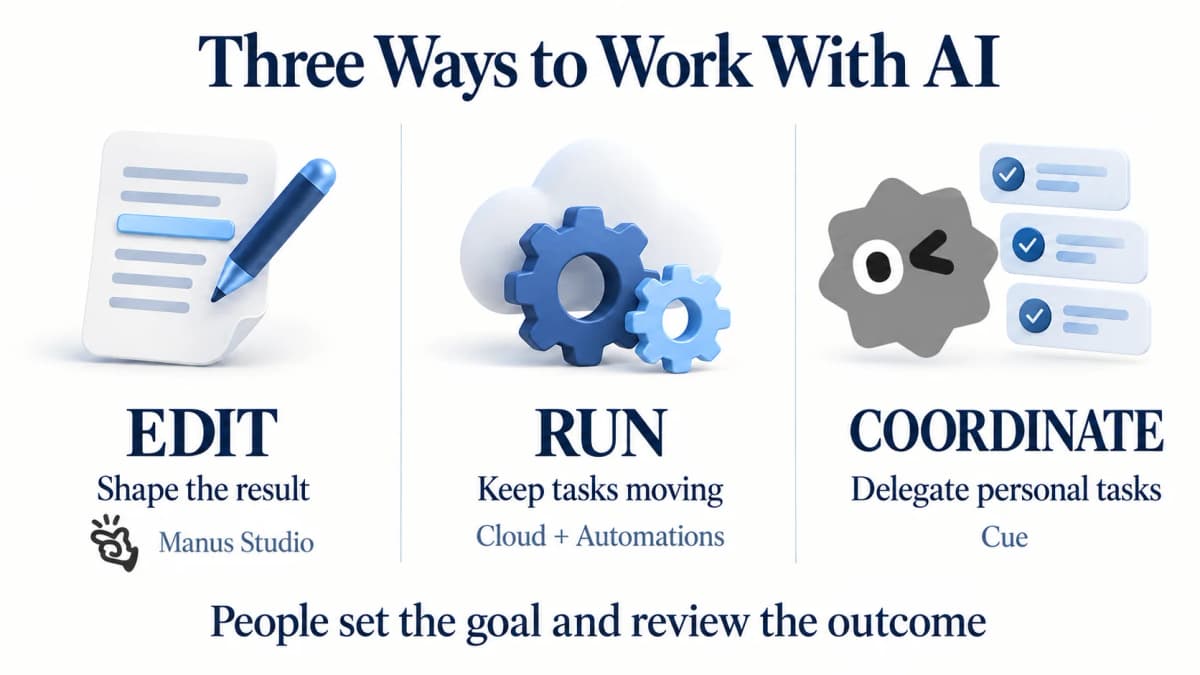
The three categories describe different working patterns; they do not imply that every component automatically connects to every other component.
What Is a Manus Cloud Computer?
Cloud Computer is a purchasable dedicated environment for projects such as persistent automations and multiplayer servers.
A multiplayer game needs somewhere for players to connect after its creator closes a laptop. A persistent automation similarly needs an execution environment beyond a single interactive session. Cloud Computer supplies that project-level environment; it is distinct from controlling a user's existing desktop.
How Events Trigger Automated Manus Workflows
Automations extend scheduled execution to signals from connected services. The announcement lists examples involving email, advertising performance, calendars, Slack, and Notion.
The setup links a trigger, authorized services, and an instruction for what should happen next. The change is significant because a user no longer has to initiate every run or wait for a fixed time. An incoming signal can become the starting point for the next task.
For ecommerce automation, that distinction separates scheduled reporting from responding to a change. The workflow still needs a defined output and approval point, especially when the next action affects published content or another person.
How Remote Control Uses Your Computer
Remote Control uses Computer Use to act on an authorized computer session from a phone. Manus describes a visible workspace restricted to approved files, browser access, and applications.
The phone supplies the instruction while the connected computer performs the work. A person can request a file or a task involving local applications without manually reproducing every click on a small screen. The authorization requirement remains central: the feature works through the approved session and resources.
What Is Cue and How Do Its Personal Agents Work?
What Makes Each Cue Agent Distinct?
Cue is a separate personal-agent application using Manus infrastructure. Its agents have individual email, phone, wallet, and computer identities. Announced functions include communication, payments within an assigned budget, and call summaries.
That identity lets an agent participate in a task beyond a chat response. An address provides a communication channel, a wallet supports permitted spending, and a computer provides a place to execute work. The owner still determines the goal and the limits of delegation.
How Cue Agents Work as a Team
Cue supports agents collaborating in a group conversation around a common objective.
This expands the assistant model from one request and one response to a sequence of related assignments. Research can feed a shortlist, and the shortlist can feed a presentation. The user sets the direction and makes the final decision, while the agents divide the intermediate work.
How Cue Agents Connect With Everyday Services
The launch also demonstrates service interactions such as restaurant ordering and queue handling through QR codes.
Those examples illustrate the intended reach of personal AI. They do not establish support at every venue or in every country. The useful long-term question is whether the assistant can carry relevant context between tasks while keeping the owner informed about decisions and outcomes.
How Can You Access Manus 2.0 and Cue?
As of the September 29 source check, the launch announcement lists Manus 2.0 for web, desktop, and mobile. Cue is in free, invitation-based early access, with its iOS release described as pending App Store review. The Help Center also documents invitation-code entry through the Cue onboarding flow.
These statements describe the published rollout, not a guarantee that every feature appears in every account. Cloud Computer is described as a purchase, and the announcement does not establish a universal all-inclusive price.
The announcement's efficiency results should therefore remain separate from access and pricing. Anyone planning ongoing work should check the terms shown for the required account features and running resources.
Conclusion
The strongest idea in this release is continuity: a useful result should remain editable, a worthwhile workflow should have an appropriate place to run, and delegated work should preserve enough context for the next decision. The evidence to watch is how consistently those pieces hold together in ordinary use.
For ecommerce teams, that evaluation also depends on the quality of the inputs. Before asking an agent to suggest a product improvement or creative angle, establish what shoppers are saying and which product facts are current. Analyzing customer reviews can help turn a broad creative request into a specific research question.
Nexscope provides structured ecommerce data that teams can access through REST API or MCP in their own compatible agents and workflows. Relevant inputs include product information, reviews, keywords, and pricing data, with coverage determined by the selected API. The team retains its agent, instructions, and decision process.
Add Ecommerce Data to Your Agent
Choose the data needed for the next seller decision, verify its coverage, and connect it to a workflow the team can review.
 Browse Ecommerce Data APIs →
Frequently Asked Questions
What is new in Manus 2.0?
The release combines a revised execution framework, expanded creative workspaces, and additional ways to run delegated work. Its practical significance is the connection between generating a result and continuing to work with it. The best starting point is a specific task with clear acceptance criteria, followed by a check of the capabilities available in the user's account.
What is Manus Studio?
Manus Studio is the desktop workspace for creating and revising projects with AI assistance. Its value should be assessed through the editing process: whether the user can make a precise correction, retain approved work, and continue from the revised version. For a business team, the time needed to reach an acceptable final result is the relevant measure.
How is Cue different from Manus?
Cue focuses on personal agents, while Manus's broader workspace addresses project execution and creation. Choosing between them should start with the task: maintaining a creative project and delegating an ongoing personal assignment require different kinds of context. A useful test checks both the final result and whether the owner can understand what happened along the way.
Is Cue free to use?
The September 28 announcement describes free access with an invitation during the early-access period. That wording should not be treated as a permanent pricing promise. Prospective users should check the current onboarding terms, supported platform, and account availability before planning a recurring workflow around the service, especially when it involves paid external actions or ongoing resources.
Does Cascade reduce subscription prices?
The reported efficiency improvements concern a tested execution configuration. They do not establish a subscription discount. Subscription charges, resource purchases, and the effort required to review a result are separate considerations. A useful cost comparison measures the complete task under equivalent conditions, including corrections and the final output's suitability for its intended use.
Sources
- Manus. (2026). Introducing Manus 2.0. Retrieved from manus.im
- Manus Help Center. (2026). What is new in Manus 2.0?. Retrieved from help.manus.im
- Manus. (2026). Manus Resumes Independent Operations. Retrieved from manus.im