

20 Practical Jev AI Use Cases for Ecommerce Teams

A hundred new reviews, dozens of product updates, and a growing queue of customer questions can leave an ecommerce team making the same small decisions all day. Jev AI use cases start with those recurring tasks: spotting a sizing complaint, checking whether a product claim matches its specifications, or finding which item fits a shopper’s needs. Each judgment may take only a moment, but repeating it across a busy catalog adds up.
Jev brings structured decision-making to these tasks, helping teams turn product information and customer feedback into classifications, scores, and review flags their workflows can use. The following 20 ecommerce use cases show where to put it to work, what information to provide, and how to turn each result into a useful next step, from clearer listings and better-organized reviews to more focused product recommendations.
What Is Jev AI?
Jev is TypeSafe AI's System One model for structured decisions. An application supplies context and typed questions, then uses the returned values in its own logic. TypeSafe documents three question types: Choice selects among options, Score evaluates against a rubric, and Noul estimates whether a statement is true. Choice and Score also include confidence values. The official introduction explains this interface.
For ecommerce, the practical opportunity is a focused judgment with a reviewable result: assign a complaint category, assess a candidate product, or flag an unsupported statement. Product records, customer messages, and business criteria must come from the surrounding application. Writing descriptions, contacting suppliers, and updating listings remain separate actions.
The same separation applies to Jev SEO workflows: collect relevant evidence, ask a specific question, and decide how the result will be used. The examples below apply that pattern to ecommerce operations.
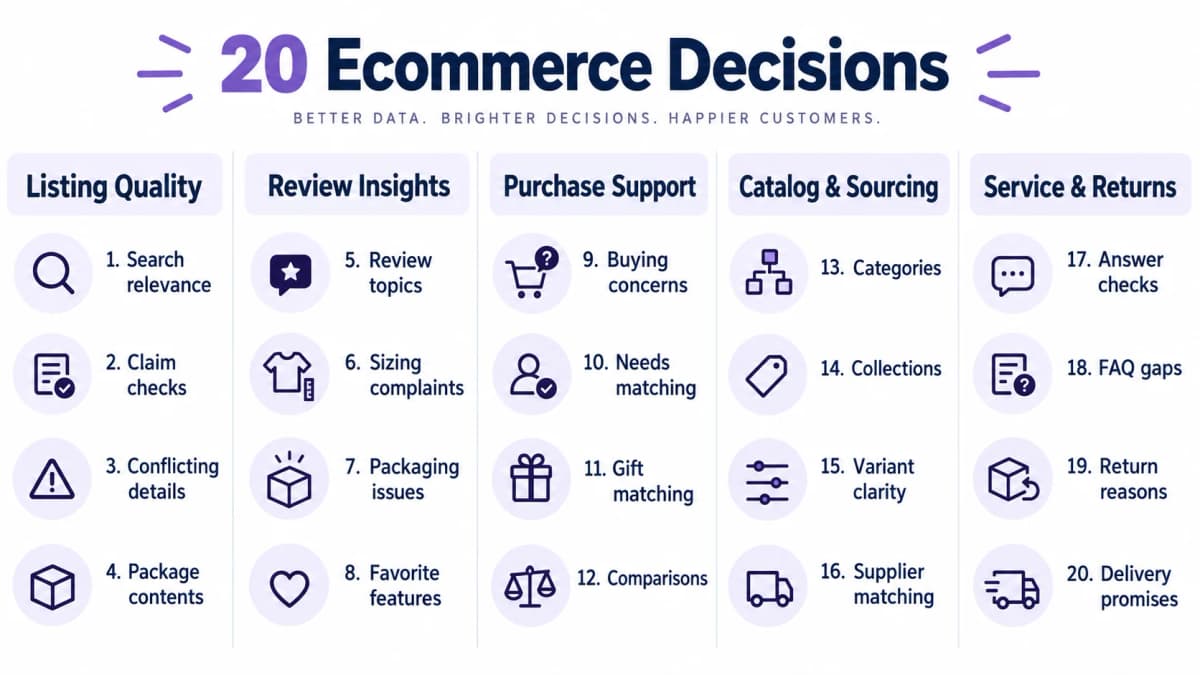
Product Listing Quality
Listing checks work best when the published copy and approved product facts are stored separately. Comparing two copies of the same unsupported statement adds little assurance.
1. Product Listing Relevance
In Amazon listing optimization, a search for a spill-resistant commuter mug carries different requirements from a search for a ceramic coffee cup. Give the workflow the search phrase, product title, description, and relevant specifications. Ask whether the listing addresses the expressed need, with an option for insufficient information.
Nexscope provides a Jev Evaluate API with a seo_relevance preset. Supply the query and a title or content excerpt to assess their textual relevance. This can support the relevance check; product suitability against detailed requirements still needs a separate workflow.
A ceramic cup without a lid might share the word “mug” while failing the commuter requirement. The result can send the listing to a merchandising review queue or identify a poor candidate for a particular search term. Keep relevance separate from predicted sales or search ranking. A semantic match does not establish demand, competitiveness, or conversion performance.
2. Product Claim Checks
Claims such as “dishwasher safe” need supporting product documentation. Supply the precise claim and the approved care instructions, keeping the source version attached to the record. A document specifying hand washing would conflict with an unrestricted dishwasher-safe statement.
Nexscope provides the Jev Evaluate API to check a claim against the evidence supplied with it. Its documented evidence_check preset accepts claim and sourceText, with an optional quote, and assesses support within that text.
An unsupported result means the supplied evidence does not establish the claim. The product team should obtain the missing documentation or revise the wording before publication.
3. Conflicting Product Details
Catalog information can disagree across titles, bullet points, and attribute fields. Supply those fields with their original labels and compare statements about the same variant. A title describing cotton alongside a polyester material field should trigger review.
For Amazon listings, Nexscope provides the Amazon Product Detail API to retrieve listing content, specifications, and available variant information by ASIN. Feed those fields into the comparison alongside the approved product record. Preserve the marketplace and collection time, and check which fields are actually populated.
The operational output is a discrepancy tied to a specific item and field. Resolve it against authoritative product documentation; the public listing alone cannot establish which conflicting statement is correct.
4. Package Contents Checks
Accessories create avoidable confusion when copy implies they are included. Supply the listing text and the confirmed packing list for the exact SKU. Ask whether each inclusion claim is supported, contradicted, or unresolved.
For example, “ready to charge out of the box” may deserve review when the package includes a cable but no power adapter. An editor can replace ambiguous wording with an explicit contents statement.
Keep bundle variants separate. A starter kit and a refill may legitimately contain different components. This check evaluates supplied text; verifying what a photograph depicts requires a separate visual inspection or an accurately prepared image description.
Customer Review Insights
Review analysis can organize evidence for product decisions. Sampling choices still determine what the resulting counts mean, particularly when teams deliberately collect more negative feedback.
5. Product Review Analysis
Define topics such as fit, durability, delivery, packaging, and usability. Give the classifier the review text and topic definitions, then retain the original wording beside the assigned labels. A review mentioning both a broken lid and slow delivery needs a way to preserve both issues.
Nexscope provides the Amazon Reviews List API to collect review samples by ASIN, with marketplace selection and star-rating filters. Use those reviews as inputs to the topic-classification workflow. Confirm the returned text is present before classification.
Group the results into an investigation queue. A sample balanced across star ratings does not represent the natural distribution of all customer experiences. Custom topic classification requires its own decision workflow beyond the current fixed Nexscope evaluation presets.
6. Sizing Complaint Analysis
A general negative label hides the difference between tight sleeves, a short torso, and inconsistent sizing across variants. Supply review text, available variant identifiers, and narrowly defined sizing categories.
“Usually wear medium, but the shoulders were too tight” could be classified under shoulder fit. Aggregate comparable comments by variant where reliable identifiers exist, then ask the product team to inspect measurements and the size guide.
Do not infer a customer's body measurements from a review. A “runs small” complaint is reported experience, and the appropriate response may be clearer fit guidance, better measurement coverage, or a product investigation. It does not automatically justify changing the entire size chart.
7. Packaging Complaint Analysis
Packaging damage and product damage require different follow-up. Provide the review text and categories that distinguish a damaged outer box, inadequate protection, a broken item, and uncertain damage.
“The carton was crushed, but the lamp works perfectly” should remain distinguishable from “the glass shade arrived shattered.” The operations team can examine packing materials for the first pattern and inspect protection, handling, and breakage evidence for the second.
Keep cause unassigned unless supporting information exists. A customer message rarely proves whether damage happened in a warehouse or with a carrier. Classification can identify the issue that needs investigation without inventing responsibility.
8. Customer Favorite Features
Positive feedback can reveal which benefits deserve clearer presentation. Supply reviews and a product-specific benefit taxonomy: easy cleaning, compact storage, comfortable grip, or straightforward assembly, for example.
If customers repeatedly praise a removable tray for being easy to clean, the merchandising team can review whether the listing explains that feature clearly. Retain the relevant excerpts and sample counts so an editor can inspect the observation.
Separate customer language from verified specifications. Praise for “lasting forever” does not support an unlimited durability claim. Use the findings to prioritize demonstrations and explanations, then check any resulting factual copy against the approved product information.
Purchase Decision Support
These applications begin with explicit customer requirements and a bounded set of candidates. They need current product facts and ordinary filters alongside semantic judgments.
9. Purchase Objection Analysis
Questions often reveal what shoppers still need to know. Supply customer questions or reviews and categories such as dimensions, compatibility, maintenance, installation, and delivery uncertainty.
“Will this fit beneath a low shelf?” indicates a clearance concern. The next action may be to add a dimension diagram or a direct answer about required space. If the measurement is missing, route the issue to the product team before preparing the answer.
Track recurring concerns by product rather than combining unrelated items. Frequency can guide content priorities, but it does not measure lost sales. Validate the effect of approved improvements with appropriate customer-service or conversion evidence.
10. Product Recommendations by Need
Start with a customer's stated requirements and a shortlist from the store's approved catalog. Filter objective constraints, including budget, dimensions, and availability, with ordinary code. Use Jev to assess the remaining descriptions against contextual needs.
For a compact home office, portability and ease of storage may distinguish products that all satisfy the price limit. Preserve the facts used for each decision so the selection can be reviewed.
Include “no suitable candidate” and “more information needed” outcomes. A recommendation system should not force a match when essential compatibility information is absent. Recheck changing facts such as stock and price before presenting a final option.
11. Gift Product Matching
Gift briefs combine concrete constraints with contextual preferences. Supply the budget, occasion, recipient's stated interests, delivery requirements, and candidate product facts. Avoid inventing preferences from sparse demographic information.
A beginner gardening kit could fit a brief requesting a compact introductory gift, provided its contents and instructions support that use. A specialist replacement component might be a weaker candidate despite falling within the budget.
Use the judgment to narrow a shortlist, then verify gift packaging, delivery timing, and required accessories separately. If the recipient's experience level is unknown, request clarification rather than treating “beginner-friendly” as an established requirement.
12. Product Comparison Selection
Useful comparisons address the same buyer task. Give Jev the intended comparison question and the candidate descriptions, then assess whether the products are reasonable alternatives. A full-sized countertop appliance and a replacement accessory usually need different treatment.
When researching Shopify product candidates, Nexscope provides the Shopify Product Query API to narrow the research dataset by criteria such as price and shipping country. Pass the resulting candidates into the comparison workflow. Confirm current specifications from the candidate pages before comparing them.
The result is a proposed comparison set. Editorial judgment still determines the comparison dimensions, and missing specifications should remain visible. A research dataset does not establish live inventory or access to a merchant's private store records.
Catalog and Sourcing
Classification is most useful when the permitted destinations already exist. Supply the actual category list, collection definitions, or sourcing requirements before asking for a match.
13. Product Category Matching
Provide the product's intended use and attributes alongside approved categories. Ask for the closest suitable category, allowing an unresolved outcome when none fits. An insulated lunch bag may belong under lunch bags rather than general travel luggage.
For Amazon research, Nexscope provides the Amazon Category Lookup API to retrieve category nodes by marketplace and parent identifier, or search category labels. Supply these permitted categories alongside the product facts for matching. Keep the node identifiers attached to their labels so a later review can inspect the proposed mapping.
A semantic recommendation does not establish listing eligibility or automatically update an Amazon category. Confirm marketplace requirements before making changes, and keep the store's own navigation taxonomy distinct from marketplace classifications.
14. Product Collection Matching
Collections express merchandising themes such as travel essentials, small-space living, or home-office accessories. Supply each collection's inclusion criteria and the facts for a product under consideration.
A compact power bank may fit a travel collection when portability is documented. That match alone does not establish compliance with airline battery rules. Keep any such requirement in a separate, verifiable check.
Allow multiple collection matches where the store permits them, and record which criterion each proposed assignment addresses. A merchandiser can approve additions in batches. The classification step produces suggestions; changing storefront collections remains a separate authorized operation.
15. Product Variant Clarity
Variant labels must distinguish what a customer will receive. Supply the option names, selected values, and SKU-level specifications. Ask whether the visible labels differentiate the actual variants.
Two options both named “standard” may hide a meaningful capacity difference. The reviewer can identify the ambiguity and use the verified capacities when preparing clearer labels. Another case might involve a color label attached to the wrong size record.
Compare each option with its own SKU, including regional naming differences where relevant. Jev can flag likely confusion in the supplied information; an editor should create replacement wording and verify the resulting selection experience before publication.
16. Supplier Product Matching
When researching products to sell, separate mandatory sourcing requirements from preferences. Supply the approved material, dimensions, packaging requirements, and order conditions, then evaluate each candidate against that brief.
If a supplier listing specifies a different material, exclude it from the qualified shortlist or request clarification. When a required field is absent, retain an “unverified” status rather than assuming compliance. Attach the original supplier statement and its date to the record.
This creates a consistent first review of supplier information. When evaluating suppliers, samples, inspections, certificates, and current quotations remain necessary where the purchasing process calls for them. A textual match does not establish manufacturing quality or delivery reliability.
Customer Service and Returns
Customer-service workflows depend on authorized first-party information. Public product datasets do not provide a store's private tickets, orders, or return records.
17. Product Answer Checks
Give the workflow the customer's question, a proposed response, and approved product facts. Evaluate specific factual statements and whether the answer addresses the question. Separate response drafting from this review.
For an indoor-only light, a draft recommending exposed outdoor installation should trigger correction. The agent can replace that statement with the documented use conditions or escalate a missing specification to the product team.
Nexscope’s Jev Evaluate API can check an individual factual claim from the draft against the supplied product documentation using evidence_check. Checking whether the full answer addresses the customer’s question requires a separate judgment.
When a response contains several claims, review each independently so one supported sentence does not obscure another unsupported promise. Keep the original draft, supplied evidence, and approved revision together. Sending the reply is a subsequent action governed by the support process.
18. Product FAQ Ideas
Supply recurring customer questions and the existing FAQ for a specific product. Determine which questions are already answered, which are only partially covered, and which need new information.
Repeated questions about charging time may expose a useful addition when the FAQ discusses battery capacity but omits charging conditions. An editor can group equivalent questions and obtain a verified answer from the product team.
The output should be a prioritized coverage queue. Generating polished FAQ copy requires a separate writing step, and every answer needs supporting facts. Keep questions about different versions or accessories separate when their answers differ, even if the wording is similar.
19. Return Reason Analysis
Store return codes often contain broad labels that hide useful detail. Supply de-identified return messages and the store's reason definitions. Classify fit problems, damaged items, expectation mismatches, delivery issues, and unresolved cases.
“The item works, but it is much larger than expected” suggests an expectation or size issue. The team can compare that pattern with the visibility of dimensions in the listing. Preserve multiple reasons when the message contains more than one.
Combine approved labels with authorized order data to calculate meaningful rates. Return-message counts alone cannot establish a product's return rate. Keep the denominator and period explicit, and leave refund approval within the existing policy and review process.
20. Delivery Promise Checks
Supply the delivery statement, destination, applicable shipping policy, and the date or conditions under which the statement appears. Check whether the wording is supported by the provided policy.
A page promising worldwide shipping conflicts with a policy that excludes certain destinations. Similarly, a dispatch-time statement should not be silently interpreted as an arrival guarantee. Flag the precise wording for the store operator to review.
Use deterministic checks for cutoff times and date calculations where the necessary data exists. Semantic evaluation can help identify misleading wording, but it cannot establish carrier performance or a delivery date without current operational evidence.
Build Your First Jev Workflow
Choose the Implementation Route
Start with a task whose result a reviewer can inspect quickly, such as review-topic classification or a product-claim check. Choose the implementation path before assembling the integration.
| Task | Implementation fit |
|---|---|
| Claim checked against a supplied specification excerpt | Nexscope's fixed evidence_check preset may fit the narrow evaluation |
| Query compared with supplied title or page excerpt | The fixed seo_relevance preset may fit the relevance component |
| Custom review labels, product categories, or recommendation criteria | Requires a custom decision workflow; these are not arbitrary-question options in Nexscope Evaluate |
| Discovery of a relevant published data API or fixed preset | Routing can identify a candidate capability; execution remains separate |
Nexscope's Jev integration exposes four fixed presets and rejects custom questions or policies. Its documented access requires an API key and an active subscription. Check current access conditions and billing separately for any data endpoints used alongside it.
When the appropriate data source is unclear, Nexscope provides the Jev Route API to match a retrieval intent with a published data API or fixed evaluation preset. Inspect the returned match and gather its required parameters before calling it separately. An ambiguous match requires clarification; routing does not fetch the data or build the complete workflow.
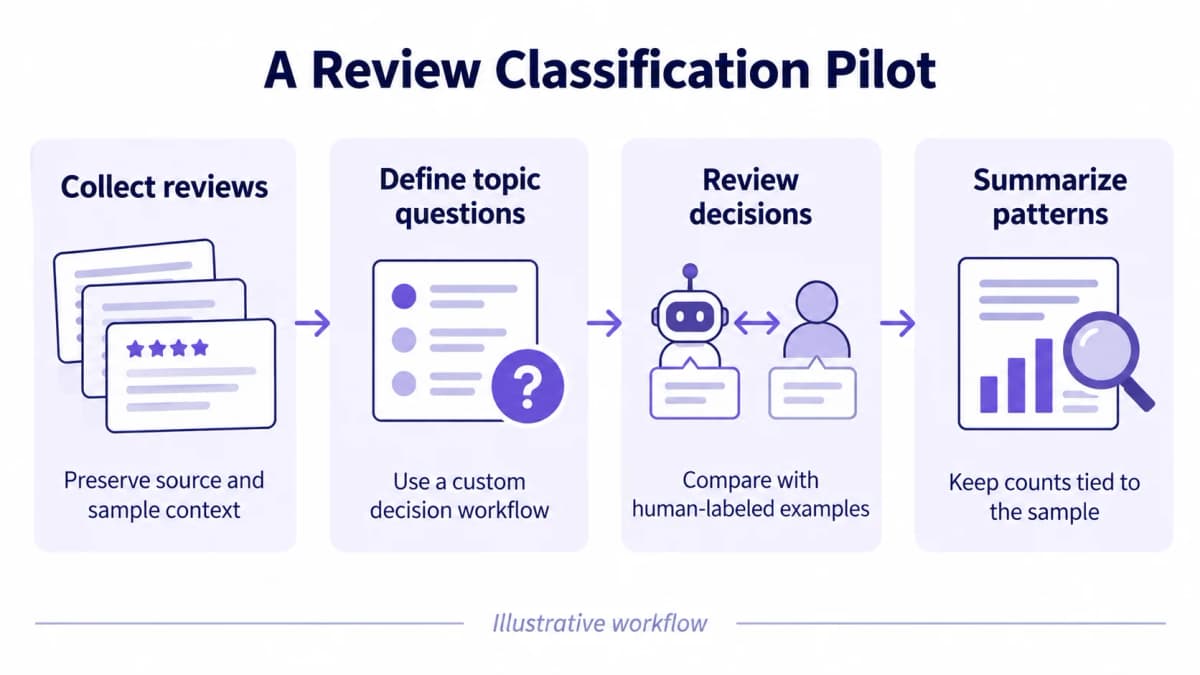
Prepare Inputs and Labels
For a review-classification pilot, select a manageable set of reviews with clear issues, mixed topics, neutral observations, and insufficient detail. Have a reviewer label them using the proposed definitions. This creates a reference for checking the custom workflow.
Retain source identifiers in the application so each result can be traced back to its evidence. Send only the authorized text required for the judgment, removing personal information that adds no value. Keep marketplace, variant, collection date, and sampling choices available for analysis.
Use one specific judgment per question. TypeSafe's question primitives support composing these decisions in application code. Where a review covers several topics, separate topic-presence questions may be more useful than forcing one exclusive label. Test that design against the team's actual reporting needs.
Evaluate Before Expanding
Compare the workflow with manual review or existing rules using the same labeled examples. Track disagreements by category, inspect confident errors, and record how many items need human review. Define acceptable error levels around the consequences of the next action.
| Measurement | What it establishes |
|---|---|
| Agreement with reviewed labels | Classification quality on the selected sample |
| Errors by topic or product | Where definitions or inputs need improvement |
| Review time per batch | Whether the complete process saves operational time |
| Data, model, and review cost | The cost of producing an accepted result |
| Later business outcomes | Whether approved changes are associated with useful operational results |
TypeSafe's confidence documentation describes signals that can help route uncertain decisions. Validate any thresholds against the actual task. A high confidence value is not a guaranteed accuracy rate on a store's data.
Keep the initial output in a review queue. Expand only after the process handles missing inputs, ambiguous cases, failed requests, and recurring errors adequately. Assess conversion or return-rate changes separately, using comparable periods and accounting for other product, pricing, and fulfillment changes.
Conclusion
The most useful Jev AI use cases for ecommerce connect a specific question to evidence and an operational decision. Review classification can organize product feedback. Claim checks can identify wording that needs support. Product matching can help teams compare candidates against explicit requirements.
Start with one workflow, retain its original inputs, and measure the work needed to produce accepted results. Relevant data APIs can supply product, review, and category information, while the team's own records provide the context for customer service and returns.
Start Using Nexscope Jev API
Use Nexscope’s supported Jev presets to check product claims against supplied evidence and assess query-to-listing relevance. Open the API documentation to prepare a request and start integrating.
Use Nexscope Jev API →Frequently Asked Questions
What is Jev AI used for in ecommerce?
Jev can be explored for focused judgments such as classifying review topics, matching products with stated requirements, and comparing claims with supplied evidence. A working application still needs data collection, explicit decision criteria, and logic for using the result. The examples in this article are implementation ideas, with a distinction between supported fixed evaluations and custom workflows.
Can Jev analyze product reviews?
A custom Jev workflow can evaluate supplied review text against defined topics or rubrics. The surrounding application must collect the reviews and preserve the sample context. Nexscope's review data endpoint supplies a potential input source, while its current fixed Jev evaluation presets do not include arbitrary review-topic classification. Test labels against human-reviewed examples before aggregating the results.
Can Jev write product descriptions?
Jev's documented interface returns typed decisions. Product-description drafting belongs in a separate writing process, which may involve an editor or a text-generation model. Jev can contribute a focused evaluation after a draft exists, such as assessing a claim against supplied specifications. The team should validate both the source facts and the final published copy.
Are all 24 ecommerce ideas built in?
No. Nexscope's Jev page presents potential applications and explains their current API fit. The Evaluate endpoint offers fixed presets, and custom classification or matching tasks require additional implementation. Route helps identify relevant published APIs or presets but does not run them. Review the endpoint contract for the exact task before assuming a use-case card describes a hosted feature.
How should a team start using Jev?
Choose one task with clear inputs and results that people can review. Determine whether a fixed evaluation fits or a custom workflow is necessary, then prepare a labeled test set. Measure errors, review time, and total cost against an existing process. Keep the first outputs advisory until the team has evidence that broader automation is appropriate.
Sources
- TypeSafe AI. (2026). Introduction. docs.typesafe.ai
- TypeSafe AI. (2026). Primitives (Questions). docs.typesafe.ai
- TypeSafe AI. (2026). Confidence. docs.typesafe.ai
- Nexscope. (2026). JEV Evaluate API Documentation and JEV Route API Documentation. nexscope.ai
- Nexscope. (2026). Amazon Reviews List, Amazon Product Detail, Amazon Category Lookup, and Shopify Product Query API Documentation. nexscope.ai