

How to Become an Amazon Affiliate and Earn Passive Income

Amazon's affiliate program — officially called Amazon Associates — lets you earn commissions by recommending products to your audience. When someone clicks your link and makes a purchase, you get a percentage of the sale.
It's one of the most accessible ways to monetize a website, blog, YouTube channel, or social media presence. Amazon sells almost everything, so no matter your niche, there are products you can promote.
This guide covers everything you need to know: how to sign up, get approved, create links, and actually earn money.
What Is Amazon Associates?
Amazon Associates is Amazon's official affiliate marketing program. Here's how it works:
- You sign up and get approved
- You create special tracking links for products
- You share those links on your website, blog, or social media
- When someone clicks and buys, you earn a commission
The program is free to join and available in most countries. Commission rates vary by product category, typically ranging from 1% to 10%.
Commission Rates by Category (2026)
| Category | Commission Rate |
|---|---|
| Amazon Games | 20% |
| Luxury Beauty, Luxury Stores Beauty | 10% |
| Digital Music, Physical Music, Handmade, Digital Videos | 5% |
| Physical Books, Kitchen, Automotive | 4.5% |
| Amazon Fire Tablet Devices, Amazon Kindle Devices, Amazon Fashion (Apparel, Shoes, etc.), Jewelry, Luggage, Watches | 4% |
| Toys, Furniture, Home, Home Improvement, Lawn & Garden, Pets, Pantry, Headphones, Beauty, Musical Instruments, Business & Industrial, Outdoors, Tools, Sports, Baby Products | 3% |
| PC, PC Components, DVD & Blu-Ray | 2.5% |
| Televisions, Digital Video Games | 2% |
| Amazon Fresh, Physical Video Games & Video Game Consoles, Grocery, Health & Personal Care | 1% |
| Gift Cards, Wireless Service Plans, Alcoholic Beverages | 0% |
Note: Rates change periodically. Check Amazon Associates Central for current rates.
Requirements to Join Amazon Associates
Before applying, make sure you meet these basic requirements:
You Need a Platform
Amazon requires you to have an established online presence where you'll share affiliate links:
- Website or blog — Most common option. Must have original content and be publicly accessible.
- YouTube channel — Must have existing videos (not empty channels)
- Social media accounts — Instagram, TikTok, Facebook, Twitter with engaged followers
- Mobile app — If you have an app where you'll promote products
Content Requirements
Your platform should have:
- Original content — Not copied or AI-generated spam
- At least 10 posts — For blogs/websites, Amazon wants to see established content
- Recent activity — Content published within the last 60 days
- No prohibited content — Adult content, violence, illegal activities, hate speech
The 180-Day Rule
After approval, you have 180 days (6 months) to make at least 3 qualifying sales. If you don't hit this threshold, your account is closed. You can reapply, but it's better to have traffic ready before signing up.
How to Sign Up for Amazon Associates
The application process takes about 10-15 minutes. Here's the step-by-step:
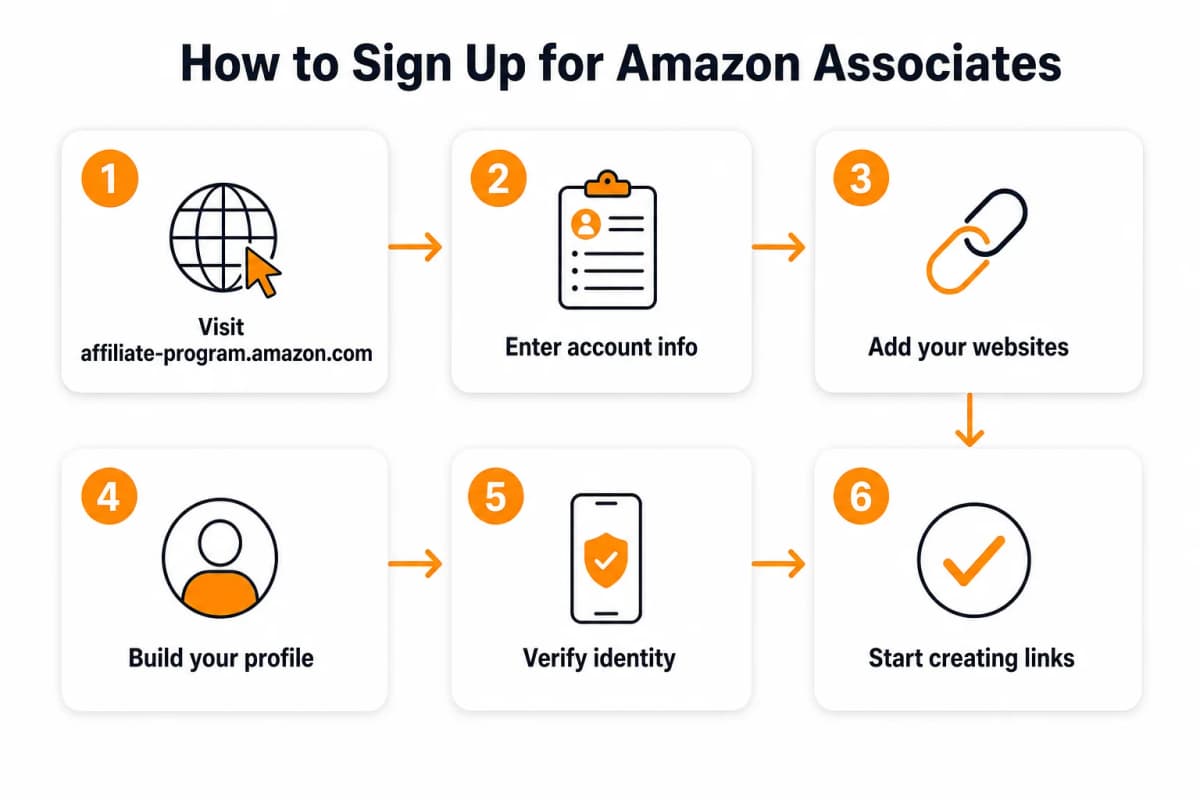
Step 1: Go to Amazon Associates
Visit affiliate-program.amazon.com and click "Sign Up."
If you have an existing Amazon account, you can use it. Otherwise, create a new account.
Step 2: Enter Your Account Information
Provide: - Your name and address - Phone number for verification - Payment information (how you want to receive commissions)
Payment options: - Direct deposit — Minimum $10 threshold - Amazon gift card — Minimum $10 threshold - Check — Minimum $100 threshold (plus $15 processing fee)
Step 3: Add Your Website or Social Media
Enter the URLs where you'll promote affiliate links: - Your main website - Any additional sites or blogs - Social media profiles - YouTube channel - Mobile app (if applicable)
Be thorough — add all platforms where you might share links.
Step 4: Build Your Profile
Complete your Associates profile: - Store ID — This appears in your affiliate links. Choose something memorable. - Website description — Explain what your site is about - Topics — Select categories that match your content - Traffic sources — How do people find your site? - Monetization methods — How else do you make money? - Link building approach — How will you create affiliate links?
Step 5: Verify Your Identity
Amazon will call or text a verification code to your phone. Enter the code to complete verification.
Step 6: Wait for Review
After submission, Amazon reviews your application. This typically takes 24-72 hours, though some approvals are instant.
You can start creating affiliate links immediately, but your account isn't fully approved until you make 3 qualifying sales within 180 days.
Getting Approved: What Amazon Looks For
Many applications get rejected. Here's how to increase your approval chances:
Have Real Content First
Don't apply with an empty or new website. Amazon reviewers check:
- Do you have at least 10 quality posts?
- Is the content original and valuable?
- Does the site look professional?
- Is there recent activity?
Recommendation: Build your site for 2-3 months before applying. Have 15-20 quality posts published.
Match Your Niche to Products
Amazon wants affiliates who make relevant recommendations. If your site is about fitness, you should promote fitness products — not random items.
Your content should naturally lead to product recommendations: - Product reviews - Comparison articles - "Best of" lists - How-to guides that mention tools/products - Resource pages
Disclose Your Affiliate Relationship
Amazon requires clear disclosure that you earn commissions from recommendations. Add a disclosure statement to:
- Your website footer or sidebar
- Individual posts containing affiliate links
- Your About page
Example disclosure: "As an Amazon Associate, I earn from qualifying purchases."
Avoid These Red Flags
Applications get rejected for: - No content or very thin content - Content that's clearly AI-generated spam - Sites that exist only to promote products (no real value) - Missing privacy policy or terms of service - Prohibited content categories - Fake traffic or engagement
Creating Your First Affiliate Links
Once approved, you can create affiliate links through Amazon Associates Central.
Method 1: SiteStripe (Easiest)
SiteStripe is a toolbar that appears at the top of Amazon.com when you're logged into your Associates account.
- Browse to any product on Amazon
- Click "Text" in the SiteStripe bar
- Copy the generated affiliate link
- Paste into your content
Method 2: Product Links Tool
In Associates Central:
- Go to Product Linking → Product Links
- Search for a product by name or ASIN
- Click "Get Link"
- Choose link type (text, image, or text+image)
- Copy the HTML or short link
Method 3: Native Shopping Ads
Create dynamic ad units that display relevant products based on your content:
- Go to Product Linking → Native Shopping Ads
- Choose ad type (Recommendation, Search, Custom)
- Configure targeting options
- Copy the ad code to your site
Link Types Explained
- Text links — Simple hyperlinks, most natural in content
- Image links — Product images that link to Amazon
- Text + Image — Combination for visual appeal
- Native ads — Dynamic product displays
- Bounty links — Promote Amazon services (Prime, Audible) for fixed bounties
Strategies That Actually Work
Getting approved is the easy part. Making money requires strategy.
Strategy 1: Product Review Content
Write detailed, honest reviews of products in your niche:
- Cover features, pros, cons, and alternatives
- Include real photos or videos if possible
- Answer common questions buyers have
- Compare to similar products
Review content converts well because readers are already considering a purchase.
Strategy 2: "Best Of" Roundup Posts
Create comprehensive lists: - "Best Wireless Earbuds Under $100" - "10 Must-Have Kitchen Gadgets for Home Cooks" - "Best Books for Learning Python Programming"
Roundup posts rank well in search and give readers multiple options to choose from.
Strategy 3: Comparison Articles
Help readers decide between options: - "AirPods Pro vs Sony WF-1000XM5: Which Should You Buy?" - "Instant Pot vs Ninja Foodi: Complete Comparison"
Comparison content targets buyers who are close to making a decision.
Strategy 4: Resource Pages
Create comprehensive resource pages for your niche: - "Complete Home Gym Equipment Guide" - "Everything You Need to Start a Podcast" - "My Recommended Photography Gear"
Resource pages work as evergreen traffic sources.
Strategy 5: Tutorial Content
Write how-to guides that naturally mention products: - "How to Set Up a Home Recording Studio" → link audio equipment - "How to Start a Vegetable Garden" → link gardening tools - "How to Train for Your First Marathon" → link running gear
Tutorial content builds trust before making recommendations.
Finding Products Worth Promoting
Not all products are worth your time. Focus on products that:
- Have good reviews — 4+ stars with substantial review counts
- Solve real problems — Products people actively search for
- Offer decent commissions — Consider both percentage and price point
- Match your audience — Relevant to your niche and readers
Using AI to Find Product Opportunities
Nexscope provides structured ecommerce data and focused seller workflows. Teams can use Nexscope's web tools directly or connect governed capabilities to their existing Agent through API, MCP, or Skills. Ready workflows include Keyword to Ads, Video Clone, and Buy Box Repricer.
Copy these prompts into Nexscope:
"What products are trending in the home fitness category on Amazon?"
"Find high-demand, low-competition products in the pet supplies niche"
"What are customers complaining about in reviews for wireless earbuds under $50?"
Nexscope analyzes real Amazon data to surface: - Trending products with growing demand - Gaps in the market you could fill with content - Customer pain points that inform your review angles - Seasonal trends to plan content around
Why this matters: The best affiliate content solves real problems. AI research helps you understand what your audience actually needs before you write.
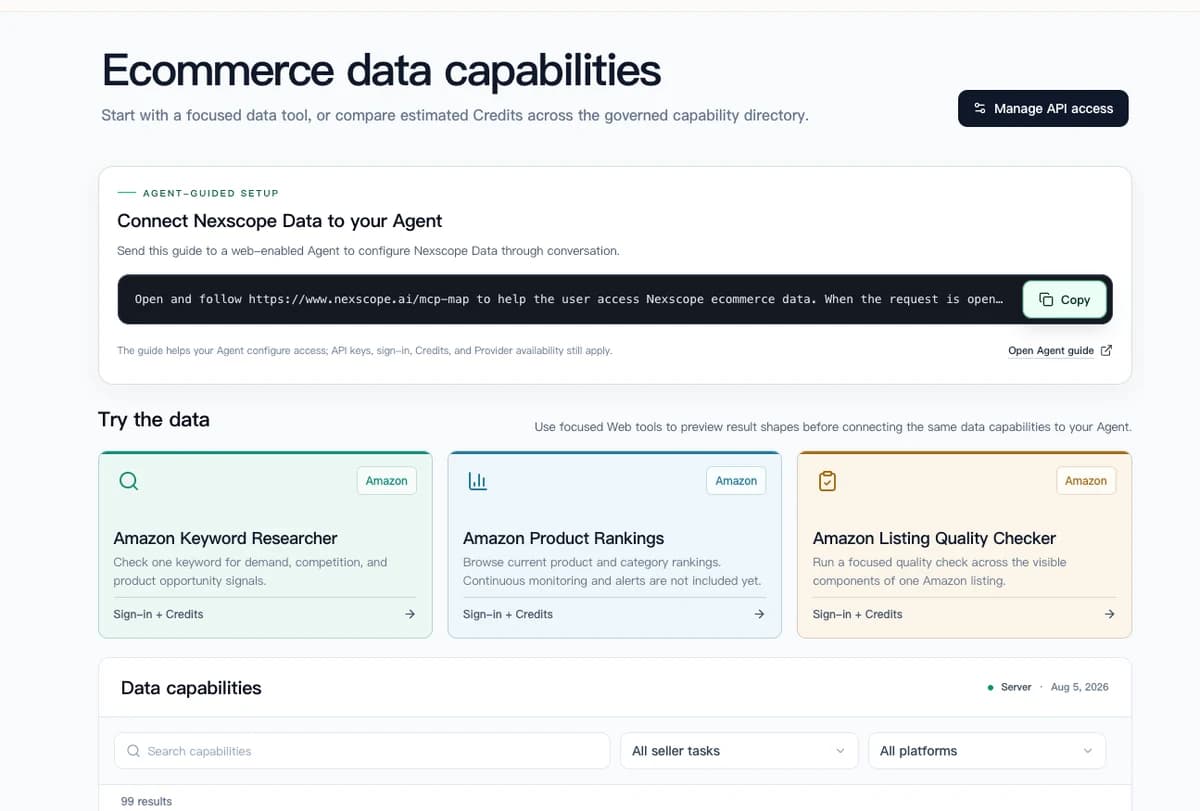
Try Nexscope Free → — Get 3 days free with 1,000 credits to research profitable product niches.
Common Mistakes to Avoid
Mistake 1: Applying Too Early
Don't apply with a brand-new site. Build content and traffic first, then apply when you're ready to make sales within the 180-day window.
Mistake 2: Promoting Everything
Focus on products relevant to your niche. Random promotions hurt trust and conversions.
Mistake 3: Hiding Affiliate Links
Always disclose affiliate relationships. It's required by Amazon's terms and FTC regulations. Hidden promotions can get your account banned.
Mistake 4: Ignoring Link Placement
Links buried at the bottom of posts rarely get clicked. Place affiliate links: - Early in the content (above the fold) - Within the natural flow of your writing - At decision points where readers are ready to buy
Mistake 5: Only Linking to Products
Take advantage of Amazon's full ecosystem: - Amazon Prime — $3 bounty for free trial signups - Audible — $5 bounty for free trial signups - Kindle Unlimited — Bounty for signups - Amazon Music — Bounty for signups
Bounties are fixed amounts regardless of purchase value.
Mistake 6: Not Tracking Performance
Use Amazon's reporting tools to understand: - Which links get clicks - Which products convert - What your actual earnings per click are
Double down on what works. Cut what doesn't.
Scaling Your Affiliate Income
Once you're earning consistently, scale with these approaches:
Expand Your Content
More quality content = more traffic = more affiliate opportunities. Focus on: - High-intent keywords ("best X for Y", "X vs Y", "X review") - Seasonal content (holiday gift guides, back-to-school) - Evergreen topics that drive traffic year-round
Build an Email List
Email subscribers are warm audiences who trust your recommendations. Build a list and: - Send product recommendations to subscribers - Promote seasonal deals (Prime Day, Black Friday) - Share exclusive finds and discounts
Diversify Traffic Sources
Don't rely on a single traffic source: - SEO — Long-term organic search traffic - Pinterest — Visual discovery, great for product content - YouTube — Video reviews and unboxings - Social media — Supplement other channels
Add Other Affiliate Programs
Amazon Associates is a starting point. Consider adding: - Direct brand affiliates — Often higher commissions - Other networks — ShareASale, CJ Affiliate, Impact - Niche-specific programs — Many industries have specialized affiliate programs
Is Amazon Associates Worth It?
Pros: - Easy to join and use - Massive product selection - Trusted brand (high conversion rates) - 24-hour cookie (earn from anything purchased) - Regular payment schedule
Cons: - Low commission rates (1-10%) - Short 24-hour cookie window - Commission rate changes without notice - Account can be closed for inactivity - Strict terms of service
The verdict: Amazon Associates works best as part of a broader monetization strategy. The low commissions are offset by Amazon's high conversion rates and the sheer variety of products available.
For beginners, it's an excellent starting point. As you grow, diversify into higher-paying programs while keeping Amazon as a reliable baseline.
Your Next Steps
Ready to start your Amazon affiliate journey? Here's your action plan:
- Build your platform — Create 15-20 quality posts before applying
- Apply to Amazon Associates — Complete the application process
- Create your first affiliate content — Start with product reviews in your niche
- Make 3 sales in 180 days — Focus on high-intent content to hit this threshold
- Scale with more content — Expand your affiliate content library
- Track and optimize — Use reporting to improve performance
The key is starting with quality content that genuinely helps your audience. Affiliate income follows naturally when you solve real problems.
Research Profitable Products with Nexscope →
Connect Ecommerce Data to Your Agent
Use Nexscope through API, MCP, or Skills, or open a ready seller workflow.
Explore Ecommerce Data →1,000 free credits • API, MCP & Skills
Frequently Asked Questions
How much can you make as an Amazon affiliate?
Earnings vary widely based on traffic, niche, and content quality. Beginners might earn $100-500/month. Established affiliates with significant traffic can earn $5,000-50,000+/month. The key factors are traffic volume and how well your content converts.
Do you need a website to be an Amazon affiliate?
No, but it helps. Amazon accepts YouTube channels, social media accounts, and mobile apps. However, websites typically convert better because you control the user experience and can create comprehensive content.
How long does Amazon affiliate approval take?
Initial approval is often instant or within 24-72 hours. However, full approval requires making 3 qualifying sales within 180 days. Your account is reviewed again after hitting this threshold.
Can you use Amazon affiliate links on social media?
Yes, Amazon allows affiliate links on social media platforms including Instagram, TikTok, Facebook, Twitter, and Pinterest. You must disclose that posts contain affiliate links.
Why do Amazon affiliate applications get rejected?
Common reasons include: insufficient content, new or inactive websites, content that violates Amazon's policies, missing disclosure statements, or platforms that don't match the application details.
Does the 24-hour cookie really work?
Yes. If someone clicks your affiliate link and purchases anything within 24 hours, you earn a commission — even if they buy different products. If they add items to their cart, the cookie extends to 90 days for those specific items.
Sources
- Amazon Associates. (2026). Operating Agreement. Retrieved from affiliate-program.amazon.com
- Amazon Associates. (2026). Commission Income Statement. Retrieved from affiliate-program.amazon.com
- Federal Trade Commission. (2026). Disclosures 101 for Social Media Influencers. Retrieved from ftc.gov