

How to Prioritize Amazon Keywords Before Launching PPC

Table of Contents
To prioritize Amazon keywords before launching PPC, start with product fit, compare demand and competition, and check whether the likely click cost fits your economics. Then assign each candidate to Test first, Watch, or Exclude, with a written reason for the decision.
A completed Amazon keyword research list can contain hundreds of plausible terms. A launch budget can support only a limited number of useful tests. The next task is deciding which unanswered questions deserve that budget. A short screening sheet makes those decisions easier to review before money is committed.
Define the Product Before the Keyword
Write a brief product specification above the keyword sheet. Include the marketplace, selling price, main features, intended buyer, and any features the product does not have. This prevents a promising demand estimate from changing the meaning of the product halfway through research.
Consider a hypothetical Amazon US listing:
- Product: A 2-liter stainless steel cat water fountain.
- Included: A replaceable filter and a mains-powered pump.
- Power: Requires a cable; it does not run on a battery.
- Price: $30 for this illustrative planning exercise.
- Unsupported claims: Wireless operation, ceramic construction, and a measured noise rating.
“Stainless steel cat water fountain” fits these facts. “Wireless cat water fountain” fails immediately. “Quiet cat water fountain” needs evidence about noise performance before it becomes a strong candidate.
Treat product fit as a gate. An impressive search-volume estimate cannot compensate for a missing feature. If the product genuinely meets a requirement but the listing does not explain it, place the keyword on hold while the relevant images, specifications, or copy are improved.
Use a Keyword Screening Sheet
Keep one row per candidate keyword. Record both the observation and its source, rather than entering a score without an explanation.
| Field | What to record | How it changes the decision |
|---|---|---|
| Product fit | Matching features, buyer needs, and any missing requirement | Reject clear mismatches before spending time on market analysis |
| Demand evidence | Volume or rank metric, reporting period, trend, and seasonality | Identify whether enough relevant demand exists for a useful test |
| Competition | Comparable offers, price, review depth, brand concentration, and sponsored presence | Explain how the listing could compete for the click and purchase |
| Cost feasibility | Planning CPC, expected conversion range, and allowable cost per order | Check whether the proposed experiment fits the product's economics |
| Evidence quality | Provider, marketplace, observation date, estimate status, and gaps | Separate testable candidates from those needing more research |
| Decision | Test first, Watch, or Exclude, plus a reason | Turn research into an accountable next action |
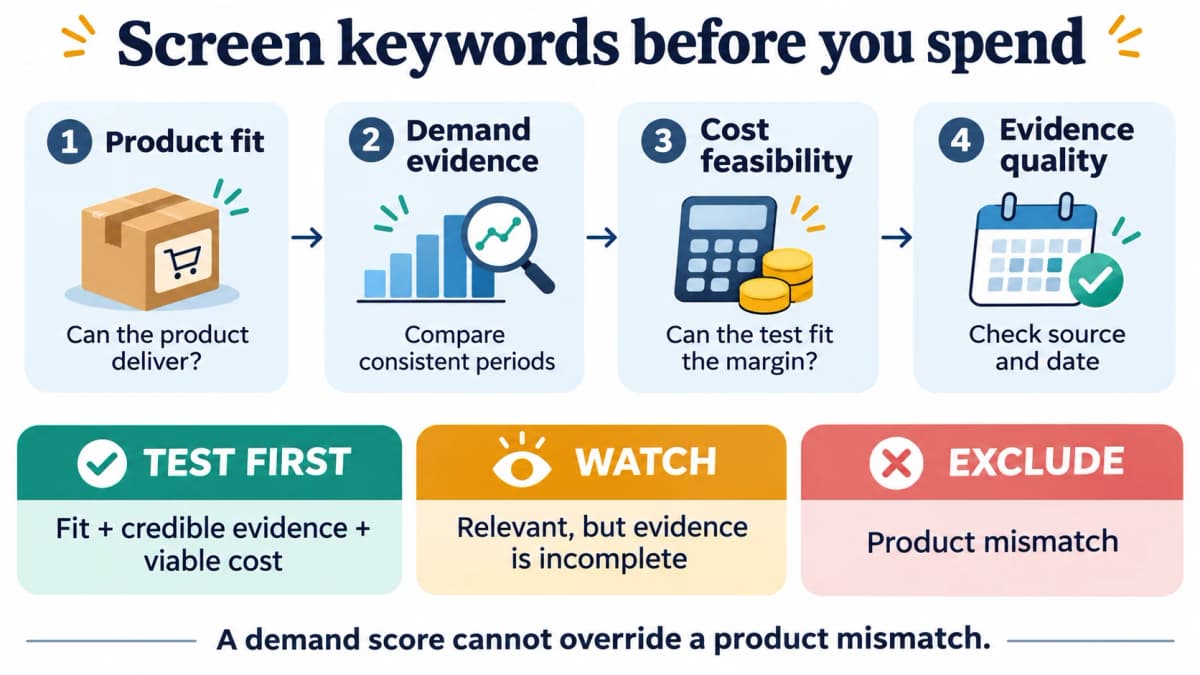
Check product fit first, then assess whether the remaining evidence supports a paid test.
Compare Demand Consistently
Compare the same marketplace, data source, metric, and reporting interval. A weekly estimate and a monthly total cannot be compared directly. Record missing observations as missing; a blank cell does not establish zero demand.
Growth can make a keyword interesting, but stable demand can also support a profitable product. Label the pattern as growing, stable, seasonal, declining, or unclear. For a seasonal term, compare equivalent periods where available rather than interpreting a holiday spike as permanent growth.
Amazon Brand Analytics provides search and purchase insights for eligible brands. Access requires a Professional selling account and a Brand Representative role for a brand enrolled in Brand Registry. Use the available reports alongside other research sources, retaining their metric definitions and reporting periods.
If a source reports search frequency rank, remember that a better rank is a relative position, not an absolute search count. A ranking improvement alone does not quantify how much demand increased.
Explain the Competitive Opening
Review the offers shoppers see for the candidate query. Compare similar product types and pack sizes, then ask why a buyer would choose this listing at its current price.
A useful note might read: “Several visible alternatives use plastic bowls; this product offers stainless steel at a comparable price.” “Top listings have fewer than 500 reviews” is less useful on its own. Review counts describe one competitive signal; they do not establish a universal entry threshold.
When collecting Amazon competitor keywords, preserve the relationship between each term and the comparable ASINs that generated it. A term found on an expensive, battery-powered fountain may be a poor fit for a lower-priced plug-in model.
For a broader comparison, Amazon keyword competition data can add estimated demand and counts of participating products. Keep the data period and estimate labels with the result, and use the actual search results to understand the offers behind those counts.
Give Unknowns a Next Action
An incomplete row belongs on the watchlist with a specific task. “Check later” is too vague. Better tasks include checking a comparable reporting period, verifying the product's noise claim, or obtaining a more relevant CPC estimate.
Use confidence labels such as strong, mixed, or incomplete. Avoid a weighted total that allows high volume to cancel out a product mismatch. If two researchers would make different decisions from the same row, improve the evidence note before adding another decimal place to the score.
Check the Cost Before Testing
Set an allowable advertising cost per order from the product's economics. Then translate it into a planning CPC using a plausible conversion range.
For the hypothetical $30 fountain, assume $12 remains after the product, fulfillment, selling fees, and other variable costs included in the calculation. If the seller wants to retain $4 per order after advertising, the allowance is:
Allowable ad cost per order = $12 − $4 = $8
Planning CPC ceiling = allowable ad cost per order × expected ad conversion rate
| Assumed conversion rate | Calculation | Planning CPC ceiling |
|---|---|---|
| 5% | $8 × 0.05 | $0.40 |
| 10% | $8 × 0.10 | $0.80 |
| 15% | $8 × 0.15 | $1.20 |
These are illustrative planning assumptions. They show how sensitive the decision is to conversion. At an average $0.90 CPC, the candidate would need an 11.25% conversion rate to meet the $8 advertising allowance: $0.90 ÷ $8 = 0.1125.
For a new listing without conversion history, use a conservative range and document its basis. If a candidate works only under the most optimistic assumption, place it behind an equally relevant candidate that works under a more cautious scenario. Recalculate when the selling price, discount, fees, or expected returns change.
The planning CPC ceiling is an average-cost target for the experiment. A campaign's actual bids and placement adjustments need separate controls. Keep the total test-spend limit distinct from the per-order advertising allowance.
Apply the Sheet to One Product
The following decisions illustrate how to use the fountain specification. Demand and cost conditions are assumed for the example; the table contains no measured keyword performance.
| Candidate keyword | Product fit | Evidence or uncertainty | Initial decision |
|---|---|---|---|
| stainless steel cat water fountain | Direct match to product and material | Assume credible demand evidence and a feasible cost range | Test first, once those assumptions are verified |
| cat water fountain with filter | Matches an included component | Assume comparable offers and costs support a small experiment | Test first, after checking how its intent overlaps with the first term |
| cat water fountain | Relevant but broad | Mixed shopper requirements; cost feasibility remains unclear | Watch while researching the competitive opening |
| quiet cat water fountain | Potential match | Noise performance has not been substantiated | Watch until the product claim can be supported |
| wireless cat water fountain | Requires a missing capability | Product needs a power cable | Exclude |
| cat water fountain replacement filters | Seeks a different purchase | Listing sells a complete fountain, not a replacement-filter pack | Exclude for this listing |
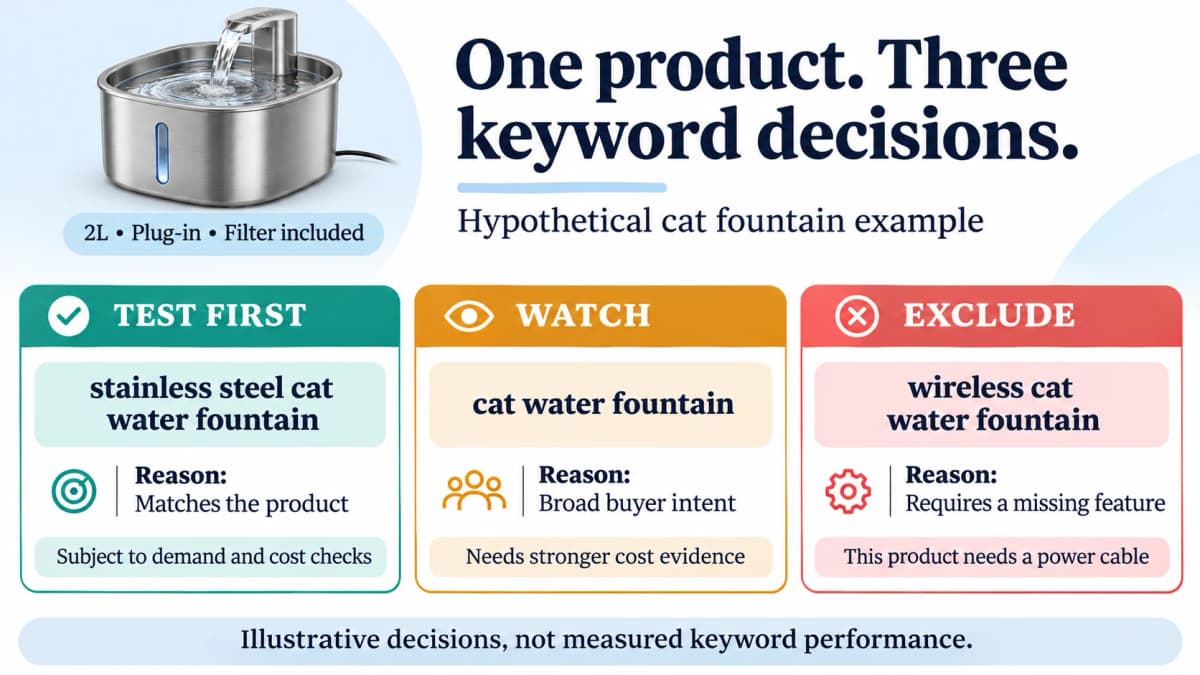
The same product supports different decisions depending on the requirement expressed in the query.
Translate Mismatches Into Exclusions
Keep the screening sheet's Exclude status separate from an advertising negative keyword. The sheet records the research decision; an exclusion changes which traffic a campaign or ad group can receive.
If a broad or phrase test can attract the unsupported wireless requirement, use Sponsored Products negative keyword management through Nexscope to prepare the relevant exclusion. Review its match type and scope so that valid plug-in fountain searches remain eligible. Creating or updating the negative keyword requires an authorized Ads connection and the documented preview-and-confirm step.
The two Test first candidates are not automatically two independent opportunities. Both may describe much of the same buyer intent. With a small budget, select the clearer first hypothesis, record why it was chosen, and keep the other candidate ready for the next controlled comparison.
“Cat water fountain” remains on the watchlist because its current evidence is weaker. A broad term can move into testing when the offer, demand, and cost case become convincing. The status describes today's decision, not a permanent rule about keyword length.
Turn Priorities Into Test Briefs
Before activating a candidate, give it a compact test brief. The brief should be understandable without reopening the entire research export.
| Test-brief field | Example entry |
|---|---|
| Candidate | stainless steel cat water fountain |
| Hypothesis | Shoppers seeking this material will find a clearly matching offer |
| Listing support | Material and power requirements are visible in images and specifications |
| Cost basis | $8 allowable ad cost per order; conversion scenarios documented |
| Spend control | An explicit total test limit chosen for the account's available budget |
| Review evidence | Actual search terms, clicks, spend, attributed orders, and reporting maturity |
| Next decision | Continue, revise the offer or bid, collect more evidence, or stop |
Prepare the Keyword Test
Choose Amazon keyword match types to fit the test. Exact match offers tighter targeting but still includes close variations, so inspect the actual search terms associated with the traffic.
For an approved candidate, carry the keyword text, match type, and proposed bid into Sponsored Products keyword management through Nexscope. The integration supports creating or updating keyword targets in an authorized Amazon Ads connection. Review the proposed request before confirming the change, keeping its targeting choices consistent with the test brief.
Review the Advertising Evidence
Use Amazon Ads reporting through Nexscope to request a report for the connected account and test period, check its status, and download the completed result. Choose the report type, grouping, and supported columns needed for the review. Compare the returned performance with the screening sheet's original cost assumptions; retain the report's attribution window and data maturity when interpreting orders or sales.
Set a review date and a spend boundary before launch. A week may be a convenient review point, but the calendar alone cannot establish whether the keyword works. Sparse clicks, recent clicks awaiting attribution, a changed price, or an out-of-stock period can all change how the results should be read.
Treat Test first as permission to learn within a limit. A candidate earns more budget only when the resulting evidence supports the next decision. Once it does, it can enter the broader Amazon keyword ranking strategy.
Conclusion
Prioritize Amazon keywords by eliminating product mismatches, making demand and competition evidence comparable, and checking costs against a realistic conversion range. Keep unresolved candidates on a watchlist with a specific research task. The output should be a small set of testable hypotheses, each with a reason, a spending boundary, and a review plan.
Research and Test Keywords With Nexscope
The screening sheet becomes more useful when research can be carried into a controlled test and reviewed against account results. Nexscope combines Amazon research data with Amazon advertising operations, helping teams connect keyword selection, approved targeting changes, and performance review in their own workflow.
Key Capabilities
- Sponsored Products keyword management: Create or update approved keyword targets for a controlled PPC test.
- Sponsored Products negative keywords: Apply reviewed exclusions to reduce traffic that does not fit the product.
- Amazon Ads reporting: Create reports, check their progress, and download completed results for the chosen reporting configuration.
- Amazon keyword research: Find traffic keywords associated with an ASIN to build a candidate list for relevance screening.
- Competitor comparison: Compare competing products by price, sales estimates, and growth to assess the offer landscape.
- Market opportunity analysis: Examine niche competition and market signals around a keyword.
- Amazon product and review data: Add listing, pricing, review, and historical information where supported to investigate the buyer requirements behind a term.
Connect supported data to your own application, Agent, or research workflow through REST API or MCP. Use Amazon Ads account authorization to connect the advertising account before requesting account reports or managing its targets. Research estimates and authorized account results serve different roles; preserve their sources and reporting periods. Advertising changes use a preview followed by confirmation.
Prepare Your Next Keyword Shortlist
Bring keyword research, authorized advertising operations, and report-based review into your next PPC test workflow.
Explore Ecommerce Data →FAQ
What should come first when prioritizing Amazon keywords?
Product fit comes first. Check whether the product satisfies the query's features, material, intended buyer, and use case. Exclude clear mismatches before comparing demand or costs. A keyword requiring a battery-powered product is unsuitable for a plug-in-only item, regardless of its search volume.
Should growing keywords always outrank stable keywords?
No. Stable demand can be commercially useful when product fit and economics are strong. Growth deserves attention, but it can reflect seasonality or a temporary event. Compare equivalent reporting periods and make the final decision using demand, competition, cost feasibility, and evidence quality together.
How many keywords should a new PPC test include?
Use a small enough set that the available budget can produce interpretable evidence for each candidate. The appropriate number depends on expected CPC, available spend, demand, and how distinct the hypotheses are. Funding many nearly identical terms can make the first review harder to interpret.
What if the keyword data is incomplete?
Mark the candidate Watch and record the missing evidence. Identify the next action, such as verifying product specifications, checking comparable demand periods, or refining the cost estimate. Missing data should not be silently converted to zero or treated as proof that a keyword has low competition.
Does Test first mean the keyword is profitable?
No. It means the candidate has a sufficiently clear fit and evidence base to justify a controlled experiment. Profitability must be evaluated from actual costs and outcomes using consistent reporting definitions, mature attribution data, and the product's current economics.
Sources
- Amazon. Improve product visibility through effective Amazon keyword research. sell.amazon.com.
- Amazon. Amazon Brand Analytics. sell.amazon.com.
- Amazon Ads. Keyword targeting and match types. advertising.amazon.com.
- Nexscope. Amazon Data API; Amazon Keyword Overview; Amazon ASIN Keywords; Amazon Competitor Lookup; Amazon Niche Info By Keyword; Amazon Ads Access; Amazon Advertising; Amazon Ads Reporting; Sponsored Products Keyword Management; Sponsored Products Negative Keyword Management. nexscope.ai.