

Keepa API Guide for Amazon Product and Price History Data

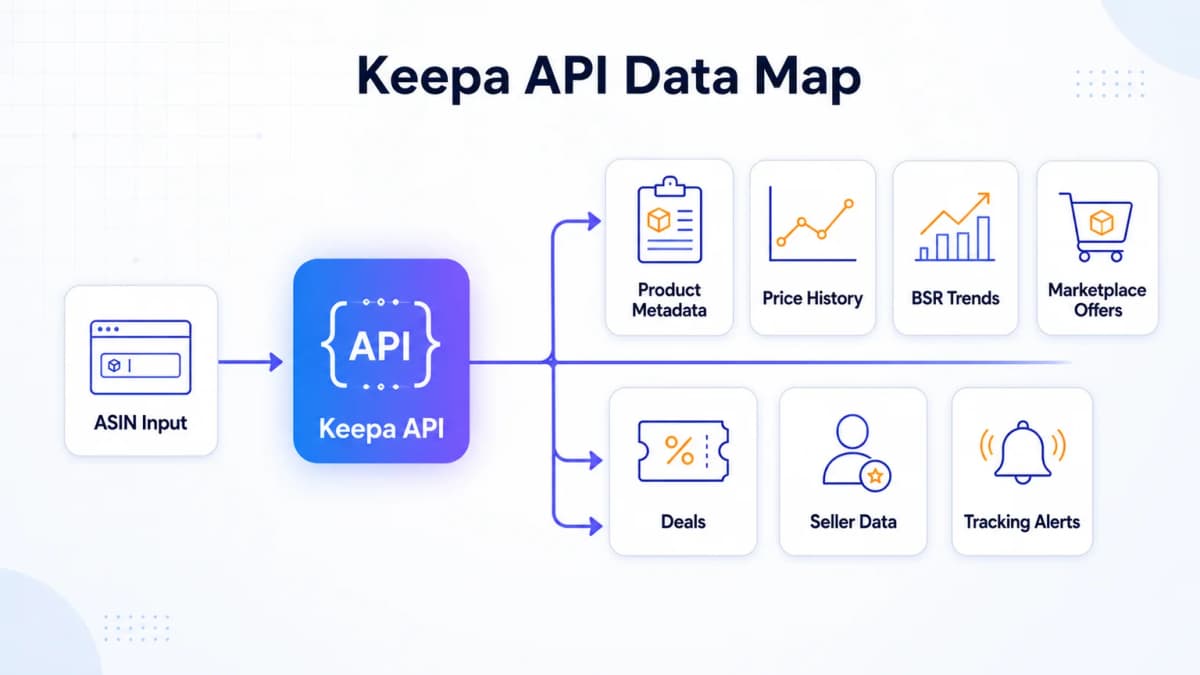
The Keepa API gives developers and Amazon sellers programmatic access to product records, price history, sales rank history, marketplace offers, deals, seller information, and tracking notifications. That makes it useful when a research process has outgrown manual chart checks and needs repeatable data for many ASINs.
The difficult part is usually not sending the first request. It is understanding which endpoint fits the job, how Keepa's token system affects throughput, how its compact historical arrays should be decoded, and which fields can be missing or stale. A pipeline that ignores those details can turn valid data into misleading conclusions.
This guide explains the Keepa API from a practical perspective. It covers the main data objects, token costs, core endpoints, a basic product request, seller use cases, and the limitations that matter in production. It also explains when a broader ecommerce data layer may be useful after Keepa has answered the historical product questions it handles best.
What Is the Keepa API?
Keepa is widely known for adding historical price charts to Amazon product pages. Its API exposes much of the underlying Amazon product and marketplace history as JSON. The base URL is https://api.keepa.com/, and every request requires an API access key.
The API is designed around Amazon locales. A request normally includes a domain identifier, such as domain=1 for Amazon.com, plus an ASIN, seller ID, category ID, or query object depending on the endpoint. Product data is returned through HTTPS, and Keepa recommends accepting gzip compression and reusing connections for efficient integrations.
The API serves several distinct jobs:
- Retrieving a known product by ASIN
- Searching products by keyword
- Filtering the product database through Product Finder
- Inspecting price, sales rank, offer count, rating, and review histories
- Finding recent deals and value changes
- Looking up sellers, categories, and best-seller lists
- Creating product tracking rules and receiving notifications
These jobs should not be treated as one interchangeable request. Product lookup, product discovery, offer refreshes, and deal browsing have different payloads and token costs. A clear workflow starts with the business question and then selects the narrowest endpoint that can answer it.
What Data Does the Keepa API Return?
The product object is the center of most Keepa API workflows. It combines product metadata with historical arrays and optional objects. Available fields depend on the product type, request parameters, locale, and whether Keepa has collected the data.
Product and Price History
Common product fields include the ASIN, title, brand, category information, images, parent and variation relationships, dimensions, package weight, features, listing dates, and update timestamps. Historical signals are stored primarily in the two-dimensional csv array.
Each first-level csv index represents a defined history type. Important examples include:
| Index | History type | Typical use |
|---|---|---|
0 |
Amazon price | Track Amazon's own price changes |
1 |
New marketplace price | Track the lowest new marketplace price |
2 |
Used marketplace price | Track used-offer pricing |
3 |
Sales rank | Review Best Sellers Rank movement |
4 |
List price | Compare historical MSRP signals |
11 |
New offer count | Monitor seller competition |
16 |
Rating | Track rating history when requested |
17 |
Review count | Track review-count history when available |
18 |
New Buy Box price | Track Buy Box price including shipping |
History entries usually alternate between a Keepa timestamp and a value. Shipping-inclusive histories use three-part entries: timestamp, price, and shipping. Prices are integers in the locale's smallest currency unit. A value of -1 generally means no offer was available for that interval.
Keepa appends a new historical entry when the value changes, not every time it checks a product. The resulting time series is event-based rather than a regularly spaced daily table. Analytics code should preserve that distinction.
Sales and Review Signals
The product object can include main and category-specific sales rank histories. It can also include monthlySold, which represents Amazon's visible bought-in-the-past-month bracket when available. Keepa documents that value as an Amazon-published bracket rather than an exact sales estimate, and most ASINs may not have it.
Review and rating histories also require careful interpretation. Some review fields depend on request parameters, some cannot be force-refreshed, and Amazon's own data availability has changed over time. Missing history should remain missing in the downstream system instead of being converted to zero.
Offers and Seller Data
Using the optional offers parameter can return marketplace offer objects with seller identity, condition, Prime and FBA flags, price, shipping, stock, coupons, and offer history. It also increases token consumption because Keepa may retrieve offer pages in addition to the base product.
Offer data has an important freshness boundary. Amazon can display many offers, their order changes frequently, and Keepa cannot continuously update every offer for every product. The response can therefore contain older offers. Fields such as offersSuccessful, liveOffersOrder, and update timestamps should be evaluated before a workflow labels an offer as current.
Deals and Tracking
The Deals endpoint identifies products that recently changed in price or sales rank and match a filter. Keepa states that deal results are limited to products updated within the previous 12 hours. A request returns up to 150 deals, with paging available for larger result sets.
The Tracking API serves a different purpose. It creates and manages product tracking rules and can produce notifications when conditions are met. This is useful for price alerts and monitoring systems, while the Deals endpoint is better suited to discovering recent changes across a filtered market.
How Does Keepa API Pricing Work?
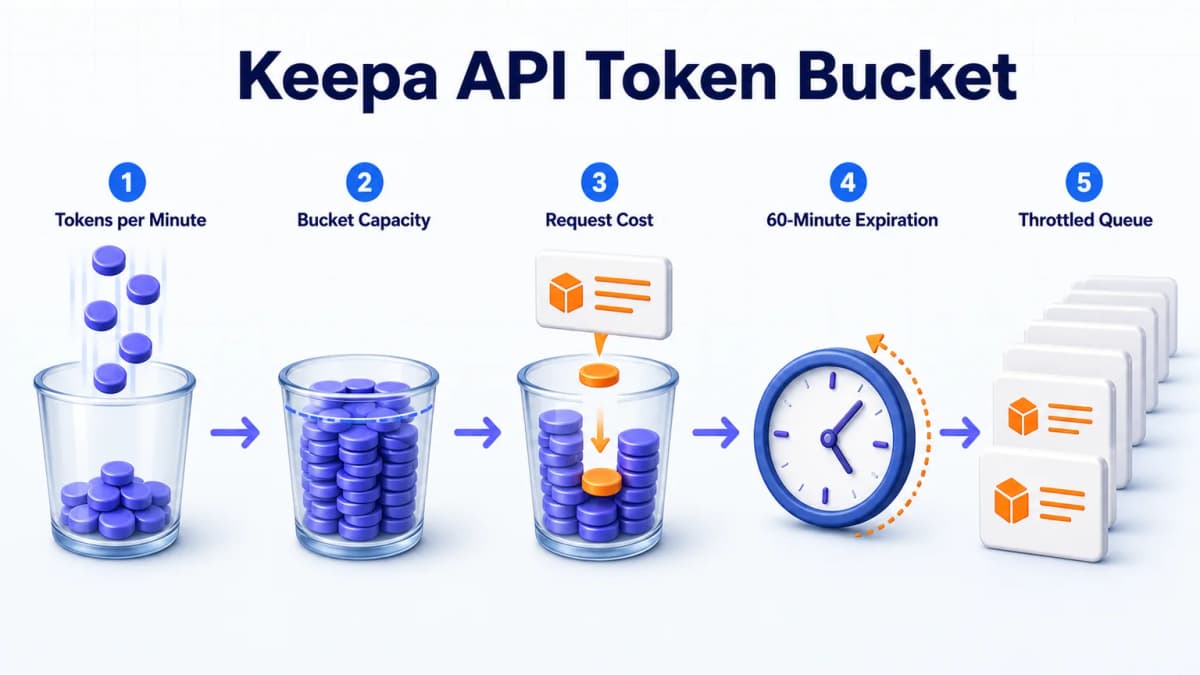
Keepa API pricing is tied to a token bucket rather than a simple monthly request count. Each plan generates a fixed number of tokens per minute. Requests consume tokens, and unused tokens expire after 60 minutes.
The exact subscription prices should be checked in the Keepa API account page before budgeting because plan amounts can change. The durable planning unit is the plan's refill rate and the token cost of the required endpoints.
Product Request Costs
The official documentation lists these baseline examples:
| Request type | Documented token cost |
|---|---|
| Product request | 1 token per ASIN |
| Optional offer page | 6 additional tokens per found page, up to 10 offers per page |
| Product search | 10 tokens per result page, up to 10 results |
| Category lookup | 1 token per request |
| Category search | 1 token per search |
| Deals | 5 tokens per request, up to 150 deals |
| Seller information | 1 token per seller |
| Best Sellers | 50 tokens per requested list |
Some endpoint options have different costs. Production estimates should use the relevant endpoint page rather than assume every call costs one token.
Refill and Burst Limits
Suppose a plan generates 60 tokens per minute. Because unused tokens expire after 60 minutes, its maximum bucket capacity is 3,600 tokens. That supports a burst of up to the current balance, followed by new tokens arriving at the refill rate.
A large theoretical monthly token total does not mean the entire amount can be spent in one batch. Workloads must also fit the refill rate and bucket capacity. A nightly job that requests hundreds of thousands of expensive offer pages may need throttling even when its monthly arithmetic looks acceptable.
Every response includes fields such as tokensLeft, tokensConsumed, refillRate, and refillIn. Applications should log them and pause or queue work when the balance approaches the cost of the next request.
Workload Planning
A realistic estimate separates inexpensive product requests from optional refresh work:
monthly token demand =
  product ASIN requests
  + product search pages × 10
  + retrieved offer pages × 6
  + deal pages × 5
  + seller lookups
  + other endpoint costs
The calculation should use expected results, not only submitted calls. For example, an offers request can cost more when more offer pages are found. Testing a representative ASIN sample provides a better estimate than applying the minimum cost to every product.
Choosing the Right Keepa API Endpoints
Keepa provides specialized endpoints instead of one universal search operation. The following endpoint map covers the most common starting points.
Product Request
/product retrieves known products by ASIN or product code. It can return product metadata and price history, with optional statistics, offers, stock, ratings, Buy Box data, and historical parameters.
Use it when the workflow already knows which ASINs to analyze. This endpoint is the usual choice for competitor monitoring, price-history checks, and catalog enrichment.
Product Search and Finder
/search?type=product searches Amazon products by keyword and returns product objects. It is useful for a straightforward keyword-to-product lookup.
/query powers Product Finder and accepts a more detailed JSON selection. It is better suited to filtering a large product database by conditions such as category, price, sales rank, ratings, offers, and historical changes. Developers should inspect the current Product Finder schema because available filters can expand or change.
Teams comparing multiple Amazon data providers can use a broader Amazon product API comparison to distinguish historical-data APIs from official seller APIs, affiliate catalog APIs, and real-time scraping services.
Deals, Sellers, and Categories
/deal browses recent product changes that match a query. /seller retrieves seller information. /category and category search resolve category objects, while /bestsellers returns ranked ASIN lists.
These endpoints support market monitoring and discovery, but they answer different questions. A deal query finds recent changes. A seller request profiles a known marketplace seller. A best-seller request returns a ranked category list. Combining them without preserving their source and timestamp can produce misleading comparisons.
Tracking and Notifications
/tracking creates, updates, and removes product tracking rules. Tracking objects define the product, threshold, price type, notification channels, and other conditions supported by the API.
Tracking is appropriate when the required output is an event, such as a target price being reached. Periodic product requests are more suitable when an application needs a complete historical record or a custom analytical snapshot.
How to Make a Keepa API Request
A minimal Keepa product request needs an access key, Amazon locale, and ASIN. The following example requests one product from Amazon.com:
curl -s --compressed \
  "https://api.keepa.com/product?key=YOUR_API_KEY&domain=1&asin=B00M0QVG3W"
Request Setup
The API key should be injected from a secret manager or environment variable. It should never be committed to a repository, written into a client-side application, or placed in analytics logs.
For larger batches, the integration should also define:
- The locale and domain ID
- Maximum ASINs per batch
- Required optional parameters
- Expected token cost
- Request timeout and retry policy
- Cache duration by data type
- Missing-value behavior
Optional parameters should be enabled only when the workflow needs the additional data. Adding offers, stock, rating, or other refresh work increases response size, processing time, and sometimes token cost.
Response Handling
A successful response contains the current token status and a products array. The integration should validate the response status, confirm that the requested ASIN was returned, inspect productType, and then decode only the fields required by the use case.
const url = new URL("https://api.keepa.com/product");
url.search = new URLSearchParams({
  key: process.env.KEEPA_API_KEY,
  domain: "1",
  asin: "B00M0QVG3W"
});

const response = await fetch(url, {
  headers: { "Accept-Encoding": "gzip" }
});

if (!response.ok) {
  throw new Error(`Keepa request failed: ${response.status}`);
}

const data = await response.json();
const product = data.products?.[0];

if (!product) {
  throw new Error("No product returned for the requested ASIN");
}

console.log({
  asin: product.asin,
  title: product.title,
  tokensLeft: data.tokensLeft,
  lastUpdate: product.lastUpdate
});
The historical csv arrays need a separate decoder. Keepa timestamps use minutes from a custom epoch. Convert them to Unix milliseconds with (keepaTime + 21564000) * 60000. Preserve the history type because some arrays contain timestamp-value pairs while shipping-inclusive types contain timestamp-price-shipping triplets.
If the application needs current Amazon search results instead of a known ASIN's history, an Amazon Search API workflow is a closer match than repeatedly querying product history.
Keepa API Use Cases for Sellers
Historical data becomes useful when it is tied to a decision. The following workflows are common starting points for Amazon sellers, agencies, and ecommerce software teams.
Price and BSR Validation
A single current price can hide discount cycles, stockouts, seasonal peaks, and unstable competition. Price history shows whether today's offer is normal, unusually low, or elevated. Sales rank history adds a demand-related signal, although BSR should not be treated as exact unit sales.
A useful validation record can include:
- Current Amazon, new, used, and Buy Box prices
- 30-day and 90-day price statistics
- Main-category and subcategory BSR history
- New and FBA offer-count history
- Last product, price, and offer update times
- Missing-value flags
The result supports product screening, but it does not prove future profitability. Fees, conversion, demand, seasonality, and sourcing costs still require separate evidence.
Competitor Monitoring
Monitoring a fixed ASIN set can reveal price moves, Buy Box changes, offer-count growth, rating movement, and shifts in sales rank. The most reliable pipeline stores each request time, source update time, and decoding version alongside the observations.
Alerts should use explicit conditions. Examples include a competitor moving below a price floor, an offer count increasing beyond a threshold, or BSR leaving a defined range. Broad labels such as "competitor is winning" require more evidence than one price or rank change.
Product Discovery
Product Search, Product Finder, Deals, and Best Sellers can build candidate lists. The next stage should enrich those ASINs with price stability, rank history, seller competition, ratings, and category context.
This is different from searching a known product. Discovery workflows often consume more tokens because they generate result pages first and then request details for the returned ASINs. Filtering early reduces both cost and irrelevant data.
For teams developing a wider sourcing process, product research methods should combine marketplace history with demand, competition, fees, review gaps, and supply constraints.
Deal and Availability Checks
Deals can surface products with recent price or rank changes. Product and offer requests can then verify current values, available conditions, seller information, and update timestamps.
The second verification step matters because a deal record reflects a recent change, not a guarantee that the same offer remains available. A robust workflow treats the deal result as a candidate and confirms the live decision inputs before acting.
Keepa API Limits and Data Quality
Keepa provides valuable historical coverage, but every historical API has boundaries. Those limits should be part of the data model rather than buried in error handling.
Freshness and Sampling
Product fields have separate update timestamps. Price, rating, stock, offers, and seller information may not share the same freshness. A response received now can contain values collected at different times.
Offer history deserves extra caution. Keepa states that retrieving and updating billions of offers continuously is not feasible. The offers parameter controls how many offer pages are retrieved, and older offers can remain in the history. Workflows that require current page state should verify freshness and consider whether a live Amazon data source is a better fit.
This is also the main difference between a structured data API and a scraping API. A comparison of Amazon scraper APIs can help teams evaluate freshness, parsing risk, location variance, and maintenance responsibility.
Missing Values
Fields may be null, undefined, empty, 0, -1, or unavailable depending on the field definition. Those states are not interchangeable.
-1can mean no offer was available for a price-history interval.nullcan mean a history type was not collected.- A missing monthly-sold value should not become zero sales.
- A missing rank can result from product type, category behavior, or unavailable data.
- An incomplete offer list should not be presented as the complete seller market.
Preserve raw missing states before creating analytical defaults. A display layer may show an em dash or “unavailable,” while the stored record should retain the original status and source timestamp.
Data Normalization
Keepa responses use locale-specific smallest currency units, Keepa Time, indexed history arrays, and fields whose availability depends on parameters. A normalization layer should convert these consistently and retain the original payload for debugging.
Recommended normalized fields include:
sourcesource_timestampretrieved_atmarketplaceasinmetric_namemetric_valuecurrencyavailability_staterequest_parametersschema_version
Keepa can add history types to the csv array. Code should rely on documented constants and tolerate additional indexes rather than assume the array will always have a fixed length.
When Broader Amazon Data Helps
Keepa can answer deep historical questions about Amazon products, prices, ranks, offers, sellers, and deals. Broader research often introduces additional questions: Which keywords are driving demand? What complaints repeat across review text? Which competing ASINs occupy the same niche? How concentrated is the market? What sales estimates and opportunity signals support the product decision?
Managing those questions through separate providers can create multiple credentials, schemas, billing models, and retry systems. A unified data layer becomes useful when the workflow needs Keepa-sourced history together with other product, keyword, review, competitor, sales, and market intelligence.
Nexscope provides supported ecommerce data through REST API and MCP. Its documented Amazon Product History and Product Price Series APIs cover fields such as price trends, BSR trends, seller counts, ratings, rating counts, and monthly sales where available. Other supported APIs cover product discovery, keyword demand, reviews, competitor lookup, sales estimates, and market research.
The practical benefit is operational consolidation. Supported calls use one Nexscope account and a shared credit balance instead of requiring a separate integration contract for every research step. Provider availability, request fields, response fields, freshness, and credit cost still need to be checked for each API. Selected Keepa-sourced access does not imply full parity with every Keepa endpoint.
This approach fits teams that need multiple data categories in one REST or MCP workflow. Direct Keepa access remains appropriate when a product requires Keepa's complete endpoint set, native tracking model, or dedicated token plan.

Conclusion: Building a Reliable Keepa API Workflow
The Keepa API is a strong foundation for Amazon product and price history. Its product object can support price analysis, BSR research, offer monitoring, deal discovery, seller lookup, and alerting. The quality of the result depends on choosing the correct endpoint, budgeting tokens accurately, decoding history arrays correctly, and preserving freshness and missing-value boundaries.
Start with the narrowest request that answers the business question. Test token consumption on representative ASINs, log the token fields returned by every response, and store source timestamps with the normalized values. Add optional offers, stock, ratings, and live refreshes only when the decision needs them.
When the workflow expands into keyword demand, review analysis, competitor discovery, sales estimates, or market opportunity, a broader data layer can reduce integration overhead. Direct Keepa access remains appropriate for teams that need its full native scope.
For teams that need more than historical product data, Nexscope brings supported product history, pricing, BSR, seller, keyword, review, competitor, sales, and market intelligence into one account with a shared credit balance. REST API and MCP access make it easier to add these signals to an existing research stack without maintaining a separate integration and billing workflow for every data source.
Build Your Amazon Data Stack with Nexscope
Use one Nexscope account and a shared credit balance to connect supported Amazon product history, pricing, BSR, seller, keyword, review, competitor, sales, and market data through REST API or MCP.
Get API Key →REST API • MCP • Shared credits
Frequently Asked Questions
What is the Keepa API?
The Keepa API is a token-metered interface for retrieving Keepa's Amazon marketplace data programmatically. It provides product metadata, price history, sales rank history, marketplace offers, deals, best-seller lists, seller information, category data, and product tracking notifications. Requests use an API access key and return JSON. The correct endpoint depends on whether the workflow starts with a known ASIN, a keyword, a product-filter query, a seller, a category, or a tracking condition.
Is the Keepa API free?
Keepa requires an API plan to obtain an access key. Plans generate tokens at a defined rate, and requests consume those tokens. Exact subscription pricing should be checked on Keepa's API account page because amounts can change. The browser extension and the API are different products, so access to Keepa charts does not automatically provide API capacity for an integration.
How does Keepa API pricing work?
Keepa API pricing combines a subscription plan with a token bucket. The plan generates a fixed number of tokens per minute, unused tokens expire after 60 minutes, and each request consumes a documented number of tokens. Product requests start at one token per ASIN, while searches, offer pages, deals, and best-seller lists have different costs. Capacity planning must account for both monthly demand and the plan's refill rate.
What data does the Keepa API return?
Available data includes product identity, titles, brands, categories, images, attributes, variations, price histories, sales rank histories, offer counts, ratings, review counts, monthly-sold brackets, marketplace offers, seller information, deals, and update timestamps. Some fields require optional request parameters, and some are unavailable for particular product types or ASINs. Applications should validate productType, field-specific timestamps, and missing-value meanings before analysis.
How is Keepa price history decoded?
Most Keepa price histories are stored in the product object's csv array. Each first-level index represents a history type, such as Amazon price, new price, used price, sales rank, or Buy Box price. Entries alternate between Keepa Time and a value; shipping-inclusive types use timestamp, price, and shipping triplets. Prices use the marketplace's smallest currency unit, and -1 commonly indicates that no offer was available.
Can Keepa API data estimate Amazon sales?
Keepa provides sales rank history and may expose Amazon's bought-in-the-past-month bracket through monthlySold. Sales rank is a directional marketplace signal rather than an exact unit-sales measure. Keepa documents monthlySold as an Amazon-published bracket, not an estimate, and the field is unavailable for many ASINs. Exact sales estimates require a separate method with clearly stated assumptions and uncertainty.
Is there a Keepa API alternative for broader Amazon data?
The best option depends on the required data. Direct Keepa access is well suited to deep Amazon product, price, rank, offer, seller, deal, and tracking history. Teams that also need keyword demand, review text, competitor discovery, sales estimates, and market research may prefer a broader data layer. Nexscope provides supported ecommerce data through REST API and MCP with one shared credit balance, while documenting source and availability boundaries per endpoint.
Should developers use Keepa or Amazon SP-API?
They serve different scopes. Keepa provides marketplace and historical product intelligence across many ASINs. Amazon's Selling Partner API provides authorized sellers and vendors with operational data and actions tied to their own accounts, subject to Amazon's roles and permissions. A seller application may use both: SP-API for account operations and Keepa for external product and marketplace history, provided each use complies with its terms and data policies.
Sources
- Keepa. (2026). Keepa API Documentation Overview. Retrieved from keepa.com
- Keepa. (2026). Plans & Tokens. Retrieved from keepa.com
- Keepa. (2026). Product Object and Price History. Retrieved from keepa.com
- Keepa. (2026). Marketplace Offer Object. Retrieved from keepa.com
- Amazon. (2026). Selling Partner API Product Pricing Reference. Retrieved from developer-docs.amazon.com