
How to Start Selling on eBay and Make Your First Sale

eBay remains one of the largest online marketplaces in the world, with 134 million active buyers searching for everything from vintage collectibles to brand-new electronics. Unlike Amazon's focus on new products and Prime shipping, eBay thrives on variety—used items, rare finds, auctions, and direct seller-to-buyer transactions.
For new sellers, eBay offers a lower barrier to entry than most platforms. You can start selling today with items from your closet, scale into a full business, and reach buyers across 190 countries. The platform handles payments, provides seller protection, and gives you tools to compete with established sellers.
This guide walks you through every step of selling on eBay, from setting up your account to shipping your first order and getting paid.
What You Need Before You Start
Before listing your first item, gather these essentials:
Account Requirements
- eBay account: Sign up at ebay.com/register. You can use an existing buyer account or create a new one specifically for selling.
- Bank account: eBay deposits your earnings directly to your bank account. Have your routing and account numbers ready.
- Identity verification: eBay may request a government-issued ID and tax information depending on your location and sales volume.
Product Essentials
- Product information: Know your item's brand, model, condition, and key features. Accurate details build buyer trust.
- High-quality photos: Clear, well-lit images from multiple angles. eBay allows up to 24 photos per listing for free.
- Shipping plan: Decide whether you will ship items yourself, use a fulfillment service, or offer local pickup.
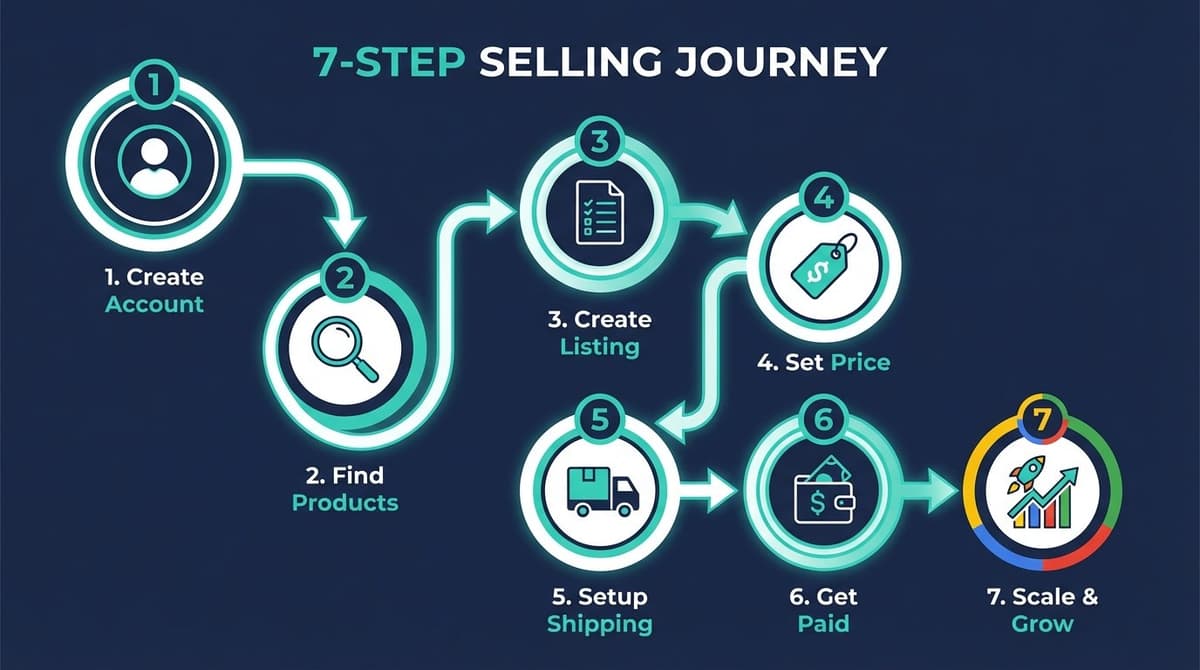
Step 1: Create Your eBay Seller Account
Individual vs Business Account
eBay offers two account types. Choose based on your selling goals:
| Feature | Individual Account | Business Account |
|---|---|---|
| Best for | Casual sellers, clearing out closets | Full-time sellers, building a brand |
| Tax reporting | Personal tax details | Business tax ID (EIN) |
| Branding | Limited | Custom store name and branding |
| Selling limits | Lower initial limits | Higher limits, scalable |
| Tools access | Basic | Advanced analytics and insights |
Recommendation: If you plan to sell regularly or want to scale, start with a business account. You can always upgrade later, but starting right saves setup time.
Account Setup Process
- Go to ebay.com/sl/sell and click "Start selling"
- Sign in or create a new account
- Choose your account type (individual or business)
- Enter your business information (if applicable)
- Add your bank account for payouts
- Verify your identity if prompted
- Complete setup and access Seller Hub
Seller Hub is your command center for managing listings, orders, and performance metrics. Bookmark it—you will use it daily.
Step 2: Find Products to Sell
What Sells Well on eBay
eBay's strength is variety. These categories consistently perform well:
Top Categories
- Electronics: Phones, laptops, gaming consoles, accessories
- Collectibles: Trading cards, coins, vintage items, memorabilia
- Clothing & Shoes: Branded apparel, sneakers, vintage fashion
- Home & Garden: Tools, decor, kitchen items
- Sporting Goods: Fitness equipment, outdoor gear
- Auto Parts: Car accessories, replacement parts
eBay's Unique Advantage
Unlike Amazon, eBay welcomes used items, refurbished products, and one-of-a-kind pieces. Collectors actively search eBay for items they cannot find anywhere else.
Sourcing Methods
Start with What You Have
Your first products are probably in your home right now:
- Unused electronics and gadgets
- Clothing that no longer fits
- Books, games, and media
- Sports equipment
- Household items in good condition
Scale with These Sources
Once you exhaust personal inventory, explore these options:
- Thrift stores: Find undervalued items to resell at profit
- Garage and estate sales: Source vintage and collectible items
- Wholesale liquidation: Buy bulk lots from retailers
- Retail arbitrage: Purchase clearance items to resell
- Direct from manufacturers: For higher-volume sellers
Step 3: Create Your First Listing
Listing Elements
Every successful eBay listing includes these components:
Title (80 characters max)
Your title is the most important SEO element. Include:
- Brand name
- Product name/model
- Key specifications (size, color, capacity)
- Condition (New, Used, Refurbished)
Bad example: "Great phone for sale!!!"
Good example: "Apple iPhone 14 Pro 256GB Space Black - Unlocked - Excellent Condition"
The good example includes searchable keywords that buyers actually use.
Description
Write clear, honest descriptions that answer buyer questions:
- What is included (accessories, original box, manuals)
- Accurate condition details
- Any flaws or defects
- Measurements or specifications
- Why you are selling (optional but builds trust)
Photos
Quality photos sell products. Follow these guidelines:
- Use natural lighting or a lightbox
- Show the item from multiple angles
- Include close-ups of important details
- Photograph any flaws or wear
- Use a clean, neutral background
- Minimum 500 x 500 pixels (larger is better)
Item Condition
eBay has standardized condition categories:
| Condition | Description |
|---|---|
| New | Unused, in original packaging |
| Open Box | New but packaging opened |
| Certified Refurbished | Professionally restored, warranty included |
| Excellent - Refurbished | Seller refurbished, like-new condition |
| Very Good | Minor wear, fully functional |
| Good | Normal wear, fully functional |
| Acceptable | Heavy wear but still works |
| For Parts | Not fully functional |
Be honest about condition. Overstating leads to returns and negative feedback.
Auction vs Buy It Now
| Format | Pros | Cons | Best For |
|---|---|---|---|
| Auction | Can drive higher prices through bidding; creates urgency | No guaranteed price; requires buyers to wait | Rare items, collectibles, items with unclear market value |
| Buy It Now | Immediate sale; predictable pricing; easier to manage | May get less attention than auctions | Common products, items with stable demand, scaling inventory |
When to use Auction: You have a rare or unique item and want the market to determine its value. Set a reasonable starting price and let buyers compete.
When to use Buy It Now: You know your item's market value and want a quick, predictable sale. This is the better choice for most sellers building consistent revenue.
You can also combine both: list at a Buy It Now price while accepting Best Offers from buyers who want to negotiate.
Step 4: Price Your Products to Sell
Research Competitor Pricing
Before setting your price, research what similar items actually sell for:
- Search for your product on eBay
- Click "Sold Items" filter on the left sidebar
- Review completed sales from the past 90 days
- Note the price range and average selling price
This shows you what buyers actually pay—not just what sellers ask for.
Use Terapeak (Free in Seller Hub)
eBay's Terapeak tool provides deeper insights:
- Historical pricing trends
- Sell-through rates
- Best times to list
- Competitive analysis
Access it through Seller Hub → Research → Terapeak Product Research.
Pricing Strategies
Psychological Pricing
Prices ending in .99 or .95 feel cheaper than round numbers. $19.99 converts better than $20.00 for most products.
Factor in All Costs
Calculate your minimum profitable price:
- Product cost (if applicable)
- eBay fees (approximately 13-15% of sale price)
- Shipping costs (if offering free shipping)
- Packaging materials
- Your time and effort
Free Shipping vs Buyer-Paid Shipping
Free shipping listings rank higher in eBay search results and convert better. Consider building shipping costs into your item price rather than charging separately.
Step 5: Set Up Shipping and Returns
Shipping Options
eBay Labels
Print shipping labels directly through eBay for discounted rates:
- USPS (best for small, light items)
- UPS (good for heavier packages)
- FedEx (reliable for all sizes)
eBay's negotiated rates save 30-50% compared to retail shipping prices.
Packaging Tips
- Use appropriate box sizes (avoid oversized packaging)
- Protect fragile items with bubble wrap or packing paper
- Include a thank-you note for personal touch
- Ship within your stated handling time
eBay Guaranteed Delivery
Qualify for the Guaranteed Delivery badge to boost visibility:
Requirements: - Same-day or one-day handling time - At least 100 transactions per year - Late shipment rate below 5% - Upload tracking promptly
Guaranteed Delivery listings appear higher in search results and attract more buyers.
eBay International Shipping (EIS)
Expand to global buyers without handling international logistics:
How it works: 1. Ship to eBay's domestic hub 2. eBay handles customs, duties, and international delivery 3. You are protected from international shipping issues 4. Buyers pay international shipping costs
EIS is automatically enabled for eligible US sellers. Check your shipping settings in Seller Hub to confirm.
Return Policy
Offering returns builds buyer confidence. eBay recommends:
- 30-day returns (minimum for most categories)
- Free returns (increases conversion rates)
- Clear policy displayed on every listing
Listings with free returns get the "Free Returns" badge, which improves visibility and trust.
Step 6: Understand Fees and Payments
eBay Fee Structure
eBay charges two main types of fees:
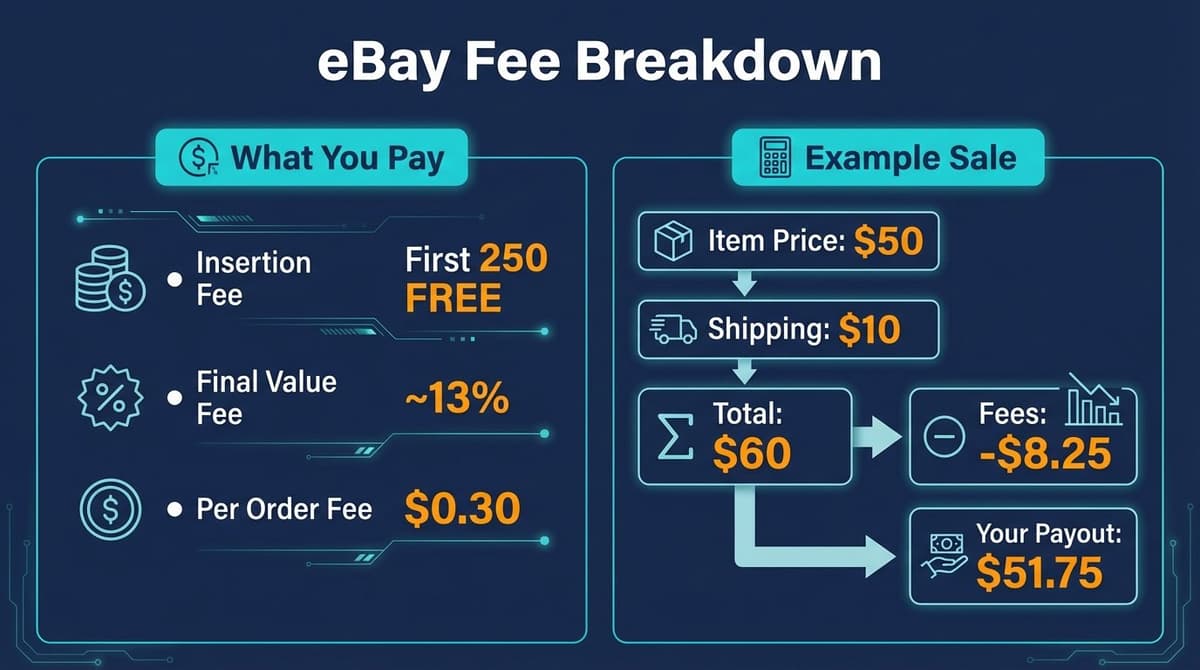
Insertion Fees
- First 250 listings per month: Free
- Additional listings: $0.35 each
With an eBay Store subscription, you get more free listings.
Final Value Fees
eBay takes a percentage of your total sale (item price + shipping):
| Category | Final Value Fee |
|---|---|
| Most categories | 13.25% |
| Books, DVDs, Music | 14.95% |
| Guitars & Basses | 6.35% |
| Sneakers (authentication) | 8% - 12% |
| Trading Cards | 13.25% (items over $7,500: 3%) |
Plus a $0.30 per-order fee on all transactions.
Example Calculation
You sell a $50 item with $10 shipping:
- Total sale: $60
- Final value fee (13.25%): $7.95
- Per-order fee: $0.30
- Total fees: $8.25
- Your payout: $51.75
Getting Paid
eBay Managed Payments handles all transactions. Your earnings are deposited directly to your bank account.
Payout Schedule
Choose your preferred frequency:
- Daily
- Weekly
- Biweekly
- Monthly
Most sellers choose daily payouts for faster access to funds.
New Seller Payment Holds
If you are new to eBay, expect payment holds of up to 21 days on your first sales. This protects buyers and helps eBay verify you are a legitimate seller. Holds decrease as you build positive feedback and sales history.
Speed up the process: - Add tracking to every shipment - Ship promptly - Respond quickly to buyer messages - Avoid disputes and returns
Tax Requirements (US Sellers)
eBay reports your sales to the IRS via Form 1099-K:
| Year | 1099-K Threshold |
|---|---|
| 2025 | $2,500 gross sales |
| 2026 | $600 gross sales |
This applies to gross sales, not profit. Keep records of your costs and expenses for tax deductions.
Sales Tax: eBay automatically collects and remits sales tax in states that require it. You do not need to calculate or send sales tax yourself.
Step 7: Optimize and Scale
Improve Your Seller Rating
Your seller rating directly impacts visibility and buyer trust:
Metrics That Matter
- Positive feedback percentage: Aim for 98%+
- On-time shipping: Ship within your stated handling time
- Tracking uploaded: Add tracking to every order
- Defect rate: Keep under 2%
How to Get Positive Feedback
- Ship fast and communicate clearly
- Package items securely
- Describe items accurately (no surprises)
- Resolve issues promptly and professionally
- Send a friendly follow-up message after delivery
Promoted Listings
Pay to boost your listing visibility in search results:
How it works: - Set an ad rate (percentage of sale price) - Your listing appears in promoted placements - You only pay if the item sells through the ad
Recommended ad rates: 2-5% for competitive categories, higher for slow-moving items.
Start with a few listings to test ROI before scaling your ad spend.
eBay Store Subscription
As you grow, an eBay Store subscription reduces fees and adds tools:
| Store Level | Monthly Cost | Free Listings | Final Value Fee Discount |
|---|---|---|---|
| Starter | $4.95 | 250 | None |
| Basic | $21.95 | 1,000 | Small discount |
| Premium | $59.95 | 10,000 | Moderate discount |
| Anchor | $299.95 | 25,000 | Significant discount |
| Enterprise | $2,999.95 | Unlimited | Maximum discount |
When to upgrade: If you consistently list more than 250 items per month or want access to advanced tools and lower fees.
eBay vs Amazon: Which Platform is Right for You?
| Factor | eBay | Amazon |
|---|---|---|
| Best for | Used items, collectibles, unique products | New products, brand-name items |
| Fees | ~13-15% | 15-20% + additional fees |
| Fulfillment | Self-ship or EIS | FBA available |
| Competition | Less saturated | Highly competitive |
| Buyer expectations | Varies by listing | Prime-level service |
| Listing control | Full control | Shared listings |
Our recommendation: Sell on both platforms. List unique and used items on eBay. Sell new, brandable products on Amazon. Diversifying your sales channels reduces risk and maximizes reach.
For sellers managing multiple platforms, Nexscope provides AI-powered tools for product research, competitor analysis, and listing optimization across eBay, Amazon, and other marketplaces.
Conclusion
Selling on eBay is one of the fastest ways to start an online business. You can list your first item in under 30 minutes, reach millions of buyers worldwide, and scale at your own pace.
Start simple: list items you already own, learn how eBay works, and reinvest profits into sourcing more inventory. As you gain experience and positive feedback, explore promoted listings, international shipping, and store subscriptions to accelerate growth.
The key to eBay success is consistency. List regularly, price competitively, ship fast, and communicate clearly. Do these things well, and your first sale will be just the beginning.
Sell smarter on eBay
AI-powered research and pricing intelligence for eBay sellers
Get Started Free →No coding required • Instant access
FAQs
Is it free to sell on eBay?
eBay gives you 250 free listings per month. After that, insertion fees are $0.35 per listing. When items sell, eBay charges final value fees of approximately 13-15% depending on category.
How much can a beginner make on eBay?
Earnings vary widely. Casual sellers clearing out closets might make a few hundred dollars per month. Dedicated sellers treating it as a business can earn $1,000 to $10,000+ monthly. Your income depends on what you sell, how much you list, and your pricing strategy.
Is eBay or Amazon better for selling?
Both have advantages. eBay is better for used items, collectibles, and unique products. Amazon is better for new, brand-name products with Prime delivery expectations. Many successful sellers use both platforms.
Do I need a business license to sell on eBay?
For casual selling, no license is required. If you sell regularly for profit, you may need to register your business and obtain appropriate licenses depending on your state and local regulations. Consult a tax professional as your sales grow.
How do I avoid scams as an eBay seller?
Protect yourself by: - Only shipping to the address on the order - Using tracking on every shipment - Photographing items before shipping - Being cautious of unusual payment requests - Documenting everything in eBay messages (not external communication)
eBay's Seller Protection covers most issues when you follow platform policies.
Sources
- eBay Seller Center
- eBay Fee Structure
- eBay International Shipping Program
- eBay Fast Facts - Investor Relations