
How to Use Instagram MCP to Analyze Competitor Content

Table of Contents
Your competitors publish product demos, creator collaborations, educational Reels, and promotional posts. Looking through their feeds can generate ideas, but it rarely produces a clear answer to the question that matters: what should your team test next, and what evidence supports that choice?
Instagram MCP connects a compatible AI assistant to tools that retrieve Instagram information. With Nexscope, you can collect available public profile and post data, examine selected Reels, and read audience comments in the same research workflow. Your assistant organizes the evidence; you decide what deserves a place in your content plan.
This guide takes you through six steps, from choosing comparable accounts to producing a small set of original content tests. The prompts are templates you can adapt. The example brief is illustrative, not a report from a live competitor-data run.
What Instagram MCP Can Show About Competitors
An Instagram MCP server exposes tools an AI assistant can call. The capabilities depend on the provider and the individual tool. Connecting a server does not automatically give your assistant every Instagram metric or access to every account.
Nexscope provides structured data through REST APIs and MCP. In this workflow, its Instagram tools supply the available public information, while your own assistant performs the comparison and drafts the research brief.
| Evidence | Useful research question | Important boundary |
|---|---|---|
| Public profile information | Does this account serve a comparable audience? | A current follower count does not establish historical growth. |
| Posts, captions, and publication dates | Which topics and formats appear in the collected sample? | A limited collection may not cover the complete period. |
| Available likes, comments, and play counts | Which comparable posts warrant a closer look? | Missing counts are not zero; public counts do not establish sales. |
| Audience comments | What questions or objections appear repeatedly? | Commenters are a self-selected sample. |
| Reel transcripts | How does the speaker explain the product or ask viewers to act? | A transcript is not a visual review of the video. |
Keep competitor research separate from your own account analytics. Do not assume these public-data tools reveal a rival's reach, saves, revenue, audience demographics, or conversion rate. Where an item is private, restricted, unavailable, or only partially returned, record that state instead of filling the gap with an estimate.
The workflow below builds toward one deliverable: a competitor-content brief with source links, observed patterns, and a short testing plan.
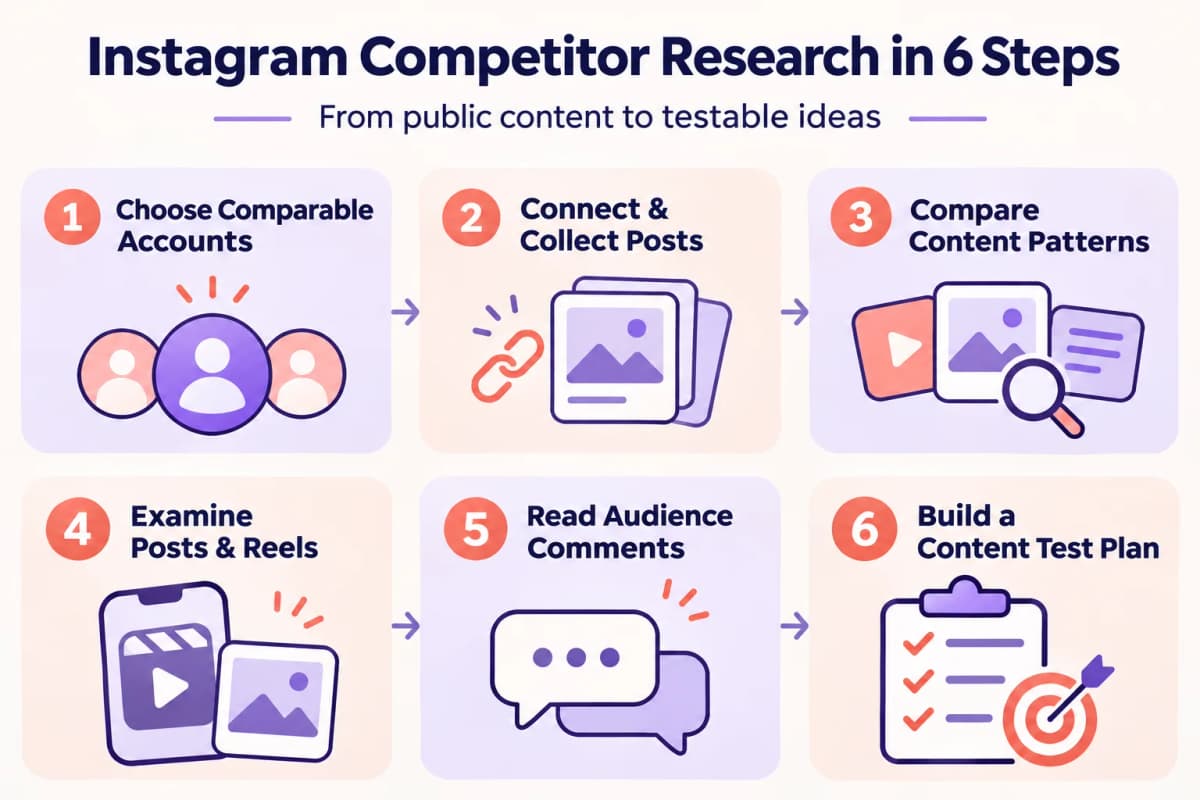
The six-step workflow: choose accounts, collect posts, compare patterns, examine content, read comments, and plan tests.
Step 1: Choose Comparable Competitor Accounts
Define the comparison
Start with a specific decision rather than a broad request to “analyze Instagram.” A skincare brand might want to explain a new product more clearly. A travel-accessory seller might want to learn which packing questions deserve a demonstration.
Choose three public accounts with a useful degree of overlap in product category, audience, price positioning, and market. A large lifestyle publisher can provide creative inspiration, but it should not automatically be treated as a direct commercial peer.
Write down why each account belongs in the comparison. Also choose a publication window, such as a specific 30-day period, and a collection budget. The date window is your analytical scope; it is not a promise that every post within it will be retrieved.
Check each profile
Use Instagram profile data to confirm the account's identity and available background information. Check its bio, profile link, and current follower count where returned. Keep your own audience interpretation separate from statements actually present in the profile.
If you have not connected Nexscope yet, prepare the handles now and run this profile check after the connection in Step 2.
Prompt to adapt:
Review these public Instagram accounts: [handle A], [handle B], and [handle C]. Our product is [description], aimed at [audience] in [market]. Using the available profile information, create a table with account link, bio, current follower count when available, and reasons each account may be a useful comparison. Separate profile facts from your interpretation. Do not infer historical growth or private audience demographics.
Your output should be a concise peer list. If one account serves a substantially different audience, replace it or label it as an inspiration reference before comparing its posts.
Step 2: Connect Nexscope and Collect Competitor Posts
Connect your AI assistant
Follow the Nexscope MCP connection guide in a compatible AI client. The documented remote endpoint is https://api.nexscope.ai/mcp. Complete the supported authorization process through your client, then refresh its tool list if necessary.
Ask the assistant which Instagram tools it can access. A description of the tools is not a successful data retrieval: confirm that an actual request returns a usable result before proceeding with the comparison.
The main collection tool for this tutorial is social_instagram_posts. The workflow also uses profile lookup, post details, comments, and transcription when needed. Check current tool costs before running a multi-account collection, because pagination and optional enrichment can add calls.
Build a bounded sample
Use Instagram competitor posts to create the initial research table. Begin with a modest goal, such as retaining up to 20 eligible posts per account while retrieving no more than two pages per account.
These are workflow limits, not a 20 posts API parameter. The documented inputs use an account handle and a continuation cursor. Your assistant should retrieve a page, inspect the actual continuation information, and stop at the agreed page cap or when no valid continuation remains.
Filter returned posts by the chosen publication dates after collection. If two pages do not cover the full period, say so. Do not label a bounded sample “all posts from the last month.”
Collection prompt:
Collect public posts for [handles] with Instagram Posts. Retrieve at most two pages per account and retain up to 20 posts per account published between [start date] and [end date]. Use only continuation information returned by the tool; stop if it is absent, repeated, or indicates the end. Keep post URL, account, publication date, returned type, caption, and available likes, comments, and views or plays with their original field labels. Deduplicate by post ID or URL. Report collection time, actual sample size, missing fields, and whether the requested date window is fully covered. Do not download media or add transcription yet.
Store the table before asking for interpretation. It becomes the evidence base for the rest of the workflow and makes it easier to correct a mistaken grouping later.
The Posts documentation includes an optional play-count requirement. It checks that returned video posts have the specified numeric play-count field; it does not guarantee that every possible view metric exists. For general content research, keep missing counts visible and avoid repeated requests simply to force a complete-looking table.
Step 3: Compare Content Themes and Public Engagement
Group posts by purpose
Classify the collected posts according to what they are trying to communicate. Useful starting categories include product demonstrations, education, use cases, customer stories, promotions, and brand updates.
Adjust the categories to the evidence. If a caption is too vague to classify confidently, label the post for manual review. A caption about “the perfect fit” does not establish whether the video demonstrates sizing, tells a customer story, or simply shows a product.
Separate content purpose from format. A Reel and a carousel might both explain a product, but their available metrics and viewing behavior are different. Keep the returned format labels and do not infer carousel structure from a field that only identifies an item as a post.
Compare like with like
For each account and theme, report the number of sampled posts and the number with usable metrics. Calculate median likes and median comments separately where enough comparable observations exist. A median reduces the influence of one unusually popular post, but it does not remove sampling bias or prove a strategy works.
Keep three comparisons distinct:
- Within an account: which themes appear stronger among comparable sampled posts?
- Across formats: what differs between Reels and other confirmed formats?
- Across accounts: which patterns recur, after considering account size and sample coverage?
Do not turn these into a single universal engagement score. A ratio based on today's followers is not a historical follower-normalized performance measure, and plays are not necessarily unique viewers. Raw counts also accumulate over time, so a post published yesterday should not be ranked uncritically against one published weeks earlier.
Comparison prompt:
Use only the collected table. Group posts by content purpose and confirmed format. For each group, show sample size, usable metric counts, and median likes and comments where the comparison is meaningful. Keep missing values out of calculations. Flag differences in post age, account size, and coverage. Identify patterns worth investigating, with supporting post URLs, rather than declaring a winning strategy.
At this stage, a useful finding is “product explanations deserve closer inspection.” A claim such as “tutorials generate more sales” would require evidence this collection does not provide.
Step 4: Examine the Posts Worth Learning From
Inspect representative posts
Select a small number of posts for closer review: stronger examples within their account, ordinary examples from the same theme, and a few posts that challenge the initial pattern. This helps avoid building an entire recommendation around outliers.
Use Instagram post and Reel details for selected URLs. Reuse information already present in the collection when sufficient; a detail request should answer a specific outstanding question.
Examine the product benefit, supporting evidence, audience situation, and call to action expressed in the returned caption. If you need to discuss camera work, visual demonstrations, or editing, inspect the actual media separately and label that observation accordingly.
Detail-review prompt:
Review these selected post URLs: [URLs]. Identify the benefit, evidence, audience situation, and call to action supported by the returned caption or text. Keep exact observations separate from interpretation. Explain one transferable content principle per post. If the visuals have not been inspected, do not describe the shots, editing, or on-screen actions.
Read what Reels actually say
For relevant videos with spoken content, Instagram Reel transcripts can help you examine the verbal opening, explanation, and closing request. A transcript can reveal whether a speaker leads with a problem, a product feature, or a customer question.
Use transcription selectively. Check the current duration and charging conditions before enabling optional longer processing. If no usable speech text is returned, mark it unavailable; do not invent a script from the caption.
Ask the assistant to distinguish spoken language from the caption and from any visual notes you supply. A clear spoken explanation may suggest a useful script structure, but it cannot by itself explain why the Reel performed as it did.
Step 5: Find Questions in Audience Comments
Comments add another perspective: what people ask after seeing the content. A demonstration may attract questions about compatibility, cleaning, sizing, availability, or how the product behaves in a particular situation.
Read Instagram audience comments on the selected posts. Start with a bounded number of pages. Include reply context only when necessary and after checking the additional request cost, because replies may clarify whether a question was already answered.
Group substantive questions separately from praise, emoji-only responses, unrelated promotion, and ambiguous remarks. Preserve a short supporting excerpt and its source post URL. Do not invent a direct comment permalink if the response does not provide one.
Audience-research prompt:
Review the returned comments for these posts: [URLs]. Group substantive questions into product information, use cases, objections, and other themes supported by the text. Count distinct comments in this collected sample, not all Instagram users. Include a short excerpt and the associated post URL for each theme. Deduplicate repeated comments, keep reply context where available, and label unclear statements. Suggest which questions our own content could answer.
Count occurrences only within the collected sample. If several comments ask the same question, that is a reason to investigate an information gap, not a population estimate of customer demand.
Avoid treating an absence of comments as proof that viewers understood the content. The post may have a small audience, hidden or unavailable comments, or incomplete retrieval. The research brief should explain what was observed and what remains unknown.
Step 6: Turn Findings Into a Content Test Plan
A good competitor brief ends with a small number of original experiments. Each should connect an observation to an interpretation and then to a test your team can execute.
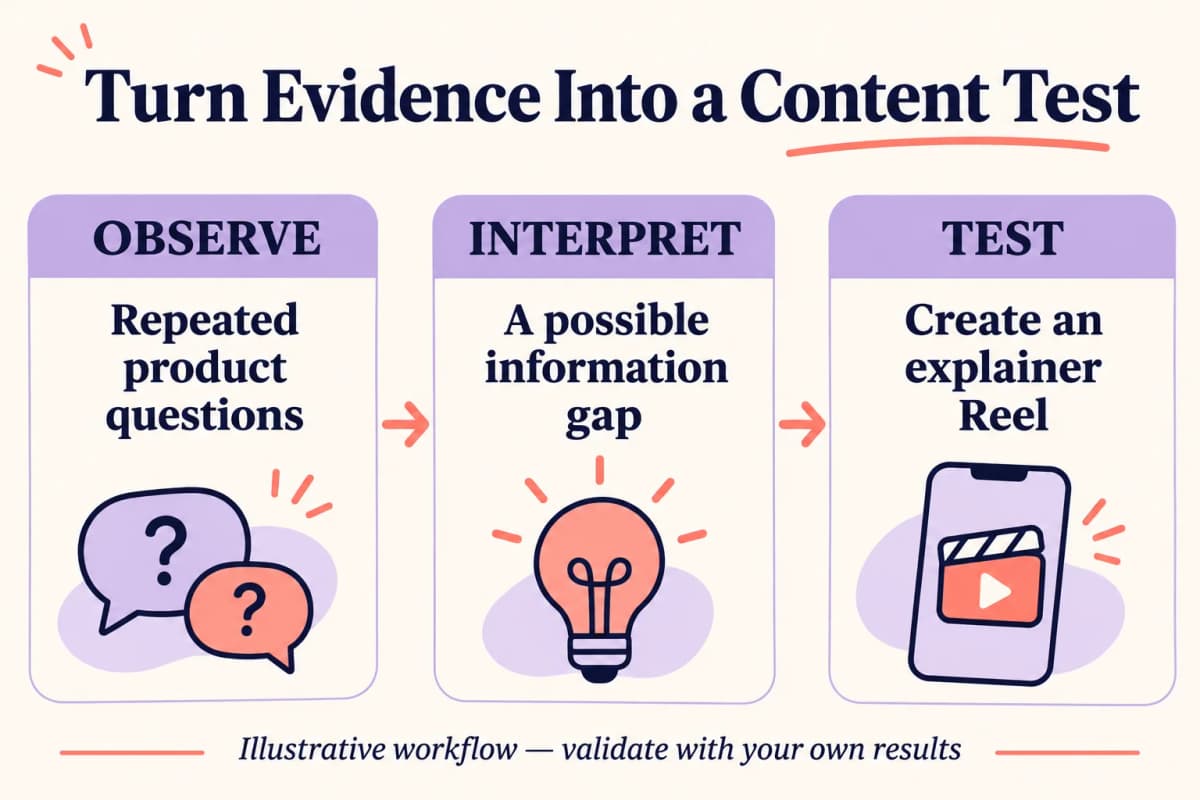
Illustrative reasoning pattern, not a measured finding about any Instagram account.
The table below shows the structure. Its examples are hypothetical; replace them with verified observations and links from your own collection.
| Illustrative observation | Hypothesis to investigate | Original content test | Your own evaluation |
|---|---|---|---|
| Several sampled comments ask about compatibility. | Existing content may leave a use-case question unanswered. | Create a demonstration showing supported and unsupported uses. | Review relevant questions and available viewing metrics over a fixed period. |
| Selected captions explain features but not practical situations. | A concrete use case may make the benefit easier to understand. | Test a situation-led opening against your usual feature-led opening. | Compare your own comparable posts, noting other differences. |
| Product-care questions recur in the collected sample. | A concise care explanation may be useful. | Publish an original care Reel and a supporting caption. | Track saves if available in your own analytics and the questions received. |
Choose up to three tests that fit your audience, product facts, and production capacity. Borrow an analytical lesson rather than a competitor's exact script, footage, or creative treatment.
For each test, specify the evidence, the hypothesis, the proposed content, the owner, the evaluation window, and a measurement available to your team. Observational before-and-after comparisons can inform decisions, but they do not isolate causality when the audience, timing, offer, or distribution changes.
Final-brief prompt:
Turn our research into a concise content brief. Include the research question, accounts, publication window, actual sample coverage, three supported observations with source links, and up to three original content tests. For every test, separate the observation from the hypothesis and specify how we can evaluate it using our own available data. Keep unsupported conclusions and missing evidence explicit. Do not predict revenue or guarantee performance improvements.
Save the collection date and source table with the brief. When you repeat the exercise, use a comparable scope and record any changes. A larger sample or a newly available metric should be explained rather than silently treated as equivalent to the earlier run.
Conclusion
Instagram competitor research is most useful when it leads to a clear content decision. Choose comparable accounts, collect a consistent sample, and combine post patterns with audience questions. Then turn the evidence into a few original content tests, using your own results to decide what to refine or repeat.
Turn Insights Into Content With Nexscope
Nexscope connects social research with creative production, helping you move from understanding your audience to making content for them:
- Research across social platforms: Nexscope Social Media APIs and MCP provide supported public data from Instagram, TikTok, YouTube, Reddit, X, Facebook, LinkedIn, and more. Explore posts, profiles, comments, and available transcripts to build a stronger creative brief.
- Create through your own AI workflow: Nexscope Creative APIs and MCP connect supported image and video models, including GPT Image 2.5 and Seedance 2.5, to your application or compatible AI assistant. Use your brief and product references to develop original campaign assets.
- Make images and videos directly in Nexscope: Use the product photo generator and image-to-video workspace to create and refine content in the web app.
Start with an audience question, turn it into a creative direction, and produce an image or video you can test.
Turn your next insight into content
Bring your product images and creative brief into Nexscope to make your next video.
Create Your Product Video →FAQs
What is an Instagram MCP server?
It is a server that makes Instagram-related tools available to compatible AI assistants through the Model Context Protocol. The provider determines which operations and data are supported. Some products focus on publishing or owned-account analytics; this guide uses Nexscope tools for public-content research.
Can Instagram MCP analyze competitor accounts?
An assistant can analyze public information returned by the connected tools. The quality of the analysis depends on the available sample, accurate interpretation, and a clear research question. Private or unavailable information should remain excluded.
Which competitor metrics can I access?
Use the fields actually returned by the relevant tool, such as available follower counts, likes, comments, and video counts. Not every field is available for every item. Do not assume public research includes reach, saves, sales, or audience demographics.
Can I analyze Instagram Reels with MCP?
You can research available Reel details, captions, comments, and transcripts. Visual claims require inspection of the video itself. Transcription alone cannot establish the camera work, on-screen demonstration, or editing style.
Why are some likes or play counts missing?
Availability varies by item and source response. A missing count is different from a genuine zero. Keep it out of calculations, report the limitation, and avoid assuming that retrying will recover it.
How many competitor posts should I compare?
Start with a bounded sample that you can review carefully, such as up to 20 eligible posts from each of three accounts. This is a practical starting point, not a statistical guarantee. Report actual coverage and expand only when the decision warrants more research.
Sources
- Nexscope. Instagram Profile MCP Tool. nexscope.ai.
- Nexscope. Instagram Posts MCP Tool. nexscope.ai.
- Nexscope. Instagram Post/Reel Info MCP Tool. nexscope.ai.
- Nexscope. Instagram Comments MCP Tool. nexscope.ai.
- Nexscope. Instagram Transcript MCP Tool. nexscope.ai.
- Nexscope. MCP Guide. nexscope.ai.
- Nexscope. Social Media APIs. nexscope.ai.
- Nexscope. Ecommerce Image & Video APIs. nexscope.ai.
- Nexscope. GPT Image 2.5 Product Photo Generator. nexscope.ai.
- Nexscope. Image to Video Generator. nexscope.ai.