

What Are Platinum Keywords on Amazon and Do They Matter?

What are platinum keywords on Amazon? They were legacy backend fields created for members of Amazon's former Platinum Merchant program to organize or populate product navigation in their custom storefronts. The name described merchant access rather than keyword quality.
The phrase still appears in old Amazon SEO tutorials, legacy inventory templates, and occasional Seller Central fields. Because the fields sit beside other listing attributes, sellers may assume that they provide extra indexing space or a ranking advantage. For a current Amazon seller, Platinum Keywords are not a dependable search-ranking control. Amazon's current search-term guidance focuses on accurate customer-facing copy, the Generic keyword field, advertising search terms, and query-level performance evidence.
This guide explains what Platinum Keywords were, why the label still causes confusion, how they differ from current backend search terms, and what sellers should use instead. It also shows how to build a practical workflow for discovering, validating, and monitoring Amazon keywords.
Platinum Keywords Today
Platinum Keywords are legacy Amazon attributes. Historical Seller Central screens labeled the fields for Platinum Merchants, a seller group connected with older storefront capabilities. The fields were not designed as a universal premium tier for high-volume or high-converting search terms.
The practical answer is straightforward: ordinary sellers should not move important keywords into a Platinum Keywords field or treat it as additional backend-search capacity. If the attribute appears in an old template or inherited catalog record, its visibility alone does not establish that Amazon currently uses it for search matching.
Current Amazon guidance discusses customer-friendly keywords and search terms in listing content. Amazon's product listing guide recommends using relevant keywords in titles, descriptions, bullet points, and other listing elements. Amazon Seller Central guidance also focuses on generic search terms, formatting, relevance, and field limits rather than Platinum Keywords.
Current Seller Action
- If the field does not appear: No action is needed. Sellers do not need to locate or request it.
- If the field appears but is empty: Leave it empty unless Amazon provides current, account-specific instructions stating otherwise.
- If the field contains old terms: Audit the terms before moving anything. Relevant missing vocabulary may belong in the Generic keyword field, while primary phrases may deserve visible placement.
- If a consultant recommends filling it: Request current Amazon documentation and proof that the specific marketplace and product type use the field for indexing.
What Platinum Keywords Were
The word "platinum" described a merchant program, not keyword quality. A Platinum Keyword was not necessarily more popular, more relevant, or more profitable than a regular search term.
Platinum Merchant Program
Amazon previously maintained merchant tiers and storefront services that differed from today's standard Seller Central structure. Platinum Merchants had access to specialized account and storefront features. The Platinum Keywords attribute supported that environment.
This history explains the misleading name. A seller could read "Platinum Keywords" and interpret it as an advanced SEO field, even though the label referred to merchant eligibility.
Legacy Storefront Use
Historical documentation and Seller Support responses indicate that Platinum Keywords helped populate or organize storefront navigation for eligible merchants. That job differs from the current Generic keyword field, which supplies hidden vocabulary for lexical matching between a product and a shopper query.
The distinction matters because old advice sometimes combines the two fields. Moving a useful search term out of a current field and into a legacy field can reduce useful coverage instead of expanding it.
Interface Remnants
Amazon catalog data has passed through many interfaces, inventory-file versions, and marketplace-specific templates. Legacy attributes can remain visible after their original program loses relevance. A field may also appear for one product type or account and remain absent for another.
A visible attribute is interface evidence, not proof of current indexing or ranking value. Sellers should prioritize Amazon's current documentation, the live controls in their marketplace, and measured query performance.
Platinum Keywords vs Current Fields
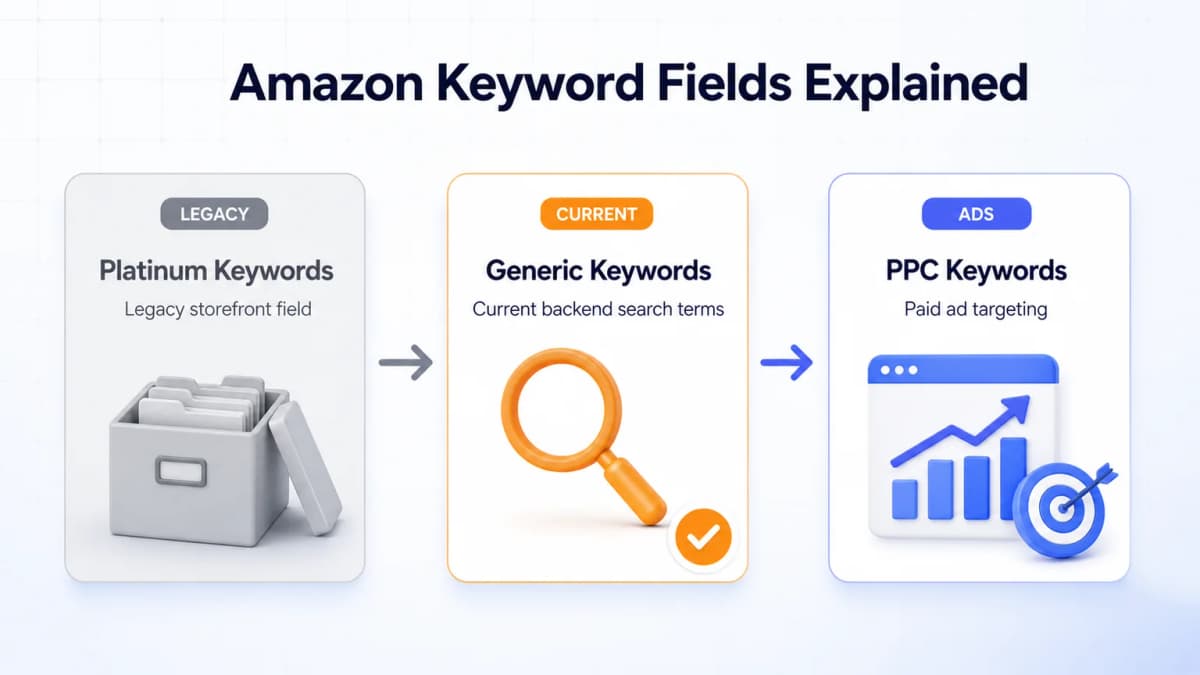
Amazon sellers work with several types of keyword data. These fields serve different systems and should not be treated as interchangeable.
| Keyword location | Shopper visibility | Primary function | Current action |
|---|---|---|---|
| Platinum Keywords | Hidden | Historical storefront attribute | Usually leave blank |
| Generic keyword field | Hidden | Add relevant vocabulary missing from visible content | Use selectively |
| Product title | Visible | Identify the product and its primary search intent | Prioritize clarity and relevance |
| Bullet points | Visible | Explain benefits, features, materials, and use cases | Write for conversion |
| Product description or A+ Content | Visible | Provide deeper product context | Keep natural and accurate |
| PPC keywords | Ad system | Control paid-search eligibility and targeting | Manage with bids and match types |
Generic Keywords
Amazon backend keywords are commonly entered through a Generic keyword or Search Terms attribute. The exact label can vary by marketplace, interface, and product type. Shoppers do not see the field on the detail page.
The strongest use is incremental coverage. Relevant synonyms, abbreviations, regional product names, and alternate terms can help when they would make customer-facing copy repetitive. A complete Amazon backend keyword workflow should remove duplicates, check bytes, and validate listing updates.
Frontend Keywords
Customer-facing keywords appear in the title, bullets, description, and other visible attributes. They help Amazon understand relevance while also helping shoppers decide whether the product matches their needs.
High-priority product phrases usually deserve visible placement because they can support both discoverability and conversion. Strong Amazon listing optimization balances search language with accurate merchandising instead of maximizing keyword density.
PPC Keywords
Amazon Ads keywords belong to paid campaigns. They use match types, bids, budgets, negatives, and placement controls. Adding a term to a listing does not create a PPC target, and adding a PPC keyword does not place it in the listing.
Search-term reports can still connect the workflows. A converting ad query may deserve placement in the title, bullets, or Generic keyword field if it accurately describes the product. An irrelevant query may belong in Amazon PPC negatives.
Ranking Impact Today
Platinum Keywords do not provide a supported ranking shortcut for ordinary sellers. Current Amazon search performance depends on a broader set of relevance and retail signals.
Indexing and Ranking
Indexing and ranking answer different questions:
- Indexing: Is the product eligible to appear for a relevant query?
- Ranking: Where does the product appear among eligible results?
A current backend search term may help Amazon associate an ASIN with additional relevant vocabulary. It does not guarantee page-one placement. Ranking can also reflect product-query fit, sales performance, conversion, price, availability, fulfillment, ratings, and competition.
Platinum Keywords add another layer of uncertainty because Amazon's current public seller guidance does not present them as an active search-term control. Sellers gain more reliable evidence by improving current listing fields and tracking results at the query level.
Misleading Legacy Advice
Three claims commonly appear in outdated content:
- "Platinum" means a high-value keyword: The label referred to merchant status, not keyword value.
- The field adds free backend capacity: Sellers should not assume that a legacy field expands current indexing limits.
- Filling every field improves ranking: Relevance and supported attributes matter more than field completion for its own sake.
Safe Default
The safest default is to leave Platinum Keywords blank and place each qualified term in its strongest current destination. Sellers with unusual Vendor Central, managed-account, or category-specific instructions should follow the documentation supplied for that exact program.
Backend Search Term Rules
Amazon's current Search Terms guidance provides a clearer operating standard. An Amazon moderator's search-term quick tip identifies a 250-byte limit and recommends concise, generic vocabulary.
Byte Limit
Treat 250 bytes as the working limit when that limit applies to the live field, and treat the current Seller Central control as final. Standard English letters and numbers usually occupy one UTF-8 byte. Accented and non-Latin characters can require more than one byte.
Reaching exactly 250 bytes is not an optimization goal. A shorter set of precise terms is more useful than a full field padded with weak or irrelevant vocabulary.
Formatting Rules
- Separate words with spaces.
- Avoid unnecessary punctuation.
- Do not repeat words inside the field.
- Remove redundant terms already captured in titles, brands, or other attributes.
- Use useful synonyms, alternate names, abbreviations, and valid spelling variations.
- Skip common stop words when they do not add meaning.
Prohibited Terms
Amazon's guidance excludes misleading or abusive search terms. Sellers should avoid:
- The seller's own brand name or another company's brand name
- ASINs and unrelated product identifiers
- Temporary claims such as "new" or "on sale now"
- Subjective claims such as "best" or "cheapest"
- Profanity, offensive terms, and irrelevant high-volume phrases
- Product attributes that cannot be substantiated
Relevance should act as a veto. If a keyword implies a feature, material, compatibility, audience, or use case the product cannot support, it does not belong in the title, bullets, Generic keyword field, or PPC targeting.
Placement Example
Consider a 24-ounce insulated stainless steel bottle. Research produces this raw vocabulary:
insulated water bottle stainless steel 24 oz straw lid leakproof cold vacuum flask thermal cycling gym hiking reusable canteen hydration best thermos
The listing title already contains insulated water bottle, stainless steel, 24 oz, and straw lid. Bullets cover leakproof and cold. The word best is a subjective claim, and Thermos is a brand name.
A cleaned backend string could be:
vacuum flask thermal cycling gym hiking reusable canteen hydration
The example adds missing vocabulary without copying the visible listing. It also stays well below the field limit.
A Modern Keyword Research Workflow
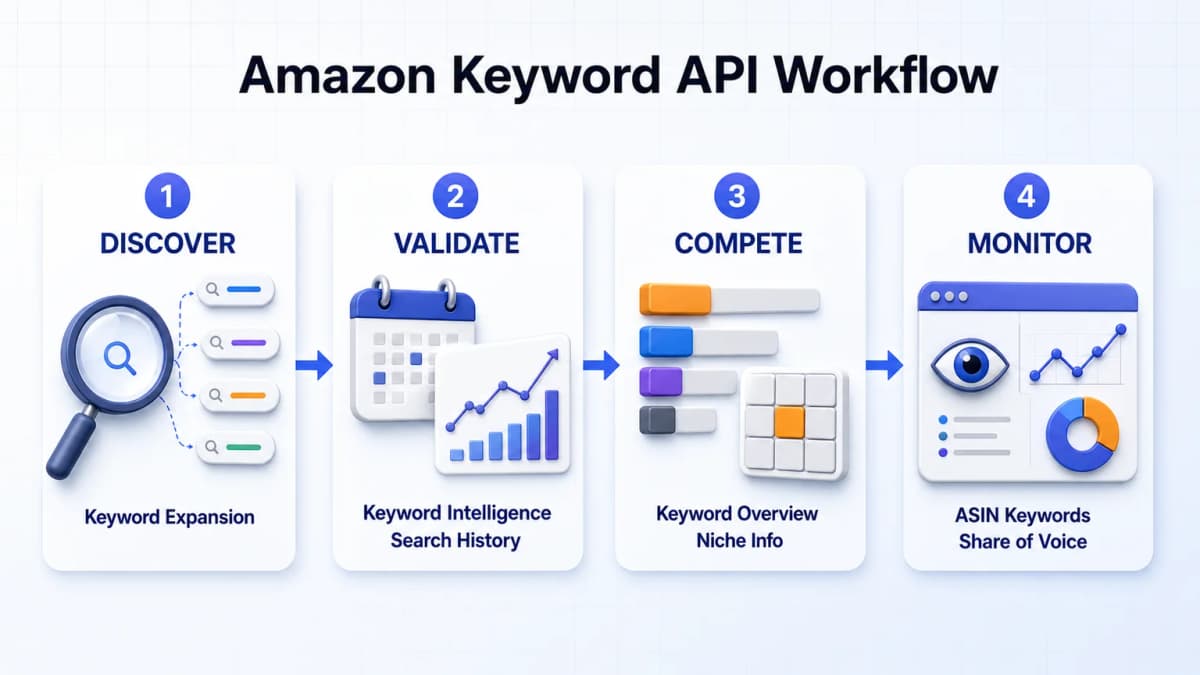
Leaving a legacy field blank still leaves a practical question: which terms deserve visible placement, backend coverage, or ad testing? A useful workflow moves through five stages: expand the seed list, validate demand, compare competition, study ASIN traffic, and monitor visibility after changes.
Amazon first-party reports and spreadsheets can support parts of this process. Teams that need repeatable data access can use Nexscope, an ecommerce data source and data platform with a dedicated collection of Amazon keyword APIs. The collection provides callable data for keyword expansion, search demand, historical trends, competition, niche analysis, ASIN traffic, and search visibility through REST API or MCP.
Expand the Seed List
Keyword research begins with product facts and a small set of phrases that accurately describe the item. The goal is to uncover synonyms, long-tail phrases, audience modifiers, use cases, and adjacent searches without drifting away from relevance.
For teams automating this step, the Amazon Keyword Expansion API expands seed terms across 10 documented Amazon marketplaces with search volume, trends, PPC bids, ranking difficulty, and related metrics. Every candidate still needs a relevance check before it enters listing copy or ad targeting. Broader Amazon keyword research should classify terms by intent and destination rather than treating an export as a finished backend field.
Validate Demand Over Time
Search volume should be read over time rather than treated as one permanent number. A term may reflect sustained marketplace demand, a predictable seasonal cycle, or a short-lived spike.
The Amazon Keyword Intelligence API queries nearly three years of weekly Amazon Brand Analytics search-term data across 15 documented marketplaces. For a more focused time series, the Amazon Keyword Search History API tracks exact keyword search volume in seven-day periods across 10 documented marketplaces. The Google Trends By Keywords API adds broader regional and time-range comparisons.
Amazon marketplace demand and broader web interest remain different signals, so teams should compare them without treating one as a substitute for the other.
Compare Market Opportunity
Demand alone does not establish that a keyword is attractive. Sellers also need to understand concentration, competitive depth, product patterns, reviews, and market entry conditions.
The Amazon Keyword Overview API evaluates market-level competition, while the Amazon Niche Info By Keyword API adds monopoly level, brand concentration, new-product success, and opportunity score. When buyer feedback matters to the decision, the Amazon Niche Reviews By Keyword API analyzes niche reviews and consumer sentiment. The Amazon Opportunity Report By Keyword API brings market potential, product traits, reviews, customer profiles, trends, and pricing into a broader assessment.
These APIs support research and prioritization. They do not guarantee that a product will rank or sell. Product quality, economics, differentiation, fulfillment, listing execution, and competition remain part of the decision.
Analyze ASIN Traffic
Competitor listing text reveals visible keyword choices, but it does not expose the full traffic mix. Traffic research can show which queries generate organic visibility, where ads are involved, and whether a term appears to contribute meaningful traffic.
The Amazon ASIN Keywords API reverse-lookups traffic keywords with organic and ad rankings, search volume, traffic share, conversion, and time-window metrics. The Amazon Traffic Keywords API provides source type, conversion type, organic rank, ad rank, historical month, and sorting controls for an ASIN's traffic terms. At the keyword level, the Amazon Keyword Summary API breaks down competitor ASIN traffic across organic search, Sponsored Products, Sponsored Brands, Sponsored Brands Video, and recommendation placements.
This evidence can help identify which terms attract organic visibility, which rely on advertising, and which show conversion signals. It should guide research rather than justify copying a competitor's branded terms or claims.
Monitor Search Visibility
Research continues after keywords are added to a listing or campaign. Visibility should be monitored against dated listing versions, campaign changes, pricing decisions, and shifts in the competitive set.
The Amazon Keyword Share Of Voice API measures organic, sponsored, and combined brand visibility across Amazon search results. Its documented outputs include volume, PPC, click, and conversion metrics. A single snapshot cannot prove why visibility moved, so the result should be interpreted alongside the conditions recorded for the same period.
The public Nexscope API Docs lists these keyword endpoints alongside product, pricing, review, sourcing, and marketplace intelligence APIs. When an endpoint does not document a source, freshness window, rate limit, or estimation method, that detail should be treated as unspecified rather than assumed.
Legacy Keyword Cleanup
Sellers who inherit old catalog data can use a controlled cleanup process instead of deleting or copying fields without evidence.
Audit Current Fields
Export or record the title, bullets, description, Generic keyword field, Platinum Keywords field if present, and current ad targets. Keep a dated copy before making changes.
Classify each term as:
- Relevant and already visible
- Relevant but missing from visible content
- Useful only for PPC research
- Duplicate
- Prohibited or misleading
- Unsupported by product evidence
Reassign Useful Terms
Move the primary product phrase into a readable title when policy and product facts support it. Place important benefits, materials, dimensions, audiences, and use cases in bullets when they help customers decide. Reserve the Generic keyword field for qualified vocabulary that adds coverage without improving visible copy.
Do not move a term simply because a tool reports high volume. A high-volume phrase with weak product fit can attract unqualified traffic and create policy risk.
Validate the Change
After saving the listing, confirm that the update processed successfully. Record the new version and monitor query-level impressions, clicks, cart adds, purchases, organic position, and ad search terms over a stable evaluation window.
If a query remains weak, check whether the issue is indexing, ranking, conversion, stock, price, fulfillment, or competition. Repeatedly replacing the entire backend field makes diagnosis harder.
Common Keyword Mistakes
- Treating Platinum as a quality label: Keyword value comes from relevance, demand, intent, competition, and performance evidence.
- Using legacy fields as extra capacity: Unsupported fields can waste useful terms and make catalog maintenance harder.
- Repeating every visible word: Backend space should add qualified vocabulary rather than copy the title and bullets.
- Adding competitor brands: Brand names and ASINs create policy and intellectual-property risk.
- Mixing organic and paid systems: Listing fields and PPC targets share research, but they require separate execution and measurement.
- Ignoring marketplace language: A useful term in the US may have different demand or wording in Germany, Japan, or another marketplace.
- Changing too many variables: Simultaneous listing, price, ad, and inventory changes make performance shifts difficult to interpret.
Build a Current Keyword System
Platinum Keywords belong to Amazon's historical seller infrastructure. Current sellers can usually leave the field blank and focus on accurate listing content, the Generic keyword field, PPC query evidence, and measured search performance.
The modern workflow requires more than a hidden-field checklist. It starts with relevant keyword discovery, validates demand over time, evaluates competition, assigns each term to the correct destination, and monitors visibility after implementation.
Nexscope supports this workflow as an ecommerce data platform with many dedicated Amazon keyword APIs. Instead of relying on one general keyword endpoint, teams can call purpose-built APIs for seed-keyword expansion, historical search demand, search-volume trends, keyword competition, niche and review analysis, ASIN traffic keywords, opportunity reports, and Share of Voice monitoring.
The data can be requested through REST API or MCP and connected to a team's own Agent, research scripts, dashboards, or internal workflows. This gives teams a consistent way to retrieve the keyword data needed at each research stage while keeping control of how the data is analyzed and used.
The Nexscope API directory documents the request schemas, response fields, and supported marketplace coverage for each endpoint. Access requires a key available through Nexscope API Access.
Explore Nexscope Keyword APIs
Call Amazon keyword data for expansion, demand history, competition, ASIN traffic, and Share of Voice through REST API or MCP.
View the Keyword API Reference →REST API and MCP access
Frequently Asked Questions
Are Platinum Keywords still used on Amazon?
Platinum Keywords are a legacy attribute associated with Amazon's former Platinum Merchant and storefront environment. Amazon's current public listing guidance focuses on visible listing keywords and generic search terms rather than presenting Platinum Keywords as an active optimization control. Ordinary sellers should not expect the field to improve indexing or ranking. If it appears in an old template or account-specific interface, the seller should request current documentation for that marketplace and program before relying on it.
Should sellers fill the field if it appears?
The safe default is to leave the field blank. Important terms should remain in supported current locations such as the product title, bullet points, description, Generic keyword field, or PPC campaigns. A visible legacy field does not prove that Amazon uses it for search. Sellers with Vendor Central, managed-account, or category-specific instructions should follow the documentation supplied for that exact workflow rather than general advice from old tutorials.
What is the difference between Platinum and backend keywords?
Platinum Keywords were tied to a historical merchant and storefront system. Backend keywords, often labeled Generic keyword or Search Terms, are current hidden listing vocabulary used to support product-query matching. Shoppers cannot see either field on the detail page, but their functions and current relevance differ. Sellers should use the Generic keyword field for qualified synonyms, abbreviations, and alternate names missing from visible copy, subject to Amazon's current rules.
Can Platinum Keywords improve Amazon rankings?
There is no dependable current basis for ordinary sellers to treat Platinum Keywords as a ranking lever. Amazon ranking depends on more than keyword presence, including product-query relevance, conversion, sales performance, price, availability, fulfillment, customer experience, and competition. Current keyword work should use supported listing fields and measured query data. A term can help establish relevance without guaranteeing a high organic position.
What belongs in the Generic keyword field?
The field is best used for relevant vocabulary that is missing from customer-facing content. Common candidates include synonyms, abbreviations, regional product names, valid spelling variations, and accurate use-case terms. Sellers should remove repeats, punctuation, unnecessary stop words, brand names, ASINs, subjective claims, and irrelevant traffic phrases. Every retained term should accurately describe the product or a legitimate shopper need.
Is the limit 250 characters or 250 bytes?
Amazon Seller Central guidance identifies a 250-byte limit for applicable search-term fields. English letters and numbers usually occupy one byte each, while accented and non-Latin characters can require more. Sellers preparing bulk files should measure UTF-8 bytes and confirm the live field behavior in their marketplace. Filling every byte is unnecessary. Relevance and accuracy matter more than reaching the maximum.
Which Nexscope APIs support Amazon keyword research?
Nexscope documents APIs for keyword expansion, Amazon Brand Analytics search-term intelligence, seven-day search history, keyword competition, niche information, niche reviews, opportunity reports, ASIN traffic keywords, traffic-source analysis, keyword summaries, Share of Voice, and Google Trends comparisons. Each API has its own schema and documented coverage. Teams can call supported endpoints through REST API or connect them to their own Agent and workflows through MCP.
Sources
- Amazon Seller Central. (n.d.). Use search terms effectively. Retrieved from sellercentral.amazon.com
- Amazon Seller Forums. (2023). Quick Tip: Search Terms. Retrieved from sellercentral.amazon.com
- Amazon. (2025). How to create Amazon product listings. Retrieved from sell.amazon.com
- DotcomReps. (2023). What Are Platinum Keywords on Amazon? The Truth Behind It. Retrieved from dotcomreps.com
- Nexscope. (2026). Ecommerce APIs and MCP Tools for AI Agents. Retrieved from nexscope.ai