

What Is an API and How Does It Work With Examples?

Table of Contents
Definition: What is an API?
An API (application programming interface) is a set of rules that lets software request data or use functionality from another software component. It defines the available operations, their required inputs, and the outputs a caller can expect.
A weather app retrieves a forecast through an API. An online store starts a payment through one. A marketing workflow can request keyword data or submit product images for video generation. In each case, the application sends defined inputs and receives a result it can use.
The same questions make these interactions easier to understand: What can the application request? Which inputs are required? What does the response contain? And what happens when a request fails? A product lookup provides a practical starting point before moving into everyday examples and a first request to a real service.
What Is an API?
Application Programming Interface
An API makes selected capabilities available through a documented interface. The system providing it controls how each operation works internally, while the caller follows the interface requirements.
For example, a shopping application might request the price of a product. The application needs to know the product identifier, the request format, and where to find the price in the response. It can use that information without knowing how the provider stores its catalog or calculates availability.
This separation lets teams reuse existing capabilities. A developer can connect payment processing, product data, or video generation to an application without building each underlying service from scratch. The integration still needs to handle permissions, errors, and changes to the interface.
APIs Beyond the Web
APIs also exist inside software libraries, operating systems, and browsers. A program can use an operating system API to open a file. A webpage can use a browser API to interact with supported device features, subject to browser permissions.
A Web API makes functionality available across a network, commonly through HTTP. That is the kind used in the examples below. It is especially useful when an application needs data or processing from a separate service.
How APIs Work
Clients, Servers, and Endpoints
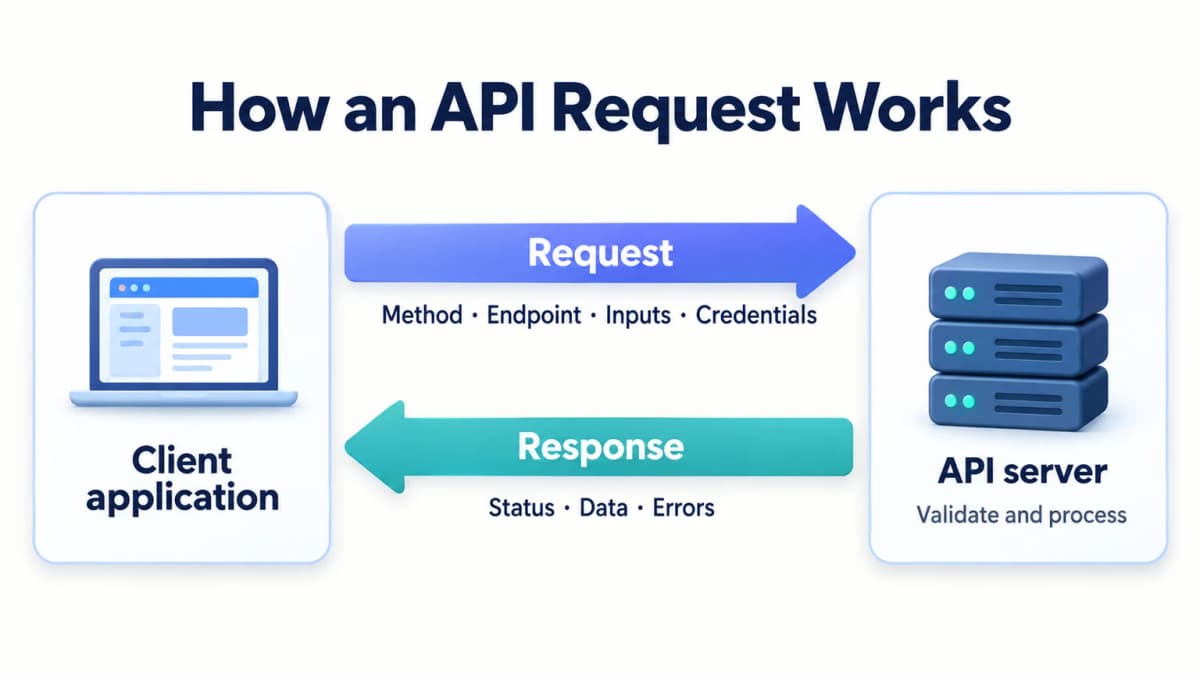
The client initiates a request. It could be a mobile app, a backend service, or an automation workflow. The server receives the request and returns a response.
An endpoint is an address where an API operation is available. In an HTTP API, the method and address together help identify the operation. For example, retrieving a product and updating it may use the same URL with different methods.
A typical exchange has four stages:
- The client prepares the required inputs and credentials.
- The server checks the request and any access requirements.
- The service performs the operation or reports a problem.
- The client reads the response and decides what to do next.
The API defines the interface for this exchange. It does not require the client to understand the server's internal implementation.
Requests and Responses
Consider this fictional product lookup:
GET /v1/products/SKU-123?currency=USD HTTP/1.1
Host: api.example.com
Accept: application/json
This is a teaching example, not a working product API. Its parts have distinct jobs:
| Request component | Example | Purpose |
|---|---|---|
| Method | GET | Requests retrieval of a resource |
| Host | api.example.com | Identifies the server |
| Path | /v1/products/SKU-123 | Identifies the product resource |
| Query parameter | currency=USD | Supplies an option for the request |
| Header | Accept: application/json | Indicates a preferred response format |
Other requests may include a body, such as the details needed to create an order. Protected endpoints also require the provider's supported credentials.
A fictional response could be:
HTTP/1.1 200 OK
Content-Type: application/json

{
  "id": "SKU-123",
  "name": "Insulated Travel Mug",
  "price": 24.99,
  "currency": "USD",
  "in_stock": true
}
JSON organizes information into fields and values. The client can read price to populate a comparison table or inspect in_stock before displaying availability. JSON is common, but APIs can return other formats, including files or binary data.
The response format determines how the application interprets the result. A missing price should be handled differently from a price of zero. Likewise, an empty result needs different treatment from a failed request.
Everyday API Examples
Weather and Maps
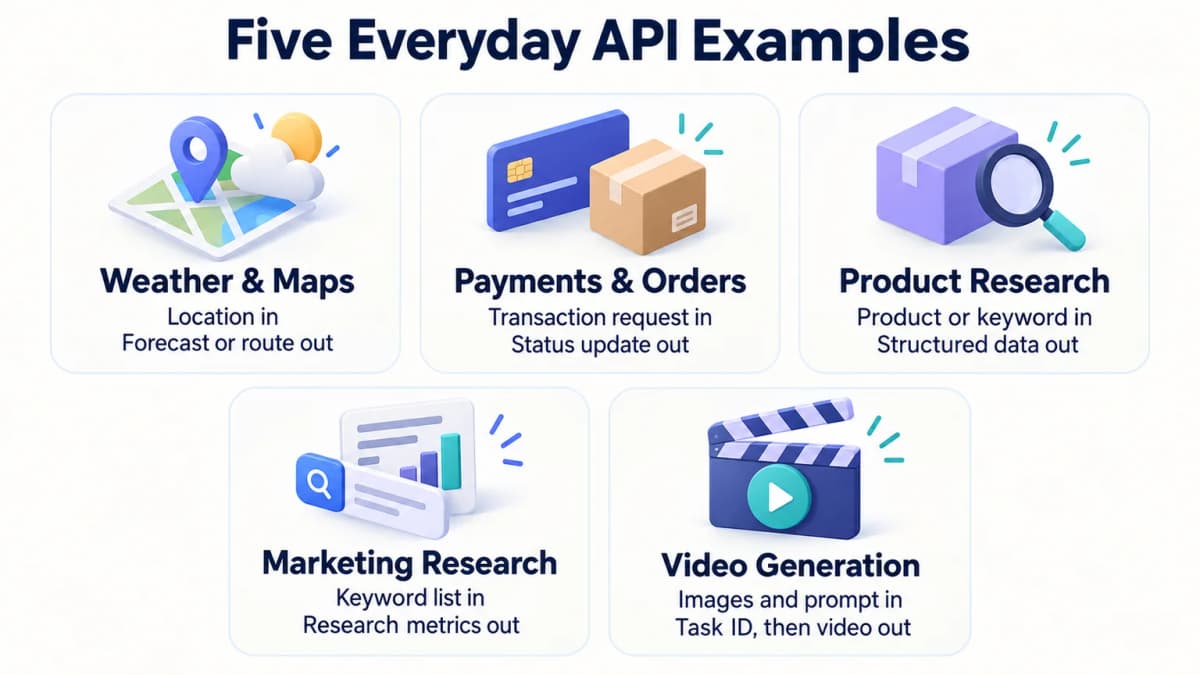
A weather application sends a location and receives forecast information. Its interface turns the returned values into a daily forecast, an hourly chart, or a rain notification.
A route-planning application sends an origin and destination to a mapping service. It receives routing information that the application can present to the user. The requested travel mode and the service's available data affect the result.
In both cases, the API supplies information to an experience built by another application. The app decides how that information appears and when to request an update.
Payments and Order Updates
At checkout, a store's backend can ask a payment provider to create a payment session. The provider returns information needed to continue the payment flow. Later, an event notification can tell the store that the payment status has changed.
A fulfillment integration can separately retrieve order details or submit a tracking number. These are different operations with different permissions and error conditions.
The business workflow connects those operations. For instance, an order should enter a paid fulfillment queue only after the application verifies the appropriate payment state. Creating a payment session alone does not establish that the customer has paid.
Product Data and Research
A product-research workflow starts with a question, such as which competing listings appear for a search term. It supplies a keyword or product identifier and receives structured fields that can be compared, filtered, and stored.
An Amazon ASIN research workflow might begin with a known product and then investigate relevant keywords or competitors. An Amazon reviews analysis workflow uses customer feedback to identify recurring complaints. Each requires an interface that returns the appropriate evidence.
The application should retain marketplace and time context alongside the data. A current listing observation and a historical estimate answer different questions, even when both arrive as JSON.
Marketing Research and Campaign Planning
A marketing team planning a product launch needs to compare the phrases customers search for. Instead of copying metrics into each content brief, its workflow can submit a keyword list and receive structured research data.
With Nexscope, a team can request keyword metrics for supported inputs and add the returned values to its own planning system. The current endpoint accepts US English keywords and describes fields for search volume, competition, estimated cost per click, and data coverage.
The team can then compare candidate topics and flag keywords that need further research. Missing data should remain missing, and estimated demand should remain labeled as an estimate. These research signals help plan content and campaigns; actual campaign performance requires data from the team's authorized advertising or analytics accounts.
Video Generation and Creative Workflows
A creative workflow can use an API to request processing as well as retrieve existing information. For a product video, the application submits approved product images and a creative brief, then tracks the generation job.
For example, Nexscope's sales talking video workflow accepts a prompt, product image URLs, a supported model, and output settings. The initial response can contain a task ID while generation remains pending. The application checks that task until it reaches a final state, then retrieves a successful result for review.
This illustrates an asynchronous API: the work finishes after the initial request returns. Saving the task ID lets the application check progress without submitting the same generation again. A person can review product accuracy and creative quality before the asset enters an advertising workflow.
Common API Types
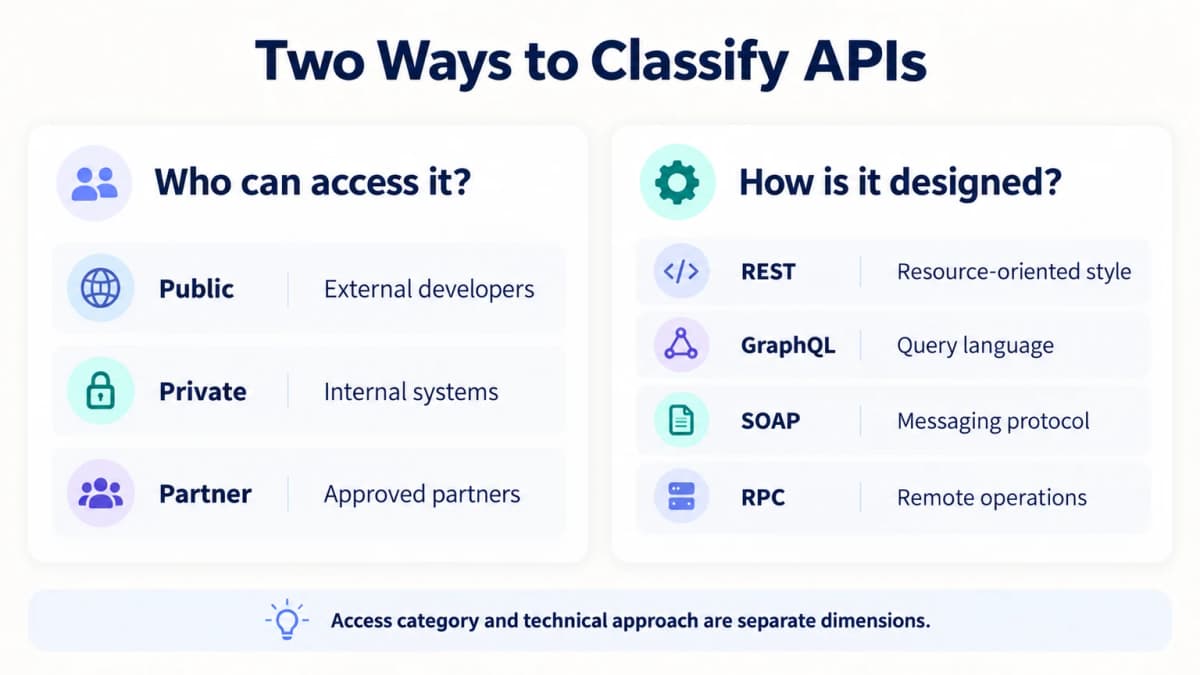
API terminology often describes two separate things: who can access an interface and how it is designed.
Public, Private, and Partner APIs
| Access category | Typical audience | Example use |
|---|---|---|
| Public API | External developers who meet access requirements | Adding a data service to an application |
| Private API | Systems within an organization | Connecting internal inventory and order services |
| Partner API | Approved business partners | Sharing fulfillment information with a logistics partner |
Public availability does not guarantee free usage or anonymous access. A public API may require registration, credentials, payment, and compliance with usage limits.
Access also depends on the operation. A service may expose public product information while protecting account-specific orders behind additional authorization.
REST, GraphQL, SOAP, and RPC
These terms describe different approaches to exposing functionality:
| Approach | Main idea | What a beginner encounters |
|---|---|---|
| REST | An architectural style commonly used for resource-oriented HTTP APIs | Resource URLs and methods such as GET or POST |
| GraphQL | A query language and execution model for APIs | Queries that specify the desired fields |
| SOAP | A structured messaging protocol | XML messages governed by a defined contract |
| RPC | Calling operations on a remote system | Named procedures or methods and their arguments |
They are not access categories. A public API can use REST, while a private service can use an RPC framework. The provider's interface determines the request format a client must follow.
A beginner usually benefits more from learning one documented operation than from comparing every architectural choice. Start with the request and response needed for the task at hand.
APIs and Related Concepts
APIs and User Interfaces
A user interface presents controls and information to a person. An API presents defined operations to software.
For example, a person may click a button to view an order. Behind that button, the application can call an API and render the returned details. Another authorized application might request those details through the same interface without displaying the original page.
APIs, SDKs, and Webhooks
An SDK, or software development kit, provides development tools for a platform. It may include a library that wraps API calls in functions for a particular programming language. The SDK can simplify integration, while the service still processes requests according to its API contract.
A webhook delivers an event notification to a configured endpoint. An order-status integration, for instance, can receive a notification when an event occurs instead of repeatedly asking whether anything changed. Webhook receivers still need to verify incoming messages and handle repeated deliveries appropriately.
API Keys and Access
An API key is a credential that some providers use to identify a calling application, project, or account. It may also be associated with permissions, usage limits, or billing.
The distinction is straightforward: the API defines available operations; the key helps the provider apply its access rules to a caller. Some APIs allow anonymous requests. Others use keys, OAuth access tokens, or another mechanism.
Private credentials belong in protected application settings. A tutorial should use placeholders or environment variables instead of placing a working key in shared code.
Make Your First API Request
Read the Request Contract
Choose one small task with an output that is easy to inspect. A product search is a useful example because the input is a familiar keyword and the result can be checked against it.
Before sending a request, establish:
- The exact endpoint and HTTP method.
- Required inputs and supported values.
- Authentication requirements and available account access.
- Expected response fields and error behavior.
- Usage charges and limits for the operation.
Before running an Amazon product search, check which inputs are required and which filters are optional. Guessing a parameter name can produce an error or an unintended query.
Send a Small Request
The following cURL example follows Nexscope's documented Amazon Search request format. It reads the key from a server-side environment variable named NEXSCOPE_API_KEY, which must already be configured securely.
curl --request POST \
  'https://api.nexscope.ai/api/skill-api/v1/skills/amazon-search/run' \
  --header "Authorization: Bearer ${NEXSCOPE_API_KEY}" \
  --header 'Content-Type: application/json' \
  --data '{
    "keyword": "travel mug",
    "page": 1
  }'
This example illustrates the documented request structure; it is not a record of an executed call. Running it requires valid access and may consume credits.
Each component serves a specific purpose:
POSTselects the method required by this endpoint.- The URL identifies the search operation.
Authorizationsupplies the credential using the required scheme.Content-Typedeclares that the body contains JSON.keywordsupplies the search phrase, andpageselects the results page.
The method is determined by the provider. A search operation can use POST even though its purpose is to retrieve information.
Check Data and Errors
Inspect both the transport response and the application result. Nexscope's API Guide specifies that HTTP 200 alone does not establish business success. The JSON code must be checked; 0 indicates success or acceptance, and asynchronous operations require a separate completion check.
For product-search data, examine whether the returned items match the intended keyword and whether the fields needed by the application are present. Keep missing values distinct from zero and retain any available source or observation context.
These common HTTP responses help narrow the next action:
| Status | Typical meaning | Next check |
|---|---|---|
| 400 | Invalid request | Required fields, JSON syntax, and supported values |
| 401 | Missing or invalid authentication | Credential configuration and required header |
| 403 | Access refused | Account permissions or resource access |
| 429 | Request rate limit reached | Retry guidance and request frequency |
| 5xx | Server or upstream failure | Service status and documented retry behavior |
Exact behavior varies by provider. Avoid automatically resubmitting an operation that may already have started a paid job. Use an existing task or request identifier when the interface supports it.
Once one request works and its output is understood, the integration can add storage, scheduling, and controlled retries. That sequence makes errors easier to diagnose than starting with a large batch.
Conclusion
An API gives software a defined way to request data and use another system's functionality. The essential pieces are the operation, its inputs, its access requirements, and the response the application needs to interpret.
Build API Workflows With Nexscope
Put these API concepts to work with a product lookup, a keyword comparison, or a creative task. Nexscope provides ecommerce data and creative APIs that teams can connect to their own applications and workflows.
- Research products and markets: Bring supported product, pricing, review, and competitor data into a research process.
- Plan marketing with data: Compare keyword demand and available research metrics when preparing content or campaign ideas.
- Create product videos: Submit product images and a creative brief, then retrieve the completed generation for review.
Use REST API for application integrations or MCP to connect supported capabilities to a team's own agent. The team keeps control of its application logic, model, and workflow.
Start with 1,000 free trial credits, valid for 3 days, with no credit card required. Use the trial to explore eligible Data APIs. Data APIs use pay-as-you-go credits; Creative APIs require a separate active subscription, so the trial offer does not imply free video API access.
Bring Your API Ideas to Life
Explore eligible ecommerce Data APIs with 1,000 free trial credits, valid for 3 days. No credit card required.
Try Nexscope Free →Frequently Asked Questions
What does API stand for?
API stands for application programming interface. It defines how software can use functionality or request data from another software component. An API specifies available operations and the expected inputs and outputs. It can exist within a library or operating system, or expose a service across a network.
Is an API the same as a website?
A website presents an experience that people navigate. An API exposes operations that software can call. A website may use several APIs behind its pages, such as a product search or payment interface. The same service can provide both a website for people and an API for applications.
Is every API a REST API?
No. REST describes one architectural approach. APIs also exist as library functions, operating system interfaces, GraphQL services, SOAP services, and remote procedure calls. Even among HTTP APIs, using JSON or a URL does not by itself establish that an interface follows REST's architectural constraints.
Do all APIs need an API key?
No. Some APIs support anonymous access, while others require an API key, an OAuth access token, or another credential. Access requirements may vary between operations within one service. The provider's authentication instructions determine what a client must send and which resources it can access.
Can I use an API without coding?
Often, yes. An automation platform or supported connector can construct requests and process responses without requiring custom application code. The user still needs to configure valid inputs, authorize access, and check results. Complex transformations, unusual authentication, or detailed error handling may require a developer.
Are public APIs free?
Not necessarily. Public describes availability to external users under the provider's terms. Some APIs offer free access or a trial, while others charge by usage or subscription. Check access requirements, request costs, and limits for the specific operation before connecting it to a recurring workflow.
Sources
- MDN Web Docs. n.d. Introduction to web APIs; Overview of HTTP. developer.mozilla.org.
- IBM. 2026. What is an API (application programming interface)? ibm.com.
- Nexscope. n.d. API Guide. nexscope.ai.
- Nexscope. n.d. SEO Keyword Metrics. nexscope.ai.
- Nexscope. n.d. Sales Talking Video API Documentation. nexscope.ai.